
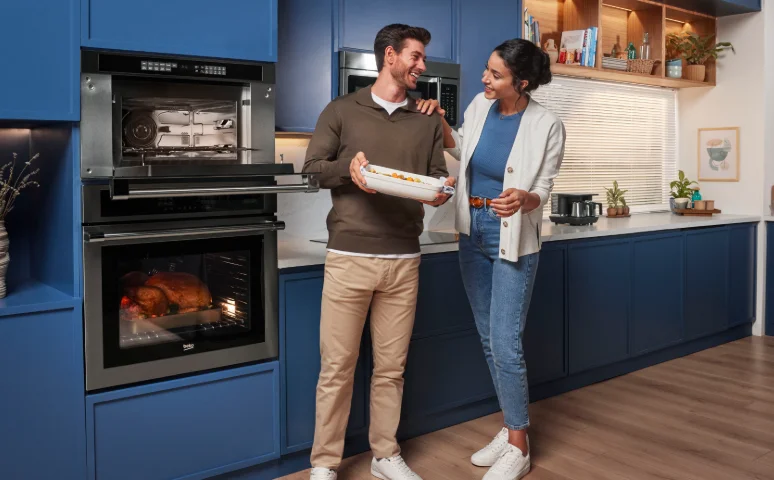

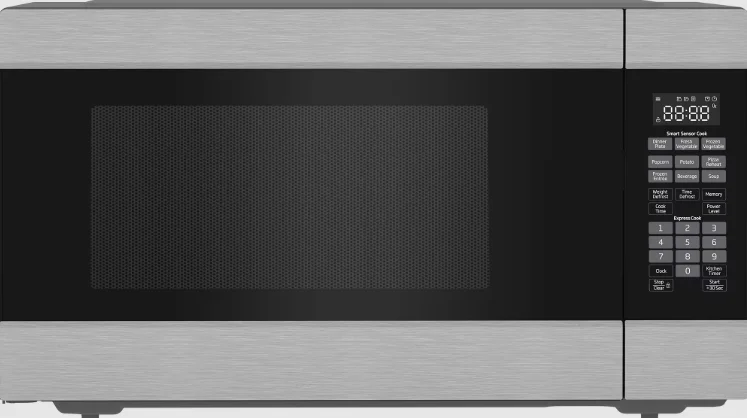
Beko MWOFS30100SS Built-in Microwave
1.1 IMPORTANT SAFETY INSTRUCTIONS
When using electrical appliances, basic safety precautions should be followed, including the following: WARNING: To reduce the risk of burns, electric shock, fire, injury to persons, or exposure to excessive microwave energy:
- Read all instructions before using the appliance.
- Read and follow the specific “PRECAUTIONS TO AVOID POSSIBLE EXPOSURE TO EXCESSIVE MICROWAVE ENERGY” found on page 4.
- This appliance must be grounded. Connect only to a properly grounded outlet. See “GROUNDING INSTRUCTIONS” found on page 6.
- Install or locate this appliance only in accordance with the provided installation instructions.
- Some products, such as whole eggs and sealed containers—for example, closed glass jars—can explode and should not be heated in this oven.
- Use this appliance only for its intended use as described in the manual. Do not use corrosive chemicals or vapors in this appliance. This type of oven is specifically designed to heat, cook, or dry food. It is not designed for industrial or laboratory use.
- HOT CONTENTS CAN CAUSE SEVERE BURNS. DO NOT ALLOW CHILDREN TO USE THE MICROWAVE. Use caution when removing hot items.
- Do not operate this appliance if it has a damaged cord or plug, if it is not working properly, or if it has been damaged or dropped.
- This appliance should be serviced only by qualified service personnel. Contact the nearest authorized service facility for examination, repair, or adjustment.
- Do not cover or block any openings on the appliance.
- Do not store this appliance outdoors. Do not use this product near water—for example, near a kitchen sink, in a wet basement, near a swimming pool, or a similar location.
- Do not immerse the cord or plug in water.
- Keep the cord away from heated surfaces.
- Do not let the cord hang over the edge of a table or counter.
- When cleaning surfaces of the door and oven that come together on closing the door, use only mild, nonabrasive soaps or detergents applied with a sponge or soft cloth.
- To reduce the risk of fire in the oven cavity:
- Do not overcook food. Carefully attend to the appliance when paper, plastic, or other combustible materials are placed inside the oven to facilitate cooking.
- Remove wire twist-ties from paper or plastic bags before placing bags in the oven.
- If material inside the oven ignites, keep the oven door closed, turn the oven off, and disconnect the power cord, or shut off power at the fuse or circuit breaker panel.
- Do not use the cavity for storage purposes. Do not leave paper products, cooking utensils, or food in the cavity when not in use.
- Liquids, such as water, coffee, or tea, can be overheated beyond the boiling point without appearing to be boiling. Visible bubbling or boiling when the container is removed from the microwave oven is not always present. THIS COULD RESULT IN VERY HOT LIQUID SUDDENLY BOILING OVER WHEN THE CONTAINER IS DISTURBED, OR A UTENSIL IS INSERTED INTO THE LIQUID.
- To reduce the risk of injury to persons:
- Do not overheat the liquid.
- Stir the liquid both before and halfway through heating it.
- Do not use straight-sided containers with narrow necks.
- After heating, allow the container to stand in the microwave oven for a short time before removing it.
- Use extreme care when inserting a spoon or other utensil into the container.
2 Your microwave oven
2.1 Overview
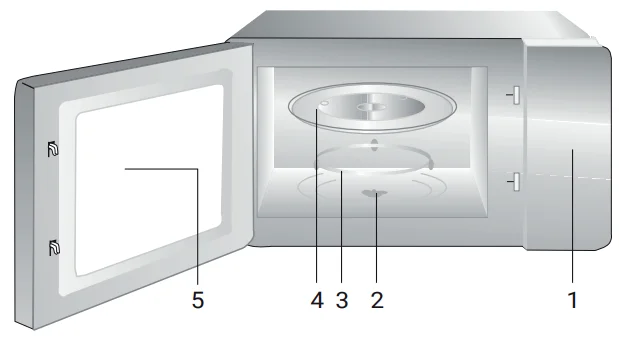
Controls and parts
- Control panel
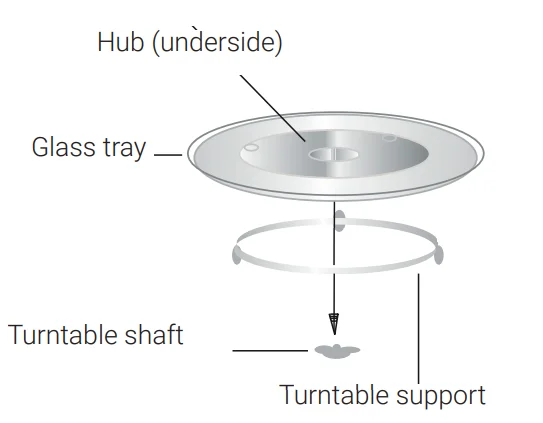
- Turntable shaft
- Turntable support
- Glass tray
- Oven door
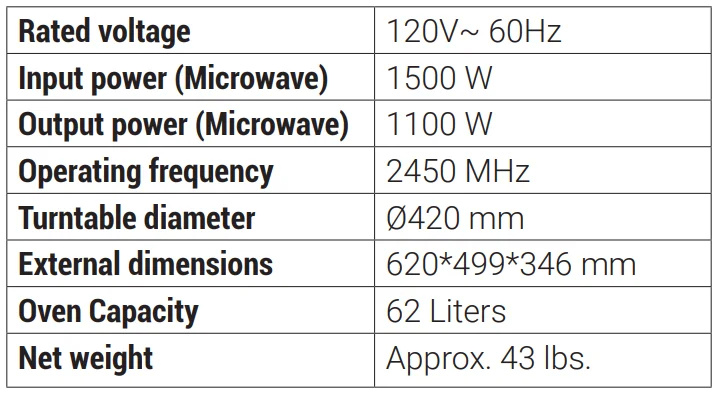
2.2 Technical data
2.3 Installing the turntable
- Never place the glass tray upside down. The glass tray should never be restricted.
- Both the glass tray and turntable support must always be used during cooking.
- All food and containers of food must always be placed on the glass tray for cooking.
- If the glass tray or turntable support cracks or breaks, contact your nearest authorized service center.

Installation
3.1 Countertop installation
Remove all packing material and accessories. Examine the oven for any damage, such as dents or a broken door. Do not install if the oven is damaged.
Cabinet: Remove any protective film found on the microwave oven cabinet surface. Do not remove the light brown mica cover that is attached to the oven cavity to protect the magnetron.
3.2 Installation
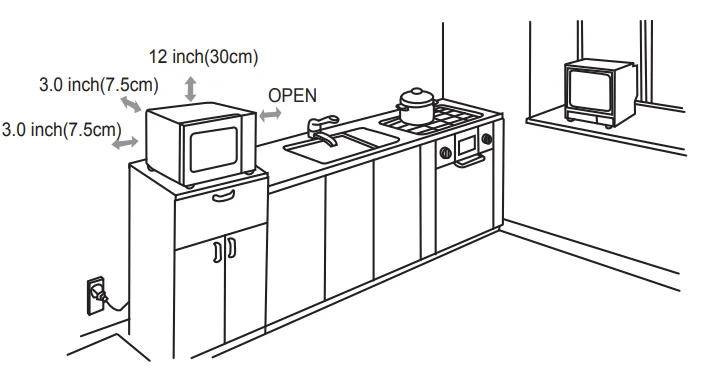
- Select a level surface that provides enough open space for the intake and/or outlet vents.

- A minimum clearance of 3.0 inches (7.5 cm) is required between the oven and any adjacent walls. One side must be open. The minimum installation height is 3.0 ft (91.6 cm).
- Leave a minimum clearance of 12 inches (30 cm) above the oven.
- Do not remove the legs from the bottom of the oven.
- Blocking the intake and/or outlet openings can damage the oven.
- Place the oven as far away from radios and TVs as possible. Operation of the microwave oven may cause interference to your radio or TV reception.
- Plug your oven into a standard household outlet. Be sure the voltage and the frequency are the same as the voltage and the frequency on the rating label.
Operation
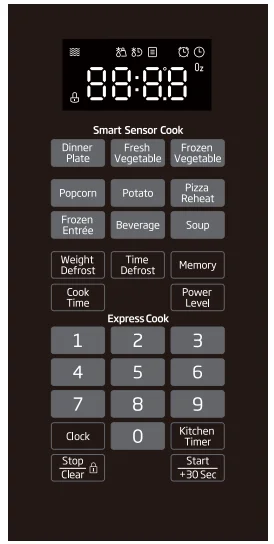
4.1 Control panel
4.3 Clock setting
- Press “Clock” once, and “00:00” will display.
- Press the number keys and enter the current time. For example, if the time is 10:12 now, please press “1, 0, 1, 2” in turn.
- Press “Clock” to finish clock setting. “:” will flash, and the clock will be lit.
- If the numbers input are not within the range of 1:00–12:59, the setting will be invalid until valid numbers are input.
4.4 Microwave cook
- Press “Cook Time” once, and the screen will display “00:00”.
- Press number keys to input the cooking time; the maximum cooking time is 99 minutes and 99 seconds.
- Press “Power Level” once, and the screen will display “PL10”. The default power is 100% power. Now you can press the number keys to adjust the power level.
- Press “Start/+30 Sec” to start cooking.
Example: To cook the food with 50% microwave power for 15 minutes.
- Press “Cook Time” once. “00:00” displays.
- Press “1, 5, 0, 0” in order.
- Press “Power Level” once, then press “5” to select 50% microwave power.
- Press “Start/+30 Sec” to start cooking.
4.5 Kitchen timer
- Press “Kitchen Timer” once, and the screen will display “00:00”.
- Press the number keys and enter the timer time. (The maximum cooking time is 99 minutes and 99 seconds.)
- Press “Start/+30 Sec” to confirm the setting; time counts down.
- When the timer time arrives, the buzzer will ring 3 times, and the screen will display “End”.
Example: When the oven is cooking with 50% microwave power for 15 minutes, the screen displays the countdown cooking time, and you want to set the timer for 10 minutes.
- Press “Kitchen Timer” once, and the screen will display “00:00”.
- Press the number keys and enter the timer time. If no timer is entered in 10 seconds, the timer setting is canceled, and the oven returns to countdown cooking time.
- Press “Start/+30 Sec”, and the timer is operated. The timer counts down on the screen. If “Start/+30 Sec” is not pressed in 10 seconds, the timer setting is canceled, and the oven returns to countdown cooking time.
- If the timer countdown time ends earlier than the cooking process, the buzzer sounds 3 times. After the buzzer, the screen displays the remaining cooking time. If the cooking process ends earlier than the timer, the buzzer sounds 5 times, and the screen displays the countdown timer. When the timer time arrives, the buzzer sounds 3 times, and the screen displays “End”. If the cooking process and the timer finish at the same time, the buzzer sounds 5 times and the screen displays “End”.
4.6 Speedy cooking
- In waiting state, instant cooking at 100% power level with 30 seconds’ cooking time can be started by pressing “Start/+30 Sec”. Each press of the same button will increase cooking time by 30 seconds. The maximum cooking time is 99 minutes and 99 seconds.
- In waiting state, press number keys 1–6 to start cooking at 100% power level with the corresponding cooking time of 1–6 minutes directly.
4.7 Weight defrost function
- Press “Weight Defrost” once, and the screen will display “0.0 lb”.
- Press the number keys to input the weight to be defrosted. If the weight input is not within 0.3–6.3 lb, the input will be invalid.
- Press “Start/+30 Sec” to start defrosting, and the remaining cooking time will be displayed.
4.8 Time defrost function
- Press “Time Defrost” once, and the screen will display “00:00”.
- Press the number keys to input the defrosting time. The maximum value is 99:99.
- Press “Start/+30 Sec” to start defrosting. The remaining cooking time will be displayed.
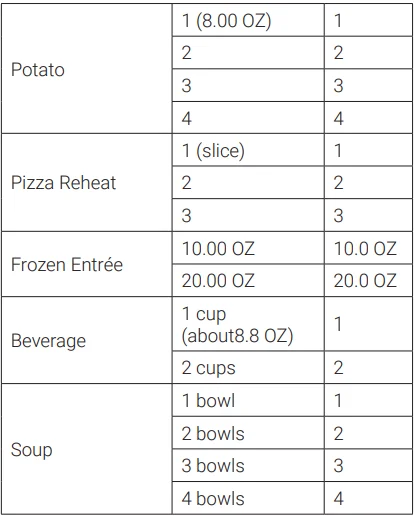
4.9 Auto menu
- In the waiting state, press “Popcorn, Potato, Pizza Reheat, Frozen Entree, Beverage, or Soup” to choose the desired menu.
- Press the chosen menu key repeatedly to choose the weight of the food.
- Press “Start/+30 Sec” to start cooking.


4.10 Sensor cook
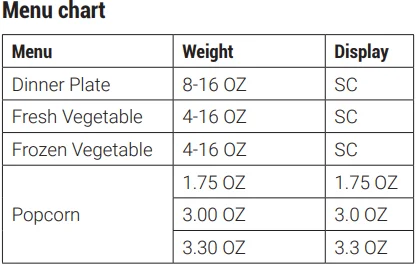
- In the waiting state, press “Dinner Plate, Fresh Vegetable, or Frozen Vegetable”, and the screen will display “SC”.
- Press “Start/+30 Sec” to start sensor cooking. “SC” will flash in the display.
- The buzzer will sound once when the sensor has finished, and the surplus cooking time will count down.
4.11 Memory function
- Press “Memory” to choose the memory 1–3 procedure. The screen will display 1, 2, or 3.
- If the procedure has been set, press “Start/+30 Sec” to use it. If not, continue to set the procedure. Only one or two stages can be set.
- If the procedure has not been set, after finishing the setting, press “Memory” once to save the procedure and return to the waiting state. If “Start/+30 Sec” is pressed, it will save the procedure and then start cooking at once.
Example: To set the following procedure as the second memory, that is, memory 2, to cook the food with 80% microwave power for 3 minutes and 20 seconds. The steps are as follows:
- In the waiting state, press “Memory” twice. Stop pressing until the screen displays “2”.
- Press “Cook Time” once, then press “3, 2, 0” in order.
- Press “Power Level” once, “PL10” displays, then press “8” and “PL8” displays.
- Press “Memory” to save the setting. The buzzer sounds once, then returns to the waiting state. If you press “Start/+30 Sec” again, the procedure will be saved as memory 2 and operated on.
4.12 Multi-stage cooking
At most, 2 stages can be set for cooking. In multi-stage cooking, if one stage is defrosting, then defrosting shall be placed at the first stage automatically. Note: The auto menu cannot work in multi-stage cooking.
Example: If you want to cook with 80% microwave power for 5 minutes plus 60% microwave power for 10 minutes, the cooking steps are as follows:
- Press “Cook Time” once, then press “5, 0, 0” to set the cooking time.
- Press “Power Level” once, then press “8” to select 80% microwave power.
- Press “Cook Time” once, then press “1, 0, 0, 0” to set the cooking time.
- Press “Power Level” once, then press “6” to select 60% microwave power.
- Press “Start/+30 Sec” to start cooking.
4.13 Inquiring function
In the cooking state, press “Clock”, and the oven will display the clock for three seconds.
4.14 Mute mode
The default mode is OFF mode. In the waiting state, open the door and then press “7” for 3 seconds to enter mute mode. The mute icon will display, and you can operate the oven without sound. Press “7” for 3 seconds again to cancel it.
4.15 Lock function for children
You can use this function to prevent children from accidentally turning the oven on.
- Lock: In waiting state, press “Stop/Clear” for 3 seconds. There will be a long “beep” denoting entry into the children-lock state, and the lock indicator will light. The screen will display the current time (if the clock is set) or “0:00”.
- Unlock: In locked state, press “Stop/Clear” for 3 seconds. There will be a long “beep” denoting that the lock is released.
4.16 Door lock function
When there is no operation for more than 5 minutes, if you set a cooking function, “door” will display when you press “Start/+30 Sec”, denoting that it cannot work as usual (clock and kitchen timer can be set). You can open and then close the door and press “Start/+30 Sec” again to restore these cooking functions.
4.17 Cooking end reminding function
At the end of cooking or the kitchen timer, the buzzer will sound 5 “beeps” to alert the user that the operation is finished. If you want to cancel the buzzer reminder at the end of cooking or the kitchen timer, in standby mode, open the door and then press “8” for 3 seconds. “Good” will display.
5 Cleaning and maintenance
5.1 Cleaning
WARNING: Never use gasoline, solvent, abrasive cleaning agents, metal objects, or hard brushes to clean the appliance.
WARNING: Never immerse the appliance or its power cable in water or in any other liquid.
- Turn off the oven and remove the power plug from the wall socket before cleaning.
- Wait for the appliance to completely cool down.
- Keep the inside of the oven clean. When food splatters or spilled liquids adhere to the oven walls, wipe with a damp cloth. Mild detergent may be used if the oven gets very dirty. Avoid the use of spray and other harsh cleaners, as they may stain, streak, or dull the door surface.
- The outside surfaces should be cleaned with a damp cloth. To prevent damage to the operating parts inside the oven, water should not be allowed to seep into the ventilation openings.
- Wipe both sides of the door and window, the door seals, and adjacent parts frequently with a damp cloth to remove any spills or spatters. Do not use an abrasive cleaner.
- A steam cleaner must not be used.
- Do not allow the control panel to become wet. Clean with a soft, damp cloth. When cleaning the control panel, leave the oven door open to prevent the oven from accidentally turning on.
- If steam accumulates inside or around the outside of the oven door, wipe with a soft cloth. This may occur when the microwave oven is operated under high humidity conditions, and it is normal.
- It is occasionally necessary to remove the glass tray for cleaning. Wash the tray in warm sudsy water or in a dishwasher.
- The roller ring and oven floor should be cleaned regularly to avoid excessive noise. Simply wipe the bottom surface of the oven with mild detergent. The roller ring may be washed in mild, sudsy water or in a dishwasher. When removing the roller ring from the cavity floor for cleaning, be sure to replace it in the proper position.
- Remove odors from your oven by combining a cup of water with the juice and skin of one lemon in a deep microwaveable bowl, microwave for 5 minutes, then wipe thoroughly and dry with a soft cloth.
- When it becomes necessary to replace the oven light, please consult a dealer to have it replaced.
- The oven should be cleaned regularly and any food deposits removed. Failure to maintain the oven in a clean condition could lead to deterioration of the surface, which could adversely affect the life of the appliance and possibly result in a hazardous situation.
- Please do not dispose of this appliance in the domestic rubbish bin; it should be disposed of at the particular disposal center provided by the municipalities.
- When the microwave oven with grill function is first used, it may produce slight smoke and smell. This is a normal phenomenon because the oven is made of a steel plate coated with lubricating oil, and the new oven will produce fumes and odor generated by burning the lubricating oil. This phenomenon will disappear after a period of use.
5.2 Storage
- If you do not intend to use the appliance for a long time, please store it carefully.
- Please make sure that the appliance is unplugged, cooled down, and totally dry.
- Store the appliance in a cool and dry place.
- Keep the appliance out of the reach of children.
5.3 Handling and transportation
- During handling and transportation, carry the appliance in its original packaging. The packaging of the appliance protects it against physical damage.
- Do not place heavy loads on the appliance or the packaging. The appliance may be damaged.
- Dropping the appliance will render it non-operational or cause permanent damage.
Troubleshooting
Check your problem by using the chart below and try the solutions for each problem. If the microwave oven still does not work properly, contact the nearest authorized service center. Visit www.beko.com for more information.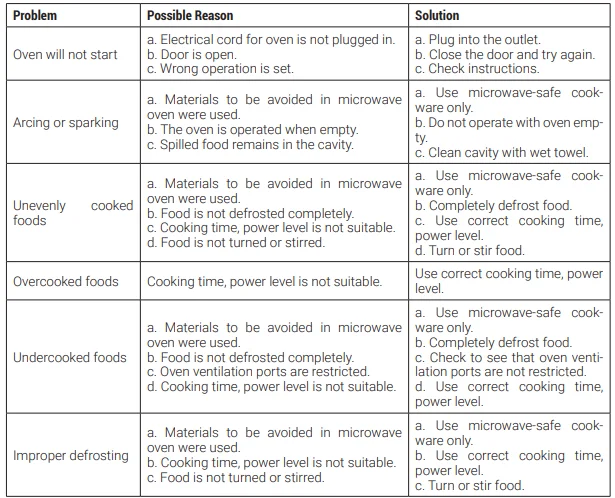
For More Manuals By Beko, Visit ManualsLibraryy.
Beko MWOFS30100SS Built-in Microwave- FAQs
What should I consider before buying a built-in microwave like the Beko MWOFS30100SS?
Before buying, consider wattage, capacity, installation size, and cooking needs. Higher wattage means faster cooking, while built-in models require accurate cabinet measurements and proper ventilation.
What wattage is ideal for a built-in microwave?
For most households, 900–1,000 watts is ideal. It provides balanced performance for reheating, defrosting, and everyday cooking without uneven heating.
Is a built-in microwave better than a countertop model?
Yes, built-in microwaves offer a sleek, integrated look and free up counter space. They are ideal for modern kitchens and long-term installations.
What is the standard size for a built-in microwave?
Most built-in microwaves fit 24″, 27″, or 30″ cabinets, with interior capacities usually between 1.2 to 1.6 cubic feet.
What items should never be put in a microwave?
Avoid metal objects, foil-wrapped food, whole eggs, non-microwave-safe plastics, paper bags, and empty containers.
Can I use aluminum foil in a microwave?
Aluminum foil can be used sparingly and carefully to shield food edges, but improper use may cause sparks or damage.
What cookware is safe to use in the microwave?
Use microwave-safe glass, ceramic, and labeled plastics. Avoid metal, aluminum foil (unless specifically instructed), and dishes with metallic trims.
What types of microwave ovens are available?
There are three main types: solo (basic reheating), grill (adds grilling function), and convection (baking and roasting). Built-in models are usually solo or convection.