
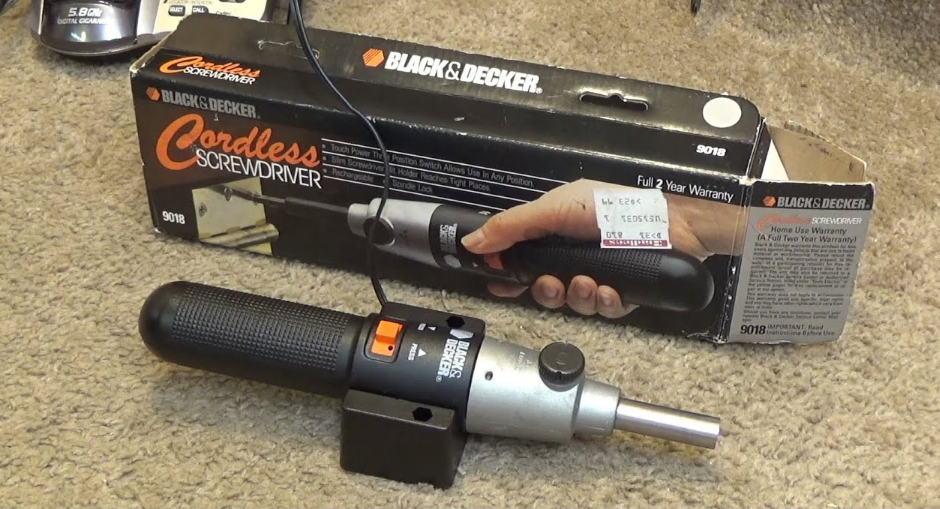

Black Decker 9018-1 Cordless Screwdriver
IMPORTANT SAFETY INSTRUCTIONS
WARNING: When using Electric Tools, basic safety precautions should always be followed to reduce the risk of fire, electric shock, and personal injury, including the following: READ ALL INSTRUCTIONS
- KEEP WORK AREA CLEAN. Cluttered areas and benches invite injuries.
- CONSIDER WORK AREA ENVIRONMENT. Don’t expose power tools to rain. Don’t use power tools in wet locations. Keep the work area well-lit.
- GUARD AGAINST ELECTRIC SHOCK. Prevent body contact with grounded surfaces. For example: pipes, radiators, ranges, refrigerator enclosures.
- KEEP CHILDREN AWAY. All visitors should be kept away from the work area. Do not let visitors contact the tool or extension cord.
- STORE IDLE TOOLS. When not in use, tools should be stored in a dry, high, or locked-up place – out of reach of children.
- DON’T FORCE TOOL. It will do the job better and safer at the rate for which it was intended.
- USE THE RIGHT TOOL. Don’t force a small tool or attachment to do the job of a heavy-duty tool. Don’t use a tool for a purpose not intended, for example, don’t use a circular saw for cutting tree limbs or logs.
- DRESS PROPERLY. Do not wear loose clothing or jewelry. They can be caught in moving parts. Rubber gloves and nonskid footwear are recommended when working outdoors. Wear a protective hair covering to contain long hair.
- USE SAFETY GLASSES. Also, use a face or dust mask if the cutting operation is dusty.
- DON’T ABUSE THE CORD. Never carry the charger base by the cord or yank it to disconnect from the receptacle. Keep cord from heat, oil, and sharp edges.
- SECURE WORK. Use clamps or a vise to hold work. It’s safer than using your hand, and it frees both hands to operate the tool.
- DON’T OVERREACH. Keep proper footing and balance at all times.
- MAINTAIN TOOLS WITH CARE. Keep tools sharp and clean for better and safer performance. Follow instructions for lubricating and changing accessories. Inspect tool cords periodically and if damaged, have them repaired by an authorized service facility. Inspect extension cords periodically and replace if damaged. Keep handles dry, clean and free from oil and grease.
- DISCONNECT OR LOCK OFF TOOLS. When not in use, before servicing, and when changing accessories.
- REMOVE ADJUSTING KEYS AND WRENCHES. Form the habit of checking to see that keys and adjusting wrenches are removed from the tool before turning it on.
- AVOID UNINTENTIONAL STARTING. Don’t carry a plugged-in tool with your finger on the switch. Be sure the switch is off when plugging in.
- OUTDOOR USE EXTENSION CORDS. When the tool is used outdoors, use only extension cords intended for use outdoors and so marked
- STAY ALERT. Watch what you are doing. Use common sense. Do not operate the tool when you are tired. ·
- CHECK DAMAGED PARTS. Before further use of the tool, a guard or other part that is damaged should be carefully checked to determine that it will operate properly and perform its intended function. Check for alignment of moving parts, binding of moving parts, breakage of parts, mounting, and any other conditions that may affect its operation. A guard or other part that is damaged should be properly repaired or replaced by an authorized service center unless otherwise indicated elsewhere in this instruction manual. Have defective switches replaced by an authorized service center. Do not use the tool if the switch does not turn it on and off. ·
- DO NOT OPERATE portable electric tools near flammable liquids or in gaseous or explosive atmospheres. Motors in these tools normally spark, and the sparks might ignite fumes.
SAVE THESE SAFETY RULES FOR FUTURE USE.
Charger Mounting Instructions
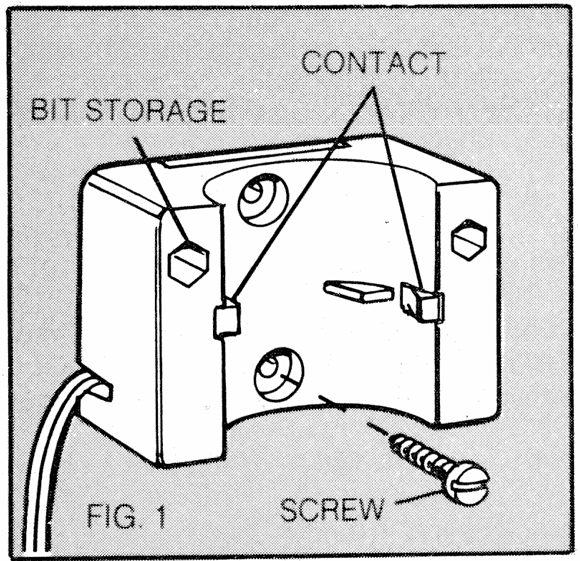
- The plastic bag supplied with your tool contains two wood screws and two plastic wall anchors. Use the anchors to mount the charger to drywall and use the wood screws to mount it to a wooden surface. (The charger need not be hung at all to operate properly.)
- To use the plastic wall anchors, drill a 3/16″ hole in the drywall where you will be installing the anchor. (Mark the desired place by holding the charger base against the wall and inserting a pencil through one of the two mounting holes.) Don’t forget to locate the charger base within 4 feet of a wall outlet. The base is symmetrical and can’t be mounted upside down.
- Insert the plastic wall anchor and tap it lightly with a hammer to seat it flush to the wall. Position the charger base over the anchor and use one of the wood screws to hold the charger base on the wall. Repeat the process for the other mounting hole in the charger base.
- When mounting the charger base to a wooden surface, drill 3/32″ pilot holes for the wood screws. The plastic wall anchors should not be used when hanging the charger base to a wooden wall.


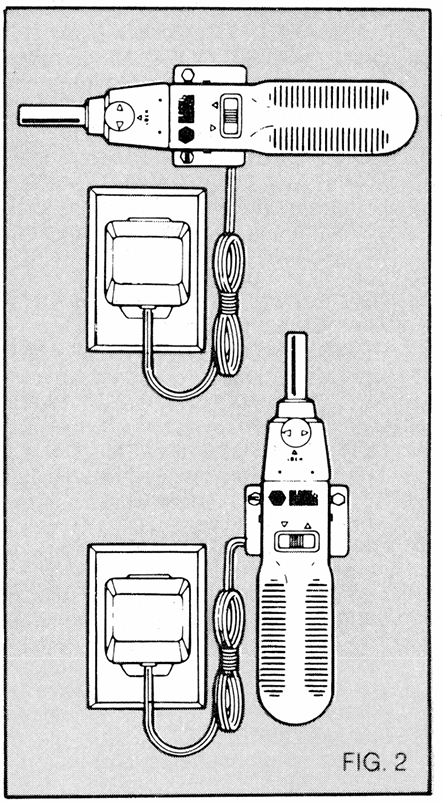
- Hang the charger base vertically or horizontally as shown in Figure 2.
- Hank the extra cord so it’s out of the way.

Charging Notes
NOTE: The Driver was sent from the factory in an uncharged condition. Before attempting to use it, it must be charged for 12 hours.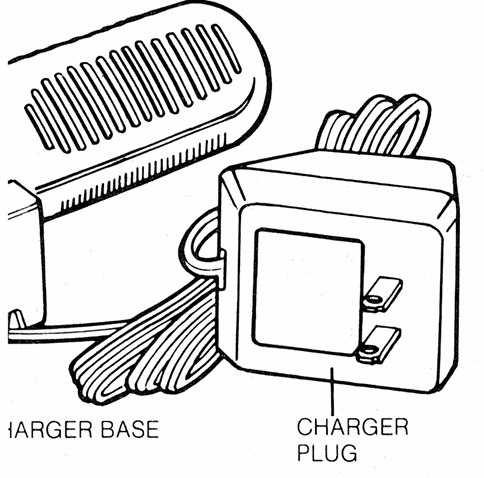
- DO NOT PLACE the charger base in an area of extreme heat or cold … it will work best at normal room temperature.
- The charger plug housing and the Screwdriver handle will become slightly warm to the touch. This is normal and does not indicate a problem.
- Insert the tool into the charger base as shown in Figure 2. When properly installed, you will feel and hear a soft click.
- The tool can be left on charge as long as you desire. A minimum charge time of 12 hours is required to recharge a completely discharged tool, but you may wish to keep the tool constantly on charge. The charger base is designed to work 24 hours a day, every day.
- For most fix-up jobs, a charge of 3 to 4 hours will be adequate (20 #8 x 1″ wood screws in pine without a pilot hole. If the screwdriver has been completely discharged (does not run) it will require 12 hours of charging to reach a full charge. Of course the harder the tool works, the faster the batteries will become discharged. This will vary depending on the type of work being done. If you notice a decrease in the working time for a full charge, fully discharge the tool’s batteries by holding the switch on until it stops running. Charge it overnight and repeat this process. Charge again, and the tool should be restored to its original level of performance.
- Always store your screwdriver in its charger base when not in use. The charger base will keep the nickel-cadmium batteries “Topped Off,” so your screwdriver is always ready.
Bit Storage
The bit supplied with your screwdriver is a double-ended type with a No. 2 Phillips on one end and a No. 8-1 0 flat blade on the other. The bit can be stored in the screwdriver or in one of the holes in the charger base, as shown in the large figure above. Note that there are two holes in the charger base to accommodate an extra bit.
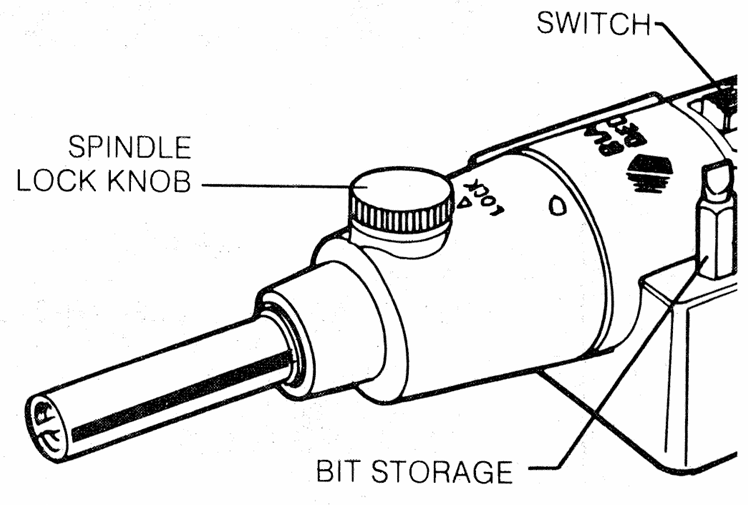
Spindle Lock (Figure 3)
To use the spindle lock feature, lift and turn the lock knob, shown in Figure 3, to the lock position by aligning either of the arrows on the knob with the arrow on the tool housing. You can turn the lock knob in either direction to align the arrows. When locked, the tool acts like a standard, hand-powered screwdriver. Use the locking feature for breaking loose particularly stubborn screws or for giving an extra twist after driving a screw all the
way in. Do Not Engage the Spindle Lock When the Tool Is Running.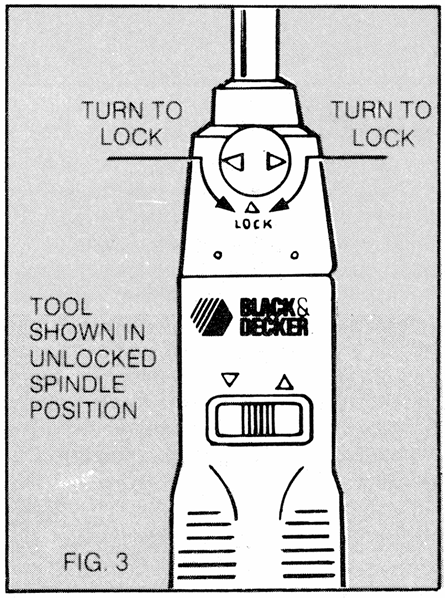
Bit Insertion (Figure 4)
There is a spring retainer inside the tool’s spindle that prevents bits from falling out. Simply insert the desired screwdriver bit as far as it will go. There’s nothing to tighten, nothing to loosen. When finished, you can easily pull the bit out or store the tool with the bit in it.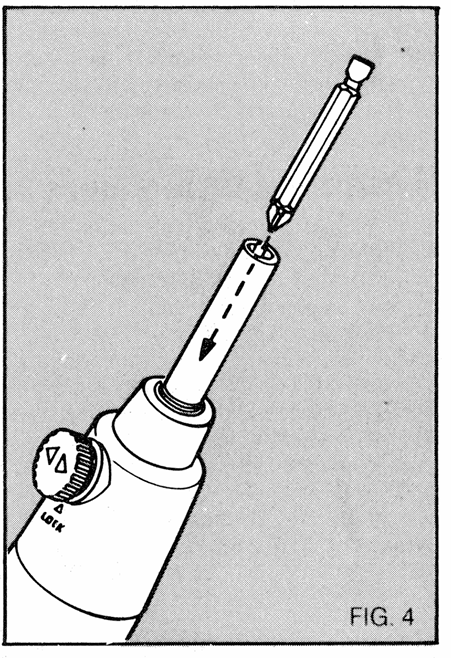
Switch (Figure 5)
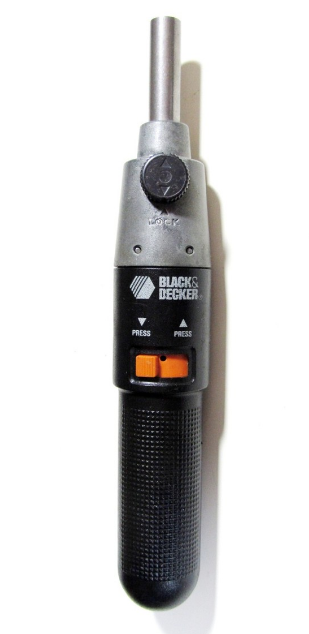
To turn the Screwdriver “ON” in a forward (driving) position, slide the switch to the right and align it with the arrow pointing forward. Depress the switch, and the tool will run. Release the switch, and the tool will stop. To operate in reverse (removing), slide the switch to the left and align it with the arrow pointing backward. Depress the switch, and the tool will run. Release the switch, and the tool will stop. To lock the tool “OFF”, slide the switch from either side to the center (no arrow) position.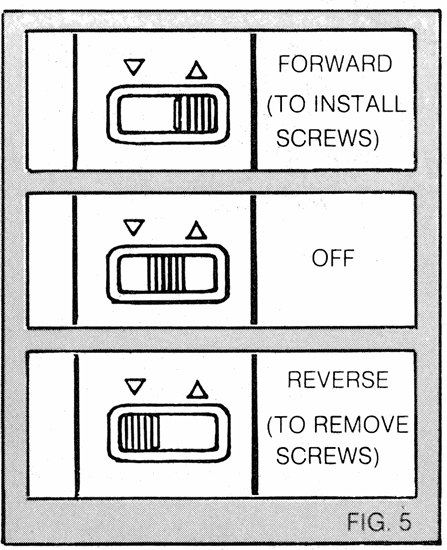
Operation
Although the Screwdriver is really very simple to operate, a few tips on how to use it best are presented here for your information.
Screw Selection
Of course, different applications require different types and sizes of screws .. There are literally hundreds of different sizes and shapes of screws, and they even come in different materials, but for your purposes, you can generally limit yourself to about two or three sizes and two types. Round-headed wood screws have round heads that stick up above the surface of the wood into which they are driven. In many cases, like hanging applications, this is desirable. In other applications, protruding screw heads are not wanted. A flat-headed wood screw is useful here. With the proper countersink and power drill (available from Black & Decker at extra cost) they can even be covered with putty and painted to be invisible. Be careful to avoid overtightening small brass screws. The heads can easily be twisted off, and the threads can strip. Hand tightening of these screws is recommended. We recommend that you use Phillips head screws whenever possible. They are easier to drive because the screwdriver bit will engage more firmly in the screw head.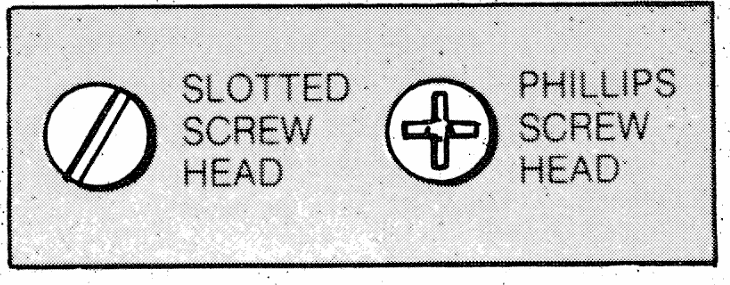
Pilot Holes
Pilot holes are holes drilled in wood that are slightly smaller than the screw that is to be driven. (For this discussion, we will limit ourselves to talking about wood, although there are other materials you may encounter.) The pilot hole has two purposes. As its name suggests, it acts as a guide for the screw to follow and allows the screw to be driven with just the threads gripping the wood. This makes the screw much easier to drive and prevents distortion or splitting of the wood caused by driving the whole screw body into the wood. Pilot holes should be drilled to a depth equal to or greater than the length of the screw to be used. For best results, use a 1 / 4″ or 3 / 8″ power drill. When drilling in wood with a twist bit, you should pull the bit out of the hole periodically to clear wood chips from the flutes. Different screw sizes and materials call for different-sized pilot holes. A handy chart on the back page of this manual should supply you with all the pilot hole information you will need to use your Screwdriver. When reinserting a wood screw into a hole that is already threaded, start the screw by hand to avoid stripping the threads in the hole. Run the screw in until you feel the threads catch, then apply the Screwdriver.
Accessories
The accessories listed in this manual are available at extra cost from your local dealer or Black & Decker Service Center. A complete listing of service centers is included on the owner’s registration card, packed with your tool. If you need assistance in locating any accessory, please contact: Black & Decker (U.S.) Inc. User Services Department US Power Tools Group PO Box 857 10 North Park Drive Hunt Valley, MD 21030-0857. Your Screwdriver is designed to operate with the following accessories only. The use of any accessory or attachment not recommended below may be hazardous.
- SCREWDRIVER BITS: All Black & Decker sizes and configurations.
- SOCKETS: Black & Decker hex sockets up to 1 / 4″ maximum.
Cleaning and Lubrication
Use only mild soap and a damp cloth to clean the tool. Other cleaners contain chemicals that could seriously damage the plastic. Never let any liquid get inside the tool; never immerse any part of the tool in a liquid. Self-lubricating bearings are used in the tool, and periodic relubrication is not
required. In the unlikely event that this tool should ever require service, take or send it to your local Black & Decker Service Center. Service center addresses are listed on the owner’s registration card, packed with your tool.
Screw Lubricants
In some cases, it may be to your advantage to use a lubricant to make a screw drive a little easier. Two of the more common lubricants are bar soap and liquid dishwashing soap. Just put a little on the screw threads for easy driving.
NOTE: Due to variables such as grain irregularity and moisture content of the wood and the amount of charge of the Screwdriver, some of the larger-size screws may be difficult to fully seat, particularly in hardwoods. In these instances, the Lock feature (page 5) will be most useful. No. 6 and smaller screws will often require a No. 1 Phillips screwdriver bit or a thinner-bladed bit. Both of these are available at extra cost from Black & Decker.
CAUTION: When screwing into hollow core doors or drywall (unsupported), use expandable anchors. (Available at extra cost from Black & Decker.)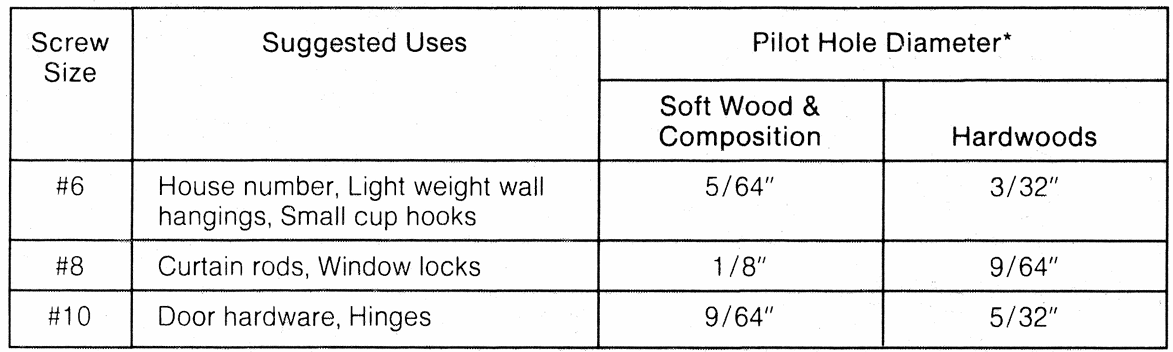
*When in doubt about whether you are drilling into soft wood or hardwood, assume that it is soft and drill the smaller pilot hole. Then, if the screw is particularly hard to turn, drill the larger-sized pilot hole.
Important!
To assure product SAFETY and RELIABILITY, repairs, maintenance, and adjustments should be performed by Black & Decker Service Centers or other qualified service organizations, always using Black & Decker replacement parts. Black & Decker’s full two-year home use warranty states that, in case of a defect, you may return the tool to the place of purchase for a free replacement (if it is a participating retailer) or you may take it to a Black & Decker Service Center.
Home Use Warranty (A Full Two-Year Warranty)
Black & Decker (U.S.) Inc. warrants this product for two years against any defects that are due to faulty material or workmanship. Please return the complete unit, transportation prepaid, to the seller (if a participating retailer) for free replacement (proof of purchase may be required). The unit may also be returned to a Black & Decker Service Center or Authorized Service Station, listed under “Tools, Electric” in the yellow pages, for free replacement or repair at our option. This warranty does not apply to accessories. This warranty gives you specific legal rights, and you may have other rights which vary from state to state. Should you have any questions, contact your nearest Black & Decker Service Center Manager. Like most Black & Decker tools, this tool is listed by Underwriters Laboratories to ensure that it meets stringent safety requirements. This symbol on the name plate means the product is listed by Underwriters Laboratories, Inc.
For more manuals by Black and Decker, visit ManualsLibraryy
Black Decker 9018-1 Cordless Screwdriver-FAQs
How long does it take to charge the Black Decker 9018-1 screwdriver?
It takes about 60 minutes to fully charge, allowing you to drive up to 500 screws. A quick 15-minute charge gives enough power for around 100 screws.
Why is my Black Decker cordless screwdriver not charging?
Check the charging contacts for dirt, corrosion, or damage. Clean with a lint-free cloth and ensure the contacts are not bent. If the issue persists, the battery may need replacement.
How does a cordless screwdriver work?
It uses a small electric motor that converts battery power into rotation, driving the screwdriver bit to fasten or loosen screws.
What is the voltage of a cordless screwdriver?
Cordless screwdrivers typically range from 3.6V to 18V. Higher voltage models offer more torque and longer runtime.
How long does a fully charged battery last?
Depending on use, a fully charged battery can last long enough to complete most small to medium projects before recharging is needed.
Why does my Black Decker battery blink red on the charger?
A fast-flashing red light usually means the charger detected a weak or damaged battery. Try reinserting the battery or testing with another one.
What is torque control on a screwdriver?
Torque control lets you set the maximum tightening force. Once reached, the clutch disengages to prevent over-tightening or stripping screws.
How do I use the cordless screwdriver for the first time?
Hold the tool firmly, align the bit with the screw head, apply steady pressure, and start at a low speed before gradually increasing as needed.