

Blueair Blue 3450i Max Air Purifier
Safety information
- Blue air purifiers are electrical appliances for indoor use only. Take the necessary precautions to reduce the risk of fire, electric shock, or injury.
- This appliance can be used by children aged 8 years and above and persons with reduced physical, sensory, or mental capabilities or lack of experience and knowledge if they have been given supervision or instruction concerning the use of the appliance in a safe way and understand the hazards involved.
- Children shall not play with the appliance.
- Cleaning and user maintenance shall not be made by children without supervision.
- Always disconnect the appliance from the power supply before maintenance.
- Do not attempt to open or service the appliance yourself. Service must be done by the manufacturer, service agent, or similarly qualified personnel using only original Blueair spare parts.
- Ensure that the power cable and the power plug are not at risk of getting damaged. To avoid hazard, a damaged power cable must always be replaced by the manufacturer, service agent, or similarly qualified person.
- If the appliance is damaged or malfunctions, turn it off, disconnect it from the power supply, and contact Blueair.
- The power plug must be firmly inserted in the power socket.
- When disconnecting the unit from the power supply, do not pull on the power cord; pull on the power plug.
- Use the power cable provided with your Blueair air purifier to plug directly and firmly into an appropriate electrical outlet.
- Do not use an extension cord or a power strip. Refer to the rating label on your appliance.
- Do not alter the power plug in any way. If the plug does not fit into the outlet, contact qualified personnel to install the proper outlet.
- Do not use the included power cord for anything else but the appliance.
- Do not allow objects to enter or block the air inlets and air outlets, as this can cause electric shock or damage the appliance.
- Do not place any objects on top of or directly against the appliance.
- Do not sit on, stand, climb onto, or hang from the appliance.
- Keep the appliance, including the power cable, at a safe distance from heated surfaces and open fire.
- Keep the appliance and power plug away from water and other liquids.
- Keep the appliance and power plug away from chemicals such as pesticides and deodorants.
- Place the appliance on the floor. The appliance must be placed on a stable surface.
- Do not use the appliance outdoors or in wet environments such as bathrooms, laundry rooms, or pool areas.
Product map
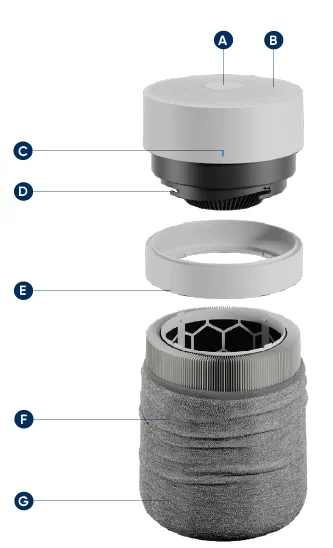
- User interface
- Air outlet
- Air quality indicator (AQI)
- Fan motor
- Noise shield
- Particle & carbon filter
- Washable fabric pre-filter
Air quality status (PM 2.5)
The air purifier has a particle sensor to measure the fine particle (PM2.5) level. The LED indicator displays air quality status in 5 colors from excellent (blue) to very polluted (red).
Getting started
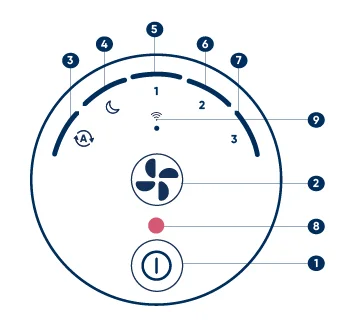
- ON/Standby button
- Fan Speed button
- Auto mode
- Night mode (lowest speed setting)
- Speed 1
- Speed 2
- Speed 3
- Filter replacement
- Wi-Fi
Two button control
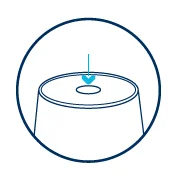
Press the ON/Standby button to turn the air purifier.
Adjust the mode and the fan speed using the Fan Speed button.
This air purifier has a total of four fan speeds – Night mode being the lowest/most silent one, Speed three being the highest one.
Auto mode
Automatically adjusts the fan speed based on your indoor PM levels to ensure optimal air quality. Recommended setting.
Night mode
Lowest fan speed and fully dimmed lights.
Fan speeds 1–2-3
Fan speed levels, which you can manually set by pressing the Fan Speed button on the interface or adjust via the Blueair app.
How to use tips
Change brightness
Press the Fan Speed button and the On/Standby button at the same time. Hold for three seconds. Then, keep holding your finger on the On/Standby button and tap the Fan Speed button with the other finger to adjust brightness.
If the brightness is on the lowest level, then it will increase by one level. If the brightness is on the highest level, then it will decrease by one level.
Turn off/on Wi-Fi LED
When starting the appliance for the first time, the Wi-Fi LED will blink to signal that the device is ready for pairing. After successfully connecting the appliance to the app, the Wi-Fi LED will stay solid.
If you choose not to connect the product, the Wi-Fi LED can be turned off. Long press the Fan Speed button for about 5 seconds and then release. The Wi-Fi LED will stop blinking.
Enable/disable Child lock
Long press On/Standby button for about 5 seconds (until all the LEDs of the interface light up and blink once). Then release.
When the Child lock is on, the air purifier will continue to operate, but the speed/mode button will be locked.
Filter reset
Extra long press the Fan Speed button for about 15 seconds (until all the LEDs of the interface light up). Then release.
After replacing the filter, it is required to manually conduct a filter reset on the appliance. If done correctly, the red filter replacement indicator will blink three times and then disappear.
Factory reset
Extra long press the On/Standby button for about 15 seconds (until all the LEDs of the interface light up for the second time and blink four times). Then release.
After a factory reset, the air purifier restarts with the default configuration will goes into Standby mode.
Connect to the Blueair app
Connecting to the Blueair app allows you to control the air purifier remotely and monitor filter usage. The app offers additional functions to the air purifier.
- Download the Blueair app from the App Store or Google Play.
- Open the app. Create or sign in to your Blueair account.
- Click on Connect Product and select Blue. Follow the instructions to complete app pairing.
First time connection tips
- Make sure to turn on your air purifier. Once the Wi-Fi indicator is blinking, it is ready to be paired with your app.
- Make sure you are using a visible Wi-Fi network that is not hidden. VPN (Virtual Private Network) should be deactivated while using the Blueair App.
- Bluetooth is required for first-time pairing. Turn your phone’s Bluetooth on and keep your phone within 3ft of the air purifier for initial pairing.
- This air purifier can only connect to 2.4 GHz Wi-Fi. If you are using a dual-band Wi-Fi router, make sure to select 2.4GHz.
- Keep your air purifier within 15 feet of your Wi-Fi router to maintain optimal connection.
Maintenance information
Important! Turn the air purifier off and disconnect the air purifier from the power supply before maintenance.
Changing your filter
When your air purifier’s indicator light turns red, it’s time to change the main filter. This will occur sometime between 6 and 9 months of operation, depending on usage and your air quality conditions.
- Turn off the air purifier and unplug it. Rotate the top counter-clockwise to unlock, then lift up to remove it.
- Remove the fabric pre-filter and the noise shield.
- Use the filter handles to pull out the old filter and replace it with a new one. Make sure to remove plastic wrapping before inserting the new filter in the appliance.
- Place the noise shield back on top of the filter. Pull up the fabric pre-filter over the filter and the noise shield. (Please ensure that the leather tag is on the upper side of the fabric pre-filter.)
- Twist the top back on and plug in the air purifier.
- Important! Turn the air purifier back on and reset the filter indicator by pressing down the Fan Speed button for 15 seconds. (until all the LEDs of the interface light up for the second time and blink once). Then release.
Cleaning your washable pre-filter
Clean your pre-filter regularly when you see dust or dirt. Vacuum the exterior of the fabric with a soft brush attachment. If the pre-filter requires a deeper clean, wash according to the instructions on the pre-filter´s label. Hang to dry.
- Turn the air purifier off and unplug it. Rotate the top counter-clockwise to unlock and remove it.
- Remove the fabric pre-filter from the noise shield and main filter.
- Wash according to instructions on the fabric pre-filter´s label.
- Pull the clean pre-filter back over the noise shield and main filter.
- Please ensure that the leather tab of the pre-filter is on the upper part.
- Push the top cylinder down, and rotate it clockwise to lock it.
Disposal and recycling
This air purifier should be recycled as electronic waste. If you have any questions regarding the disposal of this air purifier, please contact your local waste management for the best way to recycle.
Troubleshooting
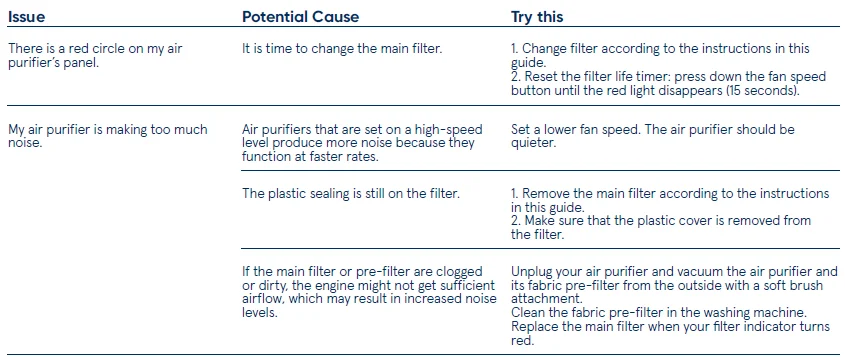
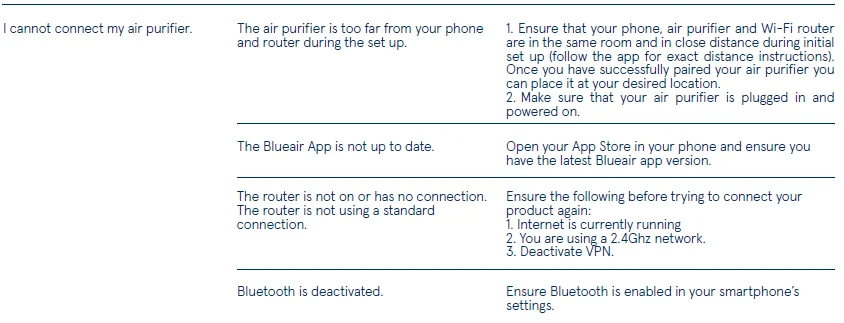
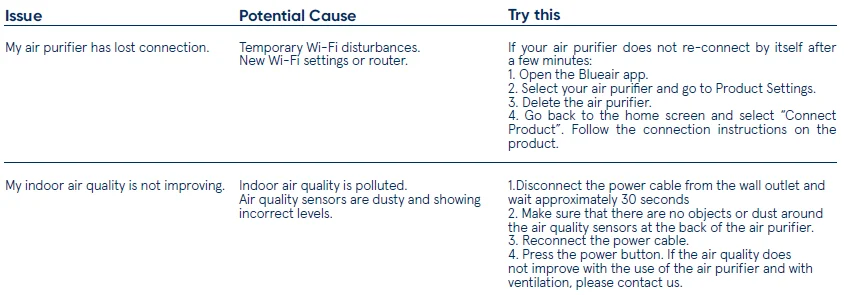
For more information and troubleshooting tips, please check the Support page on www.blueair.com
For more Manuals by Blueair, visit ManualsLibraryy
Blueair Blue 3450i Max Air Purifier-FAQs
Is Blueair a good air purifier brand?
Yes. Blueair purifiers are known for strong cleaning performance, high energy efficiency, and fast air purification, making them one of the top-rated brands in the market.
Which country does Blueair come from?
Blueair is a Swedish company known for premium air-cleaning technology and modern design.
How long does a Blueair filter last?
Blueair filters typically last 6–9 months, depending on usage and air quality. The app also alerts you when it’s time to replace them.
Is it safe to sleep with an air purifier on?
Yes. Running an air purifier while you sleep helps remove dust, pollutants, and allergens throughout the night for cleaner breathing.
Is it safe to stay in a room with an air purifier running?
Yes. Experts recommend running an air purifier continuously for best results, especially in polluted or allergen-prone areas.
Are HEPA air purifiers high maintenance?
The main drawback is the filter replacement every 6–12 months. Otherwise, they are easy to use and require minimal upkeep.
Are air purifiers good for lung health?
Yes. Removing fine particles can help ease breathing, especially for people with asthma or allergies.