
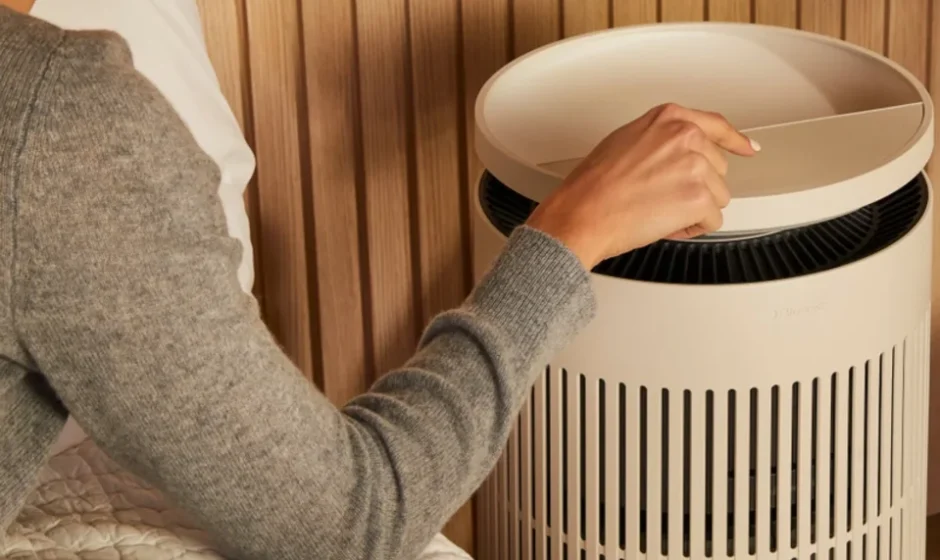

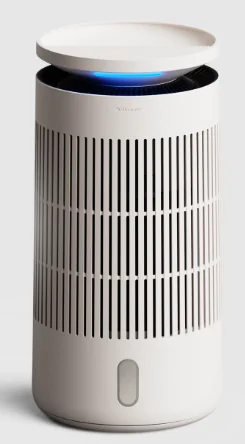
Blueair Blue Pure 411a Max Air Purifier
Safety information
Blue Pure 411a Max air purifier is an electrical appliance for indoor use only. Take the necessary precautions to reduce the risk of fire, electric shock, or injury.
- This appliance is not intended for use by persons (including children) with reduced physical, sensory, or mental capabilities, or a lack of experience and knowledge, unless they have been given supervision or instruction concerning use of the appliance by a person responsible for their safety.
- Supervise children to ensure that they do not play with the appliance.
- Cleaning and user maintenance shall not be made by children without supervision.
- Always disconnect the appliance from the power supply before maintenance.
- Do not attempt to open or service the appliance yourself; this can void your warranty. Service must be done by the manufacturer, service agent, or similarly qualified personnel using only original Blueair spare parts.
- Ensure that the power cable and the power plug are not at risk of getting damaged. To avoid hazard, a damaged power cable must always be replaced by the manufacturer, service agent, or similarly qualified person.
- If the appliance is damaged or malfunctions, turn it off, disconnect it from the power supply, and contact Blueair.
- The power plug must be firmly inserted in the power socket.
- When disconnecting the unit from the power supply, do not pull on the power cord; pull on the power plug.
- Use the power cable provided with your Blueair air purifier to plug directly and firmly into an appropriate electrical outlet.
- Do not use an extension cord or a power strip. Refer to the rating label on your appliance.
- Do not alter the power plug in any way. If the plug does not fit into the outlet, contact qualified personnel to install the proper outlet.
- Do not use the included power cord for anything else but the appliance.
- Do not allow objects to enter or block the air inlets and air outlets, as this can cause electric shock or damage the appliance.
- Do not place any objects on top of or directly against the appliance.
- Do not sit on, stand, climb onto, or hang from the appliance.
- Keep the appliance, including the power cable, at a safe distance from heated surfaces and open fire.
- Keep the appliance and power plug away from water and other liquids.
- Keep the appliance and power plug away from chemicals such as pesticides and deodorants.
- Place the air purifier on the floor or a stable surface to prevent tipping.
- Do not use the appliance outdoors or in wet environments such as bathrooms, laundry rooms, or pool areas.
- Always turn off and disconnect the appliance from the power supply before moving the unit, changing filters, cleaning, or carrying out maintenance procedures.
- Never clean with gasoline, chemical solvents, or corrosive materials, as these agents may damage the air purifier.
Product map
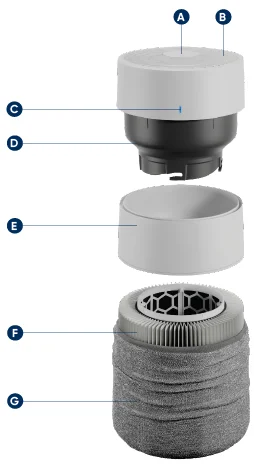
- User interface
- Air outlet
- Air quality indicator (AQI)
- Fan motor
- Silencer
- Particle & carbon filter
- Washable fabric pre-filter
Air quality status (PM 2.5)
The air purifier has a particle sensor to measure the fine particle (PM2.5) level. The LED indicator displays air quality status in 5 colors from excellent (blue) to very polluted (red).
Getting started
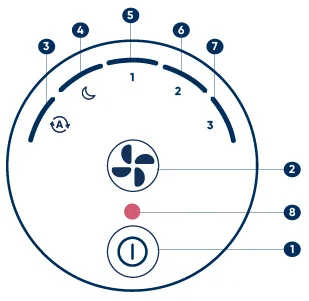
- ON/Standby button
- Fan Speed button
- Auto mode
- Night mode (lowest speed setting)
- Speed 1
- Speed 2
- Speed 3
- Filter replacement
Two button control
Press the ON/Standby button to turn the air purifier.
Adjust the mode and the fan speed using the Fan Speed button.
This air purifier has a total of four fan speeds – Night mode being the lowest/most silent one, Speed three being the highest one.
Auto mode
Automatically adjusts the fan speed based on your PM2.5 indoor level to ensure optimal air quality. Recommended setting.
Night mode
Lowest fan speed and fully dimmed lights.
Fan speeds 1–2-3
Fan speed levels, which you can manually set by pressing the Fan Speed button on the interface or adjust via the Blueair app.
How to use tips
Change brightness
Press the Fan Speed button and the On/Standby button at the same time. Hold for three seconds. Then, keep holding your finger on the On/Standby button and tap the Fan Speed button with the other finger to adjust brightness.
If the brightness is on the lowest level, then it will increase by one level. If the brightness is on the highest level, then it will decrease by one level.
Filter reset
Extra long press the Fan Speed button for about 15 seconds (until all the LEDs of the interface light up for the second time and blink once). Then release.
After replacing the filter, it is required to manually conduct a filter reset on the appliance. If done correctly, the red filter replacement indicator will blink three times and then disappear.
Enable/disable Child lock
Long press On/Standby button for about 5 seconds (until all the LEDs of the interface light up and blink once). Then release.
When the Child lock is on, the air purifier will continue to operate, but the speed/mode button will be locked.
Factory reset
Extra long press the On/Standby button for about 30 seconds (until all the LEDs of the interface light up for the second time and blink four times). Then release.
After a factory reset, the air purifier restarts with the default configuration and will go into Standby mode.
Maintenance information
Important! Turn the air purifier off and disconnect the air purifier from the power supply before maintenance.
Changing your filter
When your air purifier’s indicator light turns red, it’s time to change the main filter. This will occur sometime between 6 and 9 months of operation, depending on usage and your air quality conditions.
- Turn off the air purifier and unplug it. Rotate the top counter-clockwise to unlock, then lift up to remove it.
- Remove the fabric pre-filter and the silencer.
- Use the filter handles to pull out the old filter and replace it with a new one. Make sure to remove plastic wrapping before inserting the new filter in the appliance.
- Place the silencer back on top of the filter. Pull up the fabric pre-filter over the filter and the silencer. (Please ensure that the leather tag is on the upper side of the fabric pre-filter.)
- Twist the top back on and plug in the air purifier.
- Important! Turn the air purifier back on and reset the filter indicator by pressing down the Fan Speed button for 15 seconds. (until all the LEDs of the interface light up for the second time and blink once). Then release.
Cleaning your washable pre-filter
Clean your pre-filter regularly when you see dust or dirt. Vacuum the exterior of the fabric with a soft brush attachment. If the pre-filter requires a deeper clean, wash according to the instructions on the pre-filter´s label. Hang to dry.
- Turn the air purifier off and unplug it. Rotate the top counter-clockwise to unlock and remove it.
- Remove the fabric pre-filter from the silencer and main filter.
- Wash according to instructions on the fabric pre-filter´s label.
- Pull the clean pre-filter back over the silencer and main filter.
- Please ensure that the leather tab of the pre-filter is on the upper part.
- Push the top cylinder down, and rotate it clockwise to lock it.
Disposal and recycling
This air purifier should be recycled as electronic waste. If you have any questions regarding the disposal of this air purifier, please contact your local waste management for the best way to recycle.
Troubleshooting
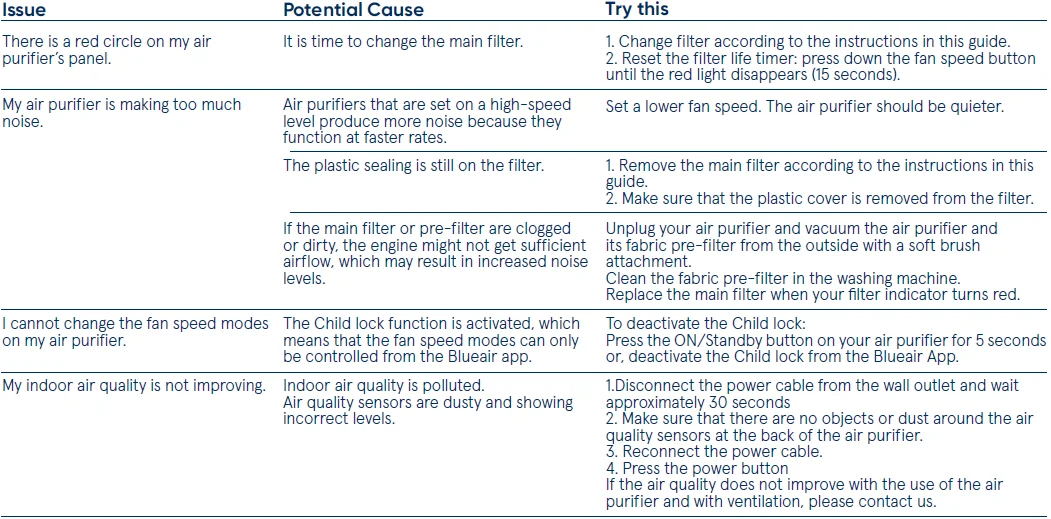
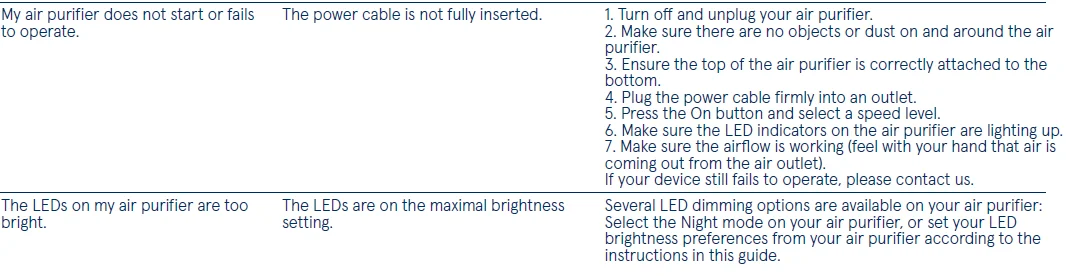
For more information and troubleshooting tips, please check the Support page on www.blueair.com
For more Manuals by Blueair, visit ManualsLibraryy
Blueair Blue Pure 411a Max Air Purifier-FAQs
Which country is Blueair from?
Blueair is a Swedish brand. The company originated in Sweden and is known for clean Scandinavian design, innovation, and high-performance air purification.
Is the Blueair Blue Pure 411a Max any good?
Yes. It is energy-efficient, quiet, and effective for small rooms. It also includes a washable fabric pre-filter, which helps reduce maintenance costs.
What is the difference between Blue Pure 411 and 411a Max?
The 411a Max offers stronger air-cleaning performance, improved noise reduction, and a more compact, refined design compared to the original 411.
How long do Blueair 411a Max filters last?
The main filter typically lasts 6 to 9 months, depending on usage and air quality. The filter indicator light turns red when it’s time to replace it.
Should I leave my Blueair air purifier on all the time?
Yes. Blueair recommends running it 24/7 for best results. It uses low power, so electricity consumption stays minimal.
Where is the best place to put the Blueair 411a Max?
Place it on the floor, desk, or nightstand with at least 4 inches (10 cm) of space around it so air can circulate freely.
Is it safe to sleep with the air purifier on all night?
Yes. It is safe and recommended to run the purifier while sleeping for continuous clean air. The low noise level makes it suitable for bedrooms.
Does the Blueair 411a Max produce ozone?
No. Blueair air purifiers are CARB-certified, meaning ozone emissions stay within safe limits.
Can I wash the Blueair 411a Max filter?
The main HEPA filter cannot be washed, but the outer fabric pre-filter sleeve can be vacuumed or machine-washed.
How long do Blueair 411a Max filters last?
The main filter typically lasts 6 to 9 months, depending on usage and air quality. The filter indicator light turns red when it’s time to replace it.
What is the difference between Blue Pure 411 and 411a Max?
The 411a Max offers stronger air-cleaning performance, improved noise reduction, and a more compact, refined design compared to the original 411.