
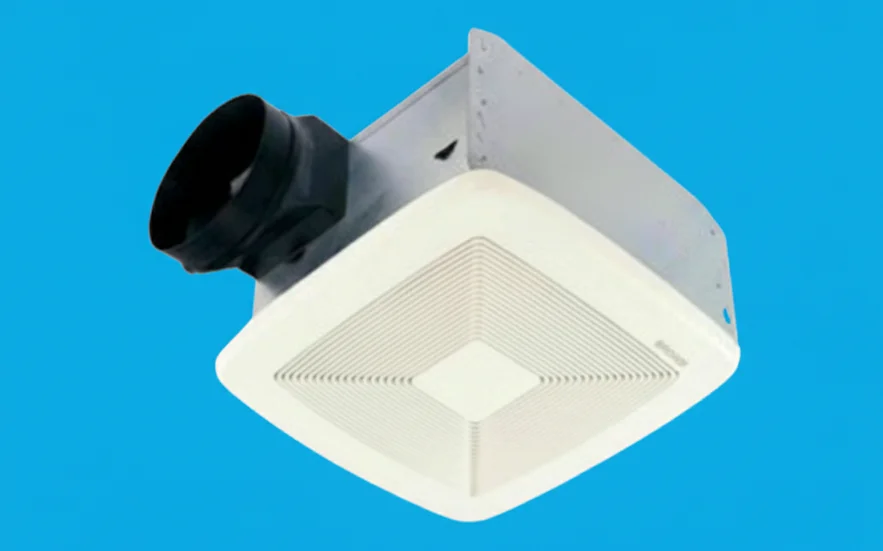

Broan SmartSense 80 CFM Ventilation Fan
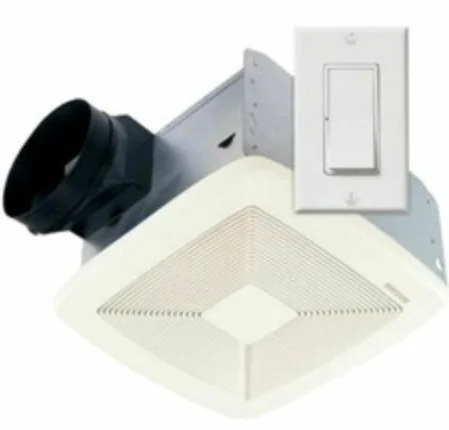
READ AND SAVE THESE INSTRUCTIONS
WARNING
TO REDUCE THE RISK OF FIRE, ELECTRIC SHOCK, OR INJURY TO PERSONS, OBSERVE THE FOLLOWING:
- Use this unit only in the manner intended by the manufacturer. If you have questions, contact the manufacturer at the address or telephone number listed in the warranty.
- Before servicing or cleaning the unit, switch the power off at the service panel and lock the service disconnecting means to prevent power from being switched on accidentally. When the service disconnecting means cannot be locked, securely fasten a prominent warning device, such as a tag, to the service panel.
- Installation work and electrical wiring must be done by a qualified person(s) in accordance with all applicable codes and standards, including fire-rated construction codes and standards.
- Sufficient air is needed for proper combustion and exhausting of gases through the flue (chimney) of fuel-burning equipment to prevent backdrafting. Follow the heating equipment manufacturer’s guidelines and safety standards, such as those published by the National Fire Protection Association (NFPA), the American Society for Heating, Refrigeration and Air Conditioning Engineers (ASHRAE), and the local code authorities.
- When cutting or drilling into the wall or ceiling, do not damage electrical wiring and other hidden utilities.
- This unit must be grounded.
- Do not connect this product as a load on a fan speed control or light dimmer.
- Read and understand the entire instructions before proceeding with installation.
INSTALLATION

Install controls and wire them as shown. Use the following guidelines:
IMPORTANT:
QTXE080 Ultra Silent™ fan must be wired to SMSC080 SmartSense® control.
QTXE110 Ultra Silent™ fan must be wired to SMSC110 SmartSense® control.
- Use a minimum 75 °C-rated electrical wiring.
- Except for the required neutral wire, these controls install like normal switches. Make sure the electrician knows each control location must have a neutral wire. Neutral wire at switch locations may be a code requirement or regular practice in installation municipalities, but unless explicitly specified, an electrician might not install it.
- Specify deep device electrical boxes where controls will be installed. These controls fit in most North American electrical boxes; however, deep boxes provide extra working space, which eases installation. Labor cost savings can offset higher box costs, which are usually less than a dollar over standard depth boxes. Use boxes that have 18 cu. in. minimum volume and are at least 1-1/2 in. deep.
- All controls must be grounded using the attached ground wire.
CONTROL OPERATION
HOW THE SYSTEM WORKS
Broan SmartSense® system is designed to provide recommended ventilation for desirable indoor air quality. Related ventilation requirements of *ANSI/ASHRAE Standard 62, “Ventilation for Acceptable Indoor Air Quality,” are fulfilled when this system is installed accordingly. Ventilation level, which is based on home square footage and number of bedrooms, is easily set during installation. Power outages do not affect settings, since they are stored in power-independent (nonvolatile) memory. Energy usage is optimized by monitoring the fan on-time and adjusting automatic ventilation as needed. Indoor air quality is provided 24 hours a day, 7 days a week.
A single Broan SmartSense® system is powerful enough to fulfill ventilation rates for larger homes; however, it is recommended to use multiple installations for homes with multiple bathrooms.
Multiple installations provide distributed ventilation throughout the home. Multiple installations are linked and communicate through the home’s normal power circuits to form an indoor air quality network. In typical multiple installations, the Master control is located in the master bathroom. Broan and Best by Broan LinkLogic™ enabled range hoods, and LinkLogic™ enabled electric dampers can be linked with SmartSense® so their indoor air quality ventilation contribution is included.
Additional features, which are turned off at the factory, include Vacation, Disabled, Automatic-Off, and Delayed-Off modes. Vacation mode temporarily disables the system until the Master fan is manually turned on. Disabled mode removes the fan from automatic ventilation usage. Disabled mode does not affect manual operation, and its ventilation is credited toward the system level requirement, but Broan SmartSense® will not turn it on for automatic ventilation.
If the fan is manually left on, Automatic-Off turns it off after 60 minutes. Delayed-Off turns the fan off after 20 minutes from when the Off paddle is pressed. The fan can be immediately turned off by pressing the Off paddle twice.
HOW LED WORKS
LED works differently in Run and Program/Feature Selection modes.
Run Mode
LED is off when the fan is off. LED is on when the fan is on manual ventilation; turned on by pressing the On paddle. The LED turns on briefly every second (fast-blink) when the fan is on automatic ventilation, turned on by Broan SmartSense®.
Program/Feature Selection Mode
LED turns on and off every second (slow-blink) when the system is in Program or Feature Selection mode. LED is off when the Feature associated with the pressed paddle is off. LED is on when the Feature associated with the pressed paddle is on.
INDOOR AIR QUALITY NETWORK
A single Broan SmartSense® system is powerful enough to fulfill ventilation rates for larger homes; however, it is recommended to use multiple installations for homes with multiple bathrooms. Multiple installations provide distributed ventilation throughout the home.
Multiple installations communicate through a home’s electrical power circuits to form an indoor air quality network. Communication pathways are called links. For optimum link performance, wire multiple installations to the same electrical circuit. If installation on the same electrical circuit is not possible, then try to keep multiple installations on the same electrical phase. If multiple installations are connected to different electrical phases, have an electrician install an SMSCPLR Broan SmartSense® Phase Coupler near the circuit breaker panel.
Multiple installations can operate independently; however, it is recommended to link them together as an indoor air quality network. If a single system is installed or independent system operation is desired, proceed with the “How To Set System Level” section.
One Broan SmartSense® control is selected as the system Master during setup. Any control can be selected as the system Master, but typically master bathroom control is chosen. All controls are factory set as system Masters; therefore, installations will operate as independent systems at the factory-set system level after installation if the following setup is not done.
One Master control can link up to 10 Broan SmartSense® and LinkLogic™ devices. SmartSense® controls that are linked to the Master control are called Slaves.
HOW TO LINK SMARTSENSE® SYSTEM
- Unless another control is designated and clearly marked on the frame, under the decorative plate, or documented on this instruction sheet as Master control, go to the master bathroom control.
- Put Master control in Program mode; press and hold the SET button for 3 seconds (a beep should be heard), then release it. Note: In order to help with single-person installation, Master control will wait 6 minutes in Program mode for the Slave link.
- LED should be turning on and off every second (slow-blink); if it isn’t, then repeat step 2.
- Go to the first control to link as a Slave.
- Press and hold the SET button for 3 seconds (a beep should be heard), then release it.
- Fan and LED should turn on after the Slave’s SET button is released. Note: At the same time, the Slave turns on, the Master fan turns on.
- Press and release the Slave’s Off paddle to manually turn the fan off.
- If there are more Slave installations, then go to the next control and repeat steps 5 through 8; otherwise, continue with the next step. Note: In order to help with single-person installation, the Master control will remain in Program mode for 6 minutes after the last Slave is linked.
- When all Slaves are linked, exit Master Program mode; go to Master control, press and release the SET button.
- Master LED will fast-blink to indicate system level (see HOW TO SET SYSTEM LEVEL, steps 9-12) and then remain on steady, since the fan is on. This action confirms Program mode exit.
- Press and release the Master’s Off paddle to turn off the LED and fan.
HOW TO SET SYSTEM LEVEL
An installer, homeowner, or building science expert may adjust the Broan SmartSense® ventilation system level.
- System Level is only set in the Master control. If the home has more than one installation, then locate the Master control; it is usually in the master bathroom, or it should be clearly marked or documented.
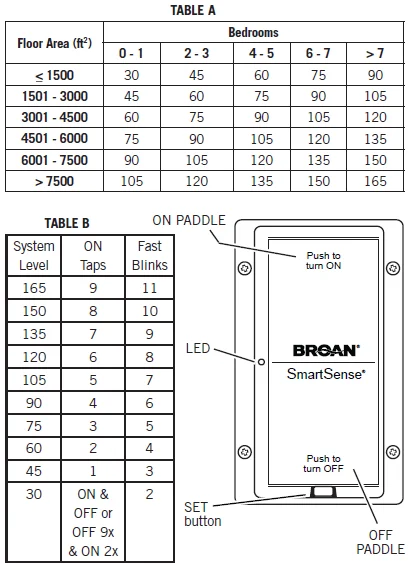
- Circle, mark, or highlight System Level in Table A using the home’s square footage and number of bedrooms. Note: Building science experts may calculate a different rate based on air infiltration measurements.
- Circle, mark, or highlight the same System Level in Table B.
- If the home’s System Level is 30, then the next steps are not necessary, since System Level is set at the factory to 30.
- Put Master control in Program mode; press and hold the SET button for 3 seconds and then release it.
- LED should be turning on and off every second (slow-blink); if it is not, then repeat step 5.
- Press and release (tap) on the paddle the number of times from Table B. If you tap the On paddle too many times, tap the Off paddle, and the System Level will be reduced once for each Off paddle tap. In order to reset System Level to 30, immediately after entering Program mode (Steps 5-6), tap the On paddle only once and then tap the Off paddle only once. If you lose on paddle counts, tap Off paddle 9 times or more, then tap On paddle twice; System Level will be at 30; proceed with On paddle taps from Table B.
- Exit Program mode; press and release the SET button.
- After exiting Program mode, the LED will fast-blink a number of times. LED will fast-blink the same number of times in three sets, with a slight pause in between each set.
- Count the number of times the LED fast-blinks in a set.
- Compare the number of times LED fast-blinks in a set to the number for System Level in Table B.
- If they are the same, then System Level is set accordingly; otherwise, re-adjust System Level starting with step 5.

FEATURES
Vacation Mode
Used only with the Master control. Temporarily disables the Broan SmartSense® system. Master control will not automatically turn on its fan or any other system fan. After the Feature Selection mode exit, Vacation mode is cancelled when the Master control On paddle is pressed.
To activate Vacation Mode:
- Make sure the fan and LED are off: Press and release the OFF PADDLE.
- Put control in Feature Selection mode: Press and hold ON PADDLE (approximately 10 seconds, a beep should be heard) until the LED turns on and off every second (slow blink).
- Release ON PADDLE.
- Press and hold ON PADDLE:
- If the LED is off when the ON PADDLE is held on, then Vacation mode is off.
- If the LED is on when the ON PADDLE is held on, then Vacation mode is on.
- Release ON PADDLE.
- Press and release ON PADDLE to toggle Vacation mode status:
- If Vacation mode is off, then it will be turned on.
- If Vacation mode is on, then it will be turned off.
- Repeat steps 4 through 6 to review and set the desired Vacation mode status.
- Press and release the SET button to exit Feature Selection mode.
- Fan and LED will turn on for 1 to 2 seconds and then turn off, which indicates Vacation mode has been set.
Note: Vacation mode is turned off when master control is manually turned on and off; therefore, make sure no one touches master control after Vacation mode is turned on.
Disabled Mode
Excludes the fan from automatic ventilation usage. Does not affect manual operation, and its ventilation is credited toward system-level accumulation. Master control will not turn it on for automatic ventilation requirement fulfillment. If Master control is put in Disabled mode, it will not turn on any fans for automatic ventilation and the recommended indoor air quality ventilation level is not assured.
To activate Disabled Mode:
- Make sure the fan and LED are off: Press and release the OFF PADDLE.
- Put control in Feature Selection mode: Press and hold ON PADDLE (approximately 10 seconds, a beep should be heard) until the LED turns on and off every second (slow blink).
- Release ON PADDLE.
- Press and hold OFF PADDLE:
- If the LED is off when OFF PADDLE is held on, then Disabled mode is off.
- If the LED is on when the OFF PADDLE is held on, then Disabled mode is on.
- Release OFF PADDLE.
- Press and release OFF PADDLE to toggle Disabled mode status:
- If Disabled mode is off, then it will be turned on.
- If Disabled mode is on, then it will be turned off.
- Repeat steps 4 through 6 to review and set the desired Disabled mode status.
- Press and release the SET button to exit Feature Selection mode.
- Fan and LED will turn on for 1 to 2 seconds and then turn off, which indicates Disabled mode has been set.
Automatic-Off Mode
Automatically turns the fan off 60 minutes after it was manually turned on.
To activate Automatic-Off mode:
- Make sure the fan and LED are off: Press and release OFF PADDLE.
- Put control in Feature Selection mode: Press and hold OFF PADDLE (approximately 10 seconds, a beep should be heard) until the LED turns on and off every second (slow blink).
- Release OFF PADDLE.
- Press and hold ON PADDLE:
- If the LED is off when the ON PADDLE is held on, then the Automatic-Off mode is off.
- If the LED is on when the ON PADDLE is held on, then Automatic-Off mode is on.
- Release ON PADDLE.
- Press and release ON PADDLE to toggle Automatic-Off mode status.
- If Automatic-Off mode is off, then it will be turned on.
- If Automatic-Off mode is on, then it will be turned off.
- Repeat steps 4 through 6 to review and set the desired Automatic- Off mode status.
- Press and release the SET button to exit Feature Selection mode.
- Fan and LED will turn on for 1 to 2 seconds and then turn off, which indicates Disabled mode has been set.
Delayed-Off Mode
Turns the fan off 20 minutes after the Off paddle is pressed once. In order to turn the fan off immediately, press the Off paddle twice.
To activate Delayed-Off mode:
- Make sure the fan and LED are off: Press and release OFF PADDLE.
- Put control in Feature Selection mode: Press and hold OFF PADDLE (approximately 10 seconds, a beep should be heard) until the LED turns on and off every second (slow blink).
- Release OFF PADDLE.
- Press and hold OFF PADDLE:
- If the LED is off when the OFF PADDLE is held on, then Delayed-Off mode is off.
- If the LED is on when the OFF PADDLE is held on, then Delayed-Off mode is on.
- Release OFF PADDLE.
- Press and release OFF PADDLE to toggle Delayed-Off mode status.
- If the Delayed-Off mode is off, then it will be turned on.
- If the Delayed-Off mode is on, then it will be turned off.
- Repeat steps 4 through 6 to review and set the desired Delayed-Off mode status.
- Press and release the SET button to exit Feature Selection mode.
- Fan and LED will turn on for 1 to 2 seconds and then turn off, which indicates Disabled mode has been set.
HOW TO CHANGE CONTROL COLOR
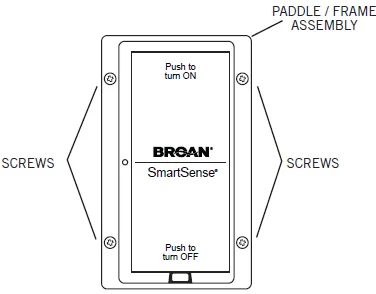
An almond paddle/frame assembly is included.
- Use magnetic #1 Philips screwdriver and remove (4) screws from white paddle/frame.
- Remove the white paddle/frame from control. Caution: Do not touch or put anything inside the control housing; control damage may result.
- Place the almond paddle/frame on the control.
- Replace (4) screws and lightly tighten them.
Caution: Do not over-tighten screws; the frame may crack.
RESTORING POWER TO CONTROL
Control stores all settings in nonvolatile memory, so they are not lost when power is removed. After a power loss, control will automatically return the fan to its state (on or off) before the power was interrupted.
For More Manuals By Broan-NuTone, Visit ManualsLibraryy
Broan SmartSense 80 CFM Ventilation Fan-FAQs
What is the Broan SmartSense 80 CFM Ventilation Fan?
It is an intelligent bathroom fan that automatically senses humidity and occupancy to ventilate the space, preventing moisture buildup and reducing odors.
How does Broan SmartSense work?
The fan uses built-in sensors to detect humidity and room activity. It turns on automatically when moisture or movement is detected and adjusts runtime based on conditions.
Is 80 CFM enough for a bathroom?
Yes, 80 CFM is suitable for bathrooms up to 80 sq. ft. For larger bathrooms, a higher CFM fan (100–110) may be needed for effective ventilation.
Can I leave the bathroom fan running all the time?
Yes, modern fans like Broan SmartSense are safe for continuous use, but ensure it’s properly installed and maintained to avoid noise or energy waste.
Why is my Broan fan not turning off?
Common reasons include a faulty thermal switch, defective fan switch, or an electronic control board issue.
Should I run the fan while showering?
Yes. Running the fan during showers removes excess humidity, reducing mold, mildew, and condensation.
How do I know if the fan is working properly?
Test airflow by placing a tissue or toilet paper near the vent. If it sticks, the fan is ventilating effectively.
Can I sleep with the bathroom fan on?
Yes, it is safe. However, fans may circulate air that could dry out your nose or throat for some people.