
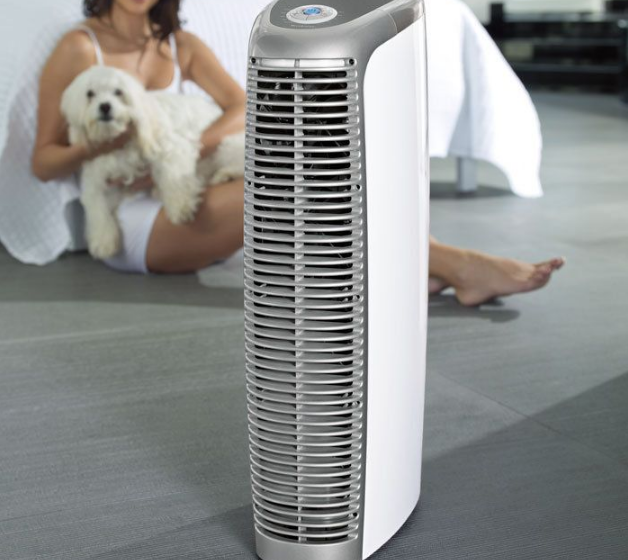

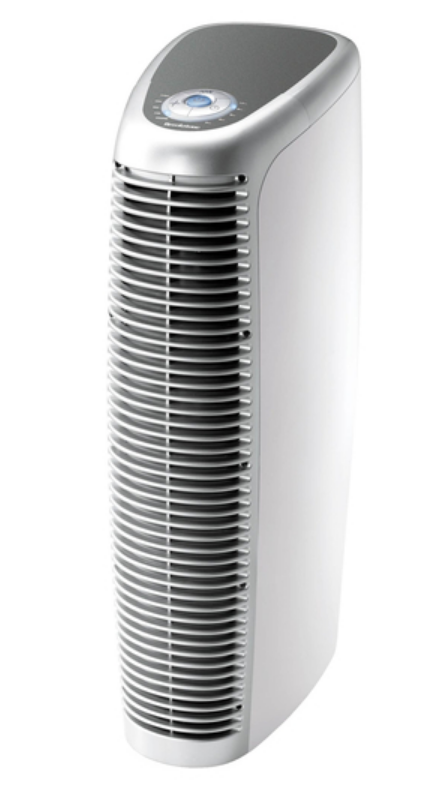
Brookstone Pure-Ion Pro
IMPORTANT SAFETY INSTRUCTIONS
All of the safety and operating instructions should be read, adhered to, and followed before the unit is operated.
CAUTION
- TO REDUCE THE RISK OF ELECTRIC SHOCK, DO NOT REMOVE COVER. THERE ARE NO SERVICEABLE PARTS INSIDE.
- TO REDUCE THE RISK OF FIRE OR ELECTRIC SHOCK, DO NOT EXPOSE THIS UNIT TO RAIN OR MOISTURE.

The lightning flash with arrow-head symbol within an equilateral triangle is intended to alert the user to the presence of uninsulated “dangerous voltage” within the unit’s enclosure that may be of sufficient magnitude to constitute a risk of electric shock.

The exclamation point within an equilateral triangle is intended to alert the user to the presence of important operating and maintenance (servicing) instructions in the literature accompanying the unit.
WARNING
- Remove all packing materials (bags, cardboard, foam, etc.) before operating the unit.
- Close supervision is necessary when the unit is used near children. Do not allow children to play with the unit. It is not a toy.
- Use this unit only for its intended use as described in this manual.
- Make sure the filter is completely dry before placing it back into the unit.
- Unplug the unit during lightning storms or when unused for long periods of time.
- Never drop or insert any object into any opening.
- Never clean this unit without unplugging it.
- Never move this unit while in operation or while plugged into an outlet.
- Always use this unit on a level, flat surface.
- Do not operate this unit on a table or desk. Recommended for floor use only.
- Protect the power cord from being walked on or pinched, particularly at plug outlets, convenience receptacles, and the point where it exits the unit.
- Do not allow the cord to touch hot surfaces. Wrap the cord loosely around the unit when storing.
- Do not use this unit in high moisture environments (bathrooms, laundry rooms, etc.).
- The unit should be situated away from direct sunlight or heat sources such as radiators, electric heaters, heat registers, stoves, or other units (including amplifiers) that produce heat. Avoid placing on top of stereo equipment that radiates heat.
- Do not overload the electrical outlet. Use only the power source as indicated.
- Never block the air openings of the unit with materials, such as clothing, plastic bags, or papers, or place it on a soft surface, such as a bed or couch, where the air openings may be blocked.
- Do not carry this unit by its cord or use the cord as a handle.
- Never operate this unit if it has a damaged cord or plug, if it is not working properly, or if it has been dropped or damaged, or dropped into water. If the unit’s supply cord or plug is damaged, do not attempt to fix it yourself.
- Do not disassemble or attempt to repair the unit. Incorrect repair can cause the risk of electric shock or injury to persons when the unit is used.
- To reduce the risk of fire or electric shock, do not use this unit with any solid-state speed-control device.
- Do not operate in the presence of explosive and/or flammable fumes.
- This unit is intended for household use only and NOT for commercial or industrial use. Do not use this unit outdoors. For indoor operation only.
- Use the correct electrical supply voltage as indicated on the unit’s name plate.
- This unit has a polarized two-pin plug. To reduce the risk of electric shock, this plug is intended to fit in an outlet only one way.
- Turn the unit off before unplugging from an electrical outlet.
- Do not allow children to play with any plastic bags that accompany this unit. Plastic bags may present a hazard to young children.
- The edges of the collection plates are sharp. Do not rub your hands on them.
- Do not touch the collection plates after removing the filter. A small amount of static charge may still be present if the unit was recently turned off.
- Inspect the collection plates after each cleaning to ensure that they are not bent and touching each other. Performance may suffer if the collection plates touch each other.
- Make sure that the filter is fully inserted into the filter slots; otherwise, the unit will not operate.
IMPORTANT
To reduce the risk of electric shock, this product has a polarized plug (one blade is wider than the other). As a safety feature, this plug will fit in a polarized outlet only one way. If the plug does not fit fully in the outlet, reverse the plug. If it still does not fit, contact a qualified electrician to install the proper outlet. Do not alter the plug in any way.
CAUTION
This is not a medical device. Small amounts of ozone are produced during the ionization process. This unit complies with U.S. guidelines set for acceptable ozone emission levels. Any person suffering from heart, lung, or respiratory illness should consult his or her physician before using this unit. If you use a pacemaker or other electrical medical devices, consult your physician before using this product.
FCC INFORMATION
Caution: Changes or modifications not expressly approved by the party responsible for compliance could void the user’s authority to operate the equipment.
This equipment has been tested and found to comply with the limits for a Class B Digital Device, pursuant to Part 15 of the FCC Rules. These limits are designed to provide reasonable protection against harmful interference in a residential installation. This equipment generates, uses, and can radiate radio frequency energy and, if not installed and used in accordance with the instructions, may cause harmful interference to radio communications. However, there is no guarantee that interference will not occur in a particular installation. If this equipment does cause harmful interference to radio or television reception, which can be determined by turning the equipment off and on, the user is encouraged to try to correct the interference by one or more of the following measures:
- Reorient or relocate the receiving antenna.
- Increase the distance between the equipment and receiver.
- Connect the equipment to an outlet on a circuit different from that to which the receiver is connected.
- Consult the dealer or an experienced radio/TV technician for help.
This equipment complies with Part 15 of the FCC Rules. Operation is subject to the following two conditions:
- This equipment may not cause harmful interference.
- This equipment must accept any interference received, including interference that may cause undesired operation.
Modifications not authorized by the manufacturer may void the user’s authority to operate this device.
LOCATION OF CONTROLS
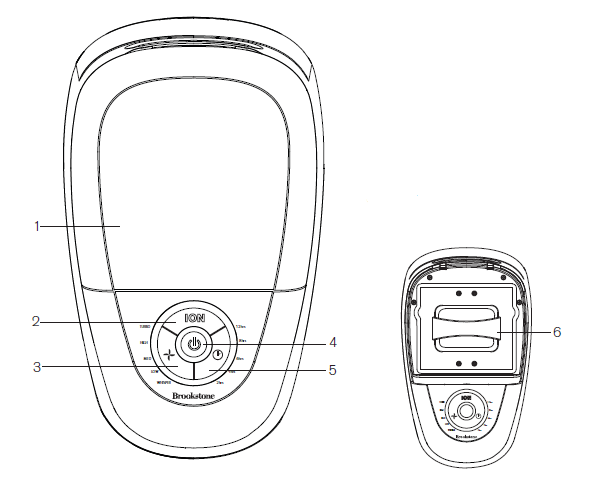
- Filter Compartment Door
- ION Boost On/Off Button
- Fan Speed Button
- Power Button
- Timer/Auto Shut-off Button
- Filter
AIR PURIFIER OPERATION
SETTING UP THE UNIT
IMPORTANT: Placement of this unit MUST BE AT LEAST 24″ from the wall, furniture, or other appliances.
- Remove all tape and protective wrap from the unit.
- Place the unit on a level floor, keeping it at least 24″ away from the wall, furniture, or other appliances.
- Position the unit so the cleaner air flows to your desired location.
Note: Ensure the foam block on top of the filter under the FILTER COMPARTMENT DOOR is removed before use.
POWERING THE UNIT ON/OFF
- Insert the power cord into an electrical outlet.
- Press the POWER BUTTON to turn the unit on.
 Illuminates.
 - Press the POWER BUTTON to turn the unit off after use.
 Illuminates.
SELECTING FAN SPEED
Press the FAN SPEED button to choose between Whisper, Low, Medium, High, and Turbo Fan Speeds. An LED will denote the selected Fan Speed.
TURNING THE ION BOOST FUNCTION ON/OFF
Ion Boost releases a stream of negative ions into the room. Negative ions are found in abundance in some of the most refreshing and invigorating environments in nature. Think waterfalls, by the surf at the seashore, and in the mountains after a good cleansing rainstorm. Some people report feeling a lightening of mood or an increased clarity of mind in such environments. Turn the Ion Boost function on and off by pressing the ION button. An LED will illuminate while the Ion Boost function is activated.
USING THE AUTO-OFF FUNCTION
- The unit can run continuously, or you can set an automatic shut-off time of 2, 4, 6, 8 or 12 hours.
- Press the TIMER button to choose between 2, 4, 6, 8, or 12 hours of auto shut-off time. An LED will denote the selected shut-off time. The unit will automatically shut off when the selected time has been reached.
Note: When there are no LEDs lit for the Timer function, the unit will run continuously. - The Timer counts down when the auto shut-off function is enabled. For example, if 12 hours is the initial auto-off selection, after 4 hours have passed, the LED will show there are 8 hours left before the unit automatically shuts off.
ADJUSTING THE CONTROL PANEL BRIGHTNESS
- The control panel has four brightness levels: High, Medium, Low, and Off.
- To adjust the brightness level, press and hold the POWER button (when the unit is powered on) for 3 seconds. The control panel will cycle through the four brightness levels.
- Release the POWER button when the control panel displays your desired brightness level.
Note: If the brightness level is set to Medium, Low, or Off, when any button is pressed, the brightness level will default to High for 5 seconds.
CLEAN FILTER WARNING
- The POWER button backlight will flash to alert you that pollutants and particles have collected on the FILTER’s collection plates. If you see visible debris built up on the collection plates, wash the FILTER.
- The unit continues to clean the air when the POWER button backlight is flashing.
CLEANING THE FILTER
IMPORTANT! Never place a wet FILTER in the unit. Placing a wet FILTER in the unit could cause irreparable damage to the unit.
- With the unit still plugged into a wall outlet, lift the FILTER COMPARTMENT DOOR and remove the FILTER.
Note: The unit must remain plugged into a wall outlet to reset properly. As a precaution, if the unit is powered on, it will power off automatically when the filter is removed.
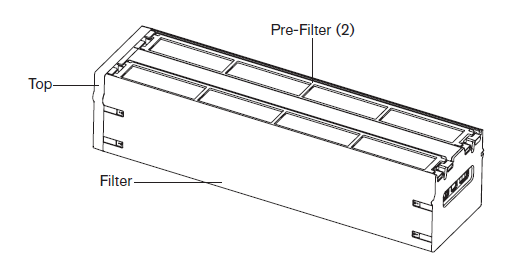
- Remove the PRE-FILTERS from the FILTER.

- Rinse the PRE-FILTERS and FILTER with warm, soapy water or place in the dishwasher.
CAUTION: The FILTER’S collection plates are sha;p, please handle them carefully. - Allow the PRE-FILTERS and FILTER to dry. Ensure they are completely dry before using.
- Replace the PRE-FILTERS.

- Place the clean, dry FILTER in the unit. Normal operation can resume.
Note: It may be necessary to clean the PRE-FILTERS and FILTER weekly, depending on the air quality in your environment. If your environment is filled with heavy smoke, you should clean the PRE-FILTERS and FILTER at least twice a week to avoid tar build-up on the FILTER.
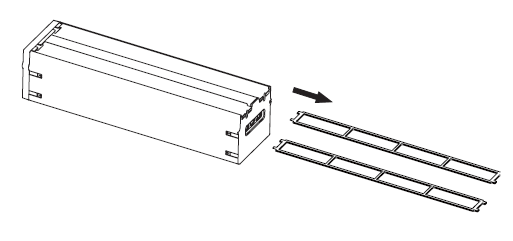
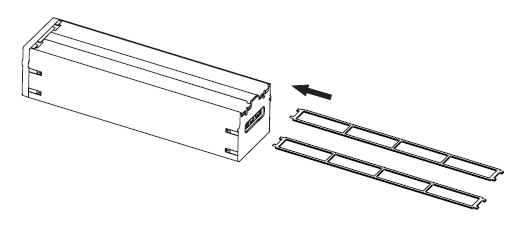
HELPFUL HINTS FOR CLEANING THE FILTER
- Do not bend the collection plates in the FILTER to fit them in the dishwasher rack. The unit will not function properly if the collection plates have been bent and touch each other.
- If you find that the collection plates in the FILTER or the PRE-FILTERS are not completely clean after one dishwasher cycle, increase the wash cycle time or wash them a second time.
- It is safe to use standard dishwasher soap.
- If hand washing, rinse the PRE-FILTERS and FILTER’s collection plates in your sink to remove loose debris. Submerge the PRE-FILTERS and FILTER in warm, soapy water and allow them to soak for 15 minutes. Rinse with cold water.
CAUTION: The collection plates are sharp, please handle carefully. - You may use a small scrub brush to clean in between the collection plates, but take care not to bend them.
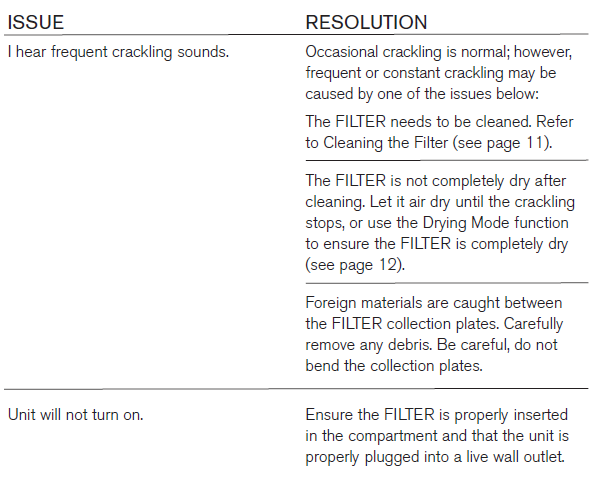
- If you do not allow the PRE-FILTERS and FILTER to completely dry, you may hear a crackling noise during use. If this occurs, remove the PRE-FILTERS and FILTER and dry completely before use.
USING THE DRYING MODE FUNCTION
IMPORTANT: The Drying Mode function should only be used to remove possible minor residual moisture. DO NOT use the Drying Mode to dry a soaking wet FILTER, as this may damage the unit.
- With the unit off and a clean FILTER in the unit, press and hold the FAN SPEED and TIMER buttons for 3 seconds. The unit will run the Fans on the Turbo setting with no electrical charge for 40 minutes. The Turbo Fan Speed LED will blink during the Drying Mode.
- After 40 minutes have passed, the unit will exit the Drying Mode and will turn off.
Note: To exit out of the Drying Mode before 40 minutes have passed, press the POWER button. The Drying Mode will be stopped, and the unit will turn off.
SPECIFICATIONS
- Input: 120V
- Frequency: 60Hz
- Power: 35W
TROUBLESHOOTING GUIDE
ONE (1) YEAR LIMITED WARRANTY
Brookstone® warrants this product against defects in materials and/or workmanship under normal use for a period of ONE (1) YEAR from the date of purchase by the original purchaser (“Warranty Period”). If a defect arises and a valid claim is received within the Warranty Period, at its option, Brookstone will either
- repair the defect at no charge, using new or refurbished replacement parts, or
- replace the product with a new product that is at least functionally equivalent to the original product, or
- Provide a store credit in the amount of the purchase price of the original product.
A replacement product or part, including a user-installable part installed in accordance with instructions provided by Brookstone, assumes the remaining warranty of the original product. When a product or part is exchanged, any replacement item becomes your property, and the replaced item becomes Brookstone’s property. When a store credit is given, the original product must be returned to Brookstone and becomes Brookstone’s property.
Obtaining Service
To obtain warranty service, call Brookstone Limited Warranty Service at 1-800-292-9819. Please be prepared to describe the product that needs service and the nature of the problem. A purchase receipt is required. All repairs and replacements must be authorized in advance. Service options, parts availability, and response times will vary. You are responsible for the delivery and the cost of delivery of the product or any parts to the authorized service center for replacement, per our instructions.
Limits and Exclusions
Coverage under this Limited Warranty is limited to the United States of America, including the District of Columbia and the U.S. Territories of Guam, Puerto Rico, and the U.S. Virgin Islands. This Limited Warranty applies only to products manufactured for Brookstone that can be identified by the “Brookstone” trademark, trade name, or logo affixed to them or their packaging. The Limited Warranty does not apply to any non-Brookstone products. Manufacturers or suppliers other than Brookstone may provide their own warranties to the purchaser, but Brookstone, insofar as permitted by law, provides these products “as is.”
This warranty does not apply to: a) damage caused by failure to follow instructions relating to product’s use or the installation of components; b) damage caused by accident, abuse, misuse, fire, floods, earthquake or other external causes; c) damage caused by service performed by anyone who is not a representative of Brookstone; d) accessories used in conjunction with a covered product; e) a product or part that has been modified to alter functionality or capability; f) items intended to be periodically replaced by the purchaser during the normal life of the product including, without limitation, batteries or light bulbs; g) any product sold “as is” including, without limitation, floor demonstration models and refurbished items; or h) a product that is used commercially or for a commercial purpose.
BROOKSTONE SHALL NOT BE LIABLE FOR INCIDENTAL OR CONSEQUENTIAL DAMAGES RESULTING FROM THE USE OF THIS PRODUCT, OR ARISING OUT OF ANY BREACH OF THIS WARRANTY. TO THE EXTENT PERMITTED BY APPLICABLE LAW, BROOKSTONE DISCLAIMS ANY AND ALL STATUTORY OR IMPLIED WARRANTIES, INCLUDING, WITHOUT LIMITATION, WARRANTIES OF MERCHANTABILITY, FITNESS FOR A PARTICULAR PURPOSE, AND WARRANTIES AGAINST HIDDEN OR LATENT DEFECTS. IF BROOKSTONE CANNOT LAWFULLY DISCLAIM STATUTORY OR IMPLIED WARRANTIES, THEN TO THE EXTENT PERMITTED BY LAW, ALL SUCH WARRANTIES SHALL BE LIMITED IN DURATION TO THE DURATION OF THIS EXPRESS WARRANTY.
Some states disallow the exclusion or limitation of incidental or consequential damages or how long an implied warranty lasts, so the above exclusions or limitations may not apply to you. This warranty gives you specific legalrightss and you may also have other rights, which vary from state to state.
For more manuals by Brookstone, visit ManualsLibraryy
Brookstone Pure-Ion Pro- FAQs
Q1. How do I use the Brookstone Pure-Ion Pro humidifier?
Place the unit on a flat surface, fill with clean water, and power it on. Adjust the mist output as needed for comfort.
Q2. How do I clean the Pure-Ion filter?
Turn off and unplug the unit. Remove the filter and gently wash it under running water. Let it dry completely before reinstalling.
Q3. How often should I replace the air filter?
Most filters should be replaced every 90 days, though this may vary depending on your environment, pets, or dust levels.
Q4. Why is my Ionic Pro making a hissing or buzzing sound?
This usually means the collection blades or ionizing wires need cleaning. A thorough cleaning should restore quiet operation.
Q5. Can I use tap water in the humidifier?
It’s best to use distilled or filtered water. Tap water can leave mineral buildup and cause white dust in the room.
Q6. How often should I change the water in my humidifier?
Replace the water daily to prevent mold or bacteria growth, especially if the unit is not used continuously.
Q7. What are signs that my humidifier needs cleaning?
Look for musty odors, visible deposits, or reduced mist output. These indicate it’s time for a full cleaning.
Q8. How do I know if my ionizer is working properly?
You may feel a slight airflow (ionic wind) or hear a faint sizzling sound near the ionizing elements, showing it is active.