
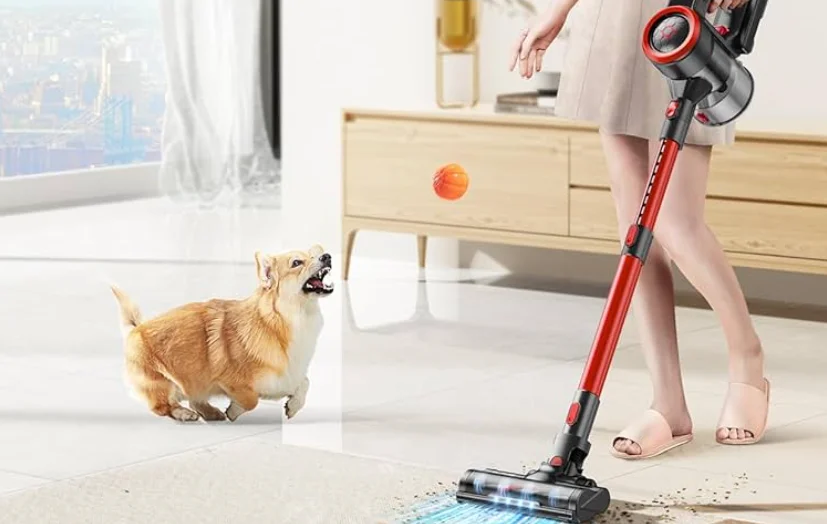

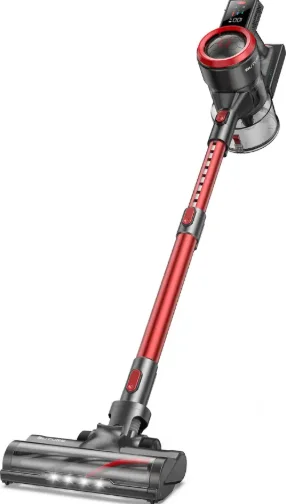
Buture JR700 Cordless Stick Vacuum Cleaner
1. INTRODUCTION
Thank you for purchasing the BUTURE JR700 stick vacuum cleaner. Please read the user manual carefully before using the product to avoid malfunctions caused by accidental operation. If the product is given to another person, please make sure the manual is conveyed. The product provides a free 2-year warranty. Please activate the warranty card in time. If you have any questions, please contact [email protected].
2. WARNING
2.1 Personal Safety
- Store it indoors in a dry place and out of the reach of children.
- This product is suitable for children 10 years old and above. Users with reduced physical functions, sensory or intellectual abilities, or a lack of experience and knowledge are advised to use the product safely under supervision or guidance and to be aware of the hazards involved.
- Please pay attention to safety when children or pets are near the vacuum cleaner.
- Children should not clean or use the product without supervision.
- Use only manufacturer’s recommended attachments as described in this manual; misuse or use of any accessory or attachment other than those recommended may present a risk of personal injury.
- Take extra care when cleaning stairs.
- Keep the appliance and accessories away from hot surfaces.
- Do not block the appliance openings or hinder airflow; keep openings free of any objects, including dust, lint, clothing, fingers (and all parts of the body).
2.2 Electrical Safety
- Only use batteries and chargers supplied by the manufacturer.
- Never modify the charger in any way.
- Do not pull the cord to disconnect it from a socket; grasp the plug and pull to disconnect it.
- Keep the charger cord away from hot surfaces and sharp edges.
- The supply cord cannot be replaced. If the cord is damaged, the charger should be discarded and replaced.
- Do not handle the charger or the appliance with wet hands.
- Do not store or charge the appliance outdoors.
- The charger must be removed from the socket before removing the battery, cleaning, or maintaining the appliance.
2.3 Battery Safety
- This appliance includes Li-ion batteries; do not incinerate batteries or expose them to high temperatures, as they may explode.
- Liquid ejected from the battery may cause irritation or burns.
- In an emergency, contact professional help immediately.
- Leaks from the battery cells can occur under extreme conditions. Do not touch any liquid that leaks from the battery. If the liquid gets on the skin, wash immediately with soap and water. If the liquid gets into the eyes, flush them immediately with clean water for a minimum of 10 minutes and seek medical attention. Wear gloves to handle the battery and dispose of it immediately in accordance with local regulations.
- When the battery pack is not in use, keep it away from paper clips, coins, keys, nails, screws, or other small metal objects that could make a connection from one terminal to another.
- When you dispose of the appliance, remove the battery and dispose of it safely in accordance with local regulations.
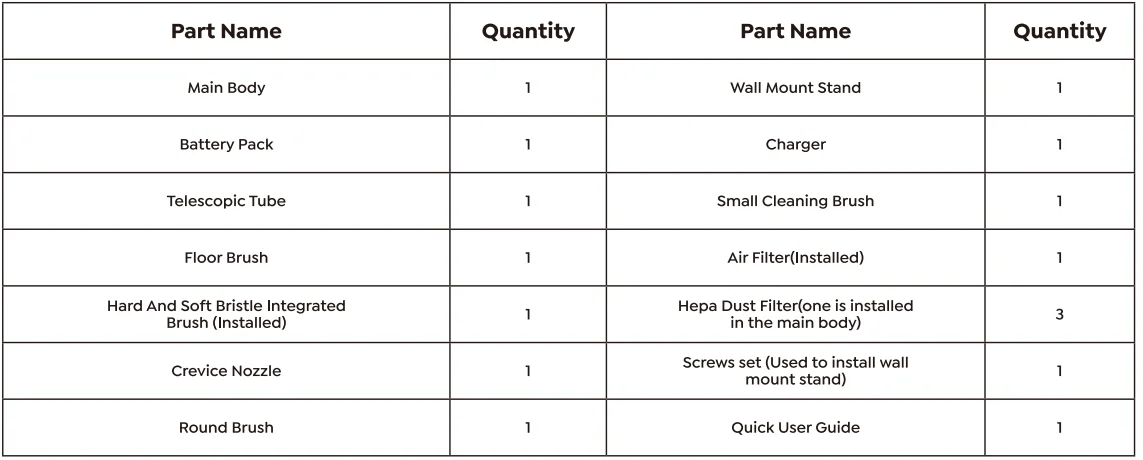
3. CONTENT OF PACKAGE
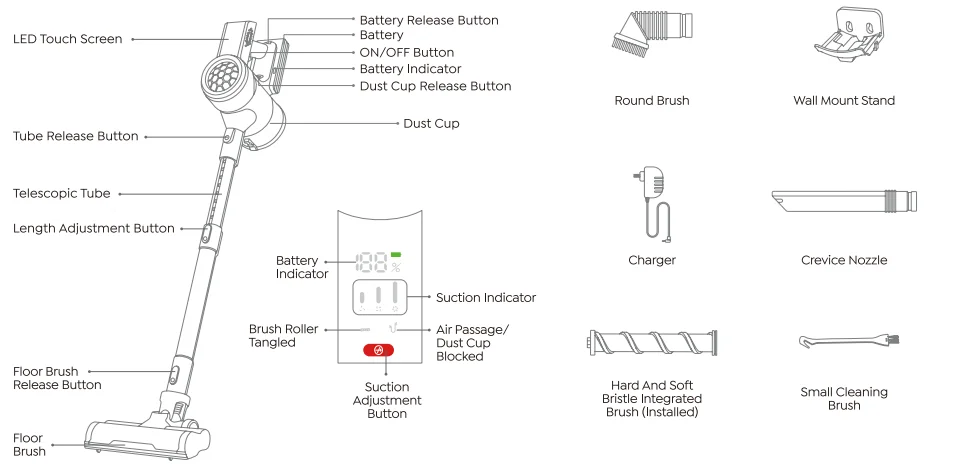
4. KNOW YOUR PRODUCT
5. CHARGING
Turn off the power before charging.
- Only charge with the original charger to avoid damage to the vacuum cleaner.
- During over-current protection and over-voltage protection, the battery indicators
- Flash at the same time, and the screen goes out.
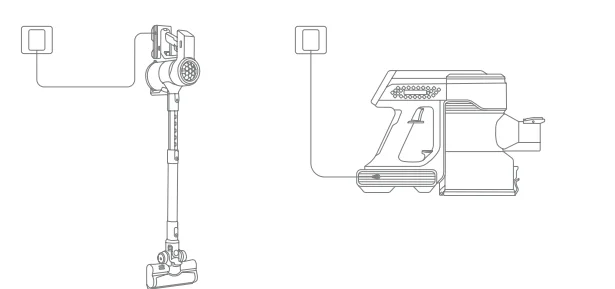
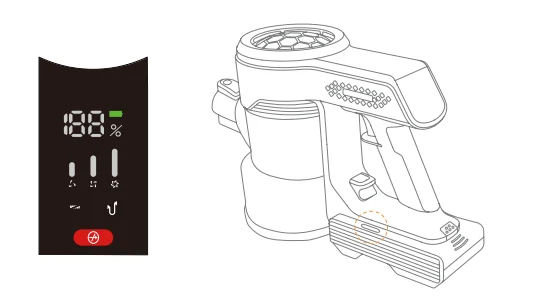
- One end of the charger is connected to the power supply, and the other end is connected to the battery charging port.

- During the charge, if the battery indicator shows 100, it means it is fully charged and ready to use.

6. ASSEMBLING
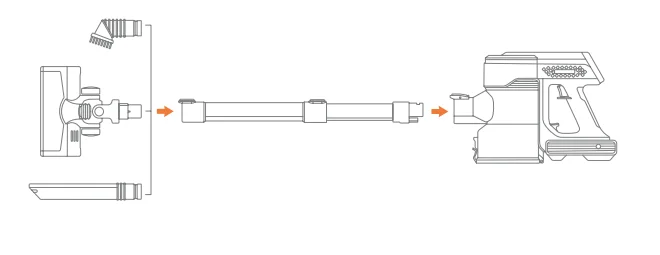
Connect the telescopic tube
- Insert the telescopic tube into the main body and make sure it is secure. Press the release button, and the telescopic tube can be removed.

- Connect brush heads.


7. USING
Warning: Do not exceed the “MAX” dust collection capacity of the dust cup. Please keep the suction nozzle unobstructed and avoid blockage. Otherwise, the motor will overheat and cause danger.
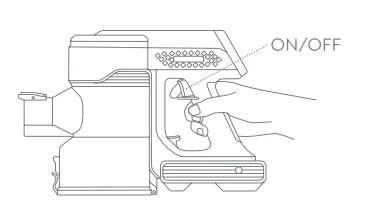
- Press the ON/OFF button to start work.

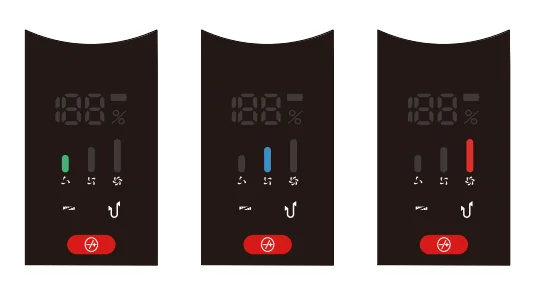
- Adjust suction power. Touch the button to adjust the suction power. When turning on the vacuum, the green light is on, and the vacuum is in ECO mode. Press the button once, the blue light is on, and the vacuum is in standard mode. Press the button twice, the red light is on, and the vacuum is in the max suction mode.

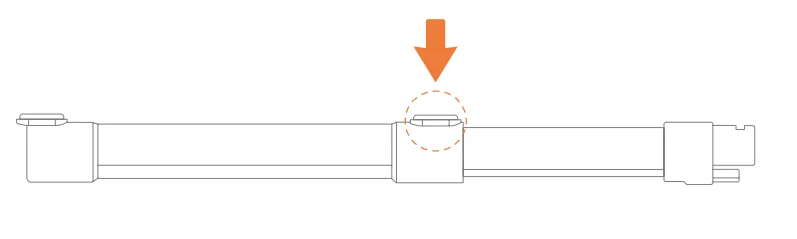
- According to different needs, the length of the tube can be adjusted.

8. CLEANING
8.1 Clean the dust cup
To maintain good suction power, please empty the dust cup and clean the filter after each use.
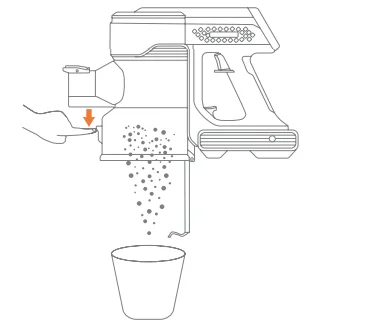
- Press the release button on the dust cup to open the dust cup lid and dump out the trash.

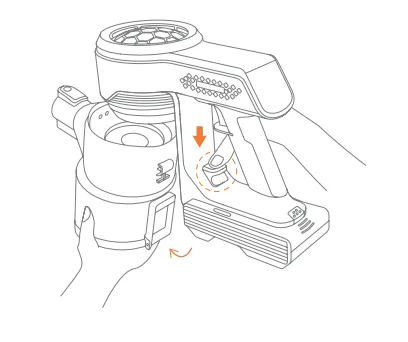
- Press the dust cup release button of the main body vertically, grasp the bottom of the dust cup, and take out the dust cup.

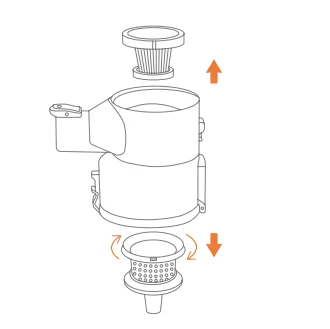
- Pull out the HEPA filter. Then open the bottom cover of the dust cup, rotate the stainless steel filter, and take it out.

- Sweep off the dust on the HEPA filter with the cleaning brush. The stainless steel filter and dust cup can be washed with water and shall be installed after being dried for 24 hours.

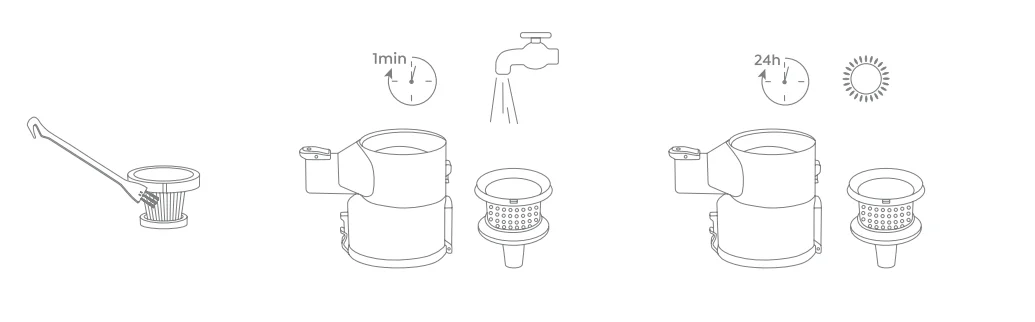
Warning: Do not use cleaning equipment (washing machine, etc.) to clean the filter. Do not use drying equipment (dryer, iron, etc.) to dry the vacuum cleaner; natural drying only.
8.2 Reinstallation
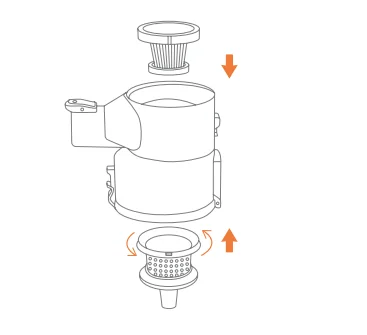
Put the stainless steel filter from the bottom of the dust cup and rotate it tightly (there are 3 small protrusions on the stainless steel filter edge corresponding to the 3 small grooves on the dust cup).
- Put the HEPA filter from above and cover the dust container’s bottom cover.

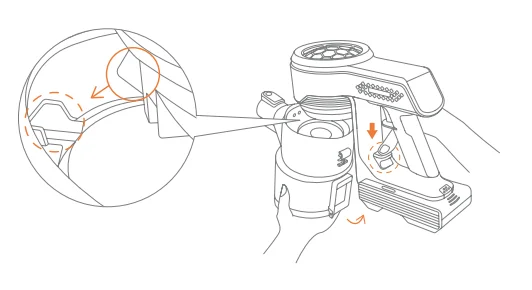
- Align the convex part of the handle with the concave part of the dust cup and insert it, and then press the release button of the dust cup to completely close the dust cup and the handle.

8.3 Clean the brush
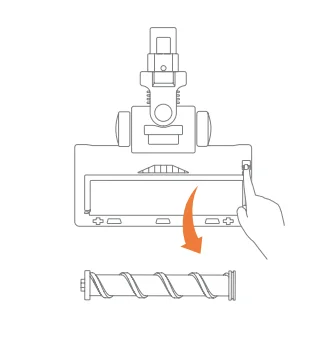
Warning: Ensure the appliance is disconnected from the charger before removing the roller brush. Be careful not to pull the ON button.
- Push up the switch to the “unlock” side, remove the plug, then take out the roller brush.

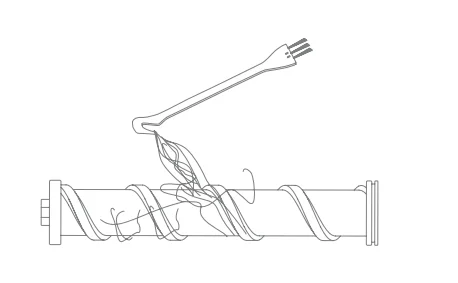
- Use the small cleaning brush to sweep away the trash on the roller. The knife side is used to remove the tangled hairs from the brush roller.

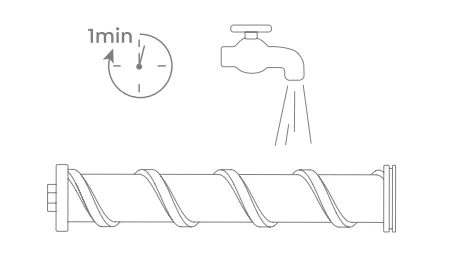
- Clean the roller brush with or without water.

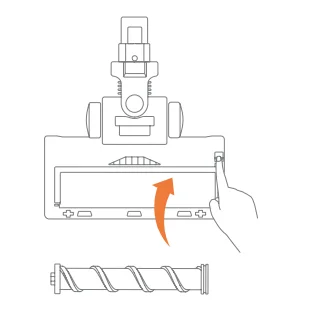
- Push in gently to install the roller brush. Before replacing, make sure the brush is completely dry.

9. TROUBLESHOOTING
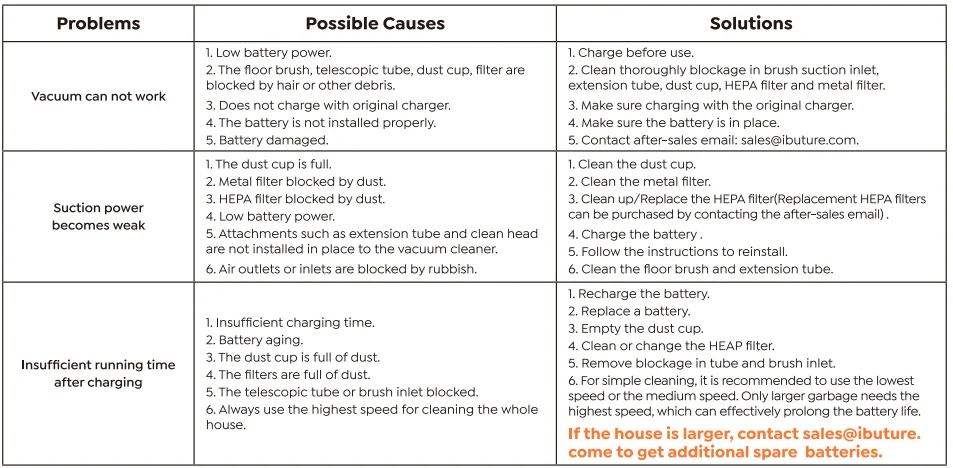
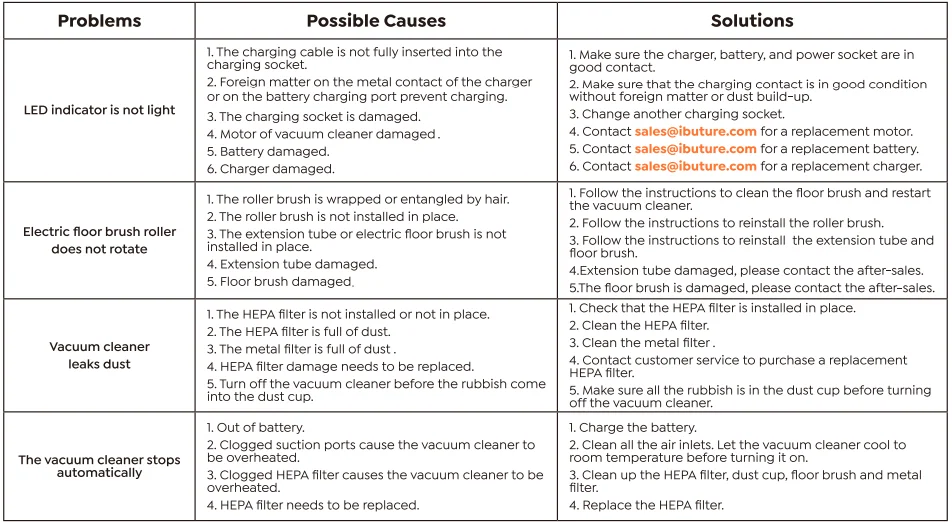
If there is any problem during use, please check the following troubleshooting table. If the problem cannot be solved, please contact the after-sales email: [email protected]. Warning: Turn off the vacuum cleaner before maintenance. Otherwise, it may cause electric shock or other personal injury.
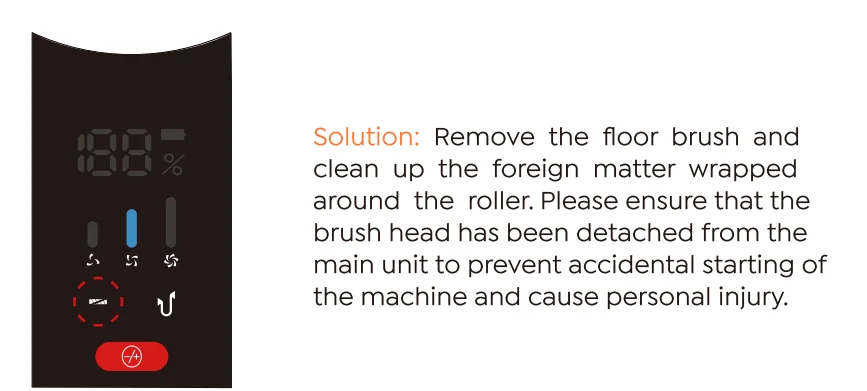
- Brush Roller Tangled: If the floor brush inhales large foreign objects or entangles too much hair, the indicator on the left flashes.

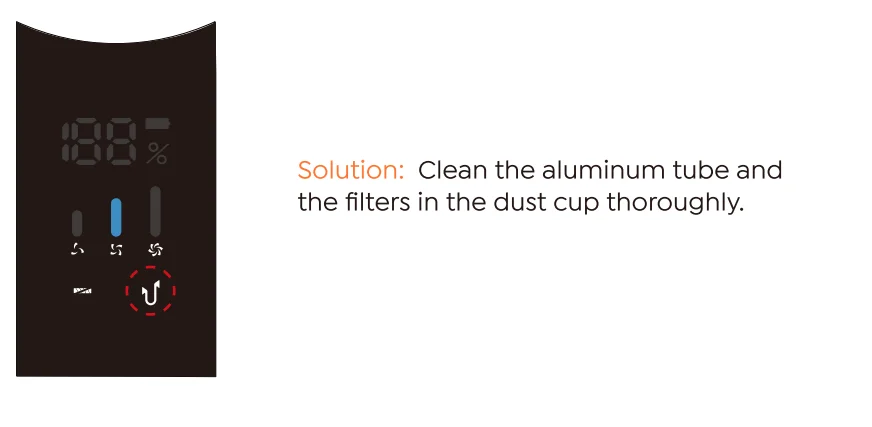
When the air passage or dust cup is blocked, the indicator on the right will flash.
10. COMMON TROUBLES
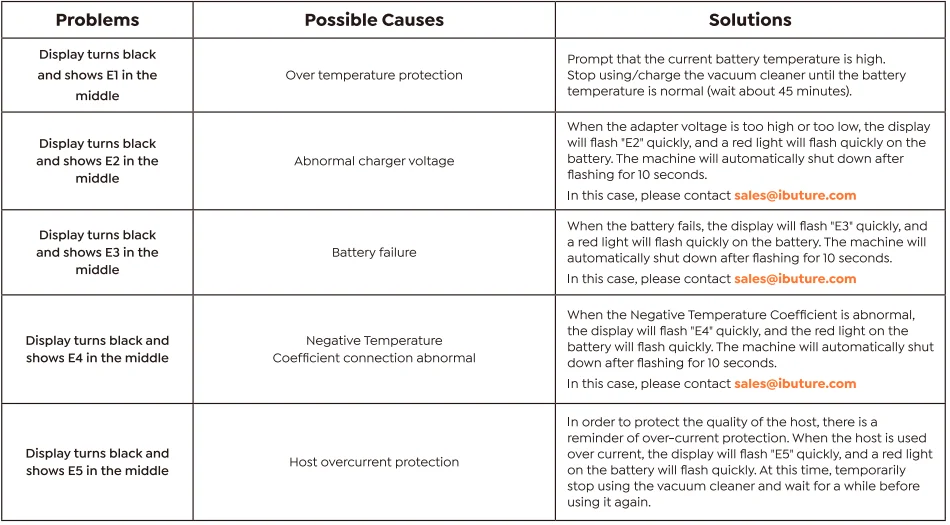
11. MAINTENANCE
- The stainless steel filter and dust cup can be washed with water. After cleaning, they must be thoroughly dried before putting them back into use. Do not immerse the HEPA filter and main unit in water or any liquid.
- Clean the Hoover casing only with a soft, slightly damp cloth. Do not allow any liquid substances to enter the Hoover.
- Do not use any corrosive chemicals or abrasives.
- It is recommended to change the HEPA filter every 2 months (depending on use) to ensure optimum performance. Do not use the filter when it is damaged or worn out.
12. WARRANTY
If there is any problem or malfunction during use, please send your question and order number to our email. We will provide you with good after-sales service within 24 hours. E-mail: [email protected] or visit https://ibuture.com. If you are looking forward to a longer battery life, please contact [email protected] for an additional battery.
Federal Communication Commission Interference Statement
NOTE: This equipment has been tested and found to comply with the limits for a Class B digital device, pursuant to part 15 of the FCC Rules. These limits are designed to provide reasonable protection against harmful interference in a residential installation. This equipment generates, uses, and can radiate radio frequency energy and, if not installed and used in accordance with the instructions, may cause harmful interference to radio communications.
However, there is no guarantee that interference will not occur in a particular installation. If this equipment does cause harmful interference to radio or television reception, which can be determined by turning the equipment off and on, the user is encouraged to try to correct the interference by one or more of the following measures:
- Reorient or relocate the receiving antenna.
- Increase the separation between the equipment and receiver.
- Connect the equipment into an outlet on a circuit different from that to which the receiver is connected.
- Consult the dealer or an experienced radio/TV technician for help.
Caution: Changes or modifications not expressly approved by the party responsible for compliance could void the user’s authority to operate this equipment.
This device complies with part 15 of the FCC Rules. Operation is subject to the following two conditions:
- This device may not cause harmful interference, and
- This device must accept any interference received, including interference that may cause undesired operation.
Correct Disposal of this product
 This marking indicates that this product should not be disposed of with other household wastes throughout the EU. To prevent possible harm to the environment or human health from uncontrolled waste disposal, recycle it responsibly to promote the sustainable reuse of material resources. To return your used device, please use the return and collection systems or contact the retailer where the product was purchased. They can take this product for environmentally safe recycling.
For More Manuals By Buture, Visit ManualsLibraryy.
Buture JR700 Cordless Stick Vacuum Cleaner -FAQs
What is the Buture JR700 Cordless Stick Vacuum Cleaner?
The Buture JR700 is a cordless stick vacuum cleaner designed for versatile home cleaning. It uses a powerful brushless motor (around 450 W) with up to 38 kPa suction, making it effective on floors, carpets, pet hair, and debris. Featuring a smart color touch screen, removable battery, and multiple tools, it’s built for convenience and thorough cleaning.
How long does the Buture JR700 cordless vacuum run on a full charge?
The JR700 vacuum can run up to 55 minutes on a full charge in low power (Eco) mode thanks to its 2200 mAh 7-cell battery. High (Boost) mode significantly reduces runtime to around 15–20 minutes for deep cleaning. Runtime varies based on suction level and floor type.
How long does it take to fully charge the JR700 vacuum battery?
Charging the JR700’s battery typically takes about 4–5 hours using the original charger and wall-mounted dock. For optimal battery health, it’s best to fully charge before first use and after each deep cleaning session.
What suction modes and controls does the JR700 offer?
The JR700 features three suction modes: Eco (longest run), Standard (balanced power), and Boost (maximum suction). You adjust these easily using the intelligent color touch screen, which also shows battery level and alerts for brush tangles or blockages.
Is the JR700 suitable for pet hair and carpets?
Yes, the JR700 includes a 2-in-1 tangle-free floor brush with soft and hard bristles that work well on hard floors and carpets, helping prevent hair wrap. LED lights on the brush also help reveal hidden dust and debris.
What filtration system does the JR700 vacuum use?
The vacuum uses a multi-stage filtration system including HEPA filters that capture fine dust particles and protect the motor. The large 1.5 L dust cup is easy to detach and empty with a one-click mechanism after cleaning.
Does the JR700 include accessories, and what are they?
Yes — it comes with a telescopic metal tube and multiple cleaning tools: floor brush, crevice brush, and round brush. These attachments let you clean floors, furniture, upholstery, and tight spaces, making the vacuum versatile for all areas of a home.
What should I do if the JR700 loses suction power?
Reduced suction can be due to a full dust cup, dirty metal filter, clogged HEPA filter, or battery power level. Cleaning or replacing filters, emptying the dust cup, and ensuring the battery is charged will help restore suction. Check brush and tubes for blockages too.
How do I maintain the battery and filters?
For best performance, charge the vacuum after use and avoid storing a depleted battery. Clean the stainless-steel filter and dust cup regularly and dry them before reuse. Replace HEPA filters every couple of months (depending on use) to maintain airflow and suction.
Is the Buture JR700 easy to assemble and use?
Yes — assembly is straightforward: attach the telescopic tube, connect the desired brush or tool, insert the dust cup, and power on. The adjustable tube and intuitive controls make it easy to clean floors, ceilings, stairs, and upholstery without complicated setup.