


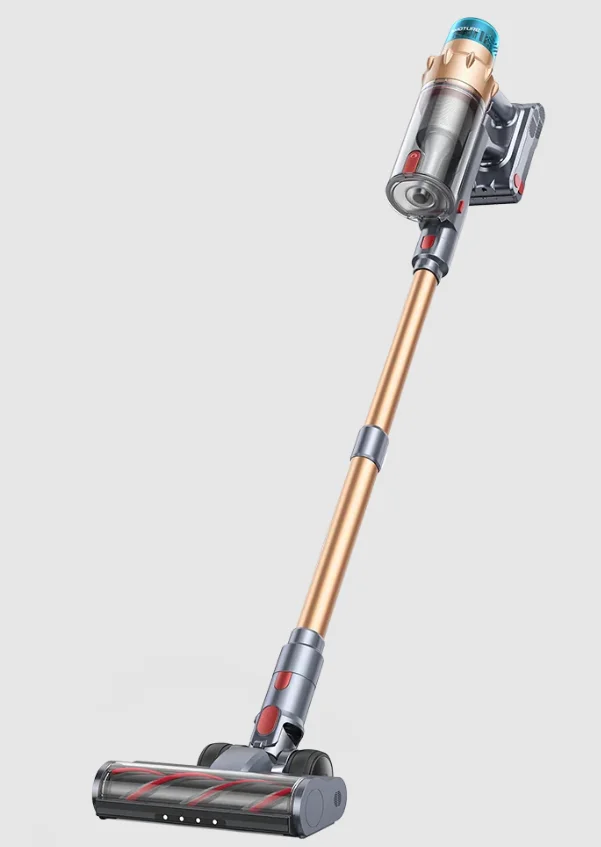
Buture X9 Cordless Vacuum Cleaner
IMPORTANT SAFETY WARNING
ATTENTION: Before using this machine, please read all instructions in the manual and cautionary markings on the machine carefully.
Precautions When Using
- This Buture machine is not intended for use by persons (including children) with reduced physical, sensory or reasoning capabilities, or lack of experience and knowledge, unless they have been given supervision or instruction concerning the use of the machine by a person responsible for their safety.
- Use only as described in this Buture User Manual. If the machine is not working as it should, if it has received a sharp blow, if it has been dropped, damaged, left outdoors, or dropped into water, do not use and contact the Buture Support Team.
- Suitable for dry locations ONLY. Do not install, charge or use this machine outdoors, in a bathroom or within 10 feet (3 meters) of a pool. Do not use it on wet surfaces and do not expose to moisture, rain or snow.
- When using this machine, please keep hair, loose clothing, fingers, and all parts of the body away from openings and moving parts. Do not point the hose, aluminum alloy tube or other accessories at your eyes or ears or put them in your mouth.
- Do not use it to pick up hard objects, such as glass slag, needles, nails, etc.
- Do not touch the charger with wet hands to avoid electric shock.
- Use only Buture-recommended accessories and replacement parts.
- Do not use without the dust cup and filter(s) in place.
- When removing or replacing a motorized brush bar, be careful not to pull the power button until the cleaner head has been reassembled.
- Do not water or spill liquid onto the vacuum cleaner. If that happens, it will increase the risk of electric shock.
- Use extra care when cleaning the stairs.
- Please do not use the vacuum cleaner to suck up the detergent, kerosene, soot, wet dust, water, sewage, matches, and other items.
- Please do not use a vacuum cleaner to suck up small particles such as cement, gypsum powder, wall powder, or large objects such as toy paper balls; otherwise, it will cause the vacuum cleaner to block and the motor to burn out.
Notes on the Battery Pack
- Do not throw the battery pack away; it should be safely disposed of in accordance with local regulations.
- Do not use a battery pack or machine that is damaged or modified. Damaged or modified batteries may exhibit unpredictable behavior resulting in fire, explosion or risk of injury.
- Do not incinerate batteries or expose to high temperatures, as they may explode.
- The battery is a sealed unit and, under normal circumstances, poses no safety concerns. In the unlikely event that liquid leaks from the battery, do not touch the liquid as it may cause irritation or burns, and observe the following precautions:
- Skin contact – can irritate. Wash with soap and water.
- Inhalation – can cause respiratory irritation. Exposure to fresh air and seek medical advice.
- Eye contact – can irritate. Immediately flush eyes thoroughly with water for at least 15 minutes. Seek medical attention.
- Disposal – wear gloves to handle the battery and dispose of it immediately, following local ordinances or regulations.
- When the battery pack is not in use, keep it away from paper clips, coins, keys, nails, screws or other small metal objects that could make a connection from one terminal to another.
Notes on Charging
- Before use, check the charger cord for signs of damage or aging. A damaged or entangled charger cord increases the risk of fire and electric shock.
- Never modify the charger in any way.
- The charger has been designed for a specific voltage. Always check that the mains voltage is the same as that stated on the rating plate
- Unplug the charger when not in use for extended periods.
- When your vacuum cleaner is fully charged and needs to be cleaned or repaired, please unplug the charger in time and do not pull the power cord directly.
- Do not pull the cord to disconnect from a socket, grasp the plug and pull to disconnect.
- Don’t wrap the cord around the charger when storing.
- Please fully recharge the battery, when first used or used after a long time storage. If the product is not used for a long time, please make sure the battery is recharged and used every three months at least.
- If smoke or fire occurs during charging, unplug the charger immediately, and use a fire extinguisher to put out the fire. Do not use water to extinguish the fire, it will increase the risk of electric shock.
- Follow all charging instructions and do not charge the battery pack or the machine outside of the temperature range specified in the instructions. Charging improperly or at a temperature outside of the specified range may damage the battery and increase the risk of fire. To ensure maximum battery life, Buture recommends the following:
- When not in use the machine should be stored at room temperature. Recommended range: 64°F (18°C) to 82°F (28°C).
- The ambient temperature range for operation and charging should be 50°F (8°C) to 86°F (35°C).
Storage and Maintenance Precautions
- Please store the product in a cool and dry environment. Please avoid long-time sunshine on the product.
- The charger must be removed from the socket before removing the battery, cleaning or maintaining the appliance.
- Please use dry a cloth to clean the vacuum cleaner. Please do not use gas or liquid that can make the surface crack or color fade.
- Do not apply any fragrance or scented product to the filter(s) of this machine. The chemicals in such products are known to be flammable and can cause the machine to catch fire.
- Do not carry out any maintenance other than that shown in this manual, or advised by the Buture Support Team.
- Do not disassemble the machine as incorrect reassembly may result in an electric shock or fire. Contact the Buture Support Team when a service or repair is required.
SAVE THESE INSTRUCTIONS
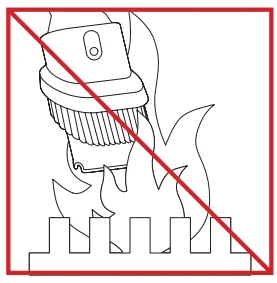
- Do not use near open flames.

- Do not pick up burning objects.

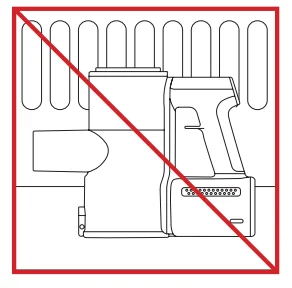
- Do not store near heat sources.

- Do not put your hands near the brush bar when the machine is in use.

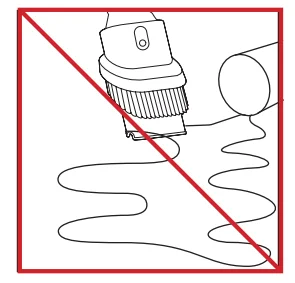
- Do not pick up water or liquids.

- Do not place on or near the cooker.
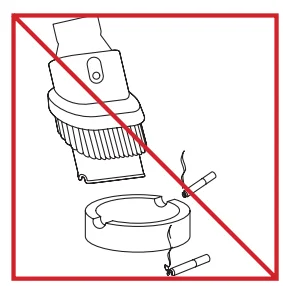
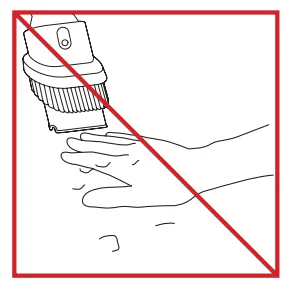
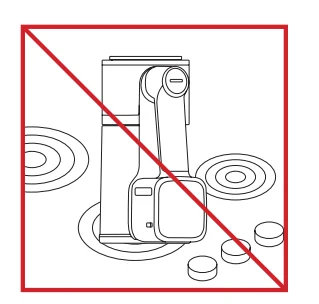
PACKAGE CONTENT
Please check and confirm the accessories and parts according to the following sheet before using.
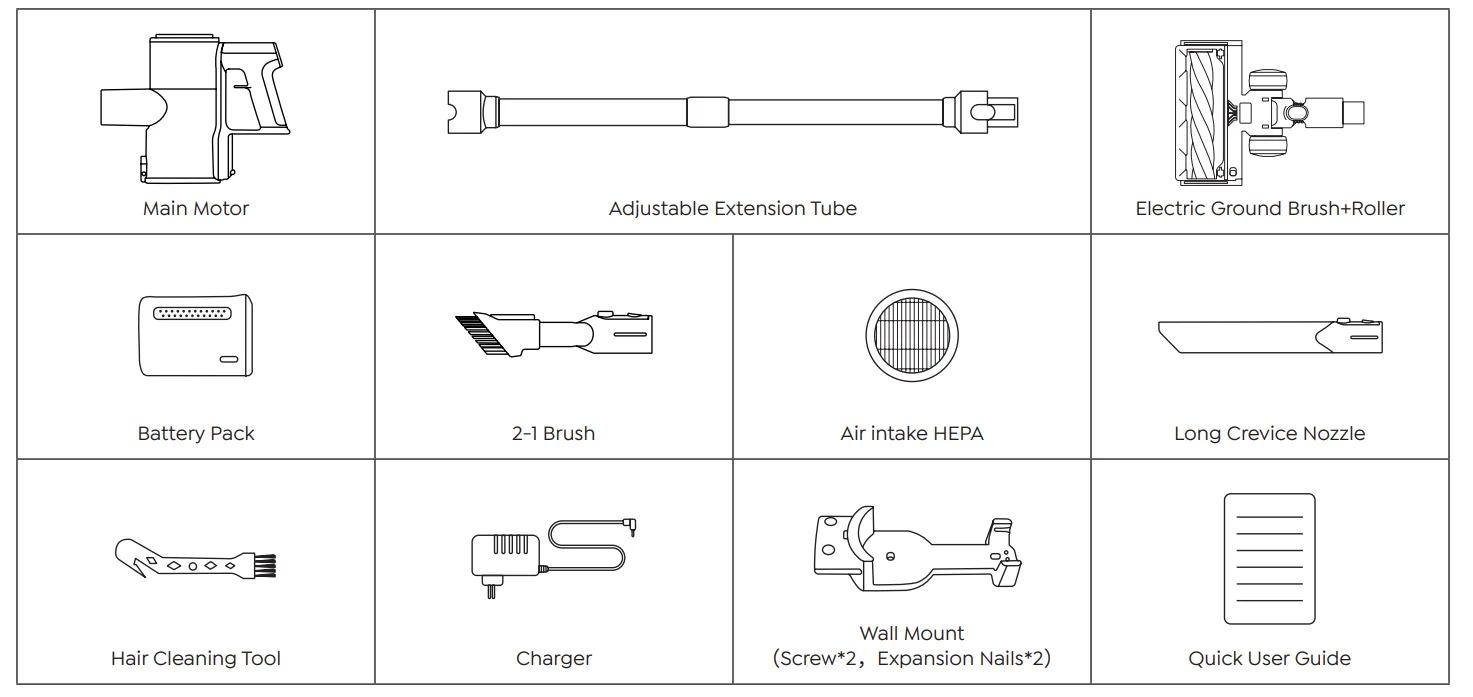
OVERVIEW & ACCESSORIES
Overview
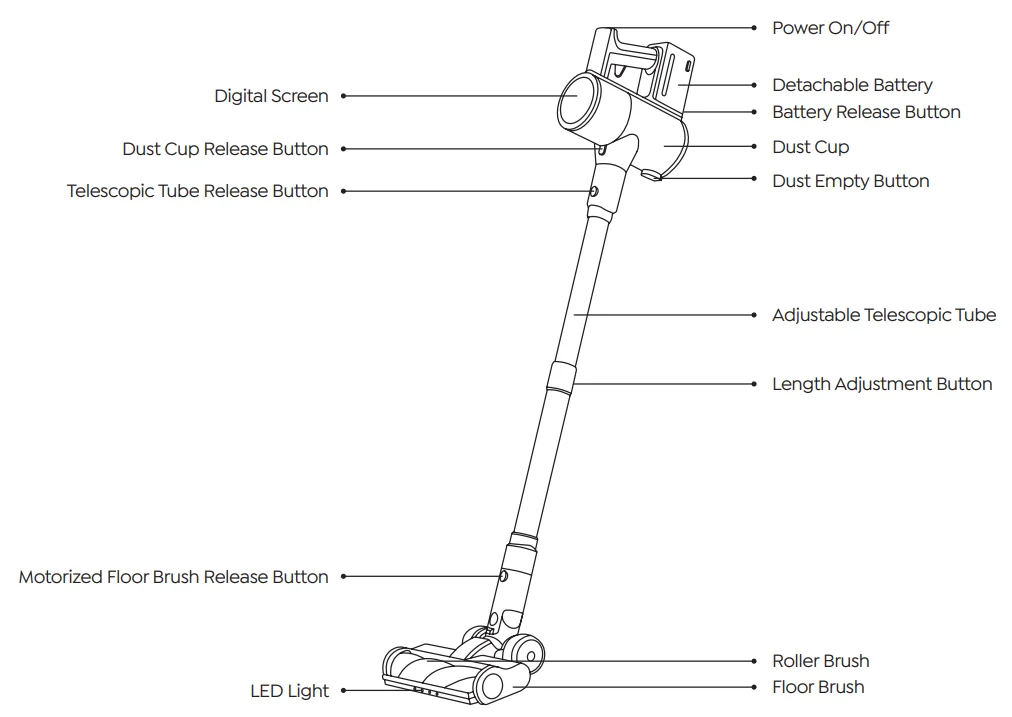
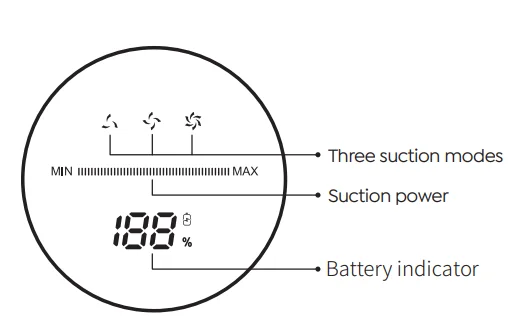
Touch Screen Indicators
ASSEMBLING & USE
Product Assembling and Use
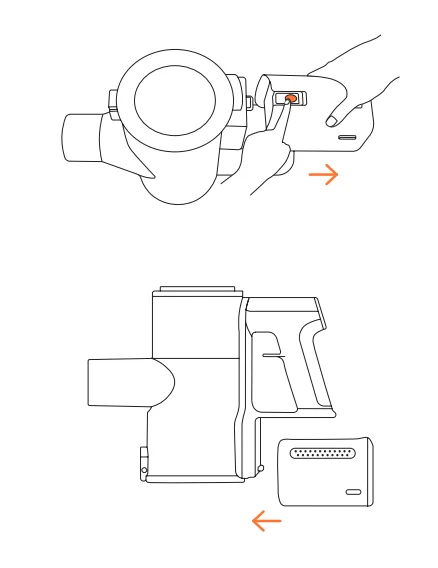
Assembling and Removing the Battery
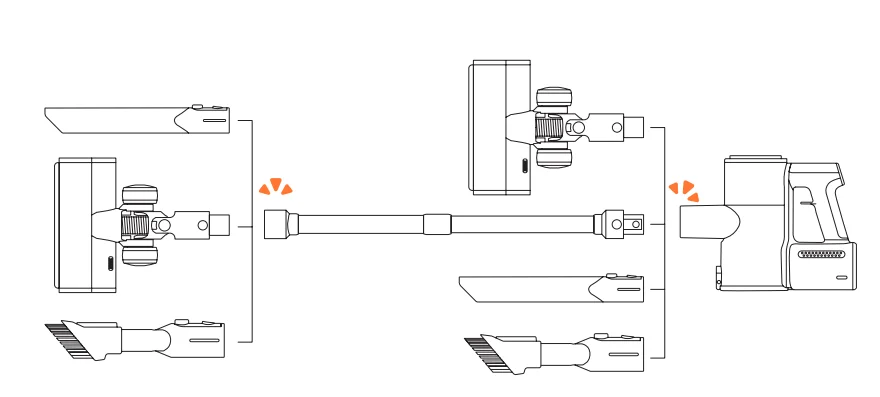
Install Cleaning Accessories
Install Charging Wall Mount
How to Use
Before use, make sure that
- The battery is fully charged, and fixed in place.
- The dust cup and filters are cleaned, dried, and fixed in place.
Start to Work
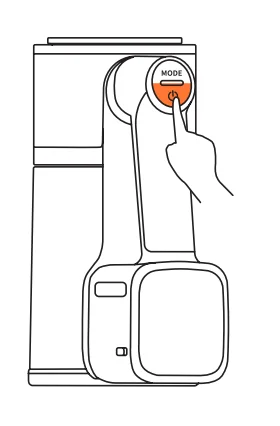
Press the switch button, the machine will start to work. Press the button again to shut down the machine.
Warning: Do not use the Cordless Vacuum cleaner without the removable filter or dust cup not in position.
Select Cleaning Mode
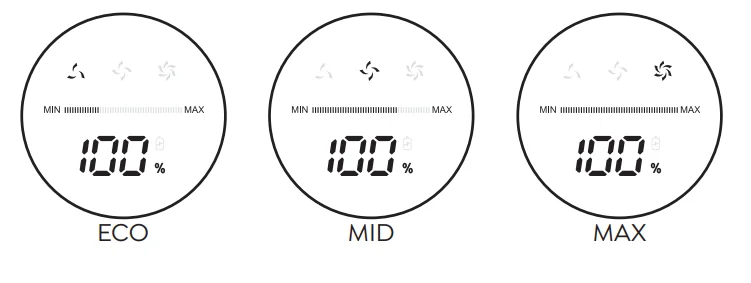
- There are three suction modes: MIN<MID<MAX.
- The default startup mode is MID Mode.
- Press the “MODE” to adjust suction mode.
- Press the “MODE” once to switch to MAX Mode, and twice to switch to MIN Mode.
Abnormal Indicator
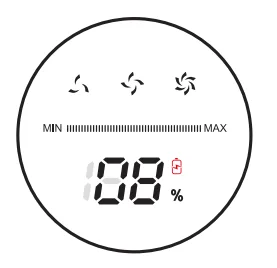
When the battery level is under 10%, the battery indicator on the screen will start to flash in red. The vacuum cleaner should be charged as soon as possible.
CHARGING METHODS
Charging Methods
During the working process of the machine, when the power display only shows 20% of the power, which is a reminder that the battery does not have enough and should be charged in time so as not to affect the use.
Method 1:
When charging, the green light on the screen indicator flashes to indicate that it is charging, when the screen charging displays 100%, the green light is always on and lasts for 5 seconds, the screen turns off.
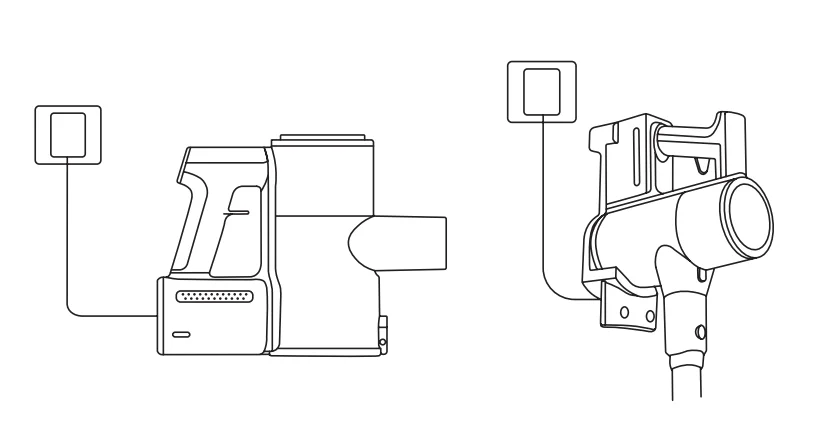
Method 2:
The battery package can be pulled out and charged separately. When charging, the white light flashes, after fully charging, the light stays on for 5 seconds and then goes out.
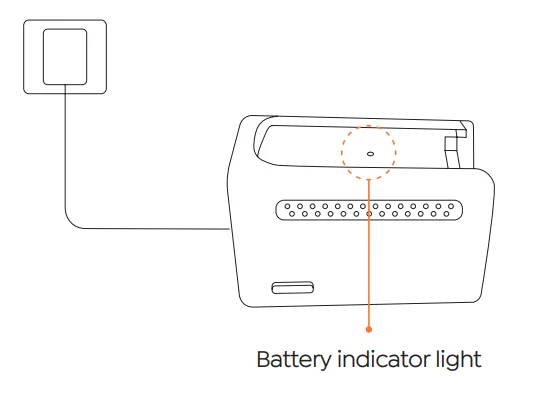
- Green light flashing (Charging)
- Green light (Fully Charged)
Wall Mount
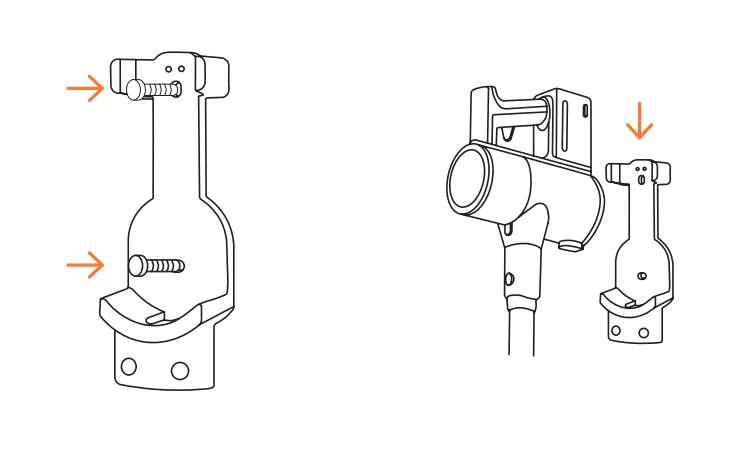
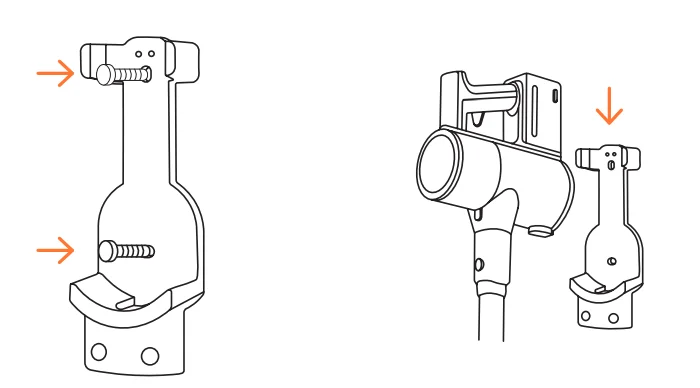
Hold the charging wall mount against the wall through the two fixing screw holes and fix it onto the wall with screws, and then hang the vacuum cleaner on the wall.
WARNING
- Please make sure there are no gas, water, electrical cables and wires behind the mounting area.
- To avoid the dock dropping down, please make sure it must be installed firmly.
MAINTENANCE
Please clean it regularly to prolong the service life of the vacuum cleaner.
Main Body Cleaning
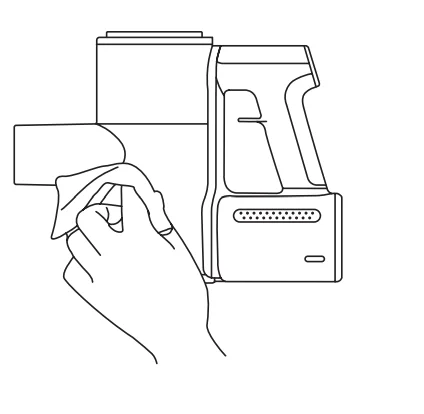
- Turn off the power before cleaning the body.
- Please use a neutral detergent, and wipe the body with a half-wet cloth.
- Please avoid sun exposure and store in a cool and dry place.
Empty the Dust Cup
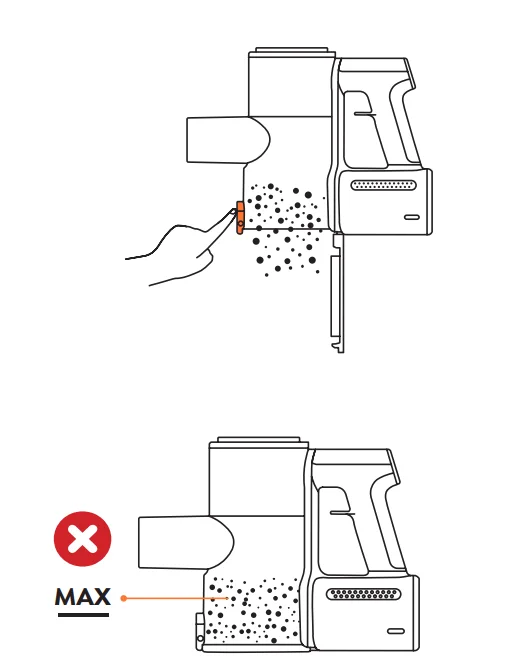
- Press the dust cup release button to empty the dust.
- When using, if the garbage in the dust cup exceeds the MAX line, please empty it in time.
Clean the Filter
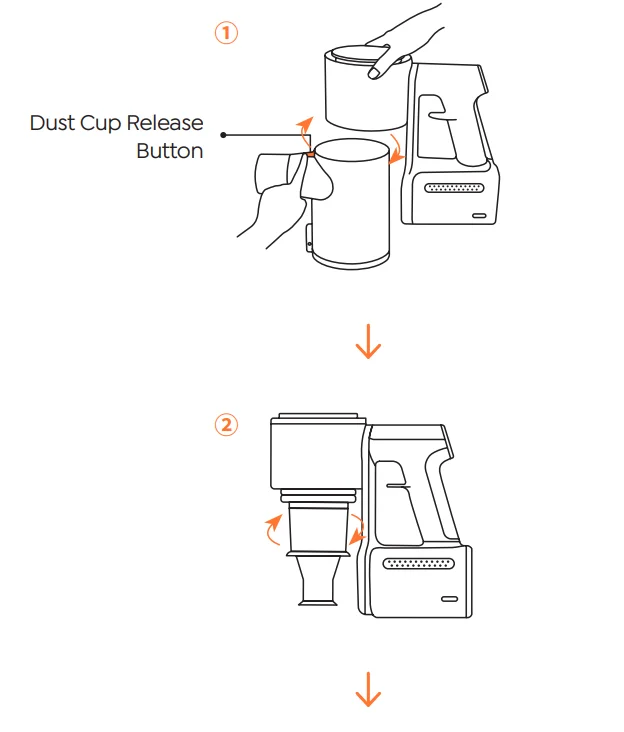
Press and hold the red button as shown in the picture below and rotate it clockwise to remove the dust cup.
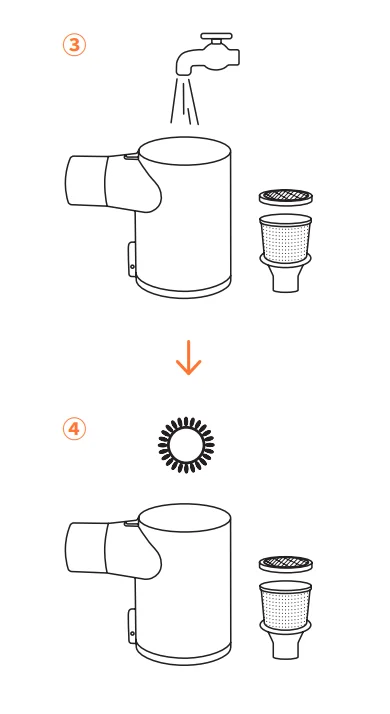
NOTE: The filter case and HEPA filter have to be cleaned once in two weeks. The HEPA filter has to be replaced every two months if necessary. Please ensure the filters are completely dry before reassembly.
Brush Roller Cleaning
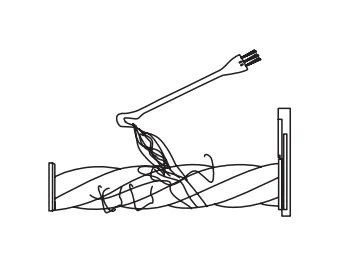
Note: After long periods of use, the bristle may be jammed by hair or similar build-up. It’s recommended to clean the brush roller periodically to ensure efficient operation and maintain suction.
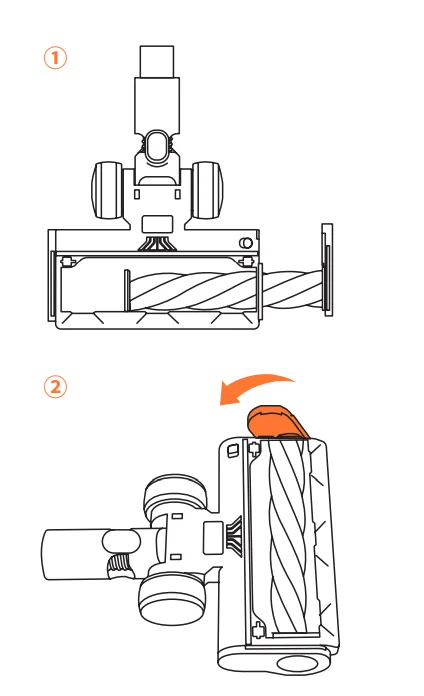
Take out the roller brush.
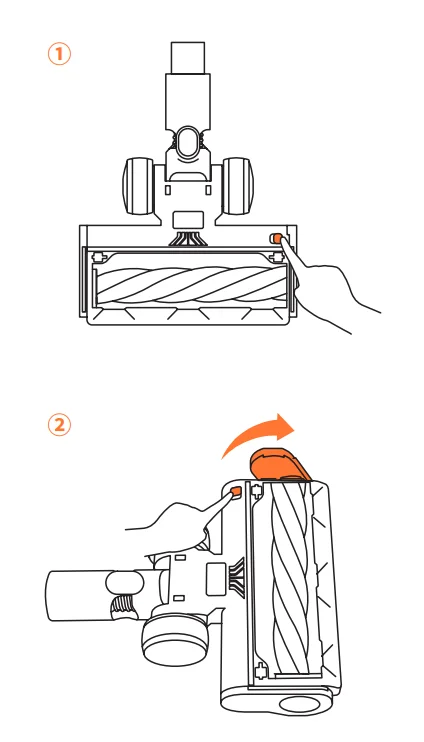
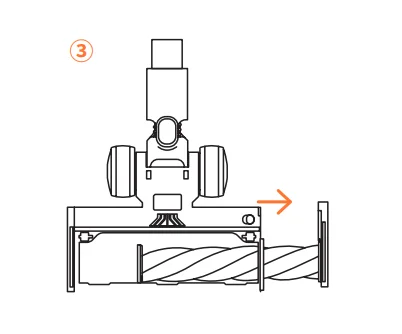
Remove any hair or fibers that have been wrapped around it. Use the mini cleaning brush to clean it.
Assemble the roller brush.
You can clean it with or without water. Please remember to use the roller after it is completely dry.
SPECIFICATION
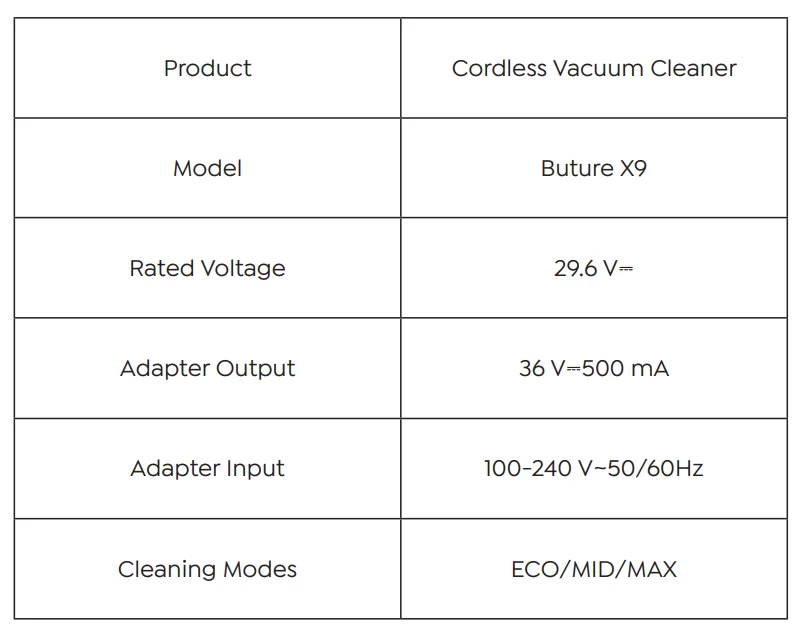
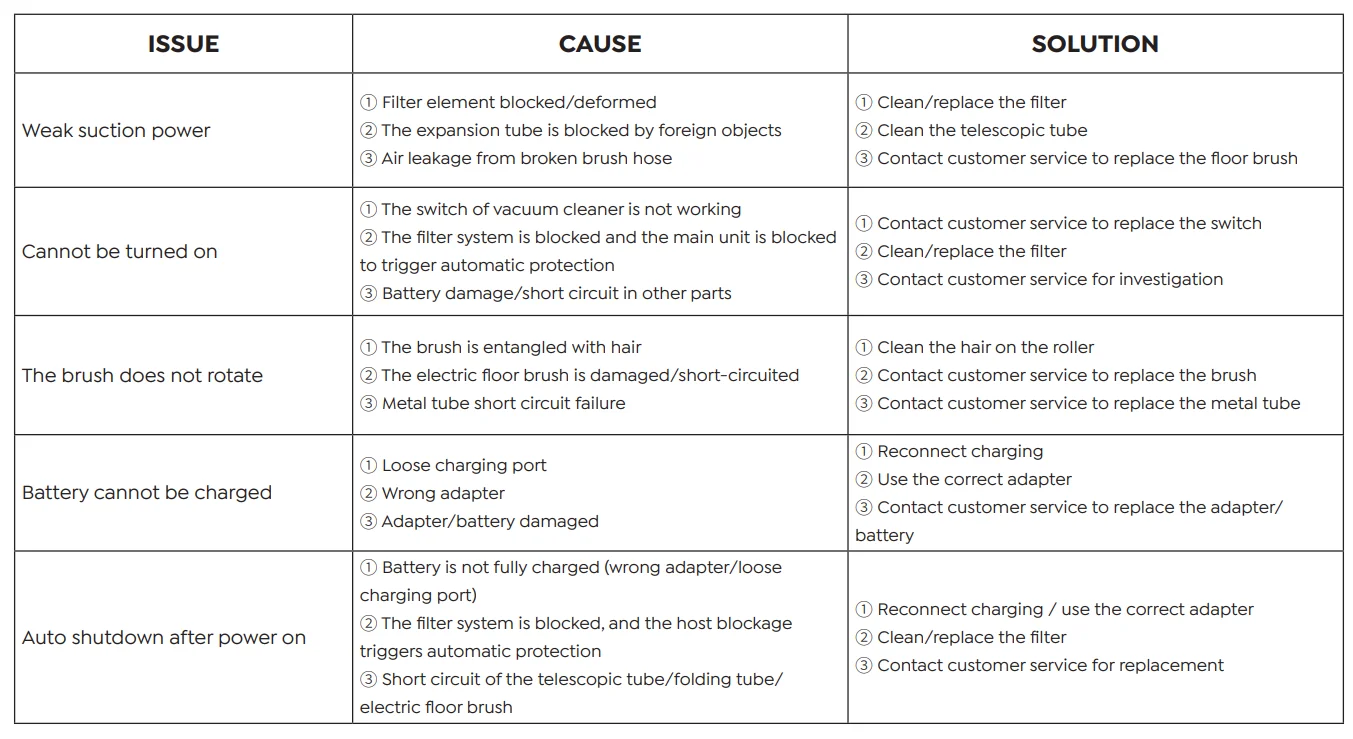
TROUBLESHOOTING
WARRANTY
The 2-Year Limited Warranty
- Your Buture acuum has a 2-year warranty against original defects in material and workmanship, when used for private household purposes by the Buture Instruction Manual.
- This warranty provides, at no extra cost to you, all labor and parts necessary to ensure your vacuum is in proper operating condition during the warranty period.
WHAT IS COVERED?
According to the requirements outlined in this instruction manual, subject to the following conditions and exclusions. This only applies to purchases made from authorized retailers of Buture. This warranty will only be valid if the machine is used in the country in which it was sold.
WHAT IS NOT COVERED?
Buture shall not be liable for costs, damages or repairs incurred as a result of:
- Machines purchased from an unauthorized dealer.
- Careless operation or handling, misuse, abuse, and/or lack of maintenance or use not following the Buture Instruction Manual.
- The machines are used for commercial or rental purposes in addition to normal domestic use.
- Use of parts not in accordance with the Buture Instruction Manual.
- Use of parts and accessories other than those produced or recommended by Buture.
- External factors unrelated to product quality and use, like accidental water damage.
- Repairs or alterations carried out by unauthorized parties or agents.
- Normal wear and tear, including Dust Cup, Belt, Filter, HEPA, Brush Roller, and Power Cord (or where external damage or abuse is diagnosed), carpet or floor damage due to use not in accordance with manufacturer’s instructions or failure to turn the brush roller off when necessary.
- Reduction in battery discharge time due to battery age or use.
HOW TO CLAIM?
Please keep your proof of purchase. To make a claim under our Limited Warranty, you need to provide your original purchase receipt with the purchase date and order number on it. All work will be carried out by Buture or its authorized agency. Any replaced defective parts will become the property of Buture. Service under this warranty will not extend the period of this warranty. If your machine is not functioning properly, or you still have questions after reading this manual, please feel free to contact us, we will try our best to provide you with a satisfactory solution.
For more manuals by Buture, visit ManualsLibraryy
Buture X9 Cordless Vacuum Cleaner-FAQs
What does the E3 error mean on the Buture X9 vacuum?
The E3 error on the Buture X9 usually points to an overheating or motor protection issue. This can happen if the filter is clogged, airflow is blocked, or the vacuum is used continuously for a long time. Turn off the vacuum, clean the filters and brush roll, and let it cool down before restarting.
How can I fix or reset the E3 error on my Buture X9?
To clear the E3 error, switch off the vacuum and unplug it from the charger. Remove debris from the brush head, dust cup, and filters. Allow the vacuum to cool for 20–30 minutes. Once cooled, reinstall everything properly and power it back on.
Is there a reset button on the Buture X9 cordless vacuum?
Most Buture cordless vacuums, including the X9, do not have a dedicated reset button. The vacuum resets automatically after cooling down. If it stops working, turn it off, wait for a while, and then restart once the motor temperature returns to normal.
How long does it take to fully charge the Buture X9 vacuum?
The Buture X9 cordless vacuum typically takes around 4–5 hours to fully charge using the wall-mounted charging dock. For best battery health, always use the original charger and avoid unplugging before the charging cycle completes.
How do I know when the Buture X9 battery is fully charged?
When charging, the indicator light stays on to show the battery is charging. Once the battery is fully charged, the light changes color or turns off, depending on the model. This signals that the vacuum is ready for use.
What is the battery runtime of the Buture X9 cordless vacuum?
On a full charge, the Buture X9 can run for up to 55 minutes on low or eco mode. Runtime may be shorter when using high suction mode or motorized attachments, especially on carpets or pet hair.
Why is my Buture X9 vacuum not charging?
If the vacuum isn’t charging, check the power outlet, adapter, and charging dock. Try another socket to rule out power issues. Also inspect the battery and charging contacts for dust or damage. If the problem continues, the battery may need replacement.
Can the battery of the Buture X9 cordless vacuum be replaced?
Yes, the Buture X9 features a removable lithium-ion battery. If battery performance drops over time, you can replace it with a compatible Buture battery, which helps extend the overall lifespan of the vacuum cleaner.
What does the Buture warranty cover for the X9 vacuum cleaner?
Buture provides a one-year limited warranty that covers manufacturing defects and workmanship issues under normal household use. Damage caused by misuse, accidents, or unauthorized repairs is not covered under the warranty.
How long do cordless vacuums like the Buture X9 usually last?
With proper care, regular filter cleaning, and correct charging habits, cordless vacuums such as the Buture X9 typically last 2 to 5 years. Replacing worn parts like filters and batteries can further extend its life.