

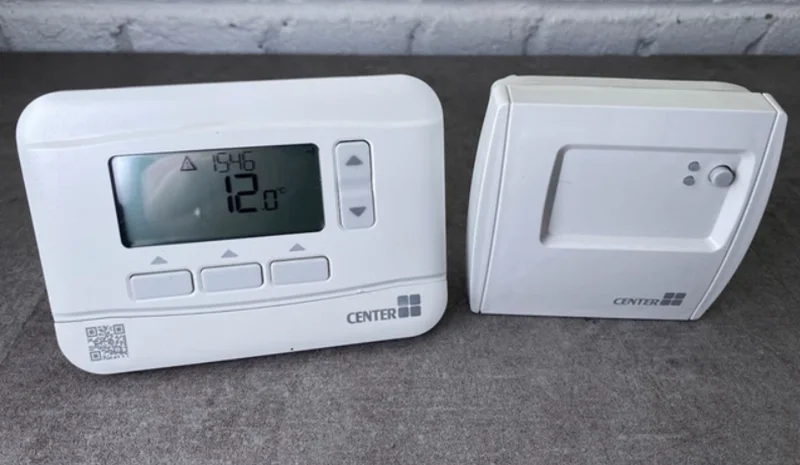

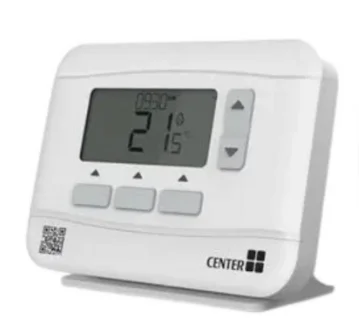
Center EHE0200322 RF Wireless 7 Day Programmable Thermostat
IMPORTANT: Please read these instructions fully prior to use, as they contain information that will help you get the best from your wireless thermostat, ensuring it is operating correctly and safely. If, during the installation or setup, you experience any issues, please call 0344 292 7060 for assistance. Must be installed by a competent person. To ensure your safety, make sure the mains power is switched OFF before accessing wiring. To prevent a short circuit from a loose wire:
- Multi-core cables: Only remove enough outer insulation to allow secure fixing of the cores into the terminal block.
- Single-core cables: Secure them together with a cable tie as close as possible to the terminal block.
Contents
The Thermostat and Receiver Box within this pack are pre-bound.
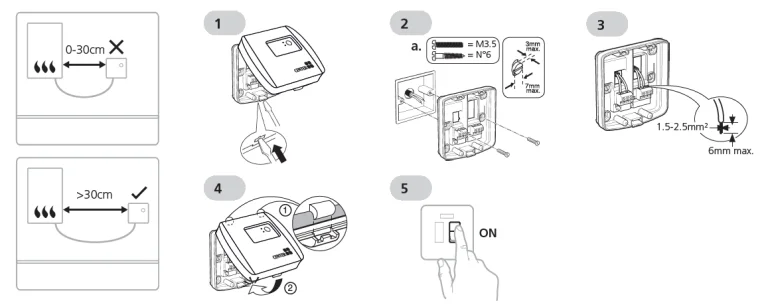
Install the Receiver Box
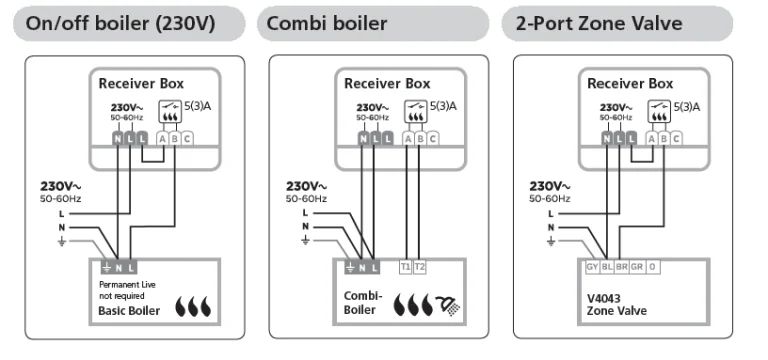
Wiring
Install the Thermostat
The Thermostat and Receiver Box in this pack are pre-bound.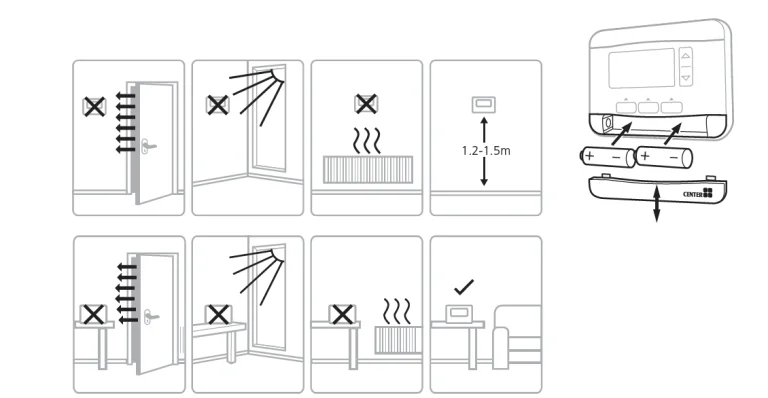
Parameters
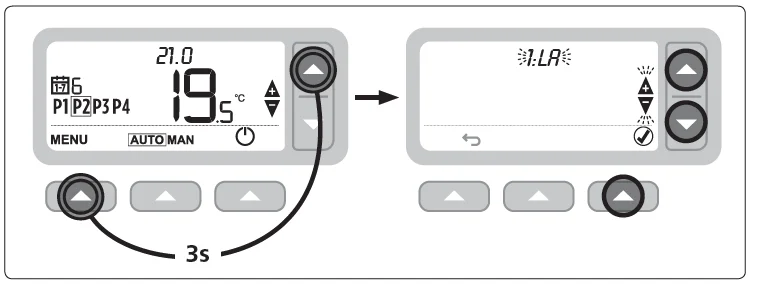
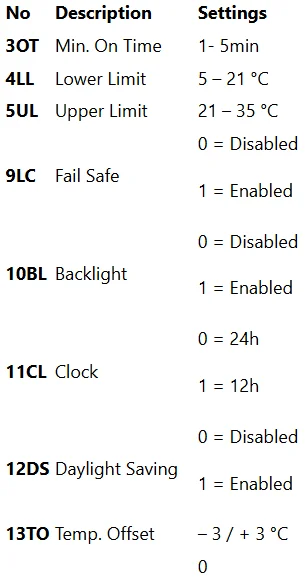
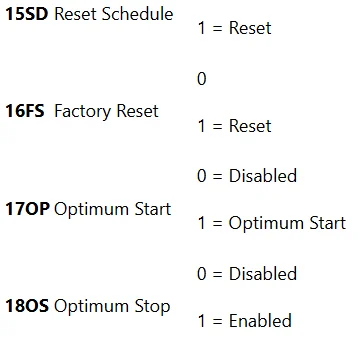
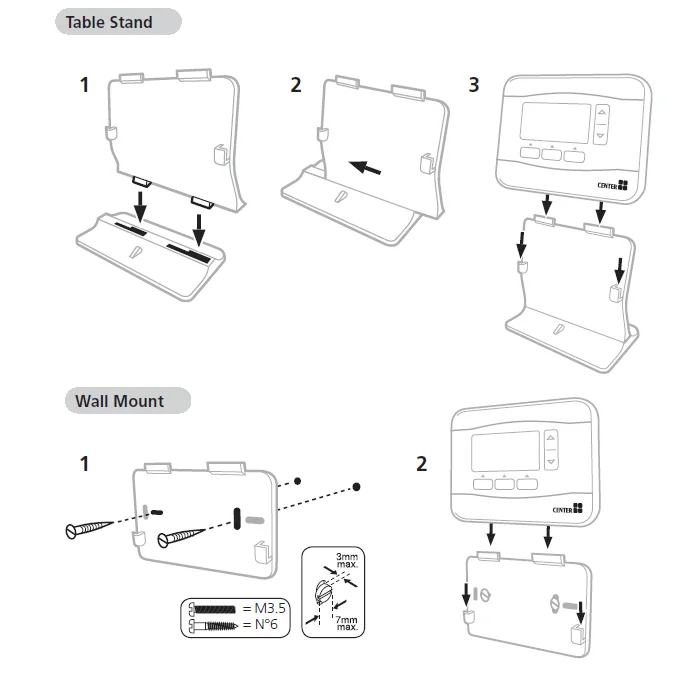
Table Stand and Wall Mount
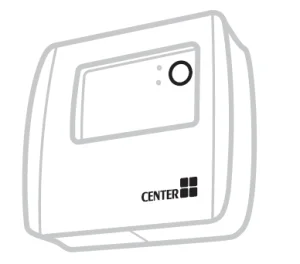
Wireless Receiver Box
The Wireless Thermostat communicates wirelessly to the Receiver Box, which is wired to the boiler. If the Thermostat loses wireless communication or becomes faulty, the boiler can be switched on or off manually using the button on the Receiver Box.
 is displayed on the Thermostat when the wireless signal is good – the Receiver Box LED will be solid GREEN.
 will flash on the Thermostat when the wireless signal is lost – the Receiver Box
 LED will flash RED.
- If communication is lost, move the Thermostat to another location to try to restore communication.
 is displayed on the Thermostat when the wireless signal is good – the Receiver Box
  will flash on the Thermostat when the wireless signal is lost – the Receiver Box
To manually override the boiler using the Receiver Box:
- Press the button once to switch the boiler ON or OFF. The button LED should be:
- Solid GREEN when the boiler is ON.

- Off when the boiler is OFF.
- Solid GREEN when the boiler is ON.
Binding / Rebinding
The binding operation described below is required if:
- Any of the system components (Wireless Thermostat or Receiver Box) can be replaced.
- The Receiver Box has incorrect or no binding data stored (e.g., when pre-bound system pack components have been mismatched).
NOTE: During the binding procedure, keep approximately 1m distance between the Wireless Thermostat and the Receiver Box.
- Press and hold the Receiver Box push button for 15 seconds to reset any previously stored data.
- After 15 seconds, the red LED will change to flashing 0.1 sec on/0.9 sec off. NOTE: After 5 seconds, the red LED will start to flash 0.5 sec on/0.5 sec off, but continue to hold the button.
- Release the push button.
- Press and hold the Receiver Box push button for 5 seconds to enter the binding mode. The red LED will start flashing at 0.5 sec on/0.5 sec off to confirm the binding mode has been entered.
- On the Wireless Thermostat, press and hold MENU
 for 3
for 3  seconds to enter the binding screen with parameter 14A flashing. If 1 is shown, then it is already bound to a Receiver Box. If O is shown, then there are no Receiver Boxes bounded.
 - Press
 or
or  to scroll to 1 and press
 again. After a few seconds, the binding result will be displayed on the screen with 1
  representing a successful bind and 0 representing failure. If successful, the red LED on the Receiver Box is switched off to confirm the successful binding operation.
 for 3
for 3  seconds to enter the binding screen with parameter 14A flashing. If 1 is shown, then it is already bound to a Receiver Box. If O is shown, then there are no Receiver Boxes bounded.
 or
or  again. After a few seconds, the binding result will be displayed on the screen with 1
 - Manufactured for and on behalf of Wolseley UK Limited,
- 2 Kingmaker Court, Warwick Technology Park,
- Gallows Hill, Warwick, Warwickshire,
- United Kingdom, CV34 6DY
- Hereby, Wolseley UK Limited declares that this product is in
- compliance with Directive 2014/53/EU. The full text of the
- The EU declaration of conformity is available at the following
- Internet address: http://www.wolseley.co.uk
- Receiver Category 2
- Max RF Power: 25mW
- 868-868.6MHz
For More Manuals By Wolseley, Visit ManualsLibraryy.
Center EHE0200322 RF Wireless 7 Day Programmable Thermostat-FAQs
What is the Center EHE0200322 RF wireless thermostat used for?
The Center EHE0200322 RF wireless thermostat is designed to control home heating systems efficiently using programmable schedules. It allows users to automate temperature settings throughout the week, improving comfort while reducing energy consumption by ensuring heating only operates when required.
Does the Center EHE0200322 support a full 7-day schedule?
Yes, this thermostat supports a full 7-day programmable schedule, allowing different temperature settings for weekdays and weekends. Users can customize multiple time periods per day, ensuring heating aligns with daily routines and helps reduce unnecessary energy usage.
How does the wireless feature work in this thermostat?
The thermostat communicates wirelessly with a receiver box connected to the boiler, eliminating the need for direct wiring between them. This RF connection allows flexible placement within the home while maintaining reliable communication for heating control.
What operating modes are available on the thermostat?
The device includes automatic, manual, temporary override, and permanent override modes. Automatic mode follows the programmed schedule, while manual modes allow fixed temperatures, and override options enable temporary or long-term adjustments without changing the full schedule.
What is standby mode with frost protection?
Standby mode turns off heating to save energy when it is not needed. However, it includes frost protection, which activates heating automatically if the temperature drops to around 5°C, preventing pipes from freezing during colder conditions.
How does the optimization feature improve heating efficiency?
The thermostat includes optimization features like Optimum Start and Optimum Stop. These functions learn how quickly your home heats up and adjust heating times accordingly, ensuring the desired temperature is reached efficiently while minimizing unnecessary energy usage.
How do you adjust the heating schedule on this thermostat?
Users can adjust the heating schedule through the menu by selecting the schedule option and modifying time and temperature settings for each period. Changes are saved directly on the device, allowing customized heating plans tailored to individual daily routines.
What happens if the wireless connection is lost?
If the wireless signal between the thermostat and receiver box is lost, the system may stop responding to thermostat commands. However, the receiver box allows manual control of the boiler, ensuring heating can still be turned on or off when needed.
What power source does the Center EHE0200322 thermostat use?
The thermostat is powered by two AA batteries, making it easy to install without complex wiring. A low battery indicator appears when power is running low, helping users replace batteries in time to maintain uninterrupted heating control.
Is the Center EHE0200322 thermostat easy to install?
Installation is relatively straightforward, especially since the thermostat and receiver box are typically pre-bound. However, wiring the receiver to the heating system should be done by a qualified person to ensure safe and correct operation.