
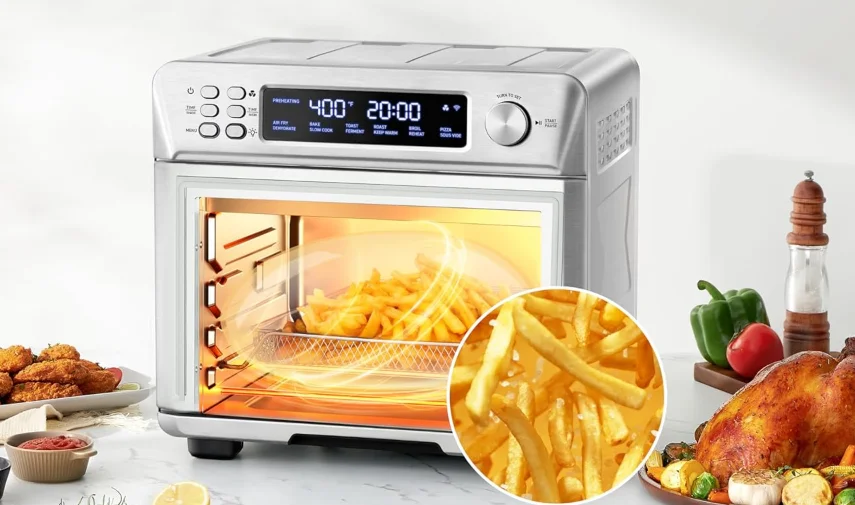

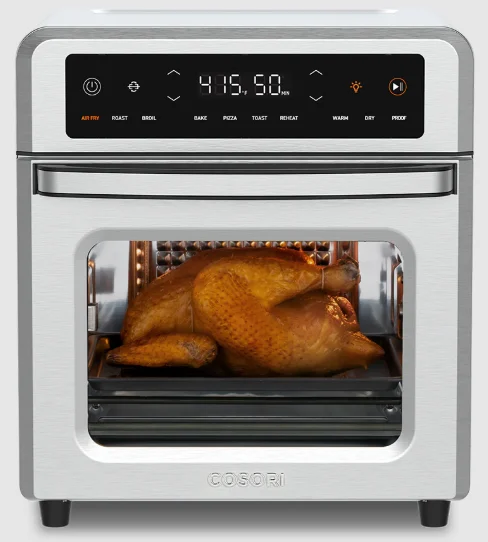
COSORI CAF-R121-SUS 13-Quart Air Fryer Oven
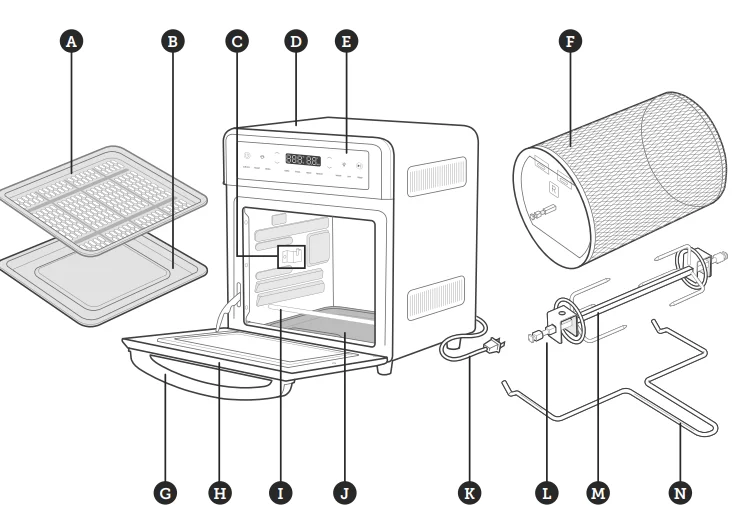
GETTING TO KNOW YOUR AIR FRYER OVEN
- A. Air Fryer Tray
- B. Food Tray
- C. Rotisserie Slots
- D. Housing
- E. LED Display
- F. Rotisserie Basket
- G. Handle
- H. Door
- I. Heating Elements
- J. Drip Tray
- K. Power Cord
- L. Rotisserie Fork Set
- M. Rotisserie Shaft
- N. Rotisserie Handle

DISPLAY
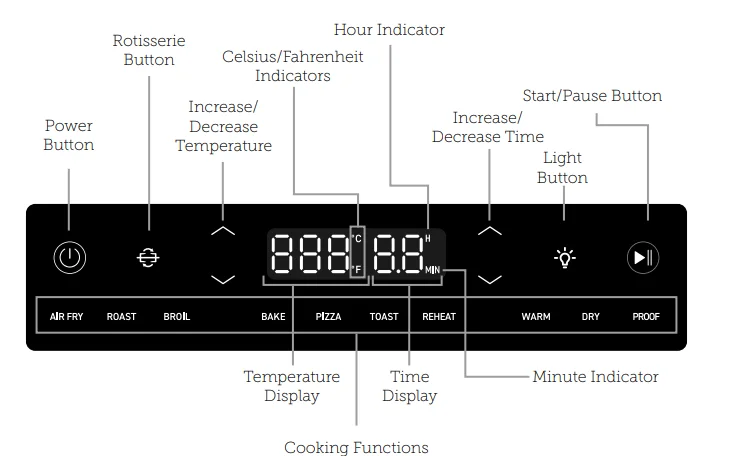
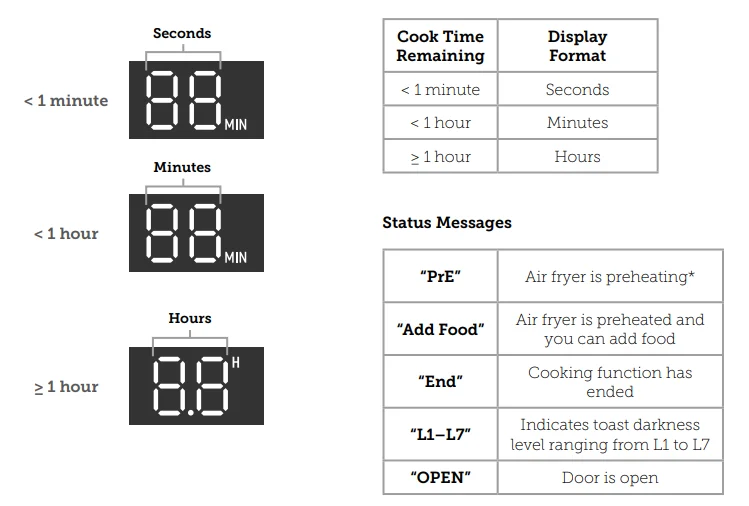
CONTROLS
Power Button
- Tap to turn the air fryer on/off.
- While the air fryer is cooking or paused, tap to cancel cooking. The air fryer will return to standby.
- Press and hold for 10 seconds to reset the air fryer to factory settings and restore all default cooking function settings.
- Tap to turn the interior light on/off.
- If not manually turned off, the light will turn off automatically after 1 minute.
- The Light turns on when the door is opened and also in the last 30 seconds of a cooking function.
ROTISSERIE Button
- Tap to turn rotisserie rotation on/off.
- Rotisserie rotation is only available when using the Air Fry or Roast cooking functions.
- Rotation turns off automatically when a cooking function finishes.
Increase/Decrease Temperature
- Tap ⋁ and ⋀to adjust the temperature setting.
- Temperature will adjust in increments of 5°F. Press and hold to adjust in increments of 10°F.
- Press and hold ⋁ and ⋀ at the same time for 5 seconds to switch temperature units from Fahrenheit to Celsius.
Increase/Decrease Time
- Tap ⋁ and ⋀ to adjust the time setting.
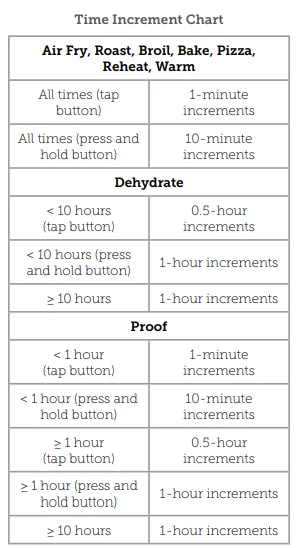
- Time will adjust in increments of 1 or 10 minutes, or 0.5 or 1 hour, depending on the cooking function (see chart).
- Press and hold ⋁ and ⋀ to adjust time in higher increments (see chart).
- To turn selection sounds on/off, press and hold and at the same time for 5 seconds.
START/PAUSE Button
- Starts or pauses a cooking function.
- Tap during cooking to switch cooking functions.
- Tap during preheating to skip the preheating stage. Preheating is automatically included in the Air Fry, Roast, Bake, and Pizza cooking functions.

Note: When you open the air fryer door during cooking, the air fryer will pause cooking automatically, and the interior light will turn on. When you close the air fryer door, the air fryer will resume cooking, and the interior light will turn off again.
BEFORE FIRST USE
Setting Up
- Remove all packaging around and inside the air fryer.
- Place on a stable, level, heat-resistant surface, away from anything that can be damaged by heat.
- Wash all accessories and clean the air fryer’s interior (see page 27). Dry and place accessories back in the air fryer.
Test Run
A test run will help you become familiar with your air fryer, make sure it’s working correctly, and clean it of possible residues.
- Make sure there is no food or packaging in the oven and plug it in.
- Tap AIR FRY, then tap
 to begin preheating.
 - Tap
 again to skip the preheating stage, and the display will show the timer counting down. Note: We recommend running the air fryer for 30–60 minutes during the test run.
 - The air fryer will stop heating and beep several times when finished.
COOKING WITH YOUR AIR FRYER OVEN
CAUTION:
- The outer surface of the air fryer, including the oven door, is hot during and after use. The temperature may be over 212°F. Do not touch hot surfaces. Use the handle.
- Always use heat-resistant gloves, pads, or oven mitts when handling hot materials, and when placing items in or removing items from the air fryer.
Using the Trays
Three trays are included with your air fryer: the food tray, air fryer tray, and drip tray. The cooking functions require different trays, so make sure to use the correct tray. Follow the recipe instructions or the suggestions given in each function section. Always make sure the drip tray is properly in place at the bottom of the air fryer when cooking. [Figure 1.1] The drip tray is not intended to cook food on.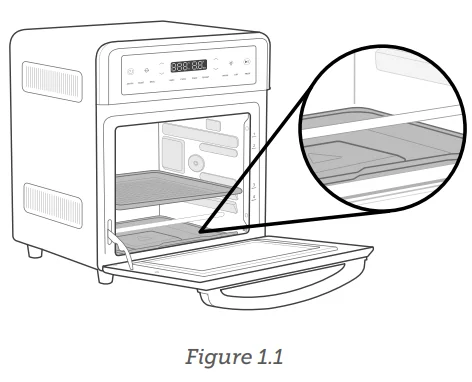
Tray Positions
Each cooking function has a recommended tray position with slots that you can slide a tray into (the food tray or air fryer tray). The standard recommended positions are indicated on the front of the air fryer [Figure 1.2]. The four positions are numbered 1, 2, 3, and 4, from top to bottom.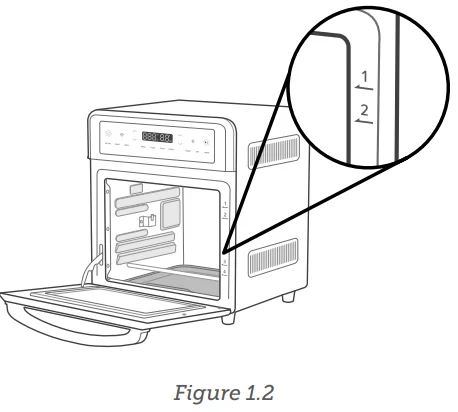
Cooking Greasy Foods
When cooking with oil or air frying greasy food such as beef, chicken, or pork, place the air fryer tray on the food tray (or insert the food tray underneath the air fryer tray) to prevent oil from dripping on the heating elements. [Figure 1.3]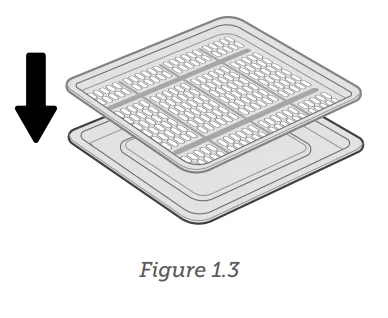
Rotisserie Handle
The rotisserie handle is used to place the rotisserie basket or fork set into the rotisserie slots in the air fryer oven. [Figure 1.4] The handle is also used to remove the rotisserie basket and fork set after cooking is finished.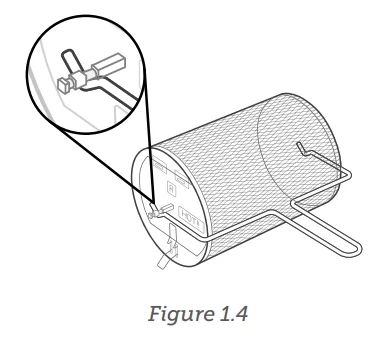
Rotisserie Basket
The rotisserie basket is used for air frying small foods, such as French fries, nuggets, or Brussels sprouts.
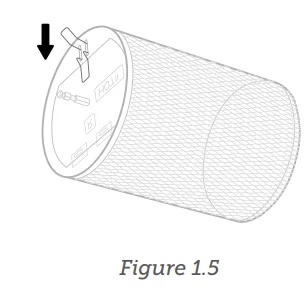
- Press the wire latch to open the door on the side of the rotisserie basket. [Figure 1.5]

- Place food inside the basket and close the door.
- Use the rotisserie handle to place the basket inside the air fryer oven, securing both ends of the rotisserie shaft into the rotisserie slots.
Rotisserie Fork Set
The rotisserie fork set is used for rotating roasts and is ideal for roasting a whole chicken. Do not cook more than 4 pounds at a time on the rotisserie fork set.
- Slide the food item onto the rotisserie shaft.
- Place the rotisserie forks on either side of the shaft and insert them into the food item to secure it on the shaft. Tighten the knobs on the forks to secure them. [Figure 1.6]

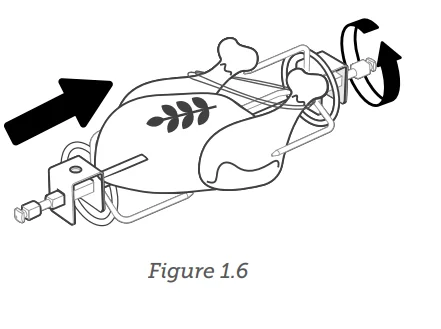
Note: When cooking a rotisserie chicken, secure the legs and wings with butcher’s twine so they do not hang loosely as the chicken rotates.
Cooking Functions
Cooking functions are programmed with an ideal time and temperature for cooking certain foods. For more information on each cooking function, see its individual section, or the Cooking Functions Quick Reference Chart (see page 15).
Customizing Cooking Functions
You can customize a cooking function’s default settings, including time and temperature. To change a function’s default settings:
- When the air fryer is not cooking or is paused, tap the cooking function you want to change.
- Select the settings you want to set as default.
- Tap the respective⋁ and ⋀ buttons to adjust temperature and/or time.
- For Toast, tap ⋁ and ⋀ the and buttons on the right side of the display to change the toast darkness level.
- Press and hold ⋁ and ⋀ the and buttons on the right side of the display at the same time for 5 seconds until the air fryer beeps 1 time.
To reset one function:
- When the air fryer is not cooking or is paused, tap the cooking function you want to reset.
- Without making any changes, press and hold the ⋁ and ⋀ right and buttons at the same time for 5 seconds until the air fryer beeps 1 time.
To reset all functions:
- When the air fryer is not cooking or is paused, press and hold
 for 10 seconds. This will reset all cooking functions.
 for 10 seconds. This will reset all cooking functions.
Preheating
The following cooking functions automatically include preheat: Air Fry, Roast, Bake, and Pizza.
- Tap a cooking function that includes preheat.
- Tap
 to start the cooking function. “Pre” will show on the display, and the air fryer will begin preheating.
 - When preheating is finished, the air fryer will beep 3 times, and “Add Food” will show on the display.
- Open the air fryer door and place food inside, then close the door to start cooking.
Note: Tap  during preheating to skip the preheating stage.
Air Fry Function (“AIR FRY”)
This function is ideal for cooking a variety of food, including French fries and chicken wings. Uses intense heat and maximized airflow.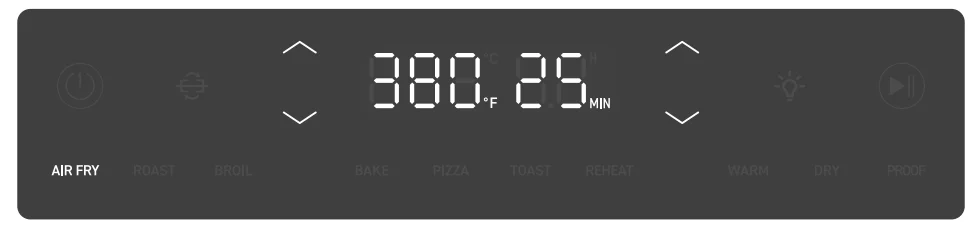
- Heating Elements: Top and bottom heating elements cycle on and off. If using the rotisserie function, the bottom heating elements are turned off.
- Rack Position: Level 2 or 3
- Fan Speed: High
- Tap AIR FRY to select the Air Fry cooking function.
- Optionally, customize the temperature and time. You can do this anytime during cooking (except during preheating).
- Tap ⋁ and ⋀ adjust the temperature between 180°–450°F / 80°–230°C.
- Tap ⋁ and ⋀ and adjust the time between 1 min and 1 hr.
- Tap to begin preheating. The
 button will light up, and the display will show “PRE”. When preheating is finished, the air fryer will beep 3 times, and “Add Food” will show on the display.
 - Tap
 during preheating to skip the preheating stage.
 - Place food in the air fryer tray or rotisserie basket.
- Avoid overfilling the air fryer tray, or food may not air fry correctly.
- When air frying fatty foods (such as chicken wings), place the air fryer tray on the food tray (or insert the food tray underneath the air fryer tray) to prevent oil from dripping on the heating elements.
- Insert at the level 2 or 3 position.
- Close the air fryer door to start cooking. The display will show the timer counting down.
- The air fryer will stop heating and beep several times when finished.
CARE & MAINTENANCE
Clean air fryer accessories (including trays, etc.) and air fryer interior after every use.
Note:
- Do not use abrasive cleaners, metal scouring pads, or metal utensils on any part of the air fryer, including trays and other accessories. These will scratch or damage their surfaces.
- This air fryer contains no user-serviceable parts. Any repairs should be performed by an authorized service representative.
- Before cleaning, turn off and unplug the air fryer, and allow it to cool completely. Open the door for faster cooling.
- Apply a non-abrasive liquid cleanser or a mild spray solution to a soft, damp cloth or sponge (not the air fryer surface) and wipe all parts of the air fryer, especially the air fryer interior. Do not use a dry cloth on the display screen, or it may be scratched. Note: Make sure you clean the top of the air fryer interior after every use. If this is not cleaned, cooking residue will burn onto the air fryer interior and be difficult to remove.
- To clean the glass door, use a glass cleaner or mild detergent and a soft, damp sponge or soft, plastic scouring pad.
- Let all surfaces dry completely before plugging in or turning on the air fryer.
Cleaning the Accessories
Note: After each use, slide out the drip tray and discard crumbs.
- Apply non-abrasive liquid cleanser or a mild spray solution to a soft, damp sponge or soft, plastic scouring pad (not the accessory surface). Wipe accessories and soak in warm, soapy water if necessary.
- For stubborn grease:
- In a small bowl, mix 2 US tbsp / 30 mL of baking soda with 1 US tbsp / 15 mL of water to form a spreadable paste.
- Use a sponge to spread the paste on the trays and scrub. Let the trays sit for 15 minutes before rinsing.
- Wash trays with soap and water.
- Dry thoroughly.
- Replace the drip tray in the air fryer before plugging in or turning on the air fryer.
Storage
- Clean and dry the air fryer and all accessories.
- Insert the drip tray into the air fryer. Insert the rack at mid position. Make sure the air fryer door is closed.
- Store the air fryer in an upright position.
- Do not store anything on top.
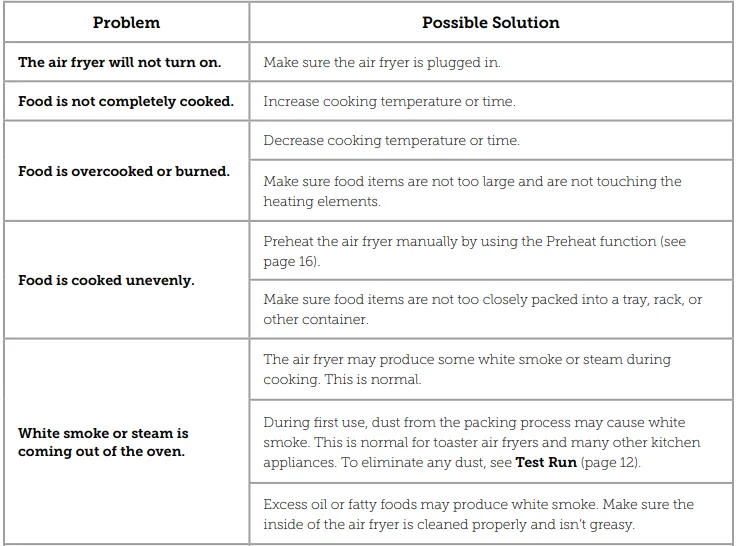
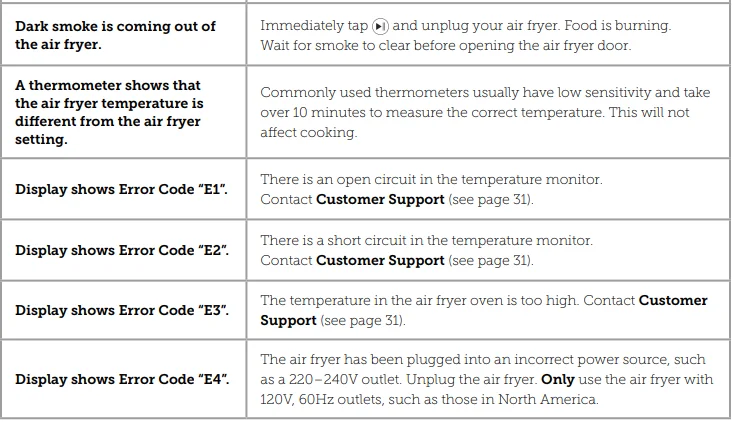
TROUBLESHOOTING
FEDERAL COMMUNICATIONS COMMISSION INTERFERENCE STATEMENT – PART 15
This device complies with Part 15 of the FCC Rules. Operation is subject to the following two conditions:
- This device may not cause harmful interference, and
- This device must accept any interference received, including interference that may cause undesired operation.
NOTE: This equipment has been tested and found to comply with the limits for a Class B digital device, pursuant to Part 15 of the FCC Rules. These limits are designed to provide reasonable protection against harmful interference in a residential installation. This equipment generates, uses, and can radiate radio frequency energy and, if not installed and used in accordance with the instructions, may cause harmful interference to radio communications.
However, there is no guarantee that interference will not occur in a particular installation. If this equipment does cause harmful interference to radio or television reception, which can be determined by turning the equipment off and on, the user is encouraged to try to correct the interference by one or more of the following measures:
- Reorient or relocate the receiving antenna.
- Increase the separation between the equipment and receiver.
- Connect the equipment into an outlet on a circuit different from that to which the receiver is connected.
- Consult the dealer or an experienced radio/TV technician for help.
FCC Caution: Any changes or modifications not expressly approved by the party responsible for compliance could void the user’s authority to operate this equipment.
FCC SUPPLIER’S DECLARATION OF CONFORMITY (SDOC)
Arovast Corporation hereby declares that this equipment is in compliance with FCC requirements. The declaration of conformity may be consulted in the support section of our website, accessible from www.cosori.com.
WARRANTY INFORMATION
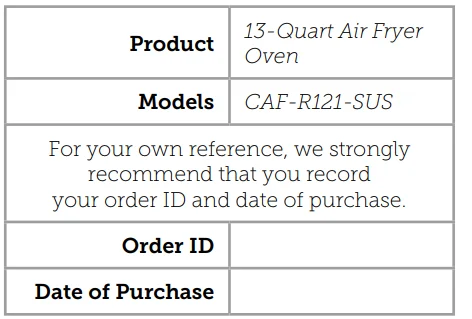
TERMS & POLICY
Arovast Corporation (“Arovast”) warrants this product to the original purchaser to be free from defects in material and workmanship, under normal use and conditions, for a period of 2 years from the date of original purchase. Arovast agrees, at our option during the warranty period, to repair any defect in material or workmanship or furnish an equal product in exchange without charge, subject to verification of the defect or malfunction and proof of the date of purchase.
There is no other express warranty. This warranty does not apply:
- If the product has been modified from its original condition;
If the product has not been used in accordance with directions and instructions in the user manual; - To damages or defects caused by accident, abuse, misuse, or improper or inadequate maintenance;
- To damages or defects caused by service or repair of the product performed by an unauthorized service provider or by anyone other than Arovast;
- To damages or defects occurring during commercial use, rental use, or any use for which the product is not intended;
- To damages or defects exceeding the cost of the product.
Arovast will not be liable for indirect, incidental, or consequential damages in connection with the use of the product covered by this warranty. This warranty extends only to the original consumer purchaser of the product and is not transferable to any subsequent owner of the product, regardless of whether the product is transferred during the specified term of the warranty.
This warranty does not extend to products purchased from unauthorized sellers. Arovast’s warranty extends only to products purchased from authorized sellers that are subject to Arovast’s quality controls and have agreed to follow its quality controls. All implied warranties are limited to the period of this limited warranty. This warranty gives you specific legal rights, and you may also have other rights which vary from state to state. Some states do not allow the exclusion or limitation of incidental or consequential damages, so the above limitation or exclusion may not apply to you.
If you discover that your product is defective within the specified warranty period, please contact Customer Support via [email protected]. DO NOT dispose of your product before contacting us. Once our Customer Support Team has approved your request, please return the product with a copy of the invoice and order ID. Every COSORI product automatically includes a 2-year warranty. To make the customer support process quick and easy, register your product online at www.cosori.com/warranty.
This warranty is made by:
Arovast Corporation
1202 N. Miller St., Suite A
Anaheim, CA 92806
CUSTOMER SUPPORT
If you have any questions or concerns about your new product, please contact our helpful Customer Support Team.
Arovast Corporation
1202 N. Miller St., Suite A
Anaheim, CA 92806
Email: [email protected]
Toll-Free: (888) 402-1684
Support Hours
Mon–Fri, 9:00 am–5:00 pm PST/PDT, Please have your invoice and order ID ready before contacting Customer Support.
For More Manuals By COSORI, Visit ManualsLibraryy.
COSORI CAF-R121-SUS 13-Quart Air Fryer Oven-FAQs
Is COSORI a Chinese company?
COSORI is owned by VeSync, a global brand with headquarters in China. However, COSORI products are designed in the United States and manufactured in China.
Where is the COSORI CAF-R121-SUS made?
The COSORI CAF-R121-SUS air fryer oven is manufactured in China, while product design, testing, and support are handled internationally.
Can aluminum foil be used in the COSORI air fryer oven?
Yes, aluminum foil can be used safely if it does not block airflow or touch the heating elements.
Can you put frozen food in this air fryer oven?
Yes, frozen foods like fries, nuggets, and wings can be cooked directly without defrosting. Cooking time may need slight adjustment.
Can you cook raw meat in the COSORI air fryer oven?
Yes, raw meat can be safely cooked as long as it is fully thawed, seasoned, and cooked to the recommended internal temperature.
Why were some COSORI air fryers recalled?
Some COSORI models were recalled due to a faulty internal wire connection that could overheat and pose a fire risk. The issue has since been addressed in newer models.
Was the COSORI CAF-R121-SUS included in the recall?
No, the COSORI CAF-R121-SUS 13-Quart Air Fryer Oven was not part of the 2023 recall. The recall affected only certain 3.7-Qt and 5.8-Qt models.