
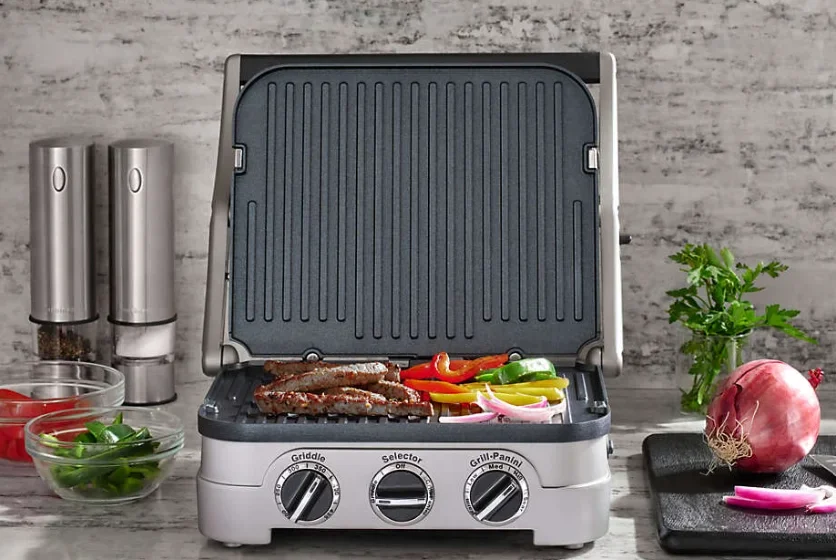

Cuisinart GR-300 6-in-1 Elite Griddler
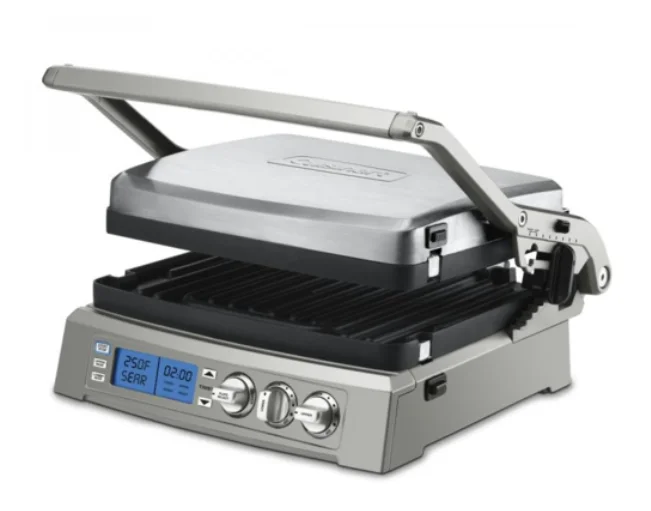
IMPORTANT SAFEGUARDS
- READ ALL INSTRUCTIONS.
- Unplug from the outlet when not in use and before cleaning. Allow to cool before putting on or taking off parts, and before cleaning the appliance.
- Do not touch hot surfaces; use handles, knobs, or buttons.
- To protect against fire, electric shock, and injury to persons, DO NOT IMMERSE CORD OR PLUG in water or other liquids.
- Close supervision is necessary when any appliance is used by or near children.
- Do not operate any appliance with a damaged cord or plug, or after the appliance has malfunctioned or has been damaged in any manner. Return the appliance to the nearest Cuisinart Repair Center for examination, repairr, or adjustment.
- The use of accessory attachments not recommended by Cuisinart may result in fire, electrical shock, or risk of injury to persons.
- Do not use outdoors.
- Do not let the power cord hang over the edge of the table or counter, or touch hot surfaces.
- Do not place on or near hot gas or electric burners, or in a heated oven.
- Unplug the unit when finished using it.
- Do not use the appliance for anything other than its intended use.
- Extreme caution must be exercised when moving an appliance containing hot oil or other hot liquids.
- To disconnect, turn the PLATE SELECT dial to the OFF setting, then remove the plug from the wall outlet.
- WARNING: TO REDUCE THE RISK OF FIRE OR ELECTRIC SHOCK, ONLY AUTHORIZED PERSONNEL SHOULD DO REPAIRS.
- Do not operate your appliance in an appliance garage or under a wall cabinet. When storing in an appliance garage, always unplug the unit from the electrical outlet. Not doing so could create a risk of fire, especially if the appliance touches the walls of the garage or the door touches the unit as it closes.
SAVE THESE INSTRUCTIONS FOR HOUSEHOLD USE ONLY
SPECIAL CORD SET INSTRUCTIONS
A short power-supply cord is provided to reduce the risks resulting from becoming entangled in or tripping over a longer cord. Extension cords may be used if care is exercised in their use.
If an extension cord is used, the marked electrical rating of the extension cord should be at least as great as the electrical rating of the appliance, and the longer cord should be arranged so that it will not drape over the countertop or tabletop where it can be pulled on by children or animals, or tripped over.
NOTICE
This appliance has a polarized plug (one blade is wider than the other) to reduce the risk of electric shock. This plug will fit in a polarized outlet only one way. If the plug does not fit fully in the outlet, reverse the plug. If it still does not fit, contact a qualified electrician. Do not modify the plug in any way.
FEATURES AND BENEFITS
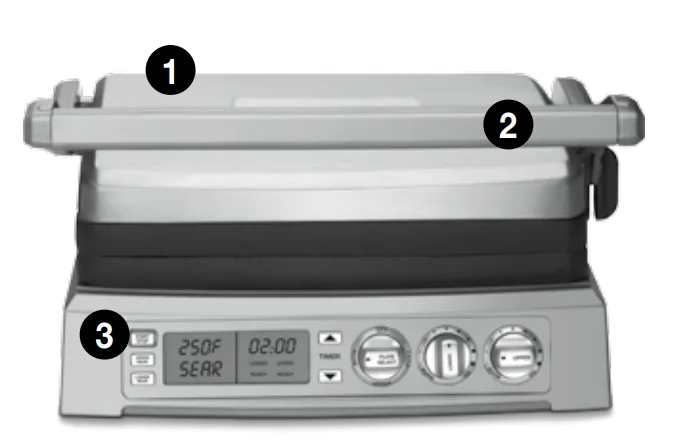
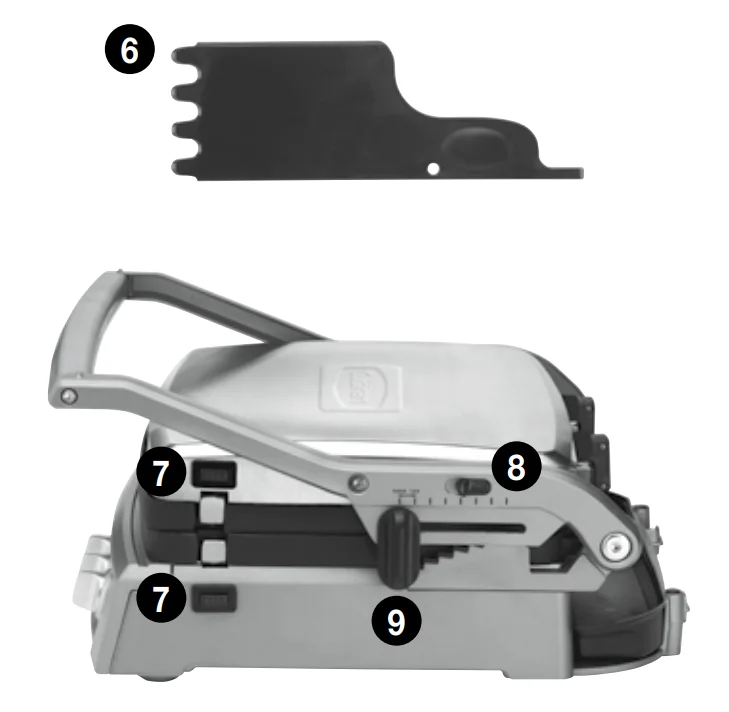
- Base and Cover
Solid construction with stainless steel self-adjusting cover. - Panini-Style Handle
Sturdy cast-metal handle adjusts cover to accommodate the thickness of food. - Control Panel
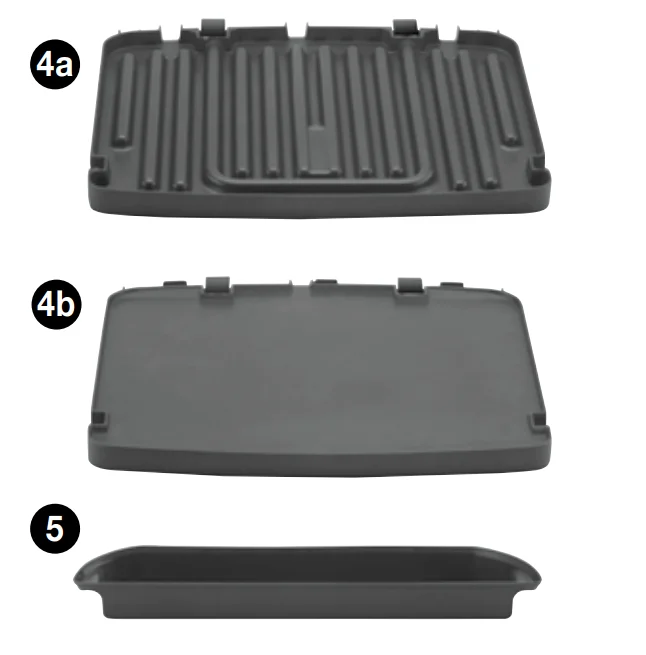
See page 5 for more details. - Removable, Reversible, and Embedded Cooking Plates
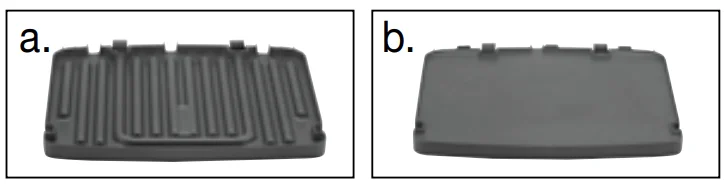
Nonstick and dishwasher safe for easy cleanup.- a. Grill Side: Perfect for grilling steak, burgers, chicken, and vegetables.
- b. Griddle Side: Prepare pancakes, eggs, bacon, and seared scallops.
- Drip Tray
Collects grease and removes from base for easy cleanup (dishwasher safe). - Cleaning/Scraping Tool
Helps clean grill and griddle plates after cooking. - Plate Release Buttons
Push in to release and remove cooking plates. - Hinge Release Lever
Allows the cover to extend back to the Flat position. - Cover Height Adjuster
Features 6 preset height positions for top melting. Locks cover the door to the store.
BPA Free (not shown)
All materials that come in contact with food are BPA-free.
GETTING TO KNOW YOUR CONTROL PANEL
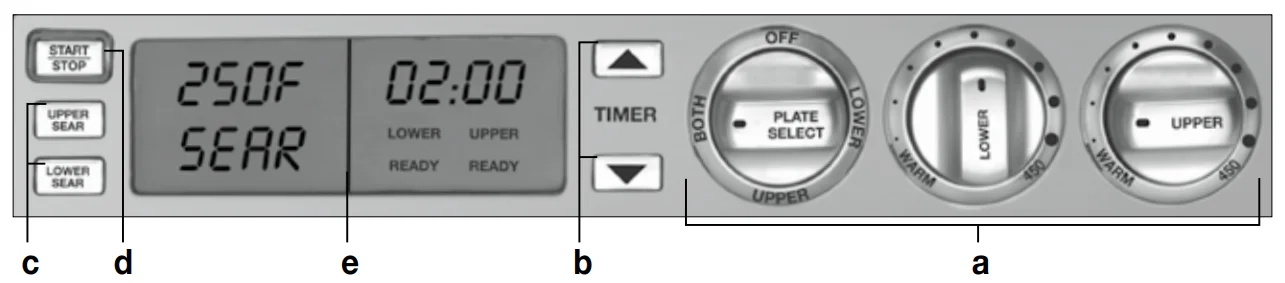
- a. Plate Select Dial & Temperature Dials
Use the PLATE SELECT dial to select LOWER and UPPER plates and to turn the unit off. Use the UPPER and LOWER temperature dials to select the temperature of each plate. - b. Time Directionals
Use to set cooking time. Press and hold to scroll quickly; press and release to advance more slowly. - c. Upper and Lower Plate Sear Buttons
Press to sear at 500˚F for up to two minutes. - d. Start/Stop Button
Starts/stops cooking selection. - e. Blue Backlit LCD Display
Shows plate temperatures, timer, and PREHEAT/READY.
BEFORE THE FIRST USE
Remove all packaging materials and any labels or stickers from your grill. Be sure all parts (see Features and Benefits) have been included before discarding any packaging materials. You may want to keep the box and packing materials for use at a later date.
Before using your Cuisinart® Griddler® Elite for the first time, remove any dust from shipping by wiping the base, cove, and controls with a damp cloth. Thoroughly clean cooking plates, drip tray, ay and scraping tool; all are dishwasher safe. Refer to the Assembly Instructions for plate removal.
ASSEMBLY INSTRUCTIONS
Place the base on a clean, flat surface where you intend to cook, with the controls directly in front of you.
To insert the cooking plates:
- Choose the side(s) you intend to cook on. The two cooking plates each have two sides:
- a. Grill side: ribbed surface intended for grilling steaks, hamburgers, chicken, seafood, and vegetables. It can also be used for panini and other toasted sandwiches.
- b. Griddle side: smooth surface intended for cooking bacon and eggs, pancakes, and French toast. It can also be used for panini and other toasted sandwiches.

- Identify the lower and upper plates. The word LOWER or UPPER is embossed on both sides of each plate.
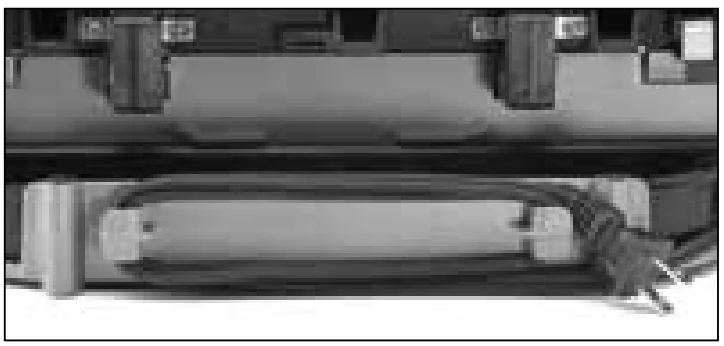
- Locate the connector prongs on the plate(s) and line up with the appropriate connection blocks. Slide the connector prongs into the blocks and push down the front end of the plate(s). They will snap into place.
 NOTE: If the plate(s) are not inserted properly and completely into the connection blocks, the plate(s) will not heat up. This is a safety feature that prevents the user from operating the grill when it is not assembled correctly.
 - Slide the drip tray into the base at the rear of the unit from the right side.

- Plug the cord into a standard electrical outlet. The blue backlight on the LCD screen will illuminate, indicating the unit is energized. The LCD will display the current settings.
NOTE: If the START/STOP button is not pressed within 10 minutes, the unit will enter SLEEP mode. The blue backlight on the LCD screen will turn off, and the screen’s display will go blank. - Just follow the instructions below to position the unit, and you’re ready to cook!
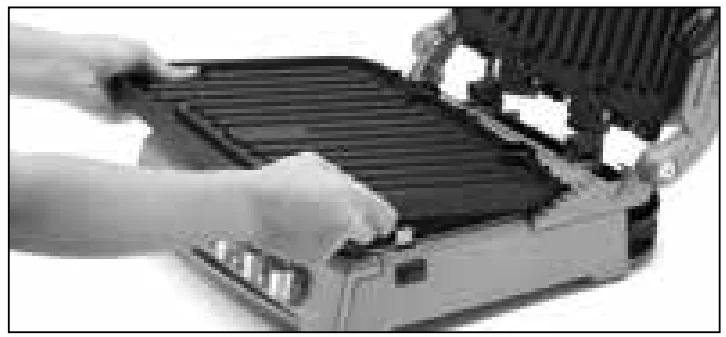 NOTE: If the plate(s) are not inserted properly and completely into the connection blocks, the plate(s) will not heat up. This is a safety feature that prevents the user from operating the grill when it is not assembled correctly.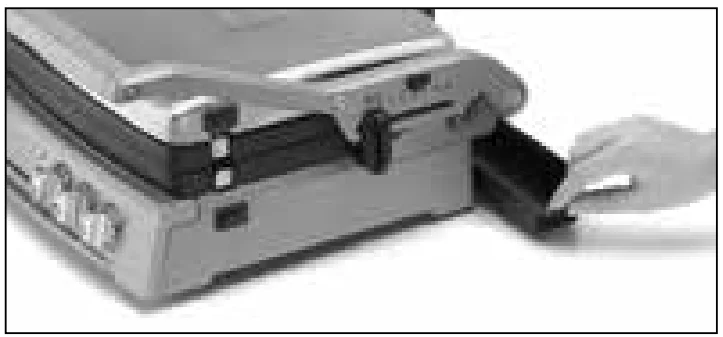
GRIDDLER® ELITE POSITIONS
- STORAGE Position – Upper plate/cover rests flat on the lower plate/base, and the cover height adjuster is in the Lock position.
- PREHEAT Position – Upper plate/cover rests flat on the lower plate/base and the cover height adjuster is in the Unlock position.
- OPEN COOKING Position – To Cook on Lower Plate Only: Lift the handle so the upper plate/cover is vertical. The plate does not “float” in this position.
- CLOSED COOKING Position – To Contact Grill or Panini Press: Start with the unit in the Open Cooking position. Lower the top carefully until the plate contacts the food. Hinge will automatically release the plate, allowing it to “float” and rest evenly on food.
- To Top Melt: Start with the unit in the Open Cooking position. Wearing an oven mitt, press down slightly on the front of the upper plate/cover to release the hinge, allowing the plate to “float.” Lower it to close to the desired height, then slide the cover height adjuster into a notch to set the position.
NOTE: After Closed Cooking, you can lock the upper plate/cover back into place by simply closing the unit without any food in it. - FLAT COOKING Position – To Cook on Full Grill, Full Griddle or Half Grill/Half Griddle: Upper plate/cover opens to lie flat, level with the lower plate/ base. To adjust to this position from the Preheat position, open the unit and slide the hinge release lever up while pushing the handle back. The upper plate/cover will sit flat, resting on the handle.
To adjust to this position from the Closed Cooking position, first close the unit, resting the upper plate/cover flat on the lower plate/base. You will hear the upper plate click into place. Open the unit and slide the hinge release lever up while pushing the handle back. The upper plate/ cover will sit flat, resting on the handle.
To adjust to this position from the Open Cooking position, grasp the handle and pull slightly forward, then slide the hinge release lever up while pushing the handle back. The upper plate/cover will sit flat, resting on the handle.
OPERATING THE GRIDDLER® ELITE
Standard Cooking
- Turn the PLATE SELECT dial to the desired plate selection.
You can choose the upper plate, lower plate, or both plates, depending on how and what you want to cook.
We recommend the following plate selections: The selected plate(s) and the corresponding temperature(s) will appear on the LCD screen.
 - Turn the temperature dial for the selected plate(s) to the desired setting – from Warm to 450°F. The temperature readout(s) in the LCD screen will change as you turn the dial.
NOTE: Warm setting will display as 200°F.
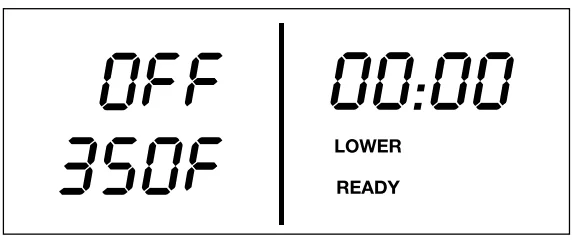
In the example below, the lower plate temperature has been set to 350˚F.
- Once the desired temperature setting(s) have been selected, press the START/STOP button.
NOTE: If the START/STOP button is not pressed within 10 minutes, the unit will enter sleep mode. Turn any knob or press any button to reactivate the unit.- The LED light around the START/STOP button will illuminate, and the unit will beep one time.
- In the LCD screen, PREHEAT will appear, and the selected temperature(s) will flash as the plate(s) heat up. It may take up to 20 minutes to reach operating temperature, depending on the temperature(s) selected.
- When the plate(s) reach temperature, the selected temperature(s) will stop flashing, READY will display, and the unit will beep 3 times.
 NOTE: If both plates are selected, when the first plate reaches temperature, it will show READY and the unit will beep 1 time; you can begin cooking on this plate if you choose. The second plate will continue to preheat until it reaches temperature, at which time it will show READY and the unit will beep 3 times. In the example below, the upper plate temperature has been set to 250˚F and is ready, and the lower plate temperature has been set to 350˚F and is still preheating.
 - To change the temperature(s) at any time during operation, simply turn the temperature dial of the selected plate(s) to the new setting.
- If the plate(s) are in PREHEAT mode, they will continue to preheat to the new selection.
- If the plate(s) are in READY mode and the temperature(s) are lowered, READY will remain on display as the unit adjusts to the lower temperature(s).
- If the plate(s) are in READY mode and the temperature(s) are raised, PREHEAT will display as the higher selected temperature will flash as the plate(s) heat up. Once the higher temperature(sareeis reached, READY will display, the temperature(s) will stop flashing, and the unit will beep 3 times.
- To change the plate selection at any time during operation, simply turn the PLATE SELECT dial to the new selection and adjust the plate(s) temperature (if necessary). PREHEAT will display the newly selected plate(s) and the temperature will flash as the plate(s) heat up.
Once the new temperature(s) are reached, READY will display, the temperature(s) will stop flashing, and the unit will beep 3 times. - To stop the unit from heating, simply press the START/STOP button.
NOTE: If the unit is on and heated for more than 2 hours, it will automatically shut off. This is a safety feature of the Griddler® Elite.
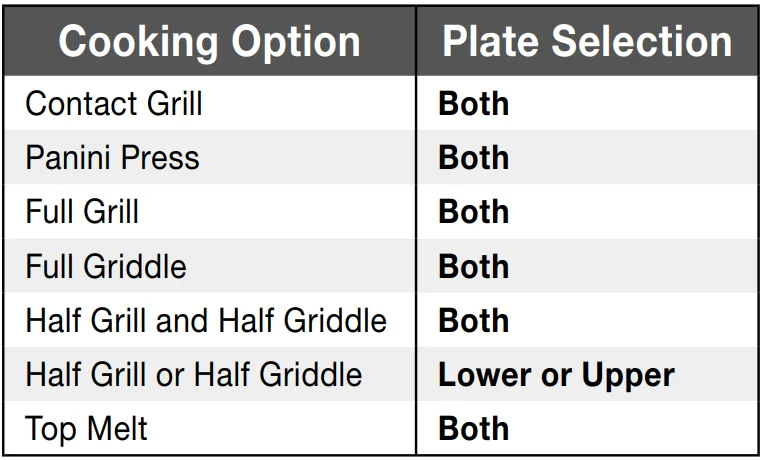 The selected plate(s) and the corresponding temperature(s) will appear on the LCD screen.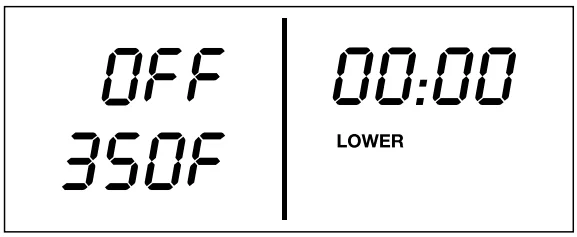
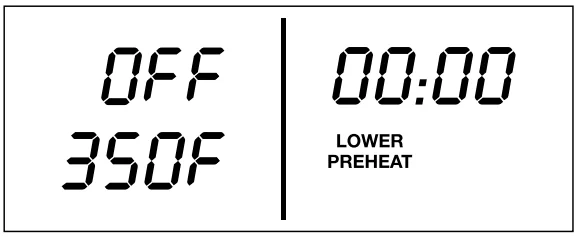
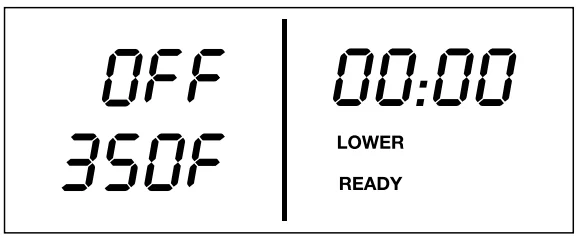 NOTE: If both plates are selected, when the first plate reaches temperature, it will show READY and the unit will beep 1 time; you can begin cooking on this plate if you choose. The second plate will continue to preheat until it reaches temperature, at which time it will show READY and the unit will beep 3 times. In the example below, the upper plate temperature has been set to 250˚F and is ready, and the lower plate temperature has been set to 350˚F and is still preheating.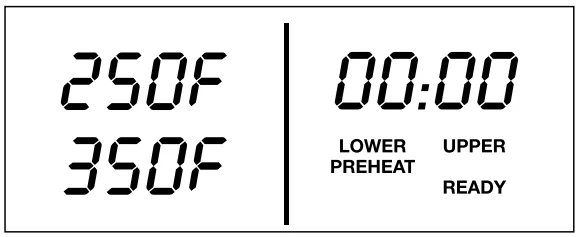
SEAR Function
You can sear foods at 500°F for up to 2 minutes.
- Follow Standard Cooking, Step 1.
- Press the UPPER SEAR and/or LOWER SEAR button to initiate the SEAR function. SEAR will appear in place of the temperature(s) in the LCD screen.
In the example below, the lower plate has been set to SEAR.
- Press the START/STOP button. The LED light around the START/STOP button will illuminate, and the unit will beep one time.
- In the LCD screen, PREHEAT will display and SEAR will flash while the plate(s) heat up to 500°.

- When the plate(s) reach the SEAR temperature, SEAR will stop flashing, READY will display, and the unit will beep 3 times.
 NOTE: If both plates are selected for SEAR, when the first plate reaches temperature, it will show READY and the unit will beep 1 time; you can begin cooking on this plate if you choose.
The second plate will continue to preheat until it reaches temperature, at which time it will show READY and the unit will beep 3 times. In the example below, both plate temperatures have been set to SEAR, and the upper plate is ready while the lower plate is still preheating.
In the example shown below, both plates have been set to SEAR, but only the upper plate has reached SEAR temperature. The lower plate is still preheating.
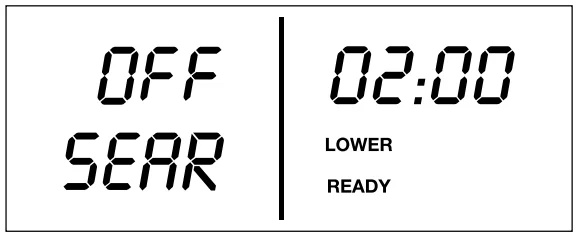
- The 02:00 minute countdown timer will flash ten times to allow enough time to put the food on the plate(s).

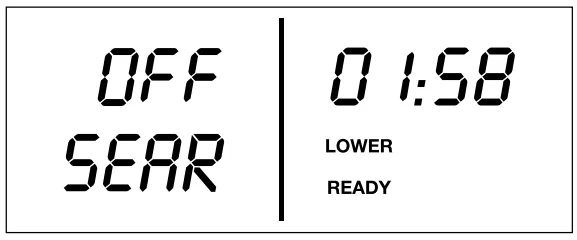
- After 10 seconds, the 2-minute countdown will begin. To sear for less than 2 minutes, simply press the arrow down button at any time during the 10-second delay or countdown to decrease the time. You cannot sear for more than 2 minutes at a time.

- When the countdown is complete, the unit will beep 3 times to indicate the SEAR cycle has finished, and the unit will adjust to the temperature(s) selected on the corresponding temperature knobs.

- To cancel SEAR, press the SEAR button(s) again, and the unit will adjust to the temperature(s) selected on the corresponding temperature knobs.
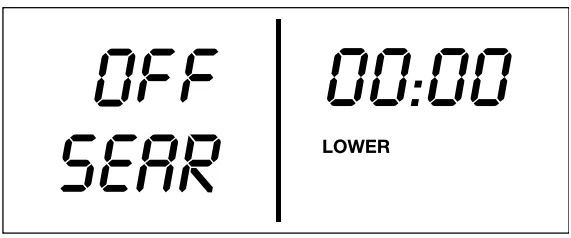
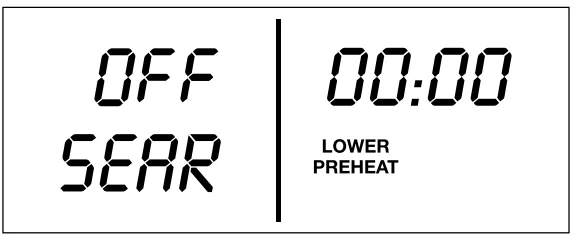
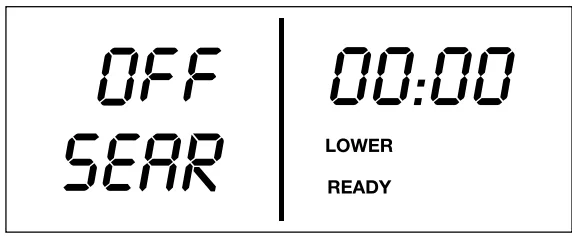 NOTE: If both plates are selected for SEAR, when the first plate reaches temperature, it will show READY and the unit will beep 1 time; you can begin cooking on this plate if you choose.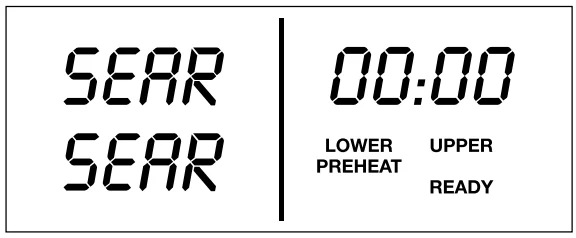
OPERATING THE TIMER
The 60-minute timer can be activated at any time the unit is on, except in the middle of a SEAR cycle.
- Press the up or down arrow button to initiate time-set mode. The LCD screen will display a blinking 00:00.
- Press the up and down arrows to add or subtract time. Time can be set in 30-second intervals up to 10 minutes, then 1-minute intervals up to 60 minutes. Press and hold the buttons to scroll through time more quickly. The timer will stop blinking and automatically start to count down when no time-set buttons have been pressed for 3 seconds.
- To add or subtract time during the countdown, simply press the up or down arrow buttons.
- When the countdown is complete, the unit will beep 3 times.
- To stop and reset the timer, press and hold both the up and down arrow buttons at the same time for 2 seconds. Timer will default to 00:00.
- To turn the unit off, simply turn the PLATE SELECT dial to OFF.
NOTE: If the timer is in use and either SEAR button is pressed, the SEAR cycle will override the previously set timer.
CLEANING AND CARE
- Once you have finished cooking, turn the PLATE SELECT dial to the OFF position and unplug the power cord from the wall outlet. Allow the unit to cool down for at least 30 minutes.
- Use the cleaning/scraping tool to remove any leftover food from the cooking plate(s).
- Dispose of grease from the drip tray once cooled.
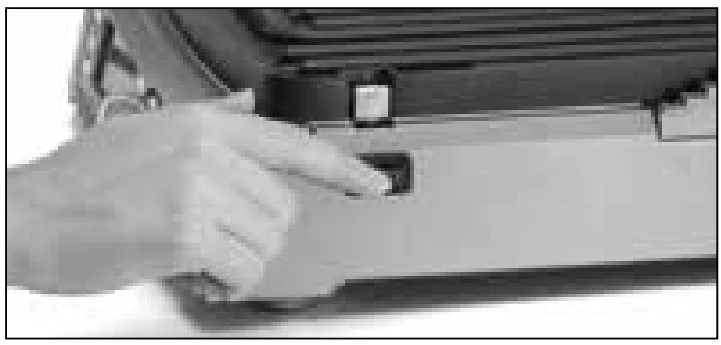
- Press the plate release buttons to remove cooking plates from the housing. Be sure that the plates have cooled completely before handling (at least 30 minutes).

- Wipe down the plates to remove any leftover food. The cooking plates, drip tray, and cleaning/scraping tool can be cleaned by hand or on the top shelf of the dishwasher. The housing base, cove, and control panel can be wiped clean with a soft, dry cloth. For tough stains, dampen a cloth. Never use an abrasive cleaner or harsh pad.
USER MAINTENANCE
- The first time you use the Griddler® Elite, it,, have a slight odor and may smoke a bit. This is common to appliances with nonstick surfaces.
- Always exercise caution when handling the Griddler® Elite during cooking. Open and close the unit using the handle only. Do not touch the arms or top cover during or immediately after cooking, as they become hot during use. We recommend you wear oven mitts when handling the Griddler® Elite to prevent burns.
- Never use metal utensils, which will scratch the nonstick plates. Instead, use wooden or heatproof plastic utensils.
- Never leave plastic utensils in contact with the hot grill plates. This includes the cleaning tool that is included.
- In between recipes, use a wooden or heatproof plastic utensil to scrape excess food buildup through grease channels and into the drip tray. Wipe off any residue with a paper towel before proceeding with the next recipe.
- Allow the Griddler® Elite to cool down completely (at least 30 minutes) before cleaning.
- Any other servicing should be performed by an authorized service representative.
STORAGE
- Wrap the power cord around the cord storage clips at the back of the base.

- Store clean cooking plates and the drip tray in the unit.
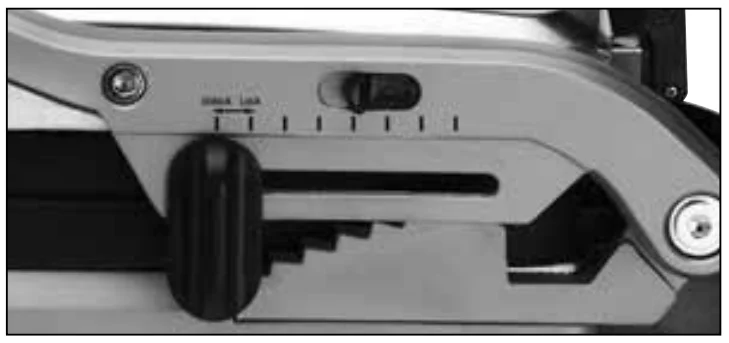
- Lock unit closed by sliding the cover height adjuster to the Lock position.

Troubleshooting Chart
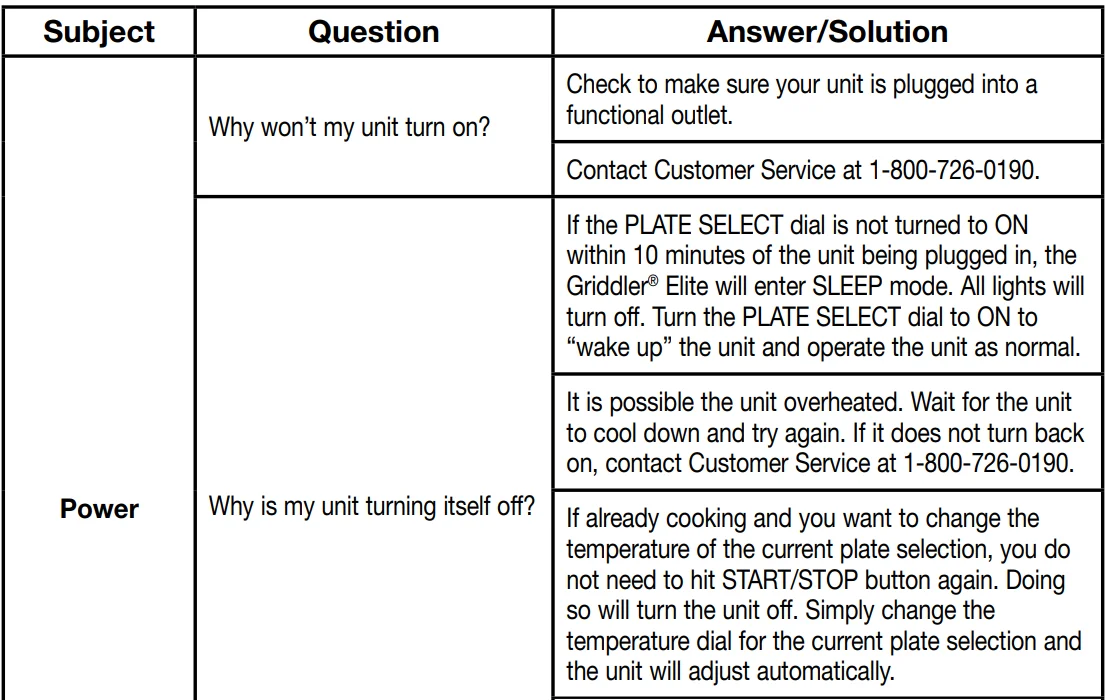
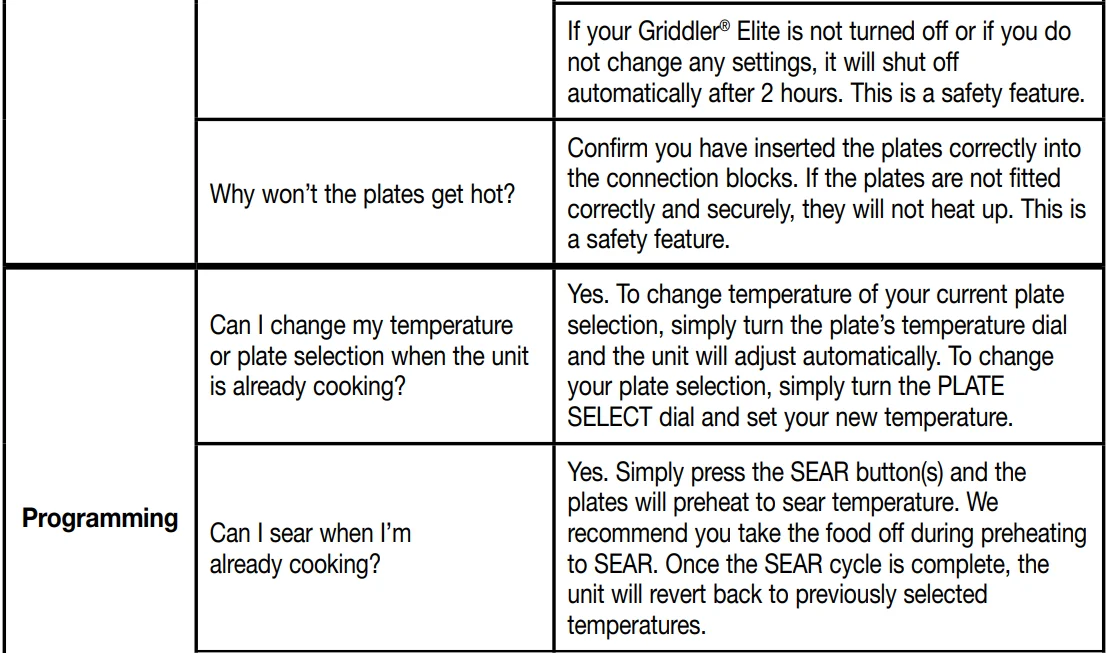
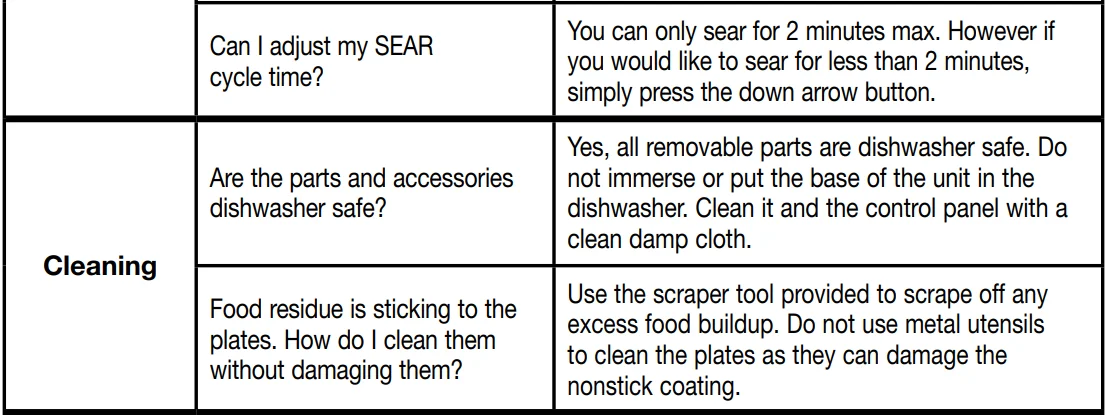
WARRANTY
LIMITED THREE-YEAR WARRANTY
This warranty is available to consumers only. You are a consumer if you own a Cuisinart® Griddler® Elite that was purchased at retail for personal, family, or household use. Except as otherwise required under applicable law, this warranty is not available to retailers or other commercial purchasers or owners.
We warrant that your Cuisinart® Griddler® Elite will be free of defects in materials and workmanship under normal home use for 3 years from the date of original purchase. We recommend that you visit our website, www.cuisinart.com, for a fast, efficient way to complete your product registration. However, product registration does not eliminate the need for the consumer to retain the original proof of purchase to obtainbebenefitss If you do not have proof of purchase date, the purchase date for purposes of this warranty will be the date of manufacture.
CALIFORNIA RESIDENTS ONLY
California law provides that for In-Warranty Service, California residents have the option of returning a nonconforming product (A) to the store where it was purchased or (B) to another retail store that sells Cuisinart products of the same type.
The retail store shall then, at its discretion, either repair the product, refer the consumer to an independent repair facility, replace the product, or refund the purchase price less the amount directly attributable to the consumer’s prior usage of the product. If the above two options do not result in the appropriate relief to the consumer, the consumer may then take the product to an independent repair facility if service or repair can be economically accomplished. Cuisinart and not the consumer will be responsible for the reasonable cost of such service, repair, replacement, or refund for nonconforming products under warranty.
California residents may also, according to their preference, return nonconforming products directly to Cuisinart for repair, or if necessary, replacement, by calling our Consumer Service Center toll-free at 1-800-726-0190. Cuisinart will be responsible for the cost of the repair, replacement, and shipping and handling for such products under warranty.
BEFORE RETURNING YOUR CUISINART® PRODUCT
If your Cuisinart® Griddler® Elite should prove to be defective within the warranty period, we will repair it, or if we think it necessary, replace it. To obtain warranty service, simply call our toll-free number 1-800-726-0190 for additional information from our Customer Service Representatives or send the defective product to Customer Service at Cuisinart, 7475 North Glen Harbor Blvd., Glendale, AZ 85307.
To facilitate the speed and accuracy of your return, please enclose $10.00 for shipping and handling of the product.
Please pay by check or money order (California residents need only supply proof of purchase and should call 1-800-726-0190 for shipping instructions).
NOTE: For added protection and secure handling of any Cuisinart product that is being returned, we recommend you use a traceable, insured delivery service. Cuisinart cannot be held responsible for in-transit damage or for packages that are not delivered to us. Lost and/or damaged products are not covered under warranty.
Please be sure to include your return address, daytime phone number, description of the product defect, product model # (located on the bottom of the product), original date of purchase, and any other information pertinent to the product’s return.
Your Cuisinart® Griddler® Elite has been manufactured to the strictest specifications and has been designed for use only in 120-volt outlets and only with authorized accessories and replacement parts.
This warranty expressly excludes any defects or damages caused by attempted use of this unit with a converter, as well as use with accessories, replacement parts, or repair service other than those authorized by Cuisinart. This warranty does not cover any damage caused by accident, misuse, shipping,, other than ordinary household use. This warranty excludes all incidental or consequential damages. Some states do not allow the exclusion or limitation of these damages, so these exclusions may not apply to you. You may also have other rights, which vary from state to state.
Important: If the nonconforming product is to be serviced by someone other than Cuisinart’s Authorized Service Center, please remind the servicer to call our Consumer Service Center at 1-800-726-0190 to ensure that the problem is properly diagnosed, the product is serviced with the correct parts, and that the product is still under warranty.
For more manuals by Cuisinart, visit ManualsLibraryy
Cuisinart GR-300 6-in-1 Elite Griddler- FAQs
What is the difference between the grill and griddle sides?
The griddle is the flat surface for cooking items like pancakes or eggs, while the grill side has raised ridges for searing and making grill marks on meats and sandwiches.
How long does it take for the Griddler to heat up?
It usually takes up to 10 minutes to reach the desired temperature, depending on the heat setting.
How much power does the Cuisinart Griddler use?
The GR-300 model operates at 1200 watts.
What foods should I avoid cooking on the griddle?
Avoid rolling or small items like hot dogs or sausages, as they can slide off the flat surface.
Can I cook a steak on the Griddler?
Yes, you can cook steaks, burgers, fish, and vegetables. Bone-in chicken is not recommended for even cooking.
Should I use oil on the griddle before cooking?
Yes, lightly oil the griddle to prevent sticking and improve browning.
Can I cook frozen foods on the Griddler?
Yes, frozen foods can be cooked, but adjust the cooking time to ensure they are fully cooked.
How do I clean the Griddler?
The plates, drip tray, and scraping tool are dishwasher safe. Always clean after each use for best performance.
How long should I grill a burger?
After preheating, cook burgers for 5–8 minutes until the internal temperature reaches 140–165°F (60–74°C), depending on preference.