
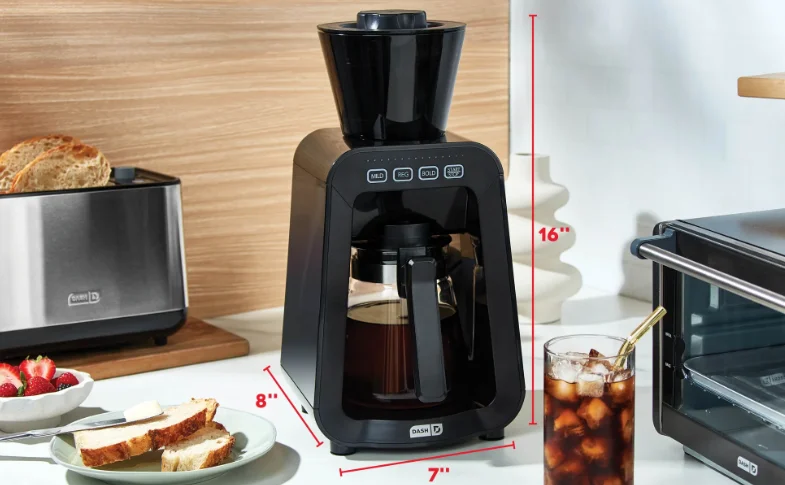

Dash DCBCM400 Rapid Cold Brew Maker
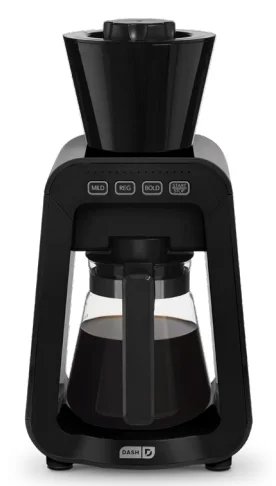
IMPORTANT SAFEGUARDS
PLEASE READ AND SAVE THIS INSTRUCTION AND CARE MANUAL. When using electrical appliances, basic safety precautions should always be followed, including:
- Read all instructions.
- Remove all bags and packaging from the appliance before use.
- Never leave the appliance unattended when in use.
- Make sure the appliance is cleaned thoroughly before using.
- Do not use the appliance for anything other than its intended use. For household use only. Do not use outdoors.
- Do not operate this appliance with a damaged cord, damaged plug, or if the appliance malfunctions, is dropped, or damaged in any manner.
- For maintenance other than cleaning, please contact StoreBound directly at 1-800-898-6970 Monday-Friday or by email at [email protected].
- Never use abrasive cleaning agents to clean your Dash Rapid Cold Brew Maker.
- To prevent the risk of fire, electric shock, or personal injury, do not put cord, plug, or appliance in or near water or other liquids.
- Do not place the appliance on or near a hot gas burner, hot electric burner, or in a heated oven.
- Refrain from using attachments that are not recommended by the appliance manufacturer, as this may result in fire, electric shock, or personal injury.
- Do not let the cord touch hot surfaces or hang over the edge of tables or counters.
- This appliance can be used by persons with reduced physical, sensory, or mental capabilities or a lack of experience and knowledge, if they have been given supervision or instruction concerning the use of the appliance in a safe way and understand the hazards involved.
- The appliance is not a toy. Do not let children use this appliance. Close supervision is necessary when any kitchen appliance is used by or near children.
- Always be sure to unplug the appliance from the outlet before moving, cleaning, storage, and when not in use.
- StoreBound shall not accept liability for damages caused by improper use of the appliance.
- This appliance has a polarized plug (one blade is wider than the other). To reduce the risk of electric shock, this plug will fit in a polarized outlet only one way. If the plug does not completely fit in the outlet, reverse the plug. If it still does not fit, contact a qualified electrician. Do not attempt to modify the plug in any way.
- A short power supply cord is provided to reduce the risk resulting from becoming entangled in or tripping over a longer cord. An extension cord may be used if care is exercised in its use. If an extension cord is used, the marked electrical rating of the extension cord should be at least as great as the electrical rating of the appliance. The extension cord should be arranged so that it will not drape over the countertop or tabletop, where it can be pulled on by children or tripped over unintentionally.
PARTS & FEATURES
USING YOUR Cold Brew Maker
BEFORE FIRST USE
Before first use, remove all packaging material, thoroughly clean the Rapid Cold Brew Maker, and wipe down all parts of the Cold Brew Maker with a moist cloth. Before the first brew, fill the carafe with water and run a regular cycle. Discard this water afterward.
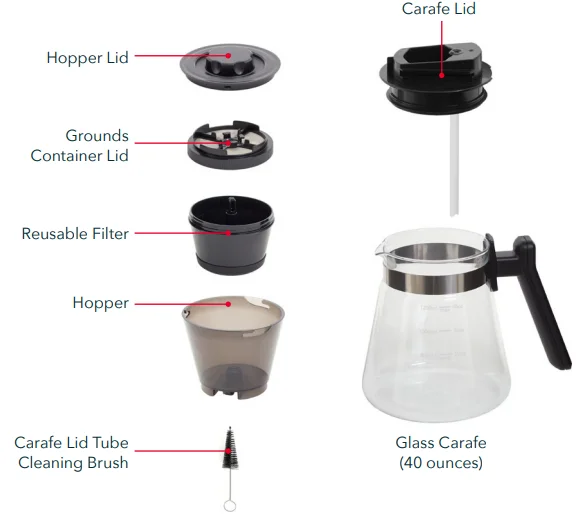
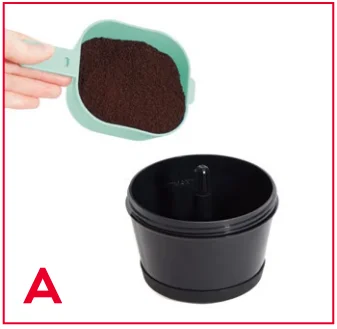
- To add coffee grounds, place the Reusable Filter on a countertop or other stable surface. Fill up to the Max line, 6.5 ounces (photo A). Close the filter by attaching the Grounds Container Lid and turning the lid clockwise.

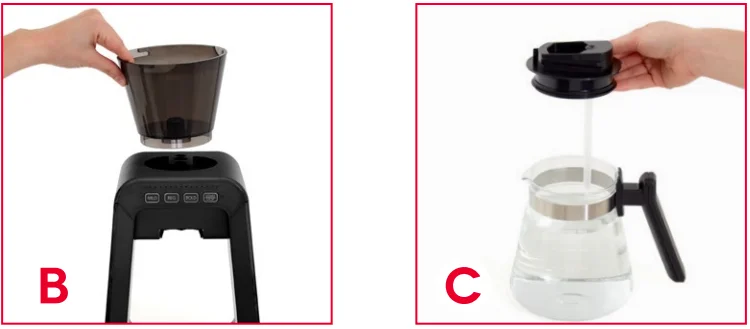
- Place the Reusable Filter inside the Hopper. Close the Hopper by attaching the Hopper Lid and turning clockwise—there will be a click when it is properly closed and locked. Place the Hopper on top of the base of the Cold Brew Maker, aligning the bottom of the Hopper with the indent on top of the base (photo B). You may have to push down for the Hopper to be firmly attached to the base (listen for a click).
- Fill the Carafe with your desired amount of cold water and close it with the Carafe Lid (photo C).

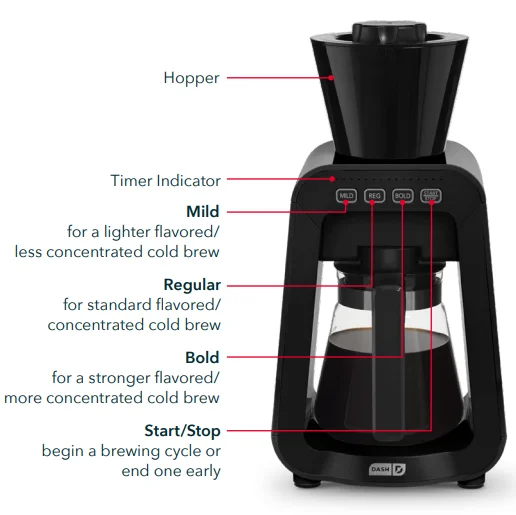
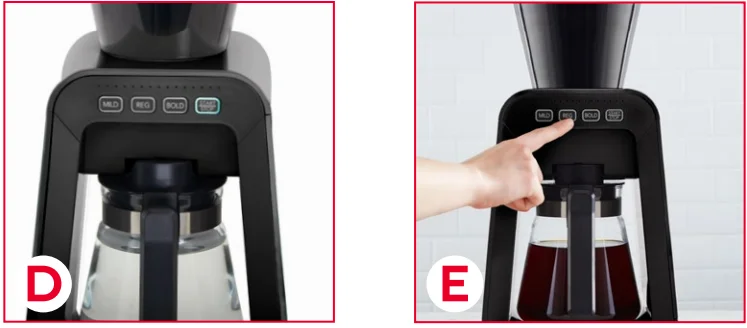
- Slide the Carafe into the main slot of the Cold Brew Maker until you hear and feel a click. The Start/Stop button will illuminate when the Carafe is properly in place (photo D). Note: The Hopper and Carafe must be in place for the Start/Stop button to illuminate. If the button won’t light up, make sure the Cold Brew Maker is plugged in and check the positioning of both the Hopper and Carafe.
- Select the strength of your brew (Mild, Regular, or Bold) (photo E) and press Start/Stop to make your cold brew. The Indicator Light will let you know when your cold brew is ready, and the Cold Brew Maker will automatically shut off when it’s finished brewing.

CLEANING & MAINTENANCE
The Rapid Cold Brew Maker is NOT dishwasher safe. Clean all parts by hand with soap and water. Make sure all parts are dry before storing.
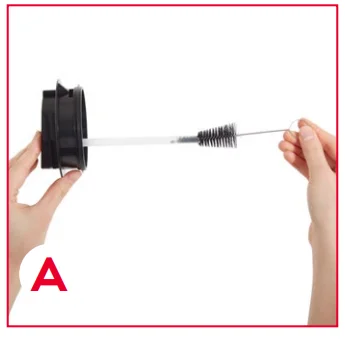
- The cleaning brush that came with your unit can be used to clean the Carafe Lid’s tube (photo A).

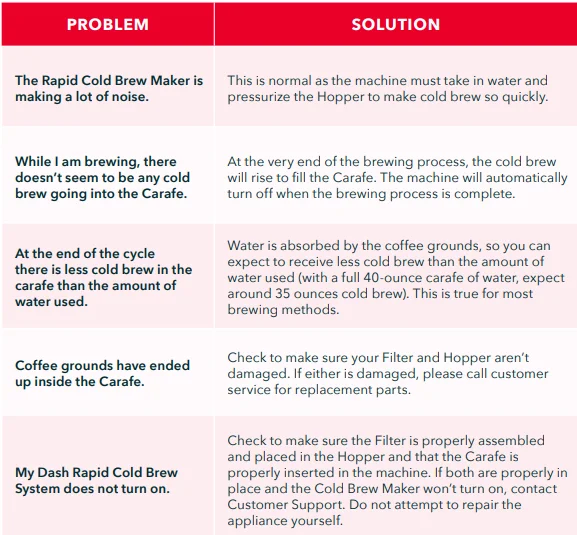
TROUBLESHOOTING
RECIPE GUIDE
ICED SALTED HONEY LATTE
Ingredients:
- 1 cup cold brew
- 1 cup milk of choice
- 1 tablespoon honey
- Heavy pinch of salt
Directions:
- Prepare cold brew and pour into a large glass. Stir in honey and salt. Once dissolved, add milk and ice.
- To serve, garnish with a pinch of flaky sea salt.
Oat Milk Iced Latte
Ingredients:
- 1 cup cold brew
- 1 cup oat milk
- 1 tablespoon maple syrup (optional)
- 1½ teaspoon vanilla (optional)
Directions:
- Prepare cold brew and pour into a large glass. Stir in maple syrup (optional) and vanilla (optional). Once dissolved, add oat milk and ice. Stir, serve, and sip!
COLD BREW CUBES
Ingredients:
- Cold brew
- Cinnamon
Directions:
- Prepare your cold brew and pour it into an ice tray.
- Sprinkle with cinnamon and freeze until solid.
COLD EISKAFFEE
Ingredients:
- 1 cup cold brew, chilled
- 1-2 scoops vanilla ice cream
Whipped cream - Chocolate shavings
Directions:
- Prepare cold brew and refrigerate to chill further.
- Add vanilla ice cream to a tall glass or milkshake cup and top with chilled cold brew.
- To serve, top with whipped cream and chocolate shavings.
Customer Support
We want you to Feel Good about your Dash products! Sign up for our Feel Good Rewards program at bydash.com/feelgood to DOUBLE your warranty, part of our commitment to quality and customer satisfaction. We’re here to help! Our customer support teams in the US and Canada are at your service Monday – Friday. Contact us at 1 (800) 898-6970 or [email protected].
Warranty
STOREBOUND, LLC – 1 YEAR LIMITED WARRANTY
Your StoreBound product is warranted to be free from defects in material and workmanship for a period of one (1) year from the date of the original purchase when utilized for normal and intended household use. Should any defect covered by the terms of the limited warranty be discovered within one (1) year, StoreBound, LLC will repair or replace the defective part. To process a warranty claim, contact Customer Support at [email protected] for further assistance and instruction.
A Customer Support agent will assist you by troubleshooting minor problems. If troubleshooting fails to fix the problem, a return authorization will be issued. Proof of purchase, indicating the date and place of purchase, is required and should accompany the return. You must also include your full name, shipping address, and telephone number. StoreBound will not ship to a PO Box. StoreBound will not be responsible for delays or unprocessed claims resulting from a purchaser’s failure to provide any or all of the necessary information. Freight costs must be prepaid by the purchaser.
All replacement inquiries are to be submitted to [email protected] or contact Customer Support at 1-800-898-6970. There are no express warranties except as listed above. Warranty is voided if used outside of the 50 states of the United States, the District of Columbia, or the 10 provinces of Canada. Warranty is voided if used with an electric adapter/converter or used with any voltage plug other than 120V.
REPAIR OR REPLACEMENT AS PROVIDED UNDER THIS WARRANTY IS THE EXCLUSIVE REMEDY OF THE CUSTOMER. STOREBOUND SHALL NOT BE LIABLE FOR ANY INCIDENTAL OR CONSEQUENTIAL DAMAGES OR FOR BREACH OF ANY EXPRESS OR IMPLIED WARRANTY ON THIS PRODUCT EXCEPT TO THE EXTENT REQUIRED BY APPLICABLE LAW. ANY IMPLIED WARRANTY OF MERCHANTABILITY OR FITNESS FOR A PARTICULAR PURPOSE ON THIS PRODUCT IS LIMITED IN DURATION TO THE DURATION OF THIS WARRANTY.
Some states do not allow the exclusion or limitation of incidental or consequential damages, or limitations on how long an implied warranty lasts. Therefore, the above exclusions or limitations may not apply to you. This warranty gives you specific legal rights, and you may also have other rights, which vary from state to state. Refurbished items or items not purchased through an authorized retailer are not eligible for warranty claims.
REPAIRS
DANGER! Risk of electric shock! The Dash Rapid Cold Brew Maker is an electrical appliance. Do not attempt to repair the appliance yourself under any circumstances. Contact Customer Support regarding repairs to the appliance.
TECHNICAL SPECIFICATIONS
- Adaptor Voltage: 120~60Hz
- Power Supply: DC 12V 1A
- Power Consumption: 12W
- Stock#: DCBCM400_20220913_V5
- Made in China
For More Manuals By Dash, Visit ManualsLibraryy.
Dash DCBCM400 Rapid Cold Brew Maker-FAQs
What is the Dash DCBCM400 Rapid Cold Brew Maker used for?
The Dash DCBCM400 Rapid Cold Brew Maker is designed to quickly prepare cold brew coffee without the traditional 12–24 hour steeping process. Using vacuum-powered brewing technology, it produces smooth cold brew in minutes. It also makes iced tea, offering a fast, convenient alternative to manual brewing at home.
How fast does the Dash Rapid Cold Brew Maker brew coffee?
The machine can brew cold coffee in as little as 8 to 17 minutes, depending on the selected strength setting. Mild brews take around 8 minutes, regular about 12 minutes, and bold around 17 minutes, making it significantly faster than traditional overnight cold brew preparation.
What capacity does the Dash DCBCM400 cold brew maker have?
The Dash DCBCM400 features a 40-ounce carafe, allowing users to prepare multiple servings of cold brew in one cycle. Because coffee grounds absorb some liquid during brewing, the final volume may be slightly less than the water added, typically around 35 ounces of finished cold brew.
How do you use the Dash DCBCM400 cold brew maker?
To use the machine, fill the reusable filter with ground coffee, assemble the hopper, and add cold water to the carafe. Insert both components into the unit, select your preferred brew strength, and press start. The system automatically brews and shuts off once the cycle is complete.
What brew strength options are available on this machine?
The cold brew maker offers three strength settings: Mild, Regular, and Bold. These options allow users to customize the flavor intensity based on personal preference. Each setting adjusts the brewing time and extraction process, ensuring flexibility for different taste profiles and coffee styles.
Is the Dash Rapid Cold Brew Maker easy to clean?
Yes, the unit is designed with removable components such as the reusable filter and hopper, making cleaning straightforward. However, it is not dishwasher safe, so all parts must be hand-washed with warm, soapy water and dried thoroughly before reassembly to maintain performance and hygiene.
Can you use pre-ground coffee with the Dash DCBCM400?
Yes, the machine works well with pre-ground coffee, provided it is measured correctly according to the filter capacity. Medium-ground coffee is generally recommended for the best results, as it ensures proper extraction and prevents clogging during the rapid brewing process.
Does the Dash cold brew maker shut off automatically?
The appliance includes an automatic shut-off feature that activates once the brewing cycle is complete. This ensures safety and convenience, allowing users to start the brewing process and return later to ready-to-drink cold brew without needing to monitor the machine continuously.
Can the Dash DCBCM400 be used to make tea?
Yes, the cold brew maker can also be used to prepare iced tea by replacing coffee grounds with loose-leaf tea. The same brewing process applies, allowing users to enjoy refreshing cold beverages beyond coffee, making the appliance more versatile for everyday use.
What should you do if the machine does not start?
If the unit does not turn on, ensure the carafe and hopper are properly installed, as the machine will not operate unless both are securely in place. Check the power connection and assembly. If issues persist, contact customer support rather than attempting repairs yourself to avoid safety risks.