


DELLA 048-MS Series Ductless Mini-Split Air Conditioner
Introduction to WI-FI Functions
The AC system is equipped with remote control technology, with the WI-FI module inside the machine connected to the display panel, and the command to run the AC is transmitted. The AC system is in constant connection with a wireless router or access point attached to the Internet. Mobile terminals such as smartphones and tablet computers, on which special control software is installed and WI-FI modules successfully configured locally, can be used as remote controllers once they are connected to the Internet.
Configure the Devices
After the control software is downloaded and installed on the mobile terminal, configure the AC devices according to the following figure.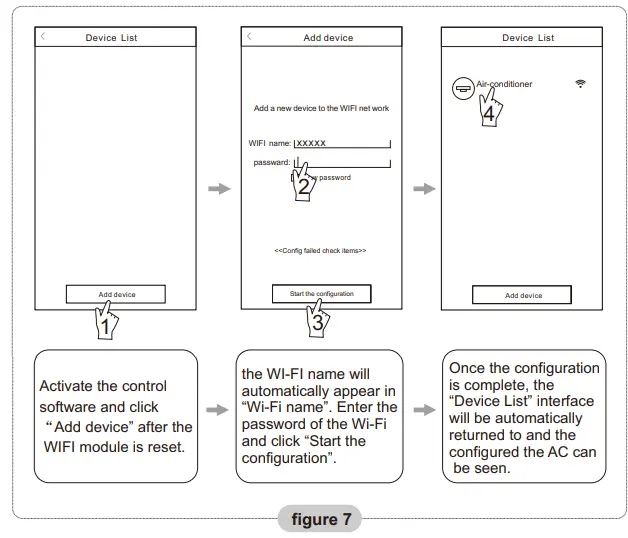
Note:
- In the case of first-time configuration or after the connected wireless router or access point is changed, make sure the mobile terminal is already connected to the wireless router or access point to be paired with the WI-FI module.
- If the configuration has failed, press “Config failed check items” to check the notes about the failure before reconfiguring the AC.
After the configuration is successful, click the corresponding AC name to enter the control interface for further operation.
Method 2:
When AC is running, press the “COOL” button and “+” button together for 3s, hear “beep” sound for 8 times, then after an interval of 2s hear twice “beep” sounds, reset successfully (see Fig.6).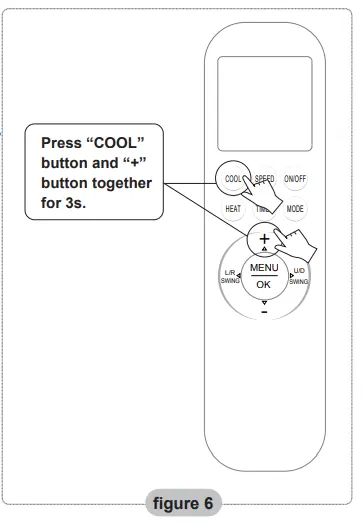
Note: If the device is not connected successfully, please reset the air conditioner Wi-Fi in the same way.
Smartphone, pad, or other mobile terminals connect to WI-FI or a hotspot
Activate the WI-FI function of the mobile terminal and connect it to a wireless router or an access point.
Note: A wireless router is required for the WI-FI function to work. Please purchase one if you do not already have one.
Download and install the control software
The control software can be downloaded and installed as follows.
- For mobile terminals such as smartphones and tablets (Android 4.1 and iOS 6.0 or above only), search and download “AC Freedom” from Google Play or App Store and install it on your system.
- You may also use your mobile terminal (Android 4.1 and iOS 6.0 or above only) to scan the “QR code” (see Fig.1) with a third-party scan tool, which will automatically direct you to the download interface of AC Freedom for you to download and install the software.
Note: If the current version of your APP is not version 2.0 or higher, please update the APP before proceeding with device network configuration.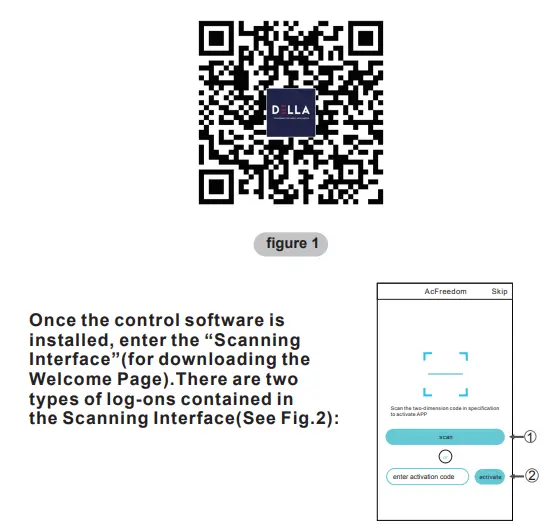
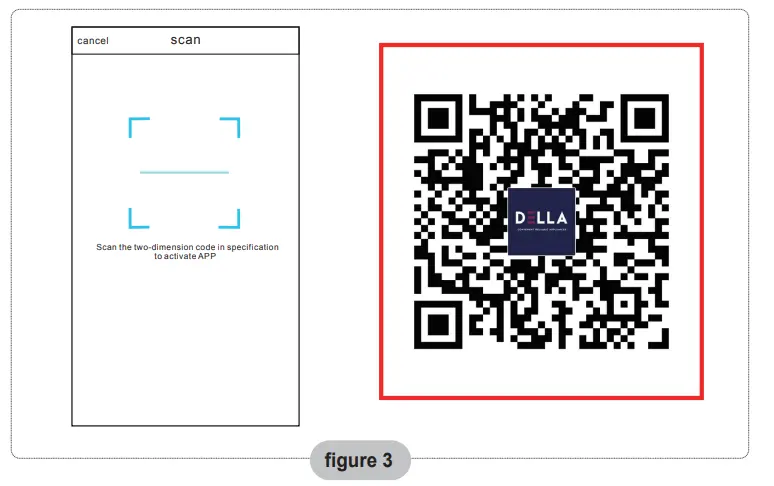
- By clicking “scan” and scanning the QR code on the right (see Fig.3).

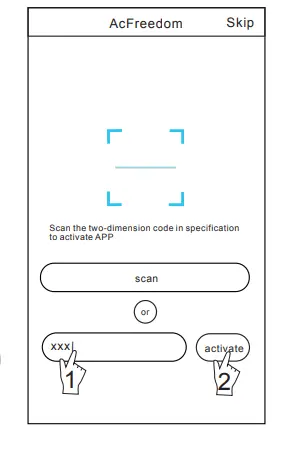
- By entering the activation code (DELLA+) in the area prompted by “enter activation code” (see Fig.4).

Reset AC WI-FI module
In the case of first-time configuration or after changing the connected wireless router, the WI-FI module inside the air conditioner needs to be reset.
Note: The remote control provided in this figure is just one of many models, which is for your reference only. Please rely on the model you have actually bought, though the operations are the same.
- If the remote controller has a “HEALTH” button, reset the WI-FI module following method 1.
- If the remote controller has no “HEALTH” button, reset the WI-FI module following method 2.
Method 1:
When AC is running, press the “HEALTH” button 8 times, reset successfully after twice “beep” sounds (see Fig.5).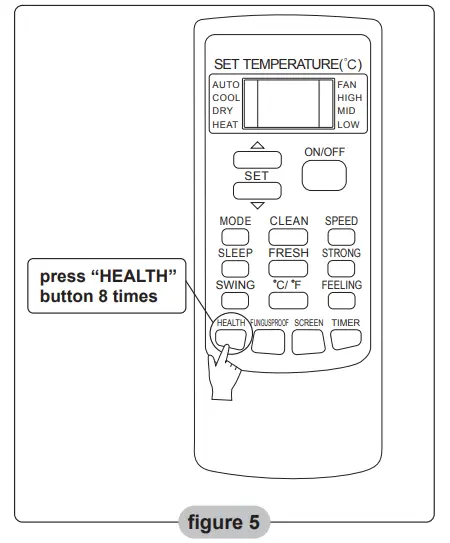
Others
- The software provides help service through which users may check the operational instructions of the software and other information.
- Besides, as the operation interface and the function of the software are under constant improvement, we will keep you informed about the subsequent upgrades for your updating.
- As the operation interface may change due to the constant version upgrading, the figures in this manual are for reference only, so please rely on the actual operation interface.
Appendix A: <<Config failed check items>>
- Please check the Wi-Fi icon on the air conditioner panel. If the icon does not display, please contact customer service.
- Please make sure the mobile phone network is under the current router WI-FI environment. Close the mobile phone 3G/4G data connection to connect to the router WI-FI pairing.
- Please check whether the module has been reset successfully. For details, see “Reset AC WI-FI module.”
- Please check the Wi-Fi name of the router. It is recommended not to contain spaces and other non-alphanumeric characters.
- Please check the Wi-Fi password of the router. It is not allowed to be more than 32 bits, and it is recommended not to contain spaces and special symbols in addition to letters and numbers.
- Please check whether the Wi-Fi password input is correct when using the app. You can check “show password” to confirm when inputting the WI-FI password.
For More Manuals By DELLA, Visit ManualsLibraryy.
DELLA 048-MS Series Ductless Mini-Split Air Conditioner-FAQs
What features do DELLA mini splits have?
DELLA mini splits offer 4D airflow, sleep mode, eco energy-saving mode, timer, “I Feel” mode, and WiFi control via the Della+ app. They come with a redesigned remote control for easy operation.
How does a ductless mini split work?
It absorbs heat from the room air and transfers it to a refrigerant. The heat is released outside, and the cooled air is circulated back indoors.
What is needed for installation?
A mini split requires an outdoor condensing unit, indoor air handler, refrigerant lines, and electrical wiring. Professional installation is recommended for proper refrigerant charging.
What maintenance does it need?
Clean filters every 4–6 weeks and schedule annual professional maintenance to check refrigerant levels, clean coils, and inspect the system.
What BTU size do I need?
12,000 BTU: 550–800 sq. ft.
24,000 BTU: up to 1,500 sq. ft. for large rooms or open areas
What refrigerant is used?
DELLA mini splits use R32 refrigerant for efficient cooling and lower environmental impact.
What is Eco mode?
Eco mode reduces electricity consumption by adjusting fan speed and temperature automatically while maintaining comfortable cooling.
What is Sleep mode?
Sleep mode gradually adjusts the temperature overnight to provide comfort and save energy.
Can I control the AC via WiFi?
Yes, it can be controlled through the Della+ app for remote operation.
Do mini splits use a lot of electricity?
No, they are energy-efficient, using 30–50% less electricity than traditional central AC systems.