
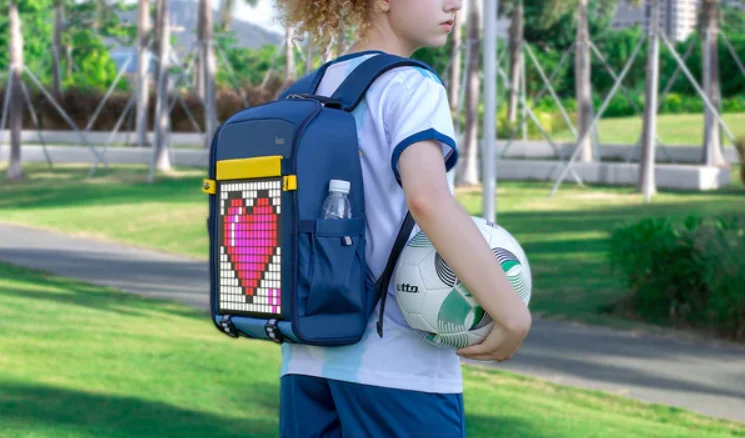

Divoom Backpack-S LED Pixel Art Bag
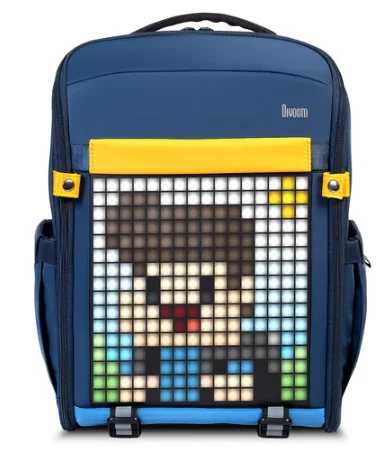
Meet Divoom-Backpack-S
Your Pixel Art Smart Backpack
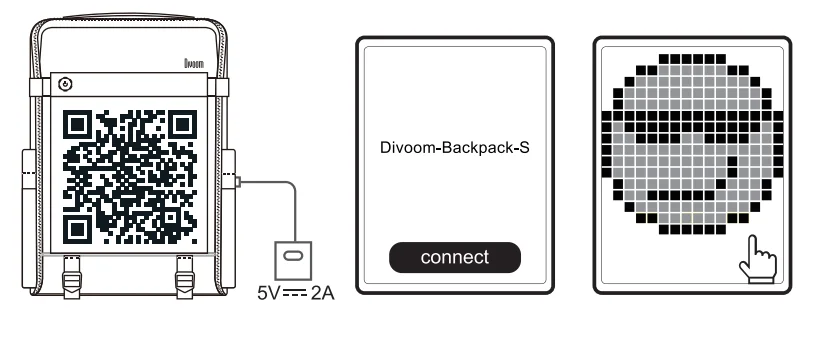
How to begin?
- Search “Divoom” on the App Store or Google Play.
- Connect the Divoom-Backpack-S with a power bank.
- Connect “Divoom-Backpack” in the Divoom App.
- You’re set! Let’s draw some pixel art!
Maintain your Divoom-Backpack-S:
- Divoom-Backpack-S is only water-resistant. Do not put it in the washing machine; use a damp fabric to wipe its surface instead.
- Please take care of the LED panel. Excessive force may damage the panel.
- We recommend using a USB power bank with 5V = 2A output.
- Limitation: Operating temperature range: -10~45°C/14~113°F
Due to the nature of any technology product, the information in this guide is subject to change without prior notice. If you want to learn more information, please feel free to contact us.
DISCLAIMER
Please read the following instructions carefully:
- Please follow our product installation and operation instructions.
- Do not place the backpack under extreme direct sunlight.
- Do not place the backpack underwater. Wipe any water or rain off the backpack if possible.
- Do not push any objects into the LED panel or USB cable. Do not apply any great force on the backpack surface.
- Please keep the backpack in a room-temperature environment. Do not place the backpack near any heat sources (such as radiators, heat registers, stoves, fireplaces, or extreme direct sunlight). Do not place the backpack near any open flame source.
- Do not attempt to service the backpack by yourself. Always refer to the instructions by qualified service personnel.
- To avoid the risk of electrical hazard, do not attempt to service the backpack while it’s ON.
DECLARATION OF CONFORMITY:
This device meets the essential requirements of the following Directive 2014/53/EU of the European Parliament and of the Council of 16 April 2014. The waste container symbol with the X through it on the device indicates that the device must be disposed of separately from normal domestic waste at an appropriate waste disposal facility at the end of its useful service life.
Please dispose of used batteries properly following local regulations. Do NOT incinerate. Removal of the rechargeable lithium-ion battery in this product should be done only by a qualified professional. ROHS This product is in compliance with Directive 2011/65/EU of the European Parliament and of the Council of 1 July 2011 on the restriction of the use of certain hazardous substances in electrical and electronic equipment.
DISCLAIMER
This device complies with Part 15 of the FCC Rules. Operation is subject to the following two conditions:
- This device may not cause harmful interference, and
- This device must accept any interference received, including interference that may cause undesired operation. Changes or modifications not expressly approved by the party responsible for compliance could void the user’s authority to operate the equipment.
NOTE: This equipment has been tested and found to comply with the limits for a Class B digital device, pursuant to Part 15 of the FCC Rules. These limits are designed to provide reasonable protection against harmful interference in a residential installation. This equipment generates, uses, and can radiate radio frequency energy and, if not installed and used in accordance with the instructions, may cause harmful interference to radio communications. However, there is no guarantee that interference will not occur in a particular installation.
If this equipment does cause harmful interference to radio or television reception, which can be determined by turning the equipment off and on, the user is encouraged to try to correct the interference by one or more of the following measures:
- Reorient or relocate the receiving antenna.
- Increase the separation between the equipment and receiver.
- Connect the equipment into an outlet on a circuit different from that to which the receiver is connected.
- Consult the dealer or an experienced radio/TV technician for help.
RF warning statement:
The device has been evaluated to meet general RF exposure requirements. The device can be used in portable exposure conditions without restriction.
CONTACT US:
If you believe your product is defective within the warranty period, please bring the product back to where it was initially purchased. Alternatively, or for any other questions or concerns, please call customer support at +0755 86290767, or contact us via email at [email protected].
 www.divoom.com.
 https://divoominternational.myshopify.com/
  https://www.facebook.com/DivoomInternational/
 https://twitter.com/divoom
 https://www.instagram.com/divoom_official/
 [email protected]


Product specification
- Dimension(mm): 285L x 125W x 370H
- Weight: 815g
- Color temperature: 1600-6500K
- HUE: 1.6 million RGB
- Max power: 10W
- Color Rendering (CRI): 80@4000K
- Charge: via USB cable, 5V-2A
- Wireless range: up to 10 meters/33 feet
- Bluetooth compliant: v5.0
For More Manuals By Divoom, Visit ManualsLibraryy.
Divoom Backpack-S LED Pixel Art Bag-FAQs
What is the Divoom Backpack-S LED Pixel Art bag?
The Divoom Backpack-S is a smart backpack that features a built-in LED pixel display on the back panel. This screen allows users to show pixel art, animations, and scrolling messages that can be customized through the Divoom mobile app. Besides the digital display, it also works as a regular backpack with compartments for laptops, gadgets, and daily essentials, making it both a functional bag and a creative tech accessory.
How does the LED display on the Divoom Backpack-S work?
The LED screen on the backpack connects to the Divoom app, where users can upload pixel designs, animations, and text messages. Once connected, you can change the display anytime from your smartphone. The screen can show moving graphics, icons, or even custom artwork, allowing the backpack to function like a portable digital billboard that reflects your style or mood.
Can you create your own pixel art for the Divoom Backpack-S?
Yes, the backpack allows full pixel art customization. Through the Divoom app, users can design their own pixel images, animations, and scrolling text messages. The app also offers a library of ready-made pixel art and animations shared by the community. This means you can either create your own designs from scratch or download artwork created by other users and display it on the backpack.
Does the Divoom Backpack-S require a battery to power the display?
Yes, the LED display is powered through a USB connection to an external power bank. The backpack includes a built-in USB cable that connects to a portable battery placed inside the bag. Once connected, the LED display can run for hours depending on the capacity of the power bank you use, allowing you to keep animations and designs active while walking or commuting.
Is the Divoom Backpack-S good for everyday use?
The backpack is designed for both style and practicality. It includes compartments for laptops, books, and accessories, making it suitable for school, work, or travel. Its ergonomic straps and breathable back panel help provide comfort when carrying the bag for long periods. At the same time, the LED display adds a unique visual element that makes it stand out from standard backpacks.
Can the Divoom Backpack-S show text or notifications?
Yes, the LED display can show scrolling text messages, animated icons, or simple graphics. Using the mobile app, you can type messages or select designs to display on the backpack’s screen. This feature allows users to show creative messages, digital art, or promotional content, making the backpack popular among gamers, tech enthusiasts, and content creators.
Is the Divoom Backpack-S waterproof or weather-resistant?
The backpack is designed with durable materials and weather-resistant construction to protect your belongings during everyday use. Some versions offer moisture resistance to help keep items safe during rain. However, the bag should still be handled carefully in heavy downpours or extreme conditions to protect both the electronics and the items stored inside.
What devices are compatible with the Divoom Backpack-S app?
The Divoom app works with both Android and iOS devices and can be downloaded from the Google Play Store or Apple App Store. Once installed, users can connect the backpack via Bluetooth and control the LED display directly from their phone. The app also gives access to a community platform where users can explore and share pixel art designs.
Is the Divoom Backpack-S suitable for students or travelers?
Yes, the backpack is suitable for students, commuters, and travelers because it provides storage space along with smart features. It typically includes a laptop compartment and several pockets for organizing gadgets, books, and personal items. The LED display also improves visibility at night, which can be helpful for people walking or cycling in urban environments.
Is the Divoom Backpack-S worth buying?
The Divoom Backpack-S is a unique option for people who want a mix of technology, creativity, and practicality. It functions as a normal backpack while also allowing users to display digital art and animations on the back. For gamers, designers, or anyone who enjoys customizable tech accessories, it offers a distinctive way to express creativity while carrying everyday essentials.