
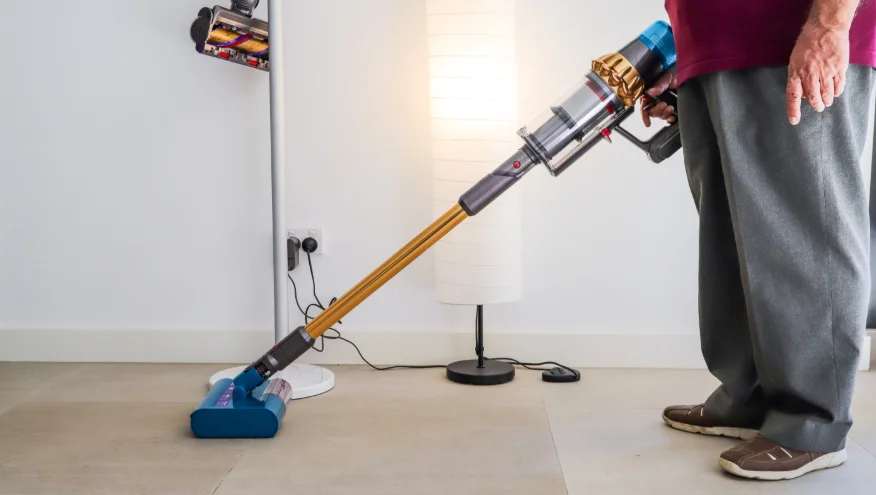

Dyson V15s Detect Submarine
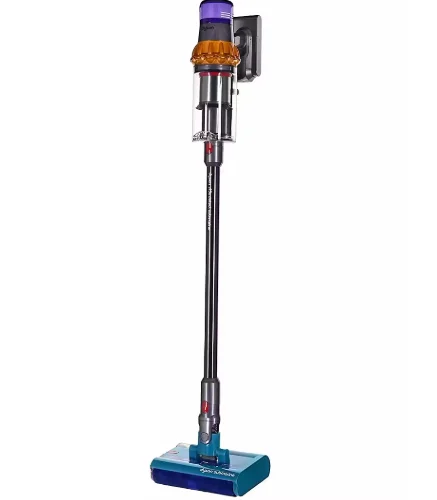
In the box
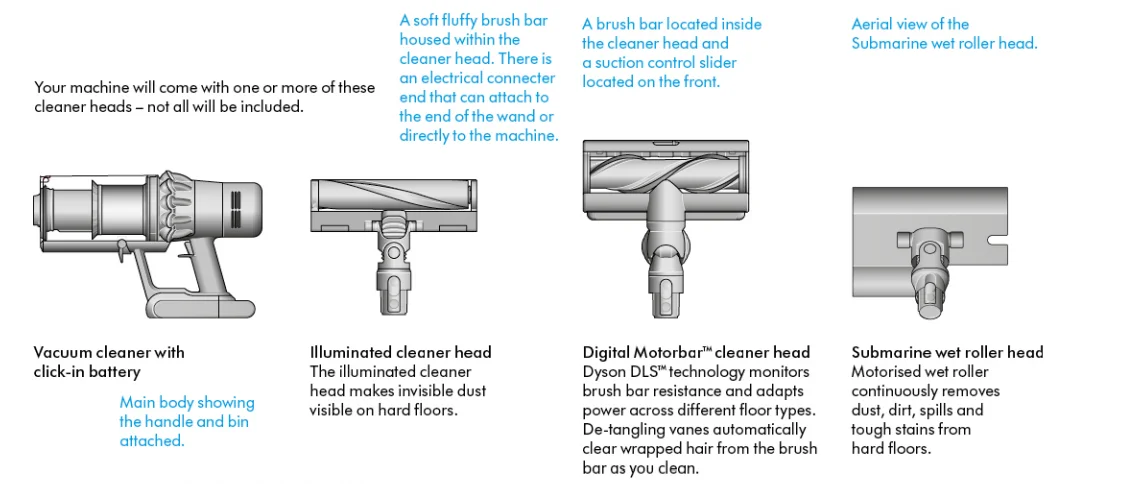
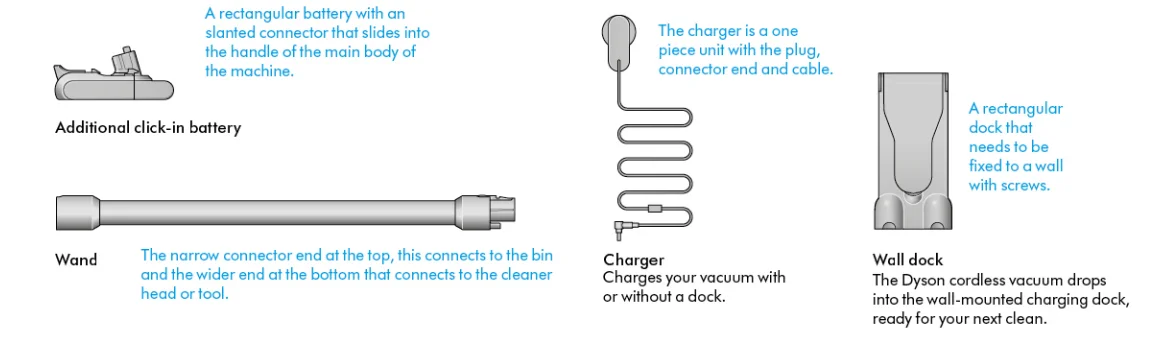
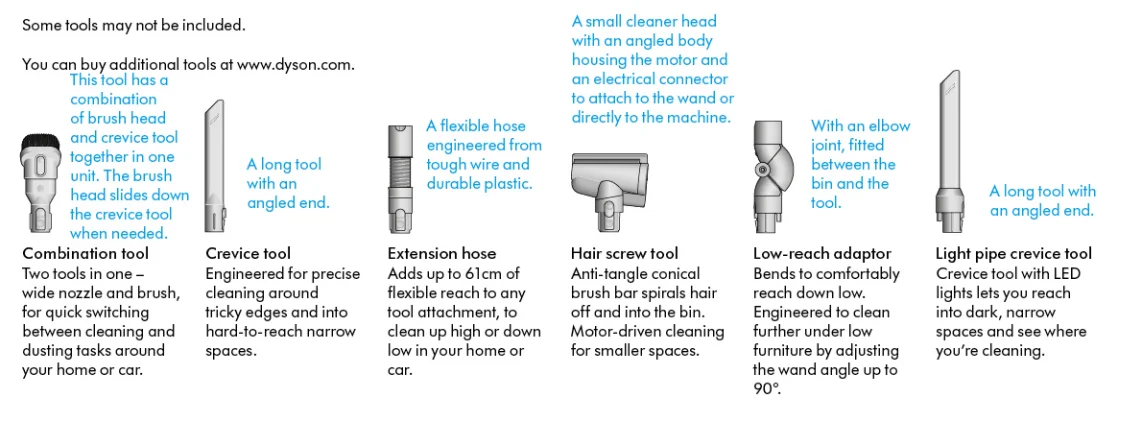
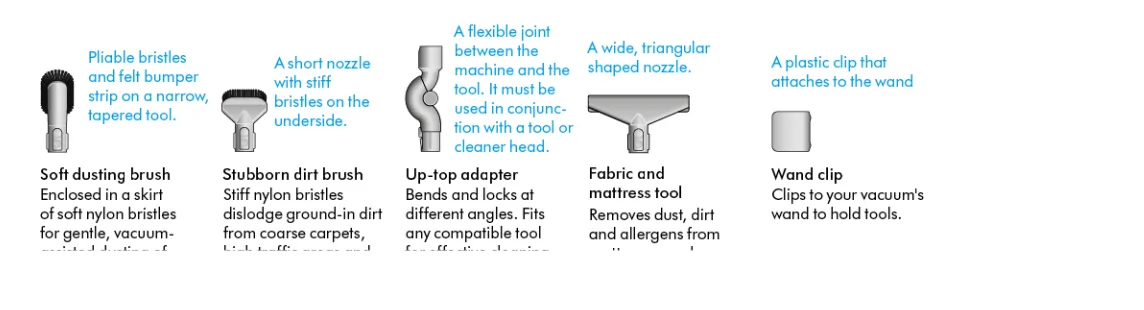
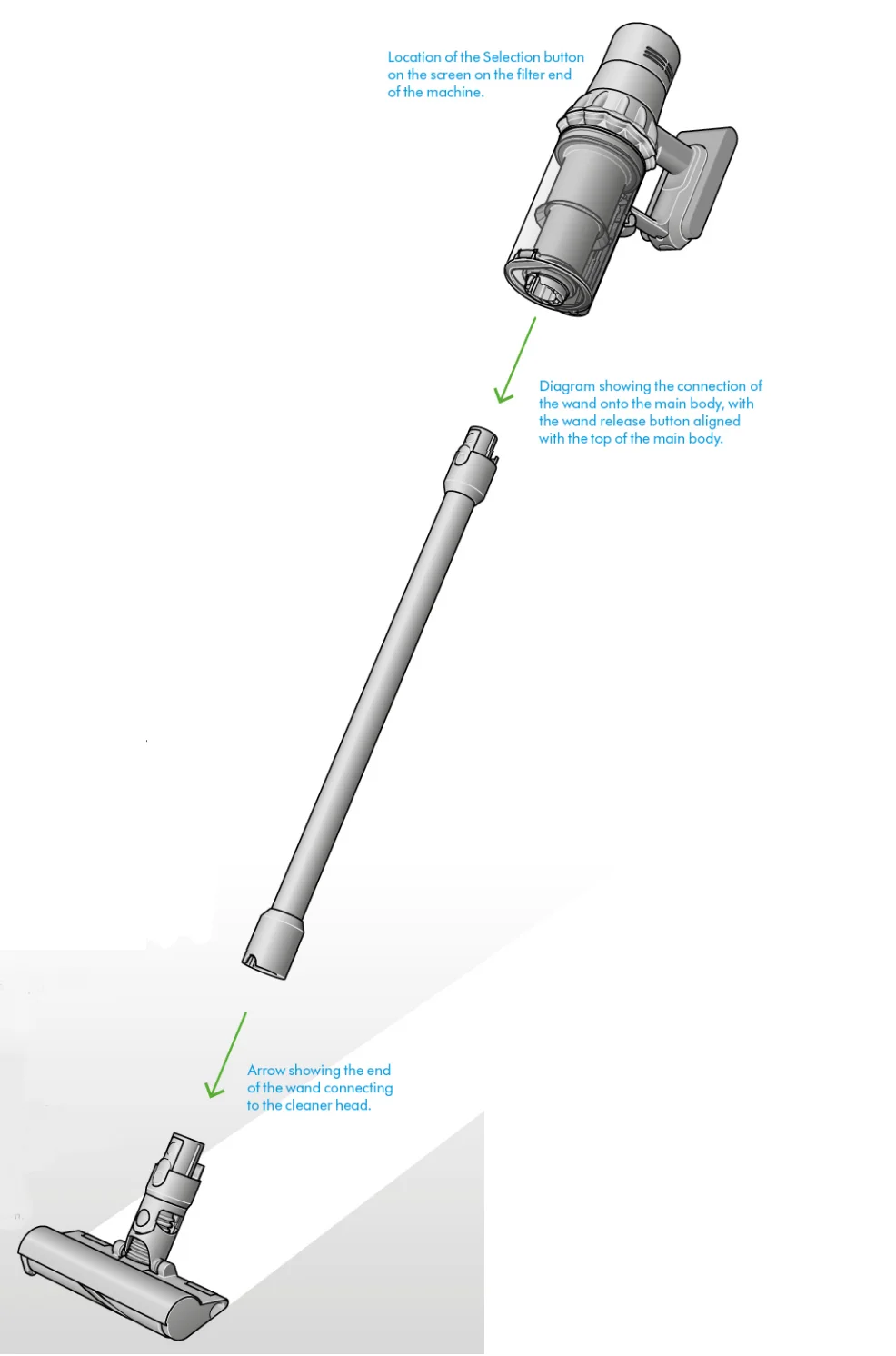
Getting started
Power modes
Your machine has three power modes for different tasks. Change power modes quickly using a single button.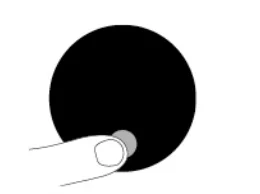
Eco mode
Maximum run time for longer cleans all around your home.
Auto and Med mode
The optimum balance of power and run time. Attach your cleaner head or Hair screw tool to activate Auto mode. Suction power automatically adapts to dust levels.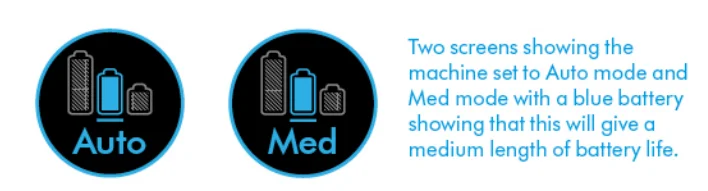
Boost mode
Designed for intensive spot cleaning of ground-in dirt.
Turn your laser on and off.
Turn your laser on or off with the slider switch on your cleaner head. Class 1 laser product – safe for pets and humans. Avoid looking directly into the beam.
The LCD screen
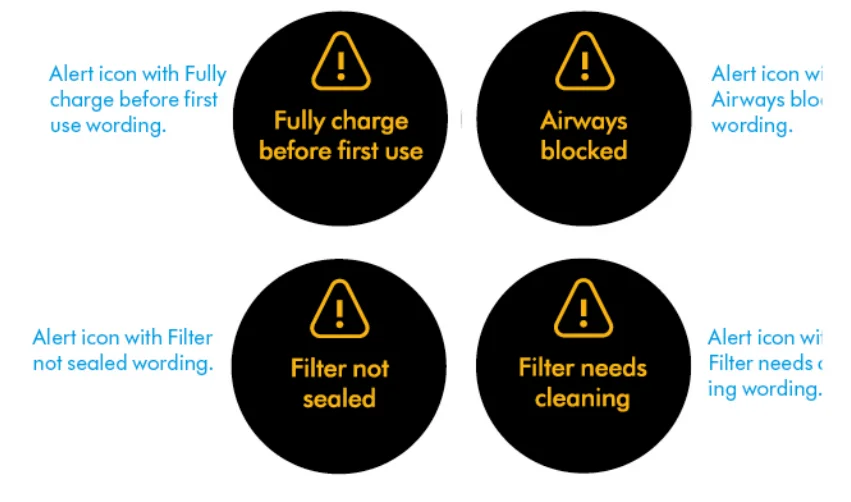
The LCD screen shows your particle count information and performance, including the cleaning mode selected, remaining run time, filter maintenance, and blockage information.
Settings menu
Control the settings on your machine using the selection button. To enter the settings menu, press and hold the button until the menu screen appears. Tap to scroll through the options available.
Particle count and graph
Select to turn the measuring and counting of particles on and off. Turn off the measuring and counting of particles to stop your machine from automatically adjusting suction power, and turn off the graph. Automatic adjustment between hard floors and carpets will continue when using the Digital Motorbar™ cleaner head.
Adjust reactive suction power sensitivity.
Use the selection button to change how sensitive the particle count is. This will change how your machine automatically reacts to the dust particles. For more information and support videos for your machine, go online: www.dyson.com/support.
Change language
To change the language on your screen, press the button and hold until the language list appears. Release the button. Tap the button to scroll through the language list to your preferred language. Press and hold the button until the countdown ends. A green tick will appear on the screen to show that your language selection is complete. To cancel your selection, release the button during the countdown.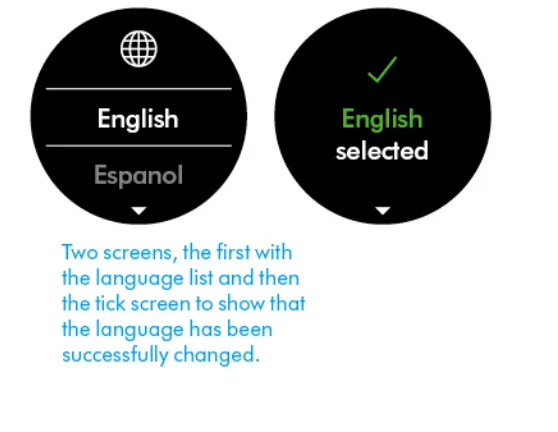
Change alert settings
You can turn the alert motor pulse off. Your motor will no longer pulse, but run-time alert information will continue to be displayed on the LCD screen when your machine needs your attention. Turning off alerts will not turn off the blockage alert pulsing. This is to ensure you clear any blockages, preventing damage to your machine. Tap to scroll through the settings menu. Select the “Alerts” option. Scroll to select on or off. Hold the button until the countdown ends and a tick appears on the screen. To cancel your selection, release the button during the countdown.
Run time countdown
When the battery needs charging, your machine will pulse three times, and a low run time icon will appear on the screen. When your battery is empty, a red warning icon will appear on the screen. When particle count and graph are turned on, low run time will be in amber and red when in Boost mode.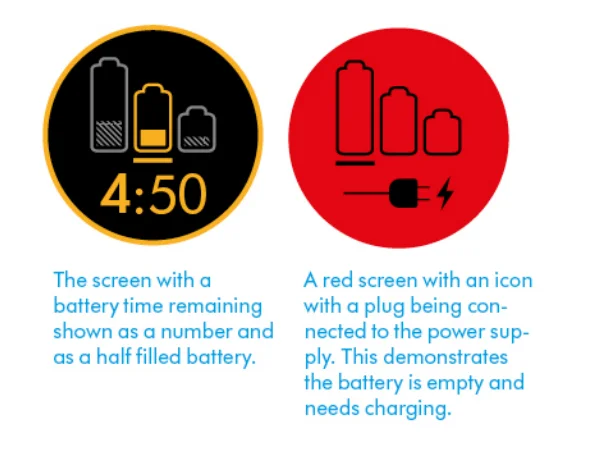
Battery health
To get the best performance and life from your battery, use Eco or Auto/Med mode.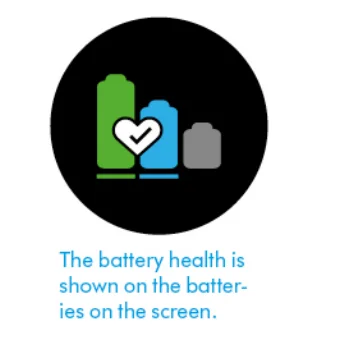
Alerts
The alerts you might see are:
- Filter – the filter isn’t fitted correctly or needs cleaning.
- Blockage – your machine has a blockage that needs to the removed.

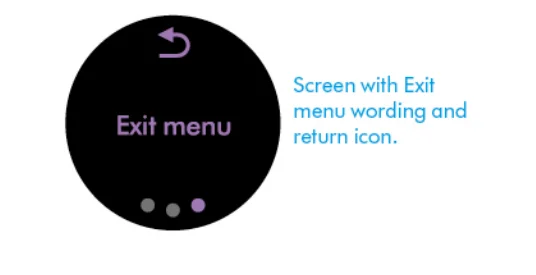
Exit settings menu
Caring for your floors
Check that the underside of the cleaner head or tool is clean and free from any objects that may cause damage. Before vacuuming your flooring, rugs, and carpets, check the manufacturer’s recommended cleaning instructions. The brush bar on your machine can damage certain carpet types and floors. Some carpets will fuzz if a rotating brush bar is used when vacuuming. If this happens, we recommend vacuuming without the motorized floor tool and consulting with your flooring manufacturer.
How to clean your Dyson Submarine wet roller head
Step 1
Turn off your machine and detach the Dyson Submarine wet roller head from the wand. Place it in the drip tray immediately to prevent dirty water spillage.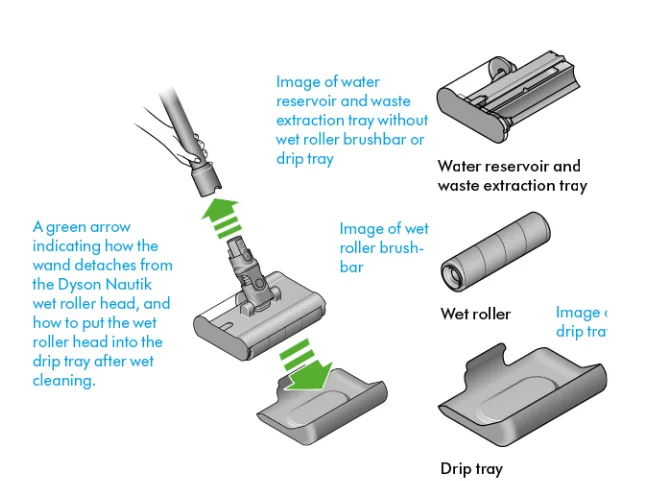
Step 2
Hold the wet roller head level in the drip tray.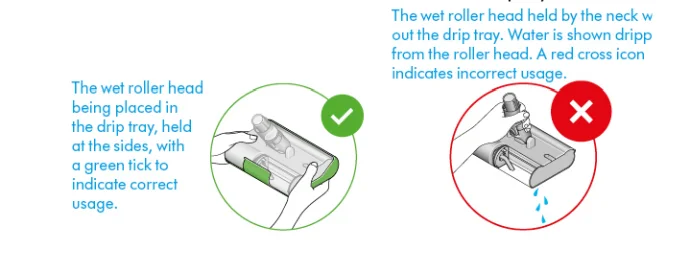
Step 3
Hold the wet roller head over a sink. Remove it from the drip tray. Hold the wet roller head at the edges, press the red quick-release button, and slide out the removable cassette from the main roller head. Remove the red dirty water tank cap to empty the waste extraction tray.
Step 4
Don’t get water on the neck of the wet roller head, as it may damage the connection to the wand. Disassemble the Submarine wet roller head. Every part of the wet roller head can be washed with water and a household antibacterial solution diluted according to the manufacturer’s recommended ratio. Empty any leftover water from the water reservoir.
Step 5
Leave the wet roller to air dry in a warm, well-ventilated space. Use a cloth to wipe away any dirt or excess water from the main roller head, waste extraction tray, and water reservoir. We recommend replacing the wet roller every six months, depending on how often you use your machine, to help maintain performance.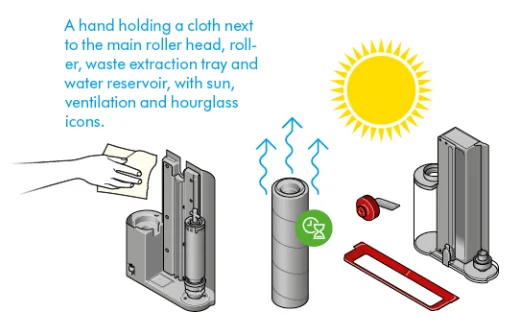
How to use your Dyson Submarine wet roller head
Step 1
Hold the wet roller head at the edges, press the red quick-release button, and slide out the removable cassette from the main roller head.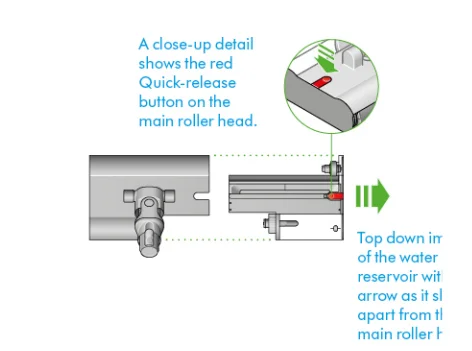
Step 2
Remove the cap on the water reservoir.
Step 3
Fill the water reservoir with clean water to the MAX line.
Step 4
Fit the cap securely on the water reservoir.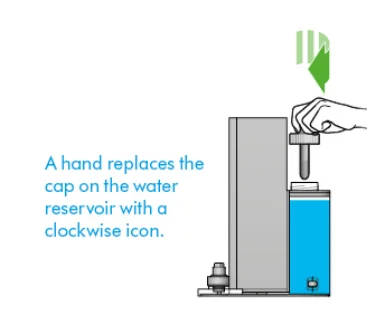
Step 5
Slide the waste extraction tray and water reservoir back into the main roller head until you hear a click. Attach the main wet roller head to your vacuum’s wand. Remaining battery life will be displayed as a percentage on your LCD screen.
You can wet clean until the water in the water reservoir is running low or until the battery runs out. To continue cleaning, simply empty the waste extraction tray, refill your water reservoir, and resume cleaning. Do not wet clean with an empty water reservoir to prevent the motor from overheating.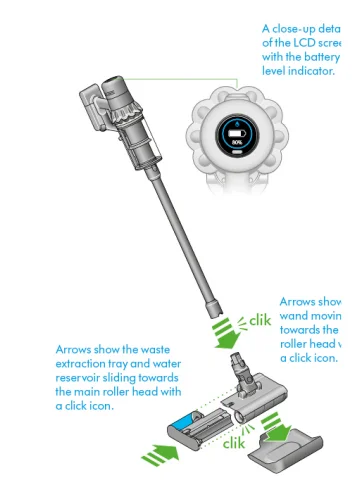
Charging your machine
It’s important to fully charge your new machine before using it for the first time and after every cleaning. This is because the battery and monitoring system’s algorithm learns over time, and fully charging your machine helps it to more accurately calculate and display remaining run time. Connect to the charger either directly or in the dock. The blue LEDs on either side of the battery will flash during charging.
When the battery is fully charged, both LEDs will light for 5 seconds. Your battery is fully charged when the display shows 100%. Your machine won’t operate or charge if the ambient temperature is below 5°C (41°F). This is designed to protect both the motor and battery.
Changing your click-in battery
If you have additional click-in batteries, we recommend that you alternate the batteries to maintain even performance.
Removing your battery
Push the battery release button on the handle and slide the battery off your machine. Charge the battery.
Refitting your battery
Align your battery with the handle and slide it in. Push firmly until it clicks into place.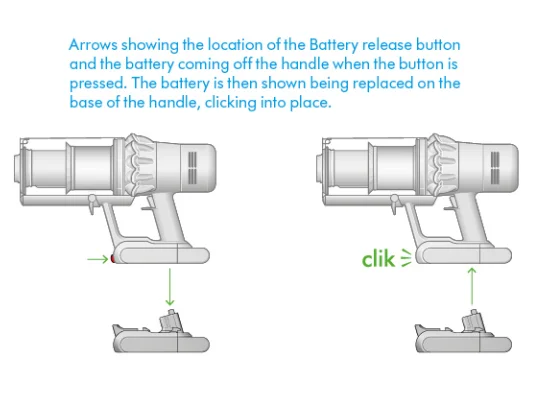
Emptying your bin
Empty as soon as the dirt reaches the MAX level – don’t overfill. Using your machine when the dirt is above the MAX line may affect performance and require more frequent filter washing. Overfilling your bin could result in inaccurate readings on the particle graph.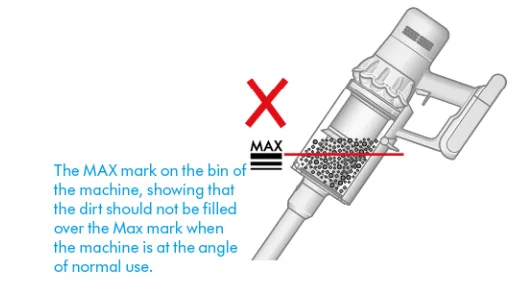
Remove your wand
Press the red wand release button on the top of the wand and pull the wand away from the bin.
Release the dirt
Hold the machine over the bin, pointing downwards. Firmly push the red bin release button. The bin will slide down, cleaning the shroud as it goes, and the bin base will open. The bin base won’t open if the red bin release button isn’t pushed down all the way.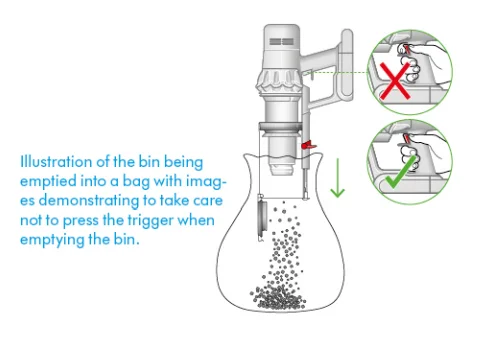
Minimize dust contact
Cover your bin tightly in a dustproof bag while you empty it. Remove your bin carefully, seal the bag tightly, and dispose.
Close the bin
Push the bin base upwards until your bin and bin base click into place.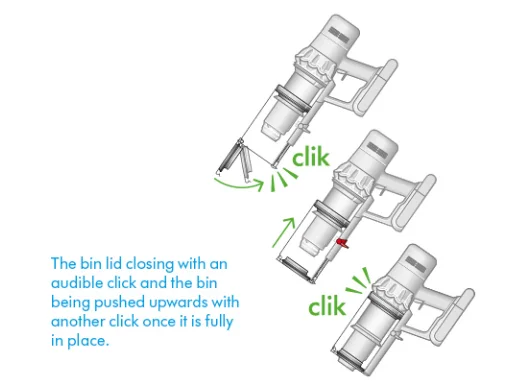
Cleaning your bin
Remove your bin. If it is necessary to clean your bin, empty it as shown in the “Emptying your bin” section. Press the red button located on the bin runner to release the bin and slide your bin off the runner. Only use a damp, lint-free cloth to clean your bin. Make sure that your bin and seals are completely dry before replacing.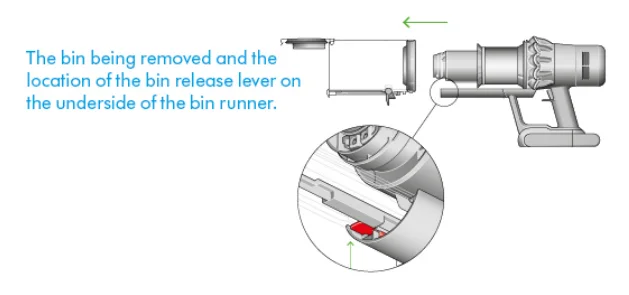
Refit your bin
Insert the spine onto the bin runner. Close your bin by pushing the bin base upwards until the bin and bin base click into place. Your bin isn’t dishwasher safe, and the use of detergents, polishes, or air fresheners to clean your bin isn’t recommended, as it may damage your machine.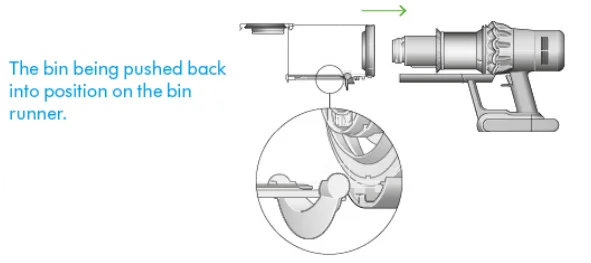
Clearing blockages
Disconnect your machine from the charger before looking for blockages. Be careful not to touch the trigger and be aware of sharp objects. Leave your machine to cool down before looking for blockages. Don’t use your machine when looking for blockages, as this could cause injury.
If your machine detects a blockage, the motor will pulse, and you won’t be able to use your machine until the blockage has been cleared. If you try to use your machine when the motor is pulsing, it will automatically cut out.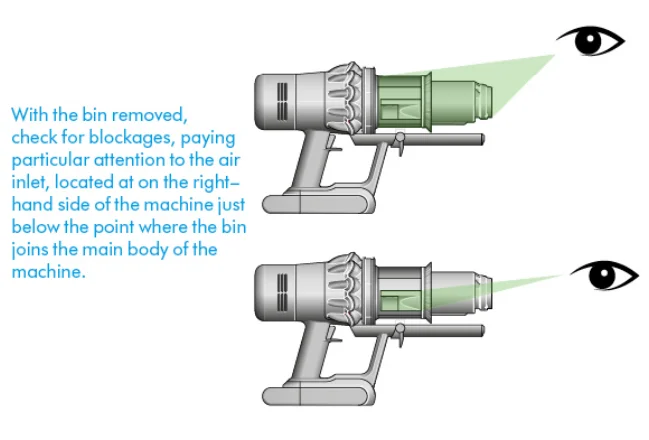
Check the main body
Remove the bin and check for blockages in the main body of your machine. Make sure any blockages are completely cleared and all parts are fitted before using your machine.
Check the wand and the cleaner head.
Check the wand for blockages. Check your cleaner head for blockages, following the instructions to remove the brush bar, where necessary.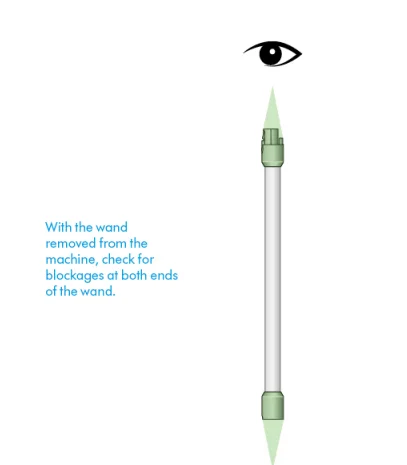
Reassemble your machine
Refit all parts securely before using your machine. Clearing blockages isn’t covered by your guarantee.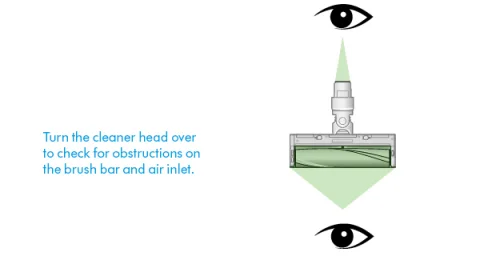
Clearing obstructions from your Digital Motorbar™ cleaner head
Your Digital Motorbar™ cleaner head doesn’t have a washable brush bar. To maintain optimum performance, check your brush bar regularly and clear any obstructions. Make sure your machine is disconnected from the charger, and make sure your machine’s power is turned off.
Remove your brush bar.
Don’t put any part of your machine in a dishwasher or use detergents, polishes, or air fresheners. Press the cleaner head release button on the end of the wand. Place the cleaner head upside down. Use a coin to unlock the end cap. Twist the end cap and remove it from your brush bar. Don’t wash the end cap. Slide your brush bar out of the cleaner head.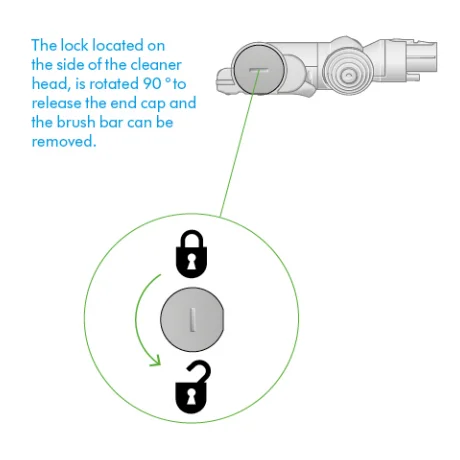
Look for obstructions
Clear any debris from your brush bar. Check inside the cleaner head and remove any debris or blockages. Your Digital Motorbar™ cleaner head and brush bar aren’t washable. Wipe over with a damp lint-free cloth. Don’t put any part of your machine in a dishwasher or use detergents, polishes, or air fresheners.
Replace your brush bar.
Push the end cap back onto your brush bar and slide it back into the cleaner head. Turn the end cap into the locked position. Your cleaner head isn’t washable and should only be wiped over with a damp, lint-free cloth.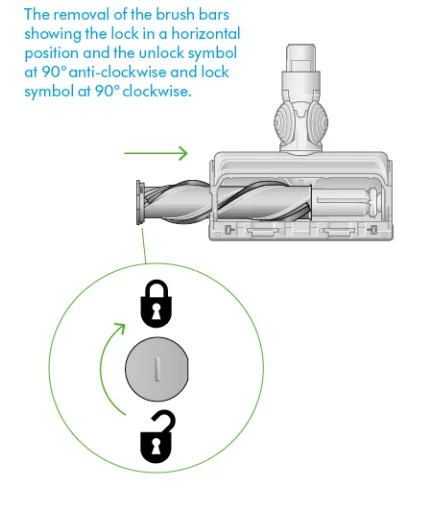
Clearing blockages from your Hair screw tool
Your Hair screw tool doesn’t have a washable brush bar. To maintain optimum performance, check your brush bar regularly and clear any obstructions. Make sure your machine is disconnected from the charger and take care not to touch the trigger.
Remove the cover and brush bar.
Remove the Hair screw tool from the wand or machine. Push the base plate open. Press the red lever down to release the cleaner head cover. Pull the cleaner head cover off the main body of the tool.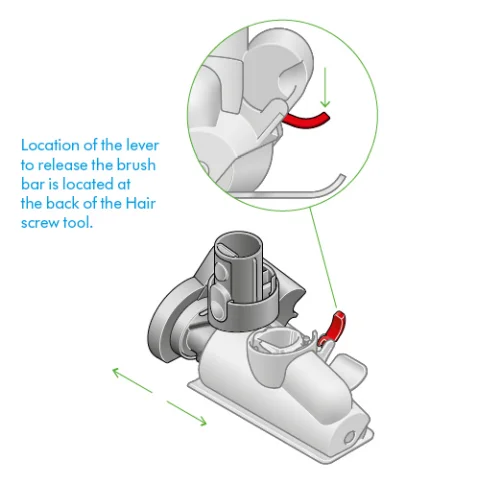
Look for obstructions
Pull your brush bar firmly to remove it from the main body. Check and remove any obstructions from all three parts of your Hair screw tool. Your Hair screw tool isn’t washable. Wipe over with a damp lint-free cloth. Don’t put any part of your machine in a dishwasher or use detergents, polishes, or air fresheners.
Reassemble the Hair screw tool.
Put your brush bar back into position and press firmly until it clicks back into place. Check that the red locking lever is in the unlocked position. Align the cleaner head cover with the guide on the main body. Push it down until it clicks into position. Push the red locking lever up until it clicks into position, and push the base plate back into place.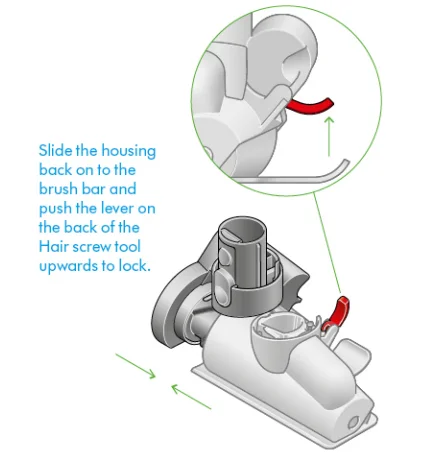
Washing your filter
Wash your filter at least once a month to maintain optimum suction power. For more information and support videos for your machine, go online: www.dyson.com/support.
Twist off your filter.
Twist your filter anti-clockwise and pull it away from your machine.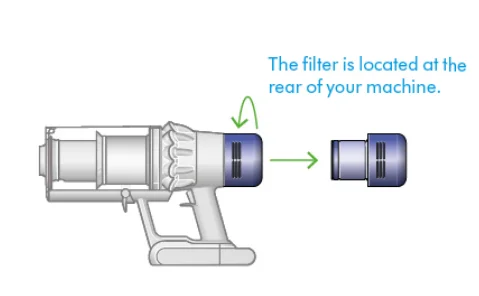
Tap your filter
Before washing your filter, tap it gently over a bin to remove any loose dust and debris.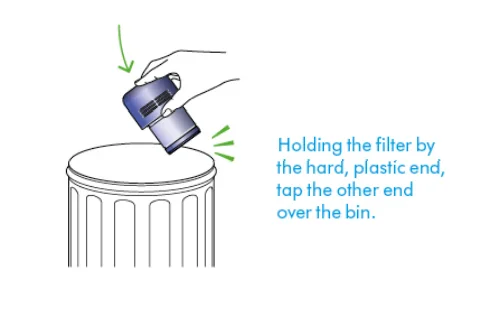
Wash your filter
Wash with warm, running tap water, gently rubbing your filter with your fingers to remove the dirt.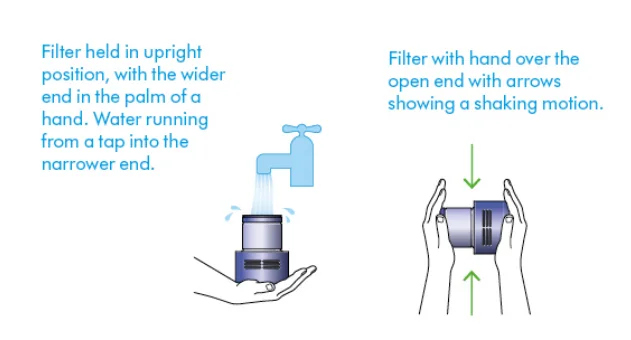
Fill and shake
Place your hand over one end of your filter. Fill the filter with warm tap water. Place your hand over the open end of the filter and shake it firmly to remove trapped dirt and debris. Repeat these steps until the water runs clear.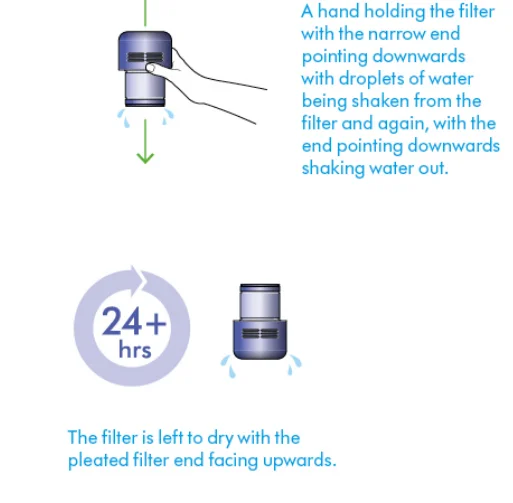
Shake and dry
Empty the filter and shake firmly to remove excess water. Keep shaking until there’s no water coming from the filter. Place your filter end up, as shown. Place the filter on its end and leave it to dry for at least 24 hours in a well-ventilated, warm place. Don’t dry your filter in a tumble dryer, microwave, or near a naked flame. Important: your filter must be completely dry before you put it back into the machine. Your machine could be damaged if used with a damp filter.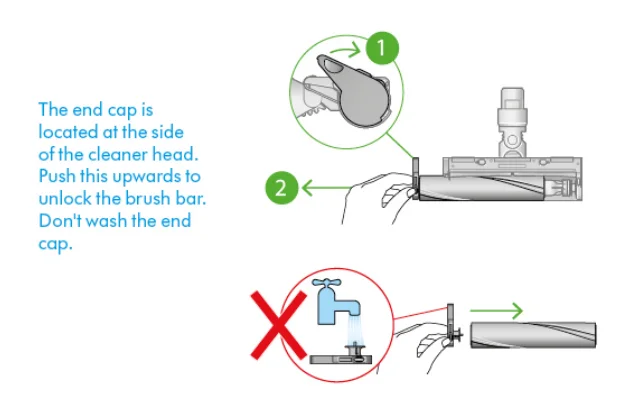
Washing your Illuminated cleaner head brush bar
Your Illuminated cleaner head has a washable brush bar. To maintain optimum performance, check and wash your brush bar regularly. Make sure your machine is disconnected from the charger and take care not to touch the trigger.
Remove your brush bar.
Don’t put any part of your machine in a dishwasher or use detergents, polishes, or air fresheners. Press the cleaner head release button on the end of the wand. Place the cleaner head upside down. Push the end cap up fully and pull the brush bar out of the cleaner head. Remove the end cap from the brush bar. Don’t wash the end cap. Slide your brush bar out of the cleaner head.
Wash and dry your brush bar.
Hold your brush bar under running water and gently rub to remove any lint or dirt. Stand your brush bar upright as shown. Leave to dry completely for at least 24 hours.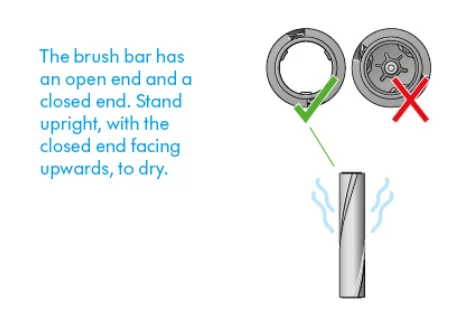
Replace your brush bar.
Before replacing, check that your brush bar is completely dry. Reattach the end cap to your brush bar. Slide your brush bar into the cleaner head. Push the end cap back down to the closed position.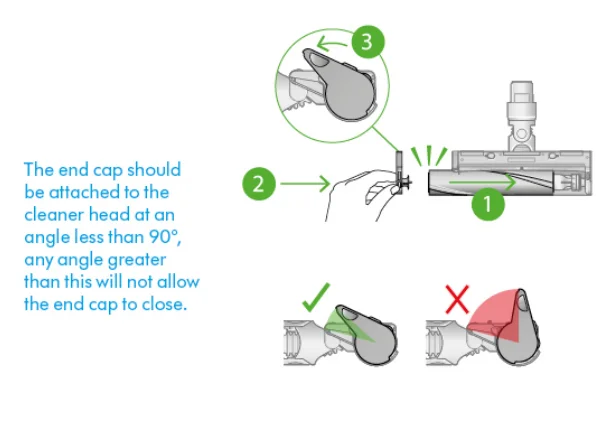
Cleaning your optic lens
To maintain optimum performance, keep your optic lens clean. Only clean the lens when the cleaner head is not attached to your machine. Use a soft, dry, lint-free cloth to wipe the lens.
Cleaning your tools
Don’t put any part of your machine in a dishwasher or use detergents, polishes, or air fresheners. Wipe with a damp, lint-free cloth, without touching the connector end. Make sure your tools are completely dry before using.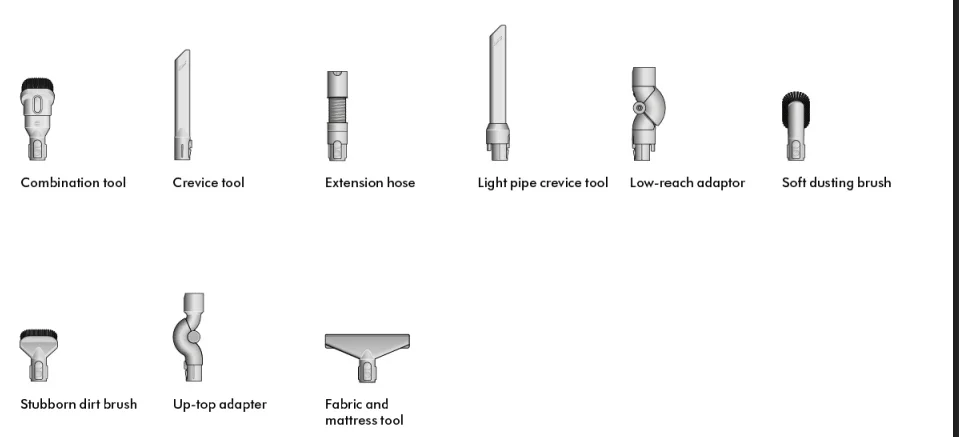
Looking after your machine
To always get the best performance from your machine, it’s important to clean it regularly and check for blockages.
Look after your machine.
If your machine is dusty, wipe with a damp, lint-free cloth. Check for blockages in the cleaner head, tools, and main body of your machine. Wash your filter regularly and leave it to dry completely. Don’t use detergents or polishes to clean your machine.
Look after your battery.
To get the best performance and life from your battery, use Eco or Auto/Med mode. Your machine won’t operate or charge if the ambient temperature is below 5°C (41°F). This is designed to protect both the motor and battery.
Your serial numbers
You can find your serial numbers on your machine, battery, and charger. Use your serial number to register. For more information and support videos for your machine, go online: www.dyson.com/support.
For More Manuals By Dyson, Visit ManualsLibraryy.
Dyson V15s Detect Submarine-FAQs
Can I put detergent in the Dyson Submarine?
Yes, you can use mild household detergents if needed. However, avoid bleach or high-foaming cleaners, as they may damage the system or affect cleaning performance.
Where does the dirty water go in the Dyson Submarine?
The Submarine wet roller head collects dirty water in a separate dirty water tank, keeping clean and dirty water completely isolated for hygienic cleaning.
How often should I clean the Dyson Submarine wet roller?
It’s best to wash the Submarine wet roller head after every use to prevent buildup and maintain optimal performance.
How long is the runtime of the Dyson V15s Detect Submarine?
The Dyson V15s Detect Submarine offers up to 60 minutes of fade-free power with its advanced seven-cell lithium-ion battery. You can also swap batteries for extended cleaning.
How often should I clean the Dyson V15 filter?
Clean the filter once a month using cold water only. Allow it to dry completely (at least 24 hours) before reinstalling to maintain suction power.
Why is my Dyson V15 blinking blue?
A flashing blue light means the vacuum needs charging. Plug it in and let it charge for at least 3.5 hours. A solid blue light indicates active charging.
Can I overcharge my Dyson battery?
No. Dyson’s built-in battery management system prevents overcharging and overheating, ensuring safe, long-lasting battery health.
How do I know when my Dyson V15s is fully charged?
While charging, the blue LEDs on the battery flash on and off. Once fully charged, both LEDs stay lit for 5 seconds and then turn off.