
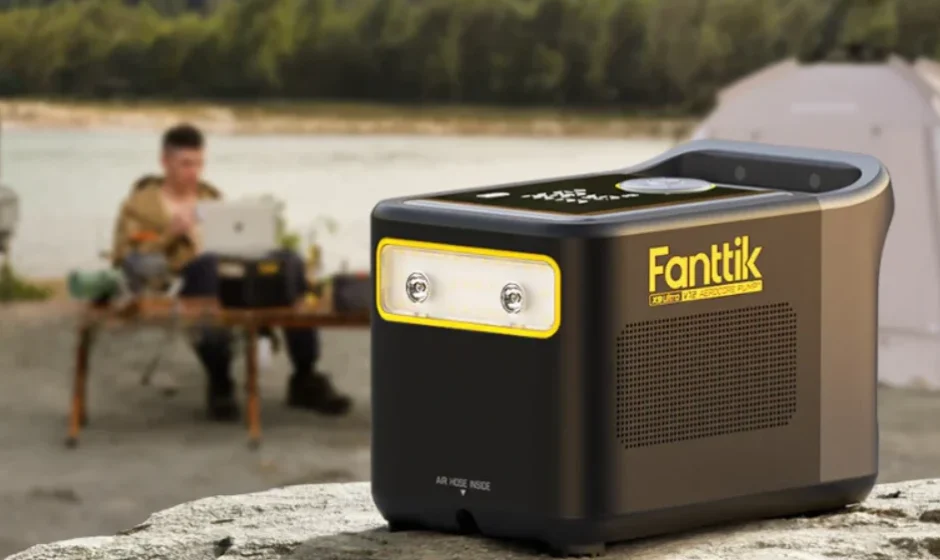

Fanttik X9 Ultra Portable Tire Inflator
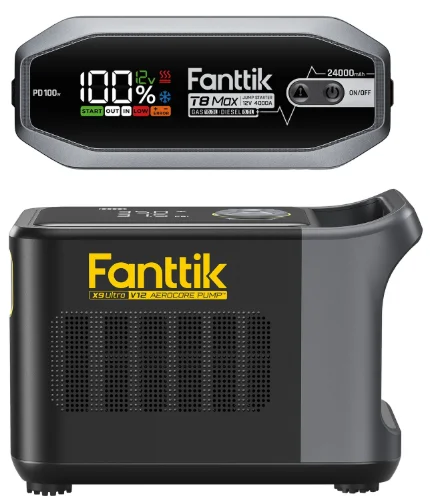
SAFETY WARNINGS
- This product is not a toy and should not be used by children. Users should be above 16 years old.
- Keep a safe distance between children and the inflator while inflating. There is a built-in lithium battery inside the product. Don’t place the product in a fire or dump the battery.
- Overheating, damage, or water may increase the risk of fire or explosion. It’s best to keep the product away from heat sources, and not leave it for prolonged periods in a hot car. If the inflater becomes very hot, there is a chance it could explode.
- Please store the product at a temperature ranging from -1 0 C -45 °C. Extremely hot or cold environments may damage the battery and shorten the lifetime of the inflater.
- Long-term storage of the product may decrease the effectiveness of the battery. Charge the inflater at least once every three months to maintain its performance.
- The product has a built-in DC motor, which may generate sparks during operation. Do not use it in an environment with dust or gas liable to explode.
- It is normal to have the sound of the fan cooling system after long-term use, and the sound will disappear after the device cools down.
- Before setting the inflation pressure value, make sure the pressure unit is correctly selected. Mixing up psi and bar could lead to dangerous overinflation. Unit conversion: 1 bar= 14.5psi, 1 bar= 1 00kPa.
- Do not leave the inflater unattended while it is in operation.
- Please use the product in a dry and clean environment. The intrusion of sand and dust may cause damage to the product. Don’t wash the product with water.
- After running for a long time, the temperature of the junction between the air tube and the main body can become very high. To avoid burns, avoid touching it.
- This inflater is equipped with short-circuit protection. Do not connect its USB-A and USB-C2 ports to its USB-C1 port.
ACCESSORIES
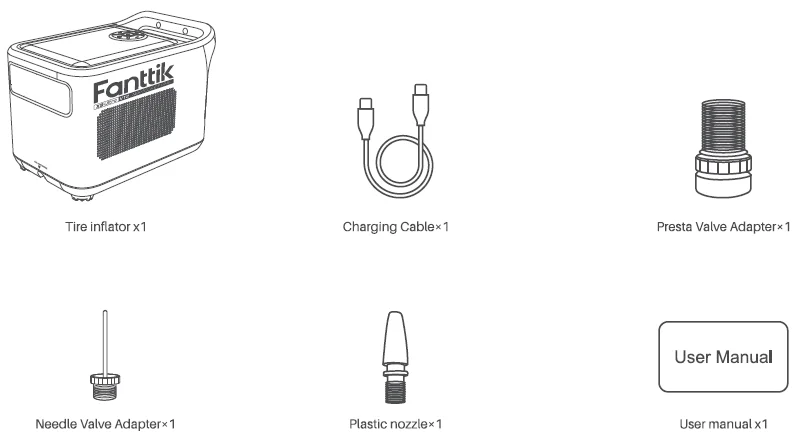
Carefully check the package contents. If anything is missing or damaged, please contact customer support.
PRODUCT OVERVIEW
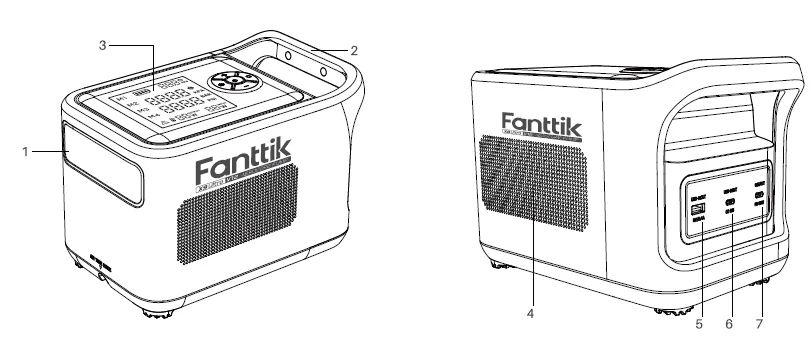
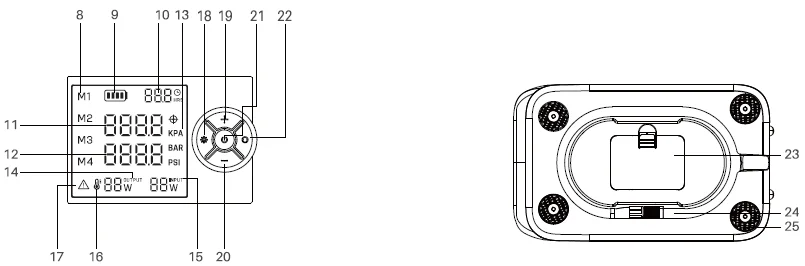
- Light
- Holder
- Display
- Heat Dissipation Vent
- USB-A Output Port
- USB-C2 Output Port
- USB-C1 Input/Output Port

- Adjustable Memory Pressure(M1 ~M4)
- Battery Level Indicator
- Charging Time
- Target Pressure Value
- Real-time pressure value
- Present Unit
- Output Power Display
- Input Power Display
- High Temperature Indicator
- Overload Protection Indicator
- Light On/Off Button
- + Button
- – Button
- Start/Stop Button
- Unit / Pressure Selection button
- Accessory Storage Slot
- High-pressure Air Hose
- Shock Pads
Note:
It is normal for the product to stop working when the temperature protection icon is on, and it could continue to be used when the temperature drops while icon disappears. (The product will not charge when the high temperature icon is on.)
HOW TO USE
Battery Level Indicator & Charging
Battery Level Indicator
The battery level is shown by four bars, with each bar representing 25%.
- 1 bar under 25%
- 2 bars between 25% and 50%
- 3 bars between 50% and 75%
- 4 bars between 75% and 100%
Note: The battery indicator will flash when the battery level is below 5%.
Charging
Fully charge the tyre inflator before using it for the first time. Connect the charging cable to the USB-C1 to charge the tyre inflator.
The screen will display the current charging wattage and the time to fully charge.
Note:
- The inflator cannot be used while it is charging.
- The USB charger is sold separately. Make sure to use a certified charger. (It is not recommended to use 5V 1A chargers and energy storage devices to charge this product)
- It is recommended to charge once every 3 months if not used for a long time.
- Please cool down for half an hour before charging, when the high temperature protection icon is on.
Turn on/off
- Turn on: Press and hold the start/stop button to turn the tyre inflator on.
- Turn off: Press and hold the start/stop button while the tyre inflator is turned on. If the tyre inflator is not used for 5minutes, it will automatically shut off.
NOTE: The product will not automatically shut down when the light is on.
Connecting the High-pressure Air Hose and Nozzle
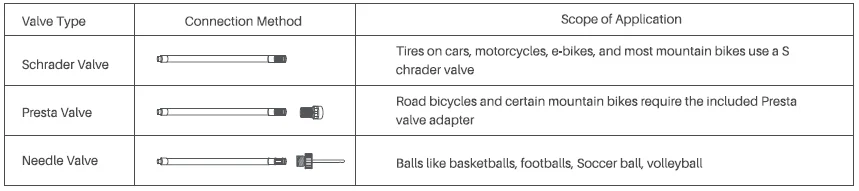
Detecting Air Pressure
The current air pressure will automatically be displayed after the high-pressure air hose is connected to an item while the tyre inflator is turned on.
Switch Units
Long-press the mode button for 2 seconds to switch pressure units(PSl, KPA, BAR).
Memory Target Pressure Switch
Press the mode button to switch modes. ( M 1 M2 M3 M4 and Manual mode )
Exit setting pressure value (M1: 42 PSI, M2: 65 PSI, M3: 75 PSI, M4:33 PSI, Manual mode: 35 PSI)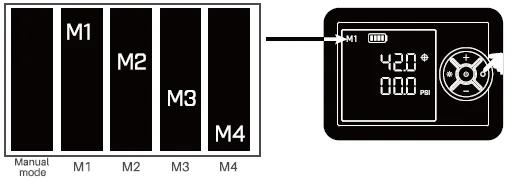
Adjusting the Preset Pressure
Select any one you want of M1-M4 and manual mode, then press the + or – button to increase or decrease(1PSl,0.05BAR,5KPA) the target pressure value.
Press and hold the + or – button to quickly adjust (5 PSI, 0.5 BAR, 50 KPA) the pressure value.
When you set the pressure and start pumping, the machine will save the pressure value of M1-M4 you set for the next use.
The tyre inflator will be in manual mode every time it’s turned on (pressure value:35PSI). The set pressure value will not be memorised in manual mode when the tyre inflator after used.
Note:
For the best inflating experience, we suggest you set an appropriate target pressure before inflating.
Light
Press the light button to switch between camping light, spotlight, SOS light, and light off.
Note: The light needs to be used when the product is on.
Inflating
Start Inflating
Press the start/stop button to start inflating. The current pressure is displayed in real-time while inflating.
Stop Inflating
Once the preset pressure value has been reached, the tyre inflator will automatically stop inflating. The tyre inflator can also be manually stopped at any time while inflating by pressing the start/stop button once.
Note: It will repeatedly test whether the tyre pressure reaches the target value after stopping inflating, if not, the tyre inflator will automatically inflate until it reaches the target value.
Power Station Function
This tyre inflator can be used as a power station when it’s not inflating other devices.
- USB-C1 Input: 5V= 3A /9V= 3N15V =3N20V= 3.25A
- USB-C1 Output: 5V =3A /9V = 3N15V = 3N20V = 3.25A
- USB-C2 Output: 5V=2N9V=2N12V =1.5A
- USB-A: Output: 5V=2.4A
Note:
- The battery needs to have a reasonable level of charge in order to work as a power station.
- USB-C2 and USB-A could supply power to other devices only when the tyre inflator is on.
- USB-C1 could supply power to other devices whether it is on or off.
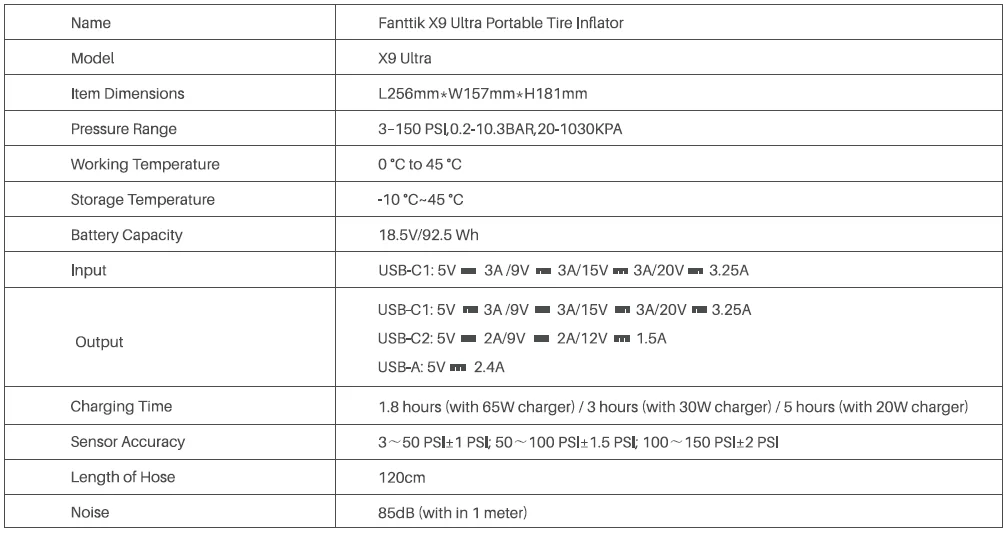
SPECIFICATIONS
TROUBLESHOOTING
Slow inflation speed
- Check whether the tyre inflater’s battery level is sufficient.
- Check whether the air hose is leaking.
- Check whether both ends of the air hose are securely connected.
- Check whether the item that is being inflated is leaking.
Tire Inflater turns on but does not inflate
- Check whether the tyre inflater’s battery level is sufficient.
- Check whether the pressure of the item being inflated exceeds the preset pressure.
The tyre inflater inflates normally
The pressure of low-pressure inflatables, including balloons, is too low to be measured.
Charging slowly
Check if you are using a compliant PD65W charger and original USB-C cable.
Air leakage after connecting the air tube
Make sure the air hose is securely connected.
The battery level indicator is different when inflating compared to the standby state
The lithium battery’s voltage level significantly drops when discharging power, causing the battery level indicator to have a different display when in the standby state compared to standby state. This is normal.
The battery level indicator doesn’t show on the screen after charging
Use a certified adapter and the included charging cable, and try charging again.
The inflater cannot charge other devices.
- Make sure the remaining battery level is sufficient.
- The discharging output is 65W Max. Make sure this output meets the requirements of the charged device.
- The inflater can not charge other devices while inflating.
Contact Information
- 929-693-6066 MON-FRI 5AM-5PM (ET)
- www.fanttik.com
- [email protected]
- METASEE LLC 12 GREENWAY PLZ STE 1161A HOUSTON, TX 77046-1203
For more Manuals by Fanttik, visit ManualsLibraryy
Fanttik X9 Ultra Portable Tire Inflator-FAQs
How do I charge the Fanttik X9 Ultra?
You can charge the Fanttik X9 Ultra using the included USB-A to USB-C cable. Plug the USB-C end into the inflator and the USB-A end into any USB charger, power bank, or car USB port.
How do I operate the Fanttik X9 Ultra inflator?
Simply connect the air hose to your tire valve, power on the unit, select the appropriate preset or PSI, and press start. The inflator will begin pumping automatically.
Can the Fanttik X9 Ultra inflate car tires?
Yes, it can inflate car, bike, motorcycle, and other small to mid-size tires. It is capable of bringing a flat tire back to safe pressure levels.
Does the Fanttik inflator support deflation?
Some Fanttik models offer both inflation and deflation. Check the unit’s menu/settings — if deflate mode is available, you can release air through the hose.
How do I know when my Fanttik X9 is fully charged?
While charging, the device displays a pulsing blue light. When the battery is fully charged, the light turns off or becomes solid depending on the model.
Can a portable inflator damage tires?
Not if used correctly. Always choose the correct PSI and avoid over-inflation. Using the wrong type of inflator or exceeding limits may damage the tire.
Does using a tire inflator drain a car’s battery?
If the inflator draws power from a car’s 12V socket, it can drain the battery if the engine is off. However, battery-powered inflators like the Fanttik X9 do not affect the car battery.
How long does the Fanttik X9 Ultra take to charge fully?
Charging time varies by charger, but it typically takes a few hours to reach full capacity.