
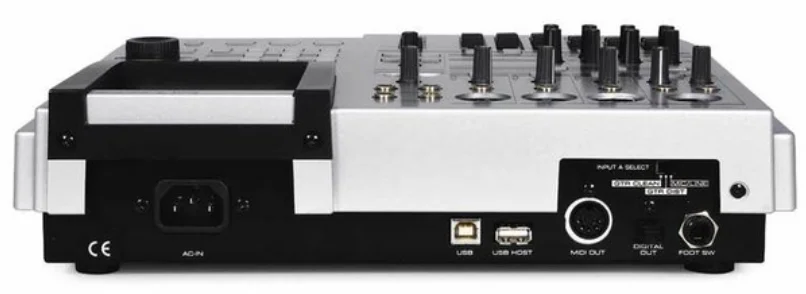

Fostex MR-8HD Digital Multitrack Recorder
SAFETY INSTRUCTIONS
- Read Instructions – All the safety and operating instructions should be read before the appliance is operated.
- Retain Instructions – The safety and operating instructions should be retained for future reference.
- Heed Warnings – All warnings on the appliance and in the operating instructions should be adhered to.
- Follow Instructions – All operating and use instructions should be followed.
- Water and Moisture – The appliance should not be used near water – for example, near a bathtub, washbowl, kitchen
sink, laundry tub, in a wet basement, or near a swimming pool, and the like. - Carts and Stands – The appliance should be used only with a cart or stand that is recommended by the manufacturer.
- Wall or Ceiling Mounting – The appliance should be mounted to a wall or ceiling only as recommended by the manufacturer.
- Ventilation – The appliance should be situated so that its location or position does not interfere with its proper
ventilation. For example, the appliance should not be situated on a bed, sofa, rug, or similar surface that may block the
ventilation openings; or, placed in a built-in installation, such as a bookcase or cabinet that may impede the flow of air
through the ventilation openings. - Heat – The appliance should be situated away from heat sources such as radiators, heat registers, stoves, or other appliances (including amplifiers) that produce heat.
- Power Sources – The appliance should be connected to a power supply of only the type described in the operating
instructions or as marked on the appliance
The basics of the MR-8HD
This section describes the basics of the MR-8HD you should know before using the MR-8HD.
Recording method
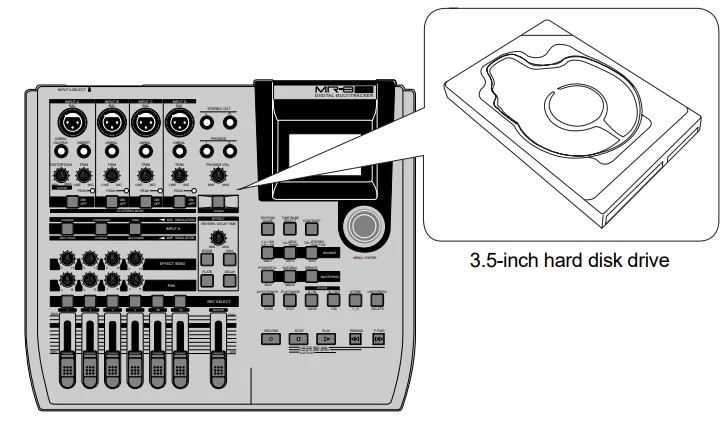
The MR-8HD is fitted with a 3.5-inch hard disk drive. Songs are recorded on a hard disk along with the ABS time (from 00m00s000ms to 99m59s999ms).
The ABS time shows the absolute time on a hard disk, and you can start recording from any desired time within the range between 00m00s000ms and 99m59s999ms ABS time.
The beginning of a song
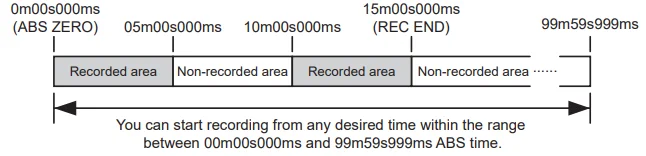
As the MR-8HD does not consume disk space when no audio is recorded, you can record audio effectively, while the recordable time for a tape recorder depends on the tape length.
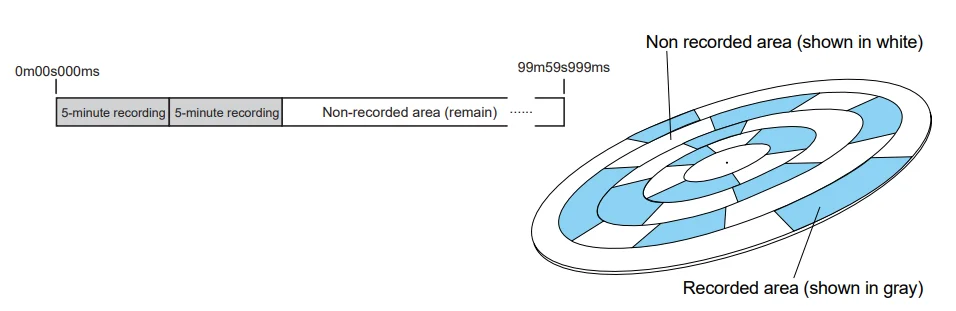
About song
To understand songs, imagine separated rooms as shown below. Each room can be regarded as a song. With the MR-8HD, you can create up to 99 rooms (songs) on the hard disk (although the available space may limit the number of songs).
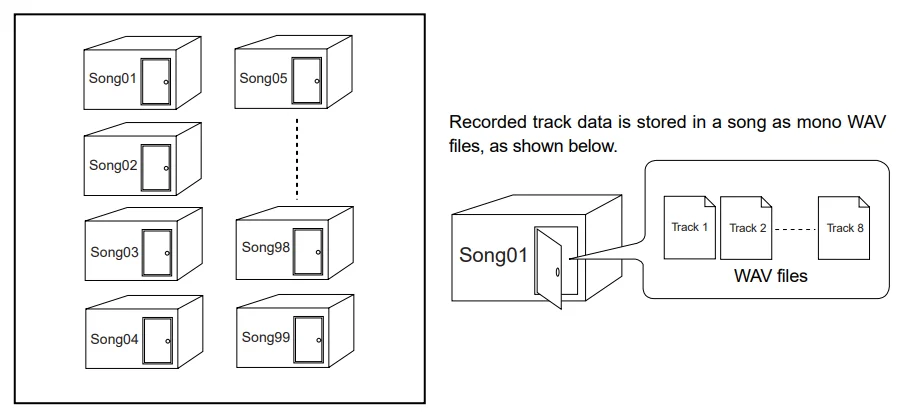
Each song is independent on a disk, and you can record, play back, or edit a song without affecting other songs. You can give a desired song name for managing recorded songs (see page 99). Recorded track data is stored in a song as mono WAV files.
The MR-8HD can convert the two WAV files recorded on tracks 7 and 8 (L and R) to a stereo WAV file (see page 90). You can export the converted stereo WAV file to your USB-connected personal computer, and use the file with a music software application or make an original audio CD using a CD burning software application (see page 92).
Remain (recordable space left on the disk)
“Remain” shows how much time you can further record audio data to the available space left on the internal hard disk. As described earlier, the MR-8HD stripes ABS time from 0m00s000ms to 99m59s999ms at maximum for each song. However, the remaining time (= available recording time left) depends on the available space on the hard disk in actual use. The remaining time is shown as in the screen example below during recording or record standby. Note that it shows the remaining time for recording onto a mono track.
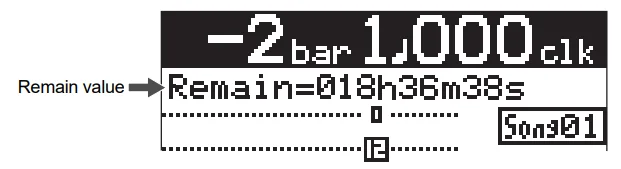
A “mono” track means a single track. Therefore, you can calculate the remaining time for recording to more than one track by dividing the displayed time by the number of tracks. Note that the remaining time shown on the screen is an approximate time.
Time base
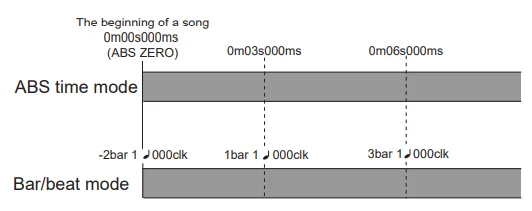
The term “time base” is used as the reference for recorder position information. Using the [TIME BASE SELECT] key, you can select from among two time base modes: ABS time and bar/beat mode. Each screen example below shows the recorder is located at the beginning of a song in each time base mode.
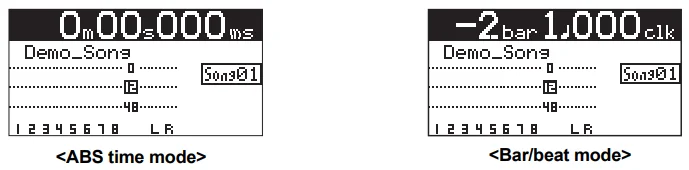
ABS time mode: ABS time stands for Absolute time, which is “striped” on the disk when creating a song. It starts from 0m00s000ms (=ABS zero, the beginning of a song) and ends at 99m59s999ms at maximum.
Bar/beat mode: The bar/beat/clock information is created according to the internal tempo map. The ABS zero position is set to “bar -2/beat 1/clk 000” by default (this is called “bar offset”). The MR-8HD determines the bar/beat/clock value in a song in reference to the bar offset, as well as the time signature map and tempo map. You can set the bar offset between bar 1 to bar -8 via the menu mode (see page 81). The figure below shows the relation between two time base modes.
Input monitor and repro monitor
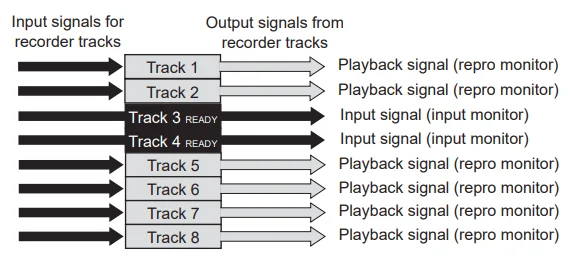
Each of the MR-8HD tracks has two output modes: repro monitor and input monitor. In the repro monitor mode, the track playback signal is output. So if you want to listen to the track playback sound, select the repro monitor mode. In the input monitor mode, the input signal fed to the track is output. So you can check the level of the input signal to be recorded. To enter a MR-8HD track to input monitor mode, press the appropriate [REC SELECT] key to arm the track (i.e., make the track record-ready), then press only the [RECORD] key to enter the “RECORD READY” mode or press both the [RECORD] and [PLAY] keys simultaneously to start recording.
[TRIM] control
You must pay great attention to the [TRIM] control adjustment when recording to the MR-8HD.
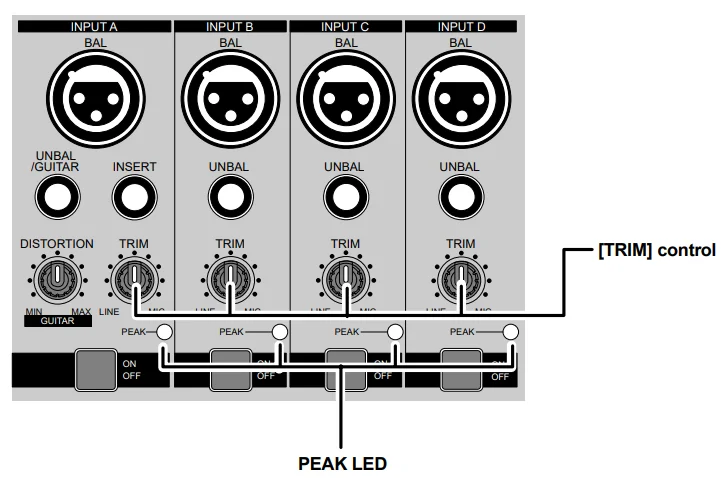
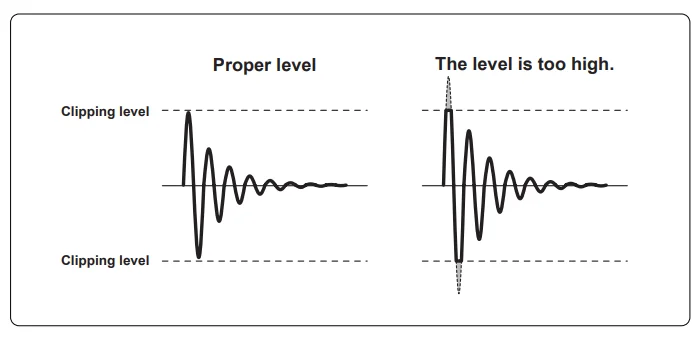
The analog signal received at each input ([INPUT A] through [INPUT D]) is sent to the TRIM control, by which the signal level fed to the A/D converter of the MR-8HD is controlled. You can check this level by the PEAK indicator. If the level is too high, the PEAK indicator lights, while you may hear the sound distorted or noisy. This distortion (noise) generated at this stage cannot be eliminated; therefore, adjust the TRIM control properly so that the PEAK indicator does not light at the loudest part of the input signal.
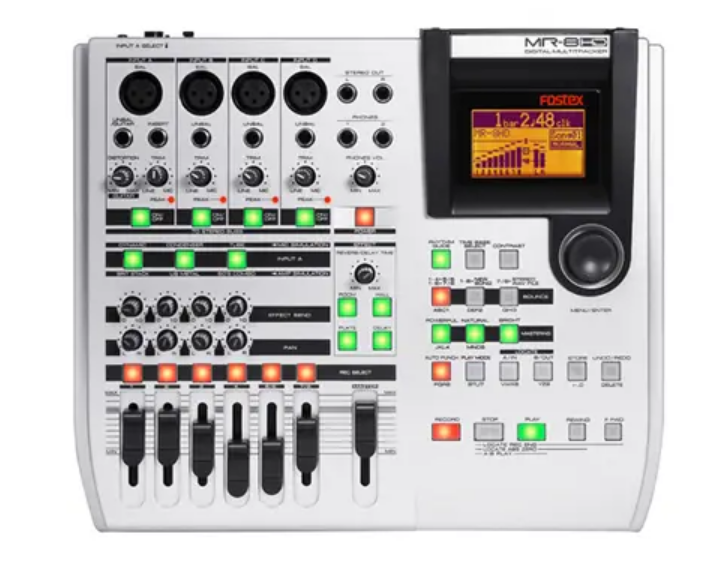
Top panel 1
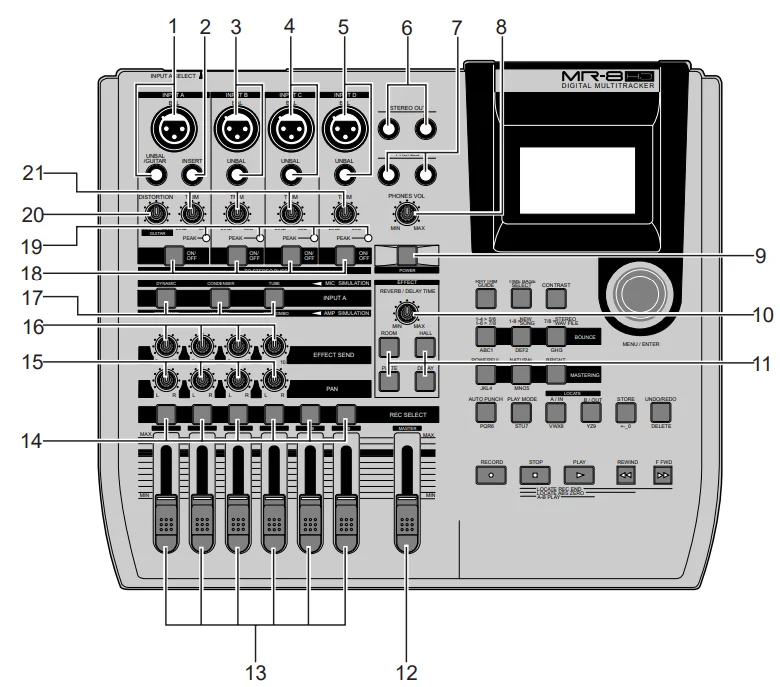
- [INPUT A] input connectors (XLR connector and phone jack): Both the [BAL] XLR connector and [UNBAL/
GUITAR] phone jack is provided. You can connect a guitar, microphone, keyboard, etc. If you connect sources to both the XLR connector and phone jack, the phone input takes priority. When using the [INPUT A] section, select the [INPUT A SEL] switch on the rear panel appropriately according to your usage (see page 33). - [INSERT] connector (TRS phone jack): Connects an external effect processor (typically, a compressor/limiter, etc.). For the connection between the MR-8HD and the effect processor, use a Y-cable as shown below (see page 59).
- [INPUT B] input connectors (XLR connector and phone jack): You can connect a guitar, microphone, keyboard, etc. to the [INPUT B] input. Both the [BAL] XLR connector and [UNBAL] phone jack are provided so you can use the appropriate connector according to the sound source. If you connect sources to both the XLR connector and phone jack, the phone input takes priority (see page 33).
- [INPUT C] input connectors (XLR connector and phone jack): You can connect a guitar, microphone, keyboard, etc. to the [INPUT C] input. Both the [BAL] XLR connector and [UNBAL] phone jack are provided so you can use the appropriate connector according to the sound source. If you connect sources to both the XLR connector and phone jack, the phone input takes priority (see page 33).
- [INPUT D] input connectors (XLR connector and phone jack): You can connect a guitar, microphone, keyboard, etc. to the [INPUT D] input. Both the [BAL] XLR connector and [UNBAL] phone jack are provided so you can use the appropriate connector according to the sound source. If you connect sources to both the XLR connector and phone jack, the phone input takes priority (see page 33).
- [STEREO OUT] jacks (L, R): These jacks output the stereo (L and R) buss signals. Connect these jacks to the monitoring equipment or master recorder (see pages 29 and 41).
- [PHONES] jacks (1, 2): Two jacks (1 and 2) are provided. You can use two pairs of stereo headphones with the MR-8HD (see page 29).
- [PHONES VOL] control: Adjusts the headphone output level (see page 30).
- [POWER] switch: Switches between standby mode and power on (see page 28). To turn off the power when the power is on, press and hold down the [POWER] switch for a few seconds.
- [REVERB/DELAY TIME] control: This control adjusts the reverb time or delay time. When you select “ROOM”, “HALL”, or “PLATE” for the effect type, it adjusts the reverb time. When you select “DELAY”, it adjusts the delay time. (See page 61.)
- [EFFECT] keys: These keys are used to select the effect type. You can select from three reverb types (ROOM, HHALL and PLATE) and a delay (DELAY). The selected key is lit (see page 60).
- [MASTER] fader: Adjusts the stereo (L and R) buss output level (see pages).
- Track faders: Each fader adjusts the track playback level. Each of the track faders 5/6 and 7/8 controls the stereo signal (see pages 30 through 39).
- [REC SELECT] keys: Used to select the recording track(s). You can record onto up to four tracks simultaneously.
Pressing a key arms or unarms the corresponding track(s). Tracks 5/6 or 7/8 are armed or unarmed simultaneously (see pages 35 through 42). - [PAN] controls: Control panning for tracks 1 through 4
- [EFFECT SEND] controls: Control the amount of signals from tracks 1 through 4 sent to the internal effect (reverb or delay) (see page 61).
- Insert effect selection keys: Used to select the insert effect (mic simulation or amp simulation) for the signal from
the [INPUT A] jack. When setting the [INPUT A SELECT] switch on the rear panel to “MIC/LINE”, you can use the mic simulation effect. When setting the switch to “GTR/DIST”, you can use the guitar amp simulation effect (see page 58). - [TO STEREO BUSS ON/OFF] keys: Each key selects whether or not to send the corresponding input signal to the stereo L/R busses (see page 72). Each press of the key alternates ON and OFF. When ON, the key illuminates in green. When OFF, it is unlit. When the corresponding input is assigned to a recording track, the key flashes in green. A long press of the key enters the input menu of the MENU mode, in which you can set phantom power on/off, panning, etc. (see page 128).
- [PEAK] indicators: Each indicator lights when the input signal is overloaded (see page 15). You should adjust the input gain using the [TRIM] control so that the [PEAK] indicator does not light.
- [DISTORTION] control: Controls the amount of the distortion effect for a guitar connected to the [XLR] connector or [UNBAL/GUITAR] jack (phone type) on the [INPUT A] channel. This control is effective only when the [INPUT A SEL] switch is set to “GTR/DIST” (see pages 35 through 40).
- [TRIM] controls: Each control adjusts the input gain of the corresponding input channel (see pages 5 and 35 through 40).
About power
The MR-8HD operates by AC power. Before you start using the MR-8HD, you must connect the supplied power cord.
Power connection
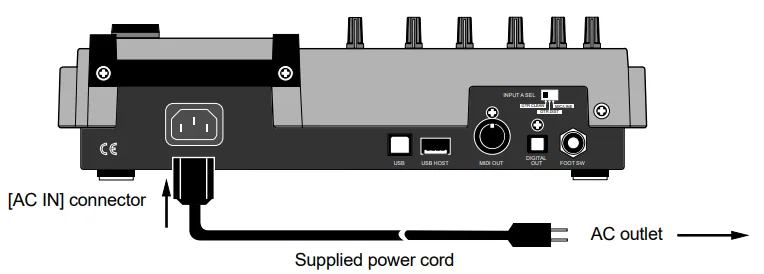
Connect the [AC IN] connector on the MR-8HD rear panel and an AC outlet using the supplied power cord. The MR-8HD enters the standby mode when the power cord is connected.
Turning on the unit
You can turn on or off the MR-8HD power using the [POWER] switch (pointed by an arrow below). To turn off the power, press and hold down the [POWER] switch for a few seconds.
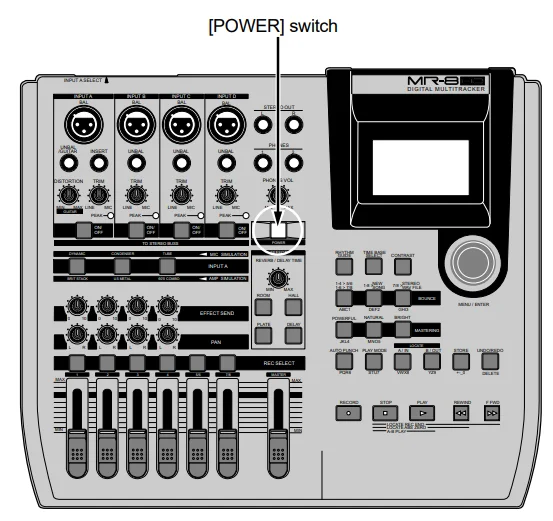
When you press the [POWER] switch to turn on the power for the first time, the MR-8HD starts up and the display shows the screen as below (note that it takes some time until the screen below is shown). This screen shows that the demo song is
loaded and stopped at the beginning (ABS 0) of the song named “FOSTEX_FEVER”.
Connecting headphones (or a monitor speaker system)
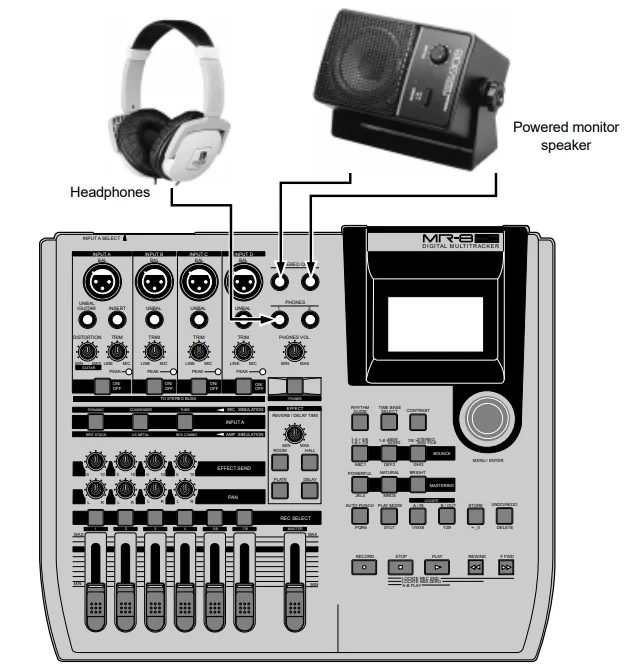
Connect headphones to either of the two [PHONES] jacks of the MR-8HD. Both jacks feed the same signal, so you may connect headphones to whichever one you like. If you have a powered monitor speaker, you may connect it to the [STEREO OUT] jacks of the MR-8HD.
Basic mixdown
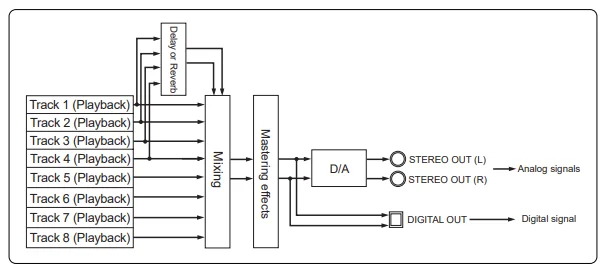
This section describes basic mixdown, which is the final process of multitrack recording. Mixdown mixes recorded materials on tracks 1 through 8 down to stereo. The mixdown material can be recorded to an external master recorder. The MR-8HD is equipped with the [DIGITAL OUT] connector, so you can record a mixed-down signal to a digital master recorder (DAT, MD, etc.), which can accept an S/P DIF digital signal in the digital domain. With the MR-8HD, you can also record a mixed-down signal internally to a new song of the MR-8HD using the track bouncing function, without the need for an external master
recorder (see “Track bouncing” described later).
Using effects
The MR-8HD provides the insert effects for recording (microphone and amplifier simulation effects), the delay/reverb effects for track bounce or mixdown (for tracks 1 through 4 only), and the mastering effects for L/R mix. You can also use an external effect device connected to the [INSERT] connector.
Using the insert effects
The [INPUT A] channel of the MR-8HD provides two types of insert effects: microphone and amplifier simulation effects. These effects can be used during recording. These effects simulate popular microphones and guitar amplifiers. If you use the microphone simulation effect when you record an acoustic guitar through your microphone, you can make the recording sound as if you are using a famous microphone. If you use the guitar amplifier simulation effect when you record an electric guitar directly connected to the MR-8HD, you can make a recording as if you are using a famous guitar amplifier. Note that you cannot get the same sound as the original microphone/guitar amplifier by using simulation effects.
Using the rhythm guide function
The MR-8HD provides the metronome function, which can output the rhythm guide click during recording. You can easily output the guide click from the [STEREO OUT] jacks by pressing the [RHYTHM GUIDE] key on the top panel. Two types of rhythm guides are available: one has a constant time signature/tempo throughout a song, while the other has a programmed time signature/tempo map.
MR-8HD Specifications
[Inputs/Outputs]
- 0dBu=0.775Vrms, 0dBV=1.0Vrms, Reference level: -12dBfs
- Analog input [INPUT A – INPUT D]
- Connectors : XLR-3-31 type (#2: hot balanced) : 1/4-inch, phone type
- Input level : -48dBu (MIC) to +4dBu (LINE)
- Input impedance: 1.5kΩ or more 400kΩ or more (When the INPUT
- A SEL switch is set to “GTR”.)
- Phantom power: P48V (Phantom power ON/OFF is selected in the “Input” menu of the MENU mode.)
Insert [INSERT (input A only)]
- Connector : 1/4-inch, TRS phone type
- (Tip: output, Ring: input)
- Nominal level: -10dBV
- Load impedance 10kΩ or more
- NoNominalnput level : 10dBV
- Input impedance: 1kΩ or more
Stereo analog output [STEREO OUT (L, R)]
- Connectors : 1/4-inch, phone type
- Norminal output level : -10dBV (unbalanced)
- Load impedance 10Ω or more
Headphones output [PHONES 1, 2]
- Connectors : 1/4-inch, stereo phone type
- Max. output power : 30mW or more (at 32Ω load)
- Load impedance:16Ωor more
FOR MORE MANUALS BY FOSTEX, VISIT MANUALSLIBRARYY
Fostex MR-8HD Digital Multitrack Recorder-FAQs
How many tracks can the Fostex MR-8HD record and play back?
The MR-8HD can record up to two tracks simultaneously and play back eight tracks at once, making it ideal for multitrack recording and mixing on the go.
How do I record a new track on the Fostex MR-8HD?
To record, select the desired track using the REC SELECT button, press REC, and then PLAY to start recording. Make sure your input source and levels are properly set before recording.
What type of storage does the Fostex MR-8HD use?
This recorder uses an internal hard drive for storing audio data, providing faster access and higher reliability than flash memory cards.
How can I transfer recorded tracks to a computer?
You can connect the MR-8HD to a computer via USB. Once connected, select the USB mode on the recorder to access and copy your audio files directly to your computer.
What audio file format does the MR-8HD record in?
The Fostex MR-8HD records in WAV format (16-bit/44.1kHz), ensuring compatibility with most audio editing and mixing software.
How do I use the built-in metronome or rhythm guide?
Press the METRONOME/RHYTHM button to activate it, then adjust tempo and volume using the DATA wheel. This helps you keep perfect timing during recording.
Can I use external microphones or instruments with the MR-8HD?
Yes. The MR-8HD provides XLR and 1/4-inch inputs for connecting microphones, guitars, keyboards, or other instruments. It also supports phantom power for condenser mics.
How do I back up or protect my recordings?
You can export tracks to your computer or burn them to CD after mixing down. Always back up important sessions to avoid data loss in case of drive failure.