


Fugoo Inferno Bluetooth Speaker

In the Box
- Glass Top
- Fugoo Inferno Speaker
- Extension Rod
- Empty Fuel Tank Canister
- Metal Funnel with Handle
- Fuel Canister Cap
- (2) Cotton Wicks
- USB-C Cable & AC Adapter
- Quick Start Guide & User Manual (Including Warranty Statement)
Control Panel

- CSB Button (Broadcast Pairing)
- CSB LED (White/Orange)
- Decrease Volume (-) Button
- Power LED (Red)
- Power/Light Button
- Increase Volume (+) Button
- Bluetooth LED (Blue)
- Bluetooth & Play/Pause Button
Flame Feature
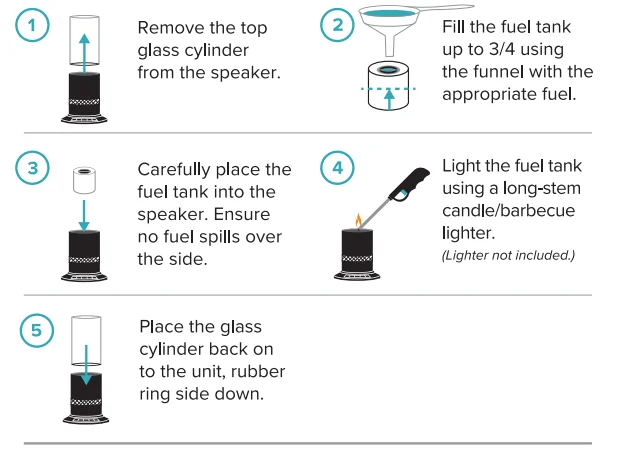
The metal frame of the product can be disassembled by unlocking it from the base (see graphic for details) . Do this over a non-flammable surface with a flame extinguisher in range—fuel burning life: estimated 2 hours. The included fuel canister is compatible with isopropyl rubbing alcohol and indoor/outdoor ethanol fireplace fuel. Chafing and gel fuel canisters are also compatible.
Igniting the Flame:
Putting Out the Flame:

STANDBY MODE
Battery Power
After 3 hours of the product will set to standby mode while using battery power (not AC power), it will turn off and disconnect the Bluetooth link to the App to save battery life. The product will then need to be powered on manually.
AC Power
When the product is set to standby mode while using AC power, it will remain in standby until it is either unplugged, turned back on through the App, or manually powered off.
CHARGING
IMPORTANT: Before first use, charge for 6 hours.
Connect the included USB-C cord to the USB-C port of the product. Connect the other end of the cord into a USB AC adapter and then into a power outlet.
To Prolong Battery Life:
- If the product is stored fully charged, recharge every 3 months; not to exceed 6 months between charges.
- If the unit is stored with no charge, do not exceed 15 days without charging.
Full Charge Achieved:
6 hours while the unit is powered OFF.
POWER ON/OFF
- ON….. Hold
 button (1 second)
 - OFF….. Hold
 button (2 seconds)
 button (1 second)
Power LED
- Charging….. Breathing
- Low…. Rapid Blink
- Full…… Solid
- Standby…… Off
Audio
BLUETOOTH PAIRING
The product will automatically enter Bluetooth mode when powered ON and will search for the last audio device it was paired to.
IMPORTANT: Pair devices within 3 feet (1 meter); max signal range of 33 feet (10 meters); signal disruption/loss may occur when devices are out of range from each other.
- Turn your audio source device’s Bluetooth ON and select “FUGOO INFERNO.”
Bluetooth LED
- Pairing… Blinking
- Paired….Solid
- Disconnect…. Hold the
 button for (3 seconds)
 button for (3 seconds)
CSB PAIRING
Connect up to six CSB FUGOO compatible products.
- TRANSMITTER: Pair the first CSB-compatible product to a Bluetooth external audio device source (see Bluetooth Pairing).
- RECEIVER: Power ON one CSB-compatible product at a time. Do NOT Bluetooth pair the receiver to the external audio device source (see Bluetooth; Disconnect).
- Pair Click
 Button
 Button
CSB LED
- Searching….. Orange Blink
- Transmitter Paired…… White Solid
- Receiver Paired….. Orange Solid
BLUETOOTH AUDIO CONTROLS
These controls are also available on your mobile device using the Fugoo Connect App.
- Play / Pause…. Click
 button
 - Volume Up… Click + button
- Volume Down…. Click – button
LED Lights/Mode Button Functions
These controls are also available on your mobile device using the Fugoo Connect App. RGB lights are ONLY available while the unit is ON.
- LED Lights ON… Click
 button
 - Cycle Light Modes (see table below)… Click
 button
 - LED Lights OFF….Double Click
 button
15 Light Modes
- All Colors Solid (1 second)
- All Colors Breathe
- Follow with Music
- All Colors Chrome
- Solid Red
- Solid Green
- Solid Blue
- Solid Yellow
- Solid Purple
- Solid Cyan
- Solid White
- Amber Flip
- Amber Breathe
- Amber Solid
- Amber Pulse
Connect App
The Fugoo Connect App allows you to control the product from your Bluetooth-connected smart device (screens are subject to change):
- Volume Levels
- LED Light Mode
- LED Brightness
- Set to Standby
- Multi-Pair CSB compatible products
- Check Battery Level
Specifications
Power
- Power Input …………………….. USB-C 5V/1A
- Battery Type …………………… 3.7V / 4400mAh
- Battery Life ……………………… 30 Hours (at 60% Volume)
Audio
- Drivers …………………………….. (x2) 1.75″ + Passive Radiator
- Audio Output ………………….. 20 Watt
- THD + Noise …………………… ≤10%
- Signal-to-Noise ………………. > 70 dB
Connectivity
- Bluetooth Version ………….. 5.0
- Range ……………………………… 10m / 33 feet
Construction
- Materials …………………………. Metal Grill, Rubber, Glass & Plastic (Fireproofed)
- Weight …………………………….. 7.1 lbs / 3.2 kg
- Dimensions (H x W x D) …. 18.2″ x 8.26″ x 8.26″ / 462 x 210 x 210 mm
Environment
- Water Resistant ………………. IPX5
- Operating Temp. Range … 32°F to 104°F / 0°C to 40°C
- Operating Humidity ……….. 40–90% RH
- Storage Temp. Range ……. -13°F to 158°F / -25°C to 10°C
Limited Warranty
This Fugoo-branded product, marketed as new in the original carton (“Product”) to the original purchaser (“Purchaser”), is warranted by Blowfish Audio, LLC (“BLOWFISH”) against manufacturing defects in materials and workmanship for a limited warranty period of one (1) year for labor and one (1) year for parts. This Limited Warranty is conditioned upon proper use of the Product by the Purchaser. This Limited Warranty does not apply to products in store displays and products classified as “as is condition,” “open box,” “missing accessories,” and “no fault found.”
Proof of purchase in the form of a Bill of Sale, Receipt, or Receipted Invoice is evidence that the Product is within the Limited Warranty period. The Bill of Sale, Receipt, or Receipted Invoice must be presented as a precondition to obtaining the Limited Warranty service.
This Limited Warranty begins on the original date of purchase and is valid only on Products purchased through authorized dealers and used in the United States, Puerto Rico, and Canada by the original Purchaser. To receive warranty service, the Purchaser must first contact us for problem determination and service procedures. The original dated Bill of Sale, Receipt, or Receipted Invoice must be presented upon request as proof of purchase.
We will repair your Product, or if repairs cannot be made, we will replace it at no charge with the same or a similar product. If the Product is defective as specified in this Limited Warranty during the limited warranty period, we may use new or remanufactured parts to repair the Product. All replaced parts and products become our property and must be returned to us. Replacement parts and products assume the remaining original limited warranty, or ninety (90) days, whichever is longer.
Product freight must be prepaid by you, the original Purchaser, and shipped in either its original packaging or packaging affording an equal degree of protection. We will not be responsible for or obligated to replace damaged Products. If the Product is received damaged, it is your responsibility as the consumer to file a claim against the carrier. We will only store the damaged Product for 30 days and reserve the right, in our sole discretion, to dispose of the damaged Product or ship it back to you at your expense.
This Limited Warranty covers manufacturing defects in materials and workmanship encountered in normal, noncommercial use of this Product, except to the extent otherwise expressly provided for in this statement, and shall not apply to the following, including but not limited to: damage which occurs in shipment; delivery and installation; applications and uses for which this Product was not intended;
altered Product or serial numbers; cosmetic damage or exterior finish; accidents, abuse, neglect, fire, water, lightning or other acts of nature; use of products, equipment, systems, utilities, services, hardware, supplies, accessories, applications, installations, repairs, external wiring or connectors not supplied or authorized by us or the manufacturer which damage this Product or result in service problems;
incorrect electrical line voltage, fluctuations, and surges; customer adjustments and failure to follow operating instructions, cleaning, maintenance, and environmental instructions that are covered and prescribed in the instruction book; reception problems and distortion related to noise, echo, interference or other signal transmission and delivery problems; and burned-in images. Uninterrupted or error-free operation of the Product is not warranted.
THERE ARE NO EXPRESS OR IMPLIED WARRANTIES OTHER THAN THOSE LISTED AND DESCRIBED ABOVE, AND NO WARRANTIES WHETHER EXPRESS OR IMPLIED, INCLUDING, BUT NOT LIMITED TO, ANY IMPLIED WARRANTIES OF MERCHANTABILITY OR FITNESS FOR A PARTICULAR PURPOSE, SHALL APPLY AFTER THE EXPRESS WARRANTY PERIODS STATED ABOVE, AND NO OTHER EXPRESS WARRANTY OR GUARANTY GIVEN BY ANY PERSON, FIRM OR CORPORATION WITH RESPECT TO THIS PRODUCT SHALL BE BINDING ON US.
REPAIR OR REPLACEMENT AS PROVIDED UNDER THIS LIMITED WARRANTY IS YOUR EXCLUSIVE REMEDY AS THE CONSUMER. WE SHALL NOT BE LIABLE FOR ANY INCIDENTAL OR CONSEQUENTIAL DAMAGES FOR BREACH OF ANY EXPRESS OR IMPLIED WARRANTY ON THIS PRODUCT. EXCEPT TO THE EXTENT PROHIBITED BY APPLICABLE LAW, ANY IMPLIED WARRANTY OF MERCHANTABILITY OR FITNESS FOR A PARTICULAR PURPOSE ON THIS PRODUCT IS LIMITED FOR THE DURATION OF THIS LIMITED WARRANTY. THIS LIMITED WARRANTY SHALL NOT EXTEND TO ANYONE OTHER THAN THE ORIGINAL PURCHASER OF THIS PRODUCT, IS NONTRANSFERABLE, AND STATES YOUR EXCLUSIVE REMEDY.
Some States or Provinces do not allow limitations on how long an implied warranty lasts, or the exclusion or limitation of incidental or consequential damages, so the above limitations or exclusions may not apply to you. This Limited Warranty gives you specific legal rights, and you may also have other rights which vary from State to State or Province to Province. Any provision contained herein that is found contrary to State, Province, or local laws shall be deemed null and void, and the remaining provisions shall continue in full force and effect.
Support
To obtain warranty service, please contact technical support with questions.
Phone: (877) 435 7596
Email: [email protected]
Please visit Fugoo.com for chat support.
Hours of Operation:
Monday – Friday: 6:00 am – 6:00 pm (PST)
Saturday: 8:00 am – 4:30 pm (PST)
Sunday: CLOSED
Claims and Dispute Resolution
BLOWFISH LLC AND YOU AGREE THAT ALL CLAIMS OR DISPUTES ARISING IN ANY WAY FROM THIS LIMITED WARRANTY OR THE SALE, CONDITION OR PERFORMANCE OF THE PRODUCT, WHETHER BASED IN CONTRACT, TORT, STATUTORY, FRAUD, MISREPRESENTATION OR ANY OTHER LEGAL THEORY, AND ALL CLAIMS THAT ARE SUBJECT OF A PURPORTED CLASS ACTION LITIGATION THAT YOU ARE NOT A MEMBER OF THE CERTIFIED CLASS,
SHALL BE RESOLVED THROUGH ARBITRATION AS PROVIDED FOR HEREIN OR IN SMALL CLAIMS COURT, AND NOT BY A TRIAL BY JURY. YOU WAIVE THE RIGHT TO A TRIAL BY JURY AND WAIVE THE RIGHT TO PARTICIPATE IN CLASS ACTIONS ARISING FROM OR RELATING TO ANY AND ALL CLAIMS AND DISPUTES WITH BLOWFISH LLC. YOU AGREE THAT YOU MAY ARBITRATE CLAIMS AGAINST BLOWFISH LLC ONLY IN YOUR INDIVIDUAL CAPACITY AND NOT AS A PLAINTIFF,
A CLASS REPRESENTATIVE, OR CLASS MEMBER IN ANY CLASS OR REPRESENTATIVE PROCEEDING. THIS AGREEMENT EVIDENCES A TRANSACTION IN INTERSTATE COMMERCE, AND THUS THE FEDERAL ARBITRATION ACT GOVERNS THE INTERPRETATION AND ENFORCEMENT OF THIS PROVISION. THIS PARAGRAPH SHALL SURVIVE THE TERMINATION OF THIS LIMITED WARRANTY.
BLOWFISH LLC REQUIRES THAT YOU ARBITRATE YOUR CLAIMS AGAINST BLOWFISH LLC PURSUANT TO THE ARBITRATION DESCRIBED BELOW BEFORE YOU EXERCISE YOUR RIGHTS PURSUANT TO TITLE I OF THE MAGNUSON-MOSS WARRANTY ACT. TITLE I OF THE MAGNUSON-MOSS WARRANTY ACT DOES NOT REQUIRE YOU TO PURSUE RIGHTS AND REMEDIES AVAILABLE TO YOU THAT ARE NOT PROVIDED BY TITLE I OF THE MAGNUSON-MOSS WARRANTY ACT.
Any such arbitration shall not be combined or consolidated with a claim or dispute involving any other person’s or entity’s product or claim or dispute, and specifically, without limitation of the foregoing, shall not under any circumstances proceed as part of a class action or class arbitration. If you intend to seek arbitration, you must first email BLOWFISH LLC at [email protected] a notice of dispute at least thirty (30) days in advance of initiating the arbitration.
The notice must include: (i) a description of your claim and the basis of the dispute; and (ii) a description of the relief you are seeking. If BLOWFISH LLC and you do not reach an agreement to resolve the claim within thirty (30) days after BLOWFISH LLC receives your notice, you or BLOWFISH LLC may commence an arbitration proceeding.
The arbitration will take place in Los Angeles, California, or a mutually agreed-upon location. Arbitration shall be administered by JAMS, or a mutually agreed upon arbitrator or arbitration service, under the applicable commercial arbitration rules for JAMS or the mutually agreed upon arbitration service, excluding any rules or procedures governing or permitting class actions. T
he arbitrator, and not any federal, state, or local court or agency, shall have exclusive authority to resolve all disputes arising out of or relating to the interpretation, applicability, enforceability, or formation of this Limited Warranty, including, but not limited to, any claim that all or any part of this Limited Warranty is void or voidable, or whether a claim is subject to arbitration.
The arbitrator shall be empowered to grant whatever relief would be available in a court under law or in equity. The arbitrator’s award shall be written and binding on the parties and may be entered as a judgment in any court of competent jurisdiction.
To the extent the filing fee for the arbitration exceeds the cost of filing a lawsuit, Russell Distribution will pay the additional cost. The arbitration rules also permit you to recover attorney’s fees in certain cases. The parties understand that, absent this mandatory provision, they would have the right to sue in court and have a jury trial. They further understand that, in some instances, the costs of arbitration could exceed the costs of litigation, and the right to discovery may be more limited in arbitration than in court.
This arbitration provision also applies to claims and disputes by you, the purchaser of the Product, and all those in privity with you, including your family members, beneficiaries, and assigns, against BLOWFISH LLC, subsidiaries and affiliates, and any person or entity that licensed, supplied, sold, or distributed the Product and each of their officers, employees, representatives, licensors/licensees, agents, beneficiaries, predecessors in interest, successors, and/or assigns.
You may opt out of this dispute resolution procedure by providing notice to BLOWFISH LLC no later than thirty (30) calendar days after the date of the first consumer purchaser’s purchase of the Product. To opt out, you must send notice by email to [email protected].
The opt-out notice must include (a) your name, email address, mailing address, and phone number; (b) the date on which the product was purchased; (c) the product model name or model number; and (d) the serial number. Opting out of this dispute resolution procedure will not affect the coverage of the Limited Warranty in any way, and you will continue to enjoy the benefits of the Limited Warranty. If you opt out of these arbitration provisions, BLOWFISH LLC also will not be bound by them.
For More Manuals By Fugoo, Visit ManualsLibraryy.
Fugoo Inferno Bluetooth Speaker-FAQs
How do I check the battery on my Fugoo Inferno speaker?
Press the Power button briefly while the speaker is on (not charging). The LED will blink to show the battery level. Wait 5 seconds after unplugging for an accurate reading.
How do I reset my Fugoo Inferno speaker?
Press and hold the Bluetooth and Action (O) buttons simultaneously for 10 seconds. The speaker will reset and power cycle.
How do I put my Fugoo speaker in Bluetooth pairing mode?
Turn on the speaker, then press and hold the Bluetooth button until the LED blinks or you hear a tone. The speaker is now ready to pair.
How can I connect two Fugoo speakers together?
For TWS (True Wireless Stereo), make one speaker the master and the other the slave. Press and hold the Bluetooth button on the slave to enter pairing mode. For Party Mode, press and hold both the Volume and Bluetooth buttons on each speaker until you hear “Party Mode.” Both speakers will play audio together.
How long does it take to charge the speaker?
A full charge typically takes around 3 hours from 0% to 100%, depending on the charger used.
How do I know if the speaker is charging or fully charged?
While charging, a solid red LED is usually visible. Once fully charged, the LED changes color or turns off, depending on the speaker version.
Can I use the speaker while it is charging?
Yes, you can play music while charging. However, charging speed may be slightly slower.
What should I do if my speaker won’t turn on?
Ensure it is charged, check for debris in the charging port, and try resetting the speaker by holding the Bluetooth and Action buttons for 10 seconds.
Why is my Bluetooth speaker not pairing?
Make sure both devices have Bluetooth turned on and that the speaker is in pairing mode. Remove old pairings, reconnect, and ensure your devices are within range.
What is the default PIN for Bluetooth pairing?
The default PIN is usually 0000 or 1111 if required by your device.