
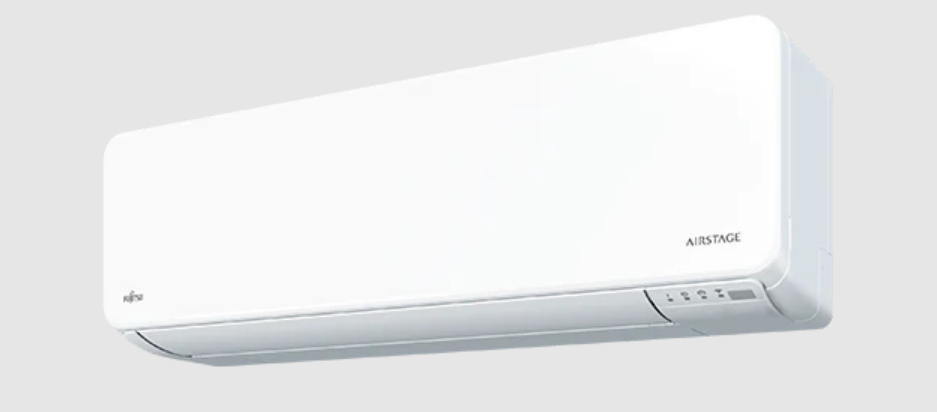

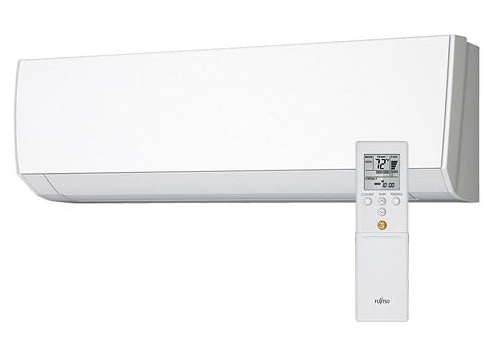
Fujitsu ASU18RLF Wall Mounted AC Unit
SAFETY PRECAUTIONS
- Do not attempt to install this air conditioner by yourself.
- This air conditioner contains no user-serviceable parts. Always consult authorised service personnel for repairs.
- When moving, consult authorised service personnel for the disconnection and installation of the air conditioner.
- Do not become excessively chilled by staying for many hours in the direct cooling air flow.
- Do not insert fingers or objects into the outlet port or intake grille.
- Do not start and stop the air conditioner operation by disconnecting the power supply cord.
- Take care not to damage the power supply cord.
- In the event of a malfunction (burning smell, etc.), immediately stop operation, turn off the breaker, and consult authorised service personnel.
FEATURES AND FUNCTIONS
INVERTER
At the start of operation, a large amount of power is used to bring the room quickly to the desired temperature. Afterwards, the unit automatically switches to a low power setting for economical and comfortable operation.
WIRELESS REMOTE CONTROLLER
The Wireless Remote Controller allows convenient control of air conditioner operation.
ECONOMY OPERATION
When the ECONOMY operation mode is operated, the room temperature will be a little higher than the set temperature under cooling mode and lower than the set temperature under heating mode. Therefore, the ECONOMY mode is able to save more energy than other normal modes.
AUTO CHANGEOVER
The operation mode (cooling, dry, heating) is switched automatically to maintain the set temperature, and the temperature is kept constant at all times.
MINIMUM HEAT OPERATION
The room temperature can be maintained at 50°F so as to prevent the room temperature from falling too far.
PROGRAM TIMER
The program timer allows you to integrate OFF timer and ON timer operations in a single sequence. The sequence can involve 1 transition from OFF timer to ON timer, or from ON timer to OFF timer, within a 24-hour period.
SLEEP TIMER
When the SLEEP button is pressed during Heating mode, the air conditioner’s thermostat setting is gradually lowered during the period of operation; during cooling mode, the thermostat setting is gradually raised during the period of operation. When the set time is reached, the unit automatically turns off.
HORIZONTAL AIRFLOW: COOLING/DOWNWARD AIRFLOW: HEATING
For cooling, use a horizontal air flow so the cool air does not blow directly on the occupants in the room. For heating, use downward airflow to send powerful, warm air to the floor and create a comfortable environment.
OMNI-DIRECTIONAL AIRFLOW (SWING OPERATION)
3-dimensional control over air direction swing is possible through dual use of both an UP/DOWN air direction swing and a RIGHT/LEFT air direction swing. Since UP/DOWN air direction flaps operate automatically according to the operating mode of the unit, it is possible to set the air direction based on the operating mode.
REMOVABLE INTAKE GRILLE
The indoor unit’s INTAKE GRILLE can be removed for easy cleaning and maintenance.
MILDEW-RESISTANT FILTER
The AIR FILTER has been treated to resist mildew growth, thus allowing cleaner use and easier care.
SUPER QUIET OPERATION
When the FAN button is used to select QUIET, the unit begins super-quiet operation; the indoor unit’s airflow is reduced to produce quieter operation.
POLYPHENOL CATECHIN AIR CLEANING FILTER
The polyphenol catechin air cleaning filter uses static electricity to clean fine particles and dust in the air, such as tobacco smoke and plant pollen, that are too small to see.
The filter contains catechin, which is highly effective against various bacteria by suppressing the growth of the bacteria adsorbed to the filter.
Note that when the air cleaning filter is installed, the amount of air produced decreases, causing a slight decrease in the indoor unit’s performance.
NEGATIVE AIR IONS DEODORIZING FILTER
It comprises pottery super micro particles which can produce negative air ions, having the effect of deodorising, and can absorb and remove the peculiar smell at home.
NAME OF PARTS
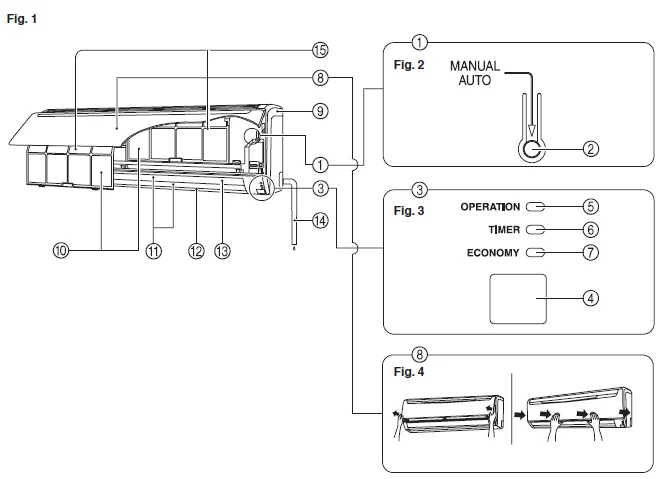
- Operating Control Panel (Fig. 2)
- MANUAL AUTO button: When the MANUAL AUTO button is pressed for more than 10 seconds, the forced cooling operation will start. The forced cooling operation is used at the time of installation. Only for authorized service personnel’s use. When the forced cooling operation starts by any chance, press the START/STOP button to stop the operation. Please press the button at the FILTER INDICATOR RESET.
- Indicator (Fig. 3)
- Remote Control Signal Receiver
- OPERATION Indicator Lamp (green)
- TIMER Indicator Lamp (orange): If the TIMER indicator lamp flashes when the timer is operating, it indicates that a fault has occurred with the timer setting (See Page 18 Auto Restart).
- ECONOMY Indicator Lamp (green): ECONOMY indicator lamp lights when ECONOMY OPERATION and MINIMUM HEAT OPERATION are operating.
- INTAKE GRILLE (Fig.4)
- Front Panel
- Air Filter
- Airflow Direction Louver
- Power Diffuser
- Right-Left Louver (behind Airflow Direction Louver)
- Drain Hose
- Air Cleaning Filter
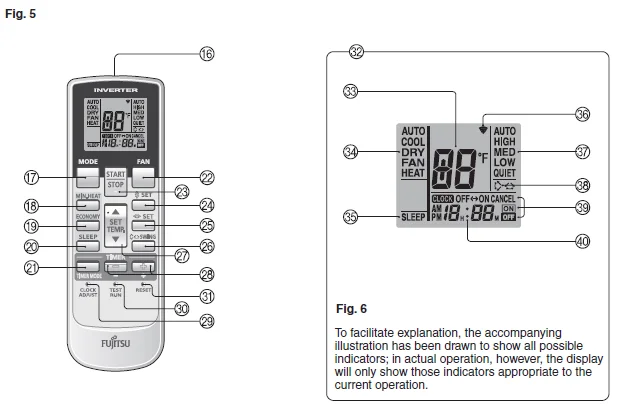
- Signal Transmitter
- MODE button
- MIN.HEAT button
- ECONOMY button
- SLEEP button
- TIMER MODE button
- FAN button
- START/STOP button
- SET button (Vertical)
- SET button (Horizontal)
- SWING button
- SET TEMP. button
- TIMER SET button
- CLOCK ADJUST button
- TEST RUN button: This button is used when installing the air conditioner, and should not be used under normal conditions, as it will cause the indoor unit’s thermostat function to operate incorrectly. If this button is pressed during normal operation, the indoor unit will switch to test operation mode, and the Indoor Unit’s OPERATION Indicator Lamp and TIMER Indicator Lamp will begin to flash simultaneously. To stop the test operation mode, press the START/STOP button to stop the air conditioner.
- RESET button
- Remote Controller Display(Fig.6)
- Temperature SET Display
- Operation Mode Display
- SLEEP TIMER Display
- Transmit Indicator
- Fan Speed Display
- SWING Display
- Timer Mode Display
- Clock Display
PREPARATION
Turn on the Power
Turn on the circuit breaker
Load Batteries (AAA/R03/LR03 × 2)
- Press and slide the battery compartment lid on the reverse side to open it. Slide in the direction of the arrow while pressing the
 mark.
mark. - Insert batteries. Be sure to align the battery polarities correctly.
- Close the battery compartment lid.
 mark.
mark.Set the Current time
- Press the CLOCK ADJUST button. Use the tip of a ball-point pen or other small object to press the button.
- Use the TIMER SET buttons to adjust the clock to the current time. – button: Press to advance the time. + button: Press to reverse the time. (Each time the buttons are pressed, the time will be advanced/reversed in 1-minute increments; hold the buttons depressed to change the time quickly in 10-minute increments.)
- Press the CLOCK ADJUST button again. This completes the time setting and starts the clock.
To Use the Remote Controller
- The Remote Controller must be pointed at the signal receiver to operate correctly.
- Operating Range: About 23ft (7 m).
- When a signal is properly received by the air conditioner, a beeping sound will be heard.
- If no beep is heard, press the Remote Controller button again.
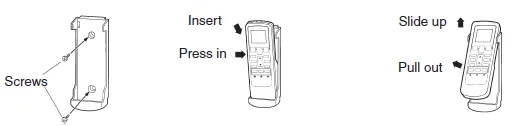
Remote Controller Holder
- Mount the Holder.
- Set the Remote Controller.
- To remove the Remote Controller (when in use at hand).

To Select Mode Operation
- Press the START/STOP button. The indoor unit’s OPERATION Indicator Lamp (green) will light. The air conditioner will start operating.
- Press the MODE button to select the desired mode.
Each time the button is pressed, the mode will change in the following order.
About 3 seconds later, the entire display will reappear.
To Set the Thermostat
Press the SET TEMP. Button.
- ∧ Button: Press to raise the thermostat setting.
- ∨ Button: Press to lower the thermostat setting.
Thermostat setting range:
- AUTO ………………………………64-88 °F
- Heating …………………………….60-88 °F
- Cooling/Dry ………………………64-88 °F
The thermostat cannot be used to set room temperature during the FAN mode (the temperature will not appear on the Remote Controller’s Display).
About 3 seconds later, the entire display will reappear.
The thermostat setting should be considered a standard value, and may differ somewhat from the actual room temperature.
To Set the Fan Speed
Press the FAN button.
Each time the button is pressed, the fan speed changes in the following order:
About 3 seconds later, the entire display will reappear.
When set to AUTO:
Heating: Fan operates so as to optimally circulate warmed air.
However, the fan will operate at very low speed when the temperature of the air issued from the indoor unit is low.
- Cooling: As the room temperature approaches that of the thermostat setting, the fan speed becomes slower.
- Fan: The fan runs at the low fan speed. The fan will operate at a very low setting during Monitor operation and at the start of the Heating mode.
SUPER QUIET Operation
When set to Quiet:
SUPER QUIET operation begins. The indoor unit’s airflow will be reduced for quieter operation.
- SUPER QUIET operation cannot be used during Dry mode. (The same is true when dry mode is selected during AUTO mode operation.)
- During Super Quiet operation, Heating and Cooling performance will be reduced somewhat. If the room does not warm up/ cool down when using SUPER QUIET Operation, please adjust the air conditioner’s Fan Speed.
TIMER OPERATION
Before using the timer function, be sure that the Remote Controller is set to the correct current time.
To use the ON timer or the OFF timer
- Press the START/STOP button (if the unit is already operating, proceed to step 2). The indoor unit’s OPERATION Indicator Lamp (green) will light.
- Press the TIMER MODE button to select the OFF timer or ON timer operation. Each time the button is pressed, the timer function changes in the following order:


The indoor unit’s TIMER Indicator Lamp (orange) will light.
- Use the TIMER SET buttons (Fig. 5 R) to adjust the desired OFF time or ON time. Set the time while the time display is flashing (the flashing will continue for about 5 seconds).
- + button: Press to advance the time.
- – button: Press to reverse the time.
About 5 seconds later, the entire display will reappear.
SLEEP TIMER OPERATION
Unlike other timer functions, the SLEEP timer is used to set the length of time until the air conditioner’s operation is stopped.
To Use the SLEEP Timer
While the air conditioner is operating or stopped, press the SLEEP button.
The indoor unit’s OPERATION Indicator Lamp (green) lights and the TIMER Indicator Lamp (orange) light.
To Change the Timer Settings
Press the SLEEP button once again and set the time using the TIMER SET (+/-) buttons.
Set the time while the Timer Mode Display is flashing (the flashing will continue for about 5 seconds)
- + button: Press to advance the time.
- – button: Press to reverse the time.
About 5 seconds later, the entire display will reappear.
About the SLEEP Timer
To prevent excessive warming or cooling during sleep, the SLEEP timer function automatically modifies the thermostat setting in accordance with the set time setting. When the set time has elapsed, the air conditioner completely stops.
During Heating operation:
When the SLEEP timer is set, the thermostat setting is automatically lowered 2 °F every 30 minutes. When the thermostat has been lowered a total of 8 °F, the thermostat setting at that time is maintained until the set time has elapsed, at which time the air conditioner automatically turns off.
SLEEP timer setting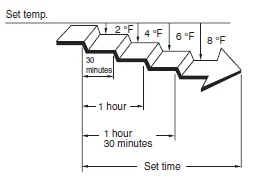
During Cooling/Dry operation:
When the SLEEP timer is set, the thermostat setting is automatically raised 2 °F every 1 hour. When the thermostat has been raised a total of 4 °F, the thermostat setting at that time is maintained until the set time has elapsed, at which time the air conditioner automatically turns off.
SLEEP timer setting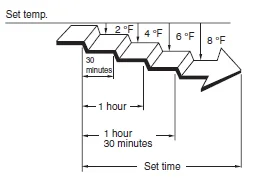
CLEANING AND CARE
- Before cleaning the air conditioner, be sure to turn it off and disconnect the Power Supply Cord.
- Be sure the Intake Grille (Fig. 1 8) is installed securely.
- When removing and replacing the air filters, be sure not to touch the heat exchanger, as personal injury may result.
Cleaning the Intake Grille
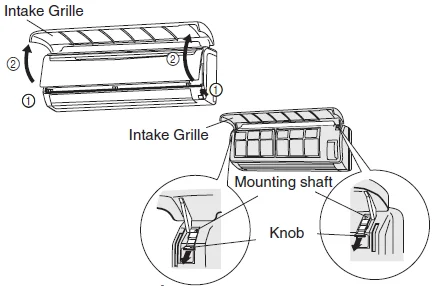
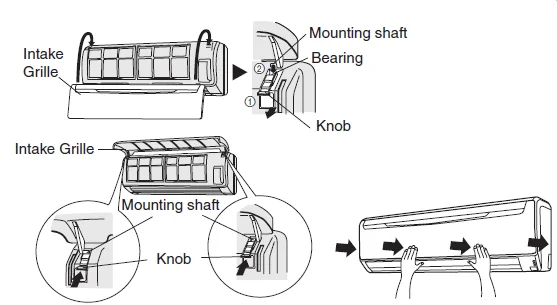
Remove the Intake Grille.
- Place your fingers at both lower ends of the grille panel, and lift forward; if the grille seems to catch partway through its movement, continue lifting upward to remove.
- Pull past the intermediate catch and open the Intake Grille wide so that it becomes horizontal.

Clean with water.
Remove dust with a vacuum cleaner; wipe the unit with warm water, then dry with a clean, soft cloth.
Replace the Intake Grille.
- Pull the knobs all the way.
- Hold the grille horizontal and set the left and right mounting shafts into the bearings at the top of the panel.
- Press the place where the arrow on the diagram indicates and close the Intake Grille.

- When used for extended periods, the unit may accumulate dirt inside, reducing its performance. We recommend that the unit be inspected regularly, in addition to your own cleaning and care. For more information, consult authorized service personnel.
- When cleaning the unit’s body, do not use water hotter than 104°F, harsh abrasive cleansers, or volatile agents like benzene or thinner.
- Do not expose the unit body to liquid insecticides or hairsprays.
- When shutting down the unit for 1 month or more, first allow the fan mode to operate continuously for half a day to allow internal parts to dry thoroughly.
Cleaning the Air Filter
Open the Intake Grille and remove the air filter.
Lift up the air filter’s handle, disconnect the 2 lower tabs, and pull out.
Remove dust with a vacuum cleaner or by washing.
After washing, allow to dry thoroughly in a shaded place.
Replace the Air Filter and close the Intake Grille.
- Align the sides of the air filter with the panel, and push in fully, making sure the 2 lower tabs are returned properly to their holes in the panel.
- Close the Intake Grille.
(For purposes of example, the illustration shows the unit without the Intake Grille installed.)
- Dust can be cleaned from the air filter either with a vacuum cleaner or by washing the filter in a solution of mild detergent and warm water. If you wash the filter, be sure to allow it to dry thoroughly in a shady place before reinstalling.
- If dirt is allowed to accumulate on the air filter, air flow will be reduced, lowering operating efficiency and increasing noise.
- During periods of normal use, the Air Filters should be cleaned every 2 weeks.
- Don’t operate the air conditioner with the intake grille.
TROUBLESHOOTING
In the event of a malfunction (burning smell, etc.), immediately stop operation, turn off the electrical breaker, and consult authorized service personnel.
Merely turning off the unit’s power switch will not completely disconnect the unit from the power source. Always be sure to turn off the electrical breaker to ensure that power is completely off.
Before requesting service, perform the following checks: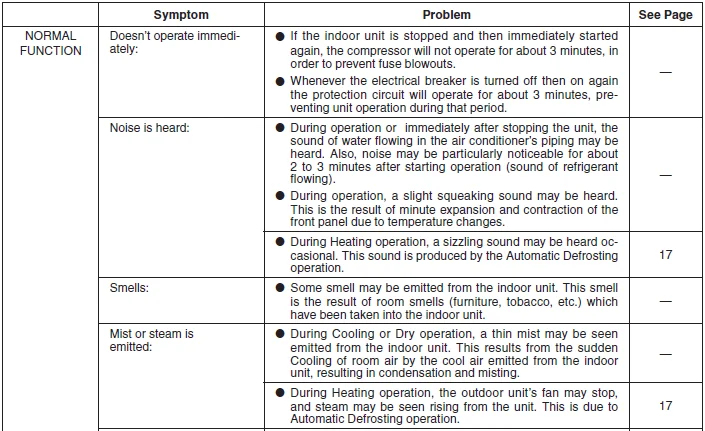
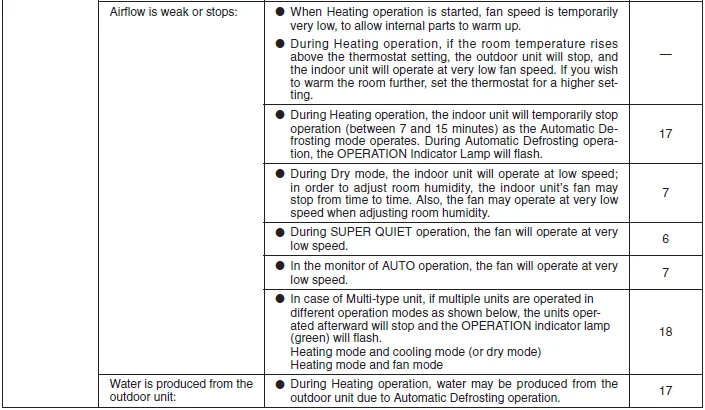
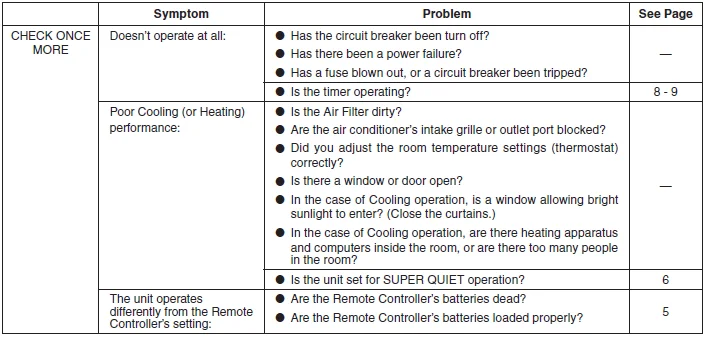
If the problem persists after performing these checks, or if you notice burning smells, or the OPERATION Indicator Lamp and the TIMER Indicator Lamp flash and the ECONOMY Indicator Lamp flashes fast, immediately stop operation, turn off the electrical breaker, and consult authorized service personnel.
OPERATING TIPS
Operation and Performance
Heating Performance
- This air conditioner operates on the heat-pump principle, absorbing heat from outdoor air and transferring that heat to the indoor unit. As a result, the operating performance is reduced as outdoor air temperature drops. If you feel that insufficient heating performance is being produced, we recommend that you use this air conditioner in conjunction with another kind of heating appliance.
- Heat-pump air conditioners heat your entire room by recirculating air throughout the room, with the result that some time may be required after first starting the air conditioner until the room is heated.
Microcomputer-controlled Automatic Defrosting
- When using the Heating mode under conditions of low outdoor temperature and high humidity, frost may form on the outdoor unit, resulting in reduced operating performance. In order to prevent this kind of reduced performance, this air conditioner is equipped with a Microcomputer-controlled Automatic Defrosting function. If frost forms, the air conditioner will temporarily stop, and the defrosting circuit will operate briefly (for about 7-15 minutes). During the Automatic Defrosting operation, the OPERATION Indicator Lamp (green) will flash.
- After the heating operation stops, if frost forms on the outdoor unit, the unit will start the Automatic Defrosting operation. At this time, the outdoor unit will automatically stop after operating for a few minutes.
For more Manuals by Fujitsu, visit ManualsLibraryy
Fujitsu ASU18RLF Wall Mounted AC Unit-FAQs
How long does it take to cool a house?
A well-functioning AC lowers room temperature by about 1°C per hour. For example, cooling from 80°F to 72°F takes roughly 8 hours.
Should I use auto mode or manual?
Auto mode saves energy, provides consistent comfort, and reduces wear on the system compared to leaving it on manual “On.”
Why is my AC not cooling properly?
Possible causes: low refrigerant, dirty filters, or incorrect mode/temperature settings.
Can I run my AC on dry mode all day?
No. Continuous dry mode can lower humidity too much, causing dry eyes, sore throat, and breathing issues. Maintain indoor humidity between 30–50%.
When should I use ECO mode?
ECO mode is ideal at night or when away from home, saving energy while maintaining comfort.
What is the best setting for inverter ACs?
Set 24–25°C for energy-efficient cooling without sacrificing comfort.
How do I clean the AC filter?
Remove the front panel, take out the filter, rinse it under lukewarm water, let it dry completely, and reinstall.
How does a Fujitsu air conditioner work?
Fujitsu ACs pull in warm air through the intake, pass it over cold refrigerant-filled coils, and push cooled air back into the room. The refrigerant absorbs heat, turning from liquid to gas, and is then cooled again.
What is the 3-minute rule for ACs?
Always wait at least 3 minutes after turning off the AC before restarting it. This allows the refrigerant pressure to stabilize and protects the compressor.
What is the best temperature setting for a Fujitsu AC?
Set 25–27°C for cooling in summer and 18–21°C for heating in winter for comfort and energy efficiency.