
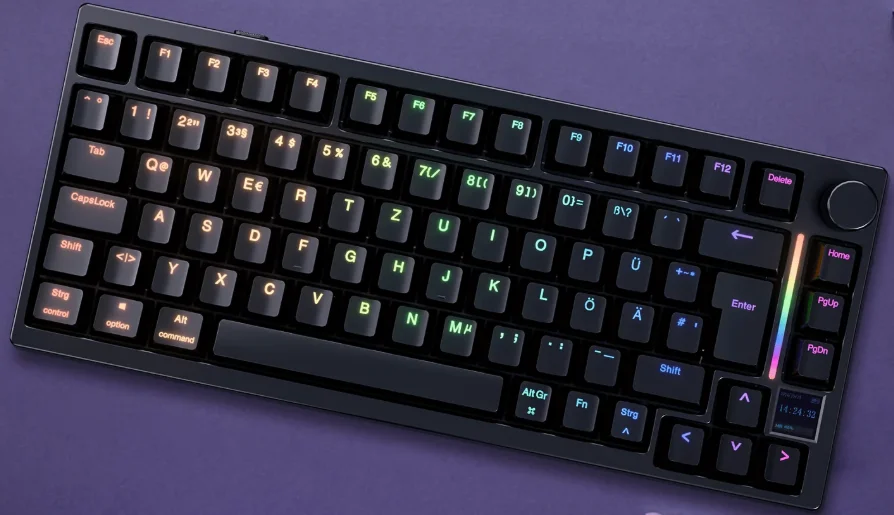

GamaKay TK75HE-V2 Hall-Effect Keyboard
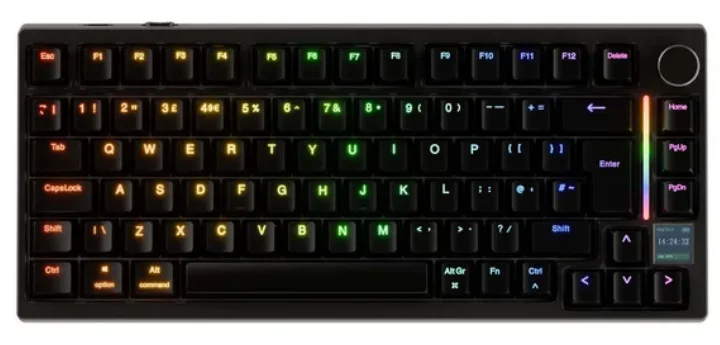
WINDOWS/ MAC OS
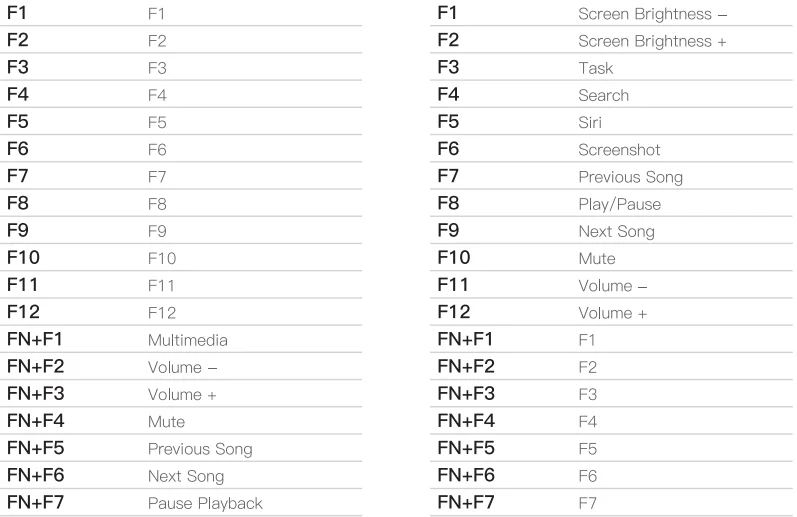
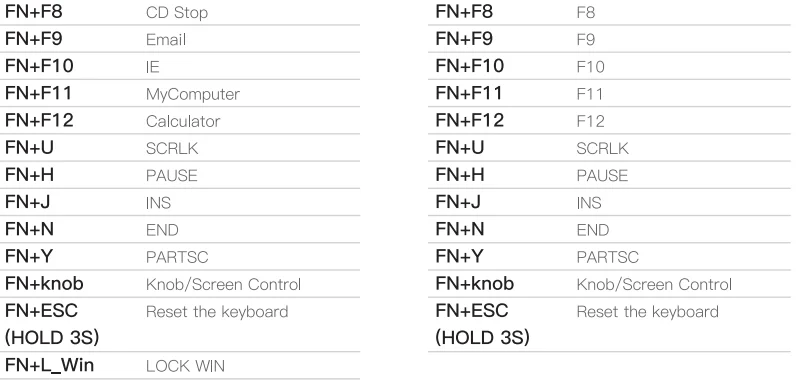
Keyboard lighting setting
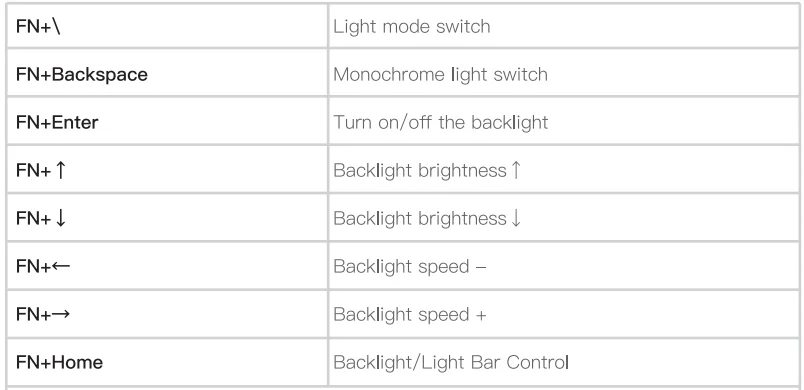
Dual light control: The keyboard’s main backlight/side light bar can be controlled separately.
Default key lighting control.
- Press FN+Home to switch main backlight/light bar control.
- Same key combination as the above table after switching.
Notes: Gamakay keyboards support full customization of light colors and key values. This can be done in two ways:
- Download the driver from the official website www.gamakay.com/pages/downloads.
- Use the driver directly at www.qmk.top.
How to use the display:
- Turn the knob left: display selects upward flip.
- Turn the knob right: the display selects downward.
- Press the knob to confirm the display’s content.
- Toggle knob default setting — FN + Press the knob.
- Default function of knob: Volume + / Volume – / Toggle Mute.
On-board Layer Setting

- Users can set three different settings (different travelling accuracies, lights, keys, key combinations, etc.).
- Three different functions can be set up in three on-board layers, and the settings can be switched freely.
- The three on-board layers provide users with more customisation and playability. Users can switch between the different layers via FN+Z/X/C to set the desired travel accuracy, lighting, and key settings to meet daily office and gaming needs.
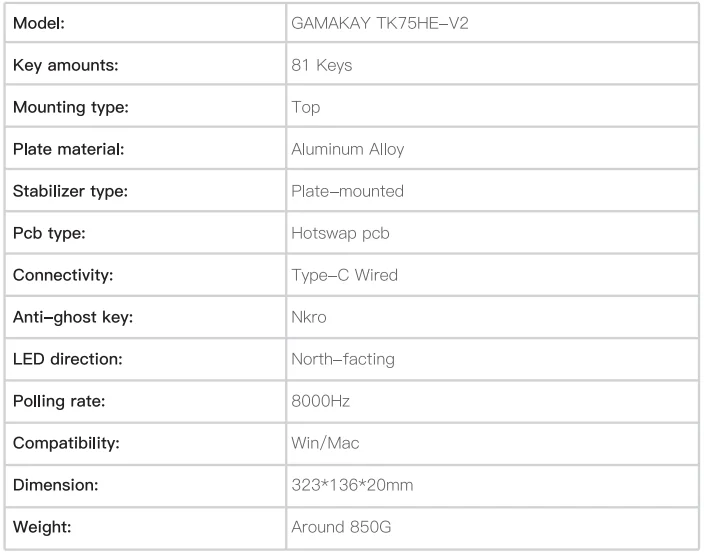
SPECS
For More Manuals By GamaKay, Visit ManualsLibraryy.
GamaKay TK75HE-V2 Hall-Effect Keyboard -FAQs
What is the GamaKey TK75HE-V2 Hall-Effect keyboard used for?
The GamaKey TK75HE-V2 is primarily used for competitive gaming, especially FPS and esports titles where precision and speed matter. Thanks to Hall Effect technology, it detects key presses using magnetic sensors instead of physical contacts. This allows accurate measurement of how far a key is pressed, enabling faster response times, smoother movement control, and customizable actuation that gives gamers an edge in fast-paced scenarios.
How does a Hall-Effect keyboard like the TK75HE-V2 work?
A Hall-Effect keyboard works by placing a magnet inside each switch and a Hall sensor on the PCB. When a key is pressed, the magnet moves closer to the sensor, changing the magnetic field. The keyboard translates this change into an input signal. Because there’s no physical contact between metal parts, the detection is more precise, consistent, and durable compared to traditional mechanical switches.
What are the advantages of Hall-Effect switches on the TK75HE-V2?
Hall-Effect switches offer several advantages, including adjustable actuation points, rapid trigger functionality, and longer lifespan. Since there’s no metal contact, wear and tear are significantly reduced. This results in smoother keystrokes, consistent performance over time, and quieter operation. For gamers, the biggest benefit is fine-tuned control, allowing faster key resets and more responsive inputs during intense gameplay.
Is the GamaKey TK75HE-V2 good for FPS and esports gaming?
Yes, the GamaKey TK75HE-V2 is well-suited for FPS and esports gaming. Features like adjustable actuation, rapid trigger, and high polling rates help players react faster and maintain precise control. These benefits are especially noticeable in movement-heavy games where strafing, counter-movement, and quick actions matter. The Hall-Effect design also ensures consistent performance even during long competitive sessions.
How do you know if the TK75HE-V2 is a Hall-Effect keyboard?
You can identify the TK75HE-V2 as a Hall-Effect keyboard by its switch technology and software features. It uses magnetic switches instead of traditional mechanical contacts and offers adjustable actuation settings through software. Physically, each switch contains a magnet, while the PCB includes Hall sensors. These characteristics distinguish it clearly from standard mechanical keyboards.
Does the GamaKey TK75HE-V2 require special Hall-Effect switches?
Yes, Hall-Effect keyboards like the TK75HE-V2 require dedicated Hall-Effect switches designed to work with magnetic sensors. Standard mechanical switches are not compatible because they rely on metal contacts to register keystrokes. The keyboard’s PCB, firmware, and switches are all designed as a system, so only compatible Hall-Effect switches can be used for proper functionality and performance.
What is the actuation point on the GamaKey TK75HE-V2?
The actuation point on the GamaKey TK75HE-V2 is adjustable rather than fixed. Users can customize how far a key needs to be pressed before it registers an input. This flexibility allows players to choose ultra-light actuation for faster response or deeper actuation for better control and typing accuracy. Adjustable actuation is one of the key benefits of Hall-Effect keyboards.
Are there any disadvantages to Hall-Effect keyboards like the TK75HE-V2?
While Hall-Effect keyboards offer many advantages, they do have some drawbacks. They are generally more expensive than traditional mechanical keyboards and offer fewer switch customization options. Replacement parts can also be harder to find. Additionally, users who prefer classic mechanical switch feel may need time to adjust to the smoother, contactless keystroke experience.
Is the GamaKey TK75HE-V2 suitable for typing as well as gaming?
Yes, the GamaKey TK75HE-V2 works well for both gaming and typing. Its smooth, consistent keystrokes and adjustable actuation allow users to tune the keyboard for comfort and accuracy. While it’s clearly optimized for gaming performance, many users find it comfortable for long typing sessions once they adjust the actuation settings to their personal preference.
What is the polling rate of the GamaKey TK75HE-V2?
The GamaKey TK75HE-V2 features a high polling rate designed to minimize input latency during gaming. A higher polling rate means the keyboard reports keypress data to the computer more frequently, resulting in faster and more responsive input. This is especially important for competitive FPS and esports players, where even small delays can impact performance. Combined with Hall-Effect switches, the high polling rate helps ensure smooth, near-instant key registration.