

GE Appliances UNC15NPWII Nugget Ice Maker
Packaging
Remove Packaging
IMPORTANT: Do not remove any permanent instruction labels inside your ice machine or the Tech Sheet that is fastened behind the kickplate.
- Remove tape and any labels from your ice maker before using (except the model and serial number label).
To remove any remaining tape or glue, rub the area briskly with your thumb. Tape or glue residue can also be easily removed by rubbing a small amount of liquid dish soap over the adhesive with your fingers. Wipe with warm water and dry. - Do not use sharp instruments, rubbing alcohol, flammable fluids, or abrasive cleaners to remove tape or glue. These products can damage the surface of your ice maker. For more information, see Important Safety Instructions.
Controls
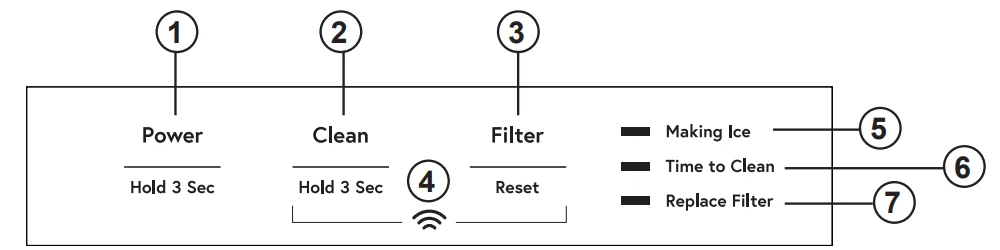
- POWER – Press and hold for 3 seconds to turn icemaking on. The Making Ice Indicator will turn on. Press and hold for 3 seconds to turn icemaking off. (If the icemaker is making ice when turned off, the Making Ice indicator will flash for 1 to 3 minutes to allow the icemaker to complete the icemaking process before turning off. The icemaker will also drain any water in the tank every time it is turned off.) If during icemaking, you need to turn off your product immediately, press and hold the “Power” button for 3 seconds again.
- CLEAN – Press and hold for 3 seconds to start the cleaning process. (See Care and Cleaning)
- FILTER RESET – Press after changing the filter to reset the filter timer. (See GSWF Water Filter)
- WiFi – Press and hold the Clean and Filter buttons at the same time. The WiFi symbol will start blinking. (See WiFi section)
- MAKING ICE – Indicator will be on when the unit is within ice-making mode.
- TIME TO CLEAN – Indicator will turn on after 5 months, indicating it is time to order cleaner. The indicator will flash after 6 months, indicating it is time to clean the machine. (See Care and Cleaning)
- REPLACE FILTER – Indicator will illuminate when it is time to order a filter. The indicator will flash when it is time to replace the filter. (See GSWF Water Filter)

Sabbath Mode
The Sabbath Mode was designed for use on the Jewish Sabbath and Holidays. The icemaker will not make ice during the Sabbath Mode. If Sabbath Mode is entered while making ice, icemaking will continue for one to two minutes to clear out any ice that is currently in the system. Icemaking will start again at the end of the Sabbath Mode. If the icemaker is equipped with a drain pump, it will continue to work as normal. The icemaker will exit Sabbath Mode automatically after 96 hours.
ON/OFF – To activate the Sabbath Mode, press and hold “Power” and “Filter Reset” for 3 seconds. To exit Sabbath Mode, press and hold “Power” and “Filter Reset” for 3 seconds. The “Making Ice,” “Time to Clean,” and “Replace Filter” lights will all turn on to indicate Sabbath Mode is active.
Door Alarm
An alert will sound when the door has been left open for 2 minutes. The alert stops when the door is closed. Snooze the alert by pressing any button. Disable the door alarm by pressing the “Power,” “Clean,” and “Filter Reset” buttons at the same time. To re-activate the door alarm, press the “Power,” “Clean,” and “Filter Reset” buttons at the same time.
Appliance Communication
WiFi (for customers in the United States, its territories, and Canada)
- Download the SmartHQ app.
- Available for iPhone from the Apple Store or from the link at GEAppliances.com.
- Available for Android from Google Play or from the link at GEAppliances.com.
- Select Create Account on the app.
- Enter information, and select Register. An email will be generated.
- When you receive the e-mail, select Verify Account.
- Sign in with your credentials and select Authorize to allow the app to communicate with your icemaker.
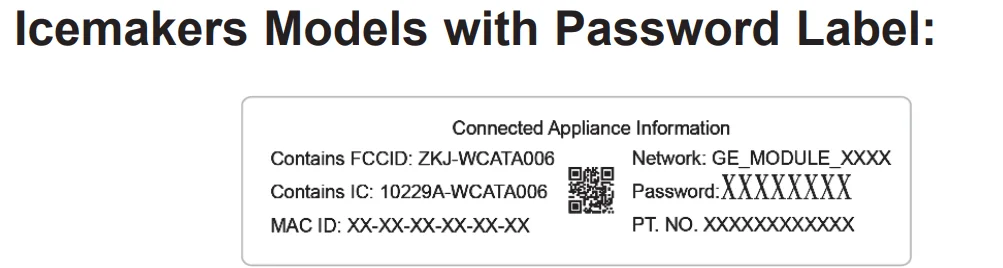
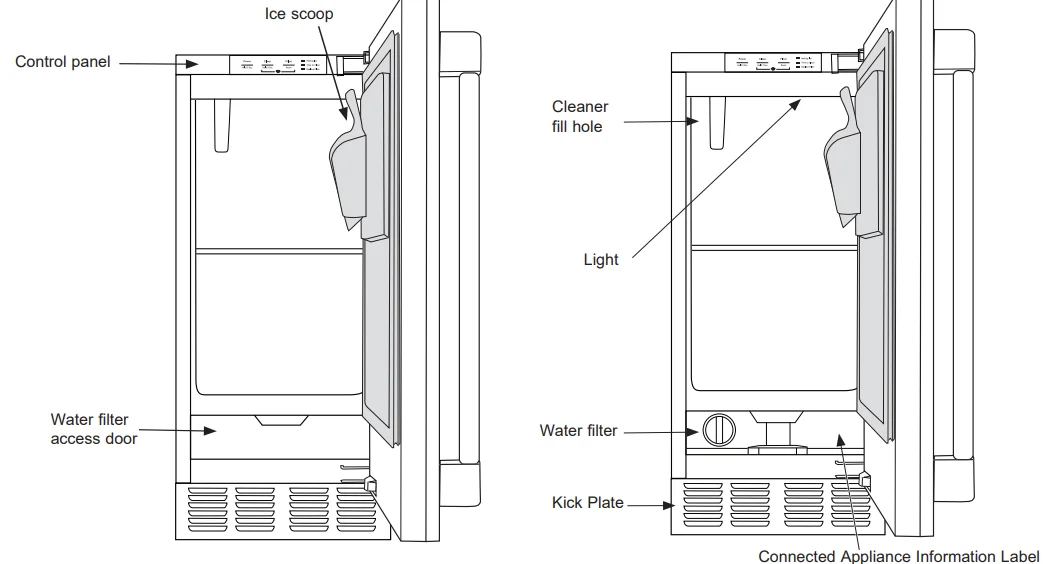
- Find the “Connected Appliance Information” label by opening the Water Filter Access Door at the bottom of the Ice Maker. Identify the label to select the right connecting method.

- Set up the app.
- Press the
 icon at the top of the screen.
 - Choose GE Appliances > Refrigeration > Under Counter Icemaker.
- The info button will show a picture of the touch display on the appliance. Select OK.
- Select Next.
- Press WiFi Connect on the control. Press and hold the Clean and Filter buttons at the same time. The WiFi symbol will start flashing on the display.
- Select Next in the app.
- Find the password on the “Connected Appliance Information” label.
- Enter the password into the app.
- Connect to the icemaker’s WiFi module in the phone’s WiFi settings, then return to the SmartHQ app and select Next.

- The WiFi will have the format “GE_MODULE_XXXX”. The module number can also be found on the label.
- Connect to the home WiFi network and type in the home WiFi password.
- Press WiFi Connect on the control. Press and hold the Clean and Filter buttons at the same time. The WiFi symbol will start flashing on the display.
- Set up the app.
- Press the
 icon at the top of the screen.
 - Icemaker will scan nearby automatically. If the mobile phone Bluetooth is off, click “GO TO SETTINGS” to turn it on first. Press Scan in the app after that again.
- Select “Under Counter Ice Maker” for connecting.
- The App will search for available WiFi networks automatically.
- Select the home WiFi network and type in the home WiFi password.
- If all check marks appear and the user gets a screen that says the device is connected, the device has been successfully connected.
- If the app fails to connect, the app will display the “Oops! Something Went Wrong” screen. The user will be given possible reasons why the connection failed and the option to retry.
 icon at the top of the screen.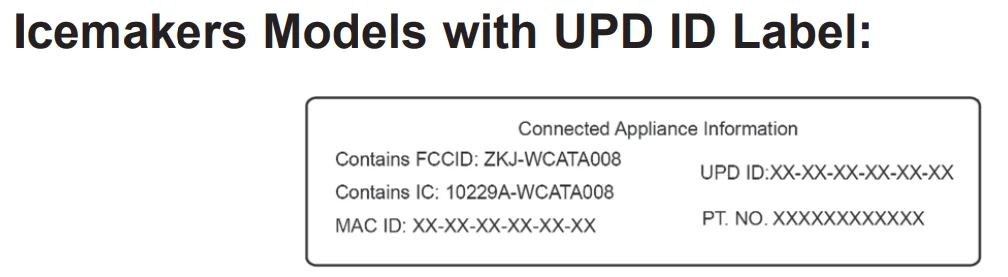
Features
Starting the ice machine
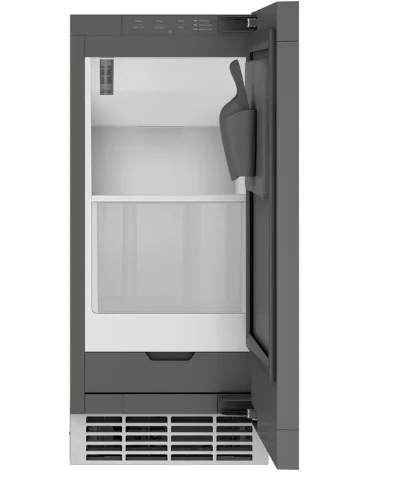
This machine takes in room temperature air at the lower right front and forces warm air out the lower left front. Restricting the airflow or operating the machine in a hot or cold environment will adversely affect the ability of the ice machine to make ice. When the door is opened, the control panel, ice-making area, and ice storage bin are visible. The scoop is located in a holder on the inside of the door.
This is a gravity drain model that must have a building drain connection below the level of the drain tube at the back of the cabinet. A pump can be installed, which can force drain water up a maximum of 8 feet, allowing it to be located where a gravity drain isn’t available. See Accessories on page 27 for more information on the drain pump.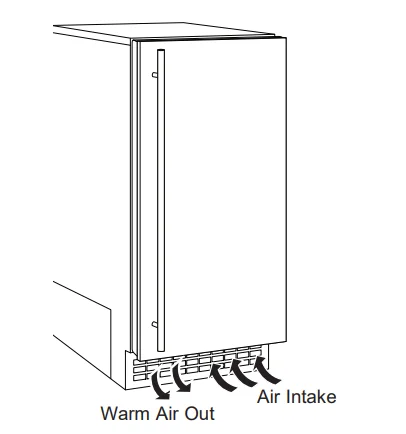
Initial Start Up
- Turn on the water supply.
- Switch on the electrical power.
- Press and hold “Power” for 3 seconds to start the machine. The “Making Ice” light will turn on.
- It will take about 20 minutes for the ice machine to begin dropping nugget ice into the storage bin. It is normal for that ice to melt and continue to melt, but at a slower rate as the bin cools. It will take about 8–10 hours to fill up the ice storage bin. The storage bin holds about 26 lbs of ice when full. Discard the first bin full of ice.
Installation Instructions
Questions? Call 833-4BODEWELL (833-426-3393) or visit our website at GEAppliances.com. In Canada, call 1.800.561.3344 or visit our website at GEAppliances.ca.
GROUNDING THE ICE MACHINE
WARNING: Electrical Shock Hazard.
Failure to follow these instructions can result in death, fire, or electrical shock. The power cord of this appliance is equipped with a 3-prong (grounding) plug, which mates with a standard 3-prong (grounding) wall outlet to minimize the possibility of electric shock hazard from this appliance. Have the wall outlet and circuit checked by a qualified electrician to make sure the outlet is properly grounded.
Where a standard 2-prong wall outlet is encountered, it is your personal responsibility and obligation to have it replaced with a properly grounded 3-prong wall outlet. DO NOT, UNDER ANY CIRCUMSTANCES, CUT OR REMOVE THE THIRD (GROUND) PRONG FROM THE POWER CORD. DO NOT USE AN ADAPTER PLUG TO CONNECT THE APPLIANCE TO A 2-PRONG OUTLET. DO NOT USE AN EXTENSION CORD WITH THIS APPLIANCE.
BEFORE YOU BEGIN
Read these instructions completely and carefully.
- IMPORTANT – Observe all governing codes and ordinances. Save these instructions for the local inspector’s use.
- Note to Installer – Be sure to leave these instructions with the consumer.
- Note to Consumer – Keep these instructions for future reference.
- Skill level – Installation of this appliance requires basic mechanical skills.
- Completion time – Installation can vary. Water Line Installation: 30 minutes.
- Proper installation is the responsibility of the installer.
- Product failure due to improper installation is not covered under the warranty.
ICE MACHINE LOCATION AND PREPARATION
This ice machine is designed to be used indoors, in a controlled environment. It is made up of two major systems: the ice-making system and the ice storage system. The ice-making system is a continuous flow that makes ice when the ice level becomes low and stops when it is full. The ice storage system is an insulated chest with a drain at the bottom for melting ice. It is not refrigerated, ensuring that the bin contains fresh ice. During ice making, nugget ice will drop into the bin at an irregular rate; sometimes there will be little ice falling, while other times a group of nuggets will fall.
IMPORTANT: Never keep anything in the ice storage bin that is not ice. Objects like wine or beer bottles are not only unsanitary, but the labels can slip off and plug up the drain.
IMPORTANT: Never allow the machine to operate without regular cleaning. The machine will last longer if it is kept clean. Regular cleaning should happen twice per year. Some water conditions will dictate even more frequent cleaning of the ice-making section, and some carpets or pets will dictate more frequent cleaning of the condenser.
Specifications
The ice machine will operate adequately within the limits, but functions best in temperatures between 60°F and 80°F.
- Minimum air temperature: 55°F (12.8°C)
- Maximum air temperature: 100°F (38°C)
- Minimum water temperature: 40°F (4.5°C)
- Maximum water temperature: 90°F (32°C)
- Minimum water pressure: 30 psi (1.06 bar)
- Maximum water pressure: 120 psi (8.27 bar)
Electrical voltage limits: See the rating plate inside the ice machine.
Utility and Operational Requirements
- This ice machine must be connected to a potable water supply. The water to this ice machine must be potable, or fit for human consumption. During ice making, some minerals will stick to the ice-making components. The higher the mineral content, the more mineral buildup will occur. Water filters are a partial help, as they will remove the suspended solids, but water treatment is needed for the dissolved solids, which are part of the water and cannot be filtered out. This machine can be supplied with reverse osmosis water, but the water conductivity must be no less than 10 microSiemens/cm. A reverse osmosis system should include post-treatment or blending to satisfy the R.O. water’s potential aggressiveness. Deionized water is not recommended and could damage the machine. Because water softeners exchange one mineral for another, softened water may not improve water conditions when used with ice machines.
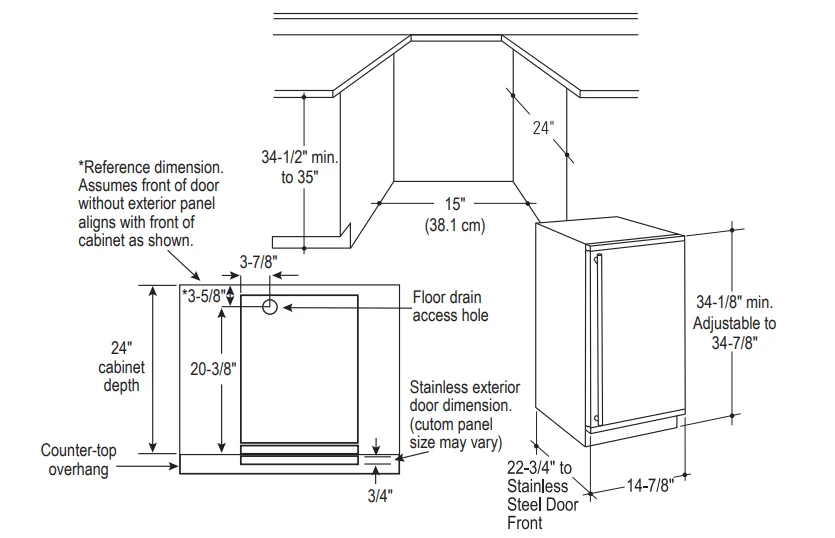
- Minimum recommended clearances: 0″ on sides, 1/8″ on top, 1 1/4″ in back.
- Minimum water pressure: 30 psi
- Maximum water pressure: 120 psi
- Minimum water temperature: 40°F
- Maximum water temperature: 90°F
This ice machine is designed to operate in a wide range of air temperatures with a minimum air temperature of 55°F and a maximum air temperature of 100°F. Although the machine will function within the listed ranges, it works best at water temperatures between 50°F and 60°F and air temperatures between 60°F and 80°F.
NOTE: Ice-making capacity goes down as the environmental temperatures go up and will be severely reduced at temperatures over 90°F. Operating a unit outside of the limits can cause problems that are not covered by the warranty and, if extreme, cause damage to the unit. This machine can be built into a cabinet. It is an air-cooled refrigeration system. Air flows in and out of it through the grille at the bottom front. The grille must not be blocked by any covering door or other obstruction.
ADVANCE PLANNING
CAUTION: Due to excessive weight, TWO PEOPLE ARE REQUIRED TO MOVE AND INSTALL THIS ICE MAKER. Failure to do so can result in back or other injury.
Cutout & Product Dimensions
Installation Notes
A drain pump is available for this ice machine. The drain pump kit number is UPK4 and is available at GEApplianceparts.com or by calling 877-959-8688. In Canada, visit GEAppliances.ca or call 800.561.3344.
- Built-in installation: If a finished floor is to be installed in the area after the ice machine has been built in, shims of the expected thickness of the floor should be installed under the unit to keep the machine level with the planned floor level. NOTE: The water connection is at the back and adds a few inches to the cabinet depth.
- Installation on a slab: You will need to install a drain pump to the appliance and pump the water to the point of drainage. See Accessories. Pumps will pump up to 8 feet high.
- Installation over a crawl space or basement: If there is not enough room behind the machine for a drain/waste receptacle, the drain will have to be below the floor.
NOTE: When installed in a corner, the door swing may be limited due to the handle’s contact with the wall or cabinet face. A water supply is required. Water supplies vary in the degree of mineral content. High mineral content water will require more frequent maintenance. Water filtration may improve the taste of the ice as well as cut down on some of the mineral buildup.
GSWF Water Filter
Water Filter Cartridge
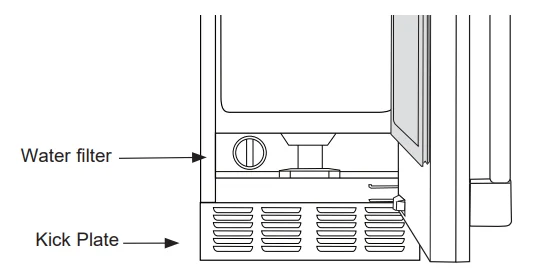
The water filter cartridge is located at the bottom of the icemaker behind the water filter access door.
When to Replace the Filter Cartridge
The “Replace Filter” indicator will come on when it is time to order a filter. This will occur after approximately 5 months or earlier after periods of heavy icemaking. To order additional filter cartridges, visit our website at gewaterfilters.com or call GE Appliances Parts and Accessories at 877.959.8688 and order filter GSWF. The “Replace Filter” indicator will flash when it is time to replace the filter. This will occur after approximately 6 months or earlier after periods of heavy icemaking.
Replacing the Filter
- Open the water filter access door by pulling on the top of the door until it flips open.
- Gently grasp the filter and slowly turn it to the left about a 1/4 turn until you can pull it out. A small amount of water may drip out of the filter.

Filter Bypass Plug
If a replacement filter cartridge is not available, a bypass plug must be used in order for the icemaker to function. To obtain a bypass plug, call 833-4BODEWELL (833-426-3393) and request WR02X11613 filter bypass plug. In Canada, call 800.561.3344. The left side panel will need to be removed to install a filter bypass plug. Be sure to unplug the icemaker before trying to install a bypass plug.
Installing the Filter
- Open the water filter access door by pulling on the top of the door until it flips open.
- Insert the filter until it aligns with the filter housing.
- Slowly turn the filter to the right until it stops. DO NOT OVERTIGHTEN. As you turn the filter, it should automatically adjust itself into position. The filter will move about a 1/4 turn or 90 degrees when in the correct position.
- Gently close the filter access door until it snaps into place.
- Press and hold the “Filter Reset” button for 3 seconds to reset the filter timer/counter.
If you have questions or need to order additional filter cartridges, visit our website at gewaterfilters.com or call GE Appliances Parts and Accessories at 877.959.8688.
Troubleshooting Tips… Before you call for service
Save time and money! Review the charts on the following pages first, and you may not need to call for service.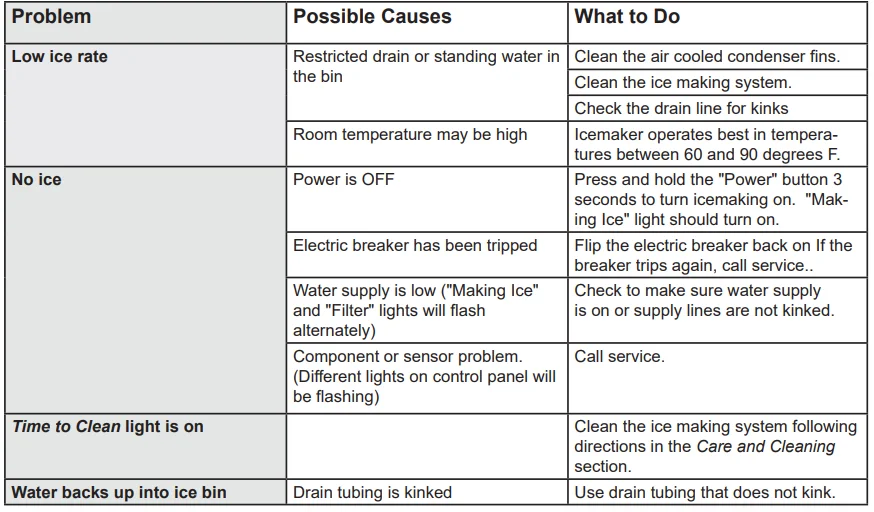
GE Appliances Ice Machine Limited Warranty
All warranty service is provided by our Factory Service Centers or an authorized Customer Care® technician. To schedule service online, visit geappliances.com/service or call GE Appliances at 833-4BODEWELL (833-426-3393). Please have your serial number and your model number available when calling for service. In Canada, visit GEAppliances.ca/en/support/service-request or call 800.561.3344.
What GE Appliances Will Not Cover:
- Service trips to your home to teach you how to use the product.
- Improper installation, delivery, or maintenance.
- Failure of the product if it is abused, misused, or used for other than the intended purpose, or used commercially.
- Replacement of house fuses or resetting of circuit breakers.
- Damage caused after delivery.
- Replacement of the light bulbs, if included.
- Damage to the product caused by accident, fire, floods, or acts of God.
- Incidental or consequential damage caused by possible defects with this appliance.
- Product not accessible to provide the required service.
EXCLUSION OF IMPLIED WARRANTIES
Your sole and exclusive remedy is product repair as provided in this Limited Warranty. Any implied warranties, including the implied warranties of merchantability or fitness for a particular purpose, are limited to one year or the shortest period allowed by law. For U.S. Customers: This limited warranty is extended to the original purchaser and any succeeding owner for products purchased for home use within the USA.
If the product is located in an area where service by a GE Appliances Authorized Servicer is not available, you may be responsible for a trip charge, or you may be required to bring the product to an Authorized GE Appliances Service location for service. In Alaska, the limited warranty excludes the cost of shipping or service calls to your home.
Some states do not allow the exclusion or limitation of incidental or consequential damages. This limited warranty gives you specific legal rights, and you may also have other rights which vary from state to state. To know what your legal rights are, consult your local or state consumer affairs office or your state’s Attorney General. Warrantor: GE Appliances, a Haier company, Louisville, KY 40225
For Customers in Canada: This limited warranty is extended to the original purchaser and any succeeding owner for products purchased in Canada for home use within Canada. In-home warranty service will be provided in areas where it is available and deemed reasonable by Mabe to provide. Warrantor Canada: MC Commercial, Inc., Burlington, Ontario, L7R 5B6
For More Manuals By GE Appliances, Visit ManualsLibraryy.
GE Appliances UNC15NPWII Nugget Ice Maker- FAQs
Where can I find the manual for my GE UNC15NPWII nugget ice maker?
You can find the official user manual on the GE Appliances website. Go to Owner Support, select Appliance Manuals, enter your model number, and download the manual.
How do I turn on the GE nugget ice maker?
Make sure the unit is plugged in and connected to water. Press the Power or Ice On/Off button on the control panel until the indicator light turns on.
Do GE ice makers turn off automatically?
Yes, most GE nugget ice makers stop producing ice when the storage bin is full and restart automatically once ice is used.
How do I clean the GE Profile nugget ice machine?
Turn off and unplug the unit. Remove the ice bin and wash it with warm, soapy water. Run a cleaning cycle using a recommended ice maker cleaner, then rinse thoroughly.
Can I turn off the ice maker without shutting off the water?
It’s not recommended for long periods. Leaving water connected while the ice maker is off can cause leaks or dry out internal components.
Why is the ice maker not filling with water but the dispenser works?
This usually indicates a blocked ice maker water line, frozen tubing, or a faulty inlet valve, even though the main dispenser still receives water.
What is the most common ice maker problem in GE appliances?
A clogged water filter is the most common issue. Over time, mineral buildup restricts water flow and stops ice production.
Where is the ice maker reset button located?
The reset button is usually found on the control panel, near the front or side of the ice maker, depending on the model design.