
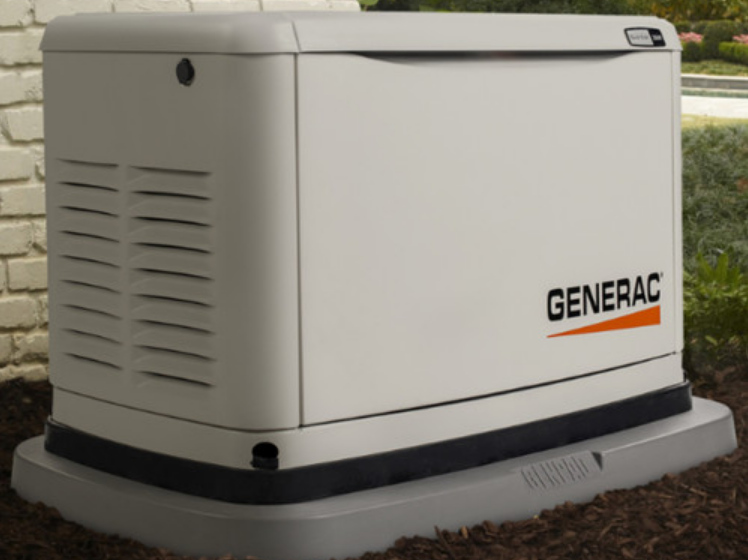

Generac 10 kW G0071720 Standby Home Generator
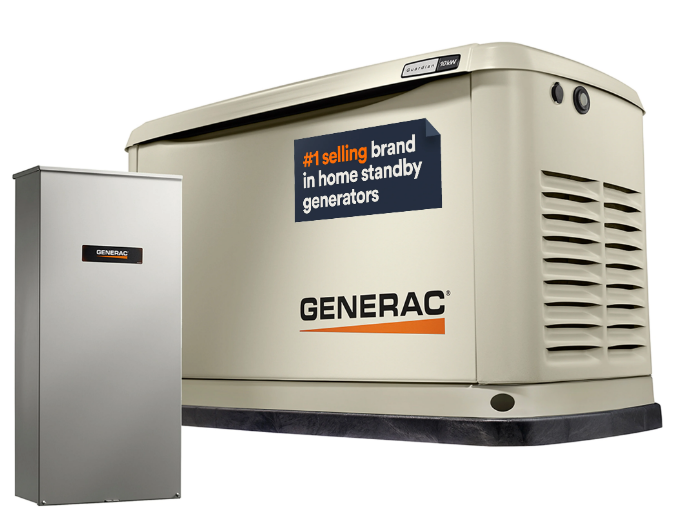
Section 1: Safety Information
Introduction
Thank you for purchasing this compact, high-performance, air-cooled, engine-driven generator. It is designed to automatically supply electrical power to operate critical loads during a utility power failure. This unit is factory-installed in an all-weather, metal enclosure intended exclusively for outdoor installation. This generator will operate using either vapor withdrawn liquid propane (LP) or natural gas (NG).
NOTE: This generator is suitable for supplying typical residential loads such as induction motors (sump pumps, refrigerators, air conditioners, furnaces, etc.), electronic components (computer, monitor, TV, etc.), lighting loads, and microwaves, when sized correctly. This unit is equipped with a Wi-Fi® module, which allows the generator owner to monitor generator status from anywhere they have Internet access.
NOTE: Wi-Fi® is a registered trademark of Wi-Fi Alliance®. The information in this manual is accurate based on products produced at the time of publication. The manufacturer reserves the right to make technical updates, corrections, and product revisions at any time without notice.
Section 2: General Information
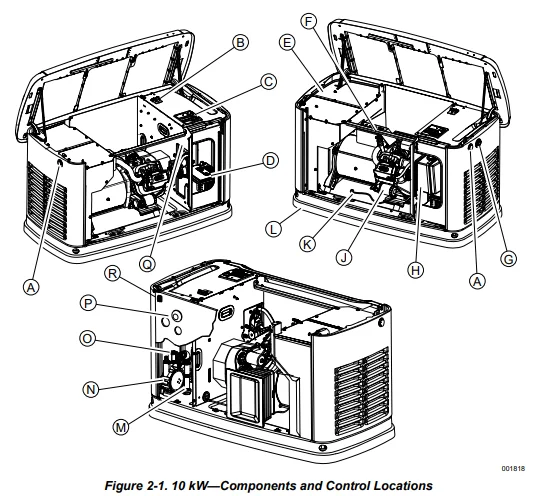
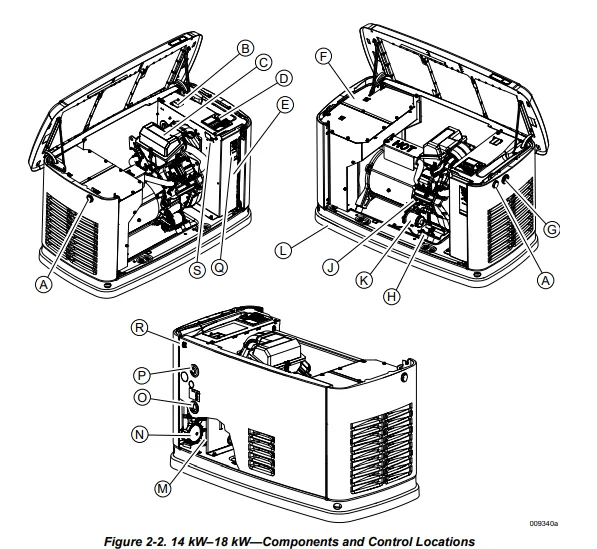
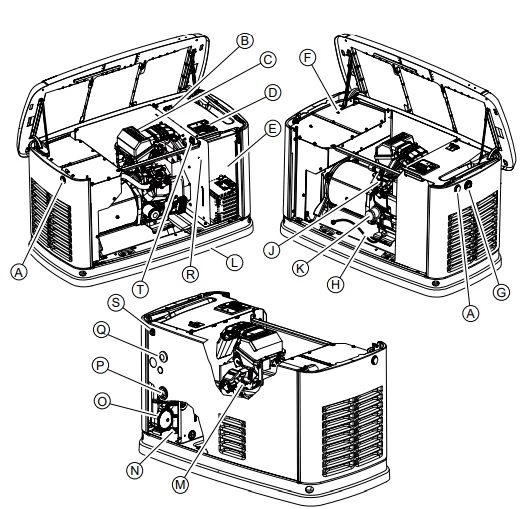
Generator Components and Control Locations
- A Lock with a cover
- B Main line circuit breaker (generator disconnect)
- C Control panel
- D Battery compartment (battery not supplied)
- E Exhaust enclosure
- F Oil fill cap/dipstick
- G Status LED indicators
- H Airbox with air cleaner
- J Oil filter
- K Oil drain hose
- L Composite base
- M Sediment trap
- N Fuel regulator
- O Fuel inlet
- P Wi-Fi module
- Q Data decal location
- R Generator emergency shut-down switch

- A Lock with a cover
- B Main line circuit breaker (generator disconnect)
- C Airbox with air cleaner
- D Control panel
- E Battery compartment (battery not supplied)
- F Exhaust enclosure
- G Status LED indicators
- H Oil drain hose
- J Oil fill cap/dipstick
- K Oil filter
- L Composite base
- M Sediment trap
- N Fuel regulator
- O Fuel inlet
- P Wi-Fi module
- Q Data decal location
- R Generator emergency shut-down switch
- S Generator emergency shut-down switch

- A Lock with a cover
- B Main line circuit breaker (generator disconnect)
- C Airbox with air cleaner
- D Control panel
- E Battery compartment (battery not supplied)
- F Exhaust enclosure
- G Status LED indicators
- H Oil drain hose
- J Oil fill cap
- K Oil filter
- L Composite base
- M Oil dipstick
- N Sediment trap
- O Fuel regulator
- P Fuel inlet
- Q Wi-Fi module
- R Data decal location
- S Generator emergency shutdown switch
- T Generator emergency shutdown switch

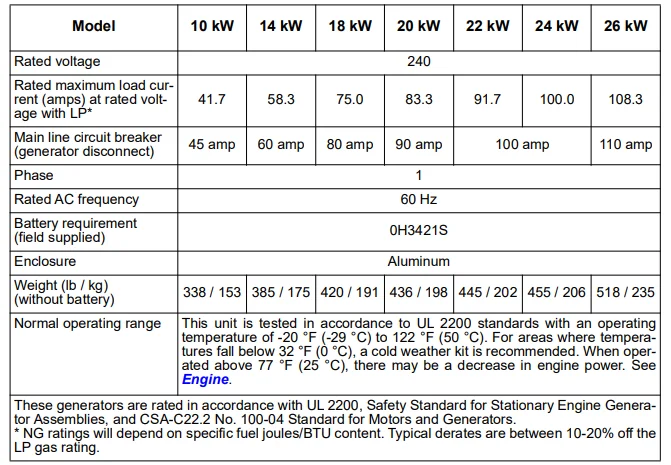
Specifications
Generator
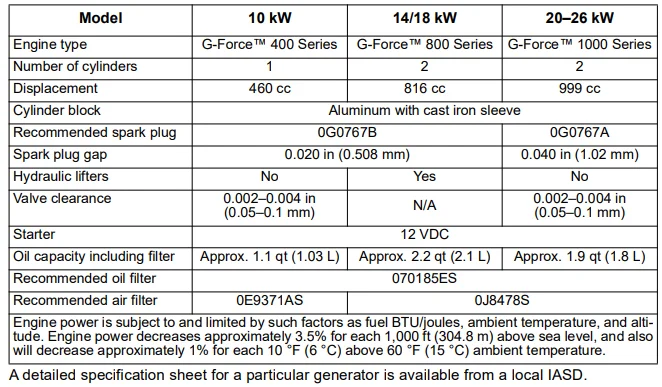
Engine
Protection Systems
The generator may need to run for long periods of time with no operator present to monitor engine or generator conditions. The generator is equipped with protection systems to automatically shut down the unit to protect against potentially damaging conditions. Some of these systems include:
Alarms:
- High Temperature
- Low Oil Pressure
- Overcrank
- Overspeed
- Overvoltage
- Undervoltage
- Overload
- Underspeed
- RPM Sensor Loss
- Controller Fault
- Wiring Error
- Stepper Overcurrent
Warnings:
- Charger Warning
- Charger Missing AC
- Low Battery
- Battery Problem
- Exercise Set Error
- USB Warning
- Download Failure
The control panel contains a display alerting the operator when a fault condition occurs. The above list is not all-inclusive. See Operation for more information about alarms and control panel operation. NOTE: A warning indicates a condition on the generator that should be addressed, but will not shut down the generator. An alarm shuts down the generator to protect the system from any damage. In the event of an alarm, an owner can clear the alarm and restart the generator before contacting an IASD. Contact an IASD if the intermittent issue occurs again.
Emissions
The United States Environmental Protection Agency (US EPA) and California Air Resources Board (CARB), for engines/equipment certified to California standards, require this engine/equipment to comply with exhaust and evaporative emissions standards. Locate the emissions compliance decal on the engine to determine applicable standards. See the included emissions warranty for emissions warranty information.
Follow the maintenance specifications in this manual to ensure the engine complies with applicable emissions standards for the duration of the product’s life. This generator is certified to operate on liquid propane vapor fuel or pipeline natural gas. The Emission Control System code is EM (Engine Modification). The Emission Control System on this generator consists of the following: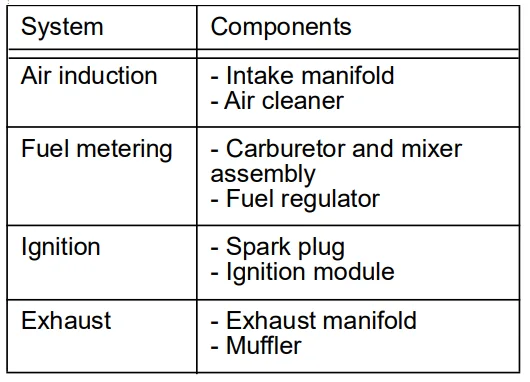
NOTE: Under U.S. EPA regulations, a mixer adjustment kit may be required when operating over 2,000 ft (609.6 m) above sea level. Contact an IASD for high altitude adjustment information. High altitude is any elevation over 2,000 ft (609.6 m).*
Fuel Requirements
The engine has been fitted with a dual-fuel carburetion system. The unit will run on NG or LP gas (vapor), but has been factory-configured to run on NG. The fuel system will be configured for the available fuel source during installation. Recommended fuels should have a BTU content of at least 1,000 BTUs per ft³ (37.26 megajoules per m³) for natural gas, or at least 2,500 BTUs per ft³ (93.15 megajoules per m³) for LP gas. NOTE: If converting to LP gas from NG, a minimum LP tank size of 250 gal (946 L) is recommended. See the installation manual for complete procedures and details.
Battery Requirements
12 volts, Group 26R wet cell 540 CCA (Part number 0H3421S) minimum, or Group 35 AGM 650 CCA minimum.
Battery Charger
The battery charger is integrated into the control panel module in all models. It operates as a smart charger, verifying output charging levels are safe and continuously optimized to promote maximum battery life. A kit is provided to install a fuse in the transfer switch for the T1 battery charger connection. Follow the installation instructions provided with the kit. NOTE: Do not use external battery chargers.
Section 3: Operation
Site Prep Verification
DANGER: Automatic start-up. Disconnect utility power and render the unit inoperable before working on it. Failure to do so will result in death or serious injury. (000191)
A generator must be installed to allow unimpeded airflow into and out of the generator. Mechanical and gravity outdoor air intake openings for air distribution and supply systems must be located not less than 10 ft (3.05 m) horizontally from the generator enclosure. See Section 401.4 in the ICC Mechanical Code for additional information.
Verify all shrubs or tall grasses within 3 ft (0.91 m) of intake and discharge louvers on the sides of the enclosure have been removed. Install the generator on high ground where water levels will not rise and endanger it. This unit must not operate in or be subjected to standing water. Verify all potential water sources, such as water sprinklers, roof runoff, rain gutter downspouts, and sump pump discharges, are directed away from the unit.
Generator Enclosure
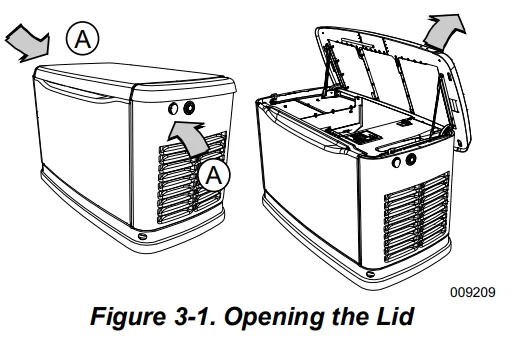
The enclosure lid is locked before shipment. A set of keys is attached to cardboard on top of the generator. An additional set of keys is attached to the pallet bracket on the front intake end of the generator. NOTE: Keys provided with this unit are intended for service personnel use only.
Opening the Lid
- Use keys to open the generator lid.
- See Figure 3-1. Two locks (A) secure the lid, one on each side. Open the protective rubber cap to access the keyhole.

- Press down on the lid above the side lock and unlock latch to correctly open the lid.
- Repeat for the other side. The lid may appear stuck if pressure is not applied from the top. NOTE: Always verify side locks are unlocked before attempting to lift the lid.
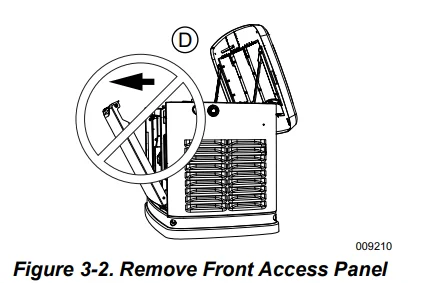
Front Access Panel Removal
See Figure 3-2. Remove the front access panel (A) by lifting straight up and out once the lid is open.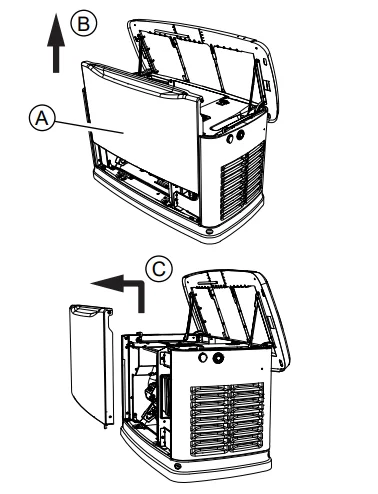
Intake Side Panel Removal
See Figure 3-3. Intake side panel (A) must be removed to access the battery compartment, fuel regulator, and sediment trap.
- Raise the lid and remove the front panel.
- Use a hex key to remove two mounting screws (B) and the L-bracket screw (C).
- Lift the intake panel up and away from the generator.
NOTE: Always lift the intake side panel straight up before pulling away from the enclosure. Do not pull the panel away from the enclosure before lifting (D).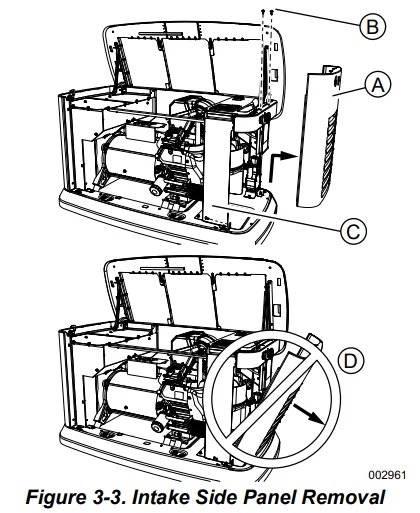
Main Line Circuit Breaker (Generator Disconnect)
See Figure 3-4. This is a 2-pole main line circuit breaker (MLCB) (generator disconnect) (A) rated according to relevant specifications. The generator MLCB (generator disconnect) can be locked in OFF (OPEN) for security. Use an appropriately sized padlock (not included) with a shackle long enough to pass through both lock tabs (B).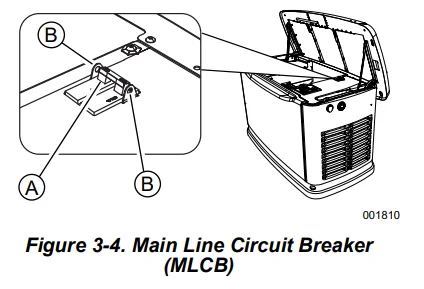
NOTE: DO NOT leave the generator MLCB (generator disconnect) locked in OFF (OPEN) during normal generator operation. Leaving the generator MLCB (generator disconnect) in OFF (OPEN) will prevent the generator from powering the structure during a power outage when placed in AUTO mode.
LED Indicator Lights
See Figure 3-5. Three LEDs are visible behind a translucent lens on the generator side panel. These LEDs indicate the generator’s operating status.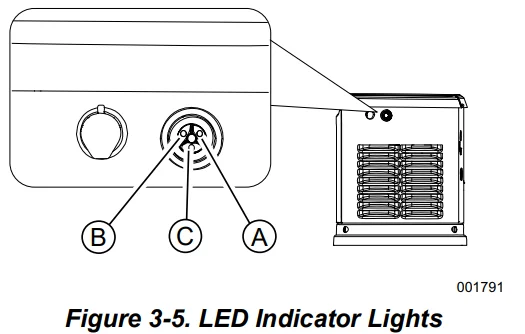
- Green LED “Ready” light (A) illuminates when utility is present, and the control panel is in AUTO. LED flashes when the automatic transfer switch converts to generator power during a utility power outage.
- Red LED “Alarm” light (B) illuminates when the generator is OFF, or a fault is detected. Contact an IASD.
- Yellow LED “Non-Critical Alert” light (C) illuminates when maintenance is required.
NOTE: The yellow LED may be illuminated at the same time as either the red or green LED.
Setting the Exercise Timer
This generator is equipped with a configurable exercise timer. Configuration can be performed directly at the control panel or through the Mobile Link® application. There are two settings for the exercise timer:
- Day/Time: Generator will start and exercise for the period defined, on the day of the week and at the time of day specified. During this exercise period, the unit runs for approximately five minutes and then shuts down.
- Exercise frequency: Exercise frequency can be set to Weekly, Biweekly, or Monthly. If Monthly is selected, the day of the month must be selected from 1-28. The generator will be exercised on that day each month. Transfer of loads to the generator output does not occur during the exercise cycle unless utility power is lost. NOTE: If Wi-Fi is enabled, the exercise timer will automatically adjust for Daylight Saving Time. NOTE: The exercise feature will operate only when the generator is in AUTO and will not work unless this procedure is performed. If Wi-Fi is NOT enabled, the current date/time will need to be reset every time the 12-volt battery is disconnected and then reconnected, and/or when the fuse is removed.
- Low Speed Exercise (Quiet-Test™) Profile: Unit will run at operating speed for approximately five seconds, then drop speed to prepare for Quiet-Test. Speed will drop to the predetermined Quiet-Test speed after approximately 40 seconds and continue to run until Quiet-Test is complete, for a total of five minutes.
Table 3-1 details exercise information and programming options for all home standby generators. NOTE: If Quiet-Test is disabled, the generator will exercise at the rated RPM.
Table 3-1. Generator Exercise Characteristics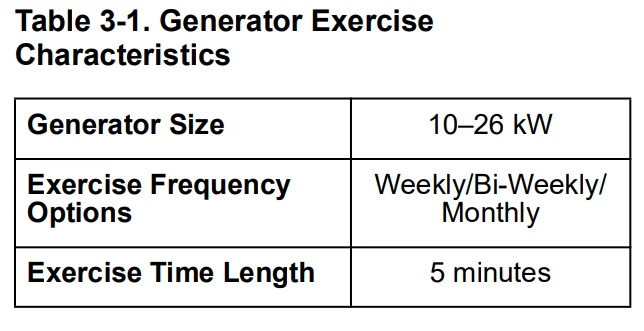
Battery Charger
IMPORTANT NOTE: Contact an IASD if the controller screen displays “CHARGER MISSING AC.” NOTE: Battery charger is integrated into the control module in all models.
- The battery charger operates as a smart charger, which verifies that
- output is continually optimized to promote maximum battery life and that
- charging levels are safe.
NOTE: A warning is displayed on the LCD when the battery needs service. NOTE: Do not use external battery chargers.
Manual Transfer Operation
Prior to automatic operation, manually exercise the transfer switch to verify there is no interference with the correct operation of the mechanism. Manual operation of the transfer switch is required if electronic operation should fail.
Transfer to Generator Power Source
Proceed as follows to transfer to generator power:
- Verify the generator is in OFF mode.
- Set generator MLCB (generator disconnect) to OFF (OPEN).
- Turn off the utility power supply to the transfer switch using means provided (such as a utility MLCB).
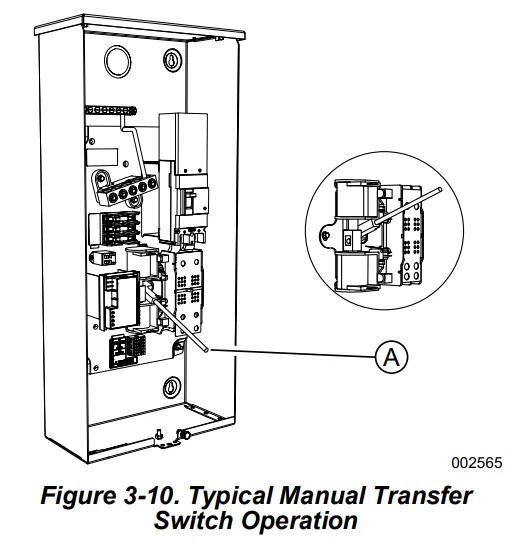
- See Figure 3-10. Use the manual transfer handle (A) inside the transfer switch to move the main contacts to STANDBY (loads connected to the standby power source).

- Press the MANUAL button on the control panel to crank and start the engine.
- Allow the engine to stabilize and warm up for a few minutes.
- Set generator MLCB (generator disconnect) to ON (CLOSED). Standby power source now powers loads.
Transfer to Utility Power Source
Shut down the generator and transfer to the utility source after utility power has been restored. Proceed as follows to manually transfer to utility power and shut down the generator:
- Set generator MLCB (generator disconnect) to OFF (OPEN).
- Run the engine for one minute at no load to stabilize internal temperature.
- Press the OFF button on the control panel. The engine will shut down.
- Verify the utility power supply to the transfer switch is turned off.
- Set main contacts to UTILITY (loads connected to utility power source) using the manual transfer handle inside the transfer switch.
- Turn on the utility power supply to the transfer switch using the means provided (such as a utility MLCB).
- Press the AUTO button on the control panel.
- Set generator MLCB (generator disconnect) to ON (CLOSED).
- Close and lock the lid.
Automatic Transfer Operation
Proceed as follows to select automatic operation:
- Verify transfer switch main contacts are set to UTILITY (loads connected to utility power source).
- Verify normal utility power source voltage is available to loads connected to the transfer switch.
- Press the AUTO button on the control panel.
- Set generator MLCB (generator disconnect) to ON (CLOSED).
The generator will start automatically when the utility source voltage drops below a preset level. Loads are transferred to the standby power source after the unit starts.
Automatic Sequence of Operation
Utility Failure
If the generator is set to AUTO when the utility fails (below 65% of nominal), a five-second (dealer programmable) line interrupt delay time is started. The engine cranks and starts if utility power is not available when the timer expires. An engine warm-up timer will be initiated once the engine is started. Timer duration varies depending on whether or not Cold Smart Start is enabled. The controller will transfer load to the generator when warm-up time expires.
If utility power is restored (above 80% nominal) at any time from initiation of engine start until the generator is ready to accept load (warm-up time has not elapsed), the controller completes the start cycle and runs the generator through its normal cool-down cycle. However, the load will remain on the utility source.
Cranking
The system will control the cyclic cranking as follows:
- 10 kW unit: Five cranking cycles as follows: 15 seconds cranking, seven seconds resting, followed by four additional cycles of seven seconds cranking, followed by seven seconds resting.
- 14-26 kW units: Five cranking cycles as follows: 16 seconds cranking, seven seconds resting, 16 seconds cranking, seven seconds resting, followed by three additional cycles of seven seconds cranking, followed by seven seconds resting.
NOTE: An alarm will be triggered if the generator does not start after these five attempts.
Cold Smart Start
Cold Smart Start is factory-enabled, but can be disabled in the EDIT menu. The generator will monitor ambient temperature when Cold Smart Start is enabled. The warm-up delay will be adjusted based on prevailing conditions. See Table 3-2. If the ambient temperature is below a fixed temperature (based on the model) upon startup in AUTO, the generator will warm up for 30 seconds. This allows the engine to warm before a load is applied. The generator will start up with a normal warm-up delay of five seconds if the ambient temperature is at or above the fixed temperature.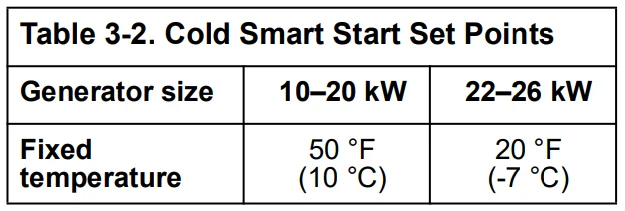
A check for correct output voltage buildup will be performed when the generator engine is started.
Cleaning Cycle
If some condition impedes normal voltage creation, such as frost crystals or dust/dirt preventing a good electrical connection, the start sequence will be interrupted so a cleaning cycle of the internal electrical connections can be attempted. The cleaning cycle is an extended warm-up period that lasts for several minutes while normal generator voltage output is determined to be low. During this cycle, the generator controller will display “Warming Up” on the display screen. The generator controller display will show “Under Voltage” if the cleaning cycle fails to clear the obstruction. After several minutes, the alarm message can be cleared and the generator restarted. If the problem persists, make no further attempts to start. Contact an IASD.
Load Transfer
The transfer of load when the generator is running is dependent upon the operating mode.
Shutting Generator Down While Under Load or During a Utility Outage
IMPORTANT NOTE: To avoid equipment damage, follow these steps in order during utility outages. Shutdowns may be required during utility outages to perform routine maintenance or to conserve fuel.
To turn the generator OFF:
- Set utility MLCB to OFF (OPEN).
- Set generator MLCB (generator disconnect) to OFF (OPEN).
- Allow the generator to run for cool down for approximately one minute.
- Set the generator to OFF at the controller.
- Remove the 7.5 A fuse from the controller.
To turn the generator back ON:
- Install a 7.5 A fuse in the controller.
- Verify generator MLCB (generator disconnect) is OFF (OPEN).
- Set the generator to AUTO mode at the controller.
- The generator will start and run. Allow the generator to run and warm up for a few minutes.
- Set generator MLCB (generator disconnect) to ON (CLOSED).
- Set utility MLCB to ON (CLOSED).
The system now operates in automatic mode.
Generator Troubleshooting
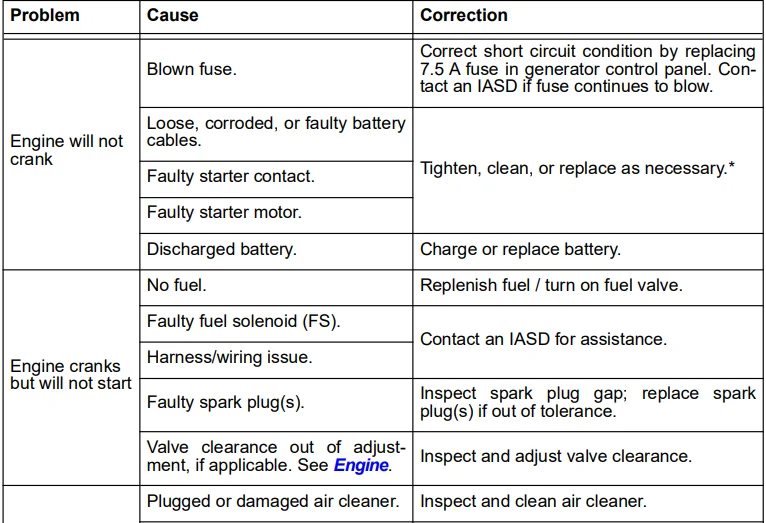
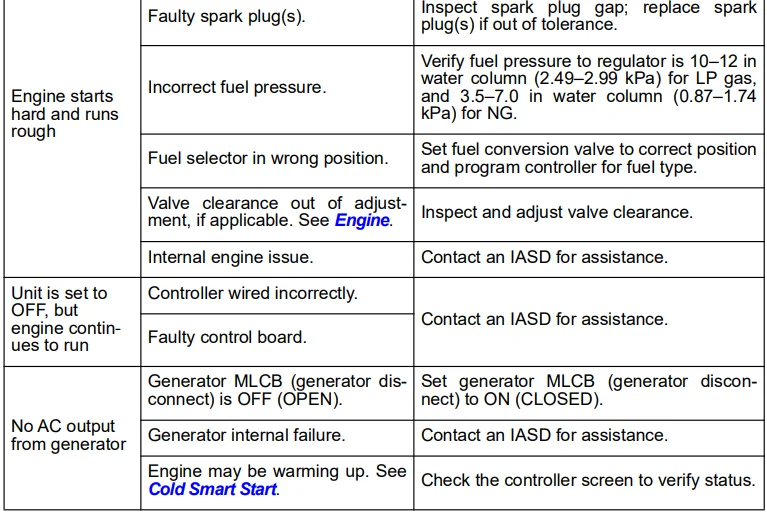
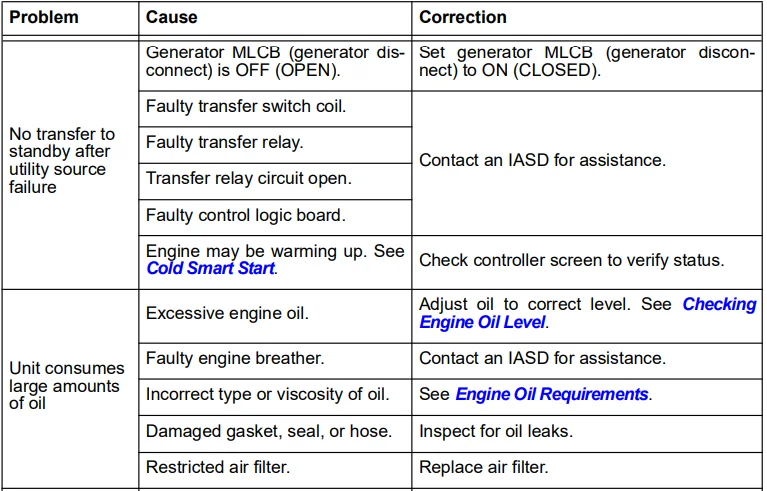

Visit www.generac.com for additional information.
For More Manuals By Generac, Visit ManualsLibraryy.
Generac 10 kW G0071720 Standby Home Generator-FAQ
Is a 10 kW Generac generator enough to power a house?
Yes, a 10 kW generator is usually suitable for homes under 1,500 sq. ft. It can run essential appliances such as lights, a refrigerator, a sump pump, and basic electronics.
What can a Generac 10 kW generator run?
It can power critical loads like lighting circuits, refrigerator, freezer, internet equipment, small HVAC systems, and selected kitchen appliances.
How does a Generac standby generator work?
The generator is installed outside the home and runs on natural gas or propane. It automatically turns on during a power outage and supplies electricity through a transfer switch.
What fuel does the Generac 10 kW generator use?
This model operates on natural gas or liquid propane (LP), depending on your home’s fuel supply.
How much fuel does a 10 kW generator use per hour?
At about 50% load, it consumes roughly 0.5–0.6 gallons per hour (diesel equivalent). Usage increases at full load.
How much does it cost to run a Generac generator for 24 hours?
Operating costs typically range from $25 to $140 per day, depending on fuel type, load, and local fuel prices.
What is the most common problem with Generac generators?
The most frequent issue is a weak or dead battery. Batteries should be replaced every 2–3 years to avoid startup failures.
Does a Generac standby generator charge its own battery?
Yes, the battery charger is built into the generator’s controller and keeps the battery charged using household power.
How long can a Generac generator run continuously?
A properly maintained standby generator can run for days or even weeks, as long as fuel supply and oil levels are maintained.