
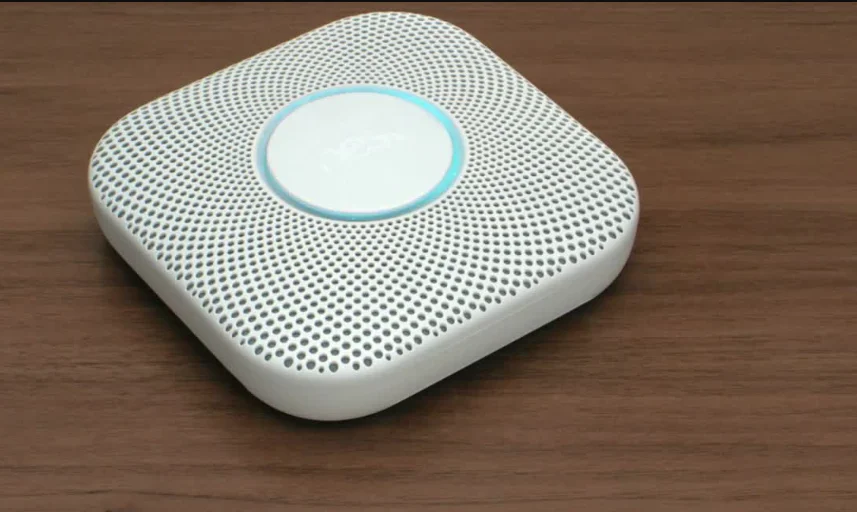

Google Nest-Wired Smoke and CO Smart Alarm
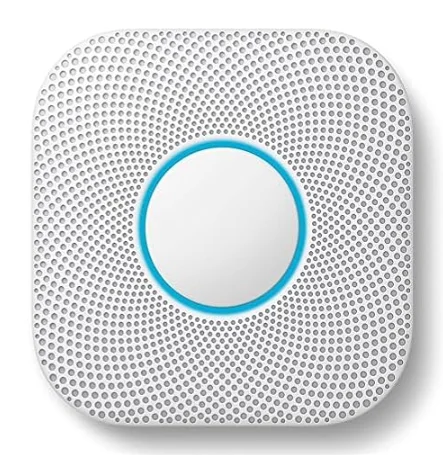
MEET YOUR NEST PROTECT
Inside the box you’ll find: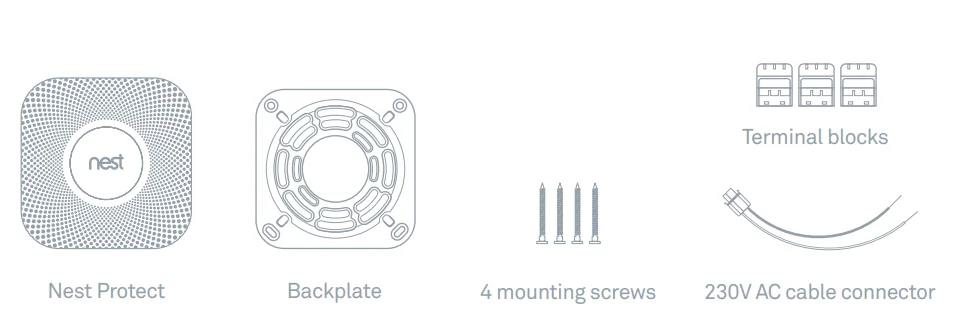
Nest Protect is designed to detect smoke and carbon monoxide in a residential environment. It has multiple sensors to help it understand what’s happening in your home and a photoelectric sensor to detect slow, smoldering fires. Nest Protect can be used as a single-station or multiple-station alarm. The installation of this apparatus should be carried out by a competent person. This guide covers the installation of Nest Protect (Wired 230V) – Model number O5C-E.
REQUIREMENTS
Wi-Fi, an iOS or Android smartphone or tablet, and a free Nest Account are required for wireless mobile notifications and software updates. During setup, Wi-Fi and a free Nest Account are required for wireless interconnect and room naming. Once all the Nest Protects in your home are connected, they can communicate with each other without Wi-Fi.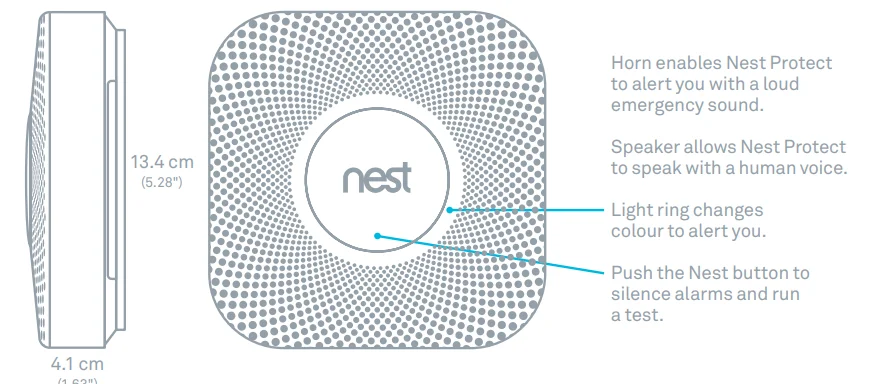
LOCATION IN YOUR HOME
It is recommended that you place at least one smoke alarm on every floor of a dwelling, and a carbon monoxide detector in at least every room with a fuel-burning appliance. The Nest Protect smoke and carbon monoxide alarm should be installed:
- On every floor (required by law for smoke alarms).
- In every room containing a fuel-burning appliance (recommended for CO alarms).
- In every sleeping room.
- In remote rooms that are often used but may be too far away to hear an alarm.
- Outside of unused rooms, like the boiler room.
Nest Protect should be installed at least 3 m (10 ft) away from cooktops or cooking appliances. Nest Protect should NOT be installed in unfinished attics or garages.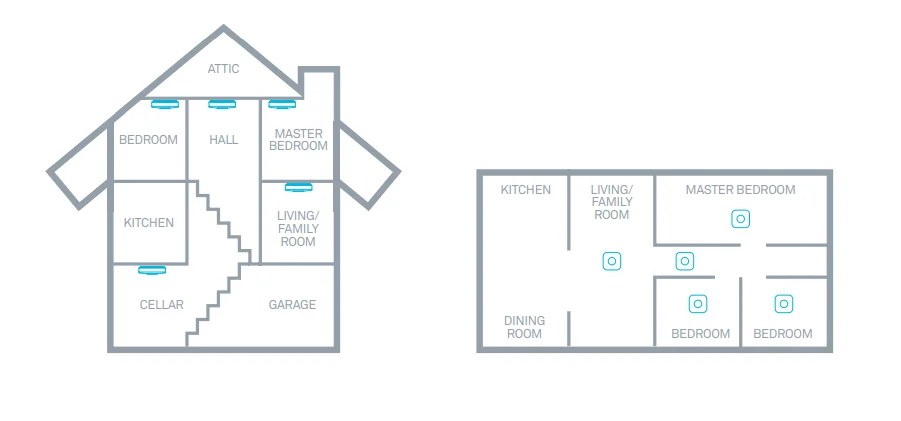
PLACEMENT ON THE CEILING OR WALL
Installing on the ceiling is recommended. Mark where the screws will go using the backplate as a guide. Make sure it’s at least 30 cm (12 in) away from the wall.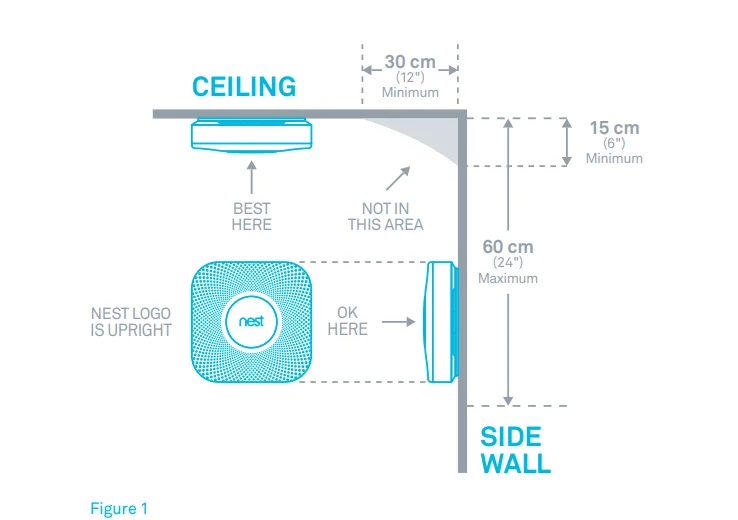
PLACEMENT ON A SLOPED CEILING
If you have a sloped, pitched, or cathedral ceiling, Nest Protect should be 90 cm (35 in) from the highest peak.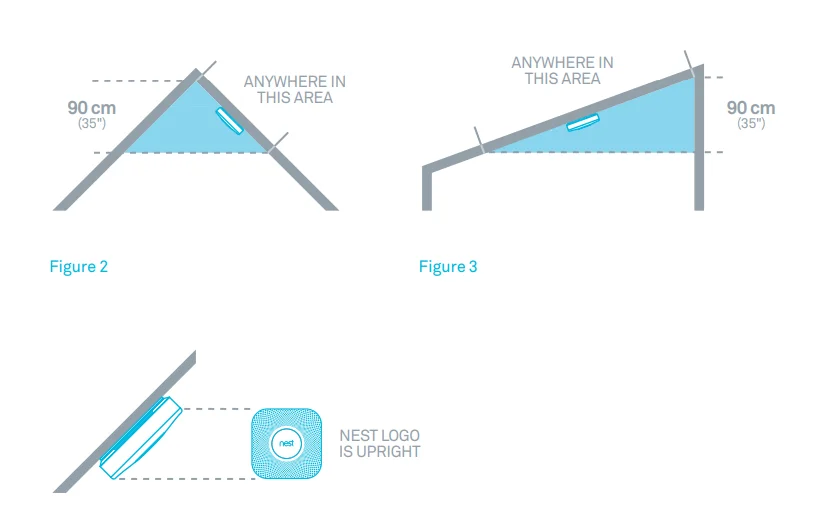
SETUP AND INSTALLATION
(Professional installation recommended)
The installation of a smoke/CO alarm should be made by a qualified technician, and all wiring used to install this alarm should be made in accordance with the British National Electrical Code, the British Standard BS 7671, with appropriate national electrical installation regulations and/or applicable codes in your local jurisdiction. A permanent connection to the fixed wiring of the building should be made in a suitable junction box. For a complete set of instructions and warnings, refer to page 24.
Tip: Lay everything out on a table for easy installation.
1. Get the Nest app
Before you install your Nest Protect on the ceiling or wall, you’ll need to set it up with the Nest app. Download the app from the Apple App Store, Google Play, or the Amazon App Store and create a free Nest Account.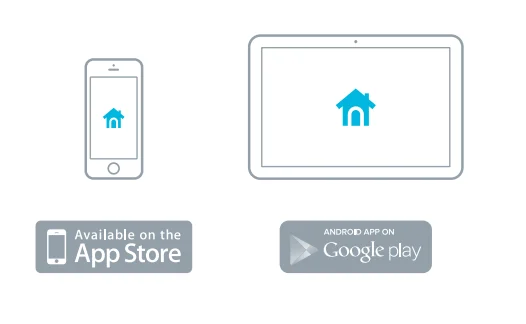
2. Set up Nest Protect with the Nest app
The Nest app will guide you through each step: scanning the Nest Protect QR code, connecting it to the Internet, and connecting it to other Nest Protects in your home. Watch the video at nest.com/eu/installprotect.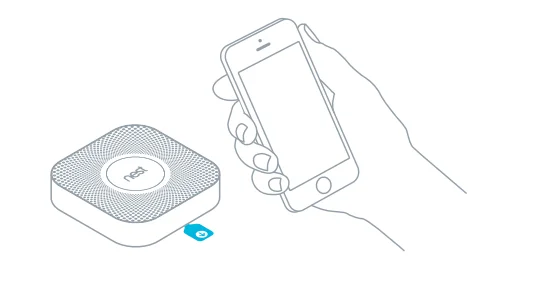
3. Have more Nest Protects?
The Nest app will ask you if you have additional Nest Protects to set up. If so, it’ll take you through a shorter setup. Make sure to keep track of which Protects you’ve already set up and where you’re going to install them.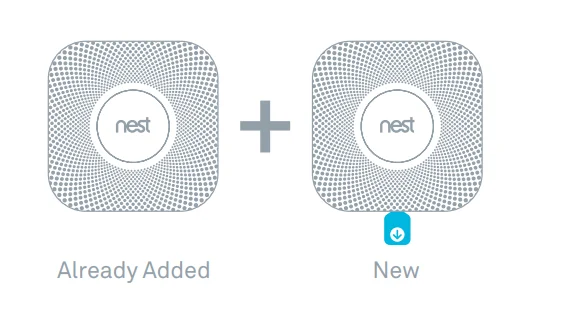
4. Test before you install
Once you’re done setting up all of your Nest Protects, test that they’re added to your Nest Account by pushing the Nest button on one Nest Protect and following the instructions to test. If they’re all added, every Nest Protect will speak up. Now you can install them on the ceiling or wall.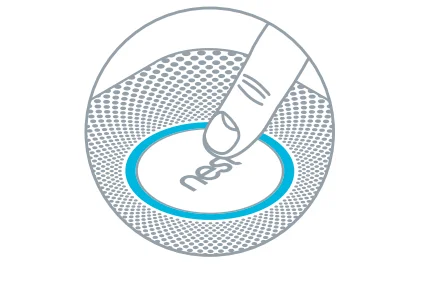
5. Turn off power
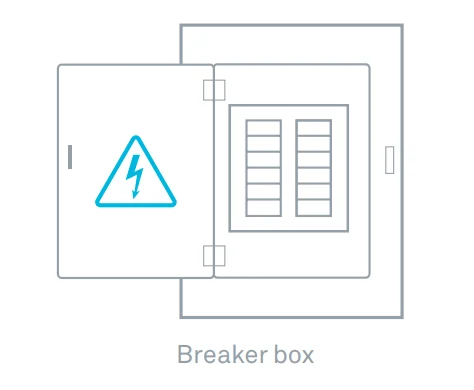
Protect yourself and avoid blowing a fuse. Switch off the correct circuit breaker or remove the fuse from the fuse box.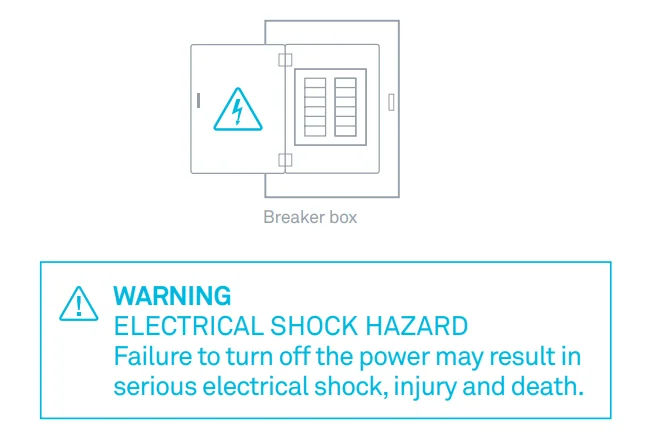
6. Remove your old smoke alarm
Make sure the green power light on the old smoke alarm is off, then safely remove the old smoke alarm from its backplate – it’ll be connected to some cables.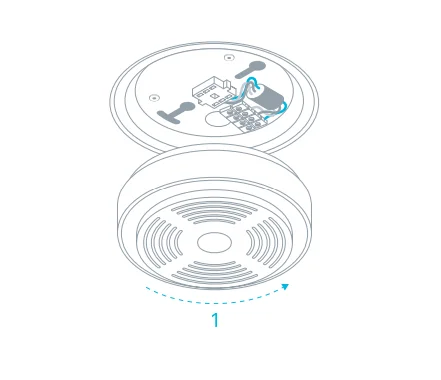
7. Disconnect all cables from the old backplate
There will be two or four conductors attached to the old backplate. Disconnect them all.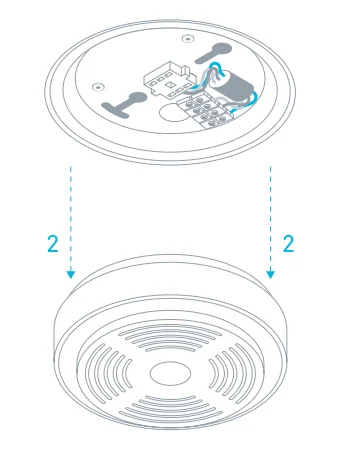
8. Remove the old backplate
Unscrew the backplate from the ceiling or dry lining box. You’ll see one or two cables coming from your ceiling.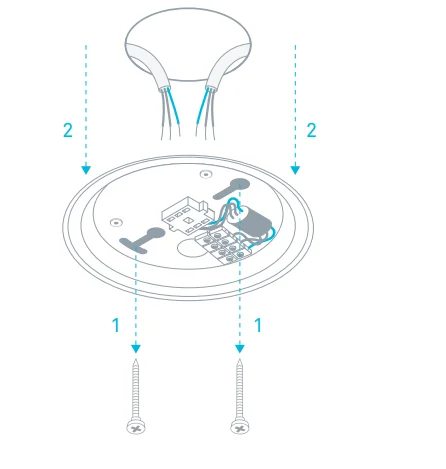
9. Connect the cables
Each cable from the ceiling or wall contains three or four differently colored conductors. Wiring colors may vary based on the age of the wiring.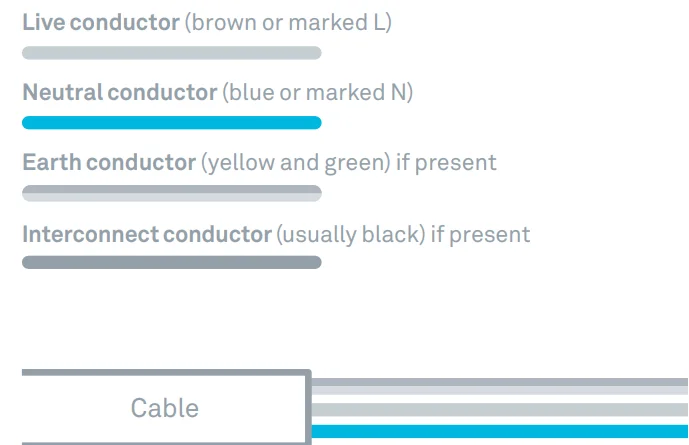
Match the live conductors coming from your ceiling to the live conductors in Nest’s 230V AC cable connector and put them into a terminal block. All the neutral conductors go into another terminal block, and the earth conductors into a third terminal block. There is no need for the interconnect cable as all Nest Protects are wirelessly interconnected. If there’s an interconnect conductor, insulate it.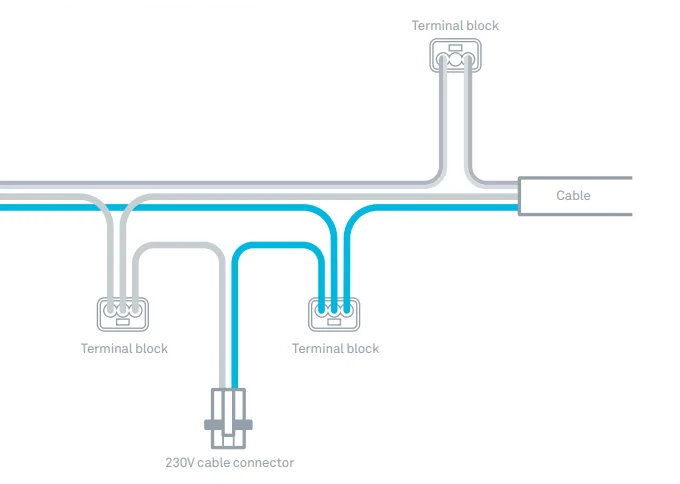
10. Install Nest Protect backplate
Screw the backplate to the existing electrical box, reusing the existing screws. (You can also screw the plate directly into the wall or ceiling with the Nest screws.)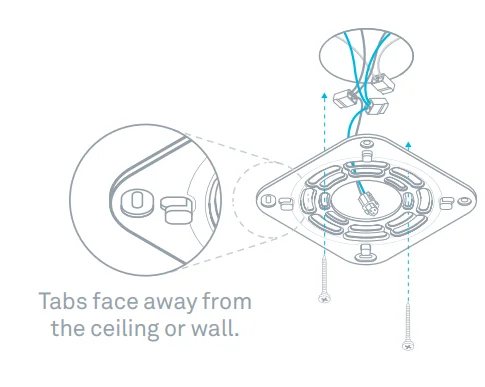
11. Connect power
Plug the 230V cable connector into the back of Nest Protect.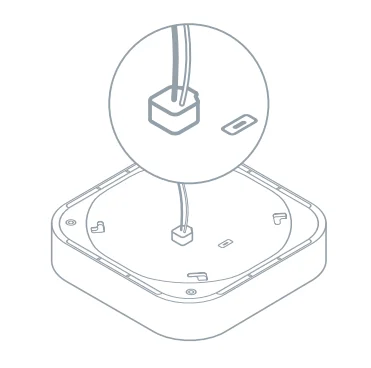
12. Mount your Nest Protect
Firstly, tuck any excess wiring into the electrical box and push Nest Protect onto the backplate. Give it a slight twist clockwise. It’ll CLICK into place.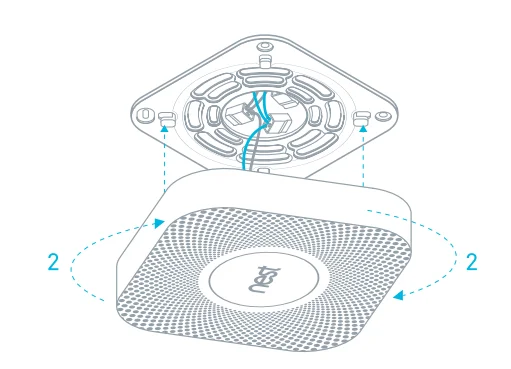
13. Switch power back on or replace the fuse.
14. Press to test
Press the Nest button on one Nest Protect and follow the spoken instructions to test. They should all speak to you, confirming that they’re in range of each other.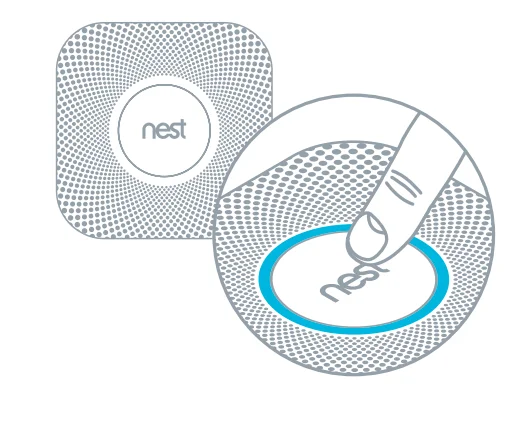
OPERATING INSTRUCTIONS
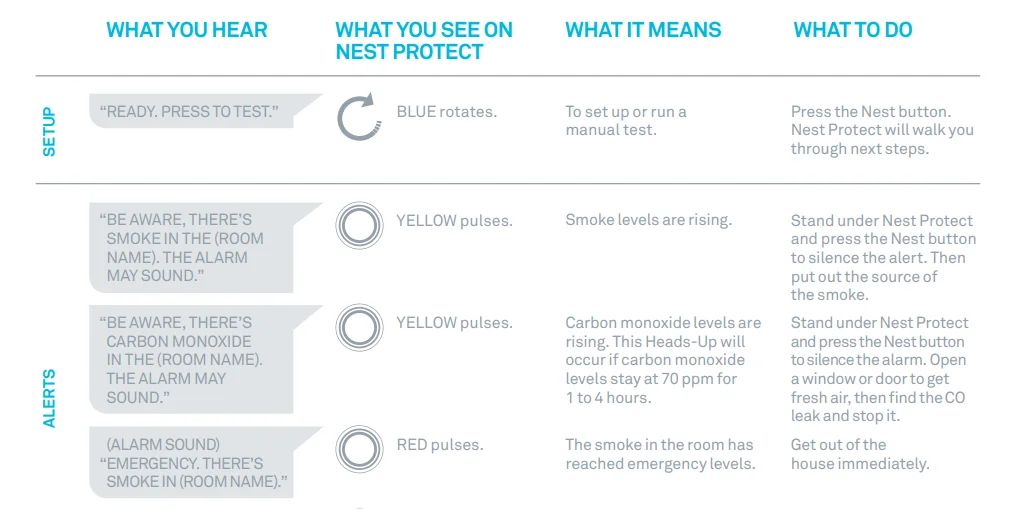
When the Nest Protect smoke and carbon monoxide (CO) alarm has something to say, it will speak to you in words and colors instead of just beeping. It has two kinds of alerts: Heads-Up and Emergency Alarms.
- Nest Protect can see smoke or carbon monoxide levels rising. So before it turns on an Emergency Alarm, Nest Protect gives you a friendly spoken Heads-Up to warn you in advance. It pulses yellow and speaks to you, telling you what and where the danger is.
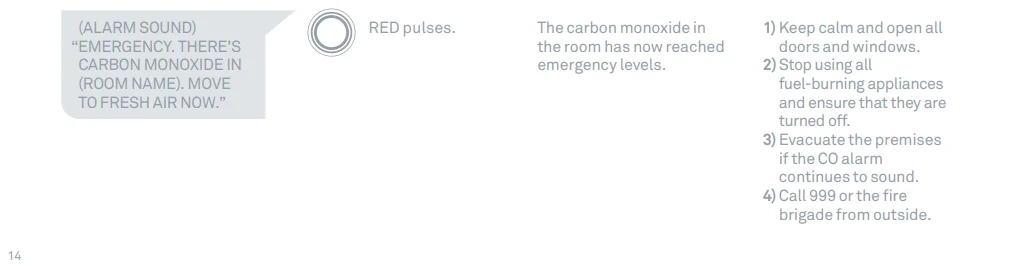
- When smoke or carbon monoxide reaches dangerous levels, Nest Protect tells you where the emergency is and pulses red, in addition to making a loud alarm sound. This is an Emergency Alarm.


HEADS-UP AND EMERGENCY ALARMS
ALERTS
Nest Protect has two kinds of voice alerts: Heads-Up and Emergency Alarms. A Heads-Up is a friendly warning before conditions get dangerous. Nest Protect pulses yellow and tells you where smoke or carbon monoxide is. An Emergency Alarm occurs when smoke or carbon monoxide reaches dangerous levels. Nest Protect pulses red, makes a loud alarm sound, and tells you which room the emergency is in. The smoke alarm takes precedence when carbon monoxide is also present.
WHICH ALERTS CAN BE SILENCED
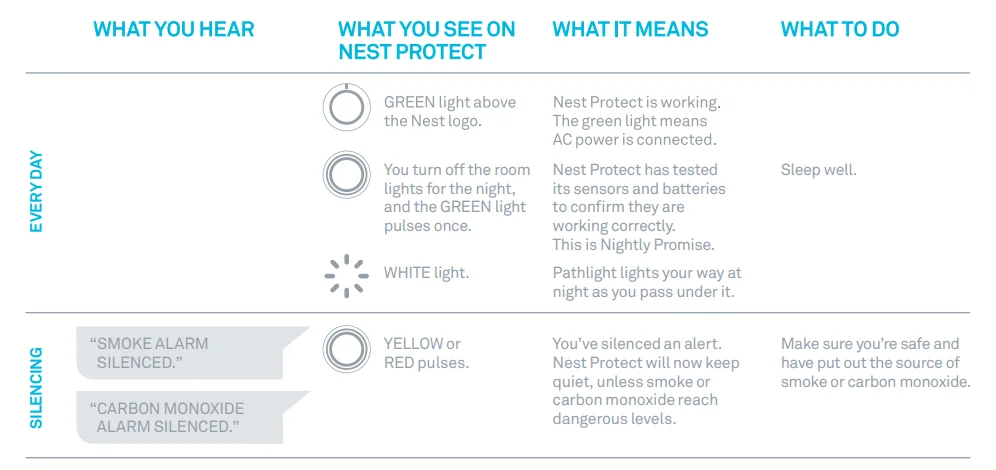
- Heads-Up alerts can be silenced by pressing the Nest button.
- Emergency Alarms can be silenced by pressing the Nest button. For your safety, get out of the house immediately.
- Because there are many different types of fires, you may experience an Emergency Alarm without having first experienced a Heads-Up alert. This means that dangerous levels of smoke or CO occurred extremely quickly, and Nest Protect must sound the Emergency Alarm.
- Once the Nest Protects in your home are connected to each other, whenever there’s a Heads-Up or an Emergency Alarm, they will all tell you what and where the danger is. So go to that room and press the Nest button on the Nest Protect there to silence every Nest Protect in the home. This will ensure that you identify the source of the danger in that room.
WIRELESS INTERCONNECT
Once your Nest Protects have been wirelessly connected, they’ll all speak up at once in an emergency. That means when one Nest Protect raises any kind of alert, every Nest Protect in the house will tell you which room the smoke or CO is in. For example, if you’re in the bedroom and the alarm goes off in the cellar, the Nest Protect in the bedroom will tell you there’s smoke in the cellar. To silence the alert, go to that room and press the button on the Nest Protect there. That will silence every Nest Protect in the house.
Nest Protect’s 230V connector does not have a cable for interconnect, as it connects wirelessly. There’s no need to connect any cable to the interconnect cable from the ceiling or wall. Nest Protects can typically communicate with each other if they’re 15 m (50 ft) apart inside a home. Some features of a home may reduce its range, including the number of floors, number or size of rooms, furniture, type of building material, suspended ceilings, ductwork, large metallic appliances, and metal studs.
This kind of interference can be overcome by adding more Nest Protects that can route wireless signals around obstructions. Nest Protect – Battery (model number 05A-E, 05A-UK) and Nest Protect – Wired 230V (model number 05C-E, 05C-UK) are compatible and can be interconnected wirelessly. Nest Protect wireless interconnect will not work with products from other brands.
PATHLIGHT
Usually, Nest Protect has its light turned off, but it will light your way as you walk underneath it in the dark. You can enable and disable Pathlight from the Nest Mobile app.
TESTING NEST PROTECT
SELF-MONITORING
Nest Protect continuously tests itself, so you don’t have to wonder if it’s working. When you turn out the lights for the night, Nest Protect will glow green for a moment – that means everything is working. If it glows yellow, this means Nest Protect has detected something wrong that needs your attention. Just push the Nest button to hear its warning: either the batteries are low, Wi-Fi has been down, or there is an issue with its sensors.
TEST NEST PROTECT MANUALLY
Regulations require a weekly manual test. After installation, test Nest Protect by pressing the Nest button twice. Before sounding the alarm, Nest Protect will give you a countdown so that you have time to move away from the alarm.
Test procedure:
- Press the Nest button twice to start a test.
- Nest Protect will say: “This is only a test. The alarm will sound.”
- Once the Nest Protect you’ve tested has made sure it’s working, it’ll tell you everything’s okay. If they are interconnected, every Nest Protect in the house will speak up. Walk to each one to make sure you hear them.
GENERAL MAINTENANCE
CLEANING YOUR NEST PROTECT
Use a damp cloth to clean your Nest Protect. Don’t clean it with detergents or solvents, and do not spray air fresheners, hair spray, or other aerosols near it. These chemicals will damage your smoke alarm and make it non-operational. Cleaning fluids, polishes, paints, and cooking operations may affect the reliability of the smoke alarm. Do not disassemble your Nest Protect or clean inside it. If a continuous alarm occurs, return it for servicing. Do not get water inside the alarm. Do not paint over Nest Protect, as paint will seal the vents and affect its ability to detect smoke and CO.
RESETTING NEST PROTECT
You can reset Nest Protect to erase all your settings and reset the wireless interconnection between Nest Protects. You may want to do this before you move to a new house. After resetting Nest Protect, it will still detect smoke and carbon monoxide. To reset, refer to the complete instructions on nest.com/eu/protect/reset.
SOFTWARE VERSION
Follow these steps to check the Nest Protect software version:
- Press and hold the button for at least 10 seconds.
- You’ll hear Nest Protect play a tone, then it will announce the software version number.
- Let go of the button.
- If you want to keep the current settings, press again to cancel erasing all settings.
You can also review the software version from the Nest App by checking the technical specifications of Nest Protect.
BACKUP BATTERY
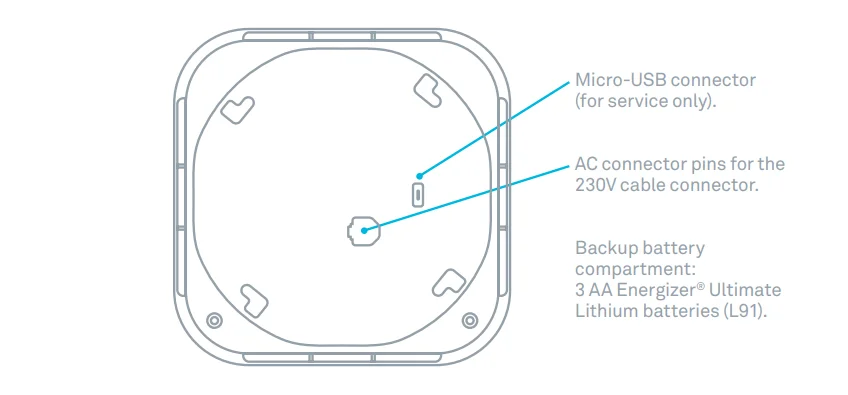
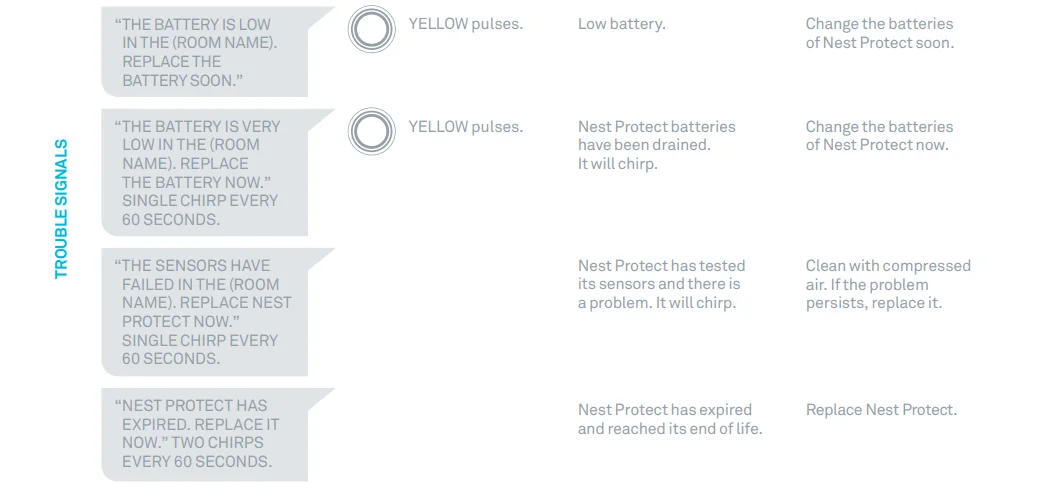
3 AA Energizer® Ultimate Lithium batteries (L91). These backup batteries can be purchased from your local retailer. Nest Protect will let you know its backup batteries are getting low before they need to be replaced. Instead of lighting up green during Nightly Promise, it’ll glow yellow.
Once you press the Nest button, Nest Protect will say, “The battery is low. Replace it soon.” In case of a power outage, Nest Protect uses long-life backup lithium batteries designed to last multiple years of operation. Battery life depends on usage.
REPLACING THE BACKUP BATTERIES
- Remove your Nest Protect from its backplate.
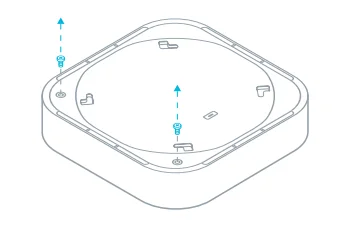
- Using a Phillips screwdriver, unscrew the two screws from the battery door on the back of Nest Protect.

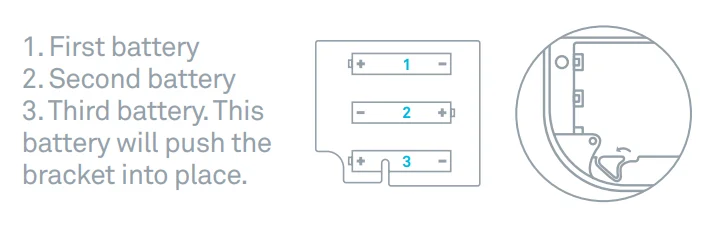
- Replace the batteries. Make sure to use Energizer Ultimate Lithium batteries and install them in the right order. If you install them out of order, you may not be able to close the battery compartment.

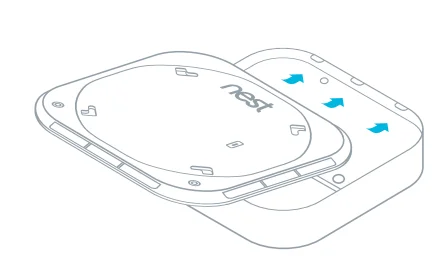
- Reattach the battery door by sliding it into the tabs located on the opposite side from the batteries, replacing the screws, and then reattaching Nest Protect to the backplate.

- Press the Nest button to run a test.
SERVICING
- Step 1: Before sending Nest Protect for service, review the information at nest.com/eu/support.
- Step 2: Contact our support team to get a return number.
- Step 3: Send it to:
Nest Labs
(YOUR RETURN NUMBER) Arvato Distribution GmbH – Technology Willi-Bleicher-Str. 36 52353 Düren, Germany.
RECYCLING AND DISPOSAL
Visit nest.com/eu/recycle. Dispose of in accordance with applicable legislation.
 The WEEE symbol means that your Nest Protect must be disposed of separately from general household waste. When Nest Protect reaches its end of life, take it to a designated waste collection point in your area for safe disposal or recycling. By doing this, you’ll conserve natural resources, protect human health, and help the environment.
NEST AND THE ENVIRONMENT
Nest recognizes its responsibility to minimize the environmental impacts of its operations and products. More information is available on the web at nest.com/eu/responsibility.
EXPIRATION
Nest Protect has a limited life like any smoke/CO alarm. Nest Protect’s lifetime is 7 years. You will need to replace Nest Protect after 7 years with a brand new Nest Protect. Check the date of replacement written on the back of Nest Protect.
WARNING
You’ll no longer be protected from smoke or CO if you don’t replace your Nest Protect. About two weeks before it expires, Nest Protect will light up with a yellow light. Press the Nest button, and it will say, “Nest Protect has expired. Replace it now.” Buy a new alarm and recycle the expired one. Make sure you test your new Nest Protect once it’s installed.
TECHNICAL SPECIFICATIONS
- Temperature range: 4 °C (40 °F) to 38 °C (100 °F).
- Humidity range: 20% RH to 80% RH (non-condensing).
- Nest Protect (Wired) uses 230V ~50Hz.
ALARM LIMITATIONS
LIMITATIONS OF SMOKE ALARMS
Alarms reduce deaths resulting from home fires worldwide. However, smoke alarms can only work if they are properly located, installed, and maintained, and if smoke reaches the alarms.
- Smoke alarms may not awaken all individuals. Make sure you create an escape plan and practice fire drills with all members of the family.
- Smoke alarms cannot work without power. If they are powered by batteries, the smoke alarms cannot work if the batteries are missing, dead, or disconnected. If they are wired, the smoke alarms cannot work during a long power outage once the backup battery is dead. Nest Protect will warn you in advance when batteries are running low so that you can replace them.
- Smoke will not be able to reach the smoke sensor while the dust cover is in place. The dust cover must be removed.
- Smoke alarms cannot detect fires if the smoke does not reach the alarms. For example, if a door is closed, smoke may not reach the smoke alarm. This is why you should have a smoke alarm in each bedroom and in the hallways, as bedroom doors may be closed at night.
- Smoke alarms may not be heard. Although the smoke alarm comes with a loud horn of 85 decibels, it may not be heard if: 1) people have consumed alcohol or drugs, 2) the alarm is drowned, by noise from a stereo, TV, traffic, air conditioner, or other appliances, or 3) residents are hearing impaired or have high-frequency hearing loss associated with aging. Special smoke alarms should be installed for those who are hearing impaired.
- This smoke alarm is not intended to alert hearing-impaired residents. Alarms specifically designed for the hearing impaired, which feature devices like flashing strobe lights or low-frequency devices, are available to alert the hearing impaired in case of fire.
- This smoke alarm alone is not a suitable substitute for complete fire detection systems in places housing many people—like blocks of flats, condominiums, hotels, guest houses, halls of residence, hospitals, long-term health care facilities, nursing homes, day care facilities, or group homes of any kind—even if they were once single-family homes. It is not a suitable substitute for comprehensive fire detection systems in warehouses, industrial facilities, commercial buildings, and specialized non-residential buildings that require specialized fire detection and alarm systems. Depending on the building codes in your area, this smoke alarm may be used to provide additional protection in these facilities.
LIMITATIONS OF CARBON MONOXIDE (CO) ALARMS
- NEVER ignore your carbon monoxide alarm if it sounds. Refer to “What to do in case of a carbon monoxide alarm” for more information. Failure to do so can result in injury or death.
- This CO alarm is designed for use inside a single-family home or apartment. It is not meant to be used in common lobbies, hallways, or cellars of multi-family buildings unless working CO alarms are also installed in each family living unit. CO alarms in common areas may not be heard from inside individual family living units.
- This CO alarm alone is not a suitable substitute for complete detection systems in places that house many people, like hotels or halls of residence, unless a CO alarm is also placed in each unit.
- DO NOT use this CO alarm in warehouses, industrial or commercial buildings, special-purpose non-residential buildings, or airplanes. This CO alarm is specifically designed for residential use and may not provide adequate protection in non-residential applications.
- Some individuals are more sensitive to CO than others, including people with cardiac or respiratory problems, infants, unborn babies, pregnant mothers, or elderly people who can be more quickly and severely affected by CO. Members of sensitive populations should consult their doctors for advice on taking additional precautions.
- The silence feature is for your convenience only and will not correct a CO problem. Always check your home for a potential problem after any alarm. Failure to do so can result in injury or death.
For More Manuals By Google Nest, Visit ManualsLibraryy.
Google Nest-Wired Smoke and CO Smart Alarm-FAQs
How does the Google Nest Smoke and CO Alarm work?
The Google Nest Protect uses a Split-Spectrum smoke sensor that detects both fast-flaming and slow-smoldering fires. It combines advanced photoelectric sensors with an intelligent smoke algorithm to reduce false alarms and provide accurate detection.
Does Nest Protect detect both smoke and carbon monoxide?
Yes. Nest Protect features two sensors: a Split-Spectrum smoke sensor for fire detection and an electrochemical sensor that identifies carbon monoxide (CO), an odorless and colorless gas.
Do multiple Nest Protect alarms communicate with each other?
Yes. Nest Protect devices use a low-power wireless connection (802.15.4 protocol) to communicate. If one detects smoke or CO, all connected alarms will sound, even if your Wi-Fi is down.
How long does a Nest smoke and CO alarm last?
Each Nest Protect is designed to last up to 10 years from the date of manufacture. After this period, it should be replaced to ensure accurate protection.
Does the wired Nest alarm have batteries?
Yes. The wired version includes backup batteries to keep it functional during power outages, while the battery model uses six AA Energizer Ultimate Lithium batteries.
How do I test my Nest Protect alarm?
Nest Protect tests itself automatically each night, but you can also perform a manual test using the Google Home app or by pressing the button on the device. It uses a built-in microphone to confirm that the horn and speaker are working correctly.
Can Nest Protect work without Wi-Fi?
Yes. Even without internet access, the device continues to detect smoke and CO and can communicate with other Nest Protects in your home via the internal wireless network.
Why did my Nest smoke alarm go off when there was no smoke?
False alarms can occur due to dust, steam, or sensor issues. Try cleaning the device with a soft cloth or compressed air. If the problem persists, check the Nest app for error messages—it may indicate a sensor failure.
What makes a smart smoke alarm better than a regular one?
Smart alarms like Nest Protect not only alert you through sound but also send notifications to your smartphone, even when you’re away. They can also be silenced, tested, and monitored through the app for added convenience.
Is the Nest Protect a heat detector too?
Yes. Along with smoke and CO sensors, it includes a heat sensor that detects sudden temperature rises—helping to identify fires that may not produce visible smoke right away.