
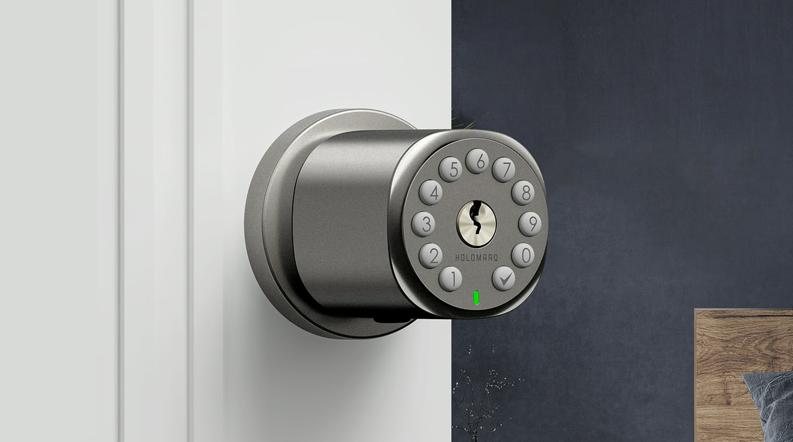

Holomarq H1 Sequra Door Knob with Keypad
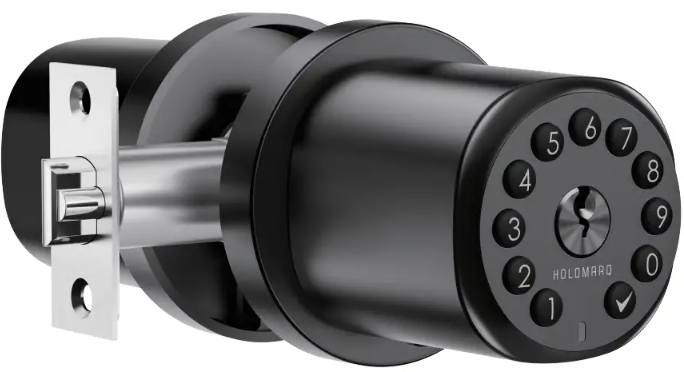
What’s in the Box


Batteries
The electronic lock requires 4 AA Alkaline batteries (Duracell or Energizer recommended) to be purchased separately. For the best result, 1.2V Rechargeable batteries are NOT recommended. When all 4 batteries are installed in the correct position, you will hear a long beep and the keypad will illuminate green.
Prepare the door and check dimensions
For installation on new doors
Prepare the door and jamb
- Take out the ‘Door Marking Template’ (Figure 1a).
- Fold template and place on door 36″ (915mm) from the ground as marked (Figure 1b).


Mark the door for drilling
- Mark the center hole on the door edge through the guide on the template for a 1″ (25mm) latch bolt (Figure 2a).
- Mark the center hole on the door face through the guide on the template for 2-3/8″ (60mm) or 2-3/4″ (70mm) backset (Figure 2b).


Drill and chisel door
- Drill 2-1/8″ (54mm) hole through door face as marked for lock set (Figure 3a).
- Drill a 1″ (25mm) hole in the center of the door edge for the Latch Assembly (Figure 3b).
- Insert the Latch Assembly in the hole, keeping it parallel to the face of the door. Mark the outline and remove the latch (Figure 3c).
- Chisel 1/8″ (3mm) deep or until latch face is flush with door edge (Figure 3d).

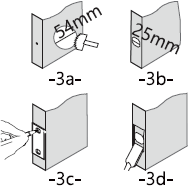
NOTE: For drive-in Latch, drill hole size indicated on template and press until it is flush with the door edge.
Mark and drill the door jamb
- Mark the center hole on the edge of the jamb even with the center of the Latch Bolt on the door edge (Figure 4a).
- Drill a hole in the door jamb at the center mark. Check if the strike plate measure can perfectly fit in (Figure 4b).
- Outline outside edges of Strike Plate (Figure 4c).
- Chisel 1/8″ (3mm) deep for Strike Plate or until flush (Figure 4d).
- Install Strike Plate using two 3/4″ (19mm) screws provided (Figure 4e).


For installation on doors with pre-drilled holes
Check door compatibility/ Remove existing door knob (if applicable)

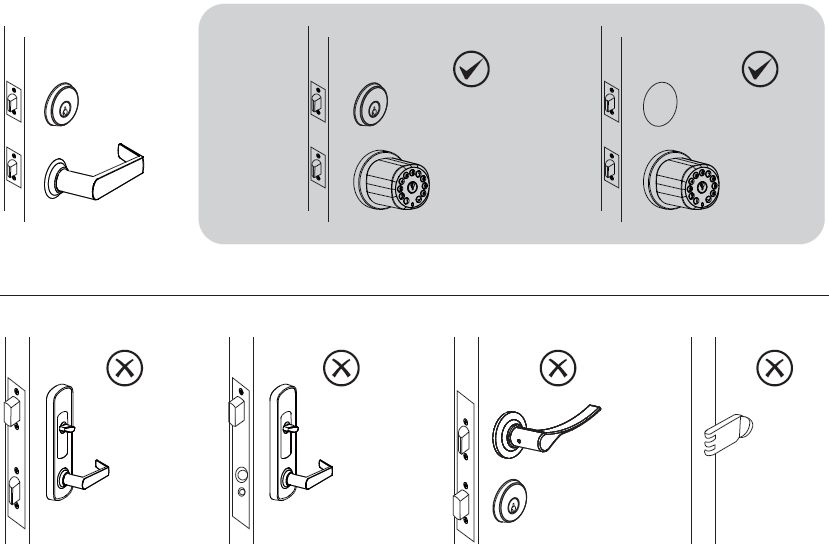
Double-check door dimensions
- Backset: measure to confirm that the backset is either 2-3/8″ or 2-3/4″ (60 or 70mm).
- Thickness: measure to confirm that the door is between 1-3/8″ to 2.5″ (35mm to 65mm) thick.
- Hole in the door: measure to confirm that the hole in the door is 2-1/8″ (54mm).
- Hole in the door edge: measure to confirm that the hole in the door edge is 1″ (25mm).
Note:
- DO NOT use an electric screwdriver; only hand-tighten screws with a Phillips screwdriver.
- DO NOT over-tighten screws.
- DO NOT install this product if your door thickness is out of range.
- DO NOT mix new batteries with used batteries when the product is in use.
Install the latch and strike plate
Hold the latch in front of the door hole, with the latch face flush against the door edge. Make sure the square-shaped hole is centered.
For a 2-3/4″ (70mm) backset, pull to extend the latch in order to center the squared-shaped hole.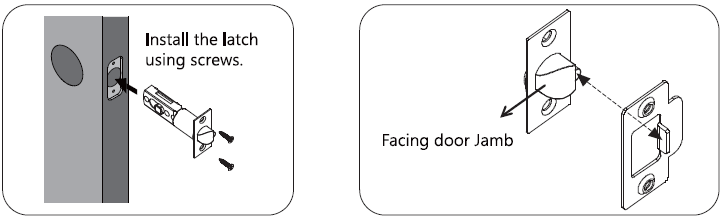
In most cases, the existing strike plate is ready to be used. You may store the strike plate in a box for future use. If not, please make sure the bolt is aligned correctly with the strike plate.
Install the Exterior Assembly
- Make sure the door is open.
- Make sure the keyhole is in a vertical position.
- Insert the Exterior Assembly onto the door with the rod bolts going through the round holes on the latch, and the square spindle and the control wire going through the square-shaped (center) hole.
- Forcing the control wire into any other place than specified above will damage the connector, making the door knob unusable.
Install the Interior Assembly
- Remove the screw on top and then pull out the cover.
- Install the interior knob onto the door with the rod bolts going through the round holes on the latch, and the square spindle and the control wire going through the square-shaped (center) hole.
- Secure both exterior and interior knobs to the door using the 2-3/8″ (60mm) or 1-3/5″ (40mm) screws. Tighten them with a Phillips Screwdriver (DO NOT over-tighten).
- Plug the control wire male plug into the female socket located on the battery compartment.
- Install the batteries in the compartment.
- Press and hold the reset button until you hear a long beep.
- Install and then secure the cover with the screw.
Testing door knob
- Always test with the door open.
- Make sure both the interior and exterior knobs are not slanted.
- Enter admin passcode 010203 (default)>
 and test the exterior knob. The bolt should move smoothly in and out.
 - Use keys to test the exterior knob. The bolt should move smoothly in and out.
- Test the interior knob. The bolt should move smoothly in and out.
- Close the door to make sure the bolt fits in the hole on the jamb.
NOTE:
- Make sure the doorknob has been reset successfully.
- If you forget your passcode, the only way to unlock is to use backup keys.
- If you happen to lose your backup keys at the same time, please immediately contact a locksmith for assistance.
Using door knob

Batteries
The electronic lock requires 4 AA Alkaline batteries (Duracell or Energizer recommended) to be purchased separately. For the best result, 1.2V Rechargeable batteries are NOT recommended. When all 4 batteries are installed in the correct position, you will hear a long beep and the keypad will illuminate green.
Warning: If the batteries die due to long idle time, use a Type-C cable with a power source such as a power bank for emergency power. As soon as unlocking is successful, immediately replace with new batteries.
Buzzer and Status indicator

Account Management

Setting
Resetting the Door Knob
Remove the screw and cover from the interior assembly.
Press and hold the Reset Button until you hear a long beep sound along with the green light, and then the door knob will reboot itself until you hear another long beep sound along with the green light, indicating the reset is successful.
Passage Mode
Turn on passage mode, and the door will stay unlocked until you turn it off.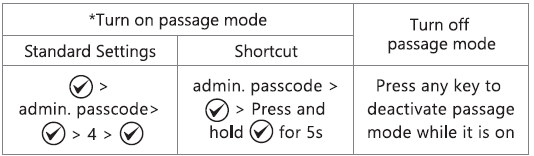
*Once succeeded, the green light stays for a while, along with a long beep.
Anti Prying
The anti-prying technology is used to protect your passcode from prying eyes. You may enter up to 20 digits, including your passcode, to unlock the doorknob.
Auto-Lock
The doorknob will automatically lock after 5s.
NOTE: Turning on Passage Mode will automatically disable the Auto-Lock feature. As soon as Passage Mode is off, Auto-Lock will resume automatically.
Silent Mode
Turn on/off Silent Mode (Buzzer)
 > admin. passcode > > 5>
You may turn on silent mode to deactivate the buzzer.
Immediate locking
Press to lock immediately.
Troubleshooting
No indicator or sound response from pressing a button
- Remove the cover from the interior assembly and then check if the cable wire is securely attached. If not, remove the connector and then plug it in again.
- Make sure the batteries are inserted properly (correct polarity).
- Make sure the batteries have enough power.
- Check if the door knob is in Silent Mode.
If you are stuck outside and not able to access the battery compartment, use USB-C emergency power to power on the door knob.
Latch will not extend or retract completely when closed
- Check the size of the hole in the door edge and adjust according to the installation guide.
- Check if the latch is installed properly according to the backset length
- Make sure the thinner edge of both the interior and exterior knobs heads downward and vertically to the floor.
Bolt is not able to go through the strike plate
- Make sure the bolt aligns with the strike plate.
- Make sure the bolt edge can slide into the strike plate.
- Make sure the depth of the hole in the door jamb fits the bolt.
Failed to unlock using a passcode
- Failed to unlock using the administrator passcode > reset the door knob
- Failed to unlock using a user passcode > use the administrator passcode to modify the user passcode.
- Check if the buttons work properly: Turn off Silent Mode, and then press each button. You should hear the buzzer every time.
Failed to lock or unlock/Failed to fully turn the knob
- Check if the screws are overtightened when installing the interior piece.
- Check if both knobs are slanted from the door edge
- Make sure the battery level is high and no mixing of new batteries with the old ones.
Important safeguard
- Protect your administrator code (less exposure) by setting a user code aside from the administrator code for daily use. Use only administrator code when you need to manage users.
- When sending a user code, always double-check that you are sending it to the correct recipient.
- Dispose of used batteries according to local laws and regulations.
- Always have access to your lock’s standard key.
- Prevent water and liquids from getting into the lock’s electric parts or battery compartment.
- Replace batteries immediately as soon as you are warned.
CAUTION: Prevent unauthorized entry. Since anyone with access to the interior assembly can factory reset the door knob, routinely check the administrator code to ensure they have not been altered without your knowledge.
WARNING: This Manufacturer advises that no lock can provide complete security by itself. This lock may be defeated by forcible or technical means, or evaded by entry elsewhere on the property. No lock can substitute for caution, awareness of your environment, and common sense. Builder’s hardware is available in multiple performance grades to suit the application. In order to enhance security and reduce risk, you should consult a qualified locksmith or other security professional.
Customer Support
- Email: [email protected]
- Website: www.marqsmart.com
For more Manuals by Holomarq, visit ManualsLibraryy
Holomarq H1 Sequra Door Knob with Keypad-FAQs
How does a keypad door lock work?
It unlocks the door when you enter a pre-set numeric code. No physical key is needed. The deadbolt automatically locks after the door closes.
What is a keyless doorknob?
A keyless doorknob can be opened with a code, app, smart key, or fingerprint instead of a traditional key.
How do I change the code on my Holomarq H1?
Remove the battery cover, press the reset button until it beeps, then enter a new code following the manual instructions.
How do I unlock the keypad lock?
Enter your access code on the keypad. Smart models may also allow unlocking via a mobile app.
What powers the Holomarq H1 keypad lock?
It uses standard alkaline batteries. Some models include a backup key or external power option.
Can a locksmith open a keypad lock without a key?
Yes, but it may take special tools and knowledge. Usually, code-based access is safer than traditional locks.
Why is my keypad not working?
Common reasons include dead batteries, incorrect code entry, or keypad malfunction. Replace batteries and check the code first.
How many codes can I set on this lock?
Depending on the model, you can set multiple user codes for family, friends, or guests. Check your manual for the exact number.
How do I reset the lock to factory settings?
Remove the batteries, press and hold the reset button for a few seconds, then reinstall the batteries. You can then set a new code.