
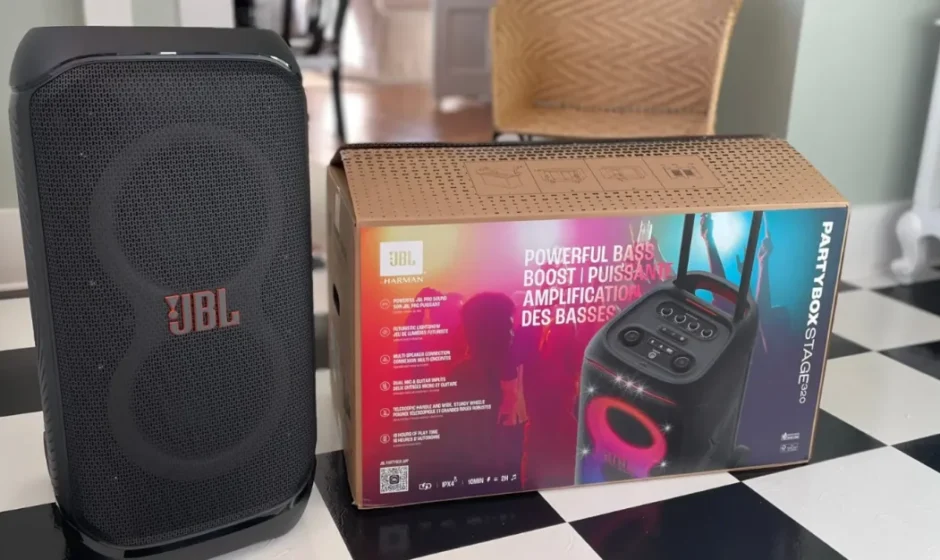

JBL PartyBox Stage 320
IMPORTANT SAFETY INSTRUCTIONS
For all products:
- Read these instructions.
- Keep these instructions.
- Heed all warnings.
- Follow all instructions.
- Do not block any ventilation openings. Install this apparatus in accordance with the manufacturer’s instructions.
- Do not install this apparatus near any heat sources such as radiators, heat registers, stoves, or other apparatus (including amplifiers) that produce heat.
- Do not defeat the safety purpose of the polarised or grounding-type plug. A polarised plug has two blades with one wider than the other. A grounding-type plug has two blades and a third grounding prong. The wide blade or the third prong is provided for your safety. If the provided plug does not fit into your outlet, consult an electrician for replacement of the obsolete outlet.
- Protect the power cord from being walked on or pinched, particularly at plugs, convenience receptacles, and the point where they exit from the apparatus.
- Use only attachments/accessories specified by the manufacturer.
- Use only with the cart, stand, tripod, bracket, or table specified by the manufacturer or sold with the apparatus. When a cart is used, use caution when moving the cart/apparatus combination to avoid injury from tip-over.
- Unplug this apparatus during lightning storms or when unused for long periods of time.
- To disconnect this apparatus from the AC mains completely, disconnect the power-supply cord plug from the AC receptacle.
- The mains plug of the power-supply cord shall remain readily operable.
- Do not expose batteries to excessive heat, such as sunshine, fire, or the like.
- This apparatus is intended to be used only with the power supply and/or charging cable provided by the manufacturer.
INTRODUCTION
Congratulations on your purchase! This manual includes information about the JBL PARTYBOX STAGE 320 speaker. We encourage you to take a few minutes to read this manual, which describes the product and includes step-by-step instructions to help you set up and get started. Read and understand all the safety instructions before using your product.
If you have any questions about this product, its installation, or operation, please contact your retailer or customer service, or visit us at www.jbl.com.
WHAT’S IN THE BOX
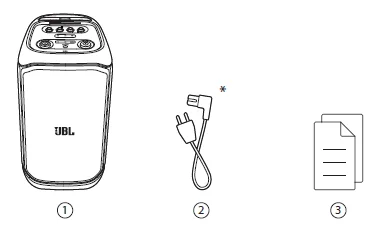
- Main unit
- Power cord
- Quick Start Guide, Safety Sheet, Warranty Card
Power cord quantity and plug type vary by region.
PRODUCT OVERVIEW
Top panel
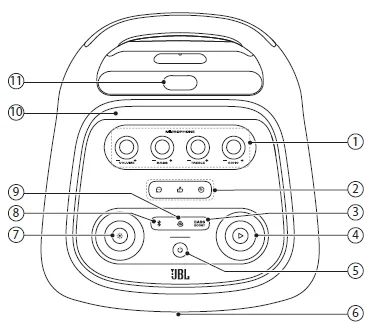
- Microphone controls: – VOLUME +: Adjust the microphone volume, – BASS +: Adjust the bass level, – TREBLE +: Adjust the treble level, – ECHO +: Adjust the echo level.
- Sound effect panel: Select a special sound effect.
- Bass Boost: Enhances the bass level: level 1, level 2, or off.
 : Play, pause, or resume. Rotate clockwise/counterclockwise to increase/decrease the main volume.
- Turn the power on or off.
- LED ring
 : Press to turn the light effect on or off. Hold for more than 2 seconds to turn the strobe and starry light on or off. Rotate clockwise / counterclockwise to switch between different light patterns.
 : Press to enter Bluetooth pairing mode.
- Press to enter multi-speaker connection.
- Mobile device dock
- Telescopic handle
Caution: Do not look directly at the light-emitting parts when the speaker’s lights are turned on.
LED behavior
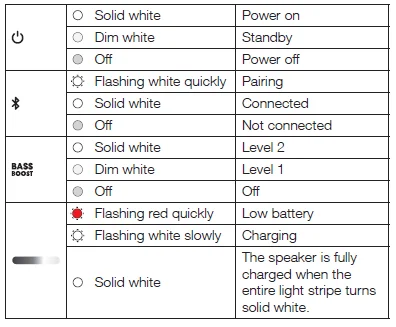
Back panel
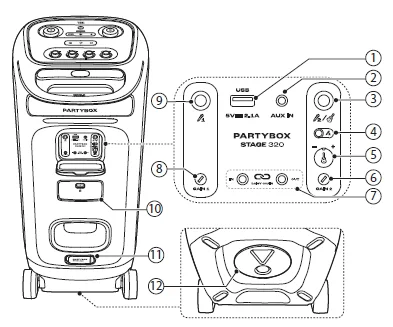
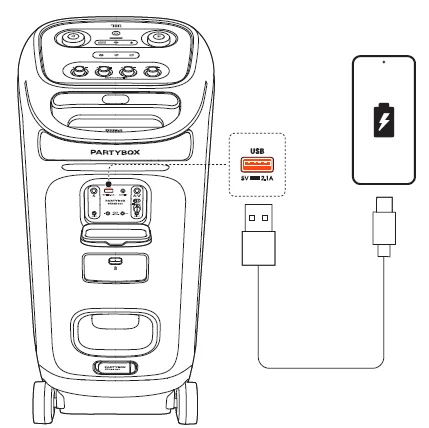
- USB: Connect to a USB storage device. Charge your mobile device.
- AUX IN: Connect to an external audio device through a 3.5 mm audio cable (not supplied).
- Microphone 2/guitar: Connect to a microphone or guitar.
- Microphone 2/guitar slider switch
- Guitar volume knob: Adjust the volume of the guitar (if connected).
- GAIN 2: Adjust the gain of the corresponding microphone (Microphone 1) or guitar input.
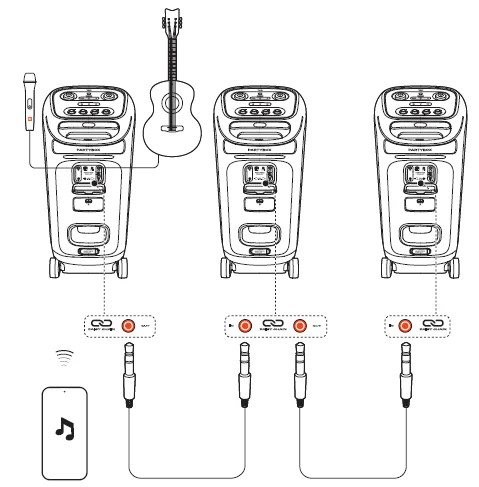
- IN/OUT: Daisy-chain multiple PARTYBOX speakers through 3.5 mm audio cables (not supplied).
- GAIN 1: Adjust the gain of the corresponding microphone (Mic 1) input.
- Mic 1: Connect to a microphone.
- Battery compartment: Pull down the latch to open the battery compartment.
- AC: Connect to the AC power supply.
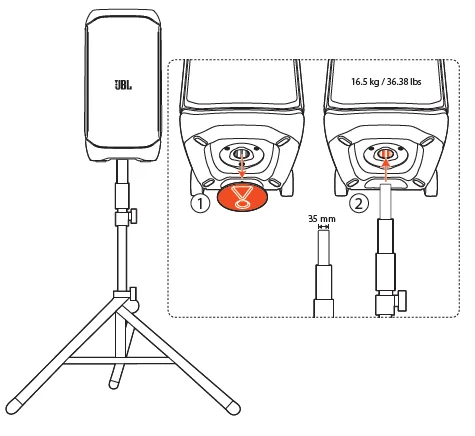
- Pole-mounting your PARTYBOX
PLACEMENT
Caution:
- Do not sit or lean on the speaker or push it sideways to avoid tipover and possible damage.
Place the speaker on a flat, stable surface and ensure that the rubber feet are down.
POWER ON
Cautions:
- Use the provided power cord only.
- You can use either AC power or the built-in battery as a power supply to the speaker.

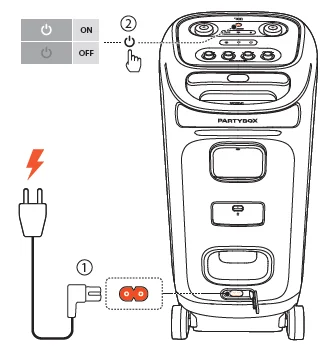
- Connect AC power. To use the built-in battery, disconnect the AC power after charging the speaker.
- Press POWER to power on.
Tips:
- Fully charge the speaker before first-time use to prolong the lifespan of the built-in battery.
- You can check the battery level by pressing any button on the speaker.
- The speaker switches to standby mode automatically after 20 minutes of inactivity. You can press POWER on the speaker to switch to normal operation.
USING YOUR PARTYBOX
Notes:
- Only one sound source can be played at a time.
- Starting playback from another source will always interrupt the current source.
Bluetooth connection
You can use the speaker with your Bluetooth-enabled smartphone or tablet.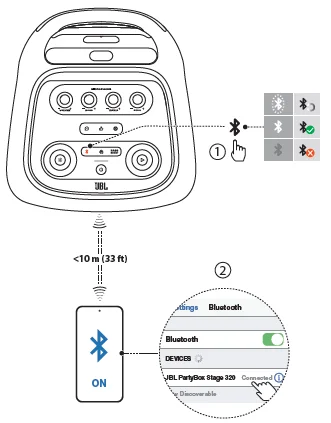
- Press on the speaker to enter Bluetooth pairing mode.
- Choose JBL PartyBox Stage 320 on your Bluetooth device to connect.
- Once successfully connected, you can stream audio from your Bluetooth device to this speaker.
Notes:
- This speaker can memorise a maximum of 8 paired devices. The ninth paired device will replace the first one.
- Enter “0000” if a PIN code is requested for connection to a Bluetooth device.
- Bluetooth performance can be affected by the distance between this product and your Bluetooth device and the environment of operation.
To terminate the Bluetooth-enabled device:
- Turn off this speaker, or
- Disable Bluetooth on your device.
To reconnect the Bluetooth-enabled device:
- When you turn on this speaker next time, it tries to reconnect the last connected device automatically.
- If not, manually select JBL PartyBox Stage 320 on your Bluetooth device to connect.
USB connection
Plug a USB storage device that contains playable audio content into the USB port of the speaker.
- The speaker switches to the USB source automatically.
- Audio playback will start automatically.
Tip:
The speaker plays audio files on the USB storage device from the root folder to the last level of subfolders in alphabetical sequence.
Up to 8 levels of subfolders are supported.
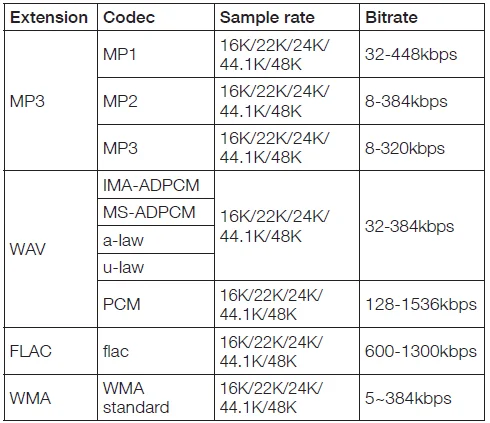
Supported audio formats
Music control
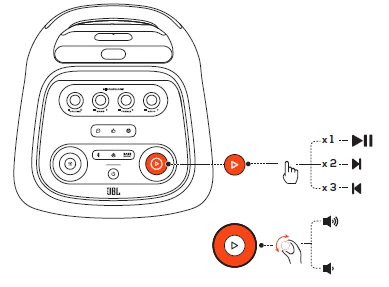
- Press once to pause or resume playback.
- Press twice to skip to the next track.
- Press three times to skip to the previous track.
- Rotate the volume knob clockwise or counterclockwise to increase or decrease the main volume.
- Press BassBoost to enhance the bass level: level 1, level 2, or off.
Note:
The skip operation is unavailable in AUX mode.
AUX connection
- Connect an external audio device to the speaker through a 3.5 mm audio cable (not supplied). The speaker switches to the AUX source automatically.
- Start audio playback on the external device.
Mixing sound with a microphone and/or guitar
By using a microphone or electric guitar (not supplied), you can mix sound with an audio source.
Notes:
- Always set the guitar or microphone volume to the minimum level before guitar or microphone connection/disconnection.
- Always disconnect the guitar or microphone when you are not using it.
Connecting a microphone
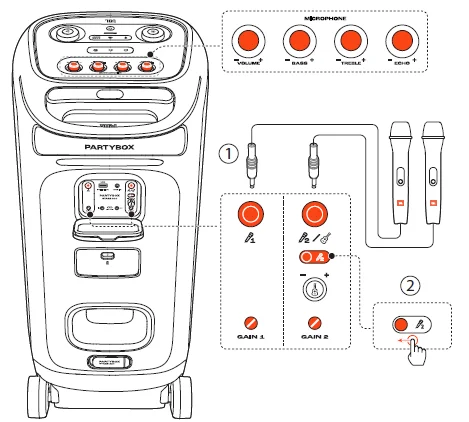
- Connect a microphone to the MIC 1 or MIC 2/GUITAR socket.
- When connecting a microphone to the MIC 2/GUITAR socket, switch the slider to show Mic 2.
Connecting a guitar
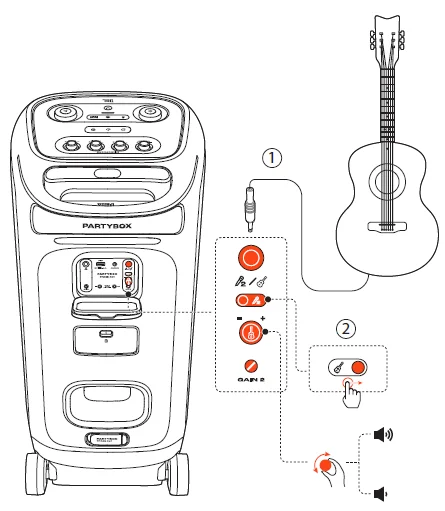
- Connect a guitar to the MIC 2/GUITAR socket.
- Switch the slider to show GUITAR.
Mixing sound
Sing through the microphone or play the guitar.
- To adjust the volume of the audio source, rotate the volume knob on the top panel clockwise or counterclockwise.
- To adjust the volume of the microphone, rotate the – VOL + knob on the top panel. To adjust the volume of the guitar, rotate the guitar volume knob on the back panel.
- To adjust the gain of the microphone or guitar, rotate the GAIN 1 or GAIN 2 knob on the back panel, respectively.
- To adjust the echo, treble, and bass levels of the microphone, rotate the – ECHO +, – TREBLE +, and – BASS + knobs on the top panel, respectively.
Charging your mobile device
Replace battery (JBL BATTERY400)
- Pull down the latch to open the battery compartment, and then remove the old battery.
- Insert a new battery of the same type (JBL BATTERY400) with the metal contacts facing down, and then close the battery cover.
CARRYING YOUR PARTYBOX
Cautions:
- Before carrying the speaker, ensure that all the cords are disconnected.
- To avoid personal injury and/or property damage, hold the product firmly while carrying.
The telescopic handle design allows you to move the speaker around easily.
POLE-MOUNTING YOUR PARTYBOX
Cautions:
- Installation must be done by qualified persons using safe rigging standards.
- The installer is responsible for the proper selection and use of mounting hardware to properly and safely pole-mount the speaker.

ADVANCED USAGE
Download and install the JBL PARTYBOX app to get more from the product.
Light effect
- Press to turn the light effect on or off.
- Hold for more than 2 seconds to turn the strobe and starry light on or off.
- Rotate the knob clockwise / counterclockwise to switch between different light patterns: NEON, LOOP, BOUNCE, TRIM, SWITCH, or FREEZE.
Daisy chain
Factory reset
To restore the factory settings, hold  and
and  for more than 10 seconds.
IPX4
Cautions:
- Always keep the charging port dry before connecting AC power.
- To ensure splash resistance, always keep the protective covers closed securely.
The speaker is IPX4 splash resistant.
SPECIFICATIONS
- Transducers: 2 x 6.5 inch (165 mm) woofers, 2 x 1 inch (25 mm) Dome tweeters
- Output power: 240 W RMS (IEC60268)
- Power input: 100 – 240 V ~ 50/60 Hz
- Frequency response: 40 Hz – 20 kHz (-6 dB)
- Signal-to-noise ratio: > 80 dB
- Battery type: JBL BATTERY400, Li-ion 68 Wh (equivalent to 7.2 V / 9444 mAh)
- Battery charge time: 3 hours (Speaker off mode)
- Music play time: up to 18 hours (varies by volume level and audio content)
- Cable type: AC power cable (type varies by region)
- Cable length: 2.0 m / 6.6 ft
- USB charge out: 5 V / 2.1 A (Max) (Speaker off mode)
- USB format: FAT16, FAT32
- Bluetooth® version: 5.4
- Bluetooth® profile: A2DP V1.4, A VRCP V1.6
- Bluetooth® transmitter frequency range: 2.4 GHz – 2.4835 GHz
- Bluetooth® transmitter power: ≤ 18 dBm (EIRP)
- Bluetooth® transmitter modulation: GFSK, π/4 DQPSK, 8DPSK
- Supported formats: .MP3, .WAV, .WMA, .FLAC
- Input sensitivity: Aux-In: 250 mV RMS (3.5 mm connector), Mic-In: 20 mV RMS, Guitar-In: 100 mV RMS, Bluetooth/USB input: -12 dBFS
- Product dimensions (W x H x D): 335 mm x 669 mm x 385 mm / 13.19” x 26.34” x 15.16”
- Net weight: 16.5 kg / 36.38 lbs
- Packaging dimensions (W x H x D): 384 mm x 729 mm x 434 mm / 15.1” x 28.7” x 17.1”
- Gross weight: 18.9 kg / 41.7 lbs
18 hours of battery playtime is only a reference and may vary depending on music content and battery aging after numerous charging and discharging cycles. It’s achievable with a predefined music source, light show and bass boost switched off, volume level at 18 and Bluetooth streaming source.
TROUBLESHOOTING
Caution:
Never try to repair the product by yourself. If you have any problems while using this product, check the following points before you request service.
System
The speaker will not turn on.
Ensure that the speaker battery is not drained. If not, use the AC power instead.
No response from some buttons
The product may be in demo mode. In demo mode, all the input sources and buttons, except //Bass boost and the volume and light pattern knobs, are disabled. With AC power connected, hold  and simultaneously for more than 10 seconds to exit.
Sound
No sound from the speaker.
- Ensure that the speaker is powered on.
- Adjust volume.
- Ensure that a sound source is active and not muted.
Bluetooth
A device cannot connect to the speaker.
- Ensure that the Bluetooth function of the device is enabled.
- The speaker is already connected with another Bluetooth device. Hold on the speaker for more than 10 seconds to disconnect and pair with a new device.
Poor audio quality from a connected Bluetooth device
The Bluetooth reception is poor. Move the device closer to the speaker, or remove any obstacle between the device and the speaker.
COMPLIANCE
The product is in compliance with the European Union energy legislation.
Bluetooth connection mode
The product is intended to be used for streaming music via Bluetooth connection. A consumer can stream Bluetooth audio to the speaker. When the product is connected through Bluetooth, the Bluetooth connection must remain active at all times to ensure proper operation.
The product will enter sleep mode (networked standby) after 20 minutes without operation. The power consumption in sleep mode is less than 2.0 Watts, after which it can be reactivated via Bluetooth connection.
Bluetooth disconnection mode
The product will enter standby mode after 20 minutes without operation. The power consumption in standby mode is less than 0.5 Watts.
For more Manuals by JBL, visit ManualsLibraryy
JBL PartyBox Stage 320-FAQs
Can I use the JBL PartyBox Stage 320 without the battery?
Yes, the speaker works perfectly while plugged into a wall outlet even if the battery is removed.
Does the JBL PartyBox Stage 320 get loud?
Yes, it delivers powerful sound that can easily fill a large room or outdoor area, though very high volumes may slightly compress the bass.
How many watts is the JBL PartyBox Stage 320?
The speaker has a 240W output power for strong, room-filling audio.
Does the JBL Stage 320 have a battery?
Yes, it uses a removable JBL Battery 400, offering up to 18 hours of playtime. You can also keep spare batteries to extend usage time.
Can I use the JBL PartyBox 320 while charging?
Yes, the speaker can charge and play music at the same time.
Is the JBL PartyBox Stage 320 good for outdoor use?
Yes, it is IPX4 splash-proof, making it suitable for parks, beaches, and outdoor parties.
How do I identify an original JBL PartyBox 320?
Genuine units have proper serial numbers, barcode labels, accurate branding, and compliance icons on the packaging.
How long does the JBL PartyBox Stage 320 take to charge?
A full charge typically takes about 3.5 hours.