
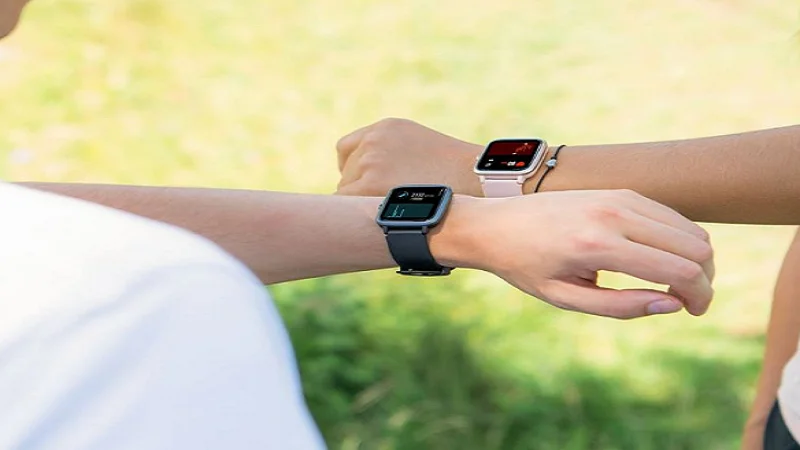
JYouPro Smart Bracelet Watch
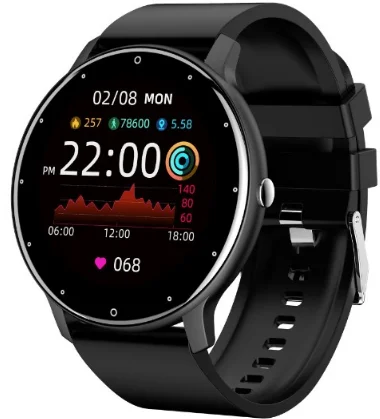
Device maintenance
Welcome to use our high-performance wristband smart bracelet, which creates a thoughtful and healthy experience for you.
Please remember the following tips when you maintain your smart bracelet:
- Clean the smart bracelet regularly, especially its inner side, and keep it dry.
- Adjust the smart bracelet tightness to ensure air circulation.
- Excessive skincare products should not be used on the wrist that wears the smart bracelet.
- Please cease wearing the smart bracelet in case of skin allergy or any discomfort.
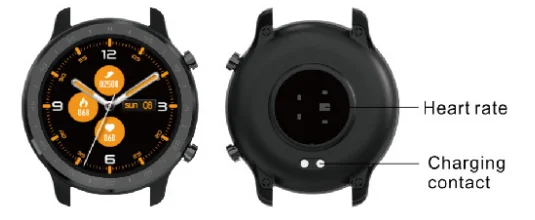
Schematic diagram of the main body of the smart bracelet
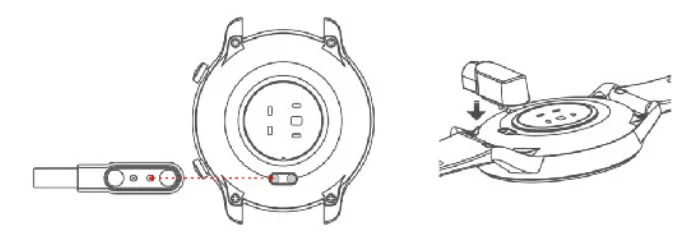
Power-on
Long-press the side button for 3 seconds or plug in the Magnetic line to charge the smart bracelet.
Downloading and binding the smart bracelet APP
- Download and install the app
Scan the QR code with your mobile phone to download the app.
For IOS system, select App Store; and for the Android system, select Google Play Store to download and install JYouPro. Note: your mobile phone must support Android 5.1 or IOS 8.0 or above, and Bluetooth 4.0 or above.
 - Bind the smart bracelet to the APP
- Click on “Scan for device” to bind the smart bracelet.
- Click on your device in the list of scanned devices.

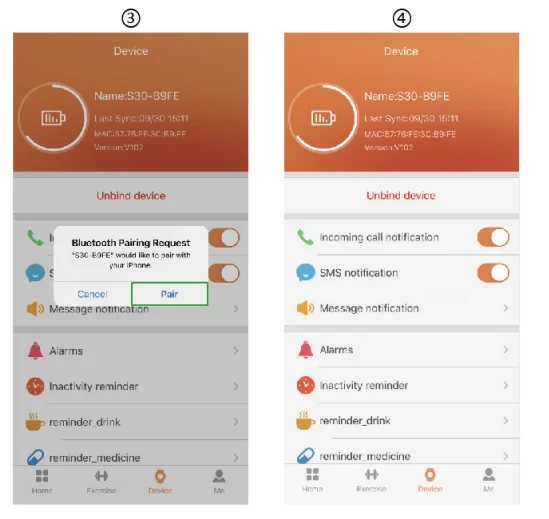
- The 10S system will show a Bluetooth pairing request, and you can click on Bluetooth “Pairing” to confirm. Connect it directly to the Android system.
- The binding is successful.

 Note: your mobile phone must support Android 5.1 or IOS 8.0 or above, and Bluetooth 4.0 or above.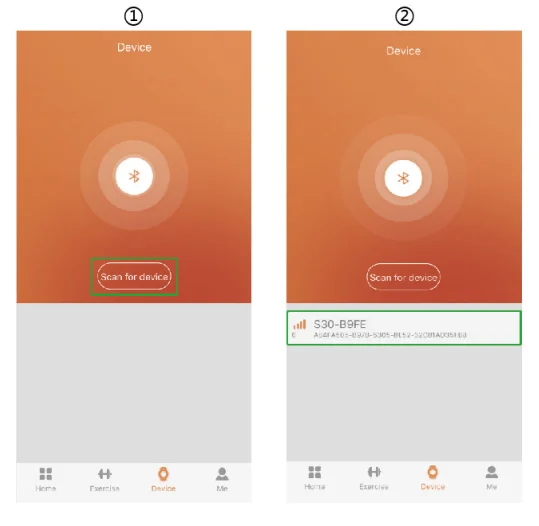
Introduction of smart bracelet functions
Power-on status
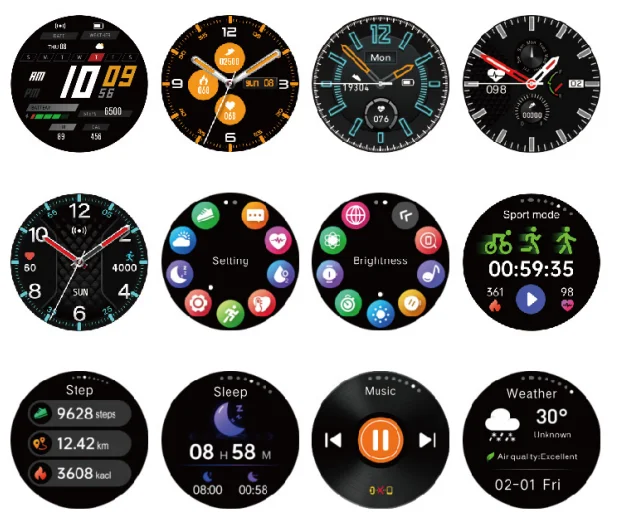
switch the menu interfaces of the main screen, as the interfaces shown in the following;
Remove device
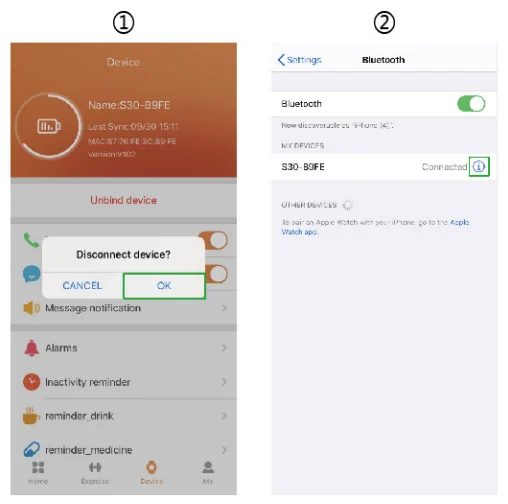
For the Android mobile phone, the device can be disconnected from your mobile phone by simply clicking on Remove device.
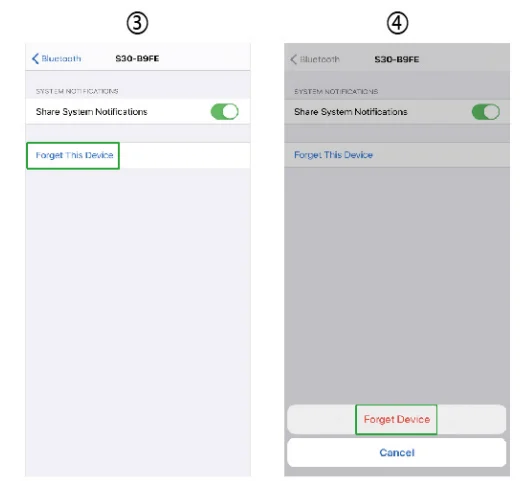
For the Apple mobile phone, after binding removal, you need to click on the symbol on the right Settings- Bluetooth, and choose to ignore the device. As shown below:
Frequently Asked Questions (FAQs)
Why does the smart bracelet automatically disconnect Bluetooth when the Android screen goes out?
- Lock background APP. When the JYouPro process is cleared, the smart bracelet will be disconnected from the mobile phone.
- Set APP self-startup
- Unrestricted background operation. The Android mobile phone installed with the APP intelligently restricts the background operation by default, and the App should be set manually without any restriction.
Why can’t the smart bracelet receive message push?
- Please confirm that you have turned on the switch for message push on the mobile phone client.
- Please confirm that messages can be displayed normally in the mobile phone notification bar. The message push on the smart bracelet is completed by reading the message from the mobile phone notification bar. The smart bracelet will not receive the message push if there is no message in the mobile phone notification bar. (You need to find notification settings in the mobile phone settings, and turn on the notification switch of WeChat, QQ call, SMS, and the mobile phone client.)
- Turn on the mobile phone — Settings. Enter “Notification use right” in the top search box, re-open JVouPro.
Why can’t you take a hot bath with the smart bracelet?
Answer: the bath water has a relatively high temperature, and generates a lot of vapor, which is in the gas phase with a small molecular radius and can easily infiltrate into the smart bracelet from the shell gap.
When the temperature drops, the vapor will condense into liquid-phase droplets, which will easily cause a short circuit inside the smart bracelet and damage the circuit board, and then damage the smart bracelet.
Why is the Bluetooth connecting icon blinking all the time?
Answer: The User may encounter this problem. It can mainly prompt the users that the pushed message is not received if the app is not connected to the bracelet. Launch the app to connect to the bracelet, and the Bluetooth icon can be displayed normally.
Note: For more frequently asked questions, please refer to the JYouPro APP User Manual
 Warning:
Please consult your doctor before you take a new sport. The smart bracelet should not be used for any medical purpose, though it may dynamically monitor the heart rate in real time.
Basic Parameters
- Screen type: 1.28-inch TFT
- Battery capacity: 210mAh
- Protection degree: IP 67
- System requirements: iOS 8.0 or above/Android 4.4 or above

All trademarks are the sole property of their respective companies
For more manuals by Blogs, visit ManualsLibraryy
JYouPro Smart Bracelet Watch- FAQs
Q1. How do I set the time on my JYouPro watch?
You can set the time through the JYouPro app. Open the app, go to Device > More settings > Bracelet’s time format, and choose the 12-hour or 24-hour system.
Q2. How do I connect my JYouPro watch to my phone?
Download the JYouPro app, enable Bluetooth and GPS on your phone, then pair the watch within the app. Also confirm the Bluetooth connection in your phone settings.
Q3. How does the JYouPro smart bracelet work?
When worn, the bracelet tracks steps, distance, calories, sleep, and heart rate. It can also display up to 7 recent message notifications directly on the watch.
Q4. Is the JYouPro watch waterproof?
Yes. Most JYouPro smart bracelets come with an IP68 waterproof rating, making them suitable for daily use, handwashing, or light swimming.
Q5. Is the JYouPro app free to use?
Yes. The JYouPro app is free for both Android and iOS devices. It allows syncing fitness data, goal setting, and health tracking without extra cost.
Q6. How do I connect JYouPro to Google Fit?
Open the JYouPro app, log in, then go to Me > Google Fit and enable the option. This lets your fitness data sync with Google Fit automatically.
Q7. Why is my JYouPro watch not turning on?
Make sure it’s charged with the original USB charger and cable. Clean the charging pins and confirm power flow. If it still doesn’t start, try a long press of the power button.
Q8. Does JYouPro sync with other fitness apps?
JYouPro is mainly designed for its own app, but it supports syncing with Google Fit. It may not fully integrate with other third-party fitness apps.