
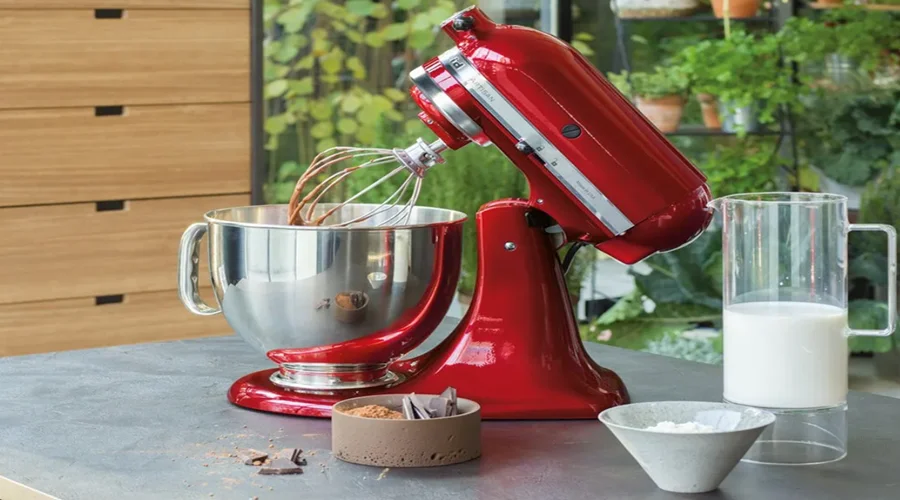

KitchenAid Artisan Stand Mixers
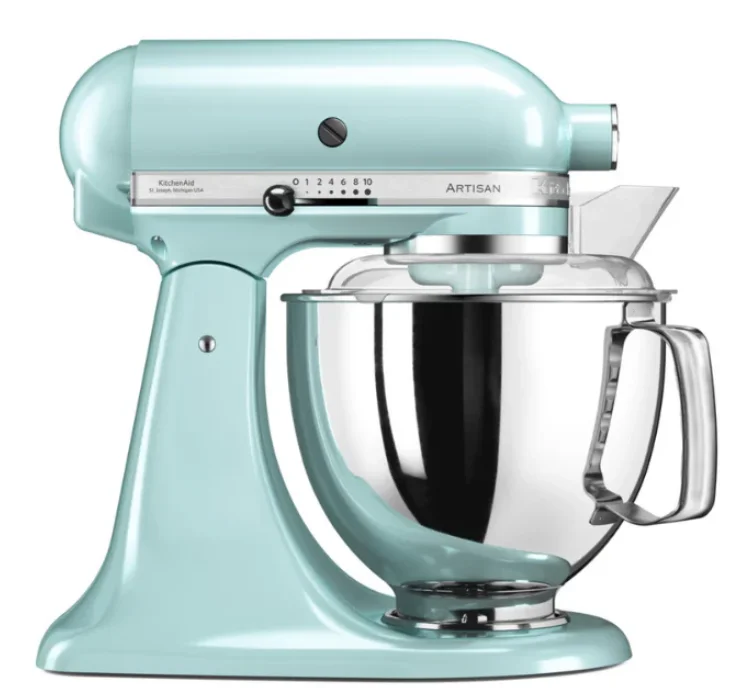
PARTS AND FEATURES
PARTS AND ACCESSORIES
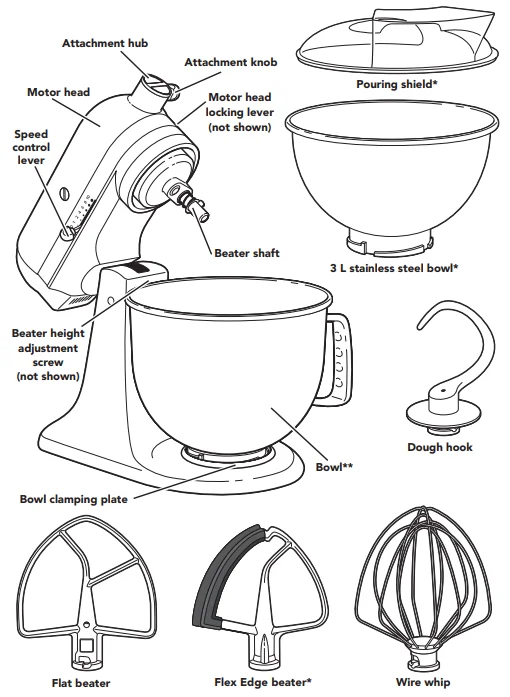
* Included with select models only. Also available as an optional accessory.
** The bowl design and material depend on the Stand Mixer model.
IMPORTANT SAFEGUARDS
When using electrical appliances, basic safety precautions should always be followed, including the following:
- Read all instructions.
- To protect against the risk of electrical shock, do not put the Stand Mixer in water or other liquids.
- Unplug the Stand Mixer from the outlet when not in use, before putting on or taking off parts, and before cleaning.
- Never leave the Stand Mixer unattended while it is in operation.
- This appliance can be used by children aged 8 years and above and persons with reduced physical, sensory, or mental capabilities or lack of experience and knowledge if they have been given supervision or instruction concerning the use of the appliance in a safe way and understand the hazards involved. Children shall not play with the appliance. Cleaning and user maintenance shall not be made by children without supervision.
- Avoid contacting moving parts. Keep hands, hair, clothing, as well as spatulas and other utensils away from the beater during operation to reduce the risk of injury to persons and/or damage to the Stand Mixer.
- Do not operate the Stand Mixer with a damaged cord or plug or after the Stand Mixer malfunctions, or is dropped or damaged in any manner. Return the appliance to the nearest Authorised Service Centre for examination, repair, or electrical or mechanical adjustment.
- The use of attachments not recommended or sold by KitchenAid may cause fire, electric shock, or injury.
- Do not use the Stand Mixer outdoors.
- Do not let the cord hang over the edge of the table or counter.
- Remove flat beater, wire whip, or dough hook from Stand Mixer before washing.
SAVE THESE INSTRUCTIONS
This product is designed for household use only.
USING THE STAND MIXER
SPEED CONTROL GUIDE
All speeds have the Soft Start feature, which automatically starts the Stand Mixer at a lower speed to help avoid ingredient splash-out and “flour puff” at start-up, then quickly increases to the selected speed for optimal performance.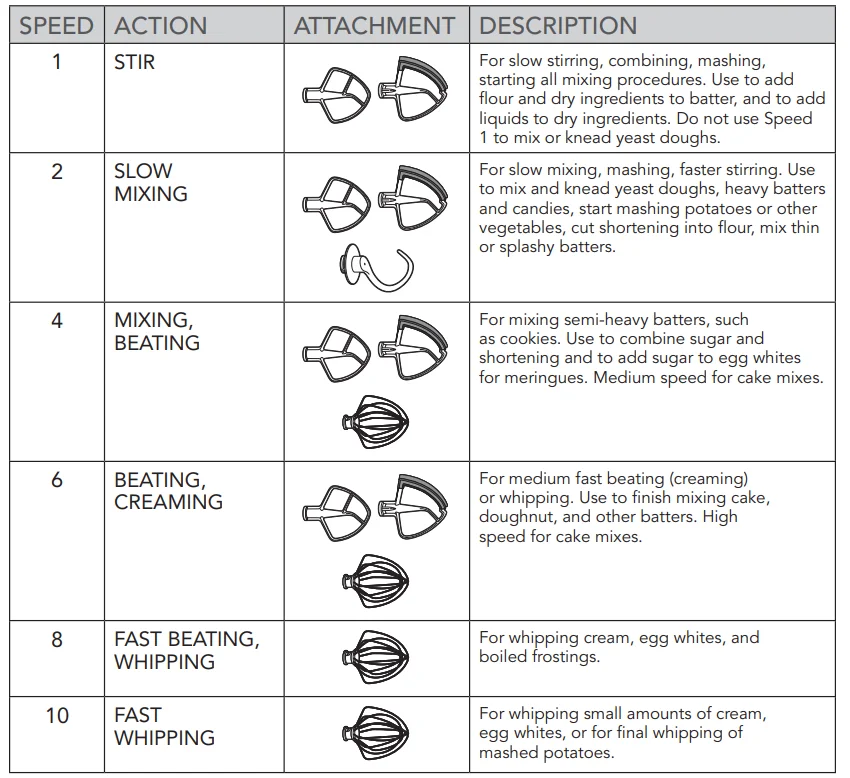
NOTE: The speed control lever can be set between the speeds listed in the above chart to obtain speeds 3, 5, 7, and 9 if a finer adjustment is required. Do not exceed Speed 2 when preparing yeast doughs, as this may cause damage to the Stand Mixer.
ACCESSORY GUIDE
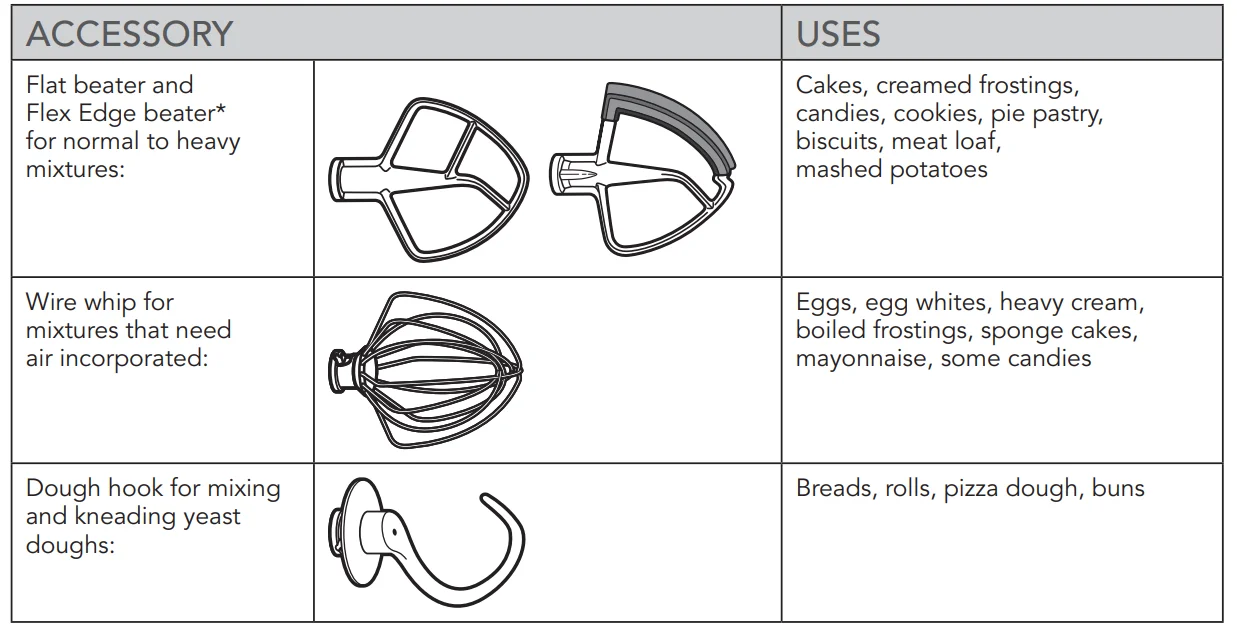
* Included with select models only. Also available as an optional accessory.
ATTACHING/REMOVING THE BOWL
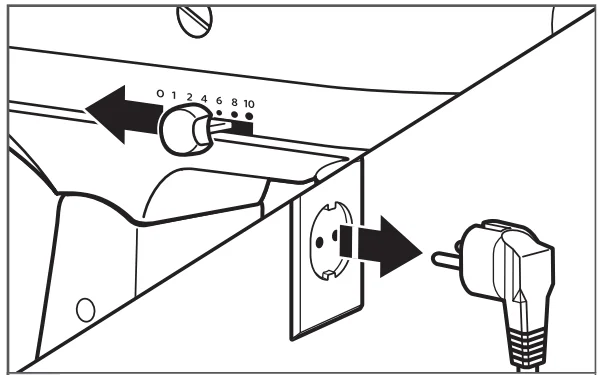
- To attach bowl: Turn speed control to “0”. Unplug the Stand Mixer.

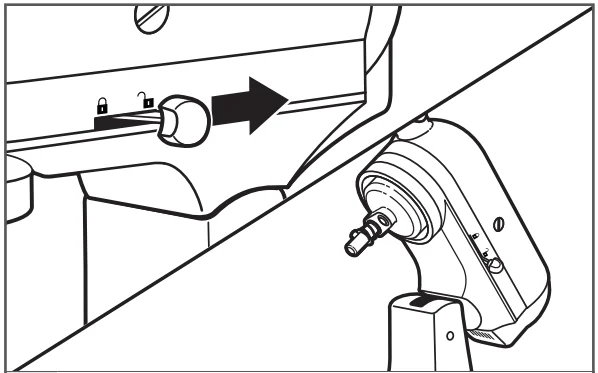
- Hold the locking lever in the UNLOCK position and tilt the motor head back.

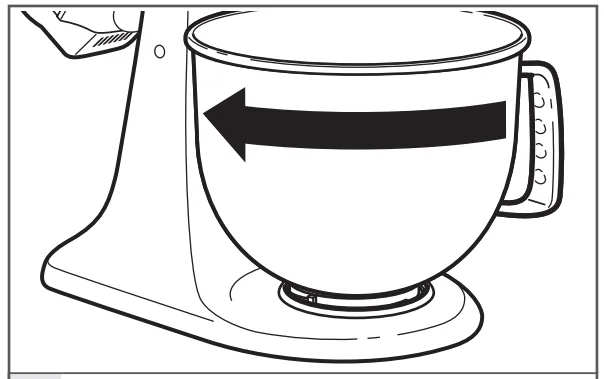
- Place the bowl on the bowl clamping plate. Turn the bowl gently in a clockwise direction.

- To remove bowl: Repeat steps 1 and 2. Turn the bowl gently counterclockwise.
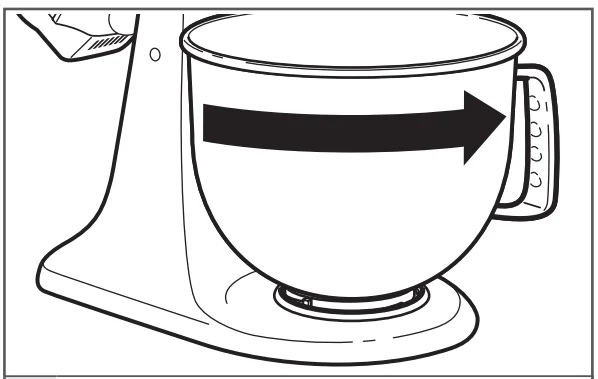
LIFTING/LOWERING THE MOTOR HEAD
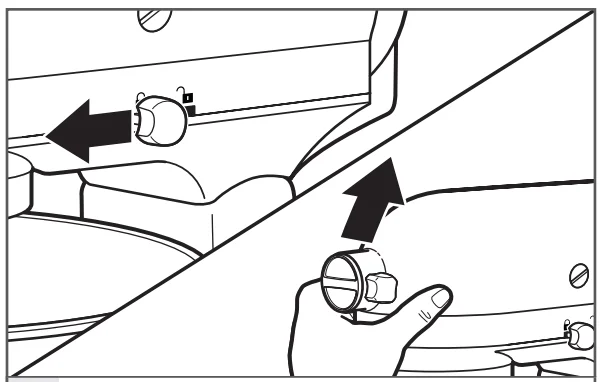
- To lift the motor head: Push the locking lever to the UNLOCK position and lift the head. Once lifted, the lever will automatically go back to the LOCK position to keep the head lifted.

- To put down the motor head: Push the locking lever to UNLOCK and gently bring the head down. The locking lever will automatically go back in the LOCK position when the head is down. Before mixing, test the lock by attempting to raise the motor head.
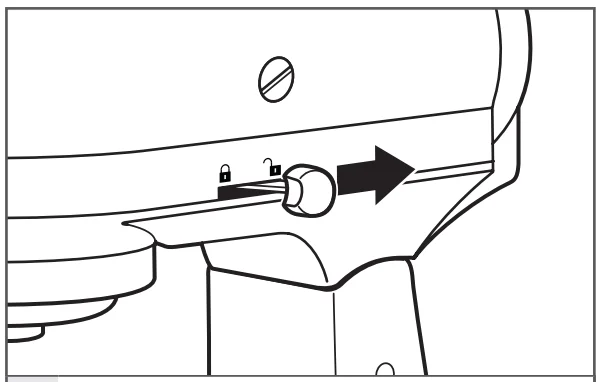
NOTE: Motor head should always be in the LOCK position when using the Stand Mixer.
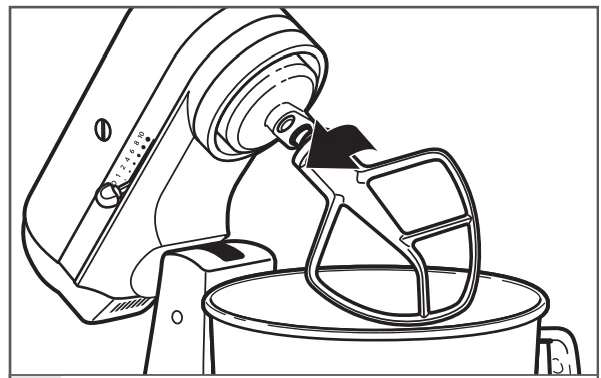
ATTACHING/REMOVING THE FLAT BEATER, FLEX EDGE BEATER*, WIRE WHIP, OR DOUGH HOOK
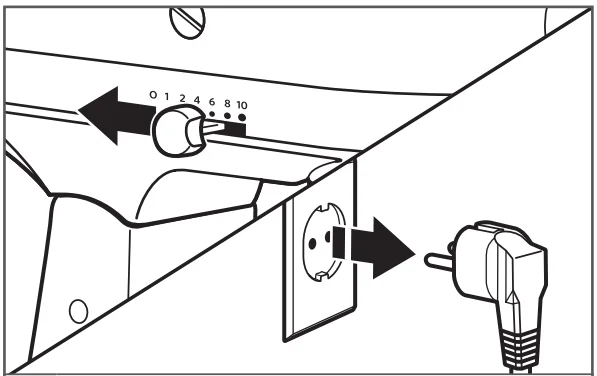
- To attach the accessory: Turn speed control to “0”. Unplug the Stand Mixer.

- Hold the locking lever in the UNLOCK position and tilt the motor head back.

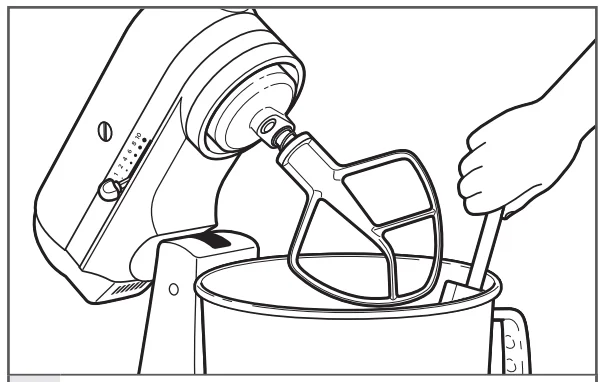
- Slip the accessory onto the beater shaft and press upward as far as possible. Then, turn the accessory to the right, hooking the accessory over the pin on the shaft.

- To remove the accessory: Repeat steps 1 and 2. Press the accessory upward as far as possible and turn to the left. Then pull the accessory from the beater shaft.


BEATER TO BOWL CLEARANCE
Your Stand Mixer is adjusted at the factory so the flat beater just clears the bottom of the bowl. If, for any reason, the flat beater hits the bottom of the bowl or is too far away from the bowl, you can correct the clearance easily.
- Turn speed control to “0”. Unplug the Stand Mixer.

- Lift motor head. Turn the screw slightly counterclockwise (left) to raise the flat beater or clockwise (right) to lower the flat beater. Adjust the flat beater so it just clears the surface of the bowl. If you over-adjust the screw, the bowl lock lever may not lock into place.
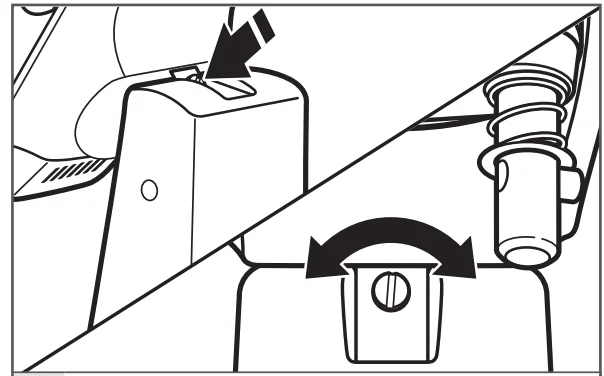
NOTE: When properly adjusted, the flat beater will not strike on the bottom or side of the bowl. If the flat beater or the wire whip is so close that it strikes the bottom of the bowl, the coating may wear off the beater, or the wires on the whip may wear.
PLACING/REMOVING THE POURING SHIELD*
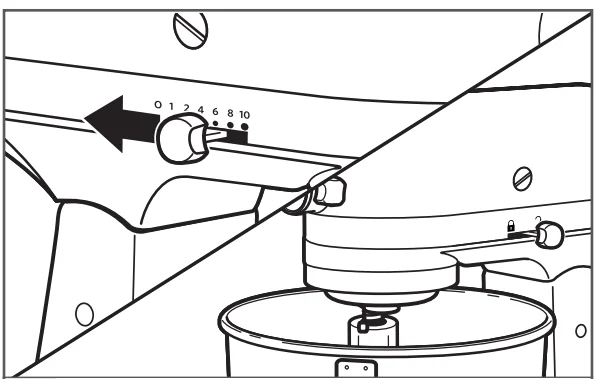
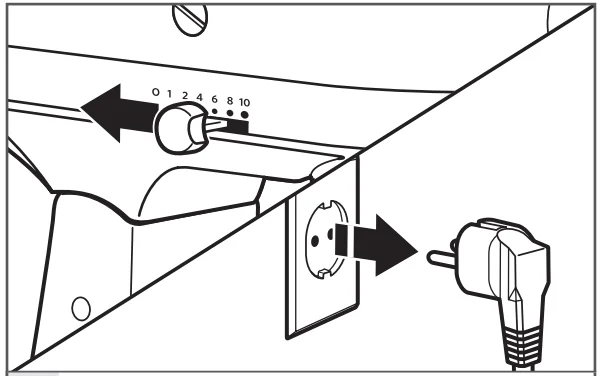
- To place the pouring shield: Turn the speed control to “0”. Unplug the Stand Mixer. Attach your chosen accessory. See “Attaching/removing the flat beater, wire whip, or dough hook” section.

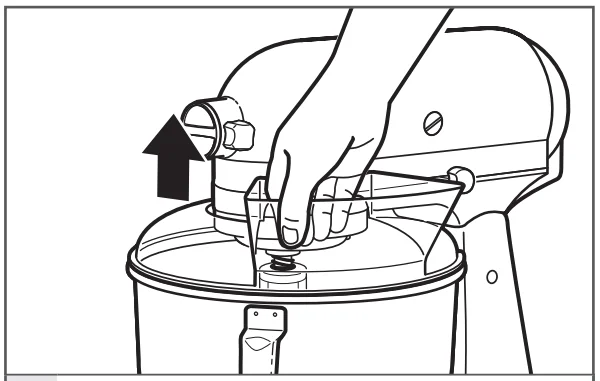
- From the front of the Stand Mixer, slide the pouring shield over the bowl until the shield is centered. The bottom rim of the shield should fit within the bowl.

- To remove the pouring shield: Turn speed control to “0”. Unplug the Stand Mixer.

- Lift the front of the pouring shield clear of the bowl rim and pull forward. Remove the attachment and bowl.
USING THE POURING SHIELD*
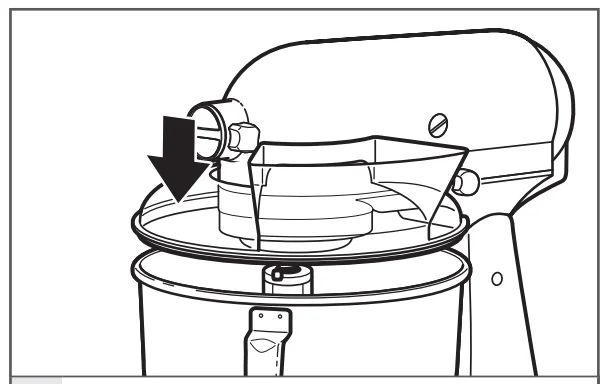
Use the pouring shield to avoid having ingredients splashing out of the bowl when mixing, as well as to easily pour ingredients into the bowl while mixing.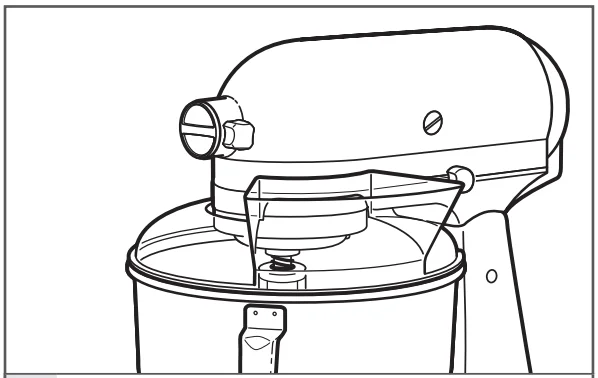
- For best results, rotate the shield so the motor head covers the U-shaped gap in the shield. The pouring chute will be just to the right of the attachment hub as you face the Stand Mixer.

- Pour the ingredients into the bowl through the pouring chute.

OPERATING THE SPEED CONTROL
NOTE: The Stand Mixer may warm up during use. Under heavy loads with extended mixing time, the top of the unit may become hot. This is normal.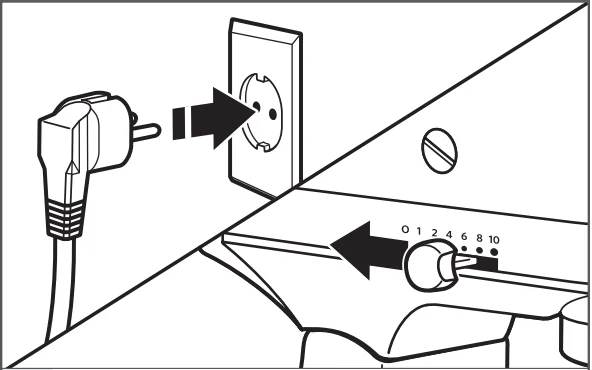
- Plug the Stand Mixer into the proper electrical outlet. Always set the speed control lever on the lowest speed to start, then gradually increase the speed to avoid splashing ingredients. See the “Speed control guide” chart.

- Do not scrape the bowl while the Stand Mixer is operating. The bowl and beater are designed to provide thorough mixing without frequent scraping. Scraping the bowl once or twice during mixing is usually sufficient.
OPTIONAL ATTACHMENTS
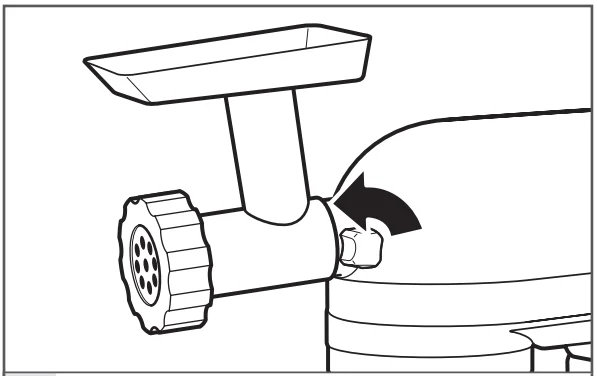
KitchenAid offers a wide range of optional attachments, such as food grinders or pasta makers. They may be attached to the Stand Mixer attachment power shaft, as shown here.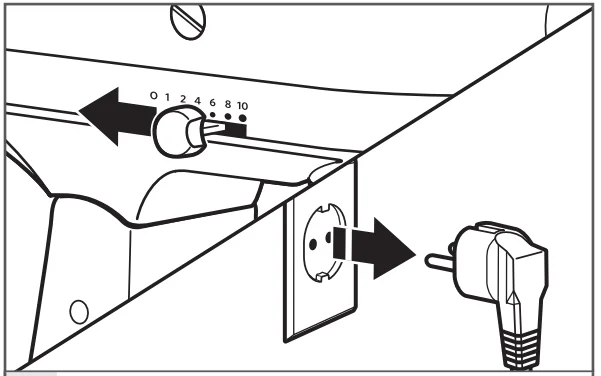
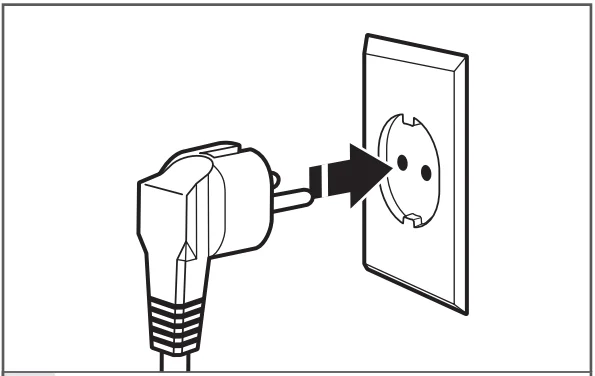
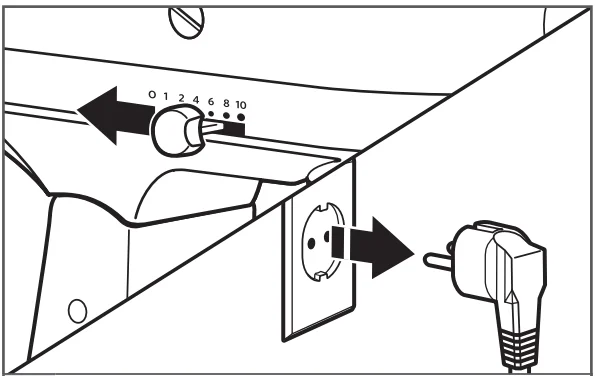
- To attach: Turn speed control to “0”. Unplug the Stand Mixer.
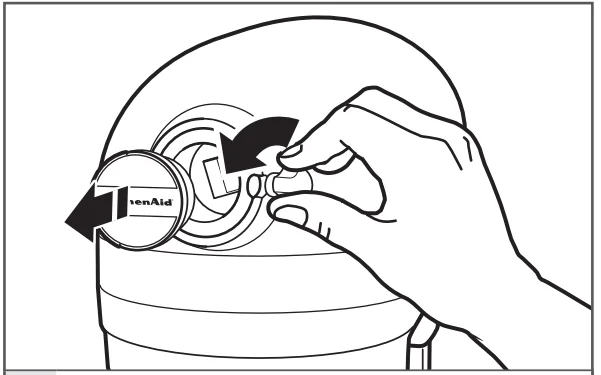
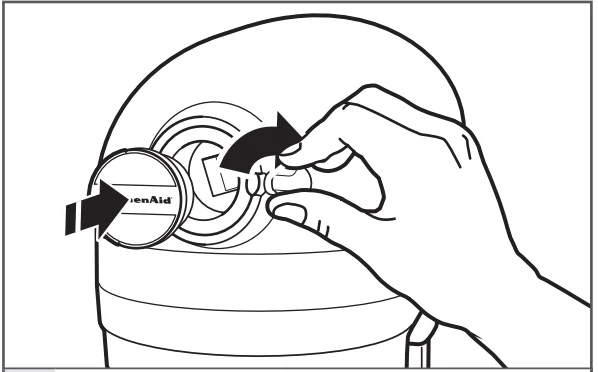
- Loosen the attachment knob by turning it counterclockwise. Remove the attachment hub cover.

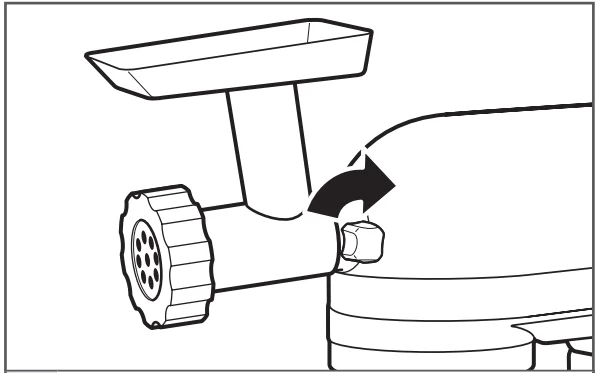
- Insert the attachment shaft housing into the attachment hub, making certain that the attachment power shaft fits into the square attachment hub socket. It may be necessary to rotate the attachment back and forth. When the attachment is in the proper position, the pin on the attachment will fit into the notch on the hub rim.

- Tighten the attachment knob by turning clockwise until attachment is completely secured to the Stand Mixer.

- Plug into a proper electrical outlet.

- To remove: Turn speed control to “0”. Unplug the Stand Mixer.

- Loosen the attachment knob by turning it counterclockwise. Rotate the attachment slightly back and forth while pulling out.

- Replace the attachment hub cover. Tighten the attachment knob by turning it clockwise.

NOTE: See the Use and Care Guide of each specific attachment for recommended speed settings and operating times.
TIPS FOR GREAT RESULTS
EGG WHITES
Place room-temperature egg whites in a clean, dry bowl. Attach the bowl and the wire whip. To avoid splashing, gradually turn to the designated speed and whip to the desired stage.
- AMOUNT SPEED
- 1 egg white GRADUALLY to 10
- 2 or more egg whites GRADUALLY to 8
Whipping stages
With your KitchenAid Stand Mixer, egg whites whip quickly. Avoid over-whipping.
WHIPPED CREAM
Pour cold whipping cream into a chilled bowl. Attach the bowl and the wire whip. To avoid splashing, gradually turn to the designated speed and whip to the desired stage.
- AMOUNT SPEED
- less than 200 ml (3/4 cup) GRADUALLY to 10
- more than 200 ml (3/4 cup) GRADUALLY to 8
Whipping stages
Watch the cream closely during whipping. Because your KitchenAid Stand Mixer whips so quickly, there are just a few seconds between whipping stages.
MIXING TIPS
- Mixing time
Your KitchenAid Stand Mixer will mix faster and more thoroughly than most other electric mixers. Therefore, the mixing time in most recipes must be adjusted to avoid overbeating. To help determine the ideal mixing time, observe the batter or dough and mix only until it has the desired appearance described in your recipe, such as “smooth and creamy.” To select the best mixing speeds, use the “Speed control guide” section. - Adding ingredients
The standard procedure to follow when mixing most batters, especially cake and cookie batters, is to add:- 1/3 dry ingredients
- 1/2 liquid ingredients
- 1/3 dry ingredients
- 1/2 liquid ingredients
- 1/3 dry ingredients
Use Speed 1 until ingredients have been blended. Then gradually increase to the desired speed.
Always add ingredients as close to the side of the bowl as possible, not directly into the moving beater. The pouring shield can be used to simplify adding ingredients.
NOTE: If ingredients in the very bottom of the bowl are not thoroughly mixed, the beater is not far enough into the bowl. See the “Beater to bowl clearance” section.
- Cake mixes
When preparing packaged cake mixes, use Speed 4 for medium speed and Speed 6 for high speed. For best results, mix for the time stated on the package directions. Adding nuts, raisins, or candied fruits. Solid materials should be folded in the last few seconds of mixing on Speed 1. The batter should be thick enough to keep the fruit or nuts from sinking to the bottom of the pan during baking. Sticky fruits should be dusted with flour for better distribution in the batter. - Liquid mixtures
Mixtures containing large amounts of liquid ingredients should be mixed at lower speeds to avoid splashing. Increase speed only after the mixture has thickened. - Kneading yeast doughs
ALWAYS use the dough hook to mix and knead yeast doughs. Use Speed 2 to mix or knead yeast doughs. Use of any other speed creates high potential for unit failure. Do not use recipes calling for more than 900 g (7 cups) all-purpose flour or 800 g (6 cups) whole-wheat flour when making dough in a 4.3 L bowl. Do not use recipes calling for more than 1 kg (8 cups) all-purpose flour or 800 g (6 cups) whole-wheat flour when making dough in a 4.8 L bowl.
CARE AND CLEANING
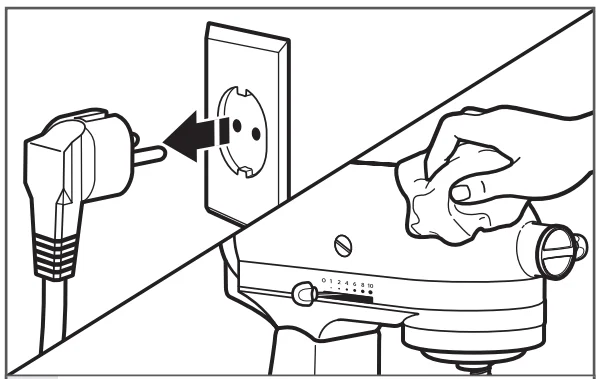
- Always be sure to unplug the Stand Mixer before cleaning. Wipe the Stand Mixer with a soft, damp cloth. Do not use household/commercial cleaners. Wipe off the beater shaft frequently, removing any residue that may accumulate. Do not immerse in water.
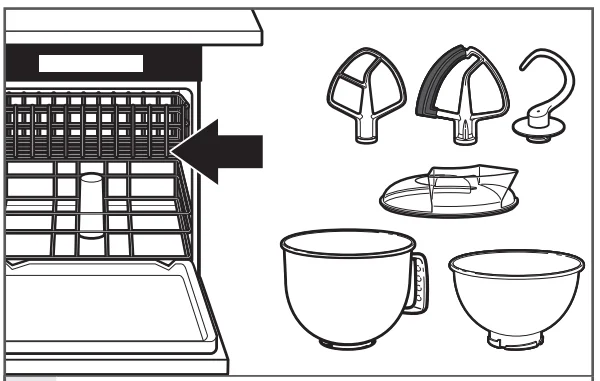
- Bowl, pouring shield*, white flat beater, Flex Edge beater*, and white dough hook may be washed in a dishwasher. Or, clean them thoroughly in hot sudsy water and rinse completely before drying. Do not store beaters on the shaft.

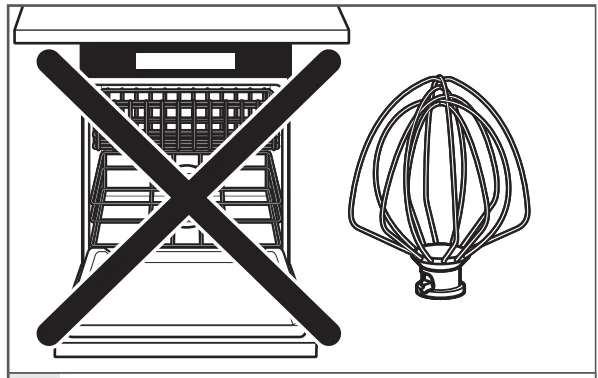
- IMPORTANT: The wire whip is not dishwasher-safe. Clean it thoroughly in hot sudsy water and rinse completely before drying. Do not store wire whip on shaft.
* Included with select models only. Also available as an optional accessory.
TROUBLESHOOTING
Please read the following before calling your service centre.
- The Stand Mixer may warm up during use. Under heavy loads with extended mixing time periods, you may not be able to comfortably touch the top of the unit. This is normal.
- The Stand Mixer may emit a pungent odor, especially when new. This is common with electric motors.
- If the flat beater hits the bowl, stop the Stand Mixer. See the “Beater to bowl clearance” section.
If your Stand Mixer malfunctions or fails to operate, please check the following:- Is the Stand Mixer plugged in?
- Is the fuse in the circuit to the Stand Mixer in working order? If you have a circuit breaker box, be sure the circuit is closed.
- Turn off the Stand Mixer for 10-15 seconds, then turn it back on. If the stand Mixer still does not start, allow it to cool for 30 minutes before turning it back on.
- If the problem is not due to one of the above items, see the “Warranty and service” section.
CUSTOMER SERVICE
In U.K. and Ireland: For any questions, or to find the nearest KitchenAid Authorised Service Centre, please find our contact details below.
NOTE: All services should be handled locally by an Authorised KitchenAid Service Centre.
- Contact number for the U.K. and Northern Ireland: Toll-free number 0800 988 1266 (calls from mobile phones are charged standard network rate) or call 0194 260 5504
- Contact number for Ireland: Toll-free number +44 (0) 20 8616 5148
- E-mail contact for the U.K. and Ireland: Go to www.kitchenaid.co.uk, and click on the link “Contact Us” at the bottom of the page.
- Address for U.K. and Ireland: KitchenAid Europa, Inc. PO BOX 19 B-2018 ANTWERP 11 BELGIUM
For more manuals by KitchenAid, visit ManualsLibraryy
KitchenAid Artisan Stand Mixers-FAQs
What is the difference between a regular KitchenAid and an Artisan mixer?
The Classic™ 4.5-quart KitchenAid mixer is a basic, entry-level option, while the Artisan® 5-quart model includes a larger bowl, a comfortable handle, a pouring shield, and comes in many colors for added convenience and style.
How do I adjust my KitchenAid Artisan stand mixer?
Use the height adjustment screw located under the mixer head. Turn it slightly clockwise if the beater is too high or counterclockwise if it’s too low. Proper adjustment ensures ingredients are mixed evenly without scraping the bowl.
Why does my stand mixer not reach the bottom of the bowl?
If adjusting the screw doesn’t help, check for worn gears or internal obstructions in the mixer head. This could prevent the beater from lowering correctly.
What is the best speed setting on a KitchenAid mixer?
Speeds 4–5 are ideal for medium mixing tasks such as cake batters or cookie dough. For creaming butter and sugar, use speeds 4–6, and for whipping egg whites, use a higher speed like 8–10.
Can I use a glass bowl on my KitchenAid mixer?
Yes. KitchenAid glass bowls are durable and microwave-safe, making them perfect for melting ingredients or visually checking your mixing progress.
How long does a KitchenAid mixer last?
A well-maintained KitchenAid mixer can last 10–15 years or even longer with proper cleaning and regular maintenance.
What type of grease does a KitchenAid mixer need?
Always use KitchenAid food-safe grease designed specifically for mixers. It keeps internal gears lubricated and safe for food contact.
Why is mixer adjustment important?
Proper adjustment ensures your ingredients are mixed thoroughly. Over time or after shipping, the mixer’s calibration can shift, so it’s good to check and readjust periodically.
Is a tilt-head or bowl-lift mixer better?
Tilt-head mixers are compact and easier for everyday use, while bowl-lift mixers handle larger batches and heavy doughs, making them better for frequent bakers.