
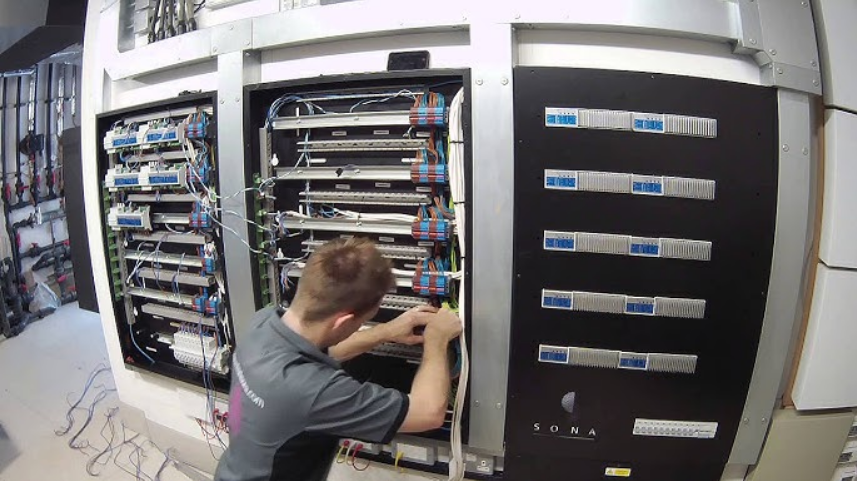

Lutron PD8-65A 120 Volts DIN Breaker Panel
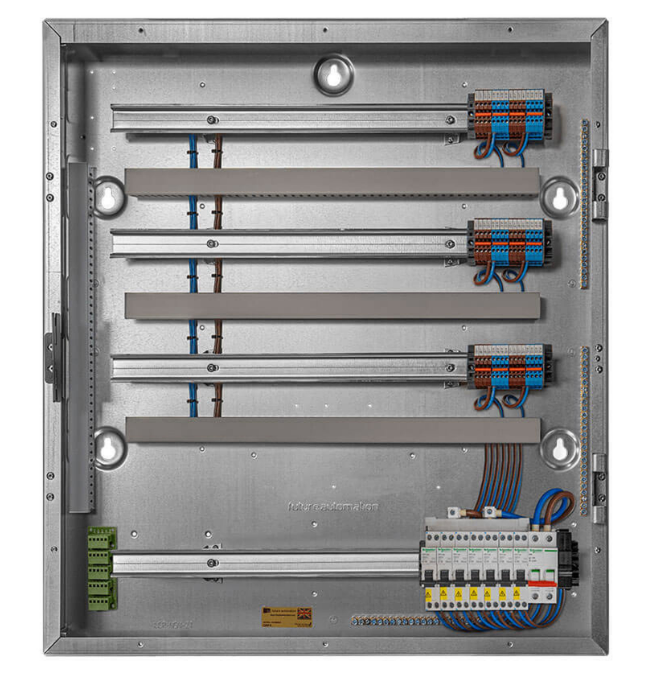
Installation Instructions
Please Read Before Installing
Important Notes
Codes:
- All wiring must be installed in accordance with all local and national electrical codes.
- Breaker panels must be installed to provide sufficient access and working space in accordance with the National Electric Code (NEC®). A typical installation may need 3 ft to 4 ft (0.914 m to 1.22 m) in front of the panel and a 30 in (772 mm) width to provide sufficient space for panel access.
- Typical code requirements may include: Maximum and minimum breaker height above the floor, proximity to the distribution panel, room size, and room entrance specifications. Check local code for proper installation.
Cooling: This equipment is air-cooled. Mount in a place where the vented cover will not be blocked. Clearance of 12 in (304 mm) is required above and in front of the unit. Clearance of 6 in (152 mm) is required below the unit to the floor.
Environment: This equipment is intended for indoor use only; in a 32 °F to 104 °F (0 °C to 40 °C) setting with a relative humidity less than 90%, non-condensing.
Mounting Location: DIN Power Modules (DPMs) will hum slightly, and internal relays will click while in use. Mount in a location where such noise is acceptable. Panel must be mounted within +/- 7° of vertical. Mount the panel so that line-voltage wiring will be at least 6 ft (1.8 m) from audio and video equipment, or radio frequency devices, equipment, and wiring.
Installation
- Turn OFF all power sources to the feed to the panel.
 Warning:
Electric Shock Hazard. May result in Serious Injury or Death.
To avoid the risk of electric shock, locate and lock the supply breaker in the OFF position before wiring to the input terminals or terminal blocks. - Remove the panel front cover.

- Mount the rough-in panel using one of the following methods (mounting hardware is not provided):
- Surface-mount: Use keyholes with bolts sufficient for a 110 lb (50 kg) load, 1/4 in (M6) bolts recommended.
- Recess-mount: Use screws sufficient for 110 lb (50 kg) through the corners of the panel. Mount panel flush to or not more than 1/8 in (3 mm) below the finished wall surface.
- Run the main feed into the panel (breaker panel only)
Locations to run the main feed and load wiring into the panel are shown below. DPMs will be on the right side of each row as shown below.
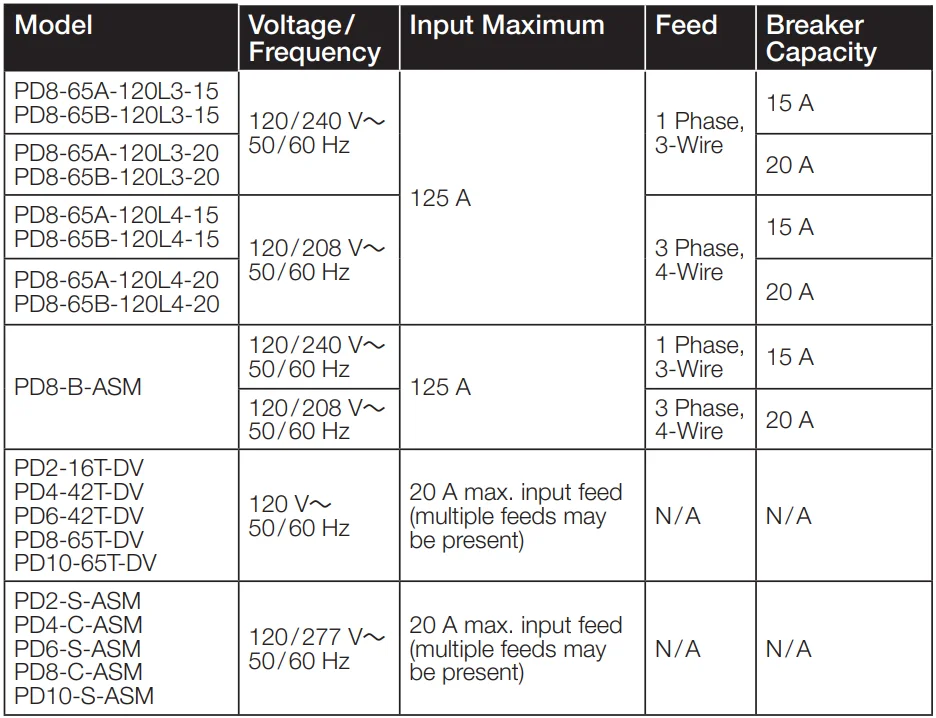
Feed sizing:- 120L3 panels: Should be fed with a single-phase, 3-wire feed. Lutron recommends an 80 A breaker if fully loading the power modules. This breaker size doesn’t include capacity for general-purpose breakers.
- 120L4 panels: Should be fed with a 3-phase, 4-wire feed. Lutron recommends an 80 A breaker if fully loading the power modules. This breaker size doesn’t include capacity for general-purpose breakers.
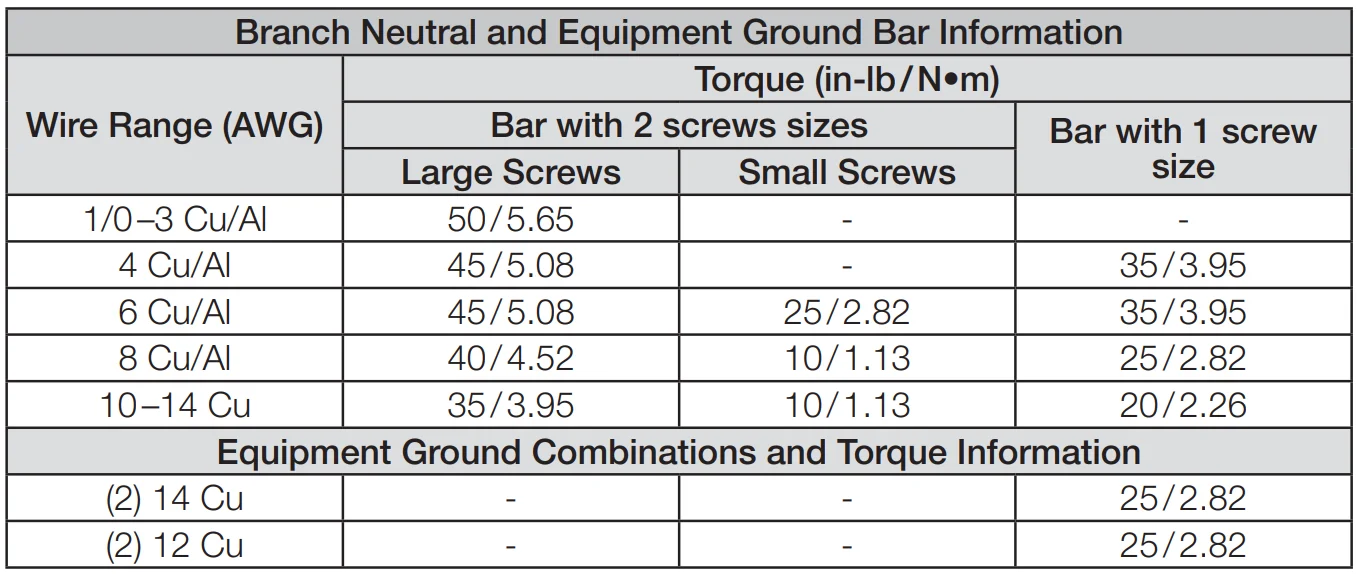
 Note: For ease of installation, you may move the small ground bar and attached ground lug to the alternate location shown in the diagram below. Torque the ground bar mounting screws to 30 in-lb (3.39 N•m). Confirm that the modified location meets NECR installation requirements.
Install the supplied yellow covers over the main lugs.
- Install breaker and branch circuit wiring on extra breaker slots (optional)
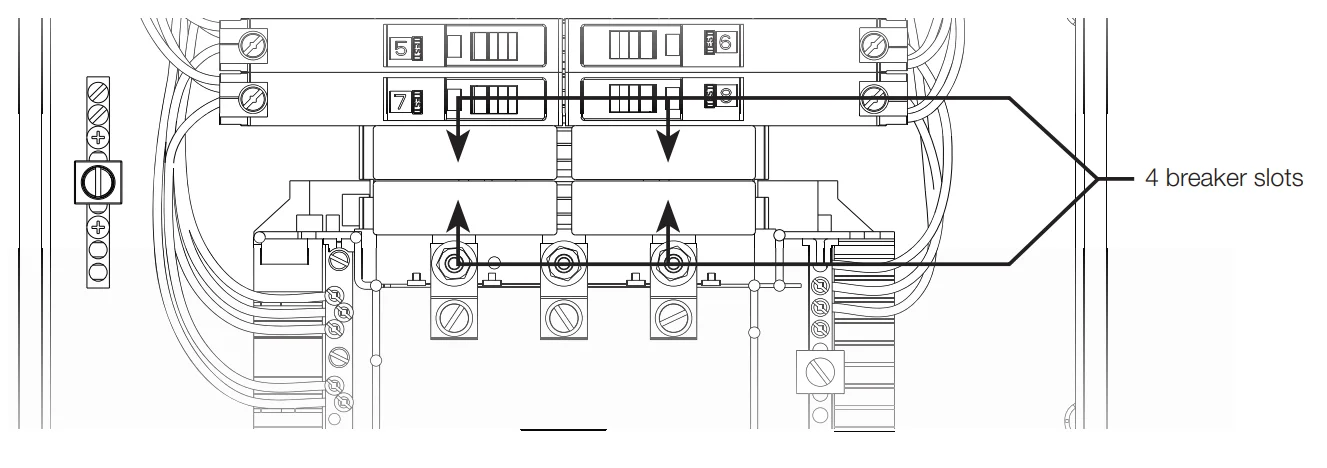
The panel has 4 available positions for running branch circuits to other devices or panels. Use only Square D, QO plug-in mount circuit breakers in these positions.
Note: Remove the filler clips in the front cover for each respective breaker added. Warning:
Electric Shock Hazard. May Result in Serious Injury or Death.
Disconnect all power sources before servicing the unit. For use only with Square D circuit breakers. Use of non-Square D circuit breakers may adversely affect user safety and impair reliability. - Run Feed Wiring into Feed-Through Panel

- Wire Control Feed (control panels only)
Remove the control feed terminal shield and wire as shown below. Lutron recommends a dedicated feed for this purpose. Power supply will draw a maximum of 0.7 A. Leave this switch off until the power supply and low-voltage interface or processor are installed.
Note: Hot and neutral terminal blocks for field wiring have a dedicated wire entry point and screw. Do not double-up wires under factory-installed wiring. * Note: White neutral wire goes into the negative (-) terminal of the power supply, and red switched hot wire (SH) goes into the positive (+) terminal of the power supply.
For increased system reliability, HomeWorks QS processors can be powered by an uninterruptible power supply (UPS) that incorporates overvoltage protection, brown-out protection, and battery backup. When selecting a UPS, allow 240 VA of capacity for each processor on the UPS. A single large UPS for all processors is better than an individual UPS for each processor. This prevents inconsistent system operation on battery backup if the individual UPS units power down at different times. - Install load wiring
Each module controls up to 4 loads. Label each wire clearly as you connect it to the terminal blocks. This panel comes with terminal blocks and jumpers to allow load wiring prior to DIN power modules being installed. Wiring (shown below) is for *-4A-120-D, *-4A1-D, *-4A5-D, *-4S8-120-D, and *-4T5-120-D using a single feed.
Note: Wiring for *-4M-120-D modules will differ. For wiring, refer to the installation instructions provided with the module. Cap off the load wiring with wire connectors rather than terminating it to the terminal blocks.
Note: This panel is factory wired for use with a single feed to power *-4T5-120-D modules. Cap 0 –10 V- communication wires until modules arrive. Leave enough wire to make it to the terminals on the module, which will be located near the far right side of the DIN row.
Note: *-2ECO and *-2DALUNV-D modules will not have any loads landed on the Neutral or DH terminal blocks. Cap EcoSystem and DALI communication wires until modules arrive. Leave enough wire to make it to the terminals on the module, which will be located near the far right side of the DIN row.
Note: * Indicates LQSE or QSN.

- Test all load wiring.
The terminal blocks with pre-installed bypass jumpers will distribute power to each load and must not be removed until after all loads are fully tested and modules have been installed. Place the front cover on the panel before testing all load wiring. Turn on the input power to each DPM location. Check all connected loads to ensure that they have power. If a circuit breaker trips, a wiring error exists and must be resolved. - Install DPMs and connect to panel terminals
Turn off the power to the panel before installing DPMs.
Warning:
Electric Shock Hazard. May Result in Serious Injury or Death.
To avoid the risk of electric shock, locate and lock the supply breaker in the OFF position before wiring to the input terminals or terminal blocks.
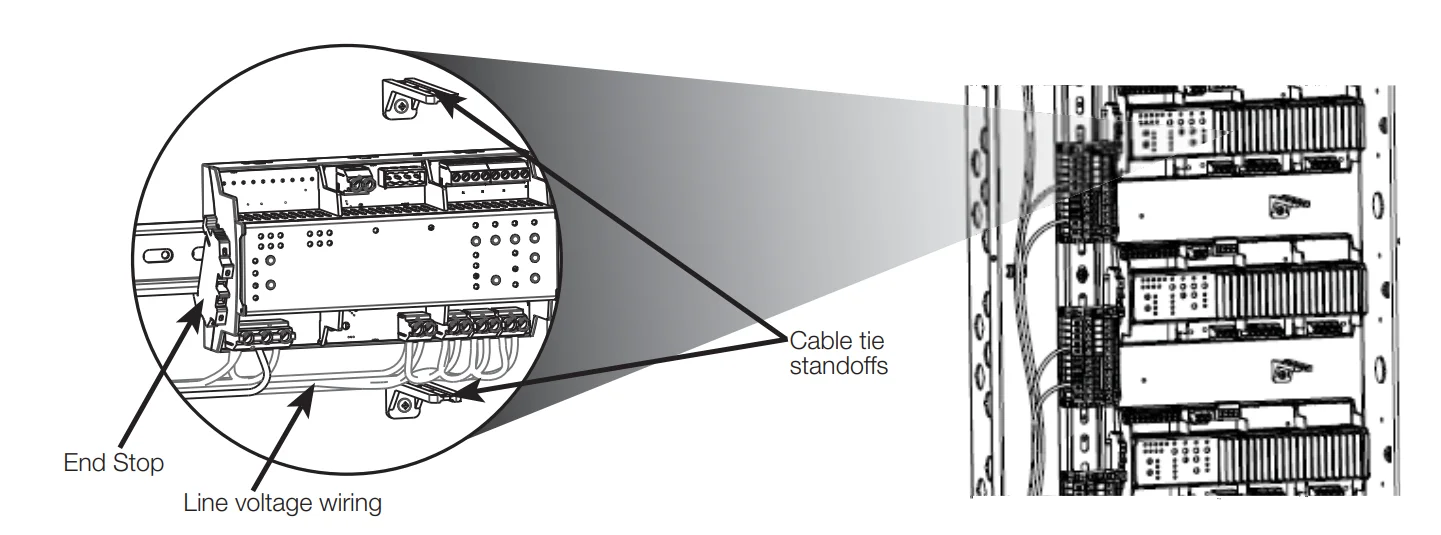
Install modules on the right side of each row. Place an end stop to the left of each module or module and terminal blocks (provided with the panel).
Connect the terminal blocks on each respective module to the appropriate panel terminal blocks. See the installation guide included with each respective module.
Dress line voltage wires away from low-voltage (Class 2) wires per local and national codes. This includes low-voltage wires connected to a wire landing board (if installed).
- Install QS-WLB and connect QS Link to modules.
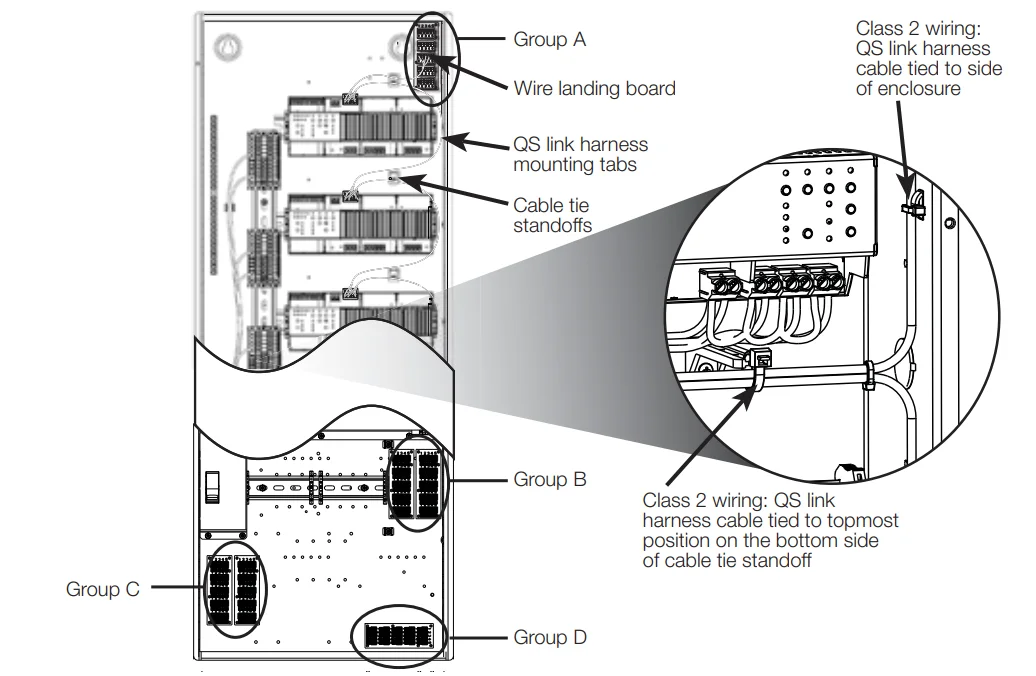
- Install the wire landing board (QS-WLB). Use group A Aposition for breaker and satellite panels (group D can be used as an alternate location). Use group B and C positions for control panels.
See image below. - Connect all modules in the panel using the provided QS Link wiring harness and QS wire landing board (QS-WLB). Using provided cable ties, cable tie harness wiring to cable tie standoffs, and to the side of the enclosure. See image below.
- NOTE: Dress line voltage wires away from low voltage (Class 2) wires per local and national codes.

- Install the wire landing board (QS-WLB). Use group A Aposition for breaker and satellite panels (group D can be used as an alternate location). Use group B and C positions for control panels.
- Check that all bypass jumpers are installed.
Bypass jumpers distribute power to each load and should not be removed until after all modules and loads are installed and verified. - Turn on the power and check for errors.
Turn on the power to the main feed and then the individual circuit breakers. If any circuit breakers trip, an error needs to be resolved.
Note: LQSE-4A-120-D, LQSE-4A5-120-D, QSN-4A5-D, and LQSE-4A1-D will show error blink codes when bypass jumpers are still installed. This is okay. The error codes will clear in Step 14. - Turn off the power and remove the bypass jumpers
Warning:
Electric Shock Hazard. May Result in Serious Injury or Death.
To avoid the risk of electric shock, locate and lock the supply breaker in the OFF position before wiring to the input terminals or terminal blocks.
After all wiring issues are resolved, turn off the main power feed to the panel and remove the bypass jumpers from H and DH terminals. Store the bypass jumper for possible later use.
Note: Bypass jumpers should be installed any time a breaker is turned off for work on a load. The bypass jumpers reduce the chance of module damage due to short circuits or miswiring during work.
This damage IS NOT COVERED by the product warranty. - Restore power to the panel
Restore the power to the panel and each branch circuit. - Install cover
Tighten the cover screws to 17 in-lb (1.9 N•m). - Leave this instruction sheet in a safe, accessible location
 Warning: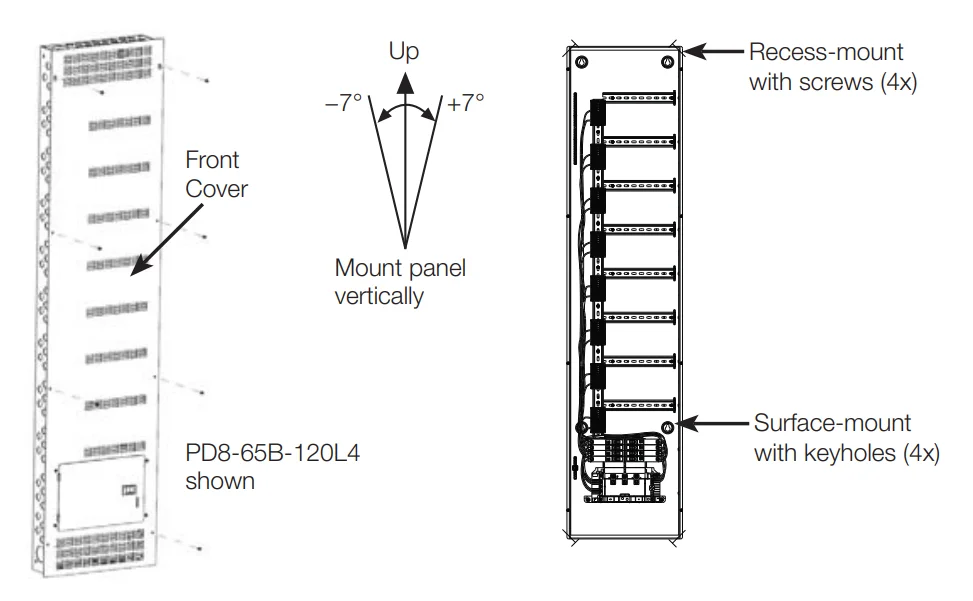
 Note: For ease of installation, you may move the small ground bar and attached ground lug to the alternate location shown in the diagram below. Torque the ground bar mounting screws to 30 in-lb (3.39 N•m). Confirm that the modified location meets NECR installation requirements.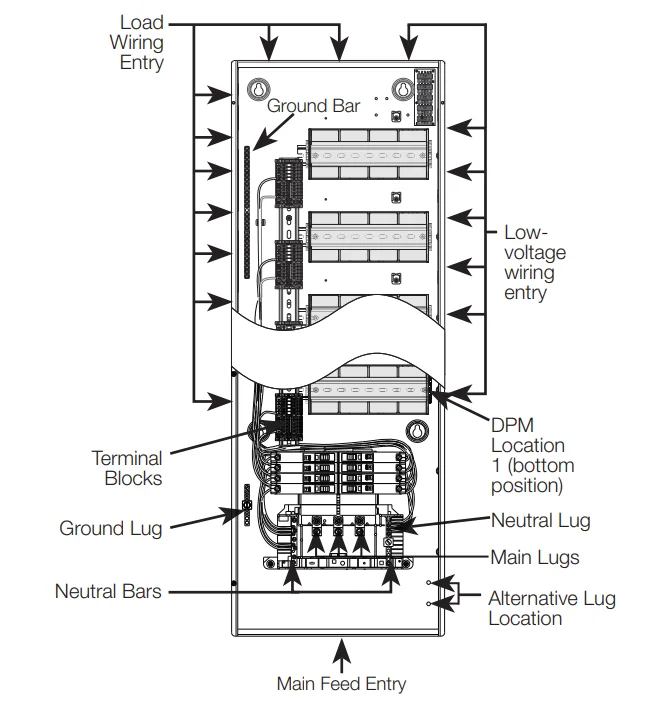
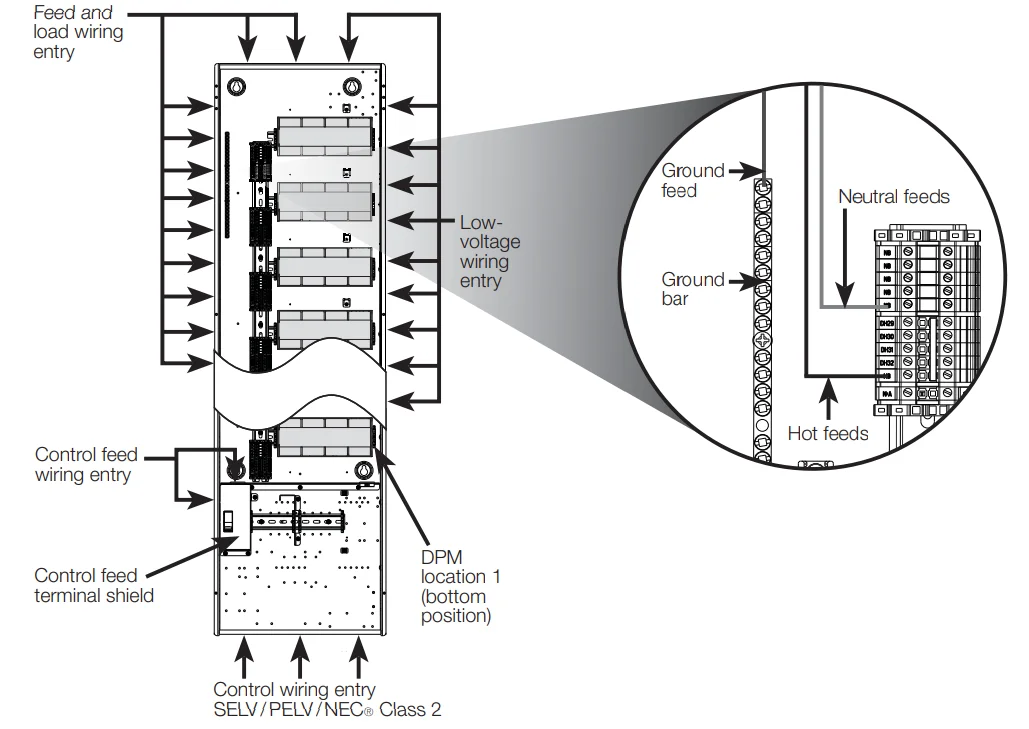
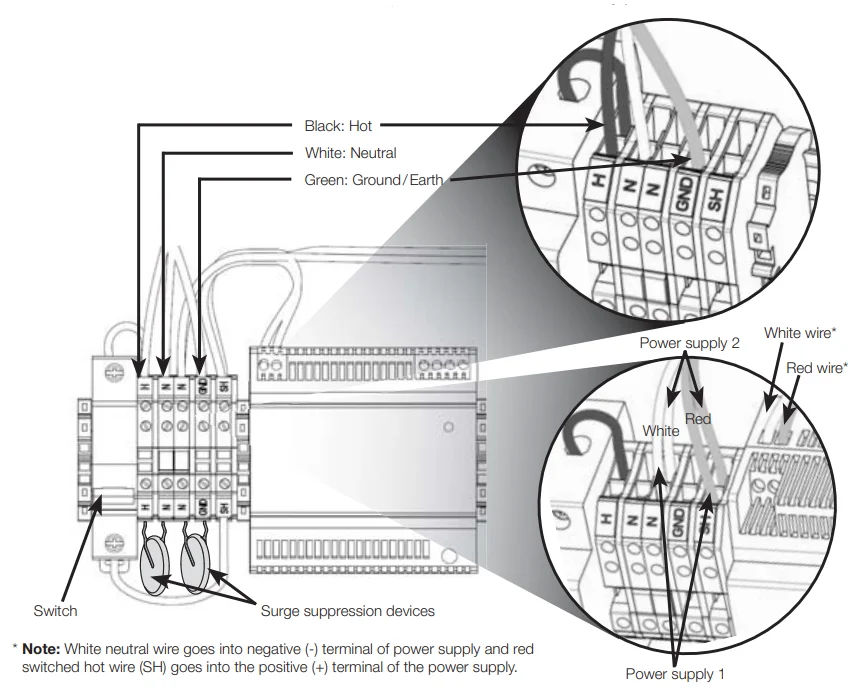 * Note: White neutral wire goes into the negative (-) terminal of the power supply, and red switched hot wire (SH) goes into the positive (+) terminal of the power supply.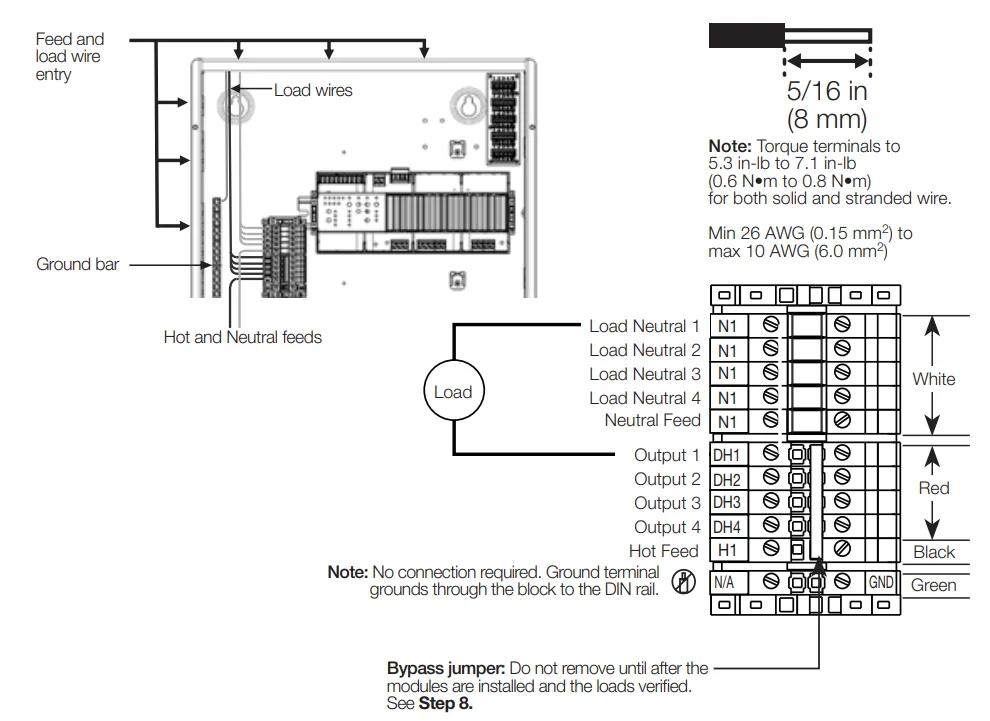
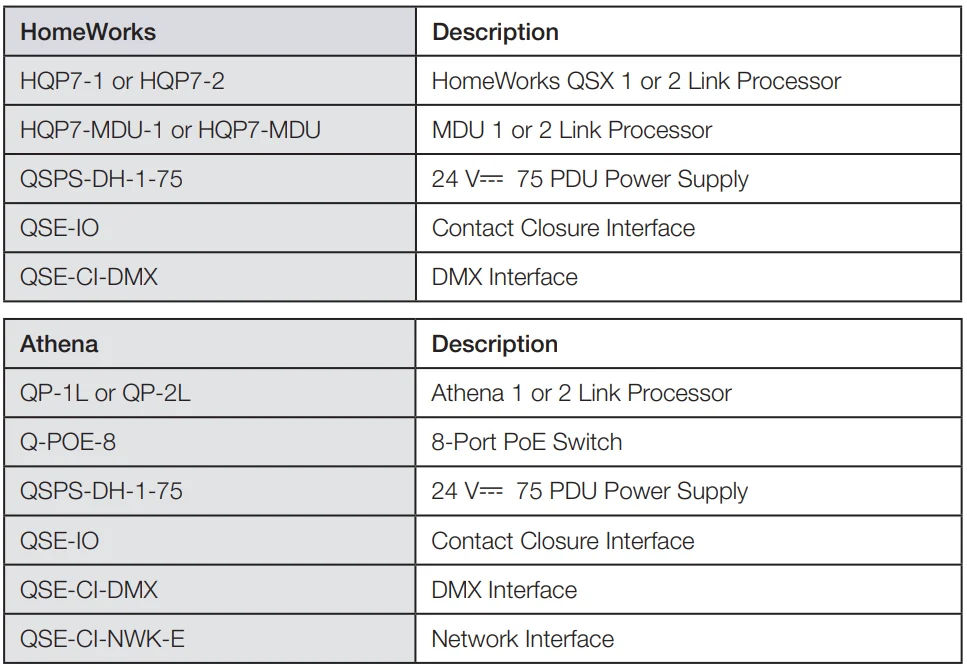
The following images show low-voltage interfaces and processor placement location options.
Use the installation guides provided with the devices being installed. Those guides include all the installation and setup information needed.
Note that each processor and PoE switch requires its own power supply.
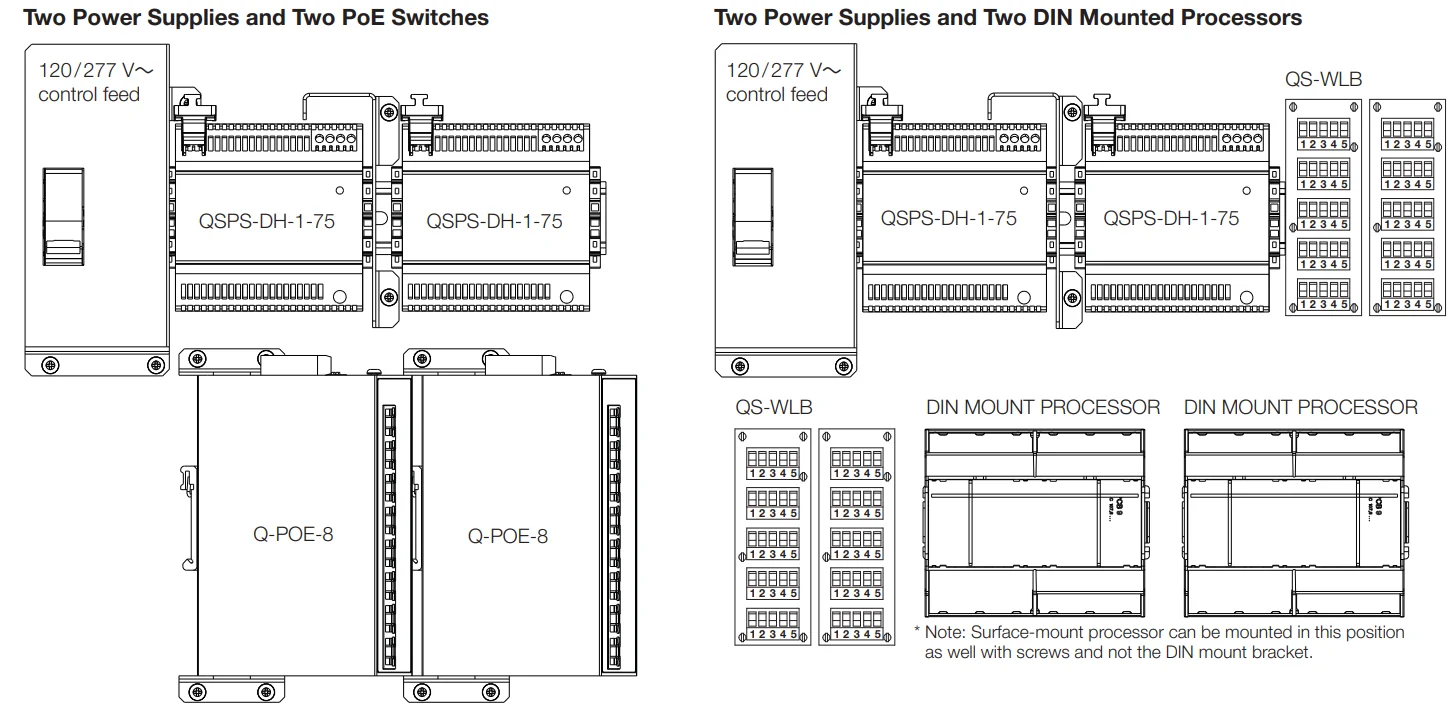
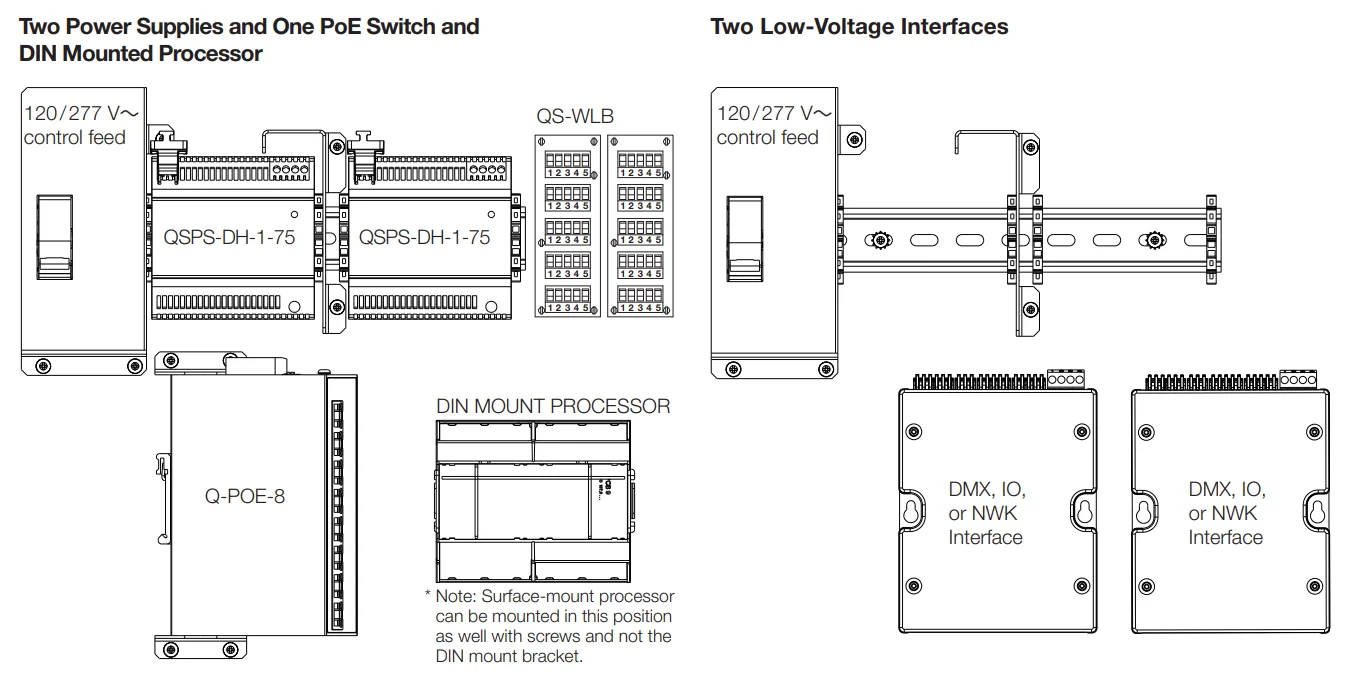
The following information shows what devices and how many can be installed inside a panel.
NOTE: Wireless devices cannot be installed inside the enclosure due to the RF nature of the devices.
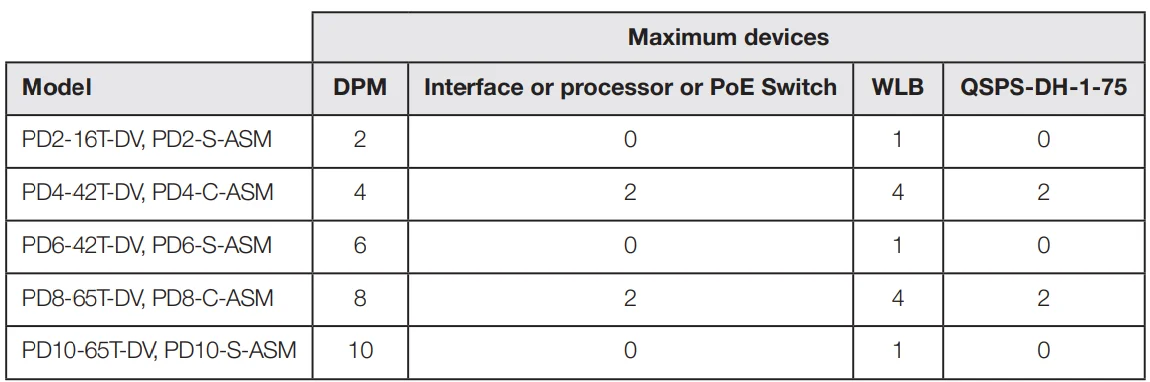
DIN Power Modules (DPM) Supported
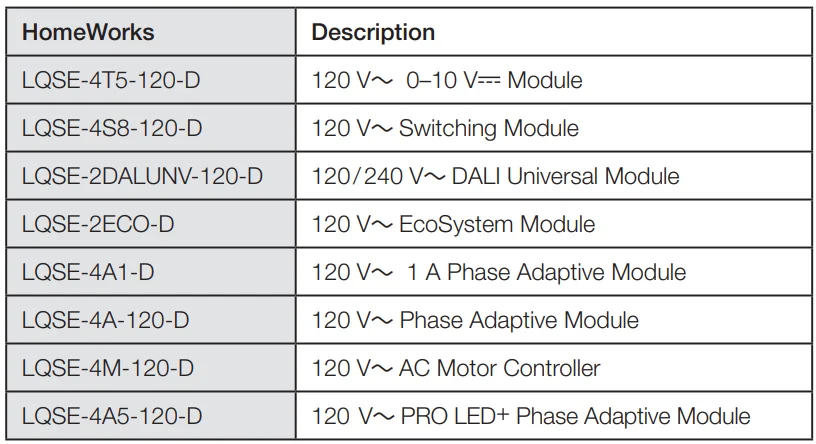
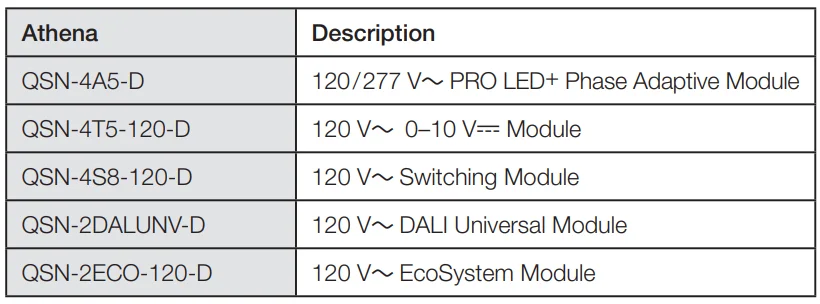
NOTE: See individual product specifications for more details.
NOTE: Lutron recommends placing dimming modules (e.g., LQSE-4A-120-D and LQSE-4A1-D) higher in the panel.
Wire Landing Board (WLB)

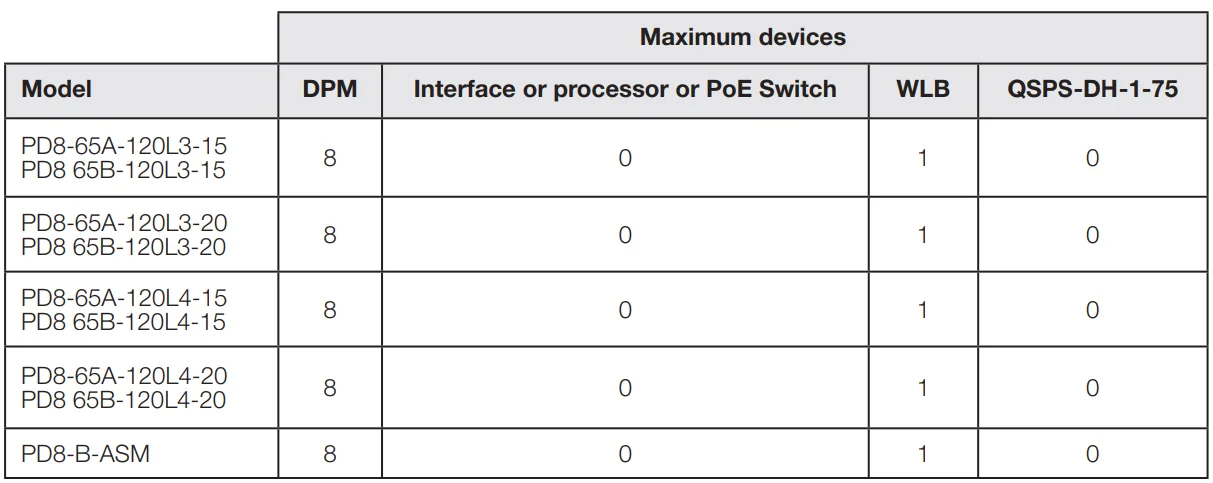
Low-Voltage Interface / Processor and Power Supply
DPM QS Link Wire Harness

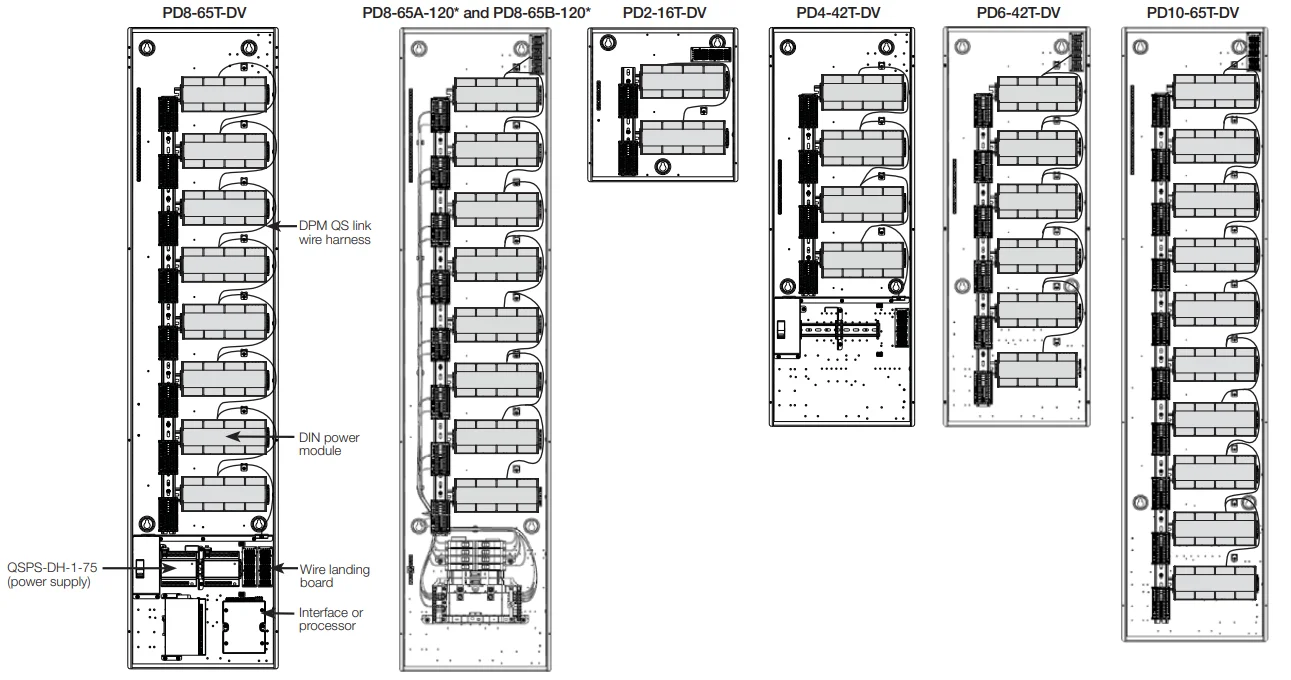
Note: * Indicates L3-15, L3-20, L4-15 or L4-20.
Warranty
For warranty information, please visit: www.lutron.com/Warranty
The Lutron logo, Lutron, Athena, LED+, and HomeWorks are trademarks or registered trademarks of Lutron Electronics Co., Inc. in the US and/or other countries. All other product names, logos, and brands are the property of their respective owners.
For more manuals by Lutron, visit ManualsLibraryy
Lutron PD8-65A 120 Volts DIN Breaker Panel- FAQs
What is the Lutron PD8-65A DIN Breaker Panel used for?
The Lutron PD8-65A is a DIN-mounted power distribution panel designed to control and protect 120-volt lighting circuits in smart lighting systems.
How do I install the Lutron PD8-65A panel?
Installation should be performed by a qualified electrician. The panel is mounted on a DIN rail and connected to the power supply and lighting loads according to the wiring diagram provided in the user manual.
What is the input voltage requirement for the PD8-65A panel?
This model operates at 120 volts AC, ensuring compatibility with standard residential and commercial lighting systems in North America.
How many circuits can the PD8-65A handle?
The panel supports up to 8 independent lighting circuits, allowing flexible control and protection for multiple lighting zones or fixtures.
Can the Lutron PD8-65A integrate with smart lighting controls?
Yes. It is compatible with Lutron HomeWorks and Quantum systems, enabling integration with smart lighting controls, dimmers, and automation devices.
What safety precautions should I follow during installation?
Always turn off power at the main breaker before installation. Follow the wiring instructions carefully, and ensure the panel is properly grounded to prevent electrical hazards.
How do I reset a tripped breaker on the PD8-65A?
If a circuit trips, locate the affected breaker switch and move it fully to the OFF position, then switch it back ON to restore power safely.
Where can I find the official Lutron PD8-65A installation guide?
You can download the official user manual and installation instructions for free from the Lutron support website by searching for “PD8-65A DIN Breaker Panel.”