
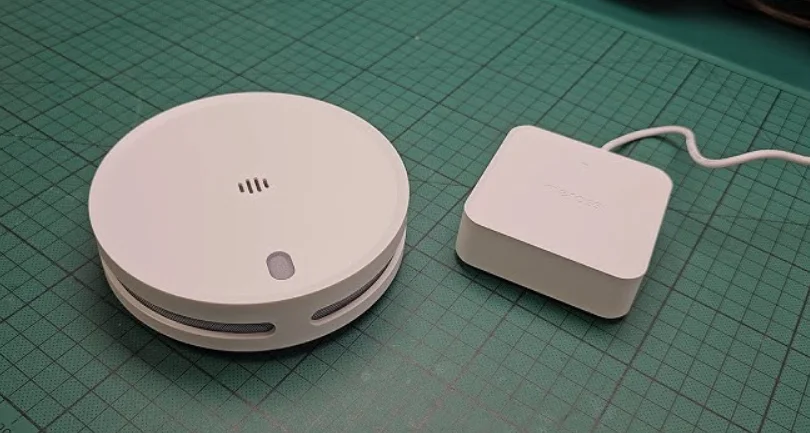

Meross MA151 Smart Smoke Detector
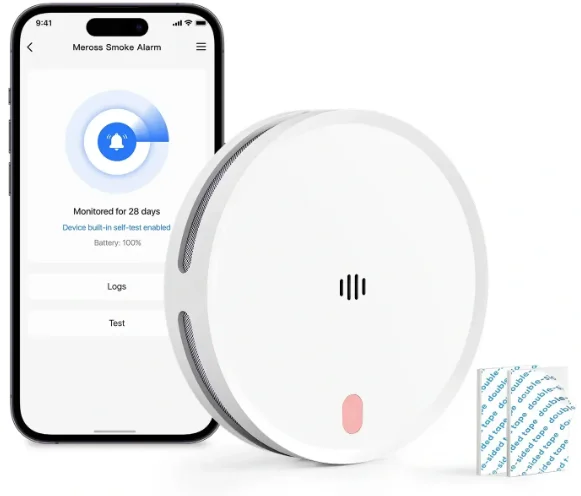
Safety Information
- The test button is designed for accurate testing of the smoke alarm’s functions. Do not use any other test method. Test the smoke alarm on a weekly basis to ensure proper functioning of the product.
- If you determine it’s a false alarm, ventilate the area by opening windows or using a fan near the smoke alarm to reset and silence it. Alternatively, you can also use the Hub and APP to conveniently silence the alarm.
- During installation, users must adhere to all local and national electrical installation and building codes.
- This smoke alarm is specifically designed for installation within individual residential homes. In multifamily buildings, each living unit should have its own smoke alarms. Avoid installing this smoke alarm in non-residential buildings, as it is not a replacement for a comprehensive alarm system.
- Place a smoke alarm in every room and on every floor of the home. Smoke may not reach the smoke alarm for many reasons. For example, if a fire starts in a remote part of the home, on another level, in a chimney, on a wall, on the roof, or on the other side of a closed door, smoke may not reach the smoke alarm in time to alert household members. The smoke alarm will not promptly detect a fire except in the area or room in which it is installed.
- The smoke alarm may not alert every household member every time. While the smoke alarm’s chirp is designed to be loud to alert individuals, there are circumstances—like outdoor or indoor noise, deep sleepers, or hearing impairments—where a household member might not hear it. If you suspect that this smoke alarm may not alert a household member, install and maintain specialty smoke alarms. Household members must hear the alarm and quickly respond to it to reduce the risk of injury or death that may result from fire. If a household member is hard of hearing, install special smoke alarms with lights or vibrating devices to alert occupants.
- Smoke alarms can only sound their alarms when they detect smoke or combustion particles in the air. They do not sense flame or gas. This smoke alarm is designed to give an audible warning of a developing fire. However, many fires are fast-burning, explosive, or intentional, and others are caused by carelessness or safety hazards. In such circumstances, smoke may not reach the alarm quickly enough to ensure safe escape. Therefore, the installation of smoke alarms is not a substitute for practicing fire safety in the home.
- Smoke alarms have limitations. This smoke alarm is not foolproof or guaranteed to protect lives or property from fire. Smoke alarms are not a substitute for insurance. Occupants should have adequate insurance coverage for their lives and property. In addition, it is possible that the smoke alarm may fail at any time. For this reason, you must test the smoke alarm weekly.
- No restrictions exist in the use of radio frequencies or frequency bands in all EU member states, EFTA countries, Northern Ireland, and Great Britain. Operating Frequency / Max Output Power: 2400MHz~2483.5MHz / 20dBm, 433.050MHz~434.790MHz / 10dBm.
Product Description
A photoelectric smoke detector fire alarm uses 4 × AA batteries. This product has EU mandatory product certification. This product is not only sensitive to white smoke but also detects black smoke to prevent under-reporting due to the advanced dual light detection method. The alarm is more sensitive in detecting slow-burning fires, which produce small amounts of smoke and low heat and may burn for hours before exploding. This smoke alarm does not contain any radioactive material.
When the smoke concentration in the monitored area reaches the threshold set for the photoelectric smoke sensor fire alarm, the alarm will promptly emit both sound and light alerts. Additionally, it will send a notification to the app via the hub, enabling you to monitor your home’s status from any location.
Note: This system requires the use of the Meross hub. For detailed information about the hub, please visit the official website.
Package Content
If you find any part missing in the package, please contact https://www.meross.com/support/Email_Support, and we will provide a proper solution for you. The smoke alarm kit (outlined with a dashed box) includes a hub. The single-pack smoke alarm does not include a hub. If used without the hub, the smoke alarm will function solely as a standard, non-smart device. In this case, it cannot connect to the internet and does not support any app-related functions.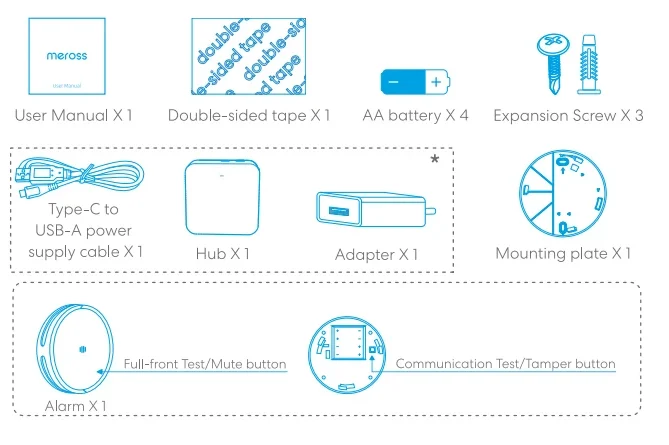
Hardware Installation
- Connect your smartphone or tablet to a 2.4 GHz Wi-Fi network.
- Make sure your smart hub is covered by a strong Wi-Fi signal.
- The smart hub supports iOS 13 / iPadOS 13 and later. It is recommended that you upgrade your iOS or iPadOS to the latest version before pairing with the smart hub.
- Download the Meross app.
- Launch the Meross app and log in to your account, or if you are a new user, tap Sign up to create a new account.
- Tap the “+” icon to select the type of smart device you want to add, and then you can just follow the setup wizard to finish the configuration.
- Relocation of the smart hub does not require additional operations, provided that it remains on the same network with a strong Wi-Fi signal.


NOTE:
- If this is not the first time you’ve added this smart hub, you’ll have to reset it before going any further.
- As long as you finish the configuration, you’ll be able to manage the device in the Apple Home app.
- If the QR code does not work, please try to add the smart device to the Apple Home app (Due to the Apple Home app design, the HomeKit-supported hub will not show up in the Home app after successful setup. It’s not the device’s fault. You need to pair the Hub with the client device, and then the client device will show up in the Home app. By double-clicking the button on the Hub and triple-clicking the button on the Alarm, you will be able to pair them.
- Find more at https://www.meross.com/support/.
Recommend Installation Locations
- Locate the first alarm in the immediate area of the bedrooms.
- Try to monitor the exit path, as the bedrooms are usually farthest from the exit. If more than one sleeping area exists, locate additional alarms in each sleeping area.
- Locate at least one alarm on every floor level.
- Locate an alarm in every bedroom.
- Locate an alarm in every room where electrical appliances are operated (i.e., portable heaters or humidifiers).
- Locate an alarm in every room where someone sleeps with the door closed. The closed door may prevent an alarm not located in that room from waking the sleeper.
- Smoke, heat, and burning things will spread horizontally after rising to the ceiling. Therefore, install the alarm in the middle of the ceiling of an ordinary house structure. Let the alarm cover every corner.
- Not recommended to use for a mobile home.
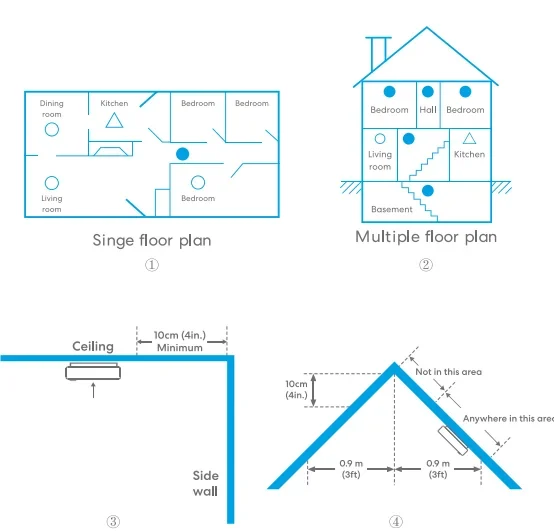
- For single-floor plan and multiple-floor plan, please refer to the diagram (12) below.
- If the alarm couldn’t be installed in the middle of the ceiling for some reason, the distance the alarm is away from the wall corner should be greater than 10 cm (4 in.), please refer to diagram 3 below.
- If the length of the room or the hall is beyond 9 m (30 ft), you need to install several alarms in the hall.
- When the ceiling is slanting, the alarm needs to be installed 15 cm (6 in.) / 30 cm (12 in.) away from the highest ceiling point in the room. Please refer to diagram (4×5) below.


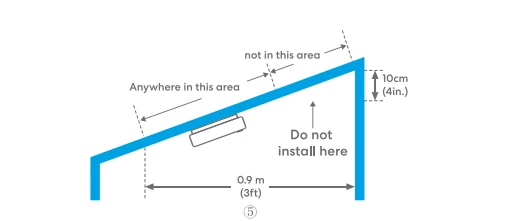
Do Not Install Here
- Near appliances or areas where normal combustion regularly occurs (kitchens, near furnaces, water heaters). Use a specialized smoke alarm device with unwanted alarm control for this area.
- In areas with high humidity, like bathrooms or areas near dishwashers or washing machines. Install at least 3 m (10 ft) away from these areas.
- Near air returns or heating and cooling supply vents. Install away from these areas by at least 0.9 m (3 ft). The air could blow smoke away from the detector, interrupting its alarm.
- In rooms where temperatures may fall below 0°C (32°F) or rise above 40°C (104°F), or in humidity higher than 93%. These conditions will reduce battery life or cause a fault alarm.
- In extremely dusty, dirty, or insect-infested areas, particles interfere with the smoke alarm device’s operation.
- The alarm should not be installed near products that are prone to electromagnetic interference, such as fluorescent lights.
- Do not install the new alarm before the renovation and other processes that may generate dust are completed.
- Do not install in the bathroom.
Hardware Installation
Steps for Installing This Product:
- Insert the 4 AA batteries into the smoke alarm’s battery compartment, ensuring correct orientation. If batteries are already inserted, remove the isolation paper between the batteries and electrodes.
- Move the smoke detector to the required location.
- Press the tamper button for 1 second to test its communication with the hub. If the green indicator light flashes three times accompanied by the buzzer sounding once, it confirms successful communication. You may then proceed with the installation steps below.
Note: If the indicator light flashes amber three times and the buzzer sounds three times, it signals a communication issue between the smoke detector and the hub at this location. Consider repositioning either the hub or the smoke alarm.
Screw Installation
- Position the mounting plate at the needed installation spot, then mark the mounting plate’s holes using a pencil.
- Using an electric drill, create two holes at the marked spots with a diameter of 5 mm (0.2 in.). Insert the plastic plugs into these holes using a hammer.
- Securely attach the mounting plate to the plastic plugs, then tighten the screws into the plugs.
Tape Installation
- Remove the protective film from one side of the adhesive tape and affix it to the clean surface of the mounting plate.
- Select an appropriate location on the ceiling, ensuring the surface is smooth, even, and contaminant-free. Avoid adhering to painted or coated surfaces, which could lead to the alarm detaching over time.
- Remove the protective film from the other side of the adhesive tape and firmly attach it to the place you chose. Apply consistent pressure for 30 seconds to guarantee a strong bond. Allow the adhesive to set for 24 hours before mounting the alarm for optimal results.
This diagram is for reference purposes only and may not accurately represent the actual installation process.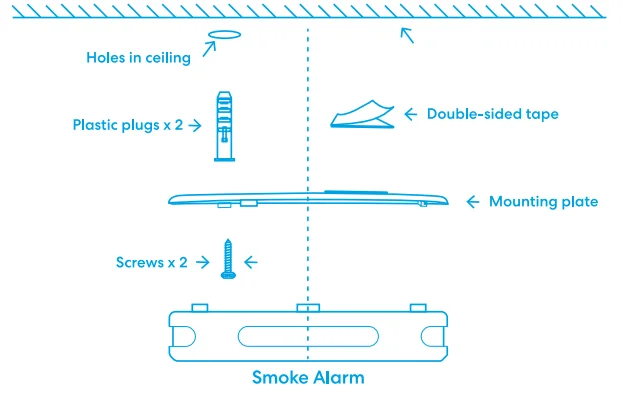
Note:
- Screw mounting is recommended as the primary method to ensure optimal mechanical stability.
- If unsure of the surface material, must not use only tape for installation.
- Place the device where people rarely walk, with at least 1.5 m of free space all around.
- We will not be responsible for any device falling off due to using the wrong surface materials for the adhesive, or not applying and drying the adhesive as instructed. We also will not be liable for any accidents that happen because of this.
Recommended materials: ceramic tiles, metal plates, glass, PVC/acrylic plastics, sealed stone.
Prohibited materials: gypsum board, rough cement, wallpaper, soft foam, silicone-based coating, loose wooden surface, treated gypsum board/wood board, special paint surfaces, etc.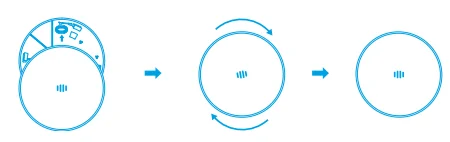
The final step: align the alarm’s indicator light with the “arrow” marking on the mounting plate. Rotate the alarm clockwise to lock it securely in position.
After completing the above installation steps, there are a few more points worth noting:
- Test the smoke alarm by pressing the test button. If no sound is produced, consult the “Troubleshooting” section for solutions.
- Due to structural reasons, the test function cannot be triggered before the device is properly installed.
- To prevent injury, the product must be securely attached to the ceiling in accordance with the installation instructions.
Maintenance
To ensure the optimal performance of your smoke alarm, follow these simple steps:
- Test the unit weekly to verify that the alarm sound and indicator are functioning correctly.
- Ensuring optimal performance is crucial, and periodic cleaning is essential. Clean the alarm at least once a year to remove any accumulated dust, dirt, or debris. Employ a vacuum cleaner with a soft brush attachment to thoroughly clean all sides and covers of the smoke alarm.
- Avoid using detergents or solvents for cleaning.
- Refrain from spraying air fresheners, hair spray, or other aerosols near the alarm.
- Do not paint the unit, as paint can seal the vents and interfere with the sensor’s ability to detect fire.
- Do not attempt to disassemble or clean the unit internally, as doing so will void your warranty.
- Place the smoke alarm back in its proper location promptly after removal to ensure continuous protection from fire.
- Ventilate the area when using household cleaning supplies or similar contaminants.
Battery Replacement
- Hold the alarm and rotate counterclockwise to detach it from the mounting position.
- Place the old battery in the designated recycling area.
- Insert four new AA batteries into the battery compartment, ensuring the alignment of the “+” signs on both the battery and the compartment.
- After battery replacement, wait for the indicator light. A single green flash and a beep indicate a successful self-check. If no sound or different light flashes occur, consult the “Troubleshooting” section for correct installation guidelines.
- Align the indicator light with the “arrow” icon on the mounting plate and rotate clockwise to secure.

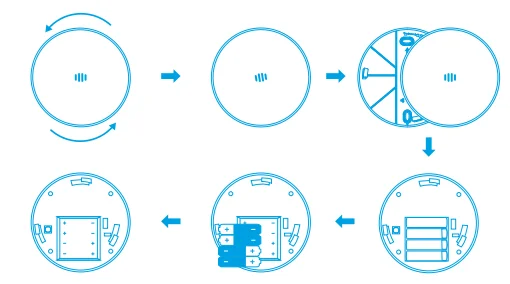
Repair
- Do not attempt to repair the alarm. It will compromise your warranty.
- If the alarm is not operating properly during the warranty, please visit https://www.meross.com/support/warranty for the detailed warranty policy and product registration.
FAQ
What should I do when my Meross app is unable to check the added smart sensor?
You can troubleshoot the following:
- Check the Wi-Fi internet connection.
- Make sure the Wi-Fi password hasn’t been changed.
- Make sure the device’s battery is not used up.
- Make sure the paired Smart Hub is still online. You can check its LED color; if it is not solid green, please power cycle it once. If it still does not work, please reset the Smart Hub and configure it with the Smart Sensor once more.
- To learn more, you can visit https://www.meross.com/support/faqs to find solutions for more frequently asked questions.
Product Specifications
- Model: MA151 / MA152
- Sensor Type: Dual Optical Detection
- Power Supply: DC 1.5V × 2 Alkaline AA battery, replaceable (PAIRDEER LR6)
- Product Life: 10 years after manufacture
Battery Life: 3 years - Temperature Operating Range: 32°F (0°C) to 113°F (55°C)
- Humidity Operating Range: ≤95% RH, non-condensing
- Alarm Sound: ≥85 dB(A) at 3 m (10 ft) @ 3.0 to 3.5 KHz pulsing alarm
- Installation Location: Ceiling
- Low Battery Warning Silence: About 10 hours
- Smoke Alarm Silence: About 10 minutes
- Dimensions (W × D × H): 125 × 125 × 33 mm or 4.92 × 4.92 × 1.30 in.
- Wireless Standard: 433 MHz (Between Smart Hub and Smart Smoke Alarm)
- Wireless Standard: IEEE 802.11 b/g/n, 2.4 GHz (Smart Hub)
- System Requirement:
- Smartphone running iOS 13 or later or Android 8.0 or later
- Existing 2.4 GHz Wi-Fi network
Warranty
Meross products are covered by a 24-month limited warranty from the date of purchase. Please visit https://www.meross.com/support/warranty for a detailed warranty policy and product registration. Note: The warranty does NOT cover the batteries supplied.
Disclaimer
- The function of this smart device is tested under typical circumstances described in the specifications. Meross does NOT guarantee that the smart device shall perform the same as described under all circumstances.
- By using third-party services, including but not limited to Apple HomeKit and SmartThings, customers acknowledge that Meross shall not be held liable in any way for the data and private information collected by such parties. Meross’s total liability is limited to what is expressly covered in its Privacy Policy.
- Damages arising from ignorance of the SAFETY INFORMATION shall not be covered by Meross’s after-sales service, nor does Meross take any legal responsibility therefrom. Customers acknowledge their understanding of these articles clearly by reading this manual.
For More Manuals By Meross, Visit ManualsLibraryy.
Meross MA151 Smart Smoke Detector-FAQs
What is the Meross MA151 Smart Smoke Detector, and how does it work?
The Meross MA151 is a smart smoke detector that identifies smoke using dual photoelectric sensors and triggers an audible alarm when danger is detected. It also connects to a hub, enabling real-time alerts and remote monitoring through the Meross app for enhanced home safety.
Does the Meross MA151 require a hub to function?
Yes, the MA151 requires a compatible Meross Matter hub to enable smart features like app control, notifications, and integrations. Without the hub, it works as a standard smoke alarm but cannot connect to Wi-Fi or provide remote alerts.
What makes the Meross MA151 different from regular smoke detectors?
Unlike traditional alarms, the MA151 offers smart connectivity, real-time notifications, and integration with smart home systems. It also combines smoke detection with intrusion and tamper alerts, making it a multifunctional safety device rather than just a basic smoke alarm.
How loud is the alarm on the Meross MA151?
The MA151 emits an 85 dB alarm directly from the device, which is loud enough to be heard clearly within a room. When connected to the hub, additional alarms can reach around 110 dB, ensuring alerts are noticeable throughout the home.
Can the Meross MA151 send alerts to your phone?
Yes, when paired with the Meross hub, the detector sends instant notifications to your smartphone for smoke detection, low battery warnings, tampering, and hazard clearance. This ensures you stay informed about your home’s safety even when you are away.
Can the Meross MA151 send alerts to your phone?
Yes, when paired with the Meross hub, the detector sends instant notifications to your smartphone for smoke detection, low battery warnings, tampering, and hazard clearance. This ensures you stay informed about your home’s safety even when you are away.
How long does the battery last in the Meross MA151?
The device uses replaceable AA batteries that typically last up to three years, depending on usage. Additionally, the overall product is designed for a lifespan of around ten years, providing long-term reliability with minimal maintenance requirements.
Does the Meross MA151 reduce false alarms?
Yes, it uses dual optical sensors and advanced detection technology to distinguish real smoke from steam or minor particles. This significantly reduces false alarms compared to traditional detectors, making it more reliable in environments like kitchens or humid areas.
Where should the Meross MA151 be installed for best performance?
For optimal performance, install the detector on ceilings near bedrooms, hallways, and each floor level. Avoid placing it near kitchens, bathrooms, or vents where smoke detection may be affected by steam, airflow, or environmental conditions.
Can multiple Meross MA151 detectors work together?
Yes, multiple detectors can be linked through the Meross hub to create a synchronized alarm system. When one unit detects smoke, all connected alarms can sound simultaneously, providing faster alerts throughout the entire home.
Is the Meross MA151 compatible with smart home platforms?
The MA151 supports Matter compatibility through the Meross hub, allowing integration with platforms like Apple HomeKit, Amazon Alexa, and Google Home. This enables centralized control, automation, and voice assistant support for a smarter and safer home environment.