
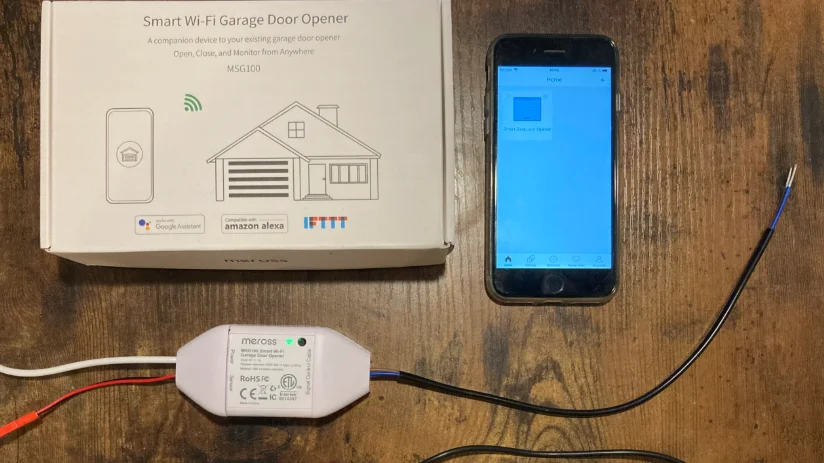

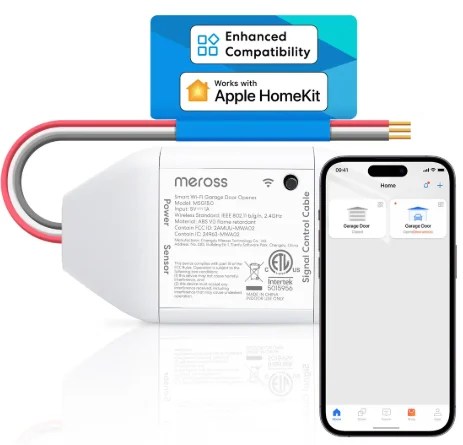
Meross MSG150 Smart Wi-Fi Garage Door Opener
Safety Information
- Keep the device away from water, fire, humidity, or hot environments.
- Make sure the device is fully plugged in and kept out of reach of children for safety concerns.
- Do not attempt to disassemble, repair, or modify the device.
- For indoor use only.
- When you leave the product unused for a long time, unplug the product from the power outlet.
- Please contact the seller for a replacement if there is any damage caused by transportation.
- Radio-frequency / Max transmission power: 2400–2483.5MHz, 20dBm.
Package Contents
If you find any part is missing in the package, please contact https://meross.com/support/Email_Support, and we will provide a proper solution for you.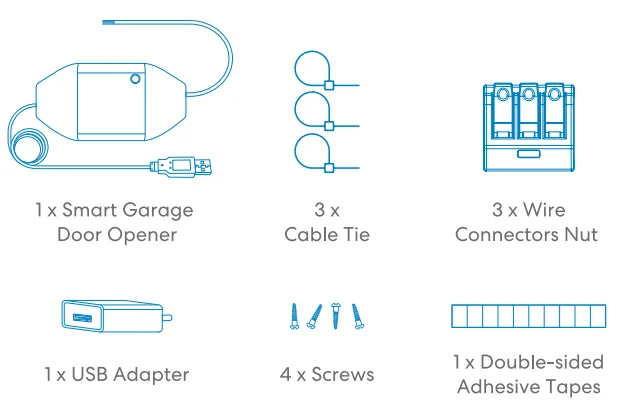
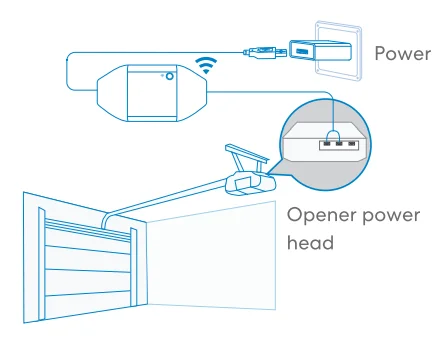
Installation Guide
- The Meross MSG150 is a next-generation smart Wi-Fi garage door opener designed as a companion device for your existing garage door system. It offers enhanced compatibility with a wide range of openers that use the Security+ 1.0 and Security+ 2.0 protocols, commonly identified by yellow, purple, red, or orange Learn buttons on the opener unit. By communicating directly with these protocols, the MSG150 eliminates the need for a wired or wireless magnetic door sensor, providing seamless control and real-time door status detection. It supports multi-mode compatibility and delivers more accurate open/close state monitoring, as well as obstruction alerts through control signal feedback. Its main working principle is as follows:

- Download the Meross app and choose Smart Garage Door Opener to get started.

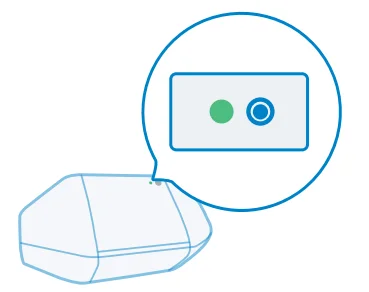
- Power on the device. Wait about 5 seconds until the status LED blinks amber and green.

- Set up the device.
- Connect your smartphone or tablet to a 2.4 GHz Wi-Fi network.
- Make sure your smart device is covered by a strong Wi-Fi signal.
- The smart device supports iOS 13/ iPadOS 13 and later. It is recommended that you upgrade your iOS or iPadOS to the latest version before pairing with the smart device.
- Launch the Meross app and log in to your account, or if you are a new user, tap Sign up to create a new account.
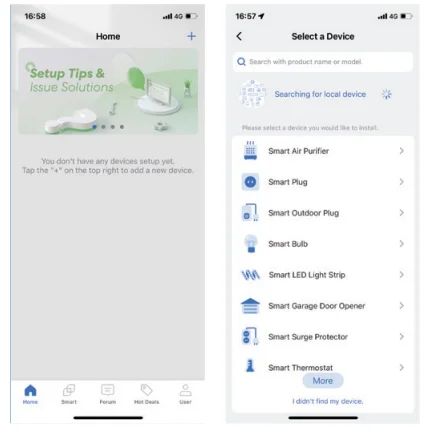
- Tap the “+” icon to select the type of smart device you want to add, then you can just follow the setup wizard to finish the configuration.

Note:
- If this is not the first time you’ve added this smart device, you’ll have to reset it before going any further.
- As long as you finish configuration, you’ll be able to manage the device in the Apple Home app.
- Find more at https://www.meross.com/support.
Attention
- We strongly recommend using the Meross app for network setup and configuration. The setup process involves selecting the Learn button color, detecting door status, configuring the safety sensor, and accessing advanced device settings.
- Once setup is completed in the Meross app, iOS users will be automatically integrated into Apple Home, allowing synchronized control.
- If you prefer to set up the device directly in Apple Home, you can switch the communication protocol by quickly pressing the power button 3 times. This helps ensure compatibility with your garage door opener.
- For detailed button operations and LED behaviors, please refer to the “LED and Button Rules” section.
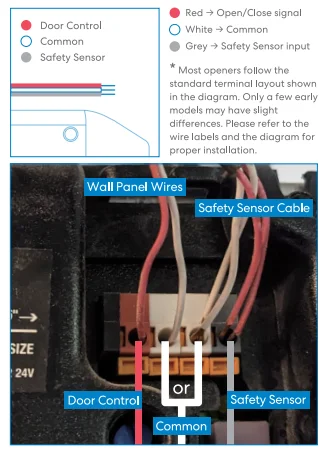
Wiring Guide
LED and Button Rules
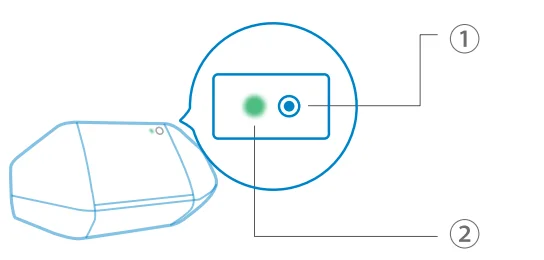
1. Reset button
- Hold for 5 seconds:
- Resets the device and enters Wi-Fi configuration mode.
- Press once (when Wi-Fi is not configured):
- Opens or closes the garage door manually.
- Press 3 times quickly: Cycles through compatibility modes: Security+ 2.0 (Default mode) → Security+ 1.0 → Dry Contact → Security+ 2.0
2. Status LED
- Flash red 1 time: Security+ 1.0 Mode
- Flash red 2 times: Security+ 2.0 Mode
- Flash red 3 times: Dry Contact Mode
- Flashing amber and green slowly: Configuration mode.
- Flashing green rapidly: Wi-Fi connecting mode.
- Solid green: Successfully connected.
- Solid red: No internet connection.
- Flashing green 3 times: Sensors connected or disconnected (door closed or opened detected).
- Off: Device is powered off or the LED is disabled.
How to Use
1. General settings
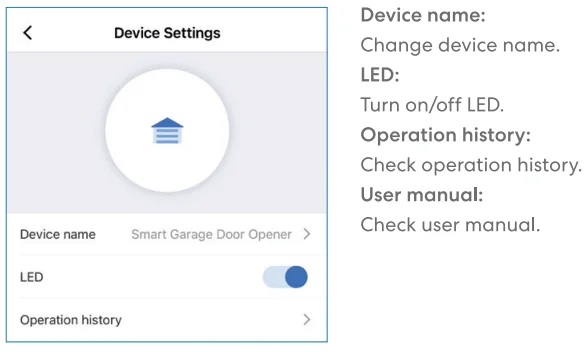
2. Door notification
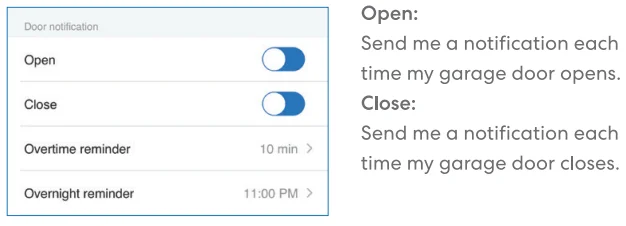
- Overtime reminder: Send me a notification when my garage door opens for 10–60 mins.
- Overnight reminder: Send me a notification when my garage door is still open after a particular time.
3. Advanced settings
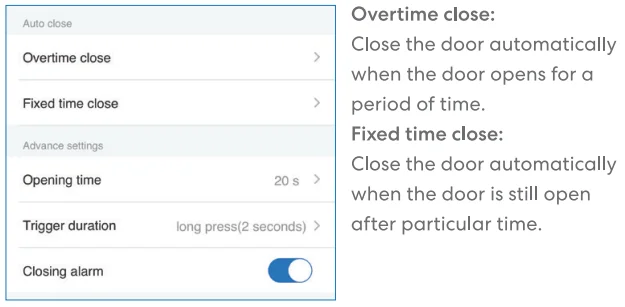
- Opening time: Choose the proper time duration for your garage door opener. App uses it as a timeout parameter to confirm the status of your garage.
- Trigger duration: Choose the proper trigger duration if you find your Meross app can’t fully close or open your garage door. The trigger duration is the same time as you press the garage wall button.
- Closing alarm: Sound an alarm when the door is closing.
4. Voice control
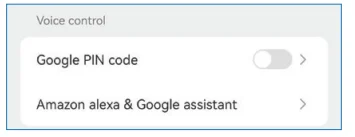
- Google PIN code: Optional password for voice control via Google Assistant. Leave blank if not using Google Assistant.
- Amazon Alexa & Google Assistant: Check the Amazon Alexa & Google Assistant user manual.
Amazon Alexa

Choose the “meross” skill. The commands are as follows:
- “Hi Alexa, open/close my garage.”
- “Hi Alexa, lock/unlock my garage.”
- “Hi Alexa, is my garage locked/closed?”
Note: Please replace “garage” with the garage door name you set. Amazon Alexa supports Security Code; you can enable it via the Amazon Alexa app.
Google Assistant

Choose the “meross” action, the commands are as follows:
- “Hey Google, open/close garage door.”
- “Can I have your security code?”
- “Hey Google, is the garage door opened/closed?”
Note:
- Please replace “garage door” with the garage door name you set.
- PIN code is required to be set by Google for safety concerns.
Homekit Siri

The Siri commands are as follows:
- “Hey Siri, open the garage door.”
- “Hey Siri, close the garage door.”
- “Hey Siri, is my garage door closed?”
Note: Please replace “garage door” with the garage door name you set.
FAQ
At Meross, we strive to assure your satisfaction. Attached below is a non-exhaustive list of questions that users are mostly concerned about.
1. What’s the difference between MSG100 and MSG150?
MSG150 is designed for openers with yellow, purple, red, or orange Learn buttons, using Security+ 1.0 or 2.0 protocols. It works without a magnetic sensor and supports multi-mode compatibility. MSG100, on the other hand, is better for traditional dry contact openers. It requires a wired magnetic sensor to detect the door status. See the comparison chart below for details.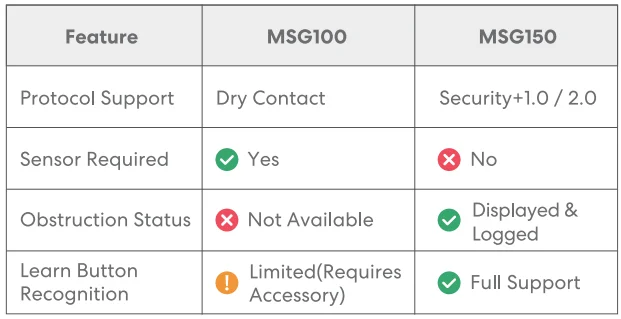
2. Do I need to install a wired sensor?
If you’re using MSG150 with a compatible opener (Security+ 1.0/2.0, usually with a yellow, purple, red, or orange Learn button), no wired sensor is needed. MSG150 can directly read the door status via protocol communication. If you’re using MSG100 or your opener only supports dry contact control, a wired magnetic sensor is required to detect whether the door is open or closed. If you purchased MSG150 but later discovered your opener does not use Security+ 1.0/2.0, don’t worry – you can still use it. Simply purchase a wired sensor (same type used with MSG100) and connect it to the MSG150. During setup, either:
- Select your brand/model manually in the Meross app, or
- Manually switch to Dry Contact mode by pressing the device button three times quickly. The LED will flash red 3 times, indicating Dry Contact mode is active.
3. My Home app can’t add the device by scanning the QR code.
You can tap “Don’t Have a Code or Can’t Scan” and input the code manually.
4. I can’t pair my device with Apple Home. What should I do?
Please follow these steps to ensure successful pairing:
- Use 2.4GHz Wi-Fi: Make sure your iOS device is connected to the 2.4GHz band of your home Wi-Fi network.
- Enable Auto-Join: If your home has multiple Wi-Fi networks, go to iOS Wi-Fi Settings and make sure the one you’re using has Auto-Join enabled.
- Use the latest iOS version: Please update to the latest version of iOS for better compatibility.
- Restart and Reset: Before each setup attempt, restart your iPhone and press and hold the MSG150 button for 5 seconds to reset the device. This helps clear any connection issues caused by the system cache.
Warranty
Meross products are covered by a 12-month limited warranty from the date of purchase. Please visit https://www.meross.com/support/warranty for detailed warranty policy and product registration.
Disclaimer
- The function of this smart device is tested under a typical circumstance described in our specifications. Meross does NOT guarantee that the smart device shall perform the same as described under all circumstances.
- By using third-party services, including but not limited to Amazon Alexa, Google Assistant, Apple HomeKit, and SmartThings, customers acknowledge that Meross shall not be held liable in any way for the data and private information collected by such parties. Meross’s total liability is limited to what is expressly covered in its Privacy Policy.
- Damages arising from ignorance of the SAFETY INFORMATION shall not be covered by Meross after-sales service, nor does Meross take any legal responsibility therefrom.
Customers acknowledge their understanding of these articles clearly by reading this manual.
FCC Compliance Information Statement
Changes or modifications not expressly approved by the party responsible for compliance could void the user’s authority to operate the equipment. This device complies with Part 15 of the FCC Rules. Operation is subject to the following two conditions:
- This device may not cause harmful interference, and
- This device must accept any interference received, including interference that may cause undesired operation.
Note: This equipment has been tested and found to comply with the limits for a Class B digital device, pursuant to Part 15 of the FCC Rules. These limits are designed to provide reasonable protection against harmful interference in a residential installation. This equipment generates, uses, and can radiate radio frequency energy, and if not installed and used in accordance with the instructions, may cause harmful interference to radio communications.
However, there is no guarantee that interference will not occur in a particular installation. If this equipment does cause harmful interference to radio or television reception, which can be determined by turning the equipment off and on, the user is encouraged to try to correct the interference by one or more of the following measures:
- Reorient or relocate the receiving antenna.
- Increase the separation between the equipment and receiver.
- Connect the equipment into an outlet on a circuit different from that to which the receiver is connected.
- Consult the dealer or an experienced radio/TV technician for help.
This equipment complies with FCC radiation exposure limits set forth for an uncontrolled environment. This equipment should be installed and operated with a minimum distance of 20cm between the radiator and your body. This transmitter must not be co-located or operating in conjunction with any other antenna or transmitter.
Canadian Compliance Statement
This device contains licence-exempt transmitter(s)/receiver(s) that comply with Innovation, Science and Economic Development Canada’s licence-exempt RSS(s). Operation is subject to the following two conditions:
- This device may not cause interference.
- This device must accept any interference, including interference that may cause undesired operation of the device.
The device meets the exemption from the routine evaluation limits in section 2.5 of RSS 102, and compliance with RSS-102 RF exposure, users can obtain Canadian information on RF exposure and compliance.
For More Manuals By Meross, Visit ManualsLibraryy.
Meross MSG150 Smart Wi-Fi Garage Door Opener-FAQs
What is the Meross MSG150 Smart Wi-Fi Garage Door Opener?
The Meross MSG150 is a smart controller that lets you open and close your garage door remotely using a smartphone app or voice assistants. It connects to your existing garage door opener via Wi-Fi, enabling automation, monitoring, and remote access without requiring a subscription.
How does the MSG150 work with an existing garage door system?
The MSG150 connects directly to your garage door motor using wired terminals and communicates over Wi-Fi. It sends commands to trigger the door just like a wall switch, while sensors track whether the door is open or closed for real-time status updates.
Does the Meross MSG150 support voice assistants?
Yes, the MSG150 supports voice control through Apple HomeKit, Amazon Alexa, Google Assistant, and Siri. This allows you to open or close your garage door using simple voice commands, making it convenient when your hands are full or when you’re entering or leaving home.
Can I control the garage door remotely with the MSG150?
Yes, the device allows full remote control through the Meross app or compatible smart home apps. You can open or close your garage door from anywhere with an internet connection, which is useful for letting in guests, deliveries, or family members.
Does the MSG150 send notifications about door status?
The MSG150 provides real-time notifications, including alerts when the garage door opens or closes, as well as reminders if the door is left open for too long. These notifications help improve home security and ensure you never accidentally leave your garage open.
Is the Meross MSG150 easy to install?
Installation is generally straightforward but involves wiring the device to your garage door opener and mounting sensors. While many users can install it themselves, beginners may find the setup slightly challenging, especially when identifying compatible terminals and positioning sensors correctly.
What garage door openers are compatible with the MSG150?
The MSG150 is designed to work with many popular brands such as Chamberlain, LiftMaster, and Craftsman, although compatibility may vary depending on the model. It’s recommended to check compatibility before purchasing to ensure smooth installation and operation.
Does the MSG150 require a subscription or additional fees?
No, the Meross MSG150 does not require any subscription fees. Once installed, you can use all core features like remote control, scheduling, and notifications for free through the Meross app and supported smart home platforms.
Is the MSG150 safe and secure to use?
The device uses secure Wi-Fi communication and app-based controls to protect access to your garage. Additionally, activity logs and alerts help monitor usage, giving you better control and awareness of when your garage door is being operated.
What are the common issues or limitations of the MSG150?
Some users may face compatibility limitations with newer garage door systems or encounter installation complexity due to wiring requirements. In certain cases, additional accessories or configurations may be needed, so checking compatibility and setup instructions beforehand is highly recommended.