
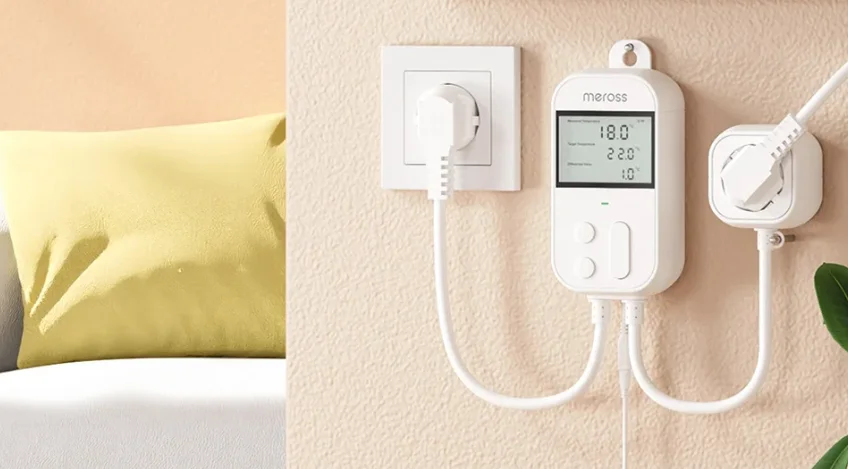

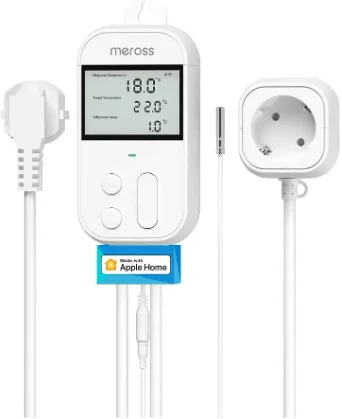
Meross MTS960 Smart Wi-Fi Socket Thermostat
Safety Information
- It is recommended that this device be used indoors in a dry location only.
- The device shall be used within its rated power, as included in the product specifications on the label.
- Make sure the device is fully plugged in and kept out of reach of children for safety concerns.
- Do not use the device where wireless devices are not allowed.
- Do not plug in this device one after the other.
- Do not cover the device when operating.
- No voltage only when the plug of the Smart Socket Thermostat is disconnected.
- The socket-outlet that supplies power to the equipment (Smart Socket Thermostat) shall be installed near the equipment and shall be easily accessible.
1 Package Content
- 1 x Smart Wi-Fi Socket Thermostat
- 1 x Temperature Sensor (Needs to be plugged into the thermostat)
- 1 x User Manual
Installation Guide
- Download the Meross app.
- Follow the instructions in the Meross app to complete the setup.

NOTE:
- This device only supports a 2.4GHz Wi-Fi network.
- Make sure your smart device is covered by a strong Wi-Fi network.
- As long as you finish configuration, you’ll be able to manage the device in the Apple Home app.
- Find more at https://www.meross.com/support/.
Display and Button Rules
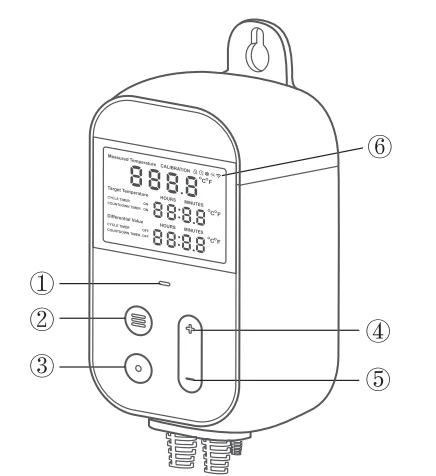
- Status LED
- Socket power ON/OFF.
- MODE
- Press and hold for 3 seconds to turn ON/OFF the device. Short press to choose different modes.
- SET
- Press to choose a particular parameter to set.
- UP
- Increase value.
- DOWN
- Decrease value. Press and hold the “UP” and “DOWN” buttons at the same time for 5 seconds, and the device will factory reset and reboot.
- Display Icons

- The operating modes of the device and the screen display in different operating modes will be described in the next section.

How to Use
The socket thermostat supports 7 working modes. You can press the MODE button to select it or control it through the Meross app.
Temperature Control-Heat Mode
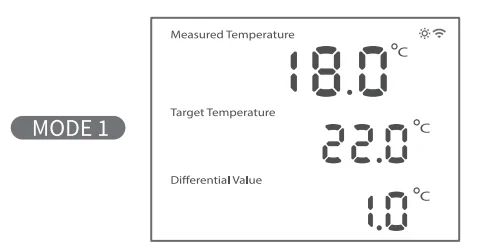
- This mode is used to control a heater to heat. When the temperature reaches the target temperature (22 C), the socket will be powered off. When the temperature decreases by a Differential Value (1 C, 22 C → 21 C), the socket will power on.
You can press the SET button to set Target Temperatures and Differential Value. Each time you press the SET button, the flashing parameter can be adjusted with the UP and DOWN buttons.
Temperature Control – Cool Mode
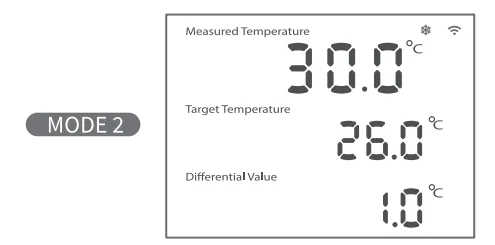
- This mode is used to control a cooler to cool. When the temperature reaches the target temperature (26 C), the socket will be powered off. When the temperature increases by a Differential Value (1 C, 26 C → 27 C), the socket will be powered on.
- You can press the SET button to set Target Temperatures and Differential Value. Each time you press the SET button, the flashing parameter can be adjusted with the UP and DOWN buttons.

Cycle Timer Mode
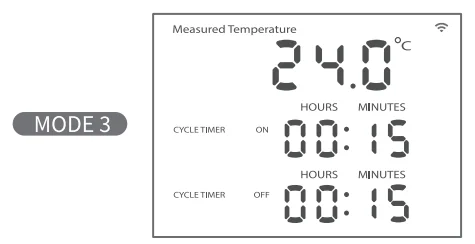
- In this mode, the socket will cycle ON and OFF at certain times. It will cycle between 15 minutes ON and 15 minutes OFF as shown in the picture above.
- You can press the SET button to set the CYCLE TIMER ON and CYCLE TIMER OFF timers. Each time you press the SET button, the flashing parameter can be adjusted with the UP and DOWN buttons.

Countdown On Mode
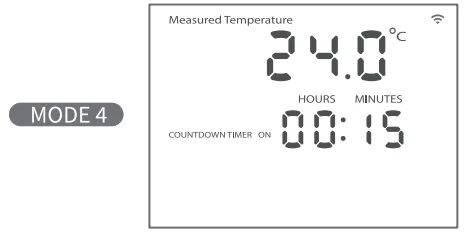
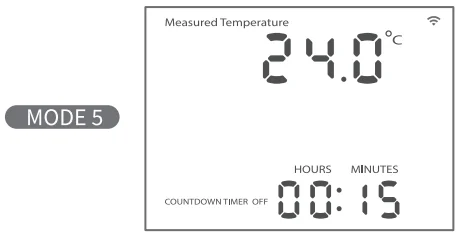
- In this mode, the socket will power ON after a certain time (15 minutes as shown in the picture above).
- You can press the SET button to set the COUNTDOWN TIMER. Each time you press the SET button, the flashing parameter can be adjusted with the UP and DOWN buttons.

Countdown Off Mode
- In this mode, the socket will power OFF after a certain time (15 minutes as shown in the picture above).
- You can press the SET button to set the COUNTDOWN TIMER. Each time you press the SET button, the flashing parameter can be adjusted with the UP and DOWN buttons.

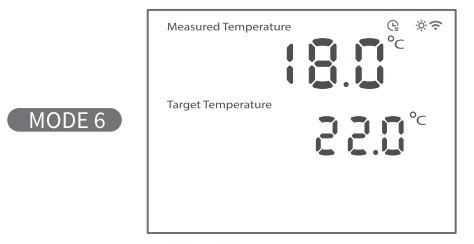
Temperature Schedule – Heat Mode
- This mode is used to control a heater to heat according to the schedule.
- You can adjust the schedule in the Meross app.

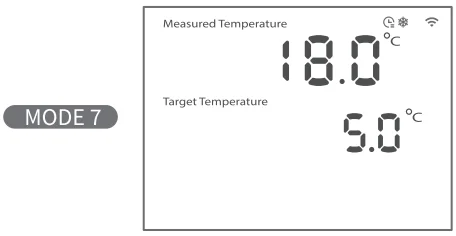
Temperature Schedule – Cool Mode
- This mode is used to control a cooler to cool according to the schedule.
- You can adjust the schedule in the Meross app.

Sensor Malfunction and Replacement
If you find the “E2” character flashing on the screen, as shown below, this means the sensor is not working properly. Please do the following steps.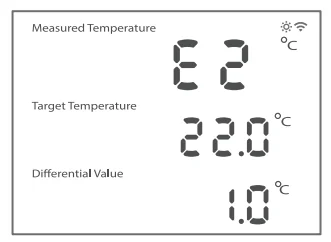
- Check whether the sensor wire has been plugged properly and re-plug it.
- Use your finger to hold the sensor to see whether the measured temperature will go above 30 C quickly. If yes, then the sensor is working properly.
- If the screen still flashes the “E2” character, then you need to replace the sensor.
How to Calibrate Temperature
It is recommended to calibrate the temperature in the Meross app, and you can also follow the steps below to calibrate the temperature on the device.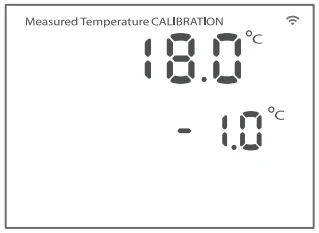
- Power the device up.
- Press and hold the SET button for 3 seconds, and the temperature calibration page will display.
- Use the “UP” and “DOWN” buttons to calibrate, then long-press the SET button for 3 seconds to save the change.
Link to Google Assistant or Amazon Alexa
- Set up the device in the Meross app first, then link it to voice assistants.
- Link to Amazon Alexa: Go to User -> Amazon Alexa and allow Meross to link with Alexa.
- Link to Google Assistant: Go to User -> Google Assistant and allow Meross to link with Google Assistant.
Warranty
For detailed warranty information, please visit https://www.meross.com/support/warranty.
Disclaimer
- The function of this smart device is tested under a typical circumstance described in our specifications. Meross does NOT guarantee that the smart device shall perform the same as described under all circumstances.
- By using third-party services, including but not limited to Amazon Alexa, Google Assistant, Apple HomeKit, and SmartThings, customers acknowledge that Meross shall not be held liable in any way for the data and private information collected by such parties. Meross’s total liability is limited to what is expressly covered in its Privacy Policy.
- Damages arising from ignorance of the SAFETY INFORMATION shall not be covered by Meross after-sales service, nor does Meross take any legal responsibility therefrom.
Customers acknowledge their understanding of these articles clearly by reading this manual.
FAQ
At Meross, we strive to assure your satisfaction. Attached below is a non-exhaustive list of questions that users are most concerned about.
1. What devices can I control with Meross Socket Thermostat?
You can control heaters or coolers to adjust the temperature, or you can control lights, fans, humidifiers, and other small appliances to make them work on a timer.
2. What should I do when the Wi-Fi icon flashes rapidly?
This means that the device’s Wi-Fi or Internet is down. You can troubleshoot the following:
- Check if your home Wi-Fi is working properly.
- Make sure that you have disabled access control in your router and that the Smart Socket Thermostat is not blocked by the router’s firmware.
- Power off and power on the device again.
- Press and hold the “UP” and “DOWN” buttons to factory reset the device and try to add it again.
Learn more at https://www.meross.com/support/faqs.
EU Declaration of Conformity
We, Chengdu Meross, declare that this product bearing the CE marking complies with the following EU directives 2014/53/EU, 2011/65/EU. Compliance with these Directives implies conformity to harmonized European standards that are noted in the EU Declaration of Conformity, which may be found at https://www.meross.com/support/eudoc.
Operating Frequency
No restrictions exist in the use of radio frequencies or frequency bands in all EU member states, EFTA countries, Northern Ireland, and Great Britain.
Operating Frequency / max output power
2400MHz ~ 2483.5MHz / 20dBm
FCC Compliance Information Statement
Changes or modifications not expressly approved by the party responsible for compliance could void the user’s authority to operate the equipment. This device complies with Part 15 of the FCC Rules. Operation is subject to the following two conditions:
- This device may not cause harmful interference, and
- This device must accept any interference received, including interference that may cause undesired operation.
Note: This equipment has been tested and found to comply with the limits for a Class B digital device, pursuant to Part 15 of the FCC Rules. These limits are designed to provide reasonable protection against harmful interference in a residential installation. This equipment generates, uses, and can radiate radio frequency energy, and if not installed and used in accordance with the instructions, may cause harmful interference to radio communications.
However, there is no guarantee that interference will not occur in a particular installation. If this equipment does cause harmful interference to radio or television reception, which can be determined by turning the equipment off and on, the user is encouraged to try to correct the interference by one or more of the following measures:
- Reorient or relocate the receiving antenna.
- Increase the separation between the equipment and receiver.
- Connect the equipment into an outlet on a circuit different from that to which the receiver is connected.
Consult the dealer or an experienced radio/TV technician for help.
This equipment complies with FCC radiation exposure limits set forth for an uncontrolled environment. This equipment should be installed and operated with a minimum distance of 20cm between the radiator and your body. This transmitter must not be co-located or operating in conjunction with any other antenna or transmitter.
Canadian Compliance Statement
This device contains licence-exempt transmitter(s)/receiver(s) that comply with Innovation, Science and Economic Development Canada’s licence-exempt RSS(s). Operation is subject to the following two conditions:
- This device may not cause interference.
- This device must accept any interference, including interference that may cause undesired operation of the device.
The device meets the exemption from the routine evaluation limits in section 2.5 of RSS 102, and compliance with RSS-102 RF exposure, users can obtain Canadian information on RF exposure and compliance. This transmitter must not be co-located or operating in conjunction with any other antenna or transmitter. This equipment should be installed and operated with a minimum distance of 20 centimeters between the radiator and your body.
For More Manuals By Meross, Visit ManualsLibraryy.
Meross MTS960 Smart Wi-Fi Socket Thermostat-FAQs
What is the Meross MTS960 Smart Wi-Fi Socket Thermostat, and how does it work?
The Meross MTS960 is a plug-in smart thermostat that controls heating or cooling devices based on temperature readings. It uses a wired external sensor to monitor temperature and automatically turns connected appliances on or off to maintain your desired settings.
What devices can the MTS960 control?
The MTS960 can control a wide range of appliances such as heaters, refrigerators, fans, incubators, and brewing equipment. It is especially useful for environments requiring precise temperature regulation, like greenhouses, aquariums, fermentation setups, and small indoor climate-controlled spaces.
Does the Meross MTS960 require a hub to function?
No, the MTS960 connects directly to your Wi-Fi network and does not need a separate hub. It works with platforms like Apple Home, Alexa, Google Home, and SmartThings, allowing remote control and automation through apps or voice commands.
Can the MTS960 handle both heating and cooling modes?
Yes, the MTS960 supports both heating and cooling modes, allowing you to automate devices based on temperature thresholds. You can switch between modes easily and set schedules to maintain specific conditions, making it versatile for year-round temperature management.
What is the temperature range and accuracy of the MTS960?
The device supports a wide temperature measurement range, typically from very low to high extremes, with high accuracy around ±1°F. This precision makes it suitable for sensitive applications like food fermentation, reptile habitats, or controlled storage environments.
How do you set schedules and automation on the MTS960?
You can create detailed schedules through the Meross app, with multiple periods per day for heating or cooling. The thermostat can follow programmed schedules even if Wi-Fi disconnects, ensuring consistent operation without relying entirely on internet connectivity.
Is the MTS960 easy to install and use?
Installation is simple since it is a plug-and-play device. You just connect it to a power outlet, plug in your appliance, and place the temperature sensor. Setup is completed via the app, and the LCD screen helps monitor settings easily.
Does the MTS960 support timers and countdown functions?
Yes, the device includes timer features such as countdown timers and cycle timers. These allow you to run appliances for specific durations or intervals, offering flexibility for tasks like timed heating, cooling cycles, or automated daily routines.
What safety features does the Meross MTS960 include?
The MTS960 includes safety features like high and low temperature alerts, sensor failure alarms, a child lock, and compressor delay protection. These features help prevent equipment damage and ensure safe operation, especially when used with heating or refrigeration systems.
What are the main use cases for the Meross MTS960 thermostat?
Common use cases include home brewing, greenhouse climate control, aquarium management, reptile enclosures, and general heating or cooling automation. Its flexibility and precision make it ideal for both hobbyists and practical home applications requiring consistent temperature control.