
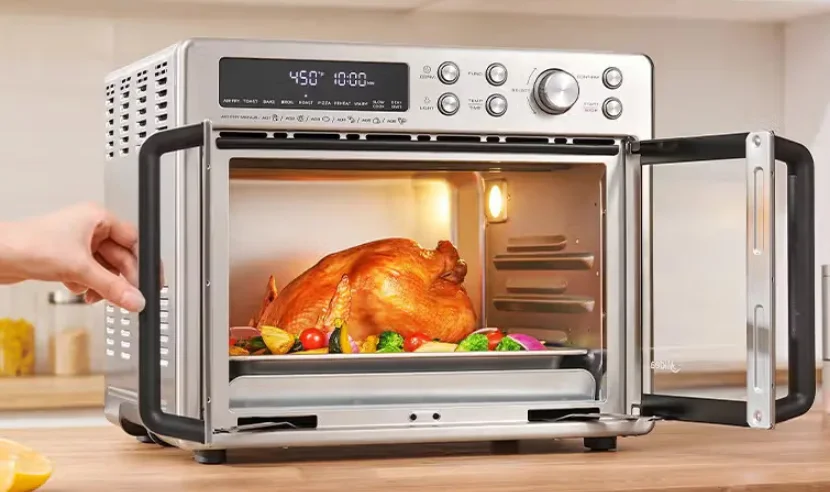

Midea MET26C3AST Flexify French Door Toaster Oven
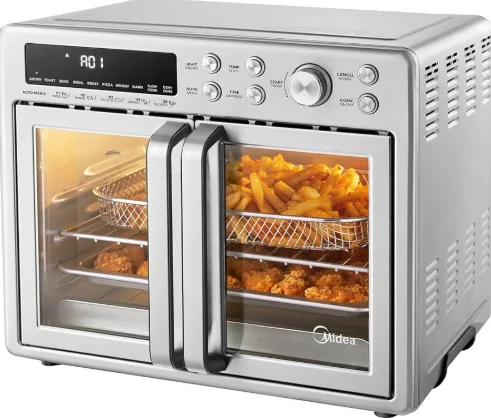
IMPORTANT SAFETY INSTRUCTIONS
When using electrical appliances, basic safety precautions should always be followed, including the following:
- Read all instructions.
- Do not touch hot surfaces. Use handles or knobs.
- To protect against electrical shock, do not immerse the cord, plugs, or any electrical parts in water or other liquids.
- Close supervision is necessary when any appliance is used by or near children.
- Unplug from the outlet when not in use and before cleaning. Allow to cool before
- Do not operate any appliance with a damaged cord or plug or after the appliance malfunctions or has been damaged in any manner. Return the appliance to the nearest authorised service facility for examination, repair, or adjustment.
- The use of accessory attachments not recommended by the appliance manufacturer may cause injuries.
- Do not use outdoors.
- Do not let the cord hang over the edge of the table or counter, or touch hot surfaces.
- Do not place on or near a hot gas or electric burner, or in a heated oven.
- Extreme caution must be used when moving an appliance containing hot oil or other hot liquids.
- To disconnect, turn any control to “off”, then remove the plug from the wall outlet.
- Do not use the appliance for anything other than its intended use.
- Use extreme caution when removing the tray or disposing of hot grease.
Electrical parts create a risk of electric shock. - Oversized foods or metal utensils must not be inserted in an air fryer oven as they may create a fire or risk of electric shock.
- A fire may occur if the oven is covered or touches flammable material, including curtains, draperies, walls, and the like, when in operation. Do not store any item on top of the appliance when in operation.
- Extreme caution should be exercised when using containers constructed of other than metal or glass.
- Do not store any materials, other than manufacturer’s recommended accessories, in this oven when not in use.
- Do not place any of the following materials in the oven: (that is, paper, cardboard, plastic, and the like).
- Do not cover the crumb tray or any part of the oven with metal foil. This will cause overheating of the oven.
- Caution—To ensure continued protection against the risk of electric shock, connect to properly grounded outlets only.
- Remove plug from outlet when the appliance is not in use, before putting on or taking off parts, and before cleaning. Allow to cool before handling.
- Avoid contacting moving parts.
- For household use only.
- During operation, pressing “START/STOP” can pause cooking.
SHORT CORD INSTRUCTION (DETACHABLE POWER-SUPPLY CORD)
- A short power-supply cord (or detachable power-supply cord) should be used to reduce the risk resulting from becoming entangled in or tripping over a longer cord
- Longer detachable power-supply cords or extension cords are available and may be used if care is exercised in their use.
- If a longer detachable power-supply cord or extension cord is used:
- The marked electrical rating of the cord set or extension cord should be at least as great as the electrical rating of the appliance.
- The cord should be arranged so that it will not drape over the countertop or tabletop, where it can be pulled on by children or tripped over unintentionally.
- The appliance is grounded type; the extension cord should be a grounding-type 3-wire cord.
SPECIFICATION

PRODUCT OVERVIEW
Notes
- In case of any differences between the appliance and the pictures in this manual, the product shall prevail.
- Place the appliance on an insulated surface when used.
- The area where this oven is used should be dry. The oven should not be used outdoors.
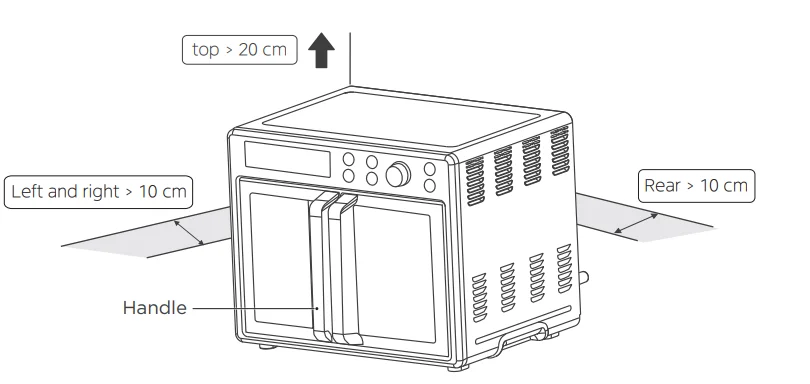
- Keep the oven at least 10–15 cm from walls and cabinets. Surrounding objects may catch fire due to heat emitted from the appliance or get covered with soot.
- Maintain a 20 cm space between the top of the oven and any objects or walls above.


OPERATION INSTRUCTIONS
Control Panel Settings
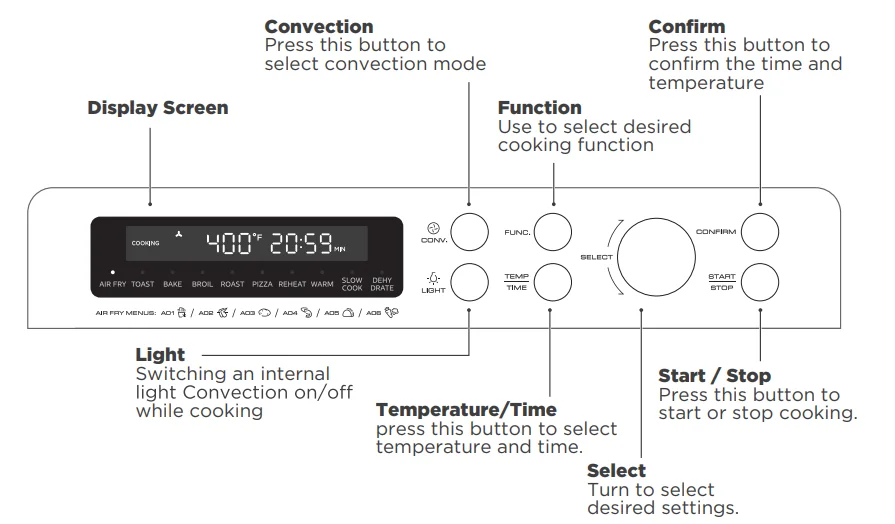
Before Using For The First Time
- Remove all accessories and shipping materials packed inside the oven.
- Wash the oven fittings with a dab of washing-up liquid and warm water. Wipe the unit and the oven fittings dry before using with paper towels or a dry cloth.
- Place the oven on a flat counter or other stable surface. DO NOT OPERATE ON THE SAME CIRCUIT WITH ANOTHER APPLIANCE.
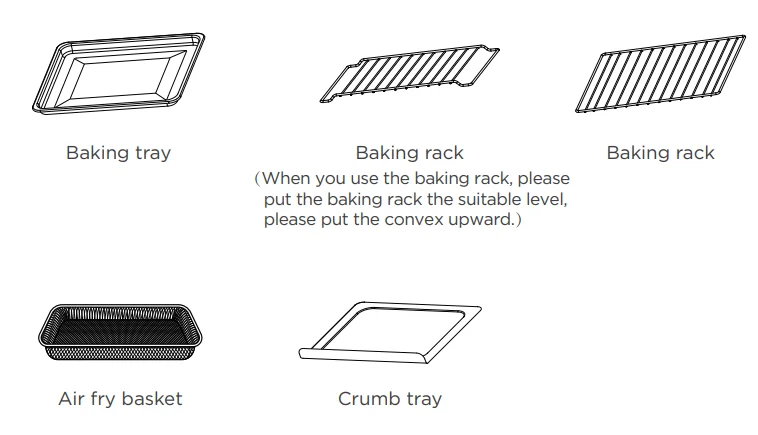
- Before working, place the crumb tray under the bottom heating element.
- Make sure the crumb tray is properly fitted before using the oven.
- Press the function button to select bake, press the
 button, and rotate the knob to time 15 minutes. This will burn off any oil still on the oven.
 - Adjust the temperature to 450°F. After that, press the
 button and rotate the knob to adjust.
 button, and rotate the knob to time 15 minutes. This will burn off any oil still on the oven.
(NOTE: The oven may smoke inside during the process. This is normal for a new oven and will not last more than 10–15 minutes.
Function Operation
Notes
- When the oven is plugged into an outlet, the buzzer will sound once.
- During cooking, you can press “STOP” to stop cooking.
- At the end of cooking, the buzzer will sound 3 times and “COMPLETE and 00:00” will display.
- Always remove food with oven mitts. The food and oven will become very hot.
Eco Mode
When the oven is plugged into an outlet and in standby mode, the default mode will not enter ECO mode.
To enter ECO mode:
In the standby state, the screen will turn off if there is no operation within 5 minutes.
To cancel ECO mode:
In ECO mode, you can press any button to cancel it.
Using the Air Fry Function
- Press the “FUNC.” button to select the air fry function.
- Press the “CONFIRM” button. A01 flashes.
- Rotate the “SELECT” knob to select A01–A06 (when you use “A01”, please put the chips into the air fry basket and use the default time and default temperature).
- Press the button and then rotate the “SELECT” knob to select the cooking temperature.
- Press the “ ” button and then rotate the “SELECT” knob to select cooking time.
- Put the food into the oven and press
 to start cooking.
 to start cooking.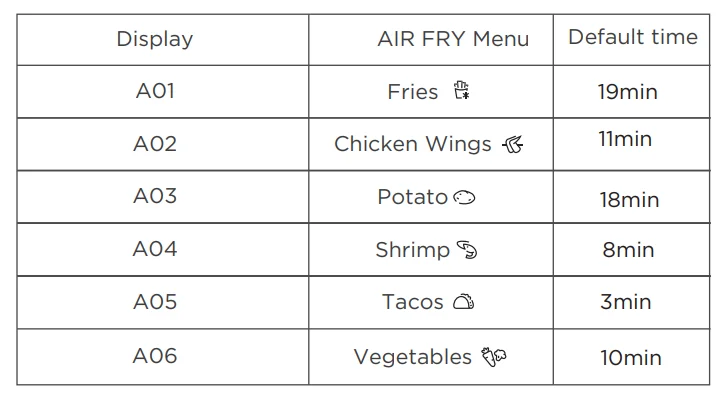
Using the Dehydrate, Slow Cook, Warm, Reheat, Roast, Broil, and Bake Functions
- Press the “FUNC.” button to select the desired function.
- Press the
 button and then rotate the “SELECT” knob to select the cooking temperature.
 - Press the “TIME” button and then rotate the “SELECT” knob to select cooking time.
- Press
 to start cooking.
Using the Pizza Function
- Press the “FUNC.” button to select the pizza function. The screen displays “9 INCH”.
- Press the “CONFIRM” button, rotate the “SELECT” knob to select the 6, 9, or 12 inches.
- Press the button to start preheating. When the preheat temperature is reached, the buzzer will sound 5 times.
- Put the food into the oven and close the door, press the “START” to start cooking.
Using the Toast Function
- Press the “FUNC.” button to select the toast function.
- Press the “CONFIRM” button, rotate the “SELECT” knob to select the 1–6 slice (default is 4 slice).
- Press the button and then rotate the “SELECT” knob to select the darkness level.
- Put the food into the oven and close the door, press the
 to start cooking.
Using the Convection Fan
Select the Convection button in function mode to circulate the heat throughout the oven cavity for even baking.
COOKING GUIDELINES
- Place the baking rack and baking tray in a position that will accommodate the height of the food to be cooked.
- The food should be put onto a baking tray to avoid catching fire due to an accumulation of food leftovers on the heating pipes.
- Make sure that you always use an ovenproof container in the oven; never use plastic or cardboard containers in the oven.
- Clean the heating pipes periodically.
- Never use glass or ceramic pans or lids.
- NEVER let oil or other liquids from the food drip down to the bottom of the oven.
- Set the temperature as suggested by the recipe or as desired.
- Securely shut the door and set the cooking time to begin cooking.
CLEANING AND CARE
With proper care and cleaning, your appliance will retain its appearance and remain fully functional for a long time. We will explain here how you should correctly care for and clean your appliance. Do not use glass cleaners or metal/glass scrapers for cleaning.
- Before cleaning, unplug the oven and allow it to cool completely.
- Wash all the accessories with mild, soapy water, including the baking rack and the baking tray.
- Do not use abrasive cleansers, scrubbing brushes, and chemical cleaners, as these will cause damage to the non-stick coating of the baking tray.
- Use a wet cloth to wipe the inside of the oven.
- Clean the door using a wet cloth saturated with detergent or soap.
- Never immerse the oven in water or other liquid. Do not clean the appliance in a dishwasher.
- Any other servicing should be performed by an authorized service representative.
TROUBLESHOOTING & FAQ
FAQ
Why won’t the oven turn on?
- Make sure the power cord is securely plugged into the outlet.
- Insert the power cord into a different outlet.
- Reset the circuit breaker if necessary.
- Press the power button.
Why is my food undercooked or overcooked?
- Do not add food before the recommended preheat time is complete. For best results, check progress throughout cooking, and remove food if the desired level of brownness has been achieved. Remove food immediately after the cook time is complete to avoid overcooking.
- This oven cooks faster than a traditional oven. Always keep an eye on your food while cooking.
Why do the heating elements appear to be turning on and off?
- This is normal. The oven is designed to control temperature precisely for every function by adjusting the heating elements’ power levels.
Why is steam coming out of the oven door?
- This is normal. The door is vented to release steam created by foods with a high moisture content.
Why is water dripping onto the counter from under the door?
- This is normal. The condensation created by foods with a high moisture content (such as frozen breads) may run down the inside of the door and drip onto the counter.
Why is there noise coming from the control panel or the back of the oven?
- When the oven is hot, a fan turns on to cool down the control panel.
Why does the oven sound like it is still running even though the power is off?
- The cooling fan may continue to run even after the oven has been turned off. This is a normal function and should not be a source of concern.
TRADEMARKS, COPYRIGHTS, AND LEGAL STATEMENT
Midea logo, word marks, trade name, trade dress, and all versions thereof are valuable assets of Midea Group and/or its affiliates (“Midea”), to which Midea owns trademarks, copyrights, and other intellectual property rights, and all goodwill derived from using any part of an Midea trademark. Use of the Midea trademark for commercial purposes without the prior written consent of Midea may constitute trademark infringement or unfair competition in violation of relevant laws.
This manual was created by Midea, and Midea reserves all copyrights thereof. No entity or individual may use, duplicate, modify, distribute in whole or in part this manual, or bundle or sell it with other products without the prior written consent of Midea. All the described functions and instructions were up to date at the time of printing this manual. However, the actual product may vary due to improved functions and designs.
DATA PROTECTION NOTICE
For the provision of the services agreed with the customer, we agree to comply without restriction with all stipulations of applicable data protection law, in line with the agreed countries within which services to the customer will be delivered. Generally, our data processing is to fulfil our obligation under contract with you and for product safety reasons, to safeguard your rights in connection with warranty and product registration questions.
In some cases, but only if appropriate data protection is ensured, personal data might be transferred to recipients located outside of the European Economic Area. Further information is provided on request. You can contact our Data Protection Officer via [email protected]. To exercise your rights, such as the right to object to your personal data being processed for direct marketing purposes, please contact us via [email protected]. To find further information, please follow the QR Code or visit www.midea.com.
For More Manuals By Midea, Visit ManualsLibraryy.
Midea MET26C3AST Flexify French Door Toaster Oven-FAQs
How do I use the Midea MET26C3AST as an air fryer?
Select the Air Fry mode, place food on the air fry basket or tray, set the recommended temperature and time, and let the rapid hot-air circulation cook food evenly with little to no oil.
Do I need to preheat the air fryer mode?
Preheating is recommended for best results. Most air fry functions preheat to 400°F (200°C) in about 3–5 minutes.
Can I use aluminum foil in the Midea air fryer toaster oven?
Yes, aluminum foil can be used safely. Make sure it does not block airflow and never covers heating elements or air vents.
Can I put aluminum foil in convection or bake mode?
Can I put aluminum foil in convection or bake mode?
Can I use my toaster oven as a regular oven?
Yes. The Midea Flexify toaster oven works like a traditional oven using Bake, Roast, or Convection modes, ideal for everyday cooking.
Can I cook eggs in the air fryer?
Yes, eggs can be cooked in an air fryer using suitable bakeware. Avoid placing raw eggs directly on the rack without a container.
Can I cook raw meat in the air fryer or toaster oven?
Yes. Raw meat can be cooked safely in air fry, bake, or convection modes. Always ensure food reaches a safe internal temperature.
What foods should not be cooked in an air fryer?
Avoid foods with wet batter, loose paper coatings, or very light items that may fly into the heating element.
What is the difference between air frying and baking?
Air frying uses high-speed hot air for crisp results with less oil, while baking uses steady heat, making it better for cakes, bread, and delicate dishes.