
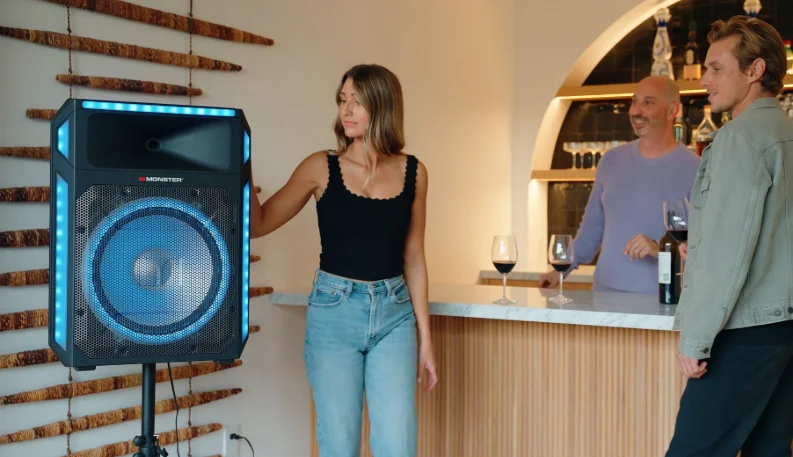

Monster X6 All-in-One PA Bluetooth Speaker System
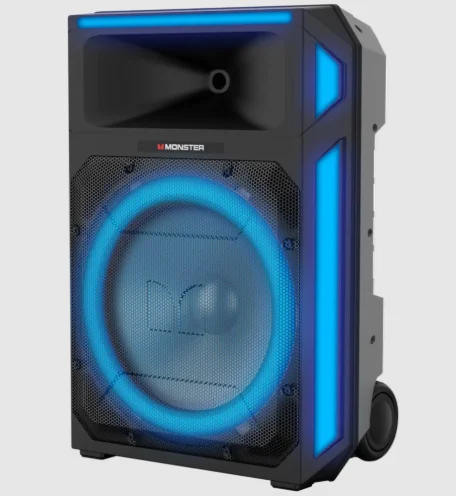
FCC Warning Statement
Changes or modifications not expressly approved by the party responsible for compliance could void the user’s authority to operate the equipment. This equipment has been tested and found to comply with the limits for a Class B digital device, pursuant to Part 15 of the FCC Rules. These limits are designed to provide reasonable protection against harmful interference in a residential installation.
This equipment generates, uses, and can radiate radio frequency energy and, if not installed and used in accordance with the instructions, may cause harmful interference to radio communications. However, there is no guarantee that interference will not occur in a particular installation. If this equipment does cause harmful interference to radio or television reception, which can be determined by turning the equipment off and on, the user is encouraged to try to correct the interference by one or more of the following measures:
- Reorient or relocate the receiving antenna.
- Increase the separation between the equipment and receiver.
- Connect the equipment into an outlet on a circuit different from that to which the receiver is connected.
- Consult the dealer or an experienced radio technician for help.
FCC Radiation Exposure Statement:
This equipment complies with FCC radiation exposure limits set forth for an uncontrolled environment. In order to avoid the possibility of exceeding the FCC radio frequency exposure limits, human proximity to the antenna shall not be less than 20 cm (8 inches) during normal operation.
UNPACKING
Check that you have all of the following items. If any item is missing, please contact the customer service hotline for assistance. The hotline number is printed on the cover page of this user manual.
- Monster Rockin’ Roller Party
- AC Power Cable
- Wired Microphone
- Telescoping Tripod Speaker Stand
- User Manual (with Warranty Statement)
- Quick Start Guide
IC Statement:
This device complies with Industry Canada’s licence-exempt RSSs. Operation is subject to the following two conditions:
- This device may not cause interference, and
- This device must accept any interference, including interference that may cause undesired operation of the device.
IMPORTANT SAFETY INSTRUCTIONS
TO PREVENT FIRE OR SHOCK HAZARD, DO NOT USE THIS PLUG WITH AN EXTENSION CORD, RECEPTACLE, OR OTHER OUTLET UNLESS THE BLADES CAN BE FULLY INSERTED TO PREVENT BLADE EXPOSURE. TO PREVENT FIRE OR SHOCK HAZARD, DO NOT EXPOSE THIS APPLIANCE TO RAIN OR MOISTURE.
- READ INSTRUCTIONS – All the safety and operating instructions should be read before the product is operated.
- RETAIN INSTRUCTIONS – The safety and operating instructions should be retained for future reference.
- HEED WARNINGS – All warnings on the product and in the operating instructions should be adhered to.
- FOLLOW INSTRUCTIONS – All operating and use instructions should be followed.
- CLEANING – Unplug this product from the wall outlet before cleaning. Do not use liquid cleaners or aerosol cleaners. Clean only with a dry cloth.
- ATTACHMENTS – Do not use attachments not recommended by the product manufacturer, as they may cause hazards.
- ACCESSORIES – Do not place this product on an unstable cart, stand, tripod, bracket, or table. The product may fall, causing serious injury to a child or adult, and serious damage to the product. Use only with a cart, stand, tripod, bracket, or table recommended by the manufacturer, or sold with the product. Any mounting of the product should follow the manufacturer’s instructions and should use a mounting accessory recommended by the manufacturer. A product and cart combination should be moved with care—quick stops, excessive force, and uneven surfaces may cause the product and cart combination to overturn.
- VENTILATION – Slots and openings in the cabinet are provided for ventilation and to ensure reliable operation of the product and to protect it from overheating, and these openings must not be blocked or covered. The openings should never be blocked by placing the product on a bed, sofa, rug, or other similar surface. This product should not be placed in a built-in installation, such as a bookcase or rack, unless proper ventilation is provided or the manufacturer’s instructions have been adhered to.

- POWER SOURCES – This product should be operated only from the type of power source indicated on the marking label. If you are not sure of the type of power supply to your home, consult your product dealer or local power company. For products intended to operate from battery power or other sources, refer to the operating instructions.
- GROUNDING OR POLARIZATION – This product may be equipped with a polarized alternating-current line plug (a plug having one blade wider than the other). This plug will fit into the power outlet only one way. This is a safety feature. If you are unable to insert the plug fully into the outlet, try reversing the plug. If the plug still fails to fit, contact your electrician to replace your obsolete outlet. Do not defeat the safety purpose of the polarized plug.
- POWER-CORD PROTECTION – Power-supply cords should be routed so that they are not likely to be walked on or pinched by items placed upon or against them, paying particular attention to cords at plugs, convenience receptacles, and the point of exit from the product.
- NON-USE PERIODS – The power cord of the product should be unplugged from the outlet when left unused for long periods of time.
- Do not use this apparatus near water.
- Do not install near any heat sources such as radiators, heat registers, stoves, or other apparatus (including amplifiers) that produce heat.
- Refer all servicing to qualified service personnel. Servicing is required when the apparatus has been damaged in any way, such as power-supply cord or plug is damaged, liquid has been spilled or objects have fallen into the apparatus, the apparatus has been exposed to rain or moisture, does not operate normally, or has been dropped.
- The mains plug is used as a disconnect device, and it should remain readily operable during intended use. In order to disconnect the apparatus from the mains completely, the mains plug should be disconnected from the mains socket outlet.
- The Battery shall not be exposed to excessive heat, such as sunshine, fire, or the like.
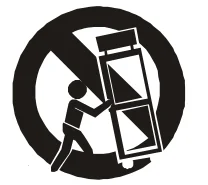
CONTROLS AND CONNECTIONS
- LED Display
- USB (MP3 Playback) Port
- BT (Bluetooth® Source) Button
- Source Button
- Previous (back arrow) Button
- Next (forward arrow) Button
- Play (/Pause) Button
- Number (Preset) Buttons
- Master Volume Knob
- Microphone 1 Gain Knob
- Microphone 2 Gain Knob
- Microphone 1 Echo Knob
- Microphone 2 Echo Knob
- Microphone 1 (/Instrument) ¼” Input
- Microphone 2 (/Instrument) ¼” Input
- Microphone 1 XLR Input
- Microphone 2 XLR Input
- AC Input
- Repeat Button
- Power (Green) LED Indicator Light
- Bluetooth® (Blue) LED Indicator Light
- Lighting Button
- TWS (Connection) Button
- Bass (Boost) Button
- Bass/Treble Button
- AUX-in (3.5mm)
- Microphone XLR-In
- Microphone XLR-Out
- On/Off Switch
- Segment LED
- Power Icon
- USB Audio Source Icon
- AUX-In Source Icon
- FM Radio Icon
- Bluetooth® Source Icon


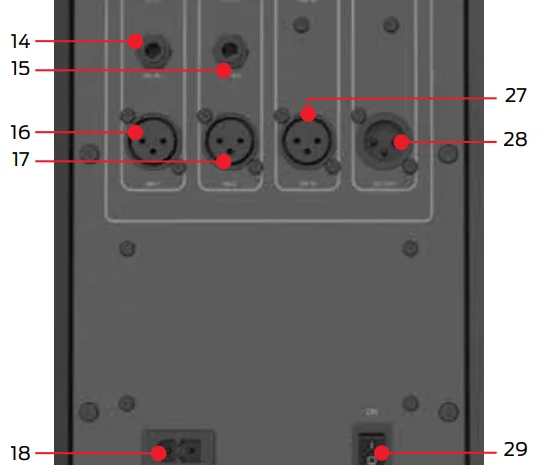
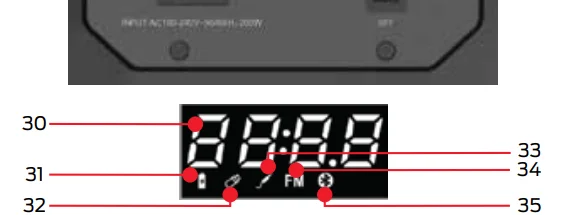
Power ON/OFF Switch:
Toggle switch to ON position:
- The green power LED Indicator light and LED Display will power on.
- The unit voice prompt will say, “Power on.”
- Automatically enters into Bluetooth® pairing status.
Toggle switch to OFF position:
- All LED Indicators and LED Displays will turn off.
- The unit voice prompt will say, “Power off,” before powering down.
BT (Bluetooth®) Button:
Switch to Bluetooth® Audio Source:
- While in another audio source, press the BT Button to switch to Bluetooth® mode or cycle through audio sources using the Source button.
- The unit will automatically disconnect from the current device.
Bluetooth® pair audio device:
- Set the unit source to Bluetooth®.
- Long-press press BT Button for 2 seconds to enter pairing status.
- Select “MNX6” from your Bluetooth® enabled audio device.
- The unit voice prompt will say, “Connected,” when successfully paired.
- The blue Bluetooth® indicator light will remain on.
- If the signal moves out of range, the blue Bluetooth® indicator light will blink and disconnect if the connection is not re-established after 5 minutes.
Disconnect Bluetooth® audio device connection:
- Set the unit source to Bluetooth®.
- Long-press press BT Button for 2 seconds to enter pairing status.
- The unit voice prompt will say, “Disconnected.”
- The blue Bluetooth® LED Indicator light will begin to flash.
- The unit will enter pairing status.
- The unit voice prompt will say, “Pairing.”
Clear Bluetooth® pairing history:
- Set the unit source to Bluetooth®.
- Long-press press BT Button for 8 seconds to clear information.
- The unit will enter pairing status.
- The unit voice prompt will say, “Pairing.”
- The blue Bluetooth® LED Indicator light will begin to flash.
Play (/Pause) Button:
- The Play/Pause Button only works with a Bluetooth ® source.
- While audio is playing, press the Play Button to pause playback.
- While audio is paused, press the Play Button to resume playback.
Master Volume Knob:
Increase overall volume in playback mode:
- The default volume level is 10.
- Rotate the master volume knob clockwise. The power LED Indicator blinks when the maximum level of 32 is reached.
Decrease overall volume in playback mode:
- Rotate the master volume knob counterclockwise. The power LED Indicator blinks when the minimum volume level of 0 (mute) is reached.
Microphone Control:
XLR & ¼” Ports (Mic 1 and Mic 2):
- Accept XLR and ¼” microphones/instrument inputs.
- The LED display will show the mic icon when a microphone is plugged in.
Gain Knob (Mic 1 and Mic 2):
- Rotate the gain knob clockwise to increase or counter-clockwise to decrease the level on each channel.
Echo Effect Knob:
- Rotate the echo knob clockwise to increase or counter-clockwise to decrease the level on each channel.
Previous & Next (arrow) Buttons:
FM radio source controls:
- The LED display FM indicator icon will light up in FM mode.
- Short-press the previous or next button to adjust the FM radio frequency shown on the LED display.
- Long-press the previous or next button to search for radio stations.
Bluetooth® source controls:
- The LED display BT indicator icon will light up in Bluetooth® mode.
- The previous/next buttons will change the audio track.
REPEAT Button:
This function is only available through the USB mode. Short-press the REPEAT button to select one of three status settings:
- Repeat ALL (tracks). “ALL” will be shown on the LED display.
- Repeat ONE (track). “ONE” will be shown on the LED display.
- Repeat OFF. “OFF” will be shown on the LED display.
TWS Button (True Wireless Dual Pairing):
TWS pairing (make sure both units A and B are in close proximity to each other):
- Long-press the TWS button to enter pairing status. The Bluetooth® indicator LED will alternate flashing blue and red.
- Press and hold the TWS button of unit A to enter TWS searching mode while unit B is set to Bluetooth® pairing mode.
- The unit A (TX) Bluetooth® indicator LED will light up purple when connected, while the indicator LED for unit B (RX) will be solid red. The unit voice prompt will say, “Synchronized.”
Disconnect TWS:
- Short-press the TWS button.
1-6 Number Button:
Equalizer presets available in BT (Bluetooth®), AUX, and USB audio sources.
- Short-press a number (1-6) button to set the preset. The LED display will show the selected equalizer setting: “Eq-1, Eq-2, . . . Eq-6.”
Save and select FM Radio station presets.
- Short-press a number (1-6) button to set the preset station. The LED display will show the selected preset: “P1, P2,… P6.”
- Long-press a number (1-6) button to save an FM radio station as a preset. The LED display will show the saved preset: “P1, P2,… P6.”
BASS/TREBLE Buttons:
Bass adjustment in working mode:
- Press the BASS/TREBLE button once to enter bass level status.
- The LED display will show the default setting of “b 00.”
- Turn the VOLUME knob clockwise to increase or counter-clockwise to decrease levels between -06 to 06.
Treble adjustment in working mode:
- Short-press the BASS/TREBLE button twice to enter treble level status.
- The LED display will show the default setting of “t 00.”
- Turn the VOLUME knob clockwise to increase or counter-clockwise to decrease levels between -06 to 06.
SOURCE Button:
- Short-press the SOURCE button to cycle through the different audio sources: BT (Bluetooth®), USB, AUX, FM (radio).
LIGHTING Button:
- Short-press the LIGHTING button to cycle through the 15 available light modes. The LED display will indicate mode number: “L01, L02, L03… OFF.” Modes included: SWIRL → DANCE → FOLLOW → DYNAMIC → SPIN → SPARK → SUNSET → MOOD → PACE → RED → GREEN → BLUE → AMBER → PURPLE → TEAL → OFF.
- Long-press the LIGHTING button to turn off the RGB LED lights.
BASS Button:
- Press the button to turn on/off the BASS (boost). The LED will display “b on” or “b off.”
XLR Out:
- While in audio sources: AUX-in, BT (Bluetooth®), FM radio, or USB, connect the unit to another active (powered) speaker via the XLR line out.
Technical Specs:
- 600 Watts RMS Audio Power
- Sub-woofer: 15” (inch)
- Passive Radiators
- Bluetooth® 5.0
- Audio File Supported: .mp3, .wma, .wav
- Frequency Response: 40Hz–20KHz
- Product Dimensions (L x W x H) Inches:
- Product Dimensions (L x W x H) mm:
- Tweeter: 1” (inch)
- AC Power 100-240 Volt
- THD + Noise: <4.10%
- S/N Ratio: >65dB
- Max SPL: >99dB
- RGB LED Lights
Limited Warranty
Model: MNX6
This Monster-branded product, marketed as new, in the original carton to the original purchaser (“Product”), is warranted by Russell Distribution Company, LLC against manufacturing defects in materials and workmanship for a limited warranty period of Ninety (90) Days for Labor and One (1) year for Parts. This Limited Warranty is conditioned upon proper use of the Product by you, the Purchaser.
This Limited Warranty does not apply to store display products and products sold as a “marked down” special, in “as is” condition, “close outs,” “liquidation and clearance sales,” “open box,” products missing accessories, or no fault found. Proof of purchase in the form of a Bill of Sale, Receipt, or Receipted Invoice is evidence that the Product is within the limited warranty period. The Bill of Sale, Receipt, or Receipted Invoice must be presented as a precondition to obtaining the limited warranty service.
This limited warranty begins on the original date of purchase and is valid only on Products purchased through authorized dealers and used in the United States and Puerto Rico, by the original Purchaser. To receive warranty service, the Purchaser must first contact us for problem determination and service procedures. The original dated Bill of Sale, Receipt, or Receipted Invoice must be presented upon request as proof of purchase.
We will repair your product or, if repairs cannot be made, we will replace it at no charge with the same or similar product. If the Product is defective as specified in this limited warranty during the limited warranty period, we may use new or remanufactured parts to repair the Product. All replaced parts and products become our property and must be returned to us. Replacement parts and products assume the remaining original limited warranty, or ninety (90) days, whichever is longer.
Product freight must be prepaid by you, the original Purchaser, and shipped in either its original packaging or packaging affording an equal degree of protection. We will not be responsible for or obligated to replace damaged Products. If the Product is received damaged, it is your responsibility as the consumer to file a claim against the carrier. We will only store the damaged Product for 30 days and reserve the right, in our sole discretion, to dispose of the damaged Product or ship it back to you at your expense after 30 days.
This limited warranty covers manufacturing defects in materials and workmanship encountered in normal, and except to the extent otherwise expressly provided for in this statement, noncommercial use of this Product, and shall not apply to the following, including, but not limited to: Damage which occurs in shipment; delivery and installation; applications and uses for which this Product was not intended; altered Product or serial numbers; cosmetic damage or exterior finish; accidents, abuse, neglect, fire, water, lightning or other acts of nature;
use of products, equipment, systems, utilities, services, hardware, supplies, accessories, applications, installations, repairs, external wiring or connectors not supplied or authorized by us or the manufacturer, which damage this Product or result in service problems; incorrect electrical line voltage, fluctuations and surges; customer adjustments and failure to follow operating instructions,
cleaning, maintenance, and environmental instructions that are covered and prescribed in the instruction book; reception problems and distortion related to noise, echo, interference or other signal transmission and delivery problems; burned-in images. Uninterrupted or error-free operation of the Product is not warranted.
THERE ARE NO EXPRESS OR IMPLIED WARRANTIES OTHER THAN THOSE LISTED AND DESCRIBED ABOVE, AND NO WARRANTIES WHETHER EXPRESS OR IMPLIED, INCLUDING, BUT NOT LIMITED TO, ANY IMPLIED WARRANTIES OF MERCHANTABILITY OR FITNESS FOR A PARTICULAR PURPOSE, SHALL APPLY AFTER THE EXPRESS WARRANTY PERIODS STATED ABOVE, AND NO OTHER EXPRESS WARRANTY OR GUARANTY GIVEN BY ANY PERSON, FIRM OR CORPORATION WITH RESPECT TO THIS PRODUCT SHALL BE BINDING ON US.
REPAIR OR REPLACEMENT AS PROVIDED UNDER THIS LIMITED WARRANTY IS YOUR EXCLUSIVE REMEDY AS THE CONSUMER. WE SHALL NOT BE LIABLE FOR ANY INCIDENTAL OR CONSEQUENTIAL DAMAGES FOR BREACH OF ANY EXPRESS OR IMPLIED WARRANTY ON THIS PRODUCT; EXCEPT TO THE EXTENT PROHIBITED BY APPLICABLE LAW, ANY IMPLIED WARRANTY OF MERCHANTABILITY OR FITNESS
FOR A PARTICULAR PURPOSE ON THIS PRODUCT IS LIMITED FOR THE DURATION OF THIS LIMITED WARRANTY. THIS LIMITED WARRANTY SHALL NOT EXTEND TO ANYONE OTHER THAN THE ORIGINAL PURCHASER OF THIS PRODUCT, IS NONTRANSFERABLE, AND STATES YOUR EXCLUSIVE REMEDY.
Some states do not allow limitations on how long an implied warranty lasts, or the exclusion or limitation of incidental or consequential damages, so the above limitations or exclusions may not apply to you. This limited warranty gives you specific legal rights, and you may also have other rights which vary from state to state. Any provision contained herein that is found contrary to state or local laws shall be deemed null and void, and the remaining provisions shall continue in full force and effect.
To obtain warranty service: Telephone: 800-976-0677
For More Manuals By Monster, Visit ManualsLibraryy.
Monster X6 All-in-One PA Bluetooth Speaker System-FAQs
How do I set up Bluetooth on the Monster X6?
Turn on the speaker, enable Bluetooth on your device, and select “MONSTER X6” from the available list. A voice prompt will confirm the connection.
Does the Monster X6 have to be plugged in to work?
Yes. The Monster X6 does not include an internal battery and must be connected to a power source for use.
Is the Monster X6 speaker wireless?
It connects wirelessly to devices via Bluetooth, but since it requires power from an outlet, it isn’t completely cordless.
How loud is the Monster X6?
With 600 watts of power and a 15-inch subwoofer, the X6 delivers strong, room-filling sound, making it suitable for parties and events.
How do I reset the Monster X6 speaker?
Press and hold the power and Bluetooth buttons together until the indicator lights flash. This restores the factory settings.
Can I connect the Monster X6 to my TV?
Yes. If your TV supports Bluetooth, select “MONSTER X6” from the available devices list to pair and stream audio wirelessly.
What are the key benefits of the Monster X6?
It offers 600W of power, Bluetooth connectivity, multiple input options, vibrant party lights, and portability with wheels for easy movement.
Which is better, JBL or Monster X6?
is known for balanced sound and portability, while the Monster X6 offers more power, bigger bass, and extra party features. The choice depends on your needs.