


MPOW X5 True Wireless Earbuds
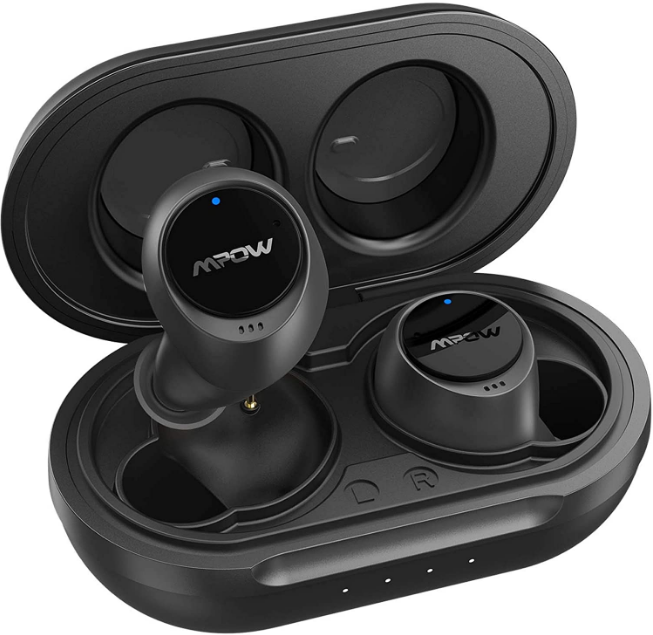
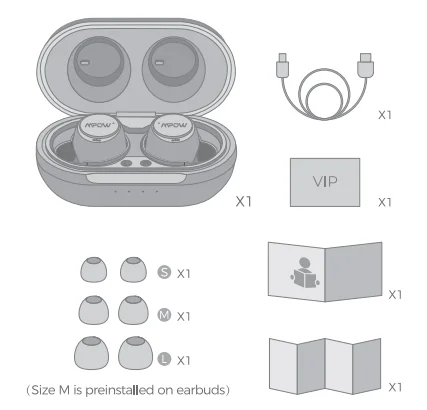
PACKING LIST
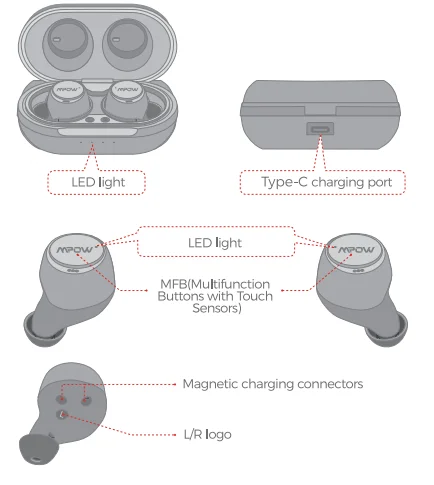
DIAGRAM
POWER ON
Mode 1 (Auto)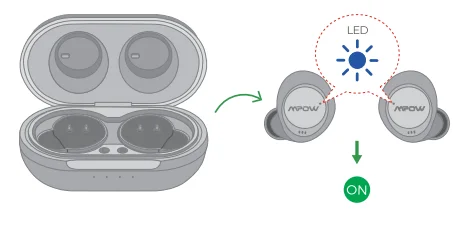
Mode 2 (Manual)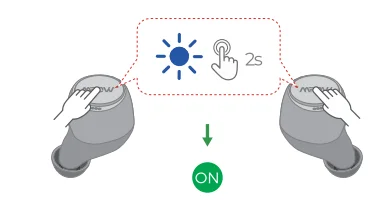
- The earphones automatically turn on (with blue LED light flashing) and start pairing when they are taken out of the charging case.
- In the shutdown status and when the earphones are not in the charging case, simultaneously press and hold the MFB of both earbuds for 2 seconds to power on (with the blue LED light flashing).
POWER OFF
Mode 1 (Auto)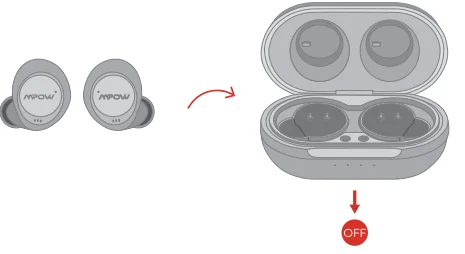
Mode 2 (Manual)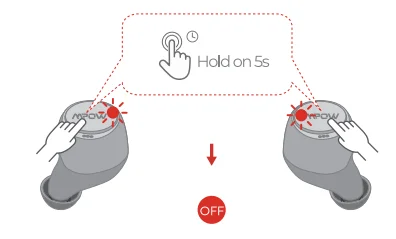
- Put the earphones back in the charging case, and they’ll shut down automatically.
- If the earphones are not in the charging case, just press and hold the MFB of both earbuds for 5 seconds to power them off. (Mode 2 cannot be conducted during music playing or calling.)
PAIRING
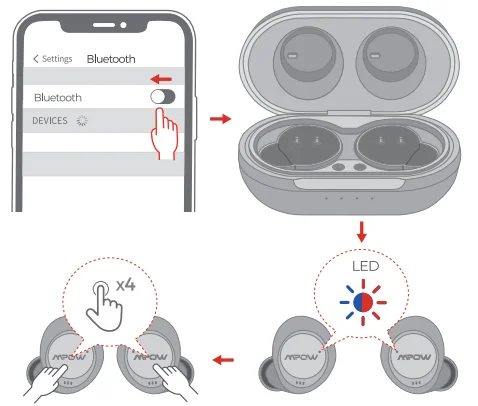
Take out the earphones; they automatically enter the pairing mode when the blue and red lights start flashing alternately, and then select “Mpow X5”.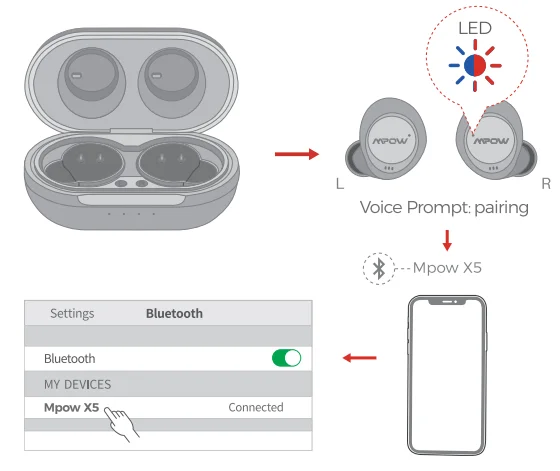
Note: The earbud will automatically reconnect to the paired device with priority. If you want to pair with another device, please first disconnect the Bluetooth on your paired device.
MUSIC
INCOMING CALL
ACTIVATE SIRI
MUSIC & INCOMING CALL & Siri
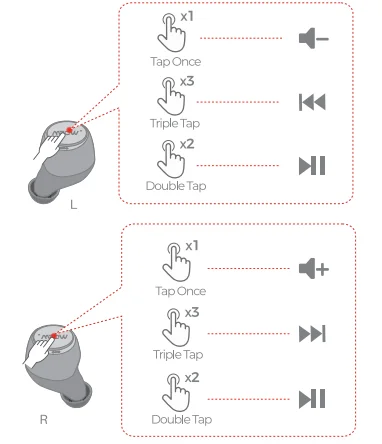
Volume Up / Down
- Volume +: Tap the Right (R) earbud once to increase one level.
- Volume -: Tap the Left (L) earbud once to decrease one level.
Play / Pause:
- Double-tap the MFB button on the Right (R) or Left (L) earphone.
Next / Previous Track:
- Next Track: Triple-tap the MFB button on the Right (R) earphone.
- Previous Track: Triple-tap the MFB button on the Left (L) earphone.
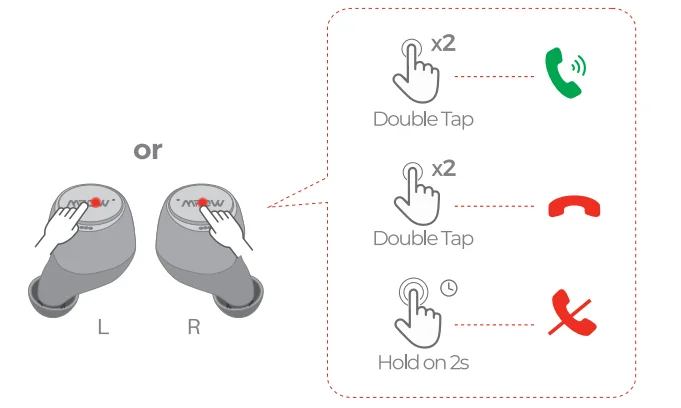
Answer
- Double-tap the MFB button on the Right (R) or Left (L) earphone.
Hang up
- Double-tap the MFB button on the Right (R) or Left (L) earphone.
Reject
- Keep pressing the MFB button on the Right (R) or Left (L) earphone for 2 seconds.
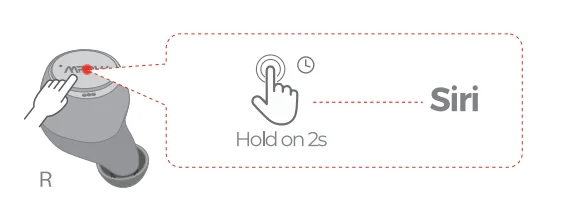
Activate Siri
- Twin mode: Press and hold the Right (R) earbud for 2 seconds to activate Siri.
- Left mono mode: Press and hold the Left (L) earbud for 2 seconds to activate Siri.
- Right mono mode: Press and hold the Right (R) earbud for 2 seconds to activate Siri.
ANC MODE
Twin mode: Press and hold the Left (L) earbud for 2 seconds to switch the noise-control modes among 3 choices: ANC On, Ambient Mode, and ANC Off.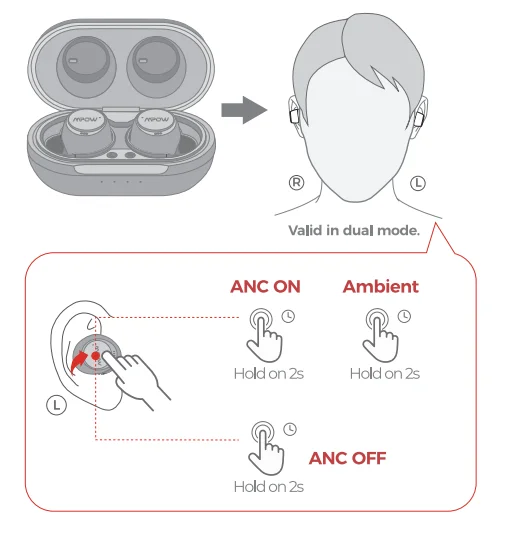
Note: The Left (L) mono or Right (R) mono mode does not support ANC.
FAQ ABOUT ANC TECHNOLOGY
How to experience the ANC effect correctly?
If you are eager to experience the ANC effect when you receive this product, you can do as follows: When you are at home or indoors, you can turn on your air conditioner’s cool or fan mode, and then wear Mpow X5 both earbuds without music playing. Next, turn on and off ANC for 2–3 times; you will find the noise difference between ANC on and off.
When you are outdoors, you can stand on the roadside and then wear Mpow X5 both earbuds without music playing. Next, turn on and off ANC for 2–3 times, then carefully listen to the noise when cars or trucks are passing by; you will feel the noticeable noise difference between ANC on and off. These methods are used solely to experience the ANC effect. When you are listening to music with Mpow X5, both earbuds, the outside noise is hard to hear.
Is ANC valid when I’m using earbuds to take a phone call?
Mpow X5 has noise reduction when you are having phone calls. What is worth mentioning is that noise-canceling technology used on phone calls is different from ANC (Active Noise Cancellation) technology; they are used for different scenarios. Mpow X5 adopts ANC technology to effectively cancel low-frequency harmful noise.
Is ANC valid when I wear only one earbud?
No, it isn’t. ANC is only valid in binaural mode.
Why is the noise-canceling effect not very significant?
- Choose the perfect size of eartips that fit your ear canals.
- Give the earbuds a slight twist to snugly lock them in your ear canals.
- Experience the ANC effect without music playing when you are in a noisy place.
RESET
- Make sure Bluetooth is turned off on your device.
- Take both earbuds from the charging case (make sure the earbuds are in pairing mode, in which the LED flashes red and blue).
- Tap both earbuds 4 times.
- The earbuds’ light will flash red and blue simultaneously, which means successful resetting.
- The LED will go out. One second later, Mpow X5 will automatically enter back into pairing mode.

CHARGING
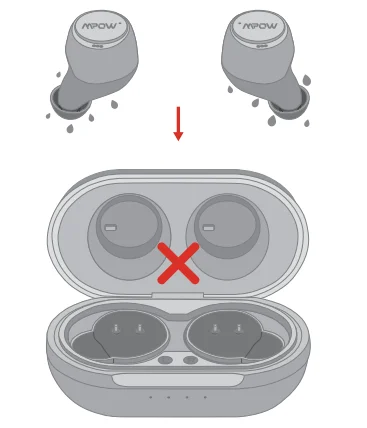
Do not put the earbuds in the charging case when the earbuds are wet.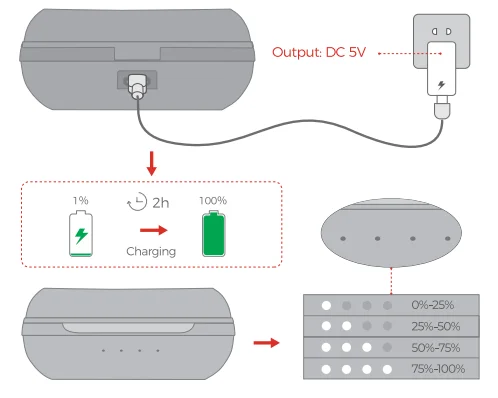
CORRECT DISPOSAL OF THIS PRODUCT
 (Waste Electrical & Electronic Equipment) This marking shown on the product or its literature indicates that it should not be disposed of with other household wastes at the end of its working life.
To prevent possible harm to the environment or human health from uncontrolled waste disposal, please separate this from other types of waste and recycle it responsibly to promote the sustainable reuse of material resources.
Household users should contact either the retailer where they purchased this product or their local government office for details of where and how they can take this item for environmentally safe recycling. Business users should contact their supplier and check the terms and conditions of the purchase contract. This product should not be mixed with other commercial wastes for disposal.
FCC STATEMENT
Any changes or modifications not expressly approved by the party responsible for compliance could void the user’s authority to operate the equipment.
This device complies with part 15 of the FCC Rules. Operation is subject to the following two conditions:
- This device may not cause harmful interference, and
- This device must accept any interference received, including interference that may cause undesired operation.
FCC Radiation Exposure Statement:
This equipment complies with FCC radiation exposure limits set forth for an uncontrolled environment.
For More Manuals By Mpow, Visit ManualsLibraryy.
MPOW X5 True Wireless Earbuds-FAQs
Do MPOW X5 earbuds have a microphone?
Yes, they come with built-in microphones for clear hands-free calls and voice assistant use.
Are MPOW X5 earbuds compatible with iPhone and Android?
Yes, they work with iOS, Android, and other Bluetooth-enabled devices.
How long does the battery last?
The earbuds offer up to 6–8 hours of playtime per charge, with additional charges from the case extending total use to around 20 hours.
Can I use MPOW X5 earbuds for calls?
Absolutely. They are designed for clear voice calls with minimal background noise.
Are MPOW X5 earbuds waterproof?
Yes, they have an IPX7 rating, making them resistant to sweat and light splashes, ideal for workouts and outdoor use.
How do I reset the MPOW X5 earbuds?
Open the charging case, remove both earbuds, and tap them simultaneously 4 times until the LED flashes. This resets the earbuds.
Why was MPOW removed from Amazon?
Some MPOW products were removed due to past policy violations related to review manipulation. The brand still exists and can be purchased from other platforms.
Where is MPOW from?
MPOW is a China-based company that started in 2013 and offers audio products globally.
What is the difference between wireless and true wireless earbuds?
True wireless earbuds have no wires at all, even between the earbuds, while standard wireless earbuds may still have a connecting wire.
How do I know when the earbuds are fully charged?
The LED indicator turns solid (usually white or blue) when the earbuds and case are fully charged.