
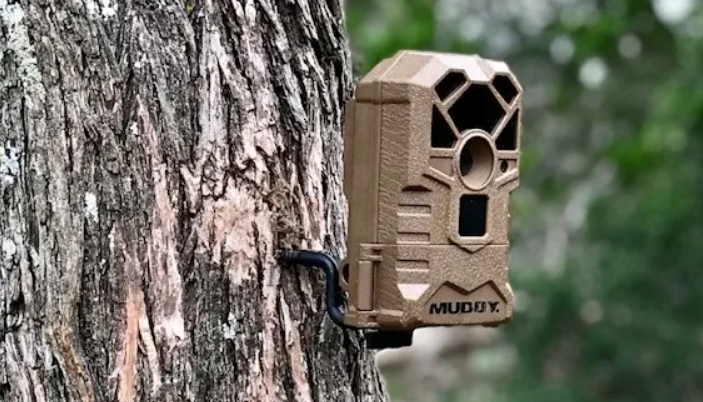

Muddy Outdoors MTC100 Trail Camera
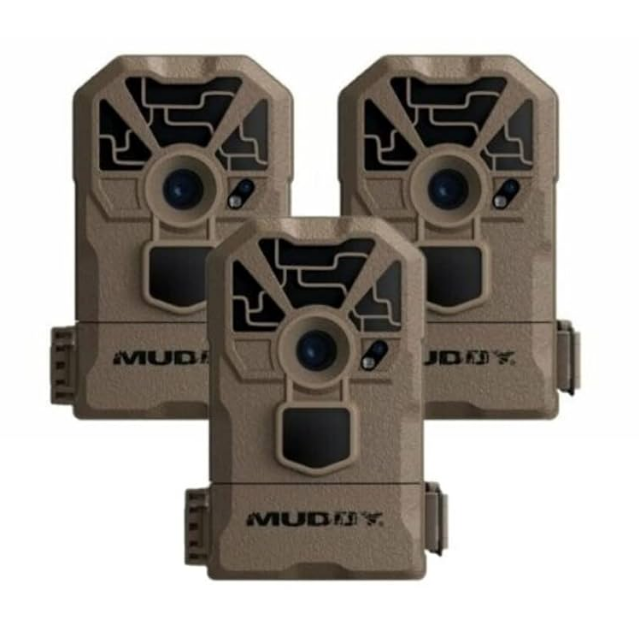
Quick Setup Guide
 Insert Batteries and SD Card
 Insert Batteries and SD Card
Install 8 AA batteries and a class 10 SD card into the camera.
 Mount Camera
 Mount Camera
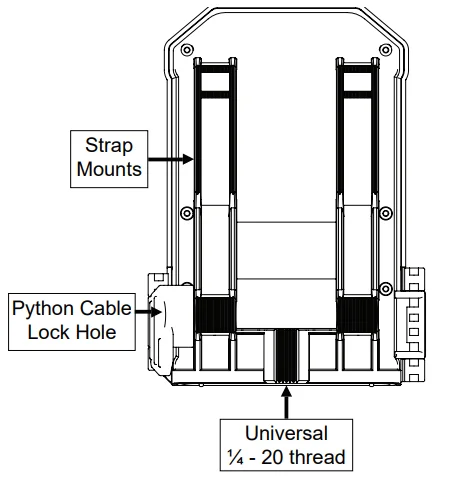
Mount the camera at the desired location using the strap mount, Python Lock cable, Articulating Ball Joint Mount, or other desired mounting mechanism. Position the camera so that it does not face East or West directly, as the rising and setting of the sun can cause false positive triggers.
 Activate Camera
 Activate Camera
Set the camera to the desired Quick Set (QSET) or to a custom configuration and place it in the desired vantage point to start capturing photos of the game.
Camera Overview
Camera Setup
 Battery Installation
 Battery Installation
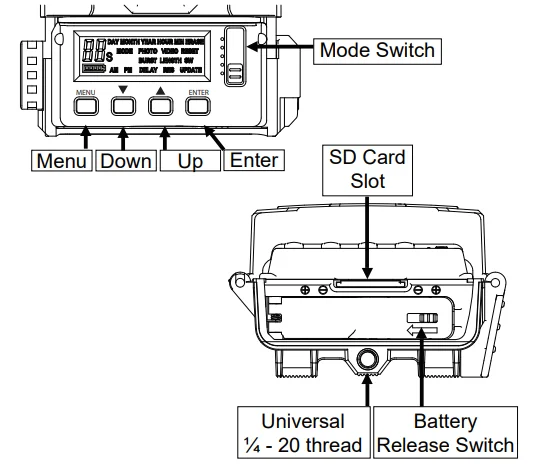
To remove batteries from the unit, simply open the camera and slide the battery release switch to the left. Once the battery compartment is open, insert batteries into the camera, being careful to match the orientation marked on your camera. After batteries are inserted, close the battery compartment and secure the battery release switch.
SD Card Installation
The SD card slot is located on the bottom of the camera, above the battery compartment. Insert the SD card with the label facing the back of the camera. Only minimal resistance should be felt as the card is inserted, and a click when the card is fully inserted.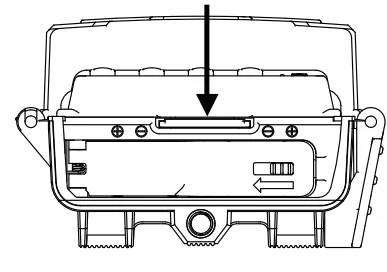
Camera Configuration
This camera features 4 distinct modes of operation: QSET 1 | QSET 2 | QSET 3 | CUSTOM |. Each setting is activated based on the position of the switch inside the unit.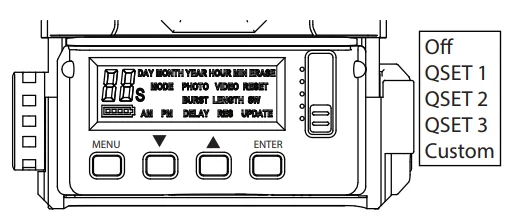
Quick Sets
Once selected, the screen will display the Quick Set (QSET) that has been chosen and then count down from 9 to 0 seconds. When the countdown has been completed, the camera is ready and in an active state.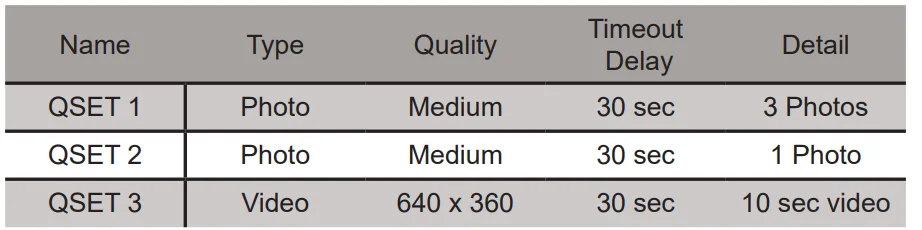
Custom Configuration
The CUSTOM setting on your camera allows you to customize every setting to fit your exact needs. To begin, move the slider to the CUSTOM position and press the menu button on the camera. Once inside the custom settings menu, use the Up and Down arrows to scroll through the different settings. To change a setting that is displayed, press the Enter key, and the setting will begin flashing. At this point, use the Up and Down arrows to change the setting. When finished, press the Enter button to save the change or press Menu to cancel the change. When you are finished configuring your camera’s settings, press the Menu button to return your camera to an active state.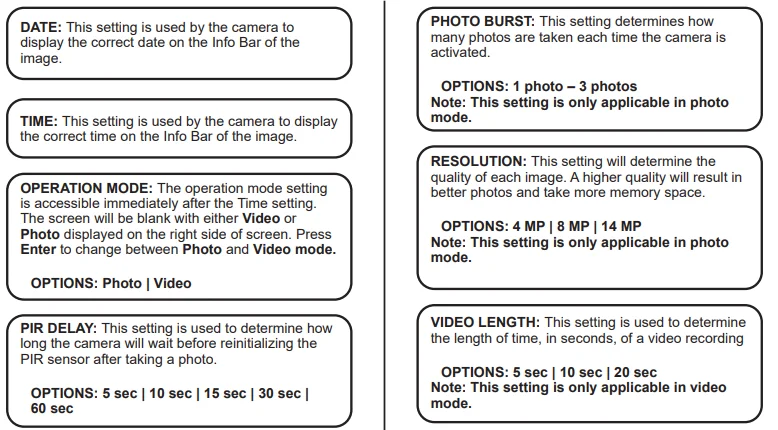
Viewing and Deleting Images
There are a few methods for viewing and deleting your files.
- Using an SD Memory Card Reader/Viewer: You will simply need to remove the SD card from the camera and insert it into the reader to view the files; you can also delete them from this device.
- Using your computer. Your computer would need to have an SD card slot installed for this to work. Please refer to your computer’s Owner’s Manual for the proper way of viewing the files.
- Obtain a mobile device adapter. This will allow you to plug one end into the device and insert the SD card on the other end. Please refer to the vendor’s User Manual for the proper way of viewing the files.
Frequently Asked Questions
Q: Will I lose my images and settings if the batteries die?
A: You will lose your settings but not your images. The images are stored on your external SD memory card, so your images will be intact only on your card.
Q: Why is my camera taking pictures with nothing in front of it?
A: This camera is powered by motion activation. This can cause objects, like a tree branch or moving water, within the camera frame to cause the camera to take a photo.
Q: Is there a warranty that comes with my camera or an extended warranty I can purchase?
A: Your Muddy Camera comes with a Limited 1-year warranty. Please contact support at 1.877.269.8490 for more information.
Q: Can I mix batteries?
A: No, you should never mix batteries. After your camera batteries die, always install brand new batteries in your camera.
Q: Can I use rechargeable batteries in the camera?
A: Rechargeable batteries can be used, but will cause the battery percentage to be reported incorrectly.
Camera Care
 Operating Conditions
 Operating Conditions
This camera is designed to function in 14°F – 104°F (-10°C – 40°C), 20%-85% relative humidity, non-condensing.
 Product Care
 Product Care
- When not in use, store the camera in a cool, dust-free environment.
- Handle the camera with care.
- Camera is weather-resistant only. Do not fully submerge the camera in water or other liquids. Doing so will void the camera warranty.
- Only use the same type of batteries to power the camera. Do not mix old and new batteries.
- Do not touch the camera lens directly. Clean only with a soft lens cloth.
- Use a damp cloth to clean. DO NOT submerge the camera.
- Remove batteries when the camera is not in use for an extended time.
- Do not open the camera housing to access internal parts. Doing so could damage the camera and void the warranty.
 Notice
The camera is an active electronic device. Attempting to service internal parts may expose you to dangerous voltages and other risks.
FCC COMPLIANCE
NOTE: This equipment has been tested and found to comply with the limits for a Class B digital device, pursuant to part 15 of the FCC Rules. These limits are designed to provide reasonable protection against harmful interference in a residential installation. This equipment generates, uses, and can radiate radio frequency energy and, if not installed and used in accordance with the instructions, may cause harmful interference to radio or television reception, which can be determined by turning the equipment off and on. The user is encouraged to try to correct the interference by one or more of the following measures:
- Reorient or relocate the receiving antenna.
- Increase the separation between the equipment and the receiver.
- Connect the equipment into an outlet on a circuit different from that to which the receiver is connected.
- Consult the dealer or an experienced radio/TV technician for help.
Caution: Changes or modifications not expressly approved by the party responsible could void the user’s authority to operate this device.
Product specifications are subject to change. GSM is not responsible for any photographic or typographical errors. May be protected by one or more U.S. Patent numbers: 6,735,387 / 6,768,868 / 6,834,162 / 7,149,422 / 7,308,196 / 7,593,632 / 7,710,457 / 8,895,926. This device complies with Industry Canada licence-exempt RSS standard(s). Operation is subject to the following two conditions:
- This device may not cause interference, and
- This device must accept any interference, including interference that may cause undesired operation of the device.
Limited Warranty Information
Your Muddy Trail Camera is covered by a 365 Day Limited Warranty on parts and labor from the date of original purchase, and purchases must be made through an authorized dealer. The warranty covers defects in workmanship and materials. The warranty does not apply to units that have been damaged or abused intentionally or unintentionally. A purchase from individuals or unauthorized Internet sites such as eBay voids the warranty.
Tampering with or altering the unit will void the warranty. Any unauthorized service will void the warranty. A copy of your original sales receipt must be produced for any warranty service, and a Return Authorization (RA) number must be obtained from customer service at 877-269-8490 prior to returning the product. Muddy is not responsible for any lost untraceable packages or those without a Return Authorization at the time of return.
CUSTOMER SERVICE CONTACT & HOURS
- Toll Free: 877-269-8490
- CALL CENTER HOURS: Mon – Fri / 8 AM – 5 PM (CST)
- WEBSITE: www.gsmoutdoors.com
For More Manuals By GoMuddy, Visit ManualsLibraryy.
Muddy Outdoors MTC100 Trail Camera-FAQs
What is the Muddy Outdoors MTC100 Trail Camera used for?
The Muddy Outdoors MTC100 is a budget-friendly trail camera designed for wildlife monitoring, hunting, scouting, and property surveillance. It captures photos and videos when motion is detected, allowing users to track animal activity or monitor remote areas without needing a constant human presence.
What image and video quality does the MTC100 offer?
The MTC100 typically captures up to 10MP daytime images and records video clips ranging from 10 to 60 seconds. Some variants offer higher resolutions like 12MP or 14MP, but overall quality is best suited for basic monitoring rather than professional-grade imaging.
How fast is the trigger speed on the Muddy MTC100?
The camera features a trigger speed of around 1.5 seconds, meaning it takes a short moment to capture an image after detecting motion. While not the fastest available, it performs adequately for general wildlife tracking and entry-level hunting setups.
What is the detection and night vision range of the MTC100?
The MTC100 uses infrared sensors with a detection range of approximately 50 to 60 feet. It includes invisible or low-glow IR flash technology for nighttime capture, allowing it to record animals in the dark without spooking them.
Does the Muddy MTC100 support wireless or cellular connectivity?
No, the MTC100 is a non-cellular trail camera and does not support Wi-Fi or mobile connectivity. All images and videos are stored locally on an SD card, which must be manually retrieved to view footage, making it a simple offline solution.
What type of batteries does the MTC100 use, and how long do they last?
The camera operates on 6 or 8 AA batteries, depending on the model variant. It can capture thousands of images on a single set, with some estimates reaching up to 10,000 photos, depending on usage, temperature, and recording settings.
Is the Muddy MTC100 easy to set up and use?
Yes, the MTC100 is designed for simplicity with a basic LCD screen and a straightforward menu system. Users can easily configure settings like time, date, photo resolution, and video length, making it suitable for beginners who want a hassle-free trail camera experience.
Can the MTC100 record videos as well as photos?
Yes, the camera supports both photo and video recording modes. It can capture video clips at standard definition, typically around 480p, which is sufficient for identifying movement and activity but not intended for high-definition recording needs.
Is the Muddy MTC100 a good choice for beginners?
The MTC100 is considered a solid entry-level option due to its affordability and ease of use. It offers essential features like motion detection, night vision, and video recording, making it ideal for beginners who want reliable performance without investing in expensive equipment.
How reliable is the Muddy MTC100 in real-world use?
User experiences suggest the MTC100 performs well for its price, delivering consistent images and durability in outdoor conditions. Some users highlight its ability to capture frequent activity, though performance may vary based on placement, sensitivity settings, and environmental factors.