
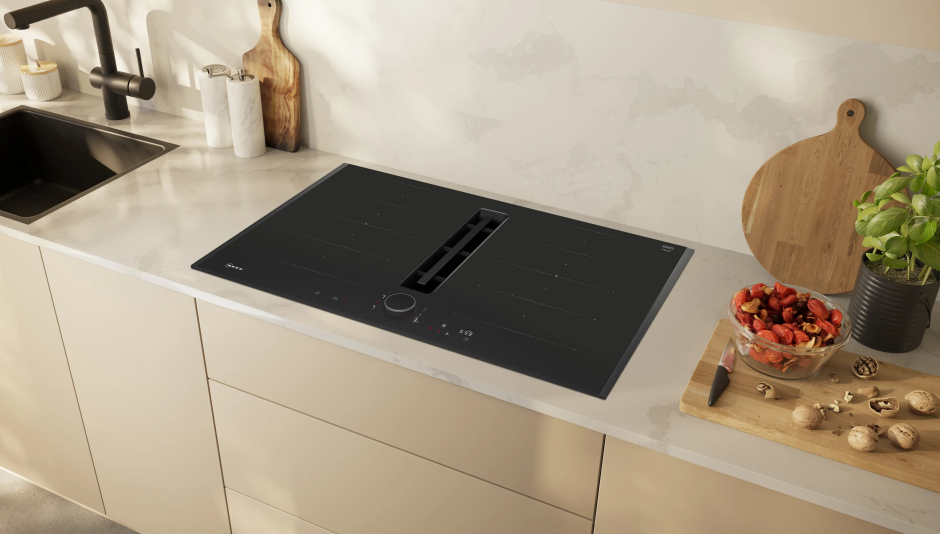

NEFF V68YX4C0 Induction Hob

Safety
Observe the following safety instructions.
General information
- Read this instruction manual carefully.
- Keep the instructions, the appliance and the product information safe for future reference or for the next owner.
- Do not connect the appliance if it has been damaged in transit.
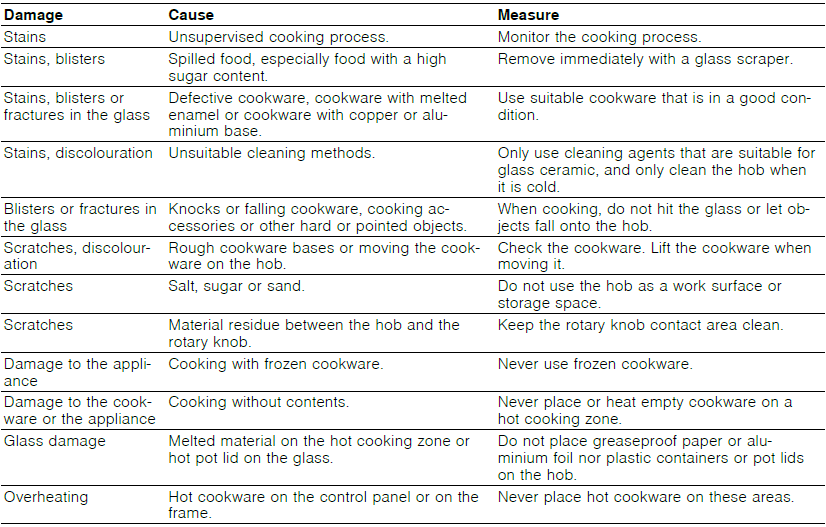
Avoiding material damage
This is where you can find the most common causes of damage and tips on how to avoid them.
Environmental protection and saving energy
Disposing of packaging
The packaging materials are environmentally compatible and can be recycled.
- Sort the individual components by type and dispose of them separately.
Saving energy
If you follow these instructions, your appliance will use less energy.
Select the cooking zone to match the size of your pan. Centre the cookware on the hob. Use cookware whose base diameter is the same as the hotplate.
Tip: Cookware manufacturers often give the upper diameter of the saucepan. It is often larger than the base diameter.
- Unsuitable cookware or incompletely covered cooking zones consume a lot of energy. Cover saucepans with suitable lids.
- Cooking without a lid consumes considerably more energy. Lift lids as infrequently as possible.
- When you lift the lid, a lot of energy escapes. Use a glass lid.
- You can see into the pan through a glass lid without having to lift it. Use pots and pans with flat bases.
- Uneven bases increase energy consumption. Use cookware that is suitable for the quantity of food.
- Large items of cookware containing little food need more energy to heat up. Cook with only a little water.
- The more water that is contained in the cookware, the more energy is required to heat it. Turn down to a lower power level early on. Use a suitable ongoing power level.
- If you use an ongoing power level that is too high, you will waste energy. Adjust the fan speed to the amount of steam produced during cooking.
- The lower the fan speed, the less energy is consumed. If cooking produces large amounts of steam, select a higher fan speed in good time.
- The odours are distributed around the room less. Switch the appliance off when you are not using it.
- Ensure that there is sufficient ventilation when cooking.
- The appliance works more efficiently and with fewer operating noises. Clean or replace the filters at regular intervals.
- The effectiveness of the filter is retained.
Product information, as required by (EU) 66/2014, can be found on the attached appliance pass and online on the product page for your appliance.
Suitable cookware
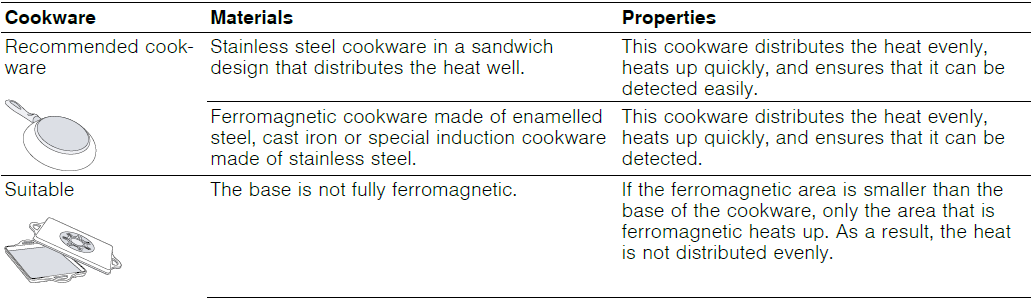
Cookware that is suitable for induction cooking must have a ferromagnetic base, i.e. it must be attracted by a magnet. The base must also match the size of the cooking zone. If cookware is not detected on a cooking zone, place this on the cooking zone with the next smallest diameter.
Size and characteristics of the cookware
To correctly detect the cookware, you must take the size and the material of the cookware into consideration.
All cookware bases must be perfectly flat and smooth. Use the Cookware test to check whether the cookware is suitable. Refer to
→ “Cookware test”, Page 20 for more details.

Notes
- Do not use adapter plates between the hob and the cookware.
- Do not heat up empty cookware, and do not use cookware with a thin base, as this may become very hot.
Familiarising yourself with your appliance
Your new appliance
Information about your new appliance
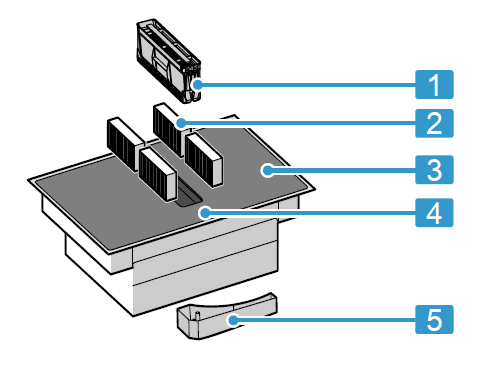
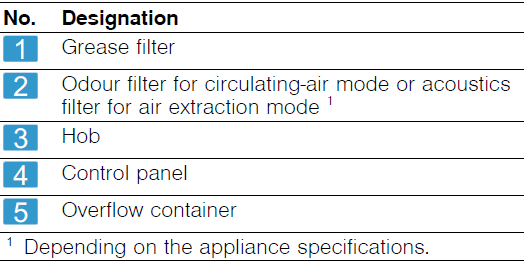
Special accessories
Depending on the appliance model, various accessories are available and you can obtain these from specialist retailers, from our after-sales service or from our official website.
- Air extraction set
- Air recirculation set
- Odour filter for recirculating air mode
- Acoustics filter for air extraction mode
Control panel
Individual details, such as colour and shape, may differ from the figure.

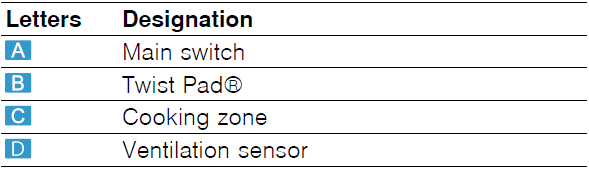
Note: Always keep the control panel clean and dry.
Tip: Avoid placing cookware near the displays or buttons. The electronics may overheat.
Control element Twist Pad®
You can use this magnetic knob to operate the hob with a simple rotary movement. The indicator lights around the rotary knob indicate the status of the selection.
Touch buttons
When you switch on the hob, the symbols for the controls available at this time light up.

The buttons for the various functions light up white when the functions are available. If you select the buttons or make changes, the buttons light up red.
Indicators/symbols

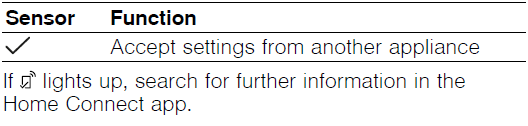
Buttons in connection with Home Connect
As soon as the connection to Home Connect has been established, the following buttons are available:
Distribution of the cooking zones
The specified power has been measured with the standard po, which is described in IEC/EN 60335-2-6. The power may vary depending on the size of the cookware or the cookware material.
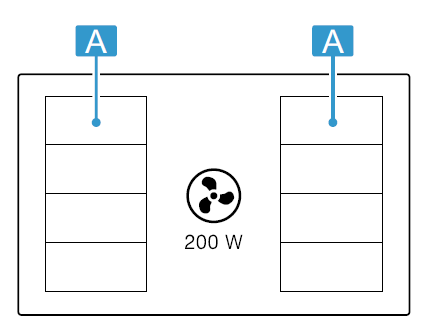
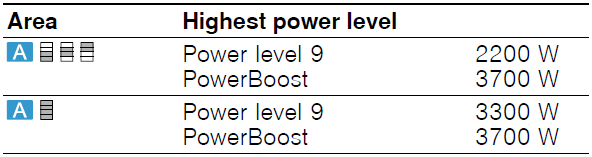
At power level 9, the hob reaches the power indicated in the table in order to reduce the preheating times and keeps them running for a certain time, provided the other cooking zone on the same side is not in use.
Cooking zone
Before you start cooking, check whether the size of the cookware fits the cooking zone that you want to use for cooking:

Residual heat indicator
The hob has a residual heat indicator for each cooking zone. Do not touch the cooking zone if the residual heat indicator is lit.

Saturation indicator
The hob is equipped with a saturation indicator. When the anti-odour filters are saturated, the lights turn on, and the filter must be replaced.
→ “Odour filter or acoustics filter”, Page 24
Control element Twist Pad®
You can use this magnetic knob to select cooking zones, power levels and other hob settings. The knob can be positioned in the central area of the control panel where it sticks. In addition, the knob can be removed at any time.
It consists of two parts, which can be easily removed. If it is removed from a metal surface, the bottom part may remain fixed to this surface. Put both parts back together again to use them.

Positioning and operating Twist Pad®
- Use
 to switch on the hob.
 - Place the knob in the central area of the control panel at the point marked on the glass.
- To switch on a cooking zone, push the rotary knob to the level of the required cooking zone.
- Turn the knob and select a power level.
 to switch on the hob.
Instructions for use
A strong magnet is located inside the rotary knob. You should therefore note the following:
- Keep the rotary knob away from magnetic data carriers such as credit cards and cards with magnetic strips. This may damage the data carrier. The magnet may also cause faults on televisions and screens.
- Metal particles stuck to the bottom may scratch the surface of the hob. Always keep the rotary knob clean. Soiling may impair its function. See “Cleaning the knob”. → Page 23
Removing Twist Pad®
You can remove the rotary knob from the cooking zone during the cooking process. If you remove the rotary knob, the Pause function is switched on for 10 minutes. → Page 18 If you do not reset the rotary knob to its position before this time elapses, the hob switches off.
 WARNING ‒ Risk of fire!
If you place a metal object on the area of the rotary knob during these 10 minutes, the cooking zone may continue to heat up.
- Always switch off the cooking zone at the main switch.
Operation without rotary knob Twist Pad®
If you lose the rotary knob, or in other situations, you can operate the hob without the TwistPad®. Proceed as follows:
- Use
 to switch on the hob.
 - Within the next 5 seconds, press and hold
 and
and  at the same time for 4 seconds. A warning tone sounds and
  lights up.
 - Press repeatedly until the display for the required job lights up.
- Then set the required power level using or .
- The cooking zone is switched on and heats up.
 lights up.
Notes
- In this mode, only the basic function for the hotplate is available.
- You can always position the rotary knob in the programming zone again.
Software update
If the appliance is connected to Home Connect, some functions may be available with a software update. More information on the availability of additional functions can be found on the website www.neff-international.com
Operating modes
You can use your appliance in air extraction mode or circulating-air mode.
Air extraction mode
The air which is drawn in is cleaned by the grease filters and conveyed to the exterior by a pipe system.
The air must not be discharged into a flue that is used for exhausting fumes from appliances burning gas or other fuels (not applicable to appliances that only discharge the air back into the room).

- If the exhaust air is to be conveyed into a non-functioning smoke or exhaust gas flue, you must obtain the consent of the heating engineer responsible.
- If the exhaust air is conveyed through the external wall, a telescopic duct should be used.
Air recirculation
The air which is drawn in is cleaned by the grease filters and an odour filter, and conveyed back into the room.

To bind odours in air recirculation mode, you must install an odour filter. The different options for operating the appliance in air circulation mode can be found in our catalogue. Alternatively, ask your dealer. The required accessories are available from specialist retailers, from our after-sales service or from the online shop.
Note: When cooking intensively and for a long time, moisture is released into the air in the room. When using the appliance in air recirculation mode, we recommend ventilating the kitchen adequately, e.g. by briefly opening a window to remove excessive moisture.
Before using for the first time
Observe the following recommendations.
Initial cleaning
Remove any leftover packaging from the hob surface and wipe the surface with a damp cloth. You can find a list of recommended detergents on the official website www.neff-international.com.
More information on care and cleaning. → Page 23
Preparing the appliance
To ensure correct operation, you must arrange the components in this order:
- Insert the filter.
- Insert the metal grease filter.
Note: Never operate the appliance without the metal grease filter and the overflow container.
Cooking with induction
In comparison to conventional hobs, induction technology brings with it a series of changes and has a number of benefits, such as time savings when cooking and frying, energy savings, as well as greater ease of cleaning and care. It also offers improved heat control as the heat is generated directly in the cookware.
Cookware
You can find a list of recommended cookware on the official website www.neff-international.com.
Further information on suitable cookware. → Page 6
Setting the operating mode
The appliance is supplied with a preset circulating-air mode.
When your hob is installed with an air outlet to the outside, you must configure the setting to this mode. You can find additional information about this in the section entitled
→ “Basic settings”, Page 19
Setting Home Connect
When you first switch on the appliance, you will be prompted to set your home network.  It lights up for a few seconds on the display panel. To begin the connection to Home Connect, touch and proceed with the information in the section
→ “Home Connect “, Page 21.
To end the setting, switch off the hob. You can also adjust the Home Connect setting at a different time.
Basic operation
Switching on the hob
- Press .
The symbols for the cooking zones and the currently available functions light up.- The job is ready to use.
ReStart
- If you switch the appliance on within four seconds of switching it off, the hob operates with the settings that were previously set.
Switching the hob off
- Touch until the displays go out.
- All cooking zones are switched off.
Note: If all of the cooking zones are switched off for longer than 59 seconds, the hob is automatically switched off.
Setting the power level in the cooking zones
The cooking zone has 17 power levels, which are displayed from  to
to  with intermediate values. Select the best power level for the food and the planned cooking process.
- Select the cooking zone by pressing the rotary knob next to the mark for the required cooking zone.
 Lights up brighter.
 - Turn the rotary knob to select the required power level.
- The power level has been set.
 Lights up brighter.
Cooking tips
- When heating up puree, cream soups or thick sauces, stir occasionally.
- To preheat, set the power level to 8-9.
- When cooking with the lid on, reduce the power level as soon as you see steam escaping. The cooking result is not affected by the steam escaping.
- After cooking, place a lid on the cookware until you serve the dish.
- To cook with the pressure cooker, observe the manufacturer’s instructions.
- Do not cook food for too long; otherwise, nutrients will be lost. The kitchen timer enables you to set the optimal cooking time.
- Ensure that the oil does not smoke.
- To brown the food, fry it in small portions, one after the other.
- Some items of cookware may reach high temperatures while the food is cooking. You should therefore use oven gloves.
- You can find recommendations for energy-efficient cooking under
→ “Saving energy”, Page 6
Cooking recommendations
The table shows which power level  is suitable for which food. The cooking time
  may vary depending on the type, weight, thickness and quality of the food.


Favourite button
You can use the function to select two functions or cooking settings to make them quickly accessible  .
.
Assigning Favourite button functions
Requirement: Connect the appliance to Home Connect. Home Connect → Page 21
- To assign
 functions, open the Home Connect app and follow the instructions.
 - As soon as you have assigned the functions, you can use them:
- Function 1: Press briefly.
- Function 2: Press and hold .
Note: If you have not assigned any functions,switch off once the job is switched on.
- Function 1: Press
FlexZone
The flexible cooking zone allows you to position cookware of any shape or size any way you like. It consists of four inductors that work independently of each other. When the flexible cooking zone is in use, only the area that is covered by cookware is activated.
Positioning the cookware
The flexible cooking zone can be configured in two ways, depending on which cookware is used. In order to guarantee good thermal detection and heat distribution, we recommend positioning the cookware in the centre, as shown in the figures.
As a connected cooking zone
Recommended for cooking with just one item of cookware.
- Position the cookware depending on the size:

- Recommended oblong cookware
 :
:

 :
:
As two separate cooking zones
Recommended for cooking with two items of cookware. You can use the front and rear zones independently of one another, and set a separate power level for each zone.

Switching on FlexZone
- Place the cookware on the cooking zone.
- The appliance detects the cookware and selects the cooking zone.
- The cooking zones split or connect automatically depending on the size and position of the cookware.
- Once the flexible zone is connected, [/] lights up red.
Notes
- By touching [/], you can manually change the settings for the cooking zone.
- If you move or lift the cookware from an active connected cooking zone, an automatic search starts.
Each item of cookware that is found within the cooking zone during this search is heated at the previously selected power level.
Cleaning and servicing
To keep your appliance working efficiently for a long time, it is important to clean and maintain it carefully.
Cleaning products
You can obtain suitable cleaning products and glass scrapers from customer service, a retailer or the online shop www.neff-international.com.
ATTENTION!
Unsuitable cleaning products may damage the surfaces of the appliance.
- Never use unsuitable cleaning products.
- Do not use cleaning products while the hob is still hot. This may cause marks on the surface.
Unsuitable cleaning products
- Undiluted detergent
- Detergent intended for dishwashers
- Abrasive cleaning products
- Aggressive cleaning products such as oven spray or stain remover
- Abrasive sponges
- High-pressure or steam jet cleaners
Cleaning the hob
Clean the hob after every use to stop cooking residues from getting burnt on.
Requirement: The job must be cold. Do not allow the hob to cool down if it has sugar stains, rice starch, plastic or aluminium foil on it.
- Remove heavy soiling using a glass scraper.
- Clean the hob with a cleaning agent for glass ceramic.
Follow the cleaning instructions on the packaging of the cleaning agent.
Tips- You can achieve good cleaning results using a special sponge for glass ceramic.
- If you keep the base of the cookware clean, the hob surface remains in good condition.
Cleaning profiles
Clean the profiles if they are dirty or stained after use.
Note: Do not use a glass scraper.
- Clean using warm, soapy water and a soft cloth. Wash new sponge cloths thoroughly before use.
- Dry with a soft cloth.
Note: If there are replaceable side profiles, wear protective gloves when removing them.
Cleaning Twist Pad®
The rotary knob consists of two parts, which you can easily remove for a more thorough clean.

Recommended cleaning
- Wipe the parts with warm, soapy water and a cloth.
- Dry the parts thoroughly before reassembling.
Non-recommended cleaning
- Do not use abrasive or corrosive products, such as citric acid, vinegar, aggressive cleaning agents or glass ceramic cleaners.
- Do not clean it in the dishwasher or immerse it in water, as this may damage it.
- Do not use the glass scraper.
- Do not use stainless steel care products.
Grease filter
The grease filter filters the grease out of the kitchen steam. The filter comprises a container and two removable grease filters. To keep them in good working order, you must clean the grease filters regularly.
 WARNING ‒ Risk of fire!
Fatty deposits in the grease filters may catch fire.
- Never operate the appliance without a grease filter.
- Clean the grease filters regularly.
- Never work with naked flames close to the appliance (e.g. flambéing).
ATTENTION!
Falling grease filters may damage the hob below.
- Grip below the grease filter with one hand.
- Remove the grease filter.
- Grease may accumulate at the bottom of the container. Keep the grease filter level to prevent grease from dripping out

- Grease may accumulate at the bottom of the container. Keep the grease filter level to prevent grease from dripping out
- Remove the components of the grease filter.

- Clean the grease filter in the dishwasher or by hand.
→ “Cleaning the grease filters manually”, Page 24
→ “Cleaning the grease filter in the dishwasher”, Page 24 - If required, remove the odour filters or acoustics filters and clean the appliance from the inside.
- If any objects get into the appliance, remove these objects and ensure that the supply to the overflow container is not blocked.
- Wipe out the inside of the appliance with soapy water and a dishcloth.
- After cleaning, reinsert the dried grease filter.


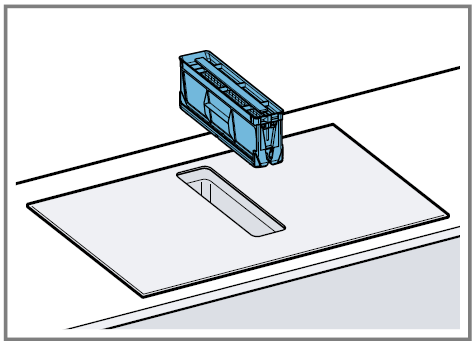
Cleaning the grease filters manually
- Remove the components of the grease filter.
- Soak the grease filter in hot, soapy water.
- Use a brush to clean the grease filter. Do not use aggressive, acidic or alkaline cleaning products.
- Use special grease solvent for stubborn dirt. You can purchase the grease solvent from Customer Service, through our online shop or in a specialist shop.
- Rinse the grease filters thoroughly.
- Leave the grease filter to drain.
- Fit the components of the grease filter.
- After drying, insert the grease filter into the appliance.
Cleaning the grease filter in the dishwasher
- Remove the grease filter.
- Remove the components of the grease filter.
- Place the components of the grease filter loosely in the dishwasher and do not jam them in.
‒ Do not clean heavily soiled grease filters with tableware. Do not use aggressive, acidic or alkaline cleaning products. - Start the dishwasher. Select a maximum temperature setting of 70 °C.
- Leave the grease filter to drain.
- After drying, insert the grease filter into the appliance.
Odour filter or acoustics filter
You can obtain odour filters or acoustic filters from specialist retailers, customer service or in the online shop.
Notes
- Replace the odour filters when the warning is displayed on the appliance.
→ “Resetting the saturation indicator”, Page 25 - Change the acoustic filters if they are dirty.
Requirement: To keep them in good working order, only use genuine replacement filters.
- Remove the grease filter.
- Remove the four odour filters or acoustics filters, and dispose of them properly.

- Insert two new odour filters or acoustics filters into the left and right of the appliance and slide them forwards.

- Insert the other odour filters or acoustics filters into the left and right sides of the alliance.

- Insert the grease filter into the appliance.


Resetting the saturation indicator
After the appliance is switched off, it lights up.
- Replace the odour filters.
→ “Odour filter or acoustics filter”, Page 24 - Press and hold
 until a signal tone sounds.
 Stops lighting up. The odour filter display is reset.
 until a signal tone sounds.
 Stops lighting up. The odour filter display is reset.
Cleaning the overflow container
The overflow container collects liquids or objects that come into the appliance from above.
Requirement: The appliance has cooled, and the residual heat indicator has gone out.
- Hold the overflow container with one hand and unscrew it with the other hand.
- Hold the overflow container level to prevent liquid from leaking out.

- Hold the overflow container level to prevent liquid from leaking out.
- Empty the overflow container and rinse it out.
- If required, unscrew the screw and clean the overflow container without the screw in the dishwasher.
- Clean the overflow container before screwing it back into place.
- Ensure that the supply to the overflow container is not blocked.
Remove any objects that have entered the appliance once it has cooled down. To do this, remove the grease filter.

Troubleshooting
You can rectify minor faults on your appliance yourself. Read the troubleshooting information before contacting after-sales service. This will avoid unnecessary costs.
WARNING ‒ Risk of injury!
Improper repairs are dangerous.
- Repairs to the appliance should only be carried out by trained specialist staff.
- If the appliance is defective, call Customer Service.
→ “Customer Service”, Page 27
WARNING ‒ Risk of electric shock!
Improper repairs are dangerous.
- Repairs to the appliance should only be carried out by trained specialist staff.
- Only use genuine spare parts when repairing the appliance.
- If the power cord or the appliance power cable of this appliance is damaged, it must be replaced with a special power cord or special appliance power cable, which is available from the manufacturer or its Customer Service.
Warnings
Notes
- If E or F appears on the display, press and hold the rotary knob next to the mark for the relevant cooking zone to read the fault code.
- If the fault code is not listed in the table, disconnect the hob from the power supply and wait 30 seconds before reconnecting it. If this display appears again, contact customer service and specify the exact fault code.
- If an error occurs, the appliance does not switch to standby mode.
- In order to protect the appliance’s electronic parts from overheating or surge currents, the hob may temporarily reduce the power level.
Information on the display panel


Normal noises from your appliance
An induction hob may sometimes cause noises or vibrations, such as buzzing, crackling, hissing noises, fan noises or rhythmic noises.
For more manuals by NEFF, visit ManualsLibraryy
NEFF V68YX4C0 Induction Hob- FAQs
What do the P and L symbols mean on a NEFF hob?
P: PowerBoost mode for maximum heat, useful for boiling water quickly.
L: Child lock or safety lock. Press and hold for a few seconds to deactivate.
What is the difference between a venting hob and an extractor fan?
A venting hob has built-in extraction at the cooking surface, pulling steam and odors directly downwards. An extractor fan is installed above the hob to remove air upwards.
Can I use normal pots on an induction hob?
Only induction-compatible cookware works directly. If you want to use non-induction pans, place an induction adapter plate between the pan and the hob.
What is the B or Booster button on the hob?
The Booster function provides extra high power for rapid heating, ideal for quick boiling or fast cooking.
What does the E symbol mean on my NEFF hob?
An “E” indicates a fault. Hold the TwistPad® near the marked zone to read the error code. If the error persists, disconnect the hob from power for 30 seconds before reconnecting.
How do I clean a NEFF induction hob?
Always wait until the hob is cool. Wipe away food with a damp cloth, then clean using soapy water or an induction hob cleaner. Avoid abrasive pads that may scratch the glass.
What does the F or U symbol mean?
This means the hob has not detected cookware. Ensure you are using induction-compatible pans, or place the pan correctly in the cooking zone.
What does the H symbol mean?
“H” shows the cooking zone is still very hot, while “h” indicates slight residual heat. If no symbol appears, the surface is safe to touch.
Can scratches be removed from a NEFF induction hob?
Unfortunately, scratches cannot be removed from the glass surface. To prevent further damage, always use non-abrasive cleaners and avoid sliding heavy pans.
Is NEFF a good brand?
Yes, NEFF is a German premium appliance brand known for innovative kitchen technology, durability, and sleek design, making it popular among both home cooks and professional chefs.