


NOCO GENIUS1 1-Amp Smart Battery Charger
Important Safety Warnings
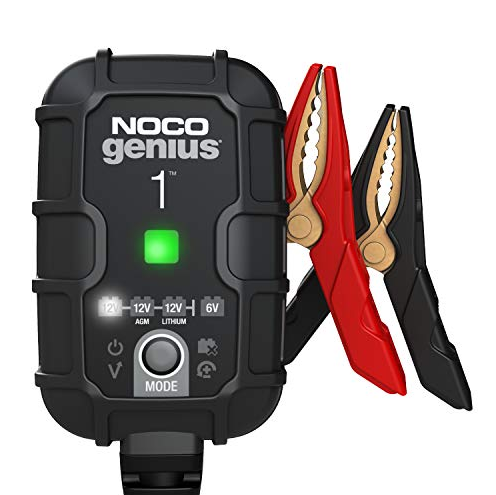
- About GENIUS1. The NOCO GENIUS1 represents some of the most innovative and advanced technology on the market, making each charge simple and easy. It is quite possibly the safest and most efficient charger you will ever use. The GENIUS1 is designed for charging all types of 6V & 12V lead-acid batteries, including Lithium (LiFePO4), Wet (Flooded), Gel, MF (Maintenance-Free), CA (Calcium), EFB (Enhanced Flooded Battery), and AGM (Absorption Glass Mat) batteries. It is suitable for charging battery capacities up to 30 Amp-Hours and maintaining all battery sizes.
- Getting Started. Before using the charger, carefully read the battery manufacturer’s specific precautions and recommended rates of charge for the battery. Make sure to determine the voltage and chemistry of the battery by referring to your battery owner’s manual prior to charging.
- Mounting. The GENIUS1 is a direct wall plug-in charger, and it is important to keep in mind the distance to the battery. The DC cable length from the charger, with either the battery clamp or eyelet terminal connectors, is approximately 107.2 inches (2722.9mm). Allow for 12 inches (304mm) of slack between connections.
- Proposition 65. WARNING: This product can expose you to chemicals, including lead and exhaust fumes, which are known to the State of California to cause cancer and birth defects or other reproductive harm. For more information, go to www.P65Warnings.ca.gov.
- Personal Precaution. Only use the product as intended. Someone should be within range of your voice or close enough to come to your aid in case of an emergency. Have a supply of clean water and soap nearby in the case of battery acid contamination. Wear complete eye protection and protective clothing while working near a battery. Always wash your hands after handling batteries and related materials. Do not handle or wear any metal objects when working with batteries, including tools, watches, or jewelry. If metal is dropped onto a battery, it may spark or create a short circuit, resulting in electrical shock, fire, or explosion, which may result in injury, death, or property damage.
- Minors. If the product is intended by “Purchaser” to be used by a minor, the purchasing adult agrees to provide detailed instructions and warnings to any minor prior to use. Failure to do so is the sole responsibility of the “Purchaser,” who agrees to indemnify NOCO for any unintended use or misuse by a minor.
- Choking Hazard. Accessories may present a choking hazard to children. Do not leave children unattended with the product or any accessory. The product is not a toy.
- Handling. Handle the product with care. The product can become damaged if impacted. Do not use a damaged product, including, but not limited to, cracks to the casing or damaged cables. Do not use the product with a damaged power cord. Humidity and liquids may damage the product. Do not handle the product or any electrical components near any liquid. Store and operate products in dry locations. Do not operate the product if it becomes wet. If the product is already operating and becomes wet, disconnect it from the battery and discontinue use immediately. Do not disconnect the product by pulling on the cables.
- Modifications. Do not attempt to alter, modify, or repair any part of the product. Disassembling the product may cause injury, death, or damage to property. If the product becomes damaged, malfunctions, or comes in contact with any liquid, discontinue use and contact NOCO. Any modifications to the product will void your warranty. Changes or modifications not expressly approved by the party responsible for compliance could void the user’s authority to operate this device.
- Accessories. This product is only approved for use with NOCO accessories. NOCO is not responsible for user safety or damage when using accessories not approved by NOCO.
- Location. Prevent battery acid from coming in contact with the product. Do not operate the product in a closed-in area or an area with restricted ventilation. Do not set a battery on top of the product. Position cable leads to avoid accidental damage by moving vehicle parts (including hoods and doors), moving engine parts (including fan blades, belts, and pulleys), or what could become a hazard that may cause injury or death.
- Operating Temperature. This product is designed to work in ambient temperatures between -4°F and 104°F (-20°C and 40°C). Do not operate outside of temperature ranges. Do not charge a frozen battery. Discontinue use of the product immediately if the battery becomes excessively warm.
- Storage. Do not use or store your product in areas with high concentrations of dust or airborne materials. Store your product on flat, secure surfaces so it’s not prone to falling. Store your product in a dry location. The storage temperature is between -22°F and 140°F (-30°C and 60°C) (average temperature). Never exceed 175°F (80ºC) under any condition.
- Compatibility. The product is only compatible with 6V & 12-volt Lead-Acid, AGM, and Lithium batteries. Do not attempt to use the product with any other type of battery. Charging other battery chemistries may result in injury, death, or property damage. Contact the battery manufacturer prior to attempting to charge the battery. Do not charge a battery if you are unsure of the battery’s specific chemistry or voltage.
- Medical Devices. The product contains magnetic components that may emit electromagnetic fields, which may interfere with pacemakers, defibrillators, or other medical devices. Consult with your physician prior to use if you have any medical devices, including pacemakers. If you suspect the product is interfering with a medical device, stop using the product immediately and consult your physician.
- Cleaning. Power off the product before attempting any maintenance or cleaning. Clean and dry the product immediately if it comes in contact with liquid or any type of contaminant. Use a soft, lint-free (microfiber) cloth. Avoid getting moisture in openings.
- Explosive Atmospheres. Obey all signs and instructions. Do not operate the product in any area with a potentially explosive atmosphere, including fueling areas or areas that contain chemicals or particles such as grain, dust, or metal powders.
- High-Consequence Activities. This product is not intended for use where the failure of the product could lead to injury, death, or severe environmental damage.
- Radio Frequency Interference. The product is designed, tested, and manufactured to comply with regulations governing radio frequency emissions. Such emissions from the product can negatively affect the operation of other electronic equipment, causing it to malfunction.
- Model Number: GENIUS1. This device complies with Part 15 of the FCC Rules. Operation is subject to the following two conditions: (1) this device may not cause harmful interference, and (2) this device must accept any interference received, including interference that may cause undesired operation.
- NOTE: This equipment has been tested and found to comply with the limits for a Class A digital device, pursuant to Part 15 of the FCC Rules. These limits are designed to provide reasonable protection against harmful interference when the equipment is operated in a commercial environment. This equipment generates, uses, and can radiate radio frequency energy and, if not installed and used in accordance with the instruction manual, may cause harmful interference to radio communications. Operation of this equipment in a residential area is likely to cause harmful interference, in which case the user will be required to correct the interference at his own expense.
How To Use
Charging Modes
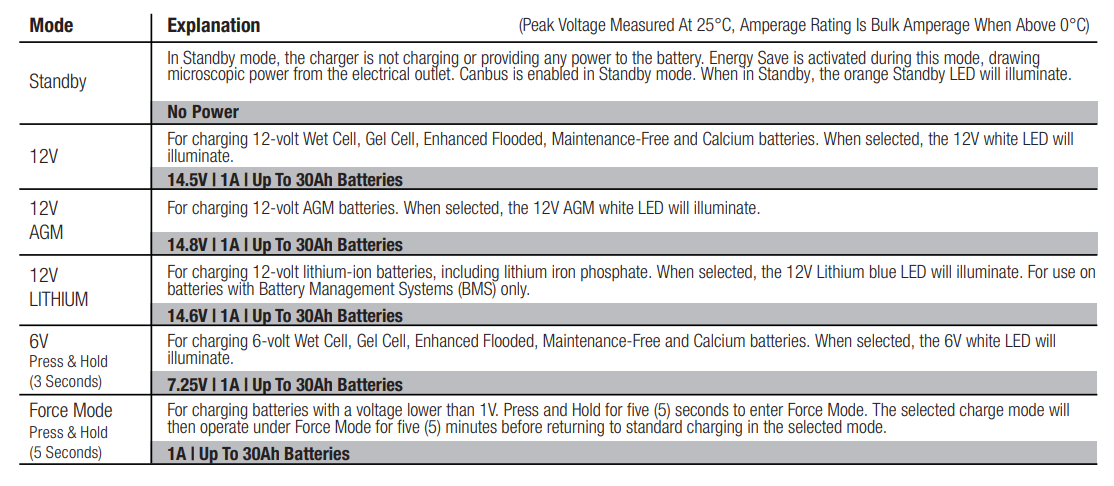
The GENIUS1 has six (6) modes: Standby, 12V, 12V AGM, 12V LITHIUM, 6V, and Force. Some charge modes must be pressed and held for three (3) to five (5) seconds to enter the mode. These “Press and Hold” modes are advanced charging modes that require your full attention before selecting. It is important to understand the differences and purpose of each charge mode. Always check with the battery manufacturer to confirm the right charge mode for your specific battery. Do not operate the charger until you confirm the appropriate charge mode for your battery. Below is a brief description:
Using 6V. [Press & Hold for 3 seconds]
6V charge mode is designed for 6-volt lead-acid batteries only, like Wet Cell, Gel Cell, Enhanced Flooded, Maintenance-Free, and Calcium batteries. Press and hold for three (3) seconds to enter 6V Charge Mode. Consult the battery manufacturer before using this mode.
Using 12V Lithium. 1
2V Lithium charge mode is designed for 12-volt lithium-ion batteries only, including lithium iron phosphate. CAUTION. USE THIS MODE WITH EXTREME CARE. THIS MODE SHOULD ONLY BE USED WITH 12-VOLT LITHIUM BATTERIES THAT HAVE A BUILT-IN BATTERY MANAGEMENT SYSTEM (BMS). LITHIUM-ION BATTERIES ARE MADE AND CONSTRUCTED IN DIFFERENT WAYS, AND SOME MAY OR MAY NOT CONTAIN A BATTERY MANAGEMENT SYSTEM (BMS). CONSULT THE LITHIUM BATTERY MANUFACTURER BEFORE CHARGING AND ASK FOR RECOMMENDED CHARGING RATES AND VOLTAGES. SOME LITHIUM-ION BATTERIES MAY BE UNSTABLE AND UNSUITABLE FOR CHARGING.
Force Mode. [Press & Hold for 5 seconds]
Force mode allows the charger to manually begin charging when the connected battery’s voltage is too low to be detected. If battery voltage is too low for the charger to detect, press and hold the mode button for 5 seconds to activate Force Mode, then select the appropriate mode. All available modes will flash. Once a charge mode is selected, the Charge Mode LED and Charge LED will alternate between each other, indicating Force Mode is active. After five (5) minutes, the charger will return to the normal charge operation, and low voltage detection will be reactivated.
CAUTION. USE THIS MODE WITH EXTREME CARE. FORCE MODE DISABLES SAFETY FEATURES, AND LIVE POWER IS PRESENT AT THE CONNECTORS. ENSURE ALL CONNECTIONS ARE MADE PRIOR TO ENTERING FORCE MODE, AND DO NOT TOUCH CONNECTIONS TOGETHER. RISK OF SPARKS, FIRE, EXPLOSION, PROPERTY DAMAGE, INJURY, AND DEATH.
Connecting to the Battery
Do not connect the AC power plug until all other connections are made. Identify the correct polarity of the battery terminals on the battery. The positive battery terminal is typically marked by these letters or symbols (POS, P, +). The negative battery terminal is typically marked by these letters or symbols (NEG, N, -). Do not make any connections to the carburetor, fuel lines, or thin sheet metal parts.
FOLLOW THESE STEPS WHEN THE BATTERY IS INSTALLED IN THE VEHICLE. WARNING: A SPARK NEAR THE BATTERY MAY CAUSE A BATTERY EXPLOSION. TO REDUCE THE RISK OF A SPARK NEAR THE BATTERY:
- Position the AC and DC cords to reduce the risk of damage from the hood, door, or moving engine parts.
- Stay clear of fan blades, belts, pulleys, and other parts that can cause injury to persons.
- Check the polarity of the battery terminals. The POSITIVE (POS, P, +) battery terminal usually has a larger diameter than the NEGATIVE (NEG, N, -) battery terminal.
- Determine which battery terminal is grounded (connected) to the chassis. If the negative battery terminal is grounded to the chassis (as in most vehicles), see Step 5. If the positive battery terminal is grounded to the chassis, see Step 6.
- For a negative-grounded vehicle only, connect the POSITIVE (RED) battery clamp or eyelet terminal connector from the battery charger to the POSITIVE (POS, P, +) ungrounded battery terminal. Connect NEGATIVE (BLACK) battery clamp or eyelet terminal connector to vehicle chassis or engine block away from battery. Connect to a heavy-gauge metal part of the frame or engine block.
- For a positive-grounded vehicle only, connect the NEGATIVE (BLACK) battery clamp or eyelet terminal connector from the battery charger to the NEGATIVE (NEG, N, -) ungrounded battery terminal. Connect the POSITIVE (RED) battery clamp or eyelet terminal connector to the vehicle chassis or engine block away from the battery. Connect to a heavy-gauge metal part of the frame or engine block.
- Connect the battery charger to a suitable electrical outlet. Do not face the battery when making this connection.
- When disconnecting the battery charger, disconnect in the reverse sequence, removing the negative first (or positive first for positive ground systems).
Charging Times
The estimated time to charge a battery is shown below. The size of the battery (Ah) and its depth of discharge (DOD) greatly affect its charging time. The charge time is based on an average depth of discharge to a fully charged battery and is for reference purposes only. Actual data may differ due to battery conditions. The time to charge a normally discharged battery is based on a 50% DOD. Temperature will also impact charging times. The GENIUS1 features thermal compensation that automatically adjusts charging profiles to maximize charging performance.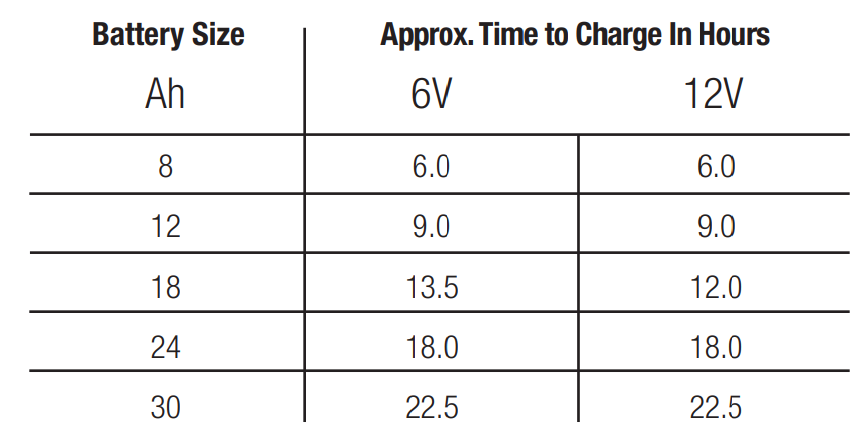
Understanding Charge LEDs
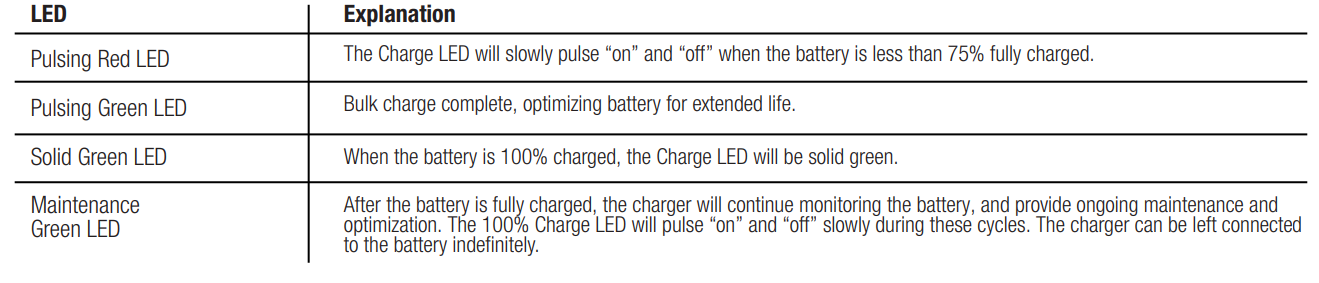
The charger has one (1) Charge LED. This Charge LED indicates the connected battery(s) state-of-charge (SOC). See the explanation below.
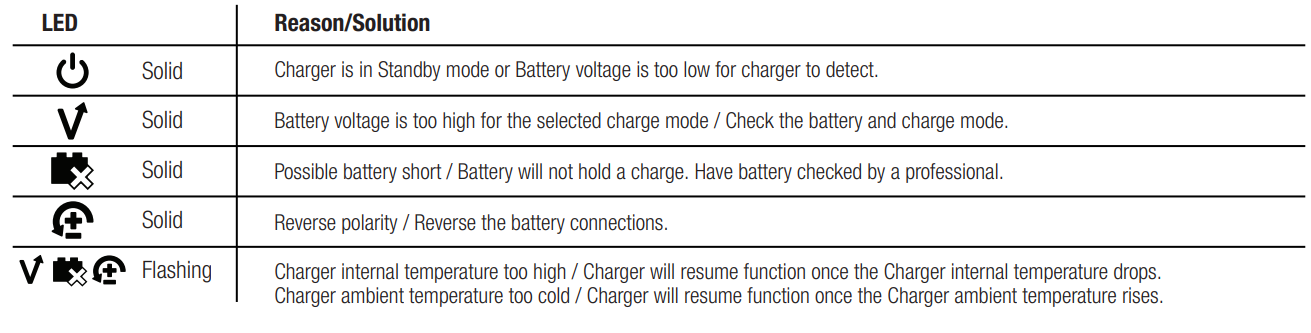
Understanding Error LEDs.
Error Conditions will be indicated by the following LEDs.
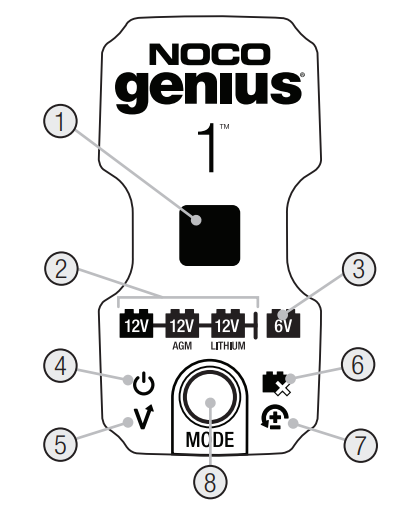
DESCRIPTION
- Charge LED indicates the connected battery(s) state-of-charge.
- Mode LED indicates the Charge Mode the charger is currently in. Push the MODE button to cycle through charge Modes.
- Press and Hold Mode LED Mode button must be pressed and held for 3 seconds to enter the mode.
- Standby LED Illuminates when the charger is in Standby Mode, the charger is not charging or providing any power to the battery.
- Overvoltage Error LED Illuminates solid Red; Battery Voltage is above the Protect voltage.
- Bad Battery Error LED illuminates solid Red when a connected battery will not hold a charge.
- Reverse Polarity Error LED Illuminates solid Red when reverse polarity is detected.
- Mode Button Push to cycle through charging Modes.

Technical Specifications
- Input Voltage AC: 100-240 VAC, 50-60Hz
- Output Power: 15W Max
- Charging Voltage: Various
- Charging Current: 1A (12V), 1A (6V)
- Low-Voltage Detection: 1V (12V), 1V (6V)
- Back Current Drain: <0.5mA
- Operating Temperature: -4°F to 104°F (-20°C to 40°C)
- Storage Temperature: -22°F to 140°F (-30°C to 60°C)
- Type of Batteries: 6V & 12V
- Battery Chemistries: Wet, Gel, MF, CA, EFB, AGM, Lithium.
- Battery Capacity: Up to 30Ah, Maintains All Battery Sizes
- Housing Protection: IP60
- Cooling: Natural Convection
- Dimensions (W x D x H): 2.32 x 1.26 x 3.62 Inches (59 x 32 x 92mm)
- Weight: 0.77 Pounds (0.35kg)
NOCO Three (3) Year Limited Warranty
IMPORTANT: BY USING THIS PRODUCT, YOU ARE AGREEING TO BE BOUND BY THE TERMS OF THE NOCO THREE (3) YEAR LIMITED WARRANTY (“WARRANTY”) AS SET OUT BELOW. DO NOT USE THE PRODUCT UNTIL YOU HAVE READ THE TERMS OF THE WARRANTY. IF YOU DO NOT AGREE TO THE TERMS OF THE WARRANTY, DO NOT USE THE PRODUCT AND RETURN IT.
THIS WARRANTY GIVES YOU SPECIFIC LEGAL RIGHTS, AND YOU MAY HAVE OTHER RIGHTS THAT VARY FROM STATE, COUNTRY, OR PROVINCE. OTHER THAN AS PERMITTED BY LAW, NOCO DOES NOT EXCLUDE, LIMIT, OR SUSPEND OTHER RIGHTS YOU MAY HAVE, INCLUDING THOSE THAT MAY ARISE FROM THE NONCONFORMITY OF A SALES CONTRACT. FOR A FULL UNDERSTANDING OF YOUR RIGHTS, YOU SHOULD CONSULT THE LAWS OF YOUR STATE, COUNTRY, OR PROVINCE. TO THE EXTENT PERMITTED BY LAW, THIS WARRANTY AND THE REMEDIES SET FORTH ARE EXCLUSIVE AND IN LIEU OF ALL OTHER WARRANTIES, REMEDIES, AND CONDITIONS, WHETHER ORAL, WRITTEN, STATUTORY, EXPRESS, OR IMPLIED.
NOCO DISCLAIMS ALL STATUTORY AND IMPLIED WARRANTIES, INCLUDING, WITHOUT LIMITATION, WARRANTIES OF MERCHANTABILITY AND FITNESS FOR A PARTICULAR PURPOSE AND WARRANTIES AGAINST HIDDEN OR LATENT DEFECTS, TO THE EXTENT PERMITTED BY LAW. IN SO FAR AS SUCH WARRANTIES CANNOT BE DISCLAIMED, NOCO LIMITS THE DURATION AND REMEDIES OF SUCH WARRANTIES TO THE DURATION OF THIS EXPRESS WARRANTY AND, AT NOCO’S OPTION, THE REPAIR OR REPLACEMENT OF PRODUCTS DESCRIBED BELOW. SOME STATES, COUNTRIES, AND PROVINCES DO NOT ALLOW LIMITATIONS ON HOW LONG AN IMPLIED WARRANTY – OR CONDITION – MAY LAST, SO THE LIMITATION DESCRIBED ABOVE MAY NOT APPLY TO YOU.
NOCO warrants the NOCO-branded Products contained in the original packaging (“NOCO Product”) against defects in materials and workmanship when used normally in accordance with NOCO’s published guidelines for a period of THREE (3) YEARS from the date of original retail purchase or delivery date by the end-user purchaser (“Warranty Period”). NOCO’s published guidelines include, but are not limited to, the information contained in this Warranty, technical specifications, and user manuals. IN SOME STATES, COUNTRIES, OR PROVINCES, NATIONAL LAW MAY PROVIDE MORE EXTENDED WARRANTY PERIODS. As such, the benefits of the Limited Warranty are intended to supplement, and not replace, the rights provided by consumer protection laws.
NOCO’S LIABILITY IS LIMITED TO REPLACEMENT OR REPAIR. NOCO SHALL NOT BE LIABLE FOR ANY SPECIAL, INCIDENTAL, CONSEQUENTIAL, OR EXEMPLARY DAMAGES RESULTING FROM ANY BREACH OF WARRANTY OR CONDITION OR UNDER ANY OTHER LEGAL THEORY, INCLUDING, BUT NOT LIMITED TO, LOST PROFITS, LOST REVENUE, LOST BUSINESS, PROPERTY DAMAGE, PERSONAL INJURY, OR ANY INDIRECT OR CONSEQUENTIAL LOSS OR DAMAGE HOWSOEVER.
This Warranty is non-transferable and does not cover return packaging and transportation costs. This Warranty does not apply:
- to damage caused by accident, abuse, misuse, fire, liquid contact, or other external cause,
- mishandling, improper installation, modifications, disassembly, or attempted unauthorized repair,
- cosmetic damage – such as dents or scratches – that doesn’t affect the functionality of the Product,
- to damage caused by operating the Product outside NOCO’s published guidelines,
- to defects caused by normal wear and tear or otherwise due to the normal aging of the Product, or
- If any serial number has been removed or defaced from the Product.
If, during the Warranty Period, you submit a claim, NOCO will, at its option:
- repair the Product that has been tested and passed our functional requirements,
- replace the Product with a replacement product of the same model (or with your consent, a product that has the same or substantially similar features as the original Product – e.g., a different model with the same features), that is new or like-new and has been tested and passed our functional requirements, or
- exchange the Product for a refund of your purchase price.
We require certain information, including proof of purchase, to process Limited Warranty claims. To make a claim under the Limited Warranty, please get in touch with NOCO Support at:
Web:https://no.co/support
Email:[email protected]
US/CA/MX +1.800.456.6626
UK +44 20 4520 7738
EU +31 20 214 0047
AU +61 2 4062 0068
JP+81 3 6893 3017
For More Manuals By NOCO, Visit ManualsLibraryy.
NOCO GENIUS1 1-Amp Smart Battery Charger-FAQs
Q1. What is the NOCO Genius1 used for?
The NOCO Genius1 is a compact, energy-efficient smart charger designed for 6V and 12V lead-acid batteries (flooded, gel, AGM, maintenance-free) as well as 12V lithium-ion batteries. It works for cars, motorcycles, ATVs, boats, lawnmowers, and more.
Q2. How does a smart battery charger like NOCO Genius1 work?
Unlike traditional chargers, smart chargers automatically diagnose, recondition, recharge, and maintain batteries. They adjust charging levels to protect battery life and prevent overcharging.
Q3. What types of batteries can the NOCO Genius1 charge?
It can charge and maintain:
6V & 12V lead-acid batteries (flooded, gel, AGM, MF)
12V lithium-ion batteries
This makes it versatile for vehicles, power equipment, and marine batteries.
Q4. Can the NOCO Genius1 revive a dead battery?
Yes. Using Force Mode, the Genius1 can charge batteries as low as 1 volt, which many chargers cannot do.
Q5. How long does it take to charge a battery with the NOCO Genius1?
Charging speed depends on battery size:
20Ah motorcycle battery → ~15 hours
40Ah lawn mower battery → ~30 hours
80Ah car battery → ~60 hours
100Ah truck battery → ~75 hours
Q6. Can a 1-amp charger fully charge a car battery?
Yes, but it will take a very long time. A 1-amp charger is best for small batteries or for maintenance charging of car batteries.
Q7. Can I leave the NOCO Genius1 connected all the time?
Yes. It’s designed to be left connected safely. The charger automatically switches to maintenance mode once the battery is full, preventing overcharging.
Q8. How do I know if my NOCO Genius1 is charging?
The built-in LED indicators show charging status, errors, and when the battery is fully charged.
Q9. Can the NOCO Genius1 overcharge a battery?
No. It constantly monitors voltage and switches to float/maintenance mode once the battery is full, preventing overcharging.
Q10. What are the 7 stages of charging in NOCO chargers?
The charging process goes through: Desulfation → Soft Start → Bulk → Absorption → Analysis → Recondition → Float/Maintenance. This ensures a complete and safe charge.