
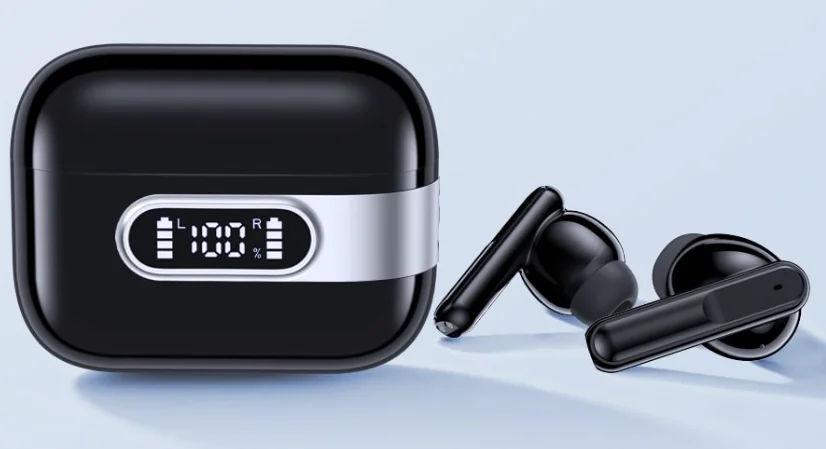

Occiam U10 TWS Earbuds
Product List
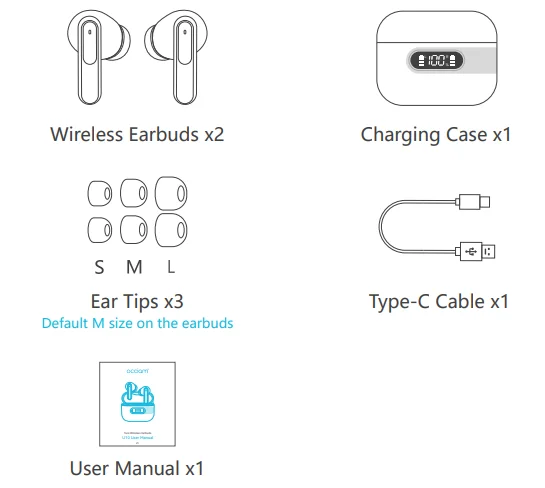
Note: Please remove protective films from the LED power display and charging contacts before using them.
Product Overview
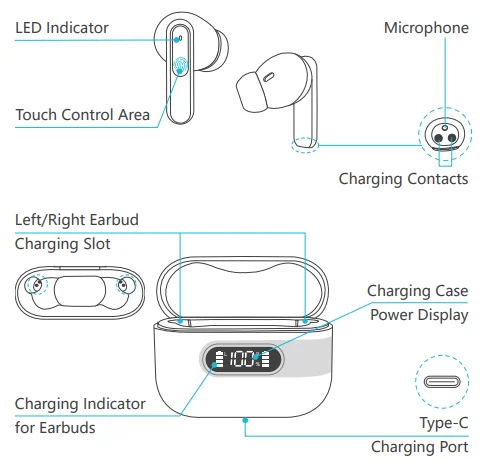
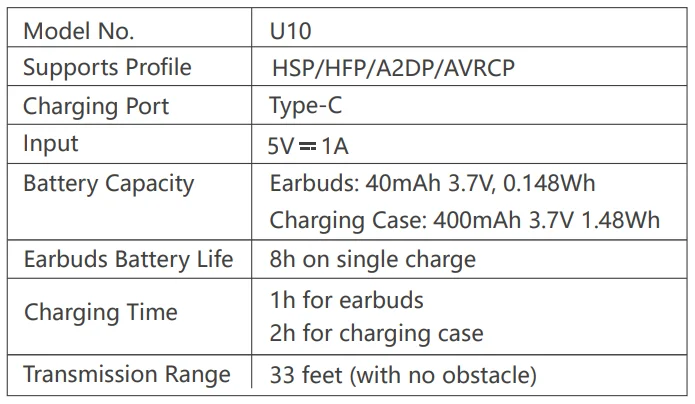
Product Parameters
First Time Use
Before your initial use, please remove the isolating film from the earbuds. Place the earbuds in the charging case, then connect the earbuds and the charging case to a power source using the provided Type-C charging cable for at least 10 minutes (or after extended periods of non-use).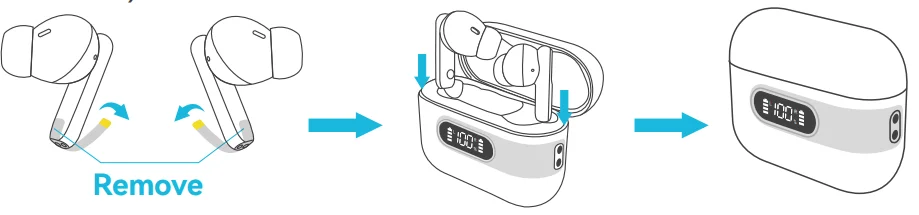
How to Wear
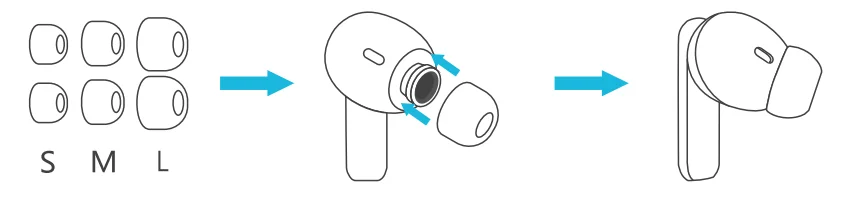
- Choose the comfortable eartips.

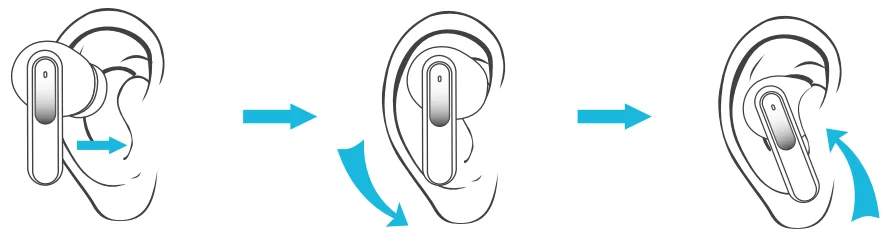
- Wear it in your ear and adjust to a comfortable position. (Please put the right and left headphones on the correct ear.

Power On / Power Off
Auto Power On
Take out the earbuds from the charging case, and the earbuds will automatically power on and start pairing.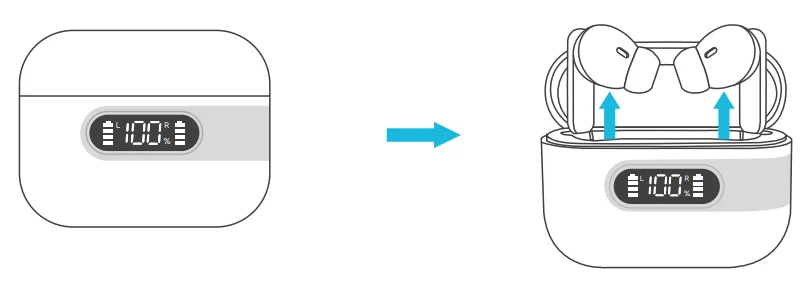
Auto Power Off
Put the earbuds back into the charging case, and the earbuds will automatically power off and enter charging mode.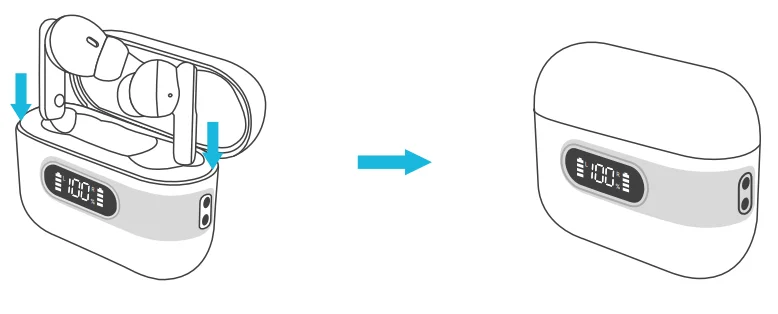
Manual Power On
If the earbuds are not in the charging case, press and hold each earbud for 3 seconds.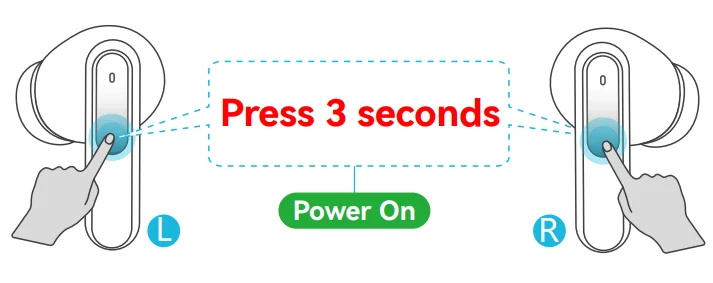
Manual Power Off
If the earbuds are not in the charging case, press and hold either earbud for 5 seconds.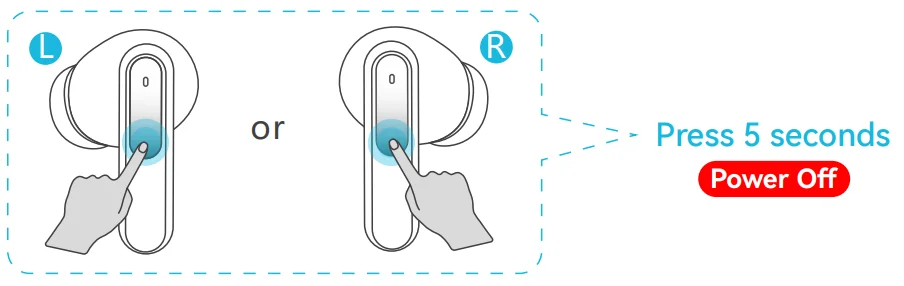
Note: If the earbuds are not connected to your device for over 5 minutes, the earbuds will power off. (Connected device status cannot be turned off manually)
Bluetooth Connection
Prior to first use (or not in use for a long time), please charge both earbuds and the charging case with the supplied Type-C charging cable.
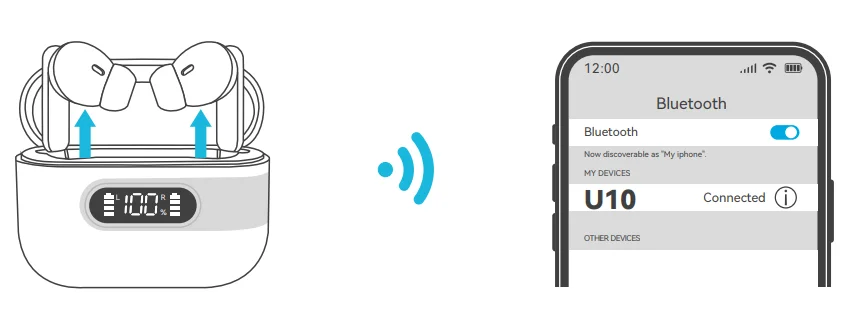
- Take out the twin earbuds from the charging case. They will automatically power on and enter pairing mode. At this time, the LED indicator of one earbud flashes blue slowly, and the LED indicator of the other earbud flashes blue and red.
- Activate the Bluetooth setting on your phone, search for and connect to “U10”. Once connected, the LED indicator of both earbuds goes out.

Factory Restore Setting
When should I reset?
- When only one side plays music.
- When you can’t use the two earbuds together.
- When both earbuds fail to pair with each other or experience connection-related issues.
How to reset?
- Deactivate the Bluetooth setting of all devices near the earbuds.
- Pick up two earbuds from the charging case. The earbuds will power on automatically.
- Quickly tap 5 times on the button of both earbuds until the earbud LED indicator flashes blue and red 3 times quickly (if you wear the earbud, you will hear a voice prompt “power off”), then the earbud will power off, which means resetting is finished.
Functions
 For Music
 For Music
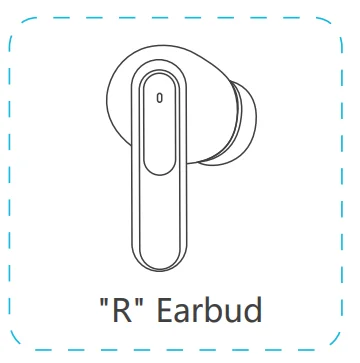
[Functions on “R Earbud”]
- Play / Pause: Double Tap
- Next Track: Triple Tap
- Volume +: Long Press MFB

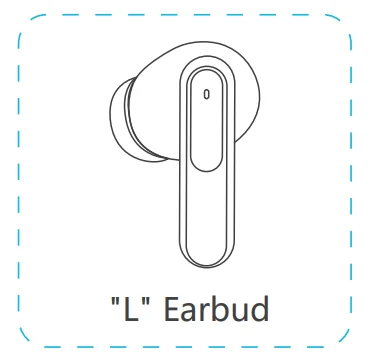
[Functions on “L Earbud”]
- Play / Pause: Double Tap
- Previous Track: Triple Tap
- Volume -: Long Press MFB

Note: In single ear mode, the single earbud does not support volume adjustment. You can adjust the volume on your phone.
 For Call
 For Call
- Answer Call: Double Tap
- End Call: Double Tap
- Reject Call: Long Press 2s

- Hang up the current call when a third-party call is received:
- Double-tap to end the current call, then double-tap to answer a new call.
 Voice Assistance
 Voice Assistance
Activate Siri or other voice assistants: Triple Tap (no music playback status)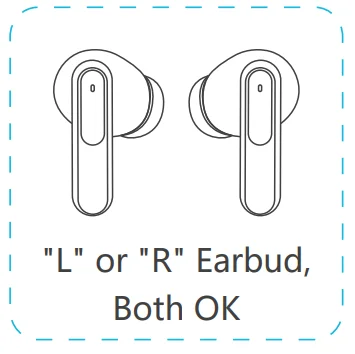
Earbuds Charging
Low Battery Alert
When the earbuds are in a low battery status, you will hear a voice prompt saying, “Low battery, please charge.” In such a situation, it is important to promptly charge the earbuds.
Earbuds Charging
Put the earbuds into the charging case, and they will power off and be charged. When the earbud LED indicator flashes red light, it means that the earbud is being charged from the charging case. Meanwhile, the LED bar for earbud on the charging case flashes light from the 1st grid to the 4th grid repeatedly.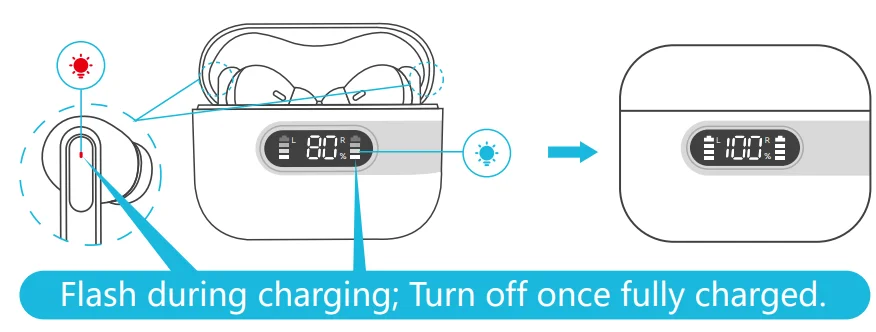
Charging Case Charging
Type-C USB Charging
There is a Type-C USB charging cable in the small white box of the package. Please use the 5V/1A adapter with the Type-C charging cable to charge the charging case. During charging, the charging case LED power display will flash and display the battery in real time. After a full charge, the number is displayed as 100.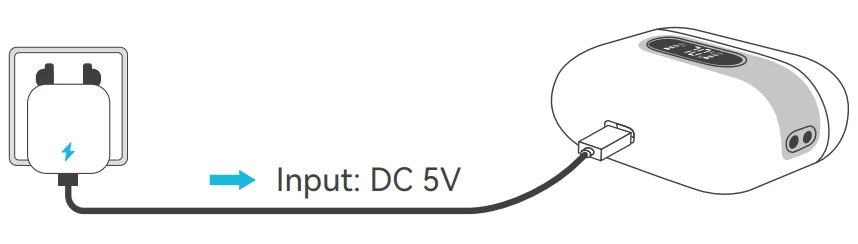
Caution
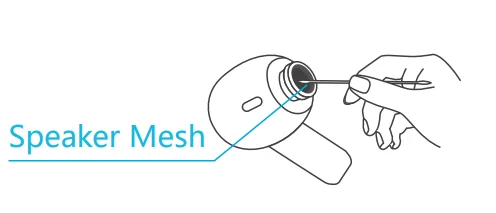
- If the sound becomes low or muted, please clean the earbuds’ speaker mesh and any visible debris promptly.

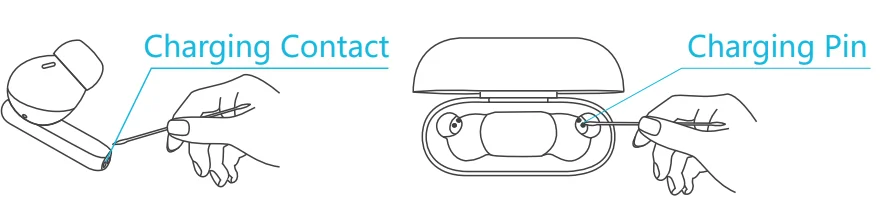
- If the earbuds won’t charge properly, use cotton swabs or alcohol pads to clean the magnetic charging contacts on both the earbuds and the case.

Battery Warning
Using the wrong battery can cause fire and other hazards (for example, in the case of some lithium battery types).
- Disposal of a battery into fire or a hot oven, or mechanically crushing or cutting a battery, which can result in an explosion.
- Do not leave a battery in an extremely high temperature environment, which can result in an explosion or the leakage of flammable liquid or gas.
- A battery subjected to extremely low air pressure that may result in an explosion or the leakage of flammable liquid or gas.
Storage and Maintenance
- If the earbuds have been unused for more than 3 months, we recommend that you charge them.
- Please use chargers that are FCC (Federal Communications Commission) approved.
- Do not disassemble earbuds.
- Adult supervision is required for children aged 6 and under.
- Do not expose the earbuds to high or low temperatures, and do not use the earbuds in a thunderstorm. Avoid falling or violent impact of the device. Keep the device away from fire, and do not put the device in water.
- Do not use oil or any volatile liquid to clean this product.
FCC Caution
Changes or modifications not expressly approved by the party responsible for compliance could void the user’s authority to operate the equipment. This equipment hasbeen tested and found to comply with the limits for a Class B digital device, pursuant to Part 15 of the FCC Rules. These limits are designed to provide reasonable protection against harmful interference in a residential installation.
This equipment generates and can radiate radiofrequency energy and, if not installed and used in accordance with the instructions, may cause harmful interference to radio communications. However, there is no guarantee that interference will not occur in a particular installation. If this equipment does cause harmful interference to radio or television reception, which can be determined by turning the equipment off and on, the user is encouraged to try to correct the interference by one or more of the following measures.
- Reorient or relocate the receiving antenna.
- Increase the separation between the equipment and receiver.
- Connect the equipment into an outlet on a circuit different from that to which the receiver is connected.
- Consult the dealer or an experienced radio/TV technician for help.
This device complies with part 15 of the FCC Rules. Operation is subject to the following two conditions:
- This device may not cause harmful interference, and
- This device must accept any interference received, including interference that may cause undesired operation.
For More Manuals By Occiam, Visit ManualsLibraryy.
Occiam U10 TWS Earbuds -FAQs
What are Occiam U10 TWS Earbuds, and who should buy them?
Occiam U10 TWS Earbuds are true wireless Bluetooth earbuds designed for everyday use such as music listening, calls, workouts, and travel. They focus on affordability, portability, and ease of use rather than premium features like active noise cancellation. These earbuds are a good choice for users who want reliable wireless audio, simple controls, and decent battery life without paying a high price for flagship-brand earbuds.
How do I use Occiam U10 earbuds for the first time?
To use Occiam U10 earbuds for the first time, fully charge the earbuds and the charging case. Open the case and remove both earbuds; they usually power on automatically. Enable Bluetooth on your phone and select “Occiam U10” from the available devices list. Once connected, the earbuds will pair automatically with the same device in future uses when removed from the case.
How do I put Occiam U10 earbuds into pairing mode?
Occiam U10 earbuds typically enter pairing mode automatically when they are removed from the charging case for the first time. If they don’t, place both earbuds back into the case, take them out again, and wait for the LED indicators to flash. If already paired to another device, you may need to reset them to re-enter pairing mode before connecting to a new phone or tablet.
Why are my Occiam U10 earbuds not charging?
If your Occiam U10 earbuds are not charging, the most common cause is dirty or blocked charging contacts. Dust or debris on the earbuds or case connectors can prevent proper charging. Gently clean the metal charging dots and pins using a soft cloth or an alcohol wipe. Also ensure the case itself has sufficient battery power and the earbuds are seated correctly.
How do I reset Occiam U10 TWS earbuds?
To reset Occiam U10 earbuds, remove them from the case and turn off Bluetooth on your phone. Press and hold the touch controls or buttons on both earbuds for several seconds until the LED indicators flash or turn off. Place them back in the case, then remove them again to re-pair. Resetting helps fix issues like connection drops, one earbud not working, or pairing failures.
Why is only one Occiam U10 earbud working?
When only one Occiam U10 earbud works, it is usually due to a synchronization issue between the left and right earbuds. This can happen if one earbud connects to the phone independently. A full reset often solves the problem. After resetting, remove both earbuds together and reconnect them to your device so they pair as a synchronized stereo set.
How long does the battery last on Occiam U10 earbuds?
Battery life on Occiam U10 earbuds depends on volume level and usage, but they generally provide several hours of playback on a single charge. The charging case extends total usage time by recharging the earbuds multiple times. For longer battery health, avoid fully draining the earbuds frequently and recharge them using a stable power source to maintain consistent performance over time.
Can I charge Occiam U10 earbuds without the charging case?
Most Occiam U10 earbuds are designed to charge only through their dedicated charging case and do not include a direct USB charging port on the earbuds themselves. Without the case, charging is usually not possible. This makes the charging case an essential accessory, so it’s recommended to keep it safe and charged to ensure uninterrupted use of the earbuds.
Are Occiam U10 earbuds good for calls and online meetings?
Occiam U10 earbuds are suitable for basic calls and casual online meetings. They include built-in microphones that work well in quiet or moderately noisy environments. However, they may not perform as well as premium earbuds in very loud surroundings. For everyday calls, voice chats, and video meetings, they provide clear and stable audio within their price range.
How long do Occiam U10 TWS earbuds last overall?
The overall lifespan of Occiam U10 TWS earbuds typically ranges from 2 to 4 years, depending on usage habits, battery care, and storage conditions. Lithium batteries naturally degrade over time, but proper charging practices—such as avoiding overcharging and extreme heat—can extend their life. Regular cleaning and careful handling also help maintain long-term performance.