
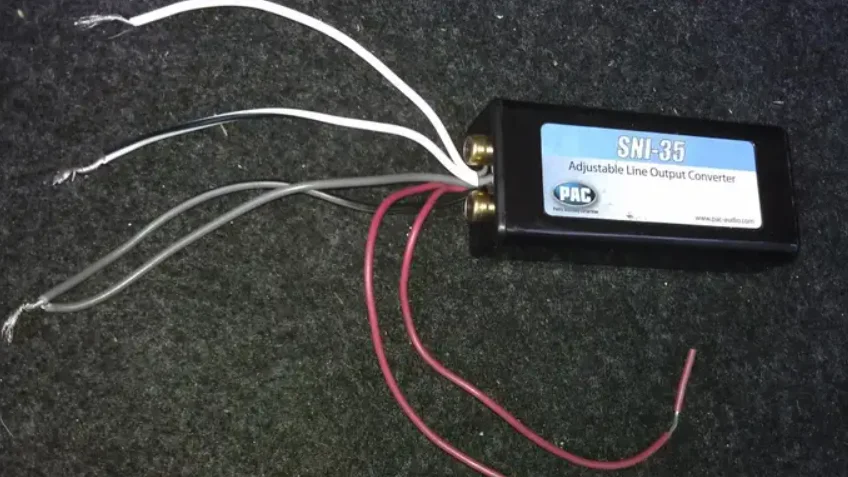

PAC SNI-35 Variable Line Converter
Before You Start
Replacing your radio? PAC also produces RadioPRO™, which is a radio replacement solution with steering wheel control retention built in. This greatly expedites the installation of a new radio into your vehicle. To see if there is a RadioPRO™ interface for your vehicle, visit www.pac-audio.com and search “Radio PRO”.
General Overview
The L.O.C.PRO™ LP6-4 can be used for either replacing an OEM radio and retaining the factory amplified system or adding amplifiers to a system that does not have RCA outputs. Level matching is achieved using precision stereo gain dials and will enable proper adjustment of the audio output of the radio for optimum system performance. Differential inputs also allow for use in OEM BOSE and other premium system scenarios.
Speaker Level Input to RCA Level Output
Speaker-level input to RCA-level output is the most commonly used configuration for the LP6-4. Use this when you need to create RCA-level outputs from a source that only has speaker-level outputs. The RCA input connectors on the main harness will not be utilized for this type of installation. We suggest cutting them off the harness 3 inches from the RCA end so they can be saved and used for a future installation. After all the connections are made on the remaining wires, skip to the level adjustment section of this manual.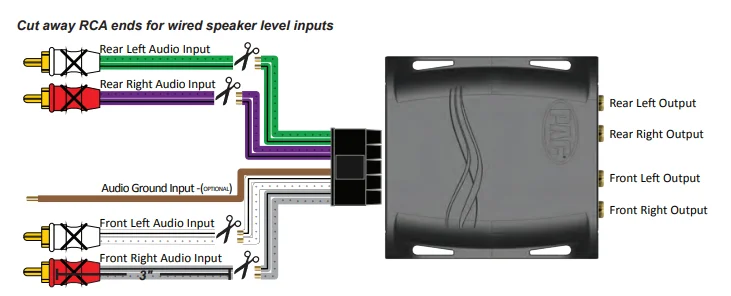
Speaker Level Input to Speaker Level Output
Speaker-level input to speaker-level output is most commonly used when replacing an OEM radio and retaining the factory-installed amplifiers. Use this when you need to match levels from a source that only has speaker-level outputs and an amplifier with speaker-level inputs. The RCA input connectors on the main harness will be used for this type of installation. We suggest cutting them off the harness 6 inches from the RCA end so they can be used for wired speaker-level output. After all the connections are made, skip to the level adjustment section of this manual.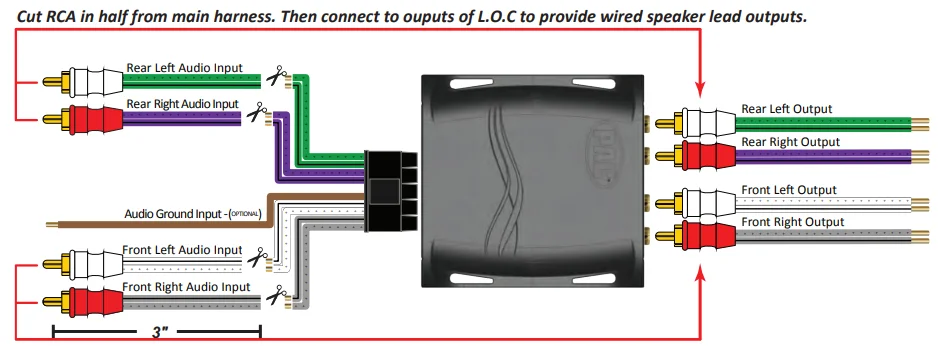
Level Adjustment
New School –
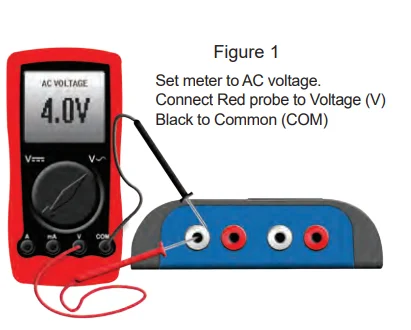
Required items: Digital Multi-Meter, test track media @ 1kHz and 100Hz. Max amplifier line-level input voltage specification (i.e., 4vrms, 8vrms, etc.). Proper level adjustment is crucial for obtaining the best possible sound quality. Following the guidelines below will enable you to properly set the output gain of the LP6-4 using equipment that is readily available.
Although this device can be set by ear (Old School), we recommend using a multimeter and test tracks for pinpoint accuracy and the least chance of noise. Amplifiers usually have 2, 4, or 8v max line-level input ratings, but this can vary. This max line-level input will be your target setting you will read on the multi-meter. Perform the following procedure for each amplifier you are installing.
Example:
Amplifier 1 (Mid/High frequency) has a maximum 4v input voltage, so you will be targeting a 4 volt output voltage from the LP6-4. Amplifier 2 (Sub frequency) has a maximum 2v input voltage, so you will be targeting a 2 volt output voltage from the LP6-4.
- Start with gain adjustment levels on LP6-4 and amplifiers set to minimum.
- Turn the source unit to ¾ maximum volume and start the test track (1kHz for mid/high or full range, 100Hz for sub).
- Choose either the left or the right channel. With a multi-meter, test the output of LP6-4 front channels. Probe with negative on the RCA shield and positive in the center of the RCA output. (Figure 1).

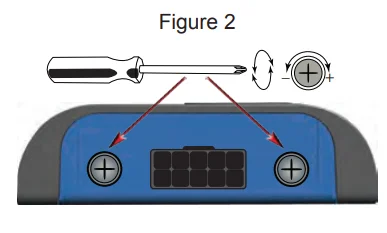
- Slowly adjust the level on LP6-4 until you reach the target voltage of the amplifier. (Figure 2).

- Repeat steps for rear channels (if connecting to a different amplifier, adjust to that amplifier’s voltage requirements).
- Turn the volume down and the system off.
- Connect RCAs, set gains on amplifiers to minimum.
- Turn the system on and fine-tune the gains of the amplifier (if needed).
Old School –
- Start with gain adjustment levels on LP6-4 and amplifiers set to minimum.
- Turn the source unit to ¾ maximum volume and play a familiar song that has dynamic attributes. For example, if your volume goes to 40, you will turn it up to 30 and play a song that has some quiet sections and some really loud sections.
- Slowly adjust the front channel gain of LP6-4 until just a hint of distortion is audible, and then back down the gain just under that threshold, and the distortion goes away. (Figure 2)
- Repeat steps 1-3 for the rear channels.
Audi Amplifier Integration
Symphony/Concert
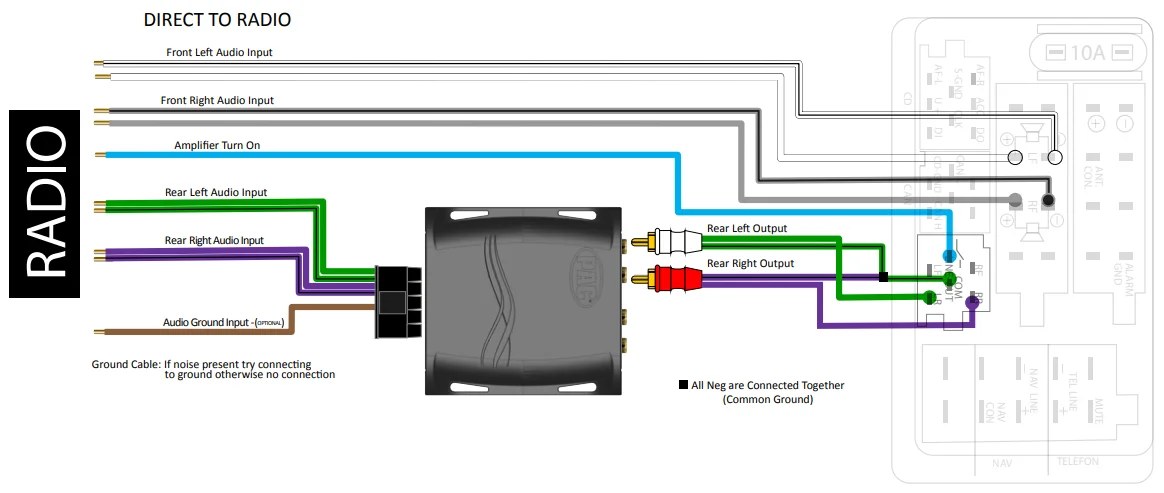
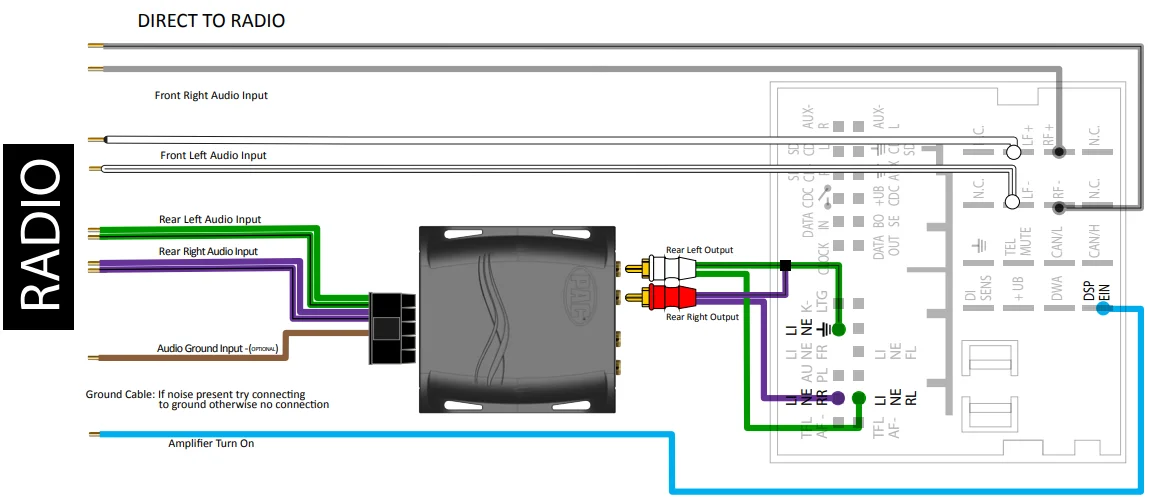
In the Symphony/Concert amplified systems, only the rear speakers are amplified. The front speakers are not amplified, so they will wire up normally to the radio with the high-level speaker wires. For integrating into the rear amplifier, you will need the LP6-4. The positive outputs on the LP6-4, you will only need to use the rear channels on the LP6-4 to complete the integration on the factory amp. You will only need to use the rear channels on the LP6-4 to complete the integration on the factory amp.
Older (VW) Style Harness
Newer (VW) Style Harness
Audi Amplifier Integration
BOSE
With BOSE amplified systems, all the speakers are amplified. For integrating into the amplifier, you will need the LPB-4.
Older (VW) Style Harness
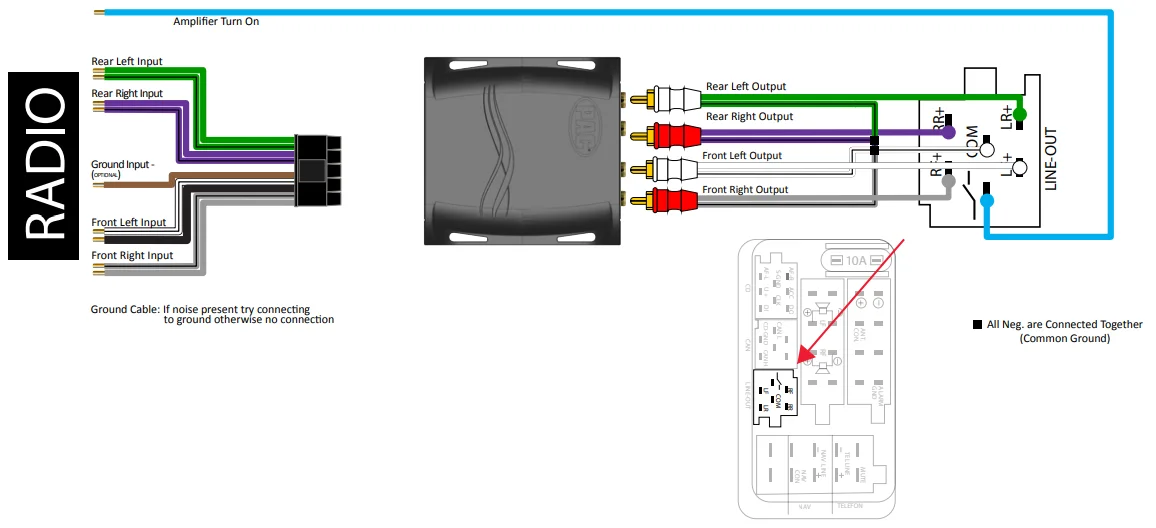
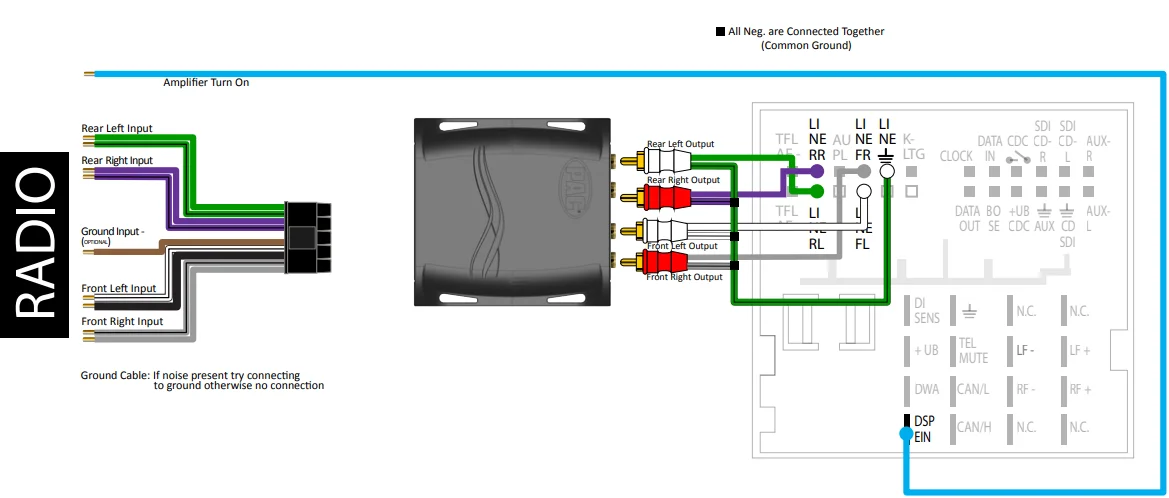
PREMIUM OEM INTERFACING
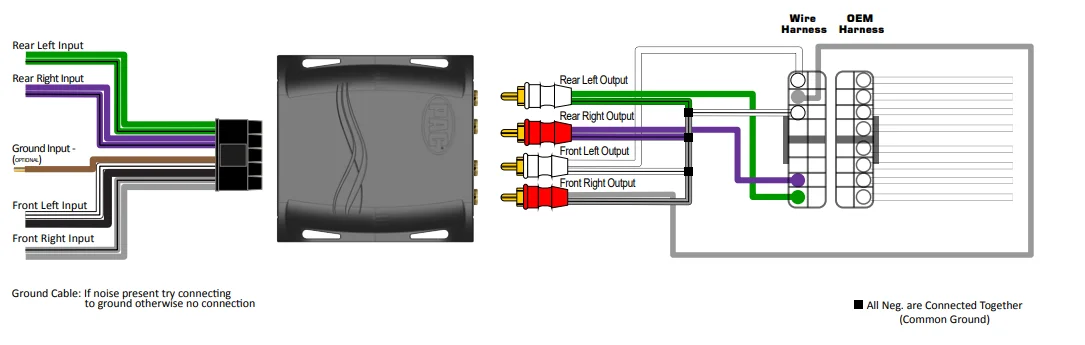
Pre-1985 General Motors Bose
INSTALLATION NOTES: Cut away shield wires (clear or uninsulated wire) from the factory side as illustrated in the diagram and connect to the chassis radio ground.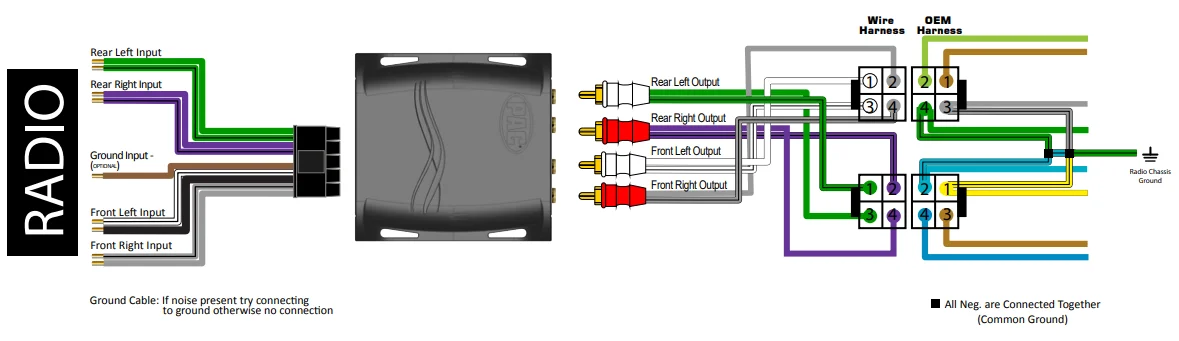
1985-1989 Corvette / Bose
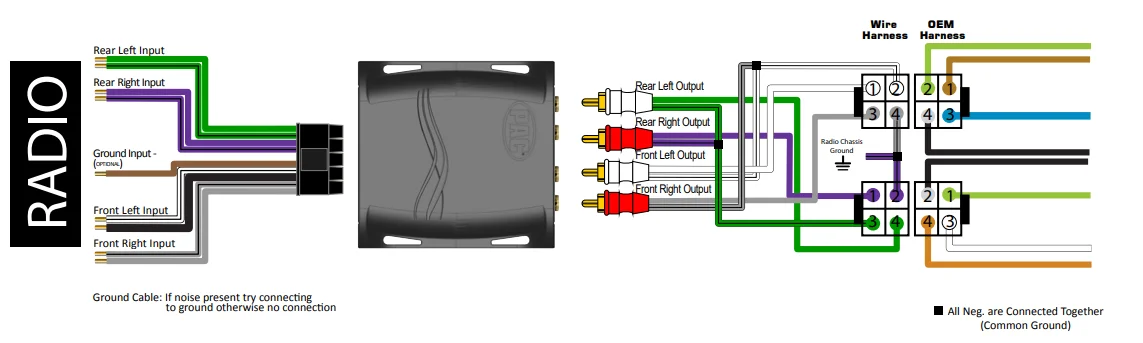
PREMIUM OEM INTERFACING
1990-1997 General Motors Bose
Common Audio Signal Ground
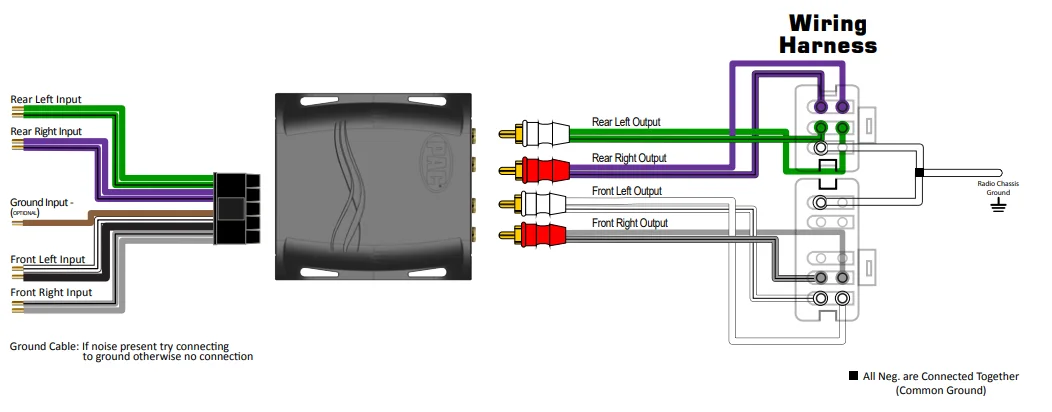
PREMIUM OEM INTERFACING
1989-1994 Nissan or Infinity Bose Sound System
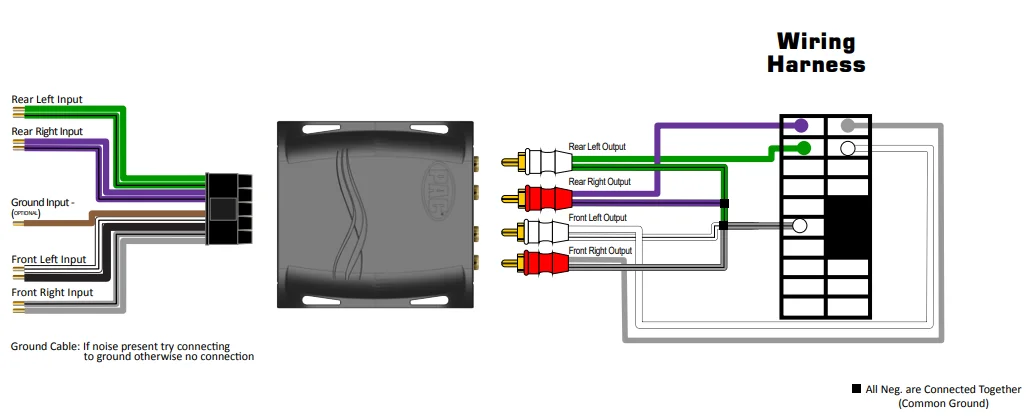
1992-1999 Toyota or Lexus Premium Sound System
1985 – 1990 General Motors Delco Bose Premium Sound System
INSTALLATION NOTES: Cut away shield wires (clear or uninsulated wire) from the factory side as illustrated in the diagram and connect to the chassis radio ground. No connection for BLACK wire on the INPUT or OUTPUT side of the LP6-4.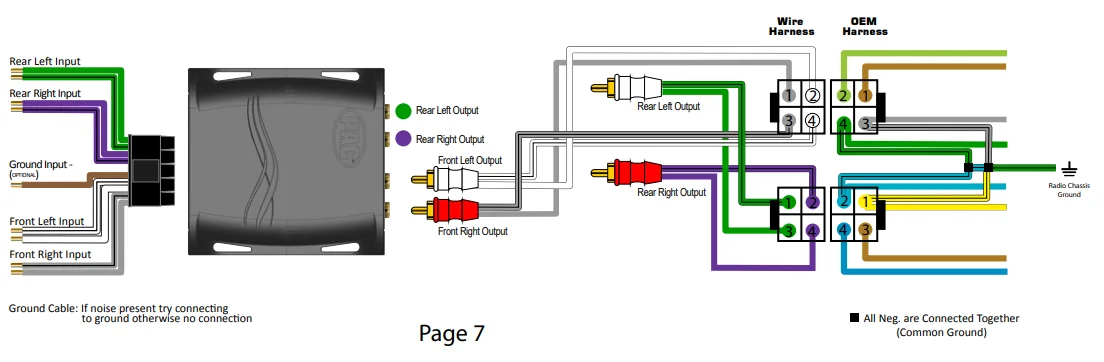
PREMIUM OEM INTERFACING
1995-2004 Nissan or Infinity Bose Sound System
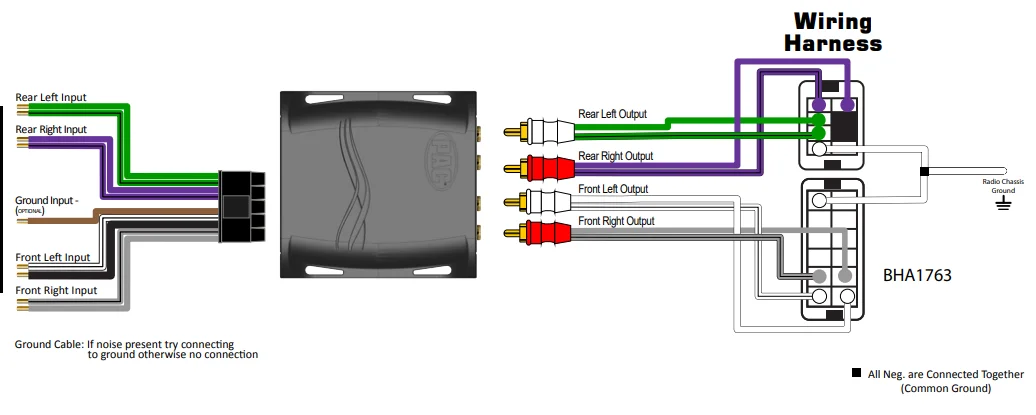
2000-2002 GM Fullsize Truck & SUV Including Cadillac, Delco Bose Premium Sound System
INSTALLATION NOTES: No connection for BLACK wire on the INPUT or OUTPUT side of the LP6-4.
1997-2004 Corvette Delco Bose Premium Sound System
INSTALLATION NOTES: No connection for BLACK wire on the INPUT or OUTPUT side of the LP6-4.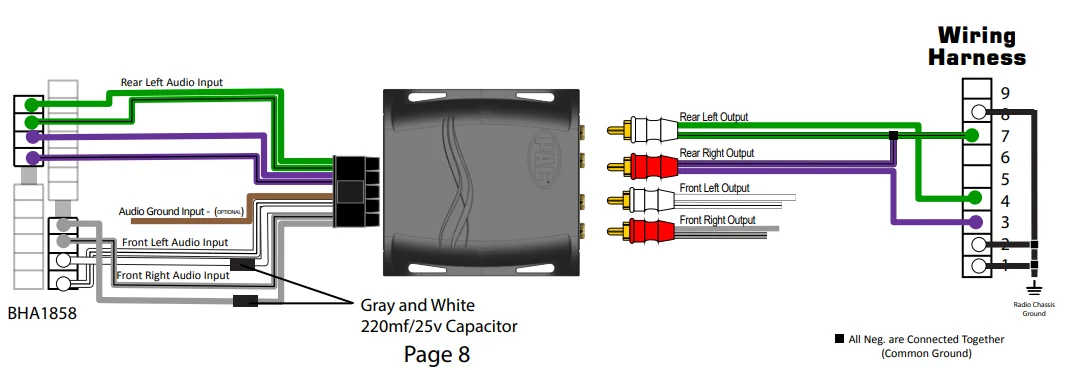
For More Manuals By PAC-Audio, Visit ManualsLibraryy.
PAC SNI-35 Variable Line Converter-FAQS
What is the PAC SNI-35 Variable Line Converter?
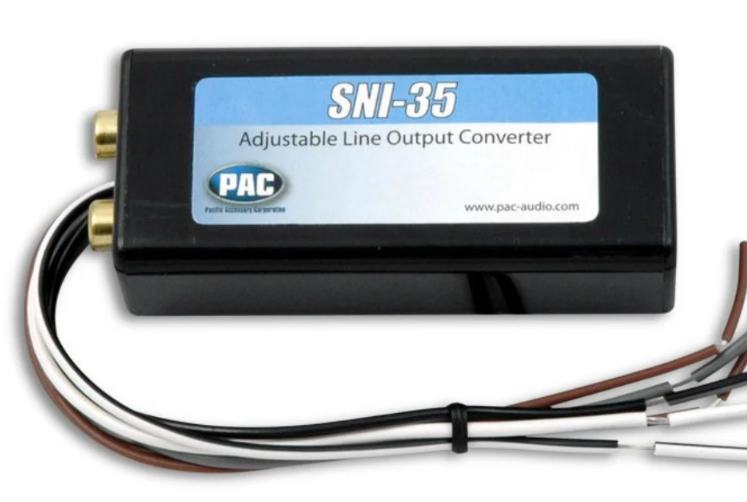
The PAC SNI-35 is a 2-channel adjustable line output converter that turns speaker-level signals from a factory radio into RCA line-level outputs for connecting an aftermarket amplifier.
What is the main purpose of a line output converter (LOC)?
A line output converter allows you to add an external amplifier to a factory stereo that does not have RCA pre-amp outputs.
When do you need a line output converter?
You need an LOC when keeping your factory head unit, upgrading to an aftermarket amplifier, retaining steering-wheel controls, or working with OEM systems that lack RCA outputs.
What are common problems with line output converters?
Common issues include weak signals, distortion, noise, or improper level matching due to incorrect settings or loose wiring.
What happens if the gain on the converter is set too high?
Excessive gain can cause clipping, distortion, and potential damage to speakers or subwoofers.
Can a line output converter improve sound quality?
Yes. When paired with an amplifier, an LOC can significantly improve volume, clarity, and bass response compared to a factory system alone.
Does the PAC SNI-35 require external power?
No. The SNI-35 is a passive line output converter and does not need a separate power or ground connection.
What power range does the PAC SNI-35 support?
The converter works with factory radios producing approximately 2 to 50 watts per channel.