

Pokemon POK3017AC Kids Digital LCD Flashing Watch

Instruction Manual:
Adjusting Date & Time:
- Press button “A” once, and the Month & Day will be shown. Press button “A” twice to adjust the Month; press button “B” to set
- Press button “A” three times, and the Day will be shown. To adjust the Day, press button “B” to set.
- Press button “A” four times, the Hour will be shown. To adjust the Hour, press button “B” to set.
- Press the button “A” five times, and the Minutes will be shown. To adjust the Minutes, press the button “p” to set.
- Press button “A” again to finalize the adjustments, confirm the adjustments by pressing button “B” to cycle through Time, Date & Seconds.
Displaying Date & Time:
- Press button “B” once. Month & Day will be shown; the proper Month & Day can be adjusted by pressing the button “A”
- Press button “B” twice. Second will be shown, Reset the Seconds to “00” by pressing button “A”.
- Press the button «R” once more to return to the normal time display.
How to Light Up:
Press the button “C” once, and flashing lights will be shown.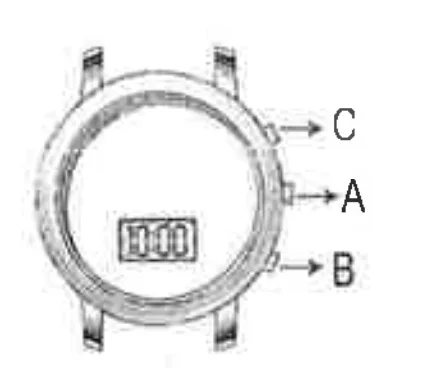
- DO NOT IMMERSE IN WATER
- DO NOT WEAR IF THE CASEBACK IS MISSING OR DISASSEMBLED
- DO NOT MIX OLD AND NEW BATTERIES (NICKEL-CADMIUM) BATTERIES.
- DO NOT MIX ALKALINE, STANDARD (CARBON-ZINC), OR RECHARGEABLE
For More Blogs, Visit ManualsLibraryy.
Pokemon POK3017AC Kids Digital LCD Flashing Watch-FAQs
How do I set the time on my Pokemon LCD flashing watch?
Press the “A” button three times to display the day. Use the “B” button to adjust it. Press “A” five times to move to the minutes, then use “B” to set the correct time.
How do I set the date on my Pokemon POK3017AC watch?
Press the MODE button twice to enter month setting mode. Press MODE again to adjust the day. Continue pressing to set hours and minutes as needed.
How can I make the flashing lights work on my Pokemon watch?
Make sure the watch is turned on and set properly. Some models automatically flash when buttons are pressed or at specific times like the hour mark.
How do I reset my Pokemon Accutime watch?
Tap the SET button and enter the password 1122 (if prompted). This will restart and reset your watch to factory settings.
How does an LCD watch work?
LCD watches display time using liquid crystals that change when powered, reflecting light to form numbers on the screen.
How long does the battery in a Pokemon LCD watch last?
Digital watch batteries usually last 1–3 years, depending on how often the backlight and flashing features are used.
How do I replace the battery in my Pokemon watch?
Use a small screwdriver to open the back cover, remove the old battery, and insert a new one of the same type. Be sure to match the polarity (+/–).
Can I charge my Pokemon digital watch?
This model uses a replaceable button-cell battery and does not require charging.
Why isn’t my Pokemon LCD watch displaying correctly?
Check the battery connection or replace it if the display is dim or missing digits. Ensure no moisture has entered the watch.
Is the Pokemon POK3017AC watch waterproof?
It is splash-resistant, but not fully waterproof. Avoid submerging it in water or wearing it while swimming.