
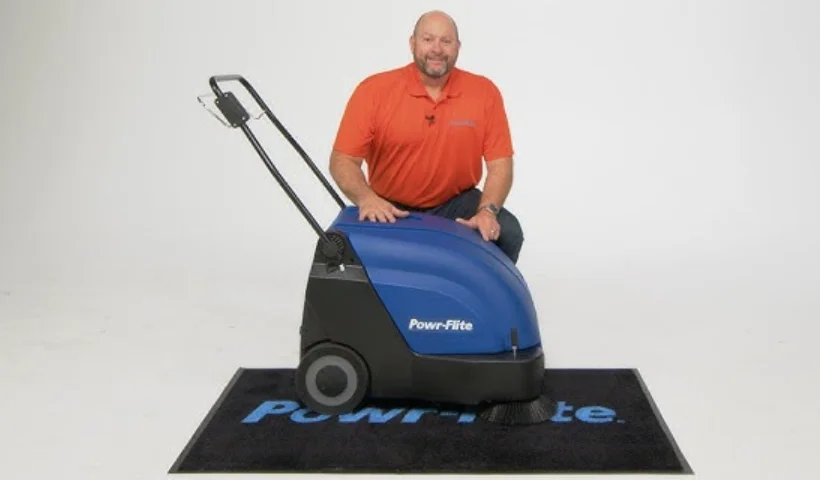

Powr-Flite PW050-W26-U Quasar 26 Battery Sweeper

IMPORTANT SAFETY INSTRUCTIONS
READ AND UNDERSTAND ALL INSTRUCTIONS. BEFORE USING THIS UNIT. Read and understand this owner’s manual and all labels on the unit before operating. Safety is a combination of common sense, staying alert, and knowing how your unit works. Use this unit only as described in this manual. Use only the manufacturer’s recommended attachments. To reduce the risk of personal injury or damage to your unit, use only recommended accessories. WARNING: To avoid fire, DO NOT use with a flammable or combustible liquid or floor cleaner. WARNING: To avoid electric shock, DO NOT expose to rain. Store indoors. When using this unit, basic precautions should always be followed, including the following:
- DO NOT leave the unit when plugged in. Unplug from the outlet when not in use and before servicing.
- DO NOT allow the unit to be used as a toy. Close attention is necessary when used around or near children.
- Use only as described in this manual. Use only the manufacturer’s recommended attachments.
- DO NOT use with a damaged cord or plug. If the unit is not working properly because it has been dropped, dropped into water, left outdoors, or damaged in any way, contact a service center.
- DO NOT handle the plug or appliance with wet hands.
- DO NOT put any objects into openings.
- DO NOT use with any opening blocked; keep free of dust, lint, hair, or anything that may reduce air flow.
- Keep hair, loose clothing, fingers, and all parts of the body away from openings and moving parts.
- DO NOT pick up anything that is smoking or burning, such as cigarettes, matches, or hot ashes.
- DO NOT use it to pick up hazardous chemicals.
- Turn off all controls before unplugging.
- DO NOT use to pick up flammable or combustible liquids such as gasoline or use in areas where they may be present.
- DO NOT use where oxygen or anesthetics are used.
- Replace damaged or worn parts immediately with genuine original equipment parts to maintain safety.
- This battery charger must be connected to a properly grounded outlet only. See grounding instructions.
- DO NOT use equipment outdoors or in the rain.
- DO NOT use equipment near or around flammable or explosive materials, fuels, or solvents.
- DO NOT allow the unit to freeze.
- Anyone designated to operate this equipment must, without fail, read and thoroughly understand all instructions and precautions before use.
- Do not operate equipment under any unsafe condition.
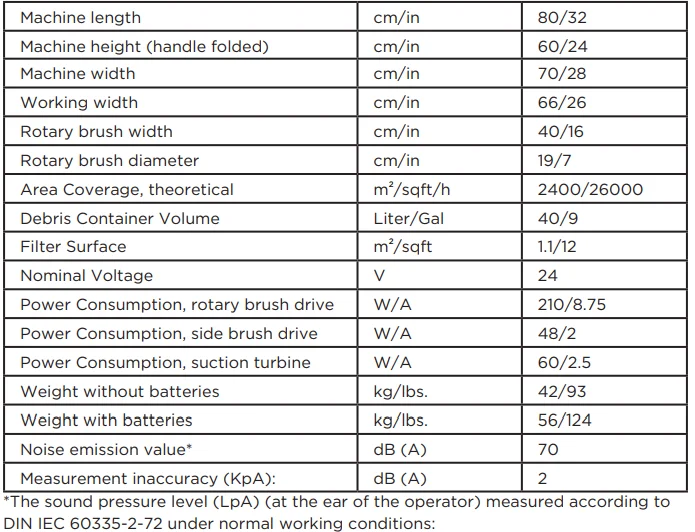
TECHNICAL SPECIFICATIONS
PARTS IDENTIFICATION
Method of operation
The Powr-Flite PW050-W26-U is a machine designed to sweep and clean waste from hard floors and carpets. The side brush (Fig. 4/1) sweeps the dirt from corners to a position in front of the rotary brush (Fig. 4/2). The rotary brush sweeps the larger particle dirt overhead into the debris container (Fig. 4/3). The finer dust picked up is drawn up by the suction turbine, fed into the filter system (Fig. 4/4), and filtered out. Only dust-free air is fed back into the ambient air. The machine is equipped with maintenance-free batteries (Fig. 4/5), a specially adapted, fully automatic battery charger (Fig. 4/6), and a total discharge signal transducer to protect it against total discharge.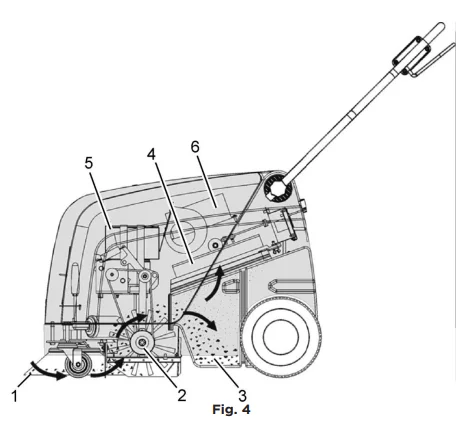
Operating and indicator elements
- Control lamp for rotary brush drive, side brush drive, and suction turbine
- ON/OFF button for rotary brush drive, side brush drive, and suction turbine
- Control lamp for side brush drive
- ON/OFF button for side brush drive
- Control lamp for battery charger operation
- Charge control indicator
- Drive bar
ON/OFF button for rotary brush, side brush, and suction turbine (Fig. 5/1).
The button activates the rotary brush drive, side brush drive, and suction turbine so they are ready to operate. The side brush drive can be switched off separately. The suction turbine cannot be switched off separately, which prevents the dust vacuum from being activated by accident.
Control lamp for rotary brush drive, side brush drive, and suction turbine (Fig. 5/2).
The green control lamp indicates that the rotary brush drive and suction turbine are ready to operate. If the rotary brush or suction turbine is overloaded, a safety shutdown is triggered and the control lamp flashes.
ON/OFF button for side brush drive (Fig. 5/3).
The button can be used to switch off the side brush drive independently of the rotary brush drive and to activate it for use again.
Control lamp for side brush drive (Fig. 5/4).
The green control lamp indicates that the side brush drive is ready to operate. If the side brush is overloaded, a safety shutdown is triggered, and the control lamp flashes.
Control lamp for battery charger operation (Fig. 5/5).
This control lamp indicates that the batteries are being charged.
Charge control indicator (Fig. 5/6).
During the charging process, the machine’s electronics system controls ensure the machine is not switched on inadvertently and indicate the charge status. The battery charge status is indicated by 4 green and 1 red LED.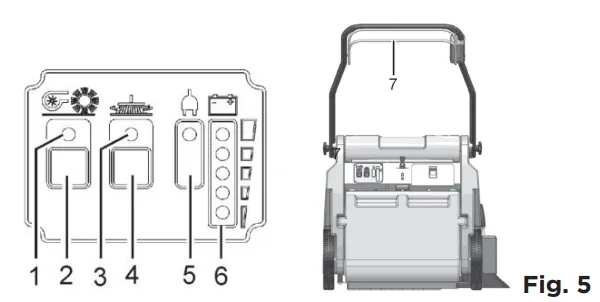
The battery voltage is depicted in 5 levels:
- > 25.1 V = all green LEDs on
- > 24.5 V = bottom 3 green LEDs on
- > 23.9 V = bottom 2 green LEDs on
- > 22.7 V = bottom green LED on
- > < 22.7 V = red battery LED flashes
Drive bar (Fig. 5/7).
The drive bar switches all the drives that are ready to operate on or off. The drive bar serves to prevent damage. If the drive bar is released during operation, all the drives are switched off.
3.2.2 Operating elements on the machine
Knurled screws for handle (Fig. 6/1).
The two knurled screws enable the handle to be adjusted to a comfortable height for the user.
Shaking device lever (Fig. 6/2).
In order to clean the filter in the dust vacuum, switch the shaking device lever several times quickly to the left and right.
Debris container locks (Fig. 6/3).
Pull the lock lever up to remove the debris container.
Side brush lever (Fig. 6/4).
Use the lever to lower or raise the side brush.
Charger cable flap (Fig. 6/5).
The battery charger cable is located behind the flap to the right, beside the operating panel. Pull the lock downwards to open the flap.
OPERATION
Starting up
Unpacking and assembling Fig. 1. Open the box; two people are required. To remove the machine from the protective wrap and place it on the floor.
- To fix the side brush (Fig. 1/1), align the drive pins on the side brush drive plate and secure with the wing bolt and washer supplied.
- Loosen the two knurled screws (Fig. 1/2) holding the handle a few revolutions until the handle can be raised and positioned. Set the handle to a height comfortable for the user and then tighten the knurled screws.
- Remove the locking bolt (Fig. 1/3) holding the hood and pivot the hood open.
- Fix the disassembled cable lug (Fig. 2) to the corresponding battery contact. It is possible that sparking will occur when connecting the batteries!
- Close the hood and lock it in place with the bolt.
- The unit is now ready to operate.


Instruction
Instructions to operators are required before putting the machine into service. Only technicians from your local, authorized Tornado dealer are allowed to provide initial instruction on how to use the machine.
Initial battery charge
Prior to starting up
Carry out the following checks before starting the machine:
- Check the charge status of the batteries.
- Check the levels of wear on the rotary brush and side brush.
- Check the fill level of the debris container.
Operation
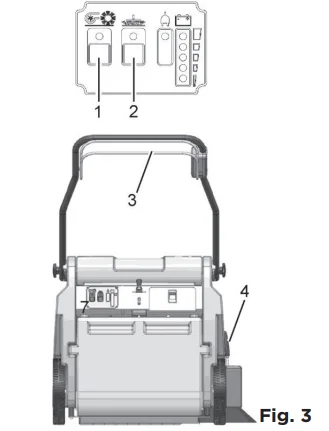
Please read the Safety Information in Chapter 1. Before switching the machine on, ensure that the drive bar (Fig. 3/3) on the handle has not been actuated.
- Switch the machine on using the (Fig. 3/1) button; the rotary brush drive, dust vacuum, and side brush drive are ready to operate.
- Lower the side brush to its working position using the lever (Fig. 3/4). When working without the side brush, do not lower the side brush and press the button (Fig. 3/2) for the side brush once. The green control lamp goes out.
- Actuate the drive bar (Fig. 3/3) on the handle; the machine starts to work. Start work immediately after actuating the drive bar; imprints could be produced on the floor. Release the drive bar when driving over thresholds.

Stopping the machine
When the drive bar is released, the rotary brush drive, dust vacuum, and side brush drive switch off automatically.
After completing work
- Drive to an appropriate maintenance area.
- Stop the machine. Raise the side brush to its idle position and switch the machine off.
- Actuate the filter shaker.
- Empty the debris container.
- Check the brush space for accumulations of dirt.
- Check the charge status of the batteries.
Battery system
- Battery indicator for the charger
- Charge control indicator
- Charger
- Flap for the charger mains power cable
- Connection cable
- Lashing straps
- Batteries
- Hood
- Connection plan
Warning: Batteries may only be handled and changed by properly skilled maintenance personnel. The charge control indicator (Fig. 7/2) indicates the charge. status of the batteries during operation. When the batteries are discharged, the red LED flashes. The machine functions are restricted. Charge the batteries immediately!
MAINTENANCE
Charging the batteries
The charge control indicator (Fig. 7/2) indicates the charge status of the batteries during operation. The batteries must be charged immediately when the red LED lights up. The batteries (Fig. 7/7) are charged using the integrated battery charger (Fig. 7/3). The charger is connected by means of the power cable (Fig. 7/4). While the battery is being charged, the battery indicator on the charger (Fig. 7/1) lights up.
Before starting the machine up for the first time, the batteries to be used must be fully charged properly by implementing the initial battery charge routine. Tornado assumes no liability for damage to the battery caused by a fault when the battery is charged for the first time.
Total discharge signal transducer (TSG)
The machine is equipped with a total discharge signal transducer to protect the batteries against total discharge. The total discharge signal transducer is integrated in the electronics.
Servicing the driving batteries: Never leave discharged batteries lying around; recharge them immediately!
Removing the batteries
- Park the machine in a level area of the floor.
- Switch off the machine.
- Loosen the locking bolt holding the hood (refer to Figure 1/3) and pivot the hood open.
- Slacken the lashing straps (Fig. 7/6).
- Disconnect the connection cable (Fig. 7/5) from the batteries and remove the batteries.
Inserting the batteries
- Install the two lower batteries in the battery holder in accordance with Figure 7.
- Lay the rubber mat on the batteries.
- Place the other two batteries on the rubber mat.
- Tighten the lashing straps (Fig. 7/6).
- Connect the battery poles to the connection cables in accordance with the connection plan (Fig. 7/9). It is possible that sparking will occur when connecting the batteries! Check to ensure a firm fit!
- Close the hood (Fig. 7/8) and lock it in place with the locking bolt on the frame.
Disposing of batteries
Used batteries with the recycling symbol contain reusable commodities. In accordance with the symbol with the crossed-out bin, these batteries must not be disposed of in domestic waste.
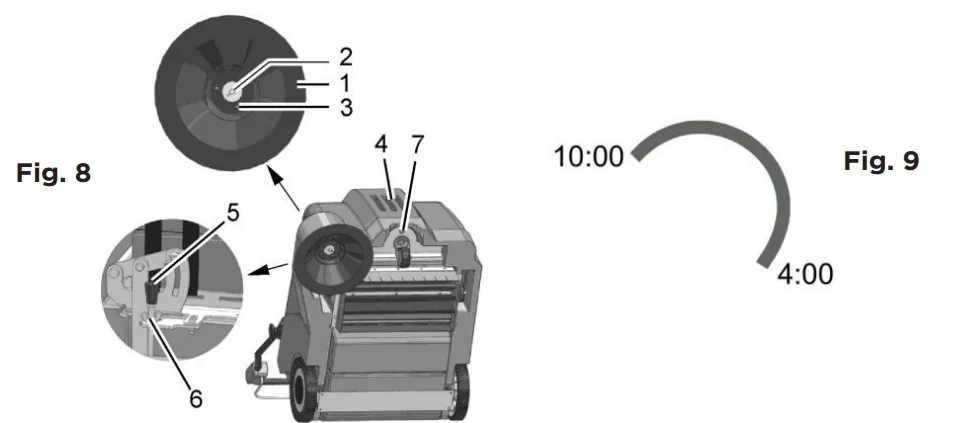
Side brush
- Side brush
- Wing bolt
- Carrier
- Hood
- Adjusting the bolt
- Counternut
- Locking bolt
Changing the side brush
Check the side brush (Fig. 8/1) weekly and change it in the case of wear.
- Switch the machine off and lay it on its side.
- Remove the wing bolt (Fig. 8/2) with the washer from underneath the side brush (Fig. 8/1).
- Pull the side brush off.
- To fix the side brush, align the drive pins on the side brush drive plate and secure with the wing bolt and washer supplied.
Setting the sweeping pattern
In the case of brush wear and after changing the side brush (Fig. 8/1), readjust the sweeping pattern.
- Switch the machine off; unscrew the locking bolt (Fig. 8/7) and open the hood (Fig. 8/4).
- Loosen the counternut (Fig. 8/6) and adjust the sweeping pattern by turning the adjusting bolt (Fig. 8/5) clockwise and counterclockwise so that it touches the floor.
- Tighten the counternut again and close the hood.
- Switch the machine on and allow the side brush to run while standing still for a short time.
- Switch the machine off, raise the front a little, and pull it back.
- Check the sweeping pattern, comparing it with a clock viewed while driving forward. When set correctly, the sweeping pattern must make an impression on the floor between approx. 10:00 and 4:00 (Fig. 9).
- Repeat the process, if necessary, until the sweeping pattern is set correctly.
- Close the hood (Fig. 8/4) and screw the locking bolt (Fig. 8/7) back in.

Rotary brush
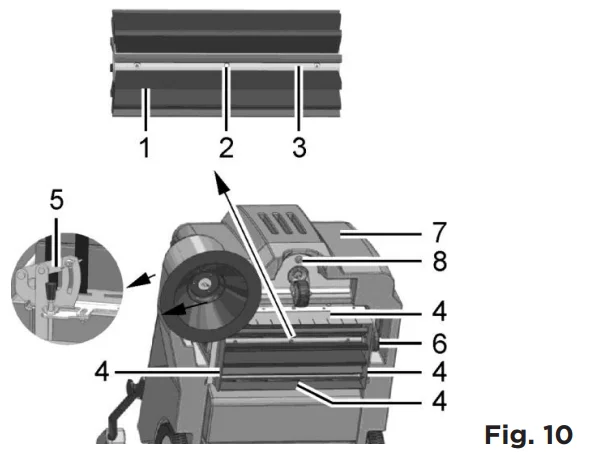
- Rotary brush
- Fillister head self-tapping screws
- Rotary brush segment
- Sealing strips
- Sweeping pattern adjusting lever
- Timing belt
- Hood
- Locking bolt
Cleaning the brush space
The brush space with rotary brush (Fig. 10/1) and gaskets (Fig. 10/4) must be checked daily for signs of dirt and cleaned, if necessary.
Changing the rotary brush
The rotary brush (Fig. 10/1) must be checked weekly and changed in the case of wear.
- Switch the machine off and lay it on its side.
- Loosen the six screws (Fig. 10/2) in the rotary brush and remove the two roller segments.
- Install the two new roller segments and fix them in place with the fillister head screws.
- After changing the rotary brush, readjust the sweeping pattern as necessary.
Setting the sweeping pattern
In the case of brush wear and after changing the rotary brush (Fig. 10/1), readjust the sweeping pattern.
- Switch the machine off, unscrew the locking bolt (Fig. 10/8), and open the hood (Fig. 10/7).
- Loosen the wing nut on the adjusting lever (Fig. 10/5) and adjust the sweeping pattern using the adjusting lever by pivoting it up and down until it touches the floor.
- Tighten the wing nut again and close the hood.
- Switch the machine on and allow the rotary brush to run while standing still for a short time.
- Switch the machine off, raise the front a little, and pull it back.
- When adjusted correctly, there must be an approx. 50 mm wide sweeping pattern on the floor, which has parallel sides.
- Repeat the process, if necessary, until the sweeping pattern is set correctly.
- Close the hood (Fig. 10/7) and screw the locking bolt (Fig. 10/8) back in.
Changing the sealing strips
The four sealing strips (Fig. 10/4) must be checked weekly and changed in the case of wear.
- Switch the machine off and lay it on its side.
- Remove all four sealing strips (Fig. 10/2) with holders.
- Loosen the screws in the holders and remove the damaged sealing strips.
- Fix the new sealing strips on the holders and reinstall them.
- Adjust the sealing strips so that they touch the floor lightly.
Changing the timing belt
The timing belt (Fig. 10/6) must be checked every 500 operating hours and changed in the event of wear.
- Switch the machine off, unscrew the locking bolt (Fig. 10/8), and open the hood (Fig. 10/7).
- Slacken the timing belt (Fig. 10/6) using the tension pulley and remove the belt.
- Slacken the tension pulley and install the new timing belt. The timing belt is automatically tensioned by means of a tension spring.
- Close the hood (Fig. 10/7) and screw the locking bolts (Fig. 10/8) back in.

Debris container
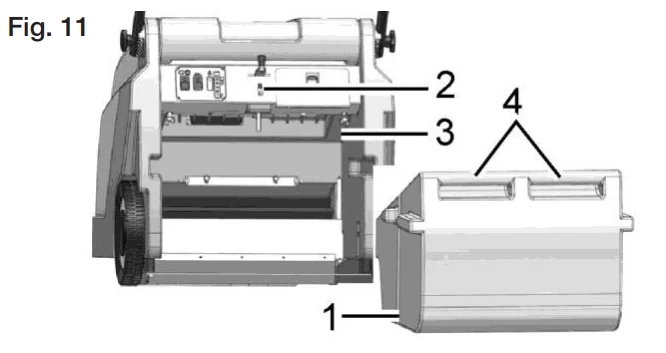
- Debris container
- Locking mechanism
- Seal
- Handle
Emptying the debris container
Check the fill level of the debris container (Fig. 11/1) at regular intervals (max. load capacity 25 kg) and empty as necessary.
- Switch the machine off and pull the locking mechanism (Fig. 11/2) on the debris container (Fig. 11/1) upwards.
- Pull the debris container to the rear out of the machine using the handle (Fig. 11/4) and dispose of the waste according to the applicable environmental laws.
- Reinstall the debris container and press it against the locking mechanism until it audibly latches into place.
Changing the seal
Check the seal (Fig. 11/3) weekly for signs of wear and change it as necessary.
- Switch off the machine and pull the locking mechanism (Fig. 11/2) on the debris container (Fig. 11/1) upwards.
- Pull the debris container (Fig. 11/3) out of the machine using the handle (Fig. 11/4).
- Pull the seal for the debris container from the filter support frame. Install a new seal.
- Reinstall the debris container.

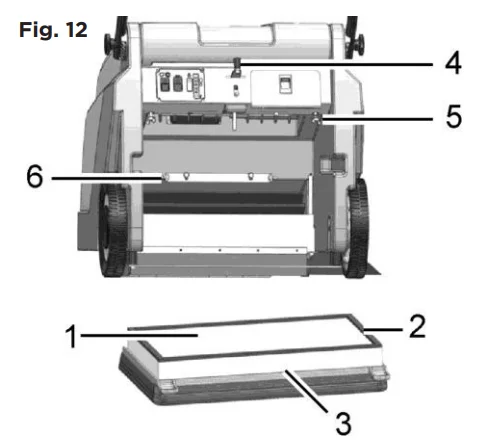
Dust vacuum
- Filter
- Sealing strip
- Filter support frame
- Shaking device
- Wing bolts
- Holders
Cleaning the filter
Clean the filter (Fig. 12/1) in the dust vacuum as necessary using the shaking device (Fig. 12/4). In the case of extreme accumulation of dirt, clean the filter as follows:
- Switch the machine off and remove the debris container.
- Loosen the wing bolts (Fig. 12/5). Pivot the filter support frame (Fig. 12/3) down and remove it.
- Remove the filter from the filter support frame. Beat the filter clean or use a vacuum cleaner. Be careful not to damage the filter ribs!
- Insert the correct side of the filter in the filter support frame. The sealing strip (Fig. 12/2) must point towards the suction turbine!
- Hook the filter support frame in the holder (Fig. 12/6) and fix it in place with the wing bolts.
- Reinstall the debris container.
Changing the filter
Check the filter (Fig. 12/1) every 250 operating hours for signs of wear and change it as necessary.
- Switch the machine off and remove the debris container.
- Unscrew the wing bolts (Fig. 12/5). Pivot the filter support frame (Fig. 12/3) downward and remove it.
- Remove the filter from the filter support frame.
- Insert the correct side of the new filter in the filter support frame. The sealing strip (Fig. 12/2) must point towards the suction turbine!
- Hook the filter support frame in the holder (Fig. 12/6), if necessary, and fix in place with the wing bolts.
- Reinstall the debris container.

Install the Lint filter.
If the machine is mainly used on carpet, you have to install the lint filter (Fig.13/7).
- Switch the machine off and remove the debris container.
- Unscrew the wing bolts (Fig.12/5). Pivot the filter support frame (Fig.13/3) down and remove it.
- Mount the lint filter (Fig.13/7) between the filter and the filter support frame
- Hook the filter support frame in the holder (Fig.12/6), if necessary, and fix it in place with the wing bolts.
- Reinstall the debris container.


Visit WWW.POWR-FLITE.COM for more information.
For More Manuals By Powr-Flite, Visit ManualsLibraryy.
Powr-Flite PW050-W26-U Quasar 26 Battery Sweeper -FAQs
What is the Powr-Flite Quasar 26 Battery Sweeper and who is it for?
The Powr-Flite Quasar 26 Battery Sweeper (model PW050-W26-U) is a cordless wide-area sweeper designed for cleaning large indoor spaces. It’s ideal for commercial environments such as schools, hospitals, offices, and retail areas where speed and efficiency are important. It combines battery power with a wide cleaning path to tackle debris on both hard floors and low-pile carpets.
How wide is the cleaning path on the Quasar 26?
This model features a 26-inch wide cleaning path, meaning it covers a wide swath of floor with each pass. The broad path helps you sweep up to 26,000 square feet per hour, making it much faster than manual brooms or standard cordless vacuums.
How long does the battery last and how long to recharge?
The Quasar 26 comes with a rechargeable 12 V/12 Ah battery that delivers about 1.5 hours of runtime on a full charge. Recharging typically takes around 4 hours with the onboard charger included with the unit. This balance of runtime and charge cycle supports most daily cleaning needs.
What warranty coverage does the Powr-Flite Quasar 26 Battery Sweeper have?
Powr-Flite backs this model with a 1-year parts and labor warranty, offering peace of mind against defects in materials or workmanship during normal use. Specific terms may vary by region or seller, so reviewing the official warranty details is recommended when purchasing.
How heavy is the sweeper and what are its dimensions?
With batteries installed, the Quasar 26 weighs approximately 124 lbs and measures about 32″ long × 28″ wide × 24″ high. Its compact footprint and collapsible handle aid storage and transport when not in use.
What filtration does the Quasar 26 use?
The unit uses a 3-micron primary filter that captures about 99.7% of dust particles, helping keep the air cleaner as you sweep. The filter also includes a manual shaker to help maintain airflow and performance between deep cleans.
Is the Quasar 26 quiet enough for noise-sensitive environments?
Yes. The sweeper operates at about 67 dB(A), which is relatively quiet for a commercial cleaning machine. This makes it suitable for environments like offices, schools, and hospitals where noise levels matter.
How is dust and debris collected and emptied?
Debris is collected in a rugged, corrosion-proof 9-gallon (40 L) bin that is top-loading for easier emptying than traditional front-load systems. This bagless design speeds up maintenance and reduces the number of times you need to stop and dump the container during cleaning.