
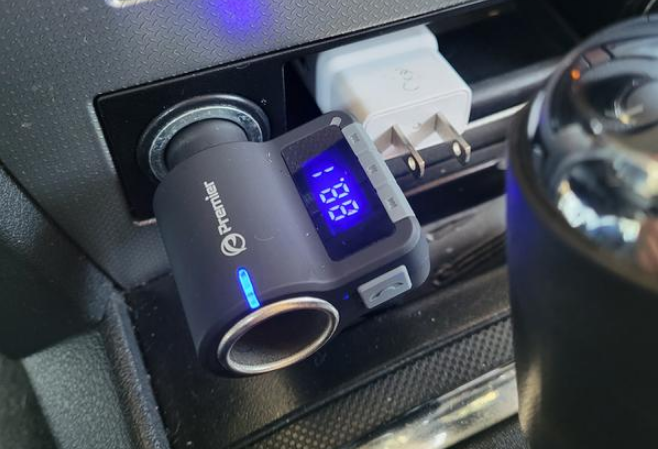

Premier PWFMT5 Bluetooth FM Transmitter

Introduction
This device lets you stream music and calls directly from your Bluetooth device to your car’s FM stereo system. The built-in microphone provides you with an amazing hands-free function. It also features a USB reader that lets you stream your favorite MP3 and WMA tunes to your car’s stereo system and charge your phone using the dual USB charger, plus a 12V socket.
Features:
- FM Frequency Support: 88.1–107.9 MHz
- Bluetooth hands-free supported
- Bluetooth® easy pairing – no pairing code needed, pairing name: PWFMT5
- 2 x USB ports: total 5V/3.4A output, USB#2 supports USB flash input (MP3 format music files)
- 1 x 12V socket: supports car chargers
- LCD Display
- Button #1 – 1) answer/end phone calls, 2) pause/play music, 3) long press for pairing
- Button #2 – 1) short press for previous track, 2) long press for volume down
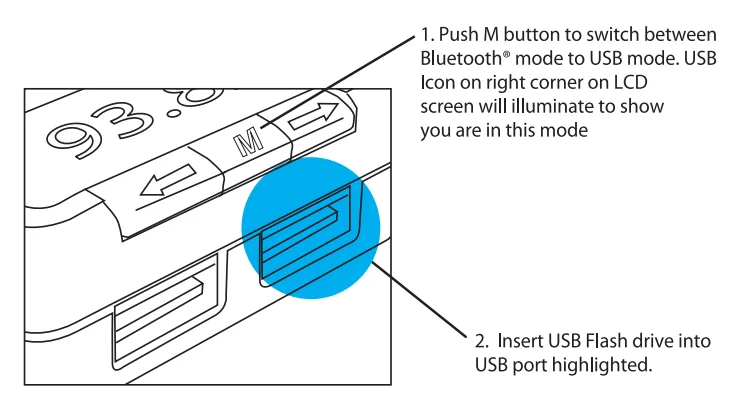
- Button #3 – M 1) short press to tune FM frequency mode, 2) long press to change between Bluetooth and USB
- flash input mode
- Button #4 – 1) short press for next track, 2) long press for volume up

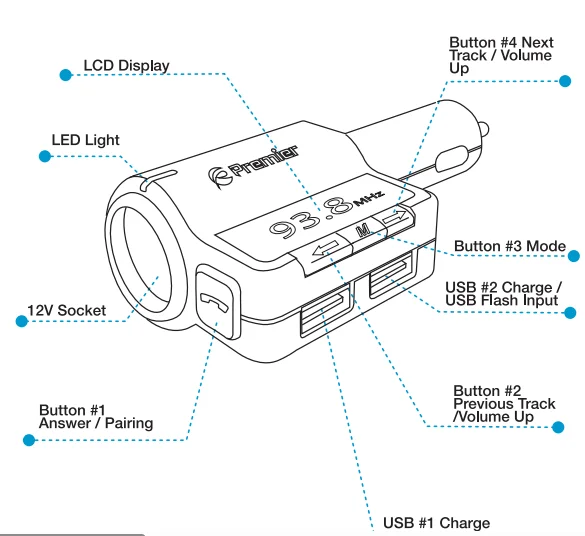
Button Control:
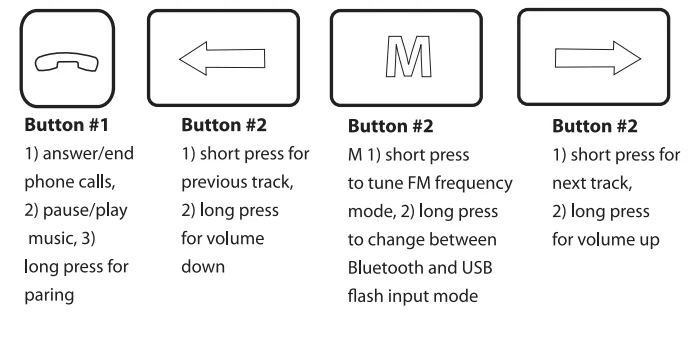
Operation Instructions:
Using FM Transmitter Function:
- Plug the FM transmitter into your vehicle’s cigarette lighter.
- Tune your radio to an unused FM frequency, then match the same frequency on this unit.
- Insert a USB flash drive into the USB port that contains MP3 files. It will play and transmit the MP3 files automatically.
Bluetooth Pairing Instructions:
Using Bluetooth® for the first time, you need to pair your mobile phone with this unit.
- Step 1: Activate PWFMT5 into pairing mode. Long-press button #1 until the screen shows “PAR.”
- Step 2: Activate your mobile phone’s Bluetooth function, then search for “new device.” When the mobile phone detects this unit (named PWFMT5), click on the name to pair. In the music playing mode, when there is an incoming call, this unit will automatically switch to hands-free mode.
Bluetooth® Calling:
- Please press button #1 to answer the incoming call.
- Please press button #1 to end the call.
- Press button #1 twice to dial the last number.
- When dialing a new call, you can only dial the phone number on your mobile phone, but once the call is connected, you can use the hands-free function.
Using USB Charger Function:
- When the FM transmitter is plugged into your 12V socket, you can plug in your compatible USB sync and charge cables that come with your device to charge two devices simultaneously.

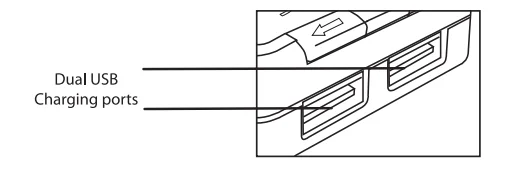
Listening to Music from Your USB Drive
Questions? Visit www.PremierAccessoryGroup.com or call 1-888-492-8338 Toll Free.
For More Blogs, Visit ManualsLibraryy.
Premier PWFMT5 Bluetooth FM Transmitter-FAQs
How do I connect the Premier PWFMT5 to my phone?
Plug the transmitter into your car’s cigarette lighter or USB port. Enable Bluetooth on your phone, search for the device, and select “PWFMT5” to pair. A voice prompt or LED indicator confirms successful pairing.
How do I tune the FM frequency on the transmitter?
Rotate the knob clockwise to increase or counterclockwise to decrease the frequency. Alternatively, use quick tuning by long-pressing the button to adjust to your car radio’s FM channel.
What is the best FM frequency to use?
Choose a frequency between 88.1 MHz and 107.9 MHz that has no nearby radio station interference. Frequencies like 92.0 MHz often work well for clear audio.
Can the transmitter play music from my phone?
Yes. Once paired via Bluetooth, you can stream music, listen to podcasts, or take hands-free calls through your car stereo.
Why is my Bluetooth showing connected but no sound?
Check that the car radio is set to the same FM frequency as the transmitter. Also, ensure your phone’s volume is up and the transmitter is properly powered.
How do I reset the PWFMT5 transmitter?
Press and hold the Power button for 10 seconds until the LED turns off. This clears all previous pairing data and restores factory settings.
What are common problems with FM transmitters?
Typical issues include: signal interference, audio distortion, weak Bluetooth connection, or power supply issues. Ensure proper frequency selection, strong Bluetooth pairing, and secure power connections.
Will the FM transmitter drain my car battery?
It uses power from your car’s cigarette lighter or USB port. If left plugged in while the engine is off, it may slowly drain the battery.
Can the Bluetooth signal pass through walls or glass?
Bluetooth works best within a 10-meter range. Walls or metal surfaces can weaken the signal, so keep devices in the car cabin for optimal performance.