
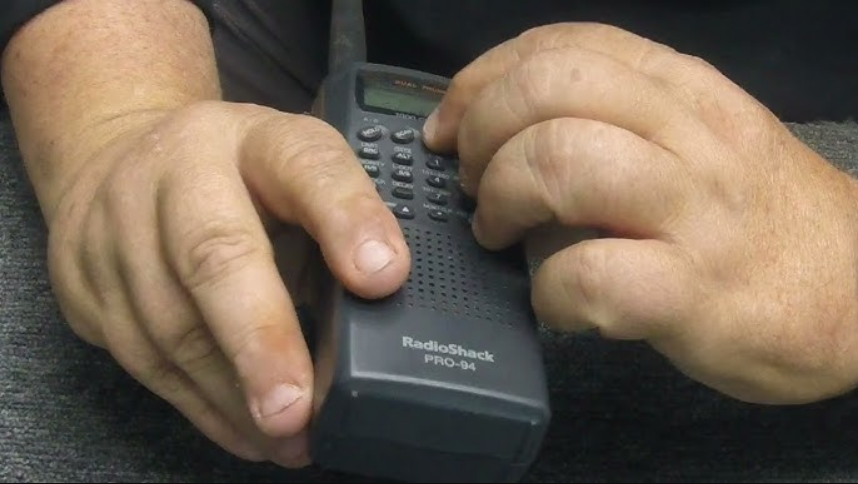

RadioShack PRO-94 1000 channel Dual Trunking Scanner
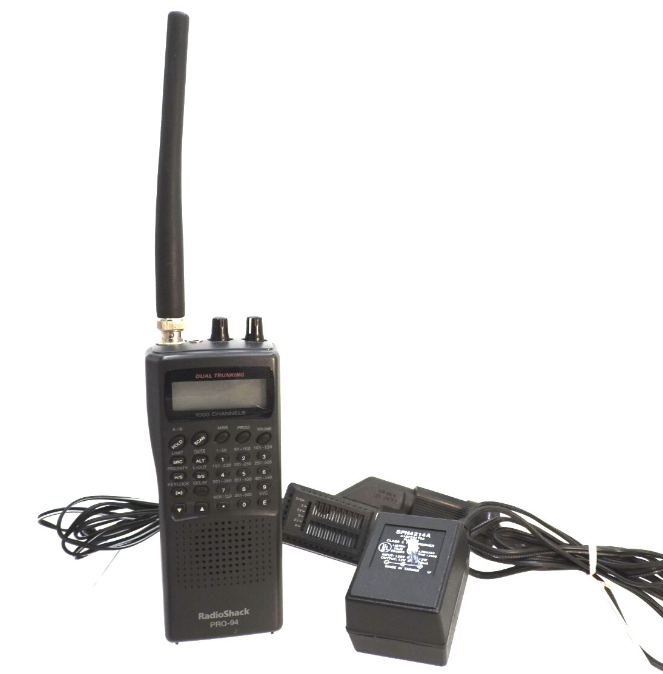
FEATURES
Your RadioShack PRO-94 1000-Channel Handheld Trunking Scanner is one of a new generation of scanners designed to track Motorola Type I, Type II, hybrid analog systems (such as Smartnet and Privacy Plus), plus GE/Ericsson EDACS. Those systems are extensively used in many 800 MHz, 900 MHz, and UHF communication systems.
Trunking communications systems let a large group of 2-way radio users (or even different groups of 2-way radio users) efficiently use a set of frequencies. Instead of selecting a specific frequency for a transmission, the user simply selects a talk group. The trunking system automatically transmits the call on the first available frequency, and also sends (on a different frequency called a data channel) a code that uniquely identifies that transmission.
Since the trunking system might send a call and its response on different frequencies, it is difficult to listen to trunked communications using a regular scanner. The PRO-94 lets you select and monitor the data channel frequency sent with a 2-way radio transmission, so you can hear the call and response for that user and more easily “follow” the conversation.
The scanner also lets you scan conventional transmissions, and it is preprogrammed with service banks for convenience. By pressing a single button, you can quickly search those frequencies most commonly used by public service and other agencies, without tedious and complicated programming.
This scanner gives you direct access to over 37,000 exciting frequencies, including police and fire departments, ambulance services, and amateur radio services, and you can change your selection at any time.
Your scanner also has these special features:
- Triple-Conversion Circuitry — virtually eliminates any interference from IF (intermediate frequency) images, so you hear only the selected frequency.
- 20 Channel-Storage Banks — you can store up to 50 channels in each of 10 different banks, in two separate groups, for a total of 1000 channels, so you can more easily identify calls.
- Five Scan Lists — you can store up to 50 trunking talk group IDs in each trunk scanning bank.
- NWR-SAME Circuitry — lets you listen to coded weather emergency information using Specific Area Message Encoding.
- Two-Second Scan Delay — delays scanning for about 2 seconds before moving to another channel, so you can hear more replies that are made on the same channel.
- Lock-Out Function — lets you set your scanner to skip over specified channels or frequencies when scanning or searching, and skip over talk group IDs when tracking trunked systems.
- Priority Channels — lets you program one channel in each bank (20 in all) and then have the scanner check that channel every 2 seconds while it scans the bank, so you don’t miss transmissions on those channels.
- Five Service Banks — frequencies are preset in separate police (fire/emergency), aircraft, ham, marine, and weather banks, to make it easy to locate specific types of calls.
- Hypersearch™ lets you set the scanner to search at up to 300 steps per second in frequency bands with 5 kHz steps, compared to the normal search speed of 100 steps per second.
- Hyperscan™ — the scanner automatically scans up to 50 channels per second to help you quickly find interesting broadcasts.
- Key Lock — lets you lock the scanner’s keys to help prevent accidental changes to the scanner’s programming.
- Data Signal Skip — lets you set the scanner to skip non-modulated or data signals (such as fax or modem transmissions) during searches. This lets the scanner avoid non-voice signals, making a search faster.
- Disconnect Tone Detect — the scanner automatically tunes to the trunking data channel when it receives a disconnect transmission. You can turn this off, so you can continuously monitor a channel with a weak transmission where conversations are often disconnected.
- Manual Access — lets you directly access any channel.
- Liquid-Crystal Display — makes it easy to view and change programming information.
- Display Backlight — makes the scanner easy to read in low-light situations.
- Flexible Antenna with BNC Connector — provides adequate reception in strong signal areas and is designed to help prevent antenna breakage. Or, you can connect an external antenna for better reception.
- Monitor Memories — let you temporarily store up to 10 frequencies or talk group IDs.
- Memory Backup — keeps the frequencies stored in memory for an extended time if the PRO-94 loses power.
- Three Power Options — let you power the scanner using internal batteries, external AC power using an optional AC adapter/charger, or DC power using an optional DC cigarette-lighter power cable.
- Key Confirmation Tones — the scanner sounds a tone when you operate correctly, and an error tone if you make an error.
- Battery Save — saves battery power when the scanner does not detect any transmissions for more than 5 seconds when a channel is manually selected.
- Battery Low Alert — warns you when battery power gets low.
- Weather Alert Indicator — your scanner also functions as a severe weather alert monitor.
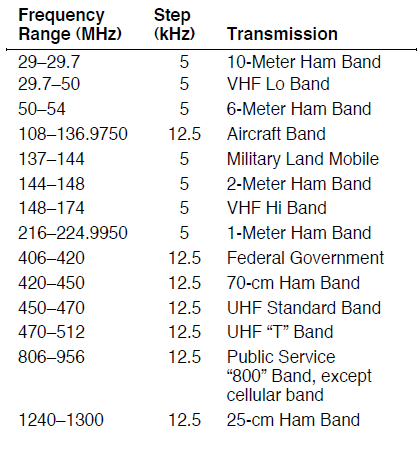
Your scanner can receive these bands:
FCC NOTICE
Your scanner might cause radio or TV interference even when it is operating properly. To determine whether your scanner is causing the interference, turn off your scanner. If the interference goes away, your scanner is causing it. Try the following methods to eliminate the interference:
- Move your scanner away from the receiver
- Connect your scanner to an outlet that is on a different electrical circuit from the receiver
- Contact your local RadioShack store for help
Note: Mobile use of this scanner is unlawful or requires a permit in some areas. Check the laws in your area.
SCANNING LEGALLY
Your scanner covers frequencies used by many different groups, including police and fire departments, ambulance services, government agencies, private companies, amateur radio services, military operations, pager services, and wireline (telephone and telegraph) service providers. It is legal to listen to almost every transmission your scanner can receive. However, there are some transmissions you should never intentionally listen to. These include:
- telephone conversations (cellular, cordless, or other private means of telephone signal transmission)
- pager transmissions
- any scrambled or encrypted transmissions
According to the Electronic Communications Privacy Act (ECPA), as amended, you are subject to fines and possible imprisonment for intentionally listening to, using, or divulging the contents of such a transmission unless you have the consent of a party to the communication (unless such activity is otherwise illegal).
This scanner is designed to prevent reception of illegal transmissions, in compliance with the law, which requires that scanners be manufactured in such a way as not to be easily modifiable to pick up those transmissions. Do not open your scanner’s case to make any modifications that could allow it to pick up transmissions that it is not legal to listen to. Doing so could subject you to legal penalties.
We encourage responsible, legal scanner use.
PREPARATION
You can power your scanner from any of three sources:
- internal batteries (not supplied)
- standard AC power (using an optional AC adapter)
- vehicle battery power (using an optional DC adapter)
USING INTERNAL BATTERIES
You can power your scanner using four alkaline, lithium, or rechargeable (Ni-Cd or Ni-MH) AA batteries (not supplied). For the longest operation and best performance, we recommend the selected batteries available from your local RadioShack store.
Using Non-Rechargeable Batteries
Follow these steps to install non-rechargeable batteries.
- Turn the volume/OFF counterclockwise until it clicks to make sure the power is turned off.

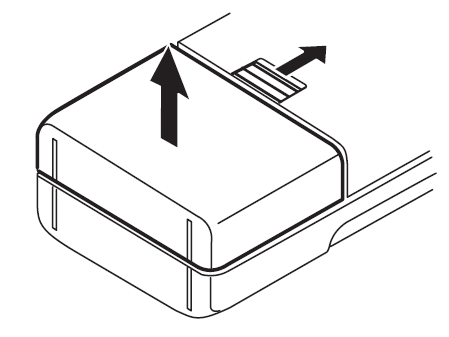
- Slide up and hold the tab on the back of the scanner, then pull up the battery compartment cover from the top edge.

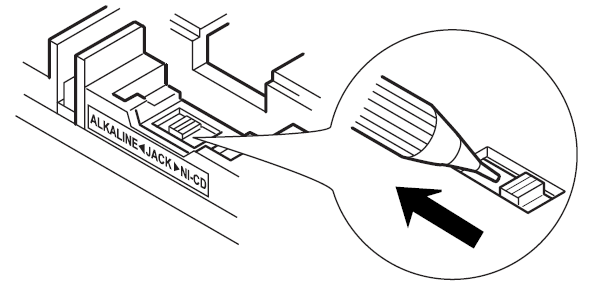
- Before you install alkaline or any other nonrechargeable batteries, use a pointed object such as a ballpoint pen to set ALKALINE ◀ JACK ▶ NI-CD inside the compartment to ALKALINE.
 Warning: Set ALKALINE ◀ JACK ▶ NI-CD to NI-CD for use only with nickel cadmium (Ni-Cd) or nickel metal hydride (Ni-MH) rechargeable batteries. Never attempt to recharge non-rechargeable batteries. Non-rechargeable batteries can get hot or explode if you try to recharge them.
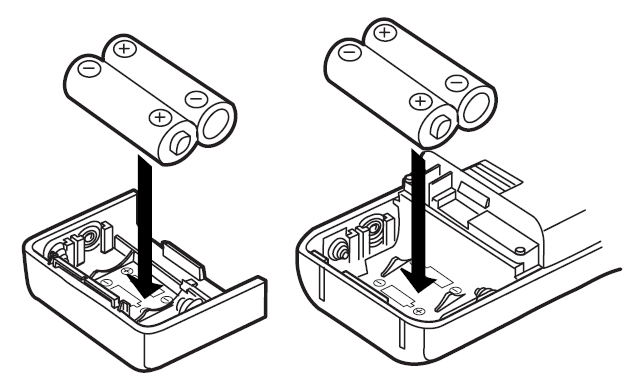
 - Install two batteries in the compartment and two in the cover as indicated by the polarity symbols (+ and –) marked inside those locations.
 Cautions:
- Use only fresh batteries of the required size and recommended type.
- Always remove old or weak batteries. Batteries can leak chemicals that destroy electronic circuits.
- Do not mix old and new batteries, different types of batteries (standard, alkaline, or rechargeable), or rechargeable batteries of different capacities.
- Replace the cover, inserting the lower tabs first.
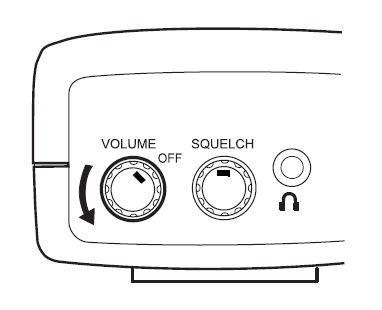
 Warning: Set ALKALINE ◀ JACK ▶ NI-CD to NI-CD for use only with nickel cadmium (Ni-Cd) or nickel metal hydride (Ni-MH) rechargeable batteries. Never attempt to recharge non-rechargeable batteries. Non-rechargeable batteries can get hot or explode if you try to recharge them.
 Cautions:
When BATT. Lo flashes and the scanner beeps every 15 seconds. Replace all four batteries.
Caution: Always dispose of old batteries promptly and properly. Do not bury or burn them.
Using Rechargeable Batteries
You can also use four rechargeable batteries. Before you use nickel-cadmium or nickel-metal hydride batteries, you must charge them.
The scanner has a built-in circuit that lets you recharge Ni-Cd and Ni-MH batteries while they are in the scanner.
To charge the batteries, set ALKALINE ◀ JACK ▶ NI-CD to NI-CD, install the batteries in the scanner, and connect an external AC or DC adapter to the scanner’s POWER jack (see “Using AC Power” on Page 13 or “Using Vehicle Battery Power” on Page 14).
Warning: Do not connect either adapter to the scanner if non-rechargeable batteries (such as alkaline batteries) are installed in the scanner and ALKALINE ◀ JACK ▶ NI-CD is set to NI-CD, or if you are unsure of the switch’s position. Non-rechargeable batteries will get hot and can even explode if you try to recharge them. Before you use Ni-Cd or Ni-MH batteries for the first time, charge them for at least 24 hours to bring them to a full charge.
Discharged batteries take about 10 to 18 hours to fully recharge. If you use the scanner while the batteries are charging, charging takes longer.
Notes:
- Nickel-cadmium batteries last longer and deliver more power if you occasionally let them fully discharge. To do this, simply use the scanner until it beeps every 15 seconds and BATT. Lo flashes.
- To prevent damage to nickel-cadmium batteries, never charge them in an area where the temperature is above 113°F (40°C) or below 40°F (4°C).
Important:
This scanner can use nickel-cadmium rechargeable batteries. At the end of a nickel-cadmium battery’s useful life, it must be recycled or disposed of properly. Contact your local, county, or state hazardous waste management authorities for information on recycling or disposal programs in your area, or call 1-800-843-7422. Some options that might be available are: municipal curbside collection, drop-off boxes at retailers such as your local RadioShack store, recycling collection centers, and mail-back programs.
USING AC POWER
You can power the PRO-94 using a 9V, 300 mA AC adapter and a size H Adaptaplug® (neither supplied). Both are available at your local RadioShack store.
Cautions:

You must use a Class 2 power source that supplies 9V DC and delivers at least 300 mA. Its center tip must be set to negative, and its plug must fit the PRO-94’s POWER 9V 300MA jack. Using an adapter that does not meet these specifications could damage the PRO-94 or the adapter.
- Always connect the AC adapter to the PRO-94 before you connect it to AC power. When you finish, disconnect the adapter from AC power before you disconnect it from the PRO-94.
Follow these steps to use the PRO-94 on AC power.
- Turn the volume/OFF counterclockwise until it clicks to make sure the power is turned off.

- Insert the Adaptaplug into the adapter’s cord so it reads TIP –. Insert the Adaptaplug into the PRO-94’s POWER 9V 300MA jack.
- Plug the adapter into a standard AC outlet.
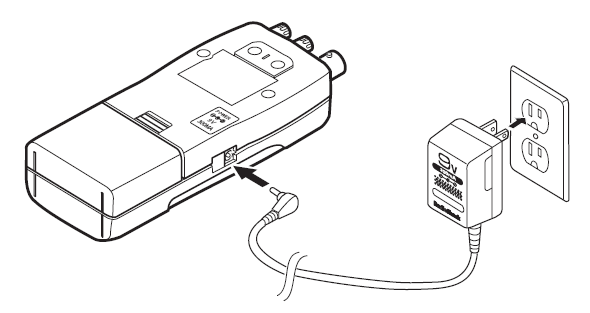
If rechargeable batteries are installed and ALKALINE ◀ JACK ▶ NI-CD is set to NI-CD, the adapter powers the scanner and recharges the installed batteries at the same time.
USING VEHICLE BATTERY POWER
You can power the PRO-94 from a vehicle’s 12V power source (such as a cigarette-lighter socket) using a 9V, 300-mA DC adapter and a size H Adaptaplug® (neither supplied). Both are available at your local RadioShack store.
Cautions:
You must use a power source that supplies 9V DC and delivers at least 300 mA. Its center tip must be set to negative, and its plug must fit the PRO-94’s POWER 9V 300MA jack. Using an adapter that does not meet these specifications could damage the PRO-94 or the adapter.
- Always connect the DC adapter to the PRO-94 before you connect it to the power source. When you finish, disconnect the adapter from the power source before you disconnect it from the PRO-94.
- If batteries are installed, make sure the battery switch inside the battery compartment is set to the correct position (see “Using Internal Batteries” on Page 10).
- Turn the volume/OFF counterclockwise until it clicks to make sure the power is turned off.
- If the adapter has a voltage switch, set the switch to 9V.
- Insert the Adaptaplug into the adapter’s cord so it reads TIP –. Insert the Adaptaplug into the PRO-94’s POWER 9V 300MA jack.
- Plug the adapter’s barrel plug into your scanner’s POWER 9V 300MA jack.

- Plug the other end of the adapter into your vehicle’s cigarette-lighter socket.
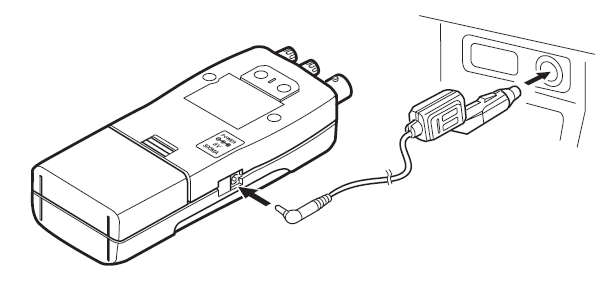
If rechargeable batteries are installed and ALKALINE ◀ JACK ▶ NI-CD is set to NI-CD, the adapter powers the scanner and recharges the installed batteries at the same time.
Note: If the scanner does not operate properly when you use a DC adapter, unplug the adapter from the cigarette-lighter socket and clean the socket to remove ashes and debris.
CONNECTING THE ANTENNA
To attach the supplied flexible antenna to the connector on the top of your scanner, align the slots around the antenna’s connector with the tabs on the scanner’s BNC connector. Then slide the antenna’s connector down over the scanner’s connector and rotate the antenna connector’s outer ring clockwise until it locks into place.
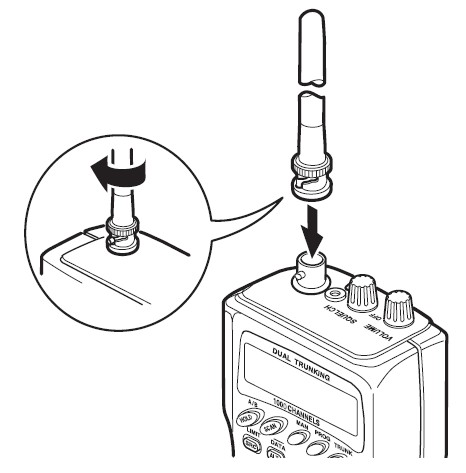
Connecting an Optional Antenna
The scanner’s BNC connector makes it easy to connect a variety of optional antennas, including an external mobile antenna or outdoor base station antenna. Your local RadioShack store sells a wide selection of antennas.
Note: Always use 50-ohm, RG-58, or RG-8 coaxial cable to connect an outdoor antenna. If the antenna is over 50 feet from the scanner, use RG-8 low-loss dielectric coaxial cable. If your antenna’s cable does not have a BNC connector, your local RadioShack store carries a variety of BNC adapters.
CONNECTING AN EARPHONE/ HEADPHONE
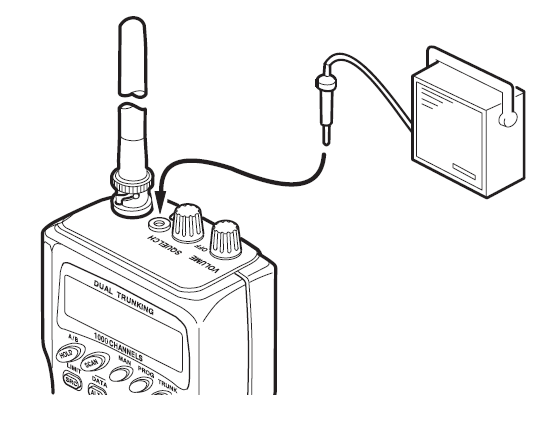
For private listening, you can plug an optional earphone or mono headphones into the  jack on top of your scanner. This automatically disconnects the internal speaker.
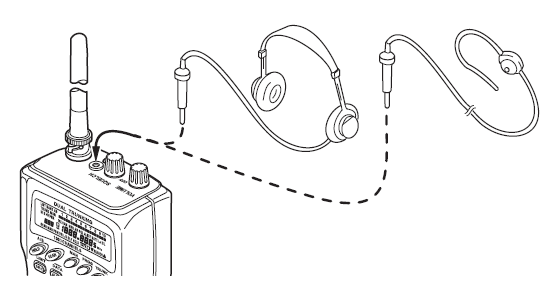
Listening Safely
To protect your hearing, follow these guidelines when you use earphones or headphones.
- Do not listen at extremely high volume levels.
Extended high-volume listening can lead to permanent hearing loss. - Set the volume to the lowest setting before you begin listening. After you begin listening, adjust the volume to a comfortable level.
- Once you set the volume, do not increase it. Over time, your ears adapt to the volume level, so a volume level that does not cause discomfort might still damage your hearing.
Traffic Safety
Do not use earphones or headphones with your scanner when operating a motor vehicle in or near traffic. Doing so can create a traffic hazard and could be illegal in some areas.
If you use earphones or headphones with your scanner, be very careful. Do not listen to a continuous broadcast. Even though some earphones/headphones let you hear some outside sounds when listening at normal volume levels, they still can present a traffic hazard.
CONNECTING AN EXTENSION SPEAKER
In a noisy area, an optional extension speaker, positioned in the right place, might provide more comfortable listening. Plug the speaker cable’s 1/ 8-inch (3.5 mm) mini-plug into your scanner’s jack. Your local RadioShack store carries a selection of suitable speakers.
ATTACHING THE BELT CLIP
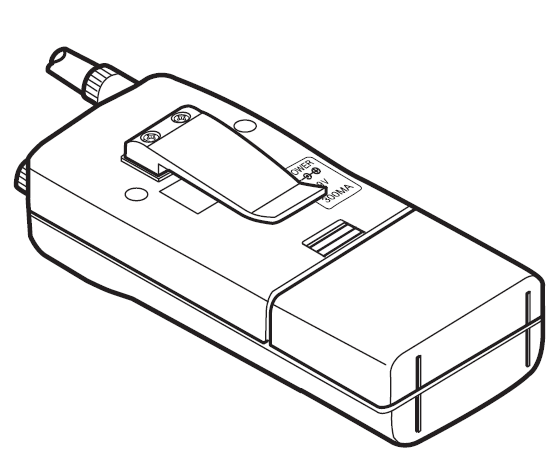
To make your scanner easier to carry when you are on the go, use the supplied belt clip. Use a Phillips screwdriver and the supplied screws to attach the clip to the scanner.
TROUBLESHOOTING
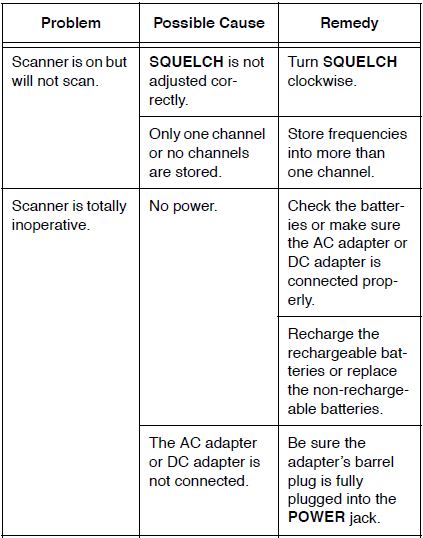
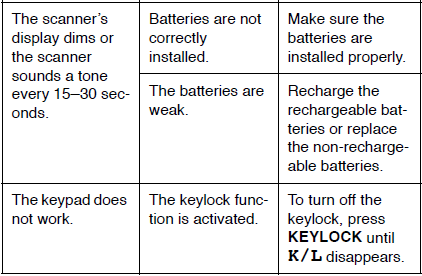
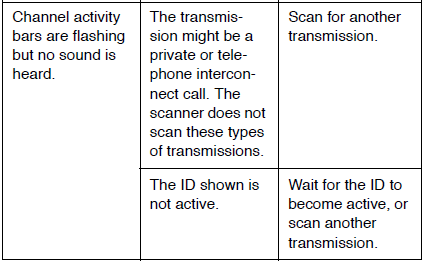
If your PRO-94 is not working as it should, these suggestions might help you eliminate the problem. If the scanner still does not operate properly, take it to your local RadioShack store for assistance.
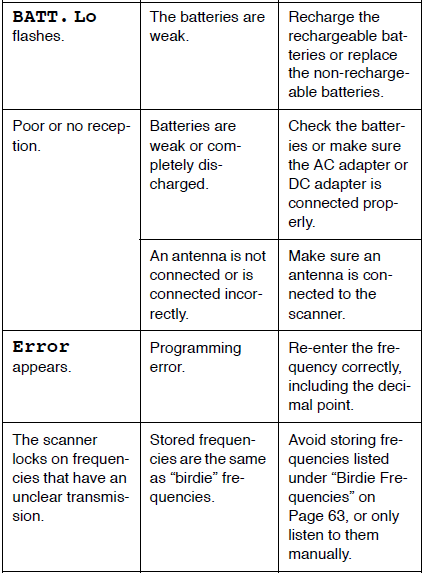
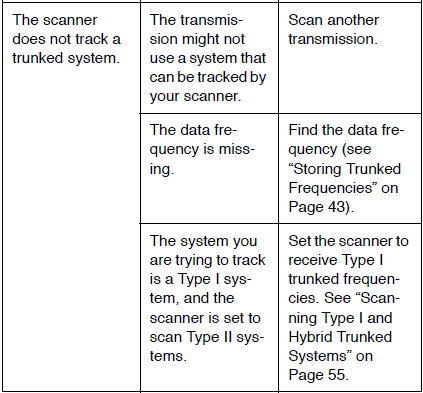
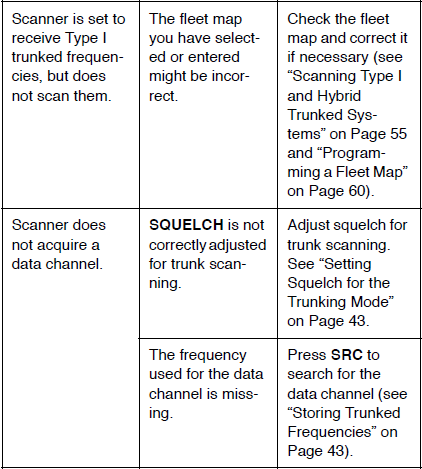
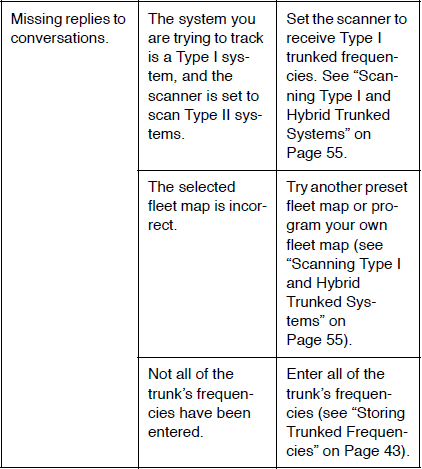
RESETTING THE SCANNER
If the scanner’s display locks up or stops operating properly, you might need to reset the scanner.
Caution: This procedure clears all the information you have stored in the scanner. Before you reset the scanner, try turning it off and on to see if it begins working properly. Reset the scanner only when you are sure it is not working properly.
- Turn off the scanner.
- While holding down the 2 and 9 keys, turn on the scanner. CLEAR flashes for about 5 seconds as the scanner clears its memory.
Note: Do not turn off the scanner again until CLEAR stops flashing. Otherwise, the scanner might not clear its memory properly.
CARE AND MAINTENANCE
Your RadioShack PRO-94 1000-Channel Handheld Trunking Scanner is an example of superior design and craftsmanship. The following suggestions will help you care for your scanner so you can enjoy it for years.
 Keep the scanner dry. If it gets wet, wipe it dry immediately. Liquids might contain minerals that can corrode the electronic circuits.
 Use and store the scanner only in normal temperature environments. Temperature extremes can shorten the life of electronic devices, damage batteries, and distort or melt plastic parts.
 Keep the scanner away from dust and dirt, which can cause premature wear of parts.
 Handle the scanner gently and carefully. Dropping it can damage circuit boards and cases, and can cause the scanner to work improperly.
 Use only fresh batteries of the required size and recommended type. Batteries can leak chemicals that damage your scanner’s electronic parts.
 Wipe the scanner with a damp cloth occasionally to keep it looking new. Do not use harsh chemicals, cleaning solvents, or strong detergents to clean the scanner.
 Keep the scanner dry. If it gets wet, wipe it dry immediately. Liquids might contain minerals that can corrode the electronic circuits.
 Use and store the scanner only in normal temperature environments. Temperature extremes can shorten the life of electronic devices, damage batteries, and distort or melt plastic parts.
 Keep the scanner away from dust and dirt, which can cause premature wear of parts.
 Handle the scanner gently and carefully. Dropping it can damage circuit boards and cases, and can cause the scanner to work improperly.
 Use only fresh batteries of the required size and recommended type. Batteries can leak chemicals that damage your scanner’s electronic parts.
 Wipe the scanner with a damp cloth occasionally to keep it looking new. Do not use harsh chemicals, cleaning solvents, or strong detergents to clean the scanner.
Modifying or tampering with the scanner’s internal components can cause a malfunction, invalidate your scanner’s warranty, and void your FCC authorization to operate it. If your scanner is not operating as it should, take it to your local RadioShack store for assistance.
SPECIFICATIONS
- Frequency Coverage: …… 29–54 MHz (in 5 kHz steps)
- 108–136.975 MHz (in 12.5 kHz steps)
- 137–174 MHz (in 5 kHz steps)
- 216–224.995 MHz (in 5 kHz steps)
- 406–512 MHz (in 12.5 kHz steps)
- 806.0000–823.9375 MHz (in 12.5 kHz steps)
- 851.0000–868.9875 MHz (in 12.5 kHz steps)
- 896.1125–956.0000 MHz (in 12.5 kHz steps)
- 1240.0000–1300.0000 MHz (in 12.5 kHz steps)
- Monitor Channels……………………………………………… 10
- Number of Banks …………………………………………….. 20
Sensitivity (AM/FM)
- FM……………………………..20 dB S/N at 3 kHz deviation)
- 29–54 MHz ……………………………………………0.5 μV
- 137–174 MHz ……………………………………… 0.5 μV
- 216–225 MHz ……………………………………… 0.6 μV
- 406–512 MHz ……………………………………… 0.5 μV
- 806–956 MHz ……………………………………… 0.6 μV
- 1240–1300 MHz ………………………………….. 4.0 μV
- AM ………………………….. 20 dB S/N at 60% modulation)
108–136.9875 MHz ……………………………… 1.5 μV - Spurious Rejection (at 40.84 MHz) ………………… 50 dB
- Selectivity:
- 10 kHz –6 dB
- 15 kHz –50 dB
- IF Rejection (at 162.4 MHz) ………………………….. 80 dB
- Channels …………………………………………………….. 1000
- Operating Temperature …. –4 to 140° F (–20 to 60° C)
- Scan Speed ………………………….. 50 Channels/Second
Search Speed
- Normal …………………………………….. 100 Steps/Second
- Hypersearch ……………………………… 300 Steps/Second
- Service …………………………….. 50 Frequencies/Second
- Priority Sampling ………………………………….. 2 Seconds
- Delay Time ………………………………………….. 2 Seconds
- IF Frequencies ……… 380.7 MHz, 10.85 MHz, 450 kHz
- Antenna Impedance ……………………………….. 50 Ohms
- Audio Output ……………………………. 350 mW maximum
- Built-in Speaker ……………………… 17/16 Inches (36 mm) 8 Ohm Dynamic Type
- Maximum Current Drain …………………………….. 180 mA
Power Requirements
- 4 AA Alkaline Batteries (6.0 VDC), or 4 AA Rechargeable Ni-Cd Batteries (4.8 VDC), or Optional AC Adapter, or Optional DC Adapter
Current Drain
- Squelched……………………………………………. 70 mA
- Full Output …………………………………………. 180 mA
- Dimensions (HWD) ………………….6 × 23/5 × 13/4 Inches (153 × 66 × 44 mm)
- Weight (without antenna, batteries, belt clip) …… 8.2 oz (232 g)
Specifications are typical; individual units might vary. Specifications are subject to change and improvement without notice.
Limited One-Year Warranty
This product is warranted by RadioShack against manufacturing defects in material and workmanship under normal use for one (1) year from the date of purchase from RadioShack company-owned stores and authorized RadioShack franchisees and dealers.
EXCEPT AS PROVIDED HEREIN, RadioShack MAKES NO EXPRESS WARRANTIES AND ANY IMPLIED WARRANTIES, INCLUDING THOSE OF MERCHANTABILITY AND FITNESS FOR A PARTICULAR PURPOSE, ARE LIMITED IN DURATION TO THE DURATION OF THE WRITTEN LIMITED WARRANTIES CONTAINED HEREIN. EXCEPT AS PROVIDED HEREIN, RadioShack SHALL HAVE NO LIABILITY OR RESPONSIBILITY TO CUSTOMER OR ANY OTHER PERSON OR ENTITY WITH RESPECT TO ANY LIABILITY, LOSS OR DAMAGE CAUSED DIRECTLY OR INDIRECTLY BY USE OR PERFORMANCE OF THE PRODUCT OR ARISING OUT OF ANY BREACH OF THIS WARRANTY, INCLUDING, BUT NOT LIMITED TO, ANY DAMAGES RESULTING FROM INCONVENIENCE, LOSS OF TIME, DATA, PROPERTY, REVENUE, OR PROFIT OR ANY INDIRECT, SPECIAL, INCIDENTAL, OR CONSEQUENTIAL DAMAGES, EVEN IF RadioShack HAS BEEN ADVISED OF THE POSSIBILITY OF SUCH DAMAGES.
Some states do not allow limitations on how long an implied warranty lasts or the exclusion of incidental or consequential damages, so the above limitations or exclusions may not apply to you. In the event of a product defect during the warranty period, take the product and the RadioShack sales receipt as proof of purchase date to any RadioShack store.
RadioShack will, at its option, unless otherwise provided by law:
- Correct the defect by product repair without charge for parts and labor;
- Replace the product with one of the same or a similar design, or refund the purchase price. All replaced parts and products, and products on which a refund is made, become the property of RadioShack.
New or reconditioned parts and products may be used in the performance of warranty service.
Repaired or replaced parts and products are warranted for the remainder of the original warranty period. You will be charged for the repair or replacement of the product made after the expiration of the warranty period.
This warranty does not cover
- damage or failure caused by or attributable to acts of God, abuse, accident, misuse, improper or abnormal usage, failure to follow instructions, improper installation or maintenance, alteration, lightning, or other incidence of excess voltage or current;
- any repairs other than those provided by a RadioShack Authorized Service Facility;
- consumables such as fuses or batteries;
- cosmetic damage;
- transportation, shipping, or insurance costs; or
- costs of product removal, installation, setup, service adjustment, or reinstallation.
This warranty gives you specific legal rights, and you may also have other rights which vary from state to state.
RadioShack Customer Relations, 200 Taylor Street, 6th Floor, Fort Worth, TX 76102
We Service What We Sell
For more manuals by RadioShack, visit ManualsLibraryy
RadioShack PRO-94 1000 channel Dual Trunking Scanner- FAQs
Q1. What is a trunking system in scanners?
A trunking system shares a pool of frequencies among multiple user groups, unlike conventional systems that assign one fixed channel per group.
Q2. How does a trunked radio system work?
It uses a control channel to assign talkgroups to available frequencies, allowing efficient communication without dedicated channels.
Q3. How do I program a frequency on my RadioShack PRO-94 scanner?
Press MANUAL, choose a channel, press PROG, enter the frequency, and then press ENTER to save it.
Q4. Can the PRO-94 scanner automatically search for radio frequencies?
Yes. Use the SCAN or SEARCH functions to automatically detect and store active frequencies.
Q5. Do scanners always need programming?
Most scanners require manual or software programming to store frequencies, but many now include preloaded or software-assisted setups.
Q6. How do I reset my RadioShack scanner?
Turn off the scanner, then press and hold the reset sequence keys (varies by model) while powering it back on to restore factory settings.
Q7. What kind of signals can I listen to with this scanner?
The PRO-94 can monitor police, fire, EMS, weather alerts, amateur radio, and other public service communications where permitted by law.
Q8. Can a scanner work without a computer or internet?
Yes. The PRO-94 is a standalone device that can scan and store frequencies directly without needing a PC or internet connection.