
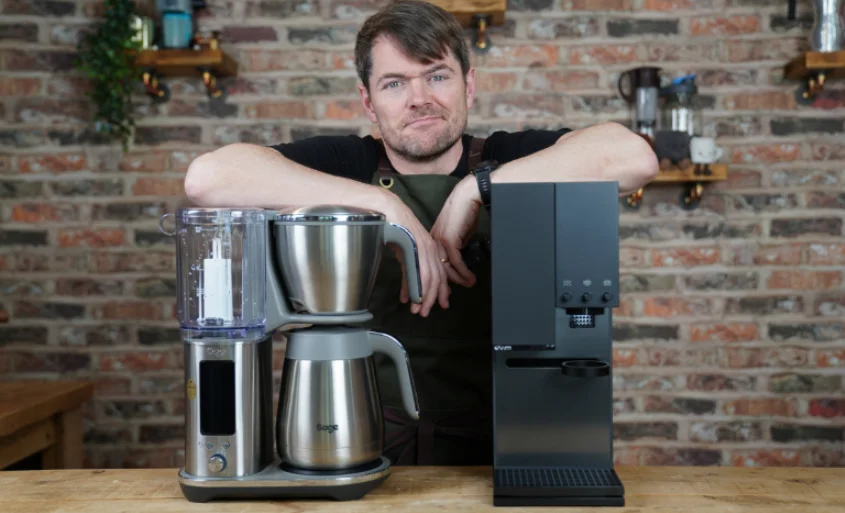

Sage SDC465BSS4GUK1 Luxe Brewer Thermal Drip Coffee Machine
Components
- A. Water tank lid
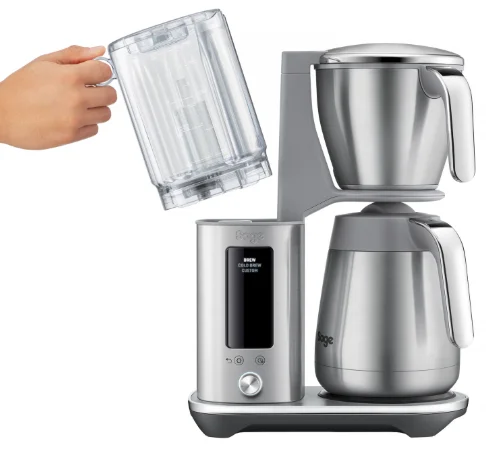
- B. Water tank
- C. LCD display
- D.
 Settings button/
 Delayed Auto Start button
 - E. SELECT dial
- F. Showerhead
- G. Showerhead screen
- H. Showerhead ring
- I. Carafe lid
- J. Carafe
- K. Hot plate (BDC415 only)

 Settings button/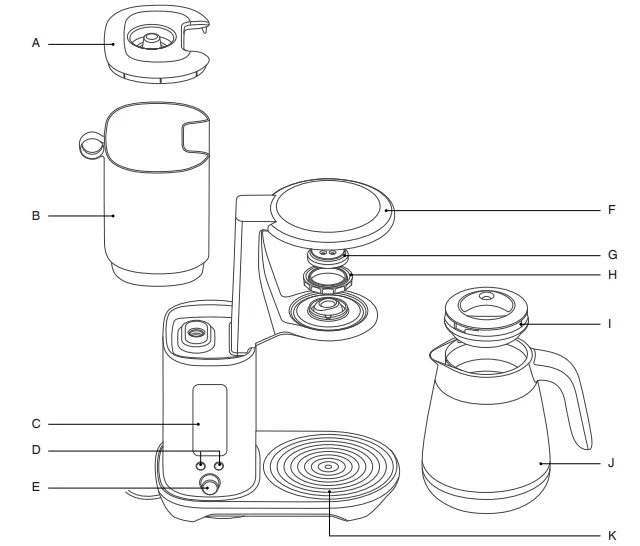
Accessories
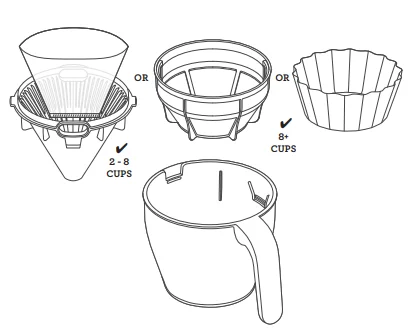
- Cone filter basket insert
- Mesh basket filter
- Brew basket
- Flat-bottom basket filter paper pack (10 pieces)
- Water hardness strip
- Coffee measuring scoop
- Water filter
- Water filter adapter


Features
This Brewer has been designed to make any style of coffee of the highest quality.
BREW
Brew up to 12 cups (1.8L) rapidly as the brewer delivers water from the tank. For a bolder brew, increase the amount of ground coffee used.
COLD BREW
Brew up to 8 cups (1.2 ml) of cold brew coffee with the flexibility to adjust steeping time between 0 and 24 hours.
KEEP WARM (only applicable for BDC415)
After brewing, the machine will keep the coffee warm.
CUSTOM
Brew up to 12 cups (1.8L) with precise control over brew, water temperature, bloom volume, bloom time, and water delivery speed.
 Delayed Auto Start
Set the machine to automatically start brewing at a preset time.
 FILTER CHANGE
Changing the water filter depends on the water hardness that the machine is using. For water hardness level 1, it is recommended to change the filter after 160 cycles.
 DESCALE
After regular use, hard water can cause mineral buildup in internal components, leading to reduced brewing flow, brew temperature, machine power, and coffee taste. It is recommended to descale regularly.
 CLOCK
CLOCK
Adjust the clock time after turning on the machine.
 SOUND
SOUND
Once a setting is selected, the machine will beep to confirm the changes. Adjust the volume between LOW, Med, HIGH, and OFF.
Assembly
BEFORE FIRST USE
NOTE
Hot brew coffee is made by using hot water to ground coffee beans. Water temperature is important in the brewing process as it affects the rate of extraction. Extraction refers to the flavours and substances dissolved from the ground coffee. The hotter the water, the quicker it is to extract compounds, such as oil, acids, and caffeine.
Remove and discard all labels and packaging materials attached to the machine. Make sure to remove all parts and accessories from the box before discarding the packaging. Take a soft cloth and firmly wipe the exterior stainless steel housing.
Wash the lid, brew basket, cone filter basket insert, mesh basket filter, and carafe in warm, soapy water. Avoid using abrasive cleansers, pads, or cloths that can scratch the surface. Rinse and dry everything thoroughly. Lastly, firmly press the carafe drip stop to ensure it moves up and down freely.
WATER HARDNESS SETTING & FLUSHING
- Ensure that the empty coffee basket and empty carafe (with assembled lid) are inserted into the machine.
- Fill the water tank with fresh cold water up to the Carafe Max mark. Plug the machine into the power outlet.
- Upon turning on the machine, the display will show “SET HARDNESS.” Dip the water hardness test strip into a cup of the same water from the tank for 1 second. Wait for one minute to determine the water hardness level. Rotate the SELECT dial to choose the water hardness level based on the number of bars shown on the strip, then press the dial. The machine will beep to confirm the changes.NOTE: If the result on the strip shows 4 or 5 bars, switch to a different water source. Using filtered water will prolong the life of the water filter, extend descaling intervals, and improve the taste. Be sure to test the water hardness of the alternative water source and adjust the machine settings accordingly.

- The machine will display 2:00 min. Press the dial once, and the machine will instantaneously run a flush cycle. The machine will dispense all the water from the tank, through the system, and into the empty carafe. After flushing, the machine will beep once. Empty the basket and carafe.

SETTING THE TIME AND TEMPERATURE UNITS
After the flushing cycle, the machine will beep 3 times, and the LCD will display the Time setting. The hour will blink first for setting. Use the SELECT dial to set the hour and press the dial to save the changes. Set the minutes by using the SELECT dial and press the dial to save the changes. Next, the LCD will display the temperature unit for setting. Use the SELECT dial to choose the temperature unit and press the dial to save the changes. The machine will beep once and display the brew modes, indicating that it’s ready for brewing.
HEATING PLATE (applies only to BDC415)
After brewing, the heating plate will turn on to keep the coffee hot. The heater plate duration can be adjusted in the settings.
Operation
BREWING USING THE CARAFE
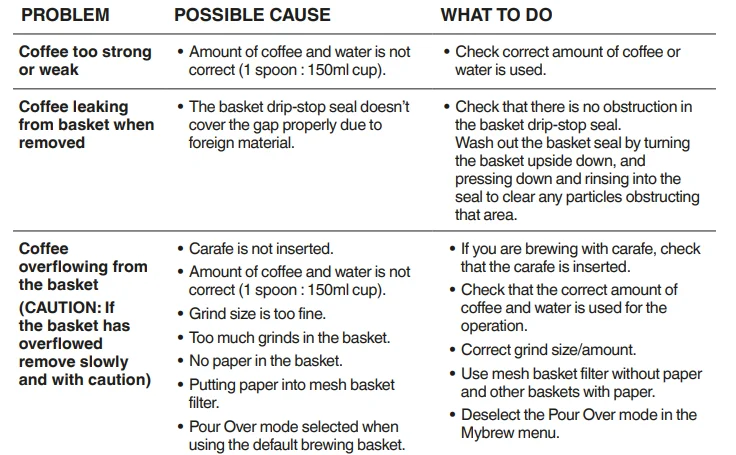
When using a carafe for brewing, make sure that the brew basket is clean and that the drip stop seal at the bottom of the basket is also clean and free of coffee particles.
- Depending on the amount of coffee to brew, select the appropriate basket and filter. For brewing between 2 and 8 cups, use the cone-shaped filter basket insert with a paper filter (note: cone-shaped paper filter is not included). For brewing more than 8 cups, use a mesh basket filter or a flat-bottom brew basket with a large paper filter.

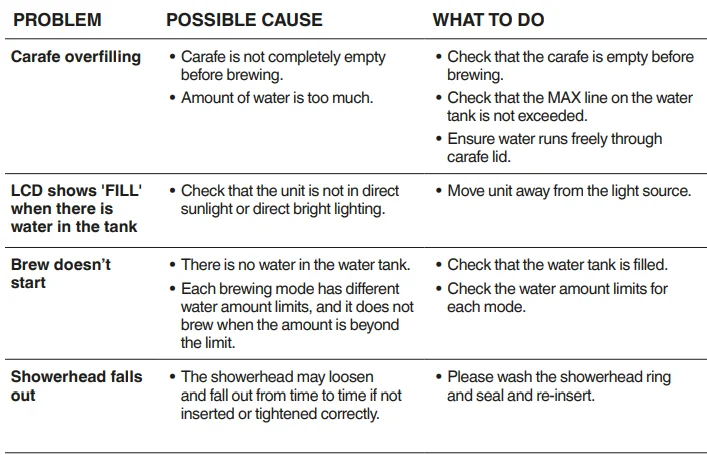
- Fill the water tank with fresh cold water up to the MAX marking on the water tank.
- For the very best tasting coffee, we recommend using freshly roasted whole bean coffee and grinding with a burr grinder directly before you brew. The grind should be medium/coarse. Never use coffee grounds for espresso, as your coffee basket may overflow.
- Grind enough coffee beans for the volume you’re making. For a full 1.8L carafe, we recommend 99g of coffee, approximately 12 level measuring scoops. Roughly 1 scoop for every 150ml.
- Insert the correct filter paper, cone, flat-bottom, or mesh basket into the brew basket, then add your ground coffee. Insert the brew basket into the machine.
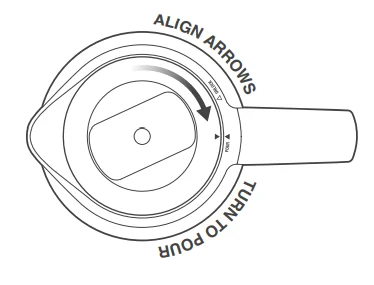
- Lock the carafe lid and place the carafe under the drip stop outlet. NOTES: Always ensure your carafe is clean and empty before brewing. Residual coffee will affect the taste, and liquid in the carafe will cause it to overflow.

- Always ensure your carafe is EMPTY before brewing to prevent overflow.
- Rotate the dial and select BREW from the LCD, then press the dial once. The machine will display the progress of the brewing cycle.
- When the coffee is ready, the machine will beep once and will automatically switch to KEEP WARM mode.
NOTES
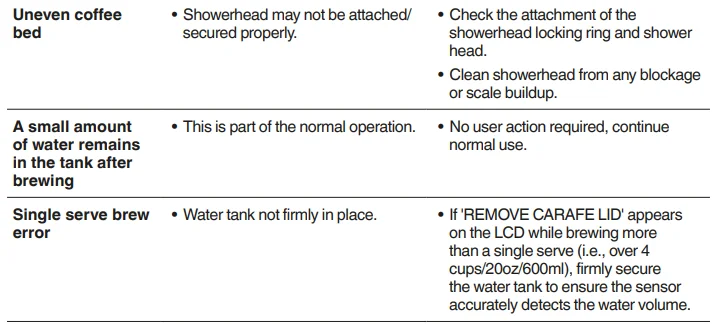
- A small amount of water remains in the tank after brewing. This is part of the normal operation.
- Never fill the water tank once the coffee machine has started a brewing cycle.
MODEL BDC415:
- The machine goes into standby mode if not used for 6 minutes. Power consumption in standby mode does not exceed 0.30 W.
MODEL BDC465:
- The machine goes into standby mode if not used for 5 minutes. Power consumption in standby mode does not exceed 0.30 W.
HOW TO MAKE COLD BREW
Cold brew coffee is brewed differently from traditional hot brew coffee. It uses cold water (not hot water). The brewer uses the “full immersion” method of brewing cold brew, which steeps the water and coffee together over an extended duration, typically 4 to 14 hours.
This method creates an intense, smooth coffee with little bitterness. Brew ratios are also different and much higher than normal. This brewer will produce a maximum of 600 mL of Cold Brew. Due to the long duration (typically 4–14 hours) of the brewing process, we recommend setting the machine up overnight so the Cold Brew will be ready in the morning.
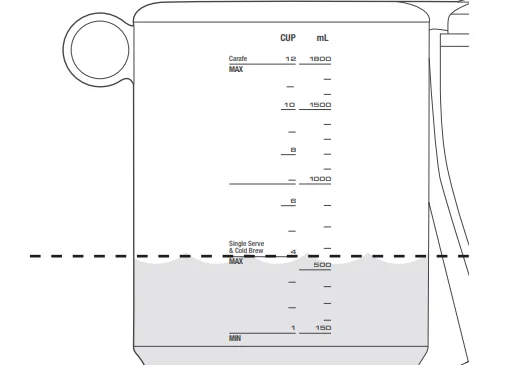
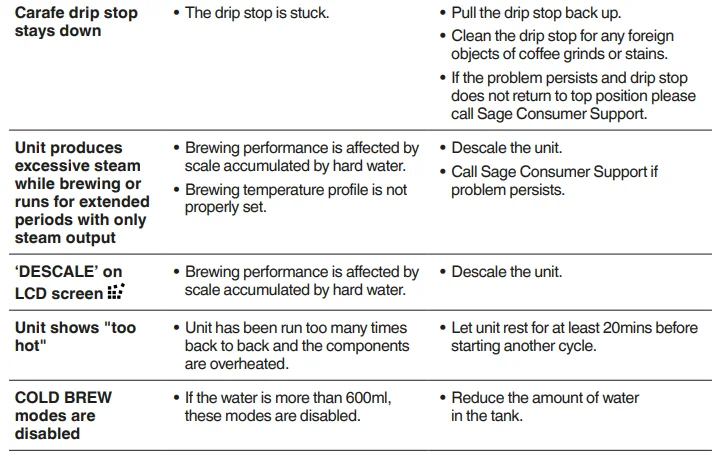
- Fill the tank with your desired volume of water, ensuring this is below the COLD BREW line or up to the COLD BREW MAX LINE (4 cups / 600 mL). NOTES: If water in the water tank is more than 600 mL or above the COLD BREW MAX LINE, the Cold Brew selection will not be available in the screen menu.
- Remove the basket and ensure both the cone insert and mesh basket filter are removed. Add a large paper filter and then add ground coffee at 2–3 times the regular ratio (approximately 12 scoops for 600 mL).
- Reinsert the basket into the machine.
- Remove the lid from the carafe.
- Insert the carafe without the lid. The lid must not be on the carafe during the brewing process; alternatively, use another vessel.
- Navigate to the COLD BREW setting and press the dial once. The machine will then begin brewing the water without the heating element. Once this is complete, a countdown timer will display on the LCD indicating when the Cold Brew is finished. At this point, the machine will automatically dispense the Cold Brew into the waiting carafe.
NOTES
- Brew time for Cold Brew can easily be adjusted to your preference, anywhere between 30 min and 24 hrs.
- DO NOT add ice to the tank. Cold, chilled water should be added.
- Ensure the carafe lid is removed for Cold Brew mode.
HOW TO BREW USING SINGLE CUP / SMALLER VOLUMES
(LESS THAN 4 CUPS, 500–600 ML)
NOTE: When brewing a single-serve coffee on the BDC415, the warming plate will not activate for this size unless manually activated after brewing.
- The machine will recognize when the brewer has 500–600 mL of water and will adjust the brew settings automatically to make the best possible tasting coffee. Fill your cup with fresh cold water and then pour it into the water tank, ensuring the water level stays below the single cup line. NOTES: DO NOT fill the water tank more than the single cup line or the volume of the cup used to receive the coffee. It will overflow, as the machine brews until the water tank becomes empty. Brewing smaller volume coffee starts at 500 mL.

- When brewing single-serve coffee, the LCD will display “REMOVE CARAFE LID.” This is to prevent the drip stop from engaging, allowing coffee to extract the full flavor for a single serve. It will take about 4 minutes to brew before the coffee pours into the cup.
- The machine is designed to automatically adjust the brew settings when it detects 500–600 mL of water in the tank to ensure the best-tasting coffee. Fill your cup with fresh cold water and then pour it into the water tank, making sure the water level remains below the single cup line.
- Position your empty cup underneath the brew basket outlet.
- Grind the appropriate amount of whole bean coffee to match the water level in the tank. One level scoop of ground coffee is suitable for 150 ml of water. NOTE: When brewing smaller volumes, use the cone filter basket insert to ensure proper contact between the brew water and the ground coffee.
- Place the cone filter basket into the brew basket using the alignment marks as a guide.
- Insert a cone-shaped paper filter into the cone filter basket, then add the ground coffee.
- Insert the brew basket into the machine.
- Turn the dial to select BREW mode.
- Press the dial to start brewing.
- Once the coffee is ready, the machine will release steam, and the LCD will display the brewing modes menu.
USING DELAYED AUTO START
Here are the steps for setting up the machine to automatically start brewing at a preset time:
- Fill the water tank with fresh cold water equal to the amount of coffee.
- Grind the correct amount of whole bean coffee. Use one scoop of ground coffee for 150 mL of water.
- Select the appropriate filter basket and paper filter.
- Insert the filter basket into the brew basket, using the alignment marks as a guide.
- Put the paper filter into the filter basket and add the ground coffee. NOTE: Never use both a mesh basket filter and a paper filter at the same time.
- Insert the brew basket into the machine.
- Place the carafe with the lid into the machine.
- Press the DELAYED AUTO START button. The LCD will display the blinking hours setting.
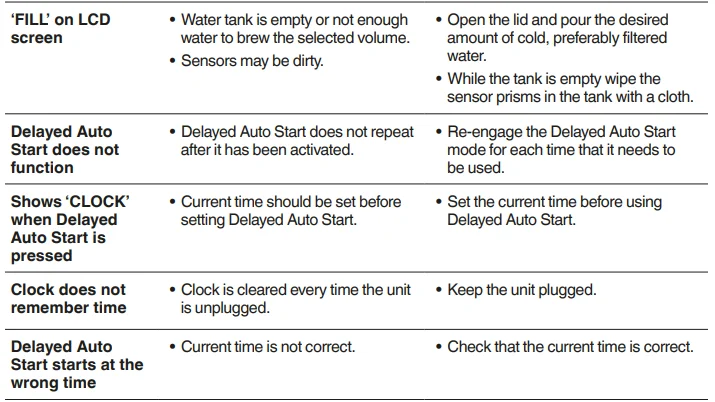
- Rotate the SELECT dial to set the desired time to start the brewing cycle, then press the dial to save the settings. The machine will beep once to confirm the changes. NOTE: If the clock hasn’t been set, the machine will keep blinking after pressing the DELAYED AUTO START button and won’t beep to confirm changes using the SELECT dial. Make sure the clock is set before using the DELAYED AUTO START function. The clock will reset every time the unit is unplugged.
- Rotate the SELECT dial to choose the brewing mode, and the machine will automatically start brewing at the set time.
NOTE: The LCD will display the set time until the machine automatically starts brewing.
Tips
WHOLE BEANS
- FRESH IS BEST! Freshly roasted, quality coffee is key to making great-tasting coffee. Peak flavour potential is 5–20 days after roast. Always look for a “Roasted On” date on the bag. Avoid coffee with a “Best Before” or “Use By” date, as you never know when it was roasted.
- Coffee flavour and strength are a personal preference. Vary the type of coffee beans and the amount of ground coffee to achieve your preferred taste.
- Freshly ground beans are the key to making coffee with more flavour and body. Pre-ground coffee will have lost most of its flavour and aromatics, so always grind right before you brew for superior taste.
- Store coffee beans in a dark, cool, and dry place. Vacuum seal if possible.
- Buy coffee beans in small batches to reduce storage time and store no more than one week’s supply at any time.
PRE-GROUND COFFEE
- Pre-ground coffee is convenient but will never taste as good as coffee ground right before you brew. We recommend investing in a quality burr grinder so you can grind fresh whole bean coffee right before you brew and enjoy superior-tasting coffee.
- The grind will affect the rate at which the water flows through the coffee in the coffee basket and, therefore, the taste of the coffee. If the grind is too fine, the water will not flow through the coffee and may clog or overflow the coffee basket. It may pass through the mesh basket filter, leaving sediment in the cup or carafe. The resulting coffee will be over-extracted, too dark, and bitter. If the grind is too coarse, the water will flow through the coffee too quickly. This will result in an under-extracted coffee lacking in flavour.
- Always use a “drip filter grind” suitable for use with drip coffee machines. Never use “Espresso grind,” as the finer grind size may cause the coffee basket to block and will be over-extracted.
COFFEE/WATER RATIO
We recommend 1 level scoop of coffee grounds per 150 ml of water. Adjust the amount according to your individual taste. The maximum capacity for pre-ground coffee is 12 level scoops. Exceeding this amount may cause the coffee basket to overflow.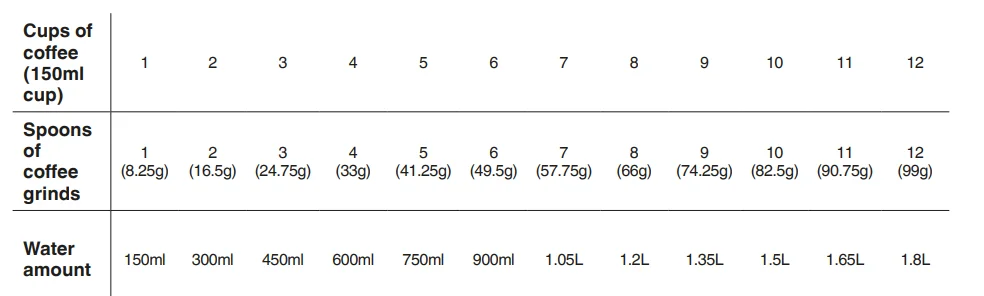
BLOOMING
- When coffee is roasted, CO₂ is trapped inside the bean. Coffee grounds release this CO₂ when hot water hits them, and this is called “blooming.” Your Brewer can automatically adjust bloom time by controlling the water flow. Blooming can have an impact on the aromas and flavours of the brewed cup. If the coffee is overly bitter, shorten bloom time, and if it’s sour, make it a little longer.
PRE-HEATING
- Pre-heat the carafe or cup for best results. A pre-heated carafe or cup will help maintain the coffee’s optimal temperature and keep the coffee hotter for longer. Fill with hot water for about 30 seconds, then discard the water.
WATER QUALITY
- Fresh, good-tasting water is essential for a perfect cup. If the water contains excessive sediment or has an “off” taste or odor, we recommend using filtered water.
Care and Cleaning
Always turn the coffee machine off and remove the plug from the power outlet before cleaning.
CLEANING THE OUTER HOUSING
The outer housing and LCD screen can be cleaned with a soft, damp cloth. Apply cleaner to the cloth and not the LCD surface. Polish with a soft, dry cloth. Cleaning and drying with dry paper towels or abrasive cloths and cleaners may scratch the surface.
CLEANING THE COFFEE BASKET AND MESH BASKET FILTER
Remove the coffee basket. Discard any ground coffee and filter paper. The coffee basket and mesh basket filter can be rinsed under running water. Ensure the fine holes of the mesh basket filter are clear. For a deeper clean, wash the coffee basket and mesh basket filter in warm, soapy water with a soft-bristle brush.
CAUTION: The coffee basket, mesh basket, or paper filter may still be very hot after brewing. Use caution and allow to cool before removing.
CLEANING THE CARAFE
After each use, empty the carafe. Do not let brewed coffee stand overnight, as this can cause the carafe to stain. Rinse the carafe and carafe lid under warm running water. For a deeper clean, we recommend regularly washing the carafe in warm, soapy water using a soft-bristle brush. Do not use abrasive cleansers, pads, or cloths, which can scratch the surface. Rinse and dry thoroughly.
CLEANING THE SHOWERHEAD
Simply wipe down the showerhead area periodically. However, if a more thorough clean is required, the Showerhead can be removed by unlocking the Showerhead Ring. Rotate clockwise, then remove the Showerhead for cleaning. Once complete, reinstall the Showerhead.
DESCALING
After regular use, hard water can cause mineral buildup in internal components, reducing the brewing flow, brewing temperature, power of the machine, and taste of the coffee. We recommend descaling regularly. When the LCDs the descale icon and is flashing, the descaling cycle is needed.
FACTORY RESET
To reset the machine to its factory settings, including the water hardness setting, hold the Settings button and the Delayed Auto Start button together for 3 seconds. When SET HARDNESS is shown on the LCD, rotate the dial to the left or the right and press the SELECT dial button to set the water hardness. (Refer to WATER HARDNESS AND FLUSHING from the Assembly page)
Troubleshooting
GUARANTEE 2 YEAR LIMITED
Sage Appliances guarantees this product for domestic use in specified territories for 2 years from the date of purchase against defects caused by faulty workmanship and materials. During this guarantee period, Sage Appliances will repair, replace, or refund any defective product (at the sole discretion of Sage Appliances). All legal warranty rights under applicable national legislation will be respected and will not be impaired by our guarantee. For full terms and conditions on the guarantee, as well as instructions on how to make a claim, please visit www.sageappliances.com.
For More Manuals By Sage Appliances, Visit ManualsLibraryy.
Sage SDC465BSS4GUK1 Luxe Brewer Thermal Drip Coffee Machine-FAQs
How do I use the Sage Luxe Brewer drip coffee machine?
Fill the water tank with fresh water, add a paper or mesh filter, place medium-ground coffee in the filter basket, select your brew settings, and press start. The machine handles the rest automatically.
What grind size is best for drip coffee in this machine?
A medium grind works best. It allows proper water flow and balanced extraction without bitterness or weak flavor.A medium grind works best. It allows proper water flow and balanced extraction without bitterness or weak flavor.
What is the ideal coffee-to-water ratio for drip brewing?
The recommended “golden ratio” is 1 part coffee to 15–16 parts water, which delivers a smooth and well-balanced cup.
Is drip coffee the same as filter coffee?
Yes. Drip coffee and filter coffee generally refer to the same brewing method using an automatic drip machine.
What are common mistakes when making drip coffee?
Using the wrong grind size, incorrect coffee-to-water ratio, poor water quality, and skipping regular cleaning are the most common issues.
What type of water should I use in the Sage Luxe Brewer?
Filtered water is ideal. It improves taste and helps prevent limescale buildup inside the machine.
How do I know when the machine needs descaling?
Signs include slower brewing, unusual noises, weaker coffee flavor, or frequent error alerts. These indicate limescale buildup.
How often should I descale the Sage coffee machine?
Descale every 2–3 months, or sooner if you live in a hard-water area or use the machine daily.
How often should I change the water filter?
Replace the water filter every 90 days or after about 40 liters of water to maintain optimal coffee quality.