
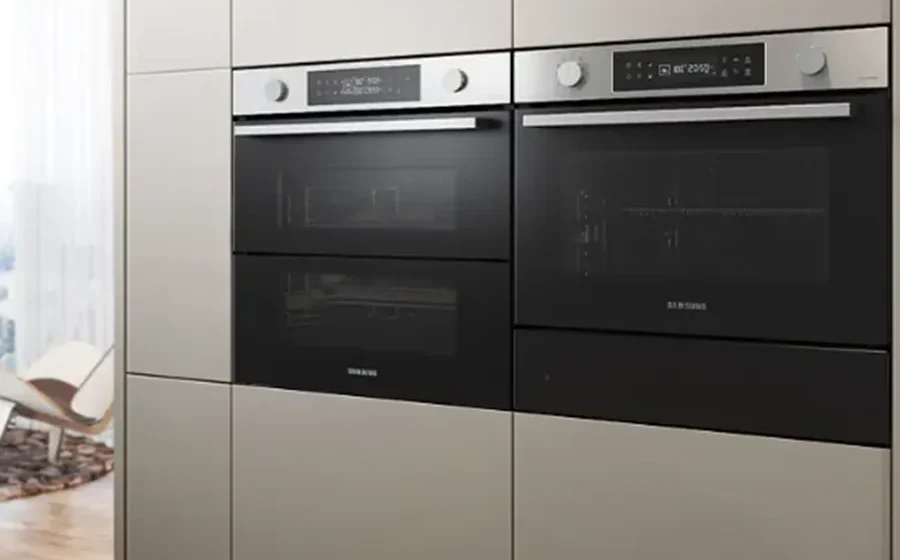

Samsung Combi Steam Built-in Oven
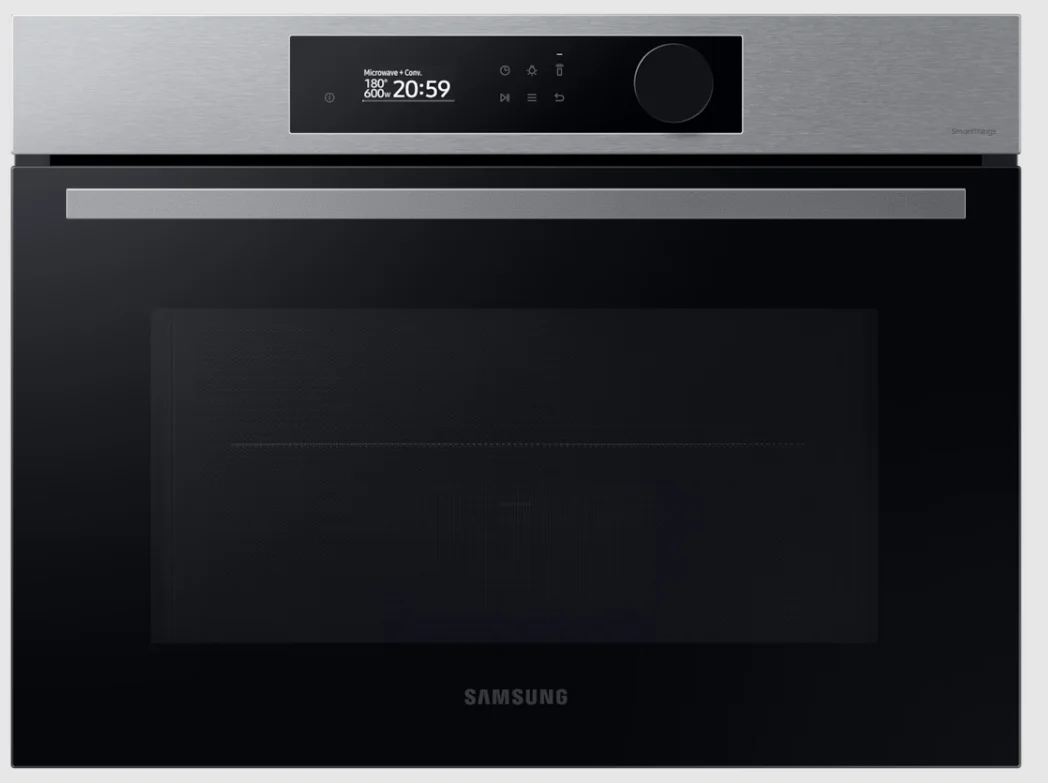
Safety instructions
Important safety instructions
WARNING
This appliance is not intended for use by persons (including children) with reduced physical, sensory, or mental capabilities, or a lack of experience and knowledge, unless they have been given supervision or instruction concerning use of the appliance by a person responsible for their safety. Children should be supervised to ensure that they do not play with the appliance. The means for disconnection must be incorporated in the fixed wiring in accordance with the wiring rules. This Appliance should be allowed to disconnect from the supply after installation. The disconnection may be achieved by having the plug accessible or by incorporating a switch in the fixed wiring in accordance with the wiring rules. If the supply cord is damaged, it must be replaced by the manufacturer, its service agent, or similarly qualified persons in order to avoid a hazard. The method of fixing stated is not to depend on the use of adhesives since they are not considered to be a reliable fixing means. This appliance can be used by children aged 8 years and above and persons with reduced physical, sensory, or mental capabilities or lack of experience and knowledge if they have been given supervision or instruction concerning the use of the appliance in a safe way and understand the hazards involved. Children shall not play with the appliance. Cleaning and user maintenance shall not be made by children without supervision. Keep the appliance and its cord out of reach of children less than 8 years. During use, the appliance becomes hot. Care should be taken to avoid touching heating elements inside the oven.
WARNING: Accessible parts may become hot during use. Young children should be kept away.
Do not use harsh abrasive cleaners or sharp metal scrapers to clean the oven door glass since they can scratch the surface, which may result in the shattering of the glass. If this appliance has a cleaning function, excess spillage must be removed before cleaning, and all utensils should not be left in the oven during steam cleaning or self-cleaning. The cleaning function depends on the model. If this appliance has a cleaning function, during cleaning conditions, the surfaces may get hotter than usual, and children should be kept away. The cleaning function depends on the model. Only use the temperature probe recommended for this oven. (Meat probe model only) A steam cleaner is not to be used.
WARNING: Ensure that the appliance is switched off before replacing the lamp to avoid the possibility of electric shock.
The appliance must not be installed behind a decorative door to avoid overheating.
WARNING: The appliance and its accessible parts become hot during use. Care should be taken to avoid touching heating elements. Children less than 8 years of age shall be kept away unless continuously supervised.
CAUTION: The cooking process has to be supervised. A short-term cooking process has to be supervised continuously.
This appliance must be connected to the mains power supply only by a specially licensed electrician. In the event of a fault or damage to the appliance, do not attempt to operate it. Repairs should be performed by a licensed technician only. Improper repair may result in considerable danger to you and others. If your oven needs repair, contact a Samsung Service center or your dealer. Electrical leads and cables should not be allowed to touch the oven. The oven should be connected to the mains power supply by means of an approved circuit breaker or fuse. Never use multiple plug adapters or extension leads. The power supply of the appliance should be turned off when it is being repaired or cleaned. Take care when connecting electrical appliances to sockets near the oven.
Installation
What’s included
Make sure all parts and accessories are included in the product package. If you have a problem with the oven or accessories, contact a local Samsung customer centre or the retailer.
Oven at a glance
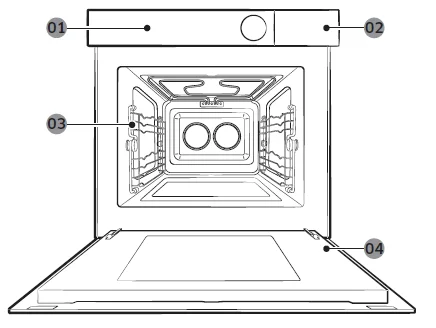
- Control panel
- Water reservoir
- Side racks
- Door
Accessories
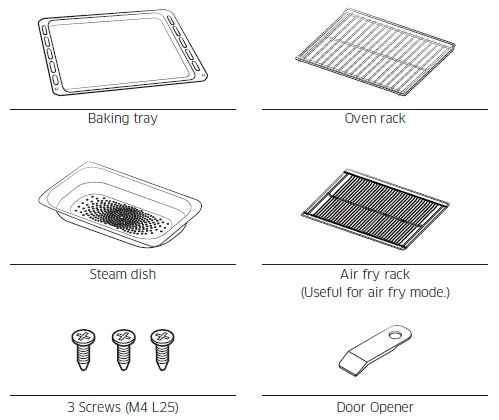
The oven comes with different accessories that help you prepare different types of food.
NOTE: See the Cooking Smart on page 25 to determine the appropriate accessory for your dishes.
Disposal of packaging and appliance
Packaging is recyclable.
Packaging may consist of the following materials:
- cardboard;
- polyethylene film (PE);
- CFC-free polystyrene(PS rigid foam).
Please dispose of these materials in a responsible manner in accordance with government regulations. The authorities can provide information on how to dispose of domestic appliances in a responsible manner.
Safety
- This appliance should only be connected by a qualified technician.
- The Oven is NOT designed for use in a commercial cooking setting.
- It should be used exclusively for cooking food in a home setting.
- The appliance is hot during and after use.
- Exercise caution when young children are present.
Electrical connection
The house mains to which the appliance is connected should comply with national and local regulations. The appliance should allow for the disconnection of the appliance from the supply after installation. The disconnection may be achieved by having the plug accessible or by incorporating a switch in the fixed wiring in accordance with the wiring rules.
Install in the cabinet
Kitchen cabinets in contact with the oven must be heat-resistant up to 100 °C. Samsung will take no responsibility for damage to cabinets from the heat.
Required dimensions for installation (This product is dedicated to built-in products.)
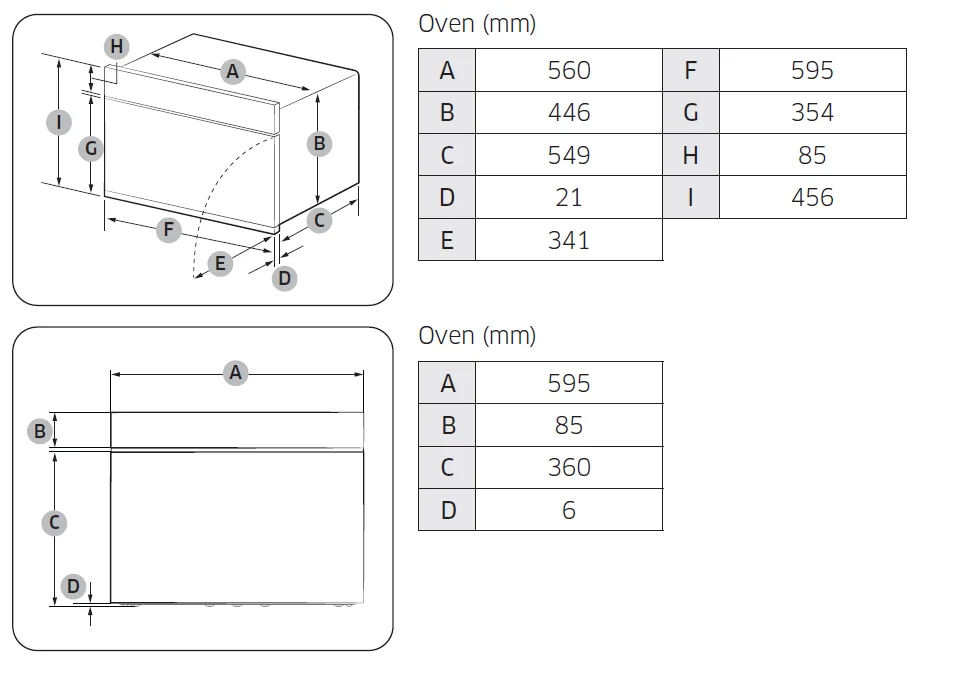
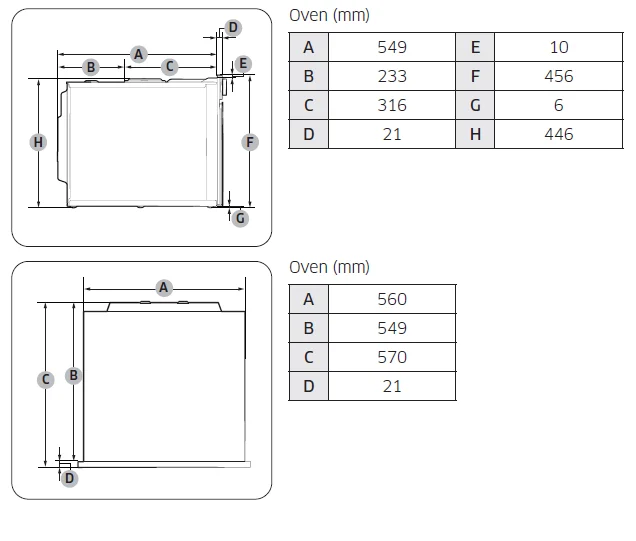
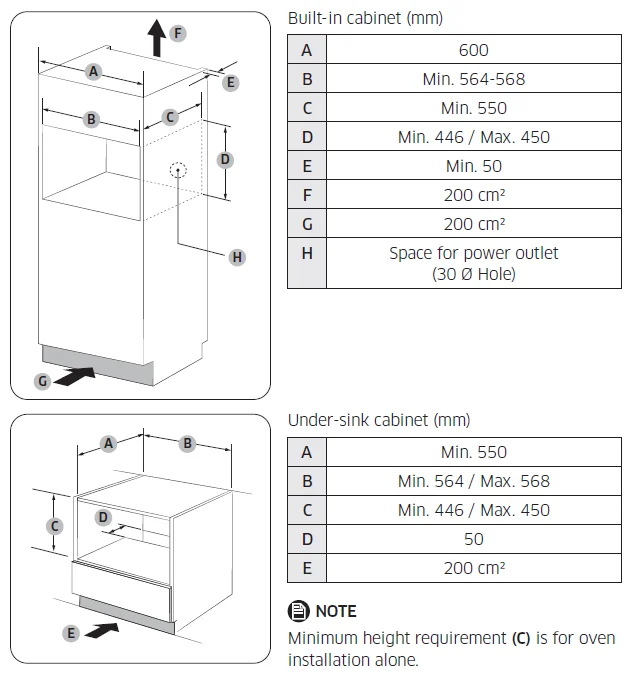
Installing with a hob
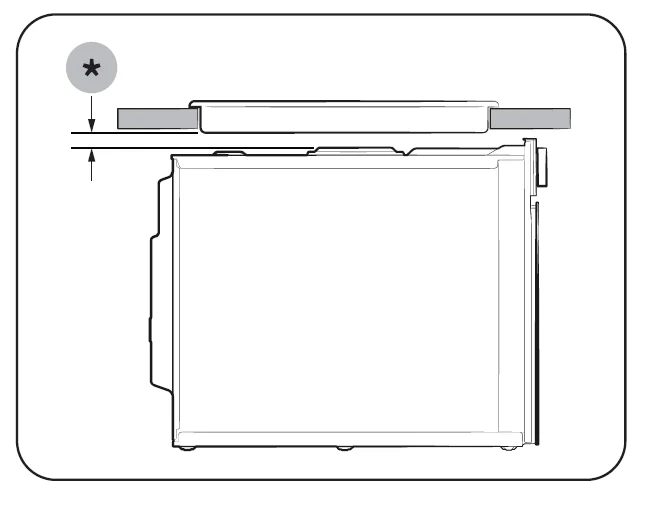
To install a hob on top of the oven, check the installation guide of the hob for the installation space requirement (*).
Mounting the oven
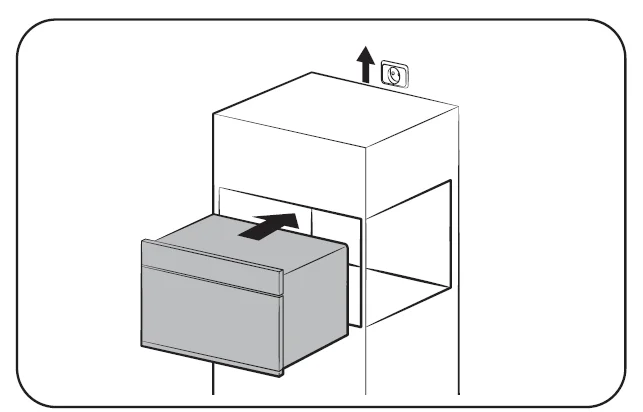
- Slide the oven partly into the recess. Lead the connection cable to the power source.

- Slide the oven completely into the recess.

- Fasten the oven using the two screws (4 x 25 mm) provided.

- Make the electrical connection. Check that the appliance works.

Be sure to hold the appliance with 2 side handles when unpacking the product.- Side handle 1
- Side handle 2
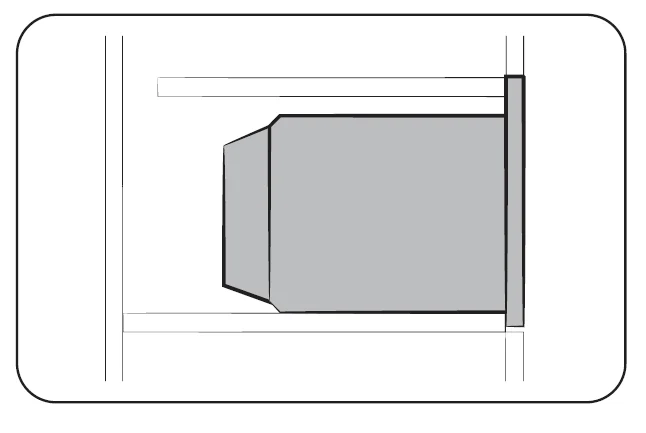
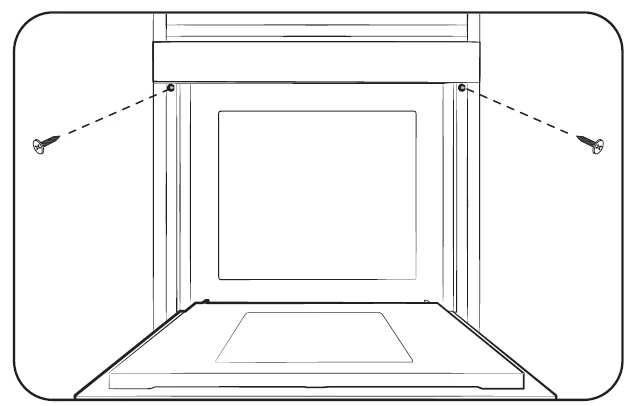
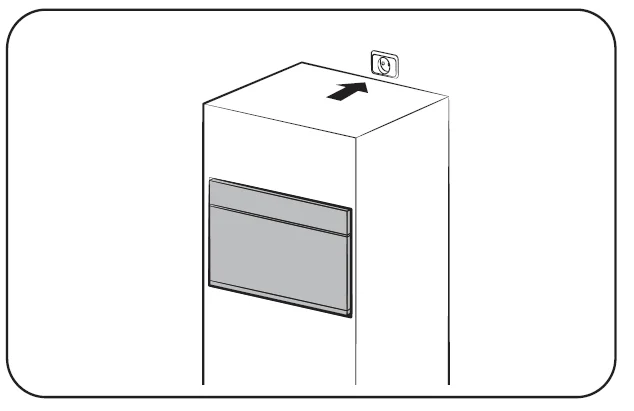
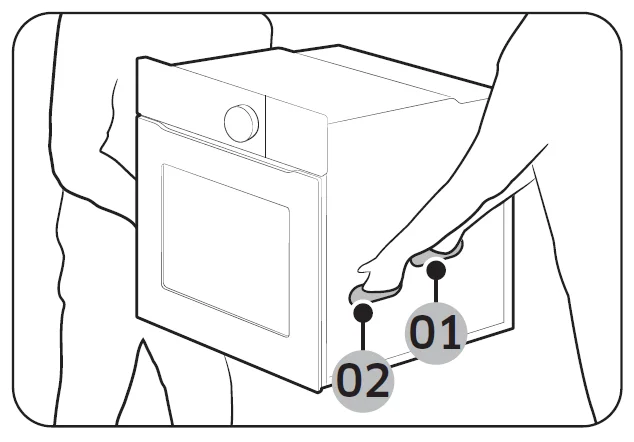
After the installation is complete, remove the protective film, tape, and other packing material, and take out the provided accessories from inside of the oven. To remove the oven from the cabinet, first disconnect the power to the oven and remove 2 screws on both sides of the oven.
Before you start
Control panel
The oven’s control panel features a display (non-touch), dial knob, and touch buttons to control the oven. Please read the following information to learn about the oven’s control panel.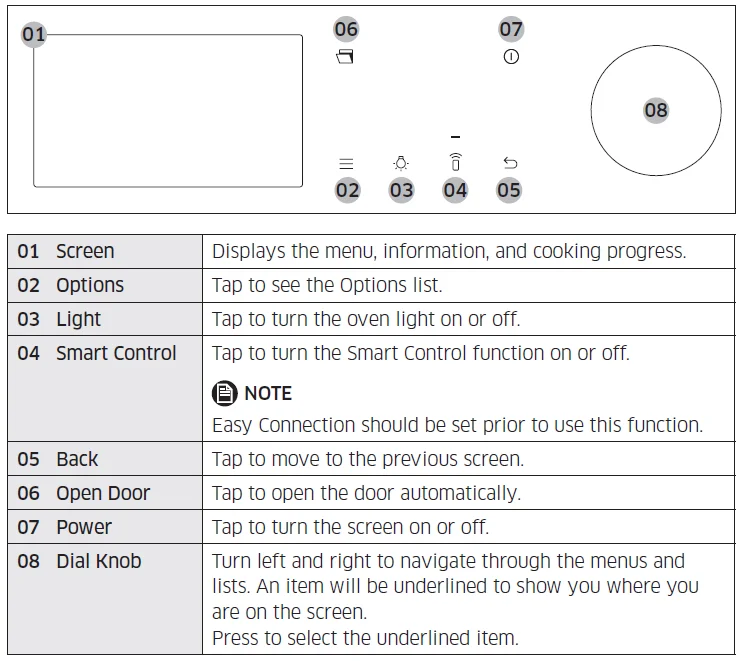
Initial settings
When you turn on the oven for the first time, the Welcome screen appears with the Samsung logo. Follow the on-screen instructions to complete the initial settings. You can change the initial settings later by accessing the Settings screen.
- On the welcome screen, select Start setup, and then press the Dial Knob.
- Set the language.
- Select the language, and then press the Dial Knob.
- Select Next, and then press the Dial Knob.
- Agree with the “Terms and Conditions” and “Privacy Policy”.
- Connect your appliance to the SmartThings app.
- On the Mobile Experience screen, select Next, and then press the Dial Knob.
- Scan the QR code on the screen with your smartphone and follow the onscreen instructions on your phone to complete the connection.
- If you do not wish to proceed to this step, select Skip, and then press the Dial Knob to proceed next step.
- Once you get the message that you are successfully connected, select OK, and then press the Dial Knob.
- Set the time zone.
- Select your time zone, and then press the Dial Knob.
- Select Next, and then press the Dial Knob.
- Set the date.
- Select the day, month, and year. Press the Dial Knob after selecting each item.
- Select Next, and then press the Dial Knob.
NOTE
Skip this step if you have connected your appliance to the SmartThings app.
- Select the time.
- Set the hour and minute. Press the Dial Knob after selecting each item.
- Select Next, and then press the Dial Knob.
NOTE
Skip this step if you have connected your appliance to the SmartThings app.
- Select Done, and then press the Dial Knob to complete the setting.
- Guide for first use screen appears. You can select LEARN MORE, and then press the Dial Knob to see the guide or select LATER, and then press the Dial Knob to skip this step.
Side racks
- Insert the accessory into the correct position inside the oven.
- Take caution when removing cookware and/or accessories from the oven. Hot meals or accessories can cause burns.
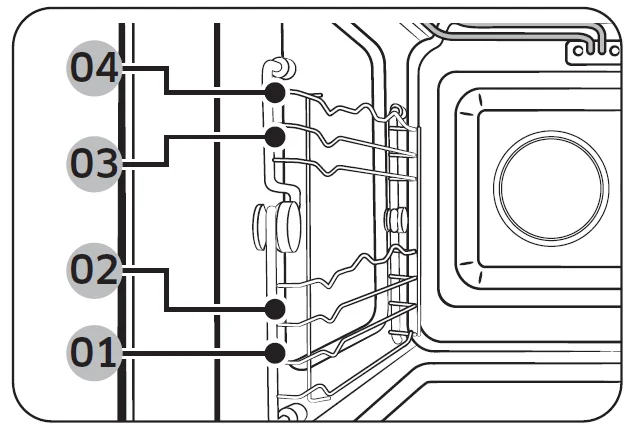
- Level 1
- Level 2
- Level 3
- Level 4
Water reservoir
The water reservoir is used for steam functions. Fill it with water in advance of steam cooking.
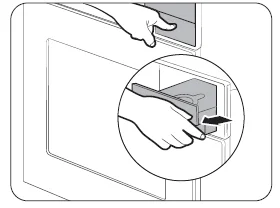
- Locate the water reservoir in the top-right corner. Push the cover to open and pull out the reservoir to remove.

- Open the reservoir cap, and fill the reservoir with 600 ml of drinkable water.
- Close the cap, reinsert the reservoir, and close the cover.
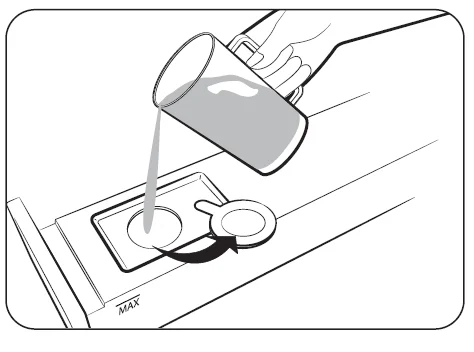
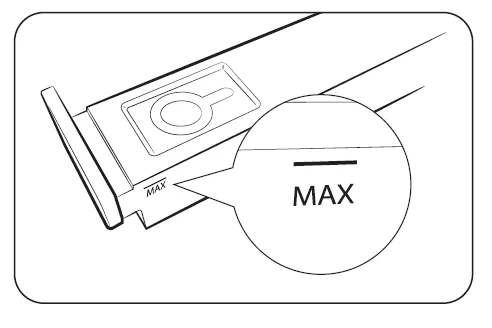
NOTE: Do not exceed the MAX line.
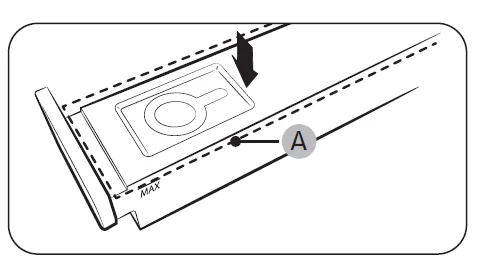
NOTE: Make sure the upper case (A) of the water reservoir is closed before using the oven.
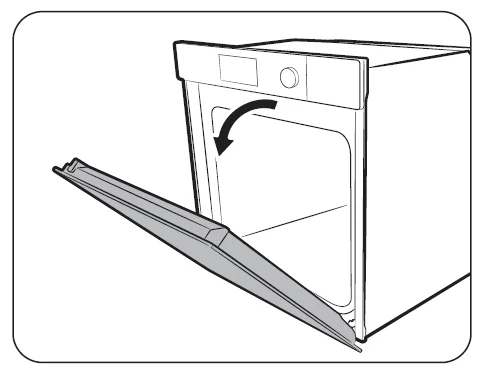
Auto door
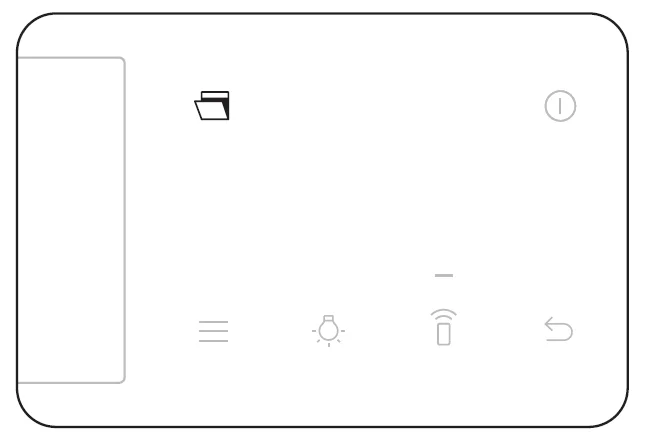
- Press the Auto door button.

- The door will open automatically.
CAUTION: If the door opens automatically, it may hit children or pets. Make sure that there are no children or pets in range of the door.
Oven modes
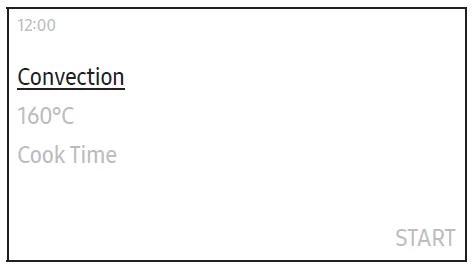
- On the main screen, select Convection, and then press the Dial Knob.
- Select the desired cook mode, and then press the Dial Knob.
(For detailed information on each mode, see the “Oven mode descriptions” section on page 15.)
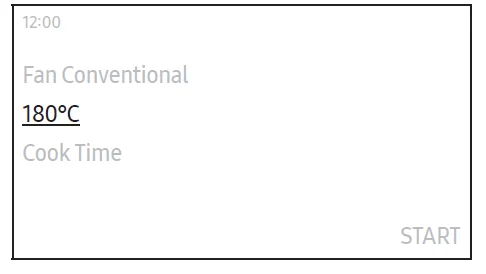
- Set the desired temperature.
- The default temperature and the temperature range differ depending on the cook mode.

- The default temperature and the temperature range differ depending on the cook mode.
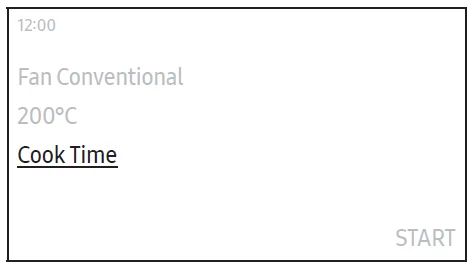
- Select Cook Time, and then press the Dial Knob to set the desired cooking time.
- Maximum cooking time is 10 hours.
- After setting the cooking time, select the option you want to run at the end of cooking, and then press the Dial Knob.
- You can select Oven Off, Keep Temp., or Keep Warm.
- The Large Grill mode does not support the Keep Warm option.
NOTE: If you start cooking without setting the cooking time or set Keep Temp. for the option, you must stop the oven manually.
- Select Ready at, and then press the Dial Knob to set the desired end time.
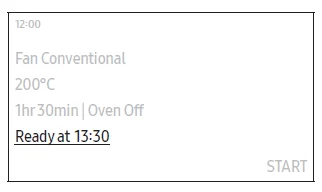
- When you set the cooking time, the oven displays the time the cooking will end. (Ex. Ready at 13:30)

- When you set the cooking time, the oven displays the time the cooking will end. (Ex. Ready at 13:30)
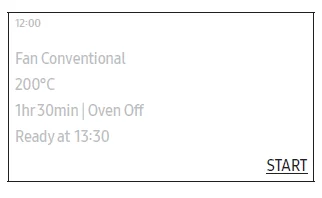
- Select START, and then press the Dial Knob.
- If you did not change the end time, the oven starts cooking immediately.
- If you change the end time, the oven will automatically adjust the start time to end cooking at the set time.
NOTE
- You can change the temperature and cooking time during cooking.
- During cooking, select Pause, and then press the Dial Knob to pause. Once you pause cooking, you can either end or continue cooking.
- Select OFF, and then press the Dial Knob to end cooking.
- Select Continue, and then press the Dial Knob to continue cooking.
- When cooking is complete, +5 mins appears on the screen.
- You can select +5 mins, and then press the Dial Knob to extend the cooking for 5 more minutes.
Operations
Auto Defrost
The oven offers 5 Auto Defrost programmes. Take advantage of this feature to conveniently defrost items. The cooking time, power level and temperature will be adjusted according to the selected programme.
- On the main screen, select Convection, and then press the Dial Knob.
- Select Auto Defrost, and then press the Dial Knob.
- Select the desired programme, and then press the Dial Knob.
- For detailed information on each programme, see “Auto Defrost” in the “Cooking Smart” section on page 29.)
- Select the weight, and then press the Dial Knob.
- Available weight differs depending on the selected programme.
- Prepare food and accessories as instructed on the screen, select Next, and then press the Dial Knob.
- Select START, and then press the Dial Knob.
Adding the new Timer
- Touch the
 button on the control panel.
 - Select Timer, and then press the Dial Knob.
- On the Timer screen, select +, and then press the Dial Knob.
- Skip this step if you are adding the timer for the first time.
- Set the time.
 button on the control panel.
Editing the existing Timer
- Touch thebutton on the control panel.
- Select Timer, and then press the Dial Knob.
- On the Timer screen, select the Timer you want to edit, and then press the Dial Knob.
- Change the time.
Deleting the Timer
- Touch thebutton on the control panel.
- Select Timer, and then press the Dial Knob.
- On the Timer screen, select
 , and then press the Dial Knob.
 - Select Delete on the right side of the Timer you want to delete, and then press the Dial Knob.
- Select Done, and then press the Dial Knob.
 , and then press the Dial Knob.
Using the Timer
- Touch thebutton on the control panel.
- Select Timer, and then press the Dial Knob.
- Select START on the right side of the Timer you want to use, and then press the Dial Knob.
- Once you start the timer, you can pause or cancel it.
NOTE
When the time has elapsed to a set point, a message of “Time is up” appears with a melody. Select OK, and then press the Dial Knob to dismiss the message.
- Once you start the timer, you can pause or cancel it.
Steam Clean
This is useful for cleaning light soiling with steam. This automatic function saves you time by removing the need for regular manual cleaning.
- Touch thebutton on the control panel.
- Select Cleaning, and then press the Dial Knob.
- Select Steam Clean, and then press the Dial Knob.
- Follow the instructions on the screen, select Next, and then press the Dial Knob.
- Select START, and then press the Dial Knob.
WARNING: Do not open the door before the cycle is complete. The water inside the oven is very hot, and it can cause burns.
NOTE
- If the oven is heavily soiled with grease, for example, after roasting or grilling, it is recommended to remove stubborn soil manually using a cleaning agent before activating Steam cleaning.
- Leave the oven door ajar when the cycle is complete. This is to allow the interior enamel surface to dry thoroughly.
- While the oven is hot inside, auto cleaning is not activated. Wait until the oven cools down and try again.
- Do not pour water onto the bottom by force. Do it gently. Otherwise, the water overflows to the front.
Descale
Clean inside the steam generator to prevent affecting the food quality and taste.
NOTE
- The oven counts the time of steam-assisted modes and notifies you to run the Descale function when required. You can still use the steam-assisted modes for the next two hours without running the Descale function. However, you cannot use the steam-assisted modes after two hours unless you run and complete the Descale function.
- When you get the notification message, select Start now, and then press the Dial Knob to run the Descale function, or select Later, and then press the Dial Knob to postpone it.
Cooking Smart
Manual cooking
Steam-assisted mode
Steam Cook
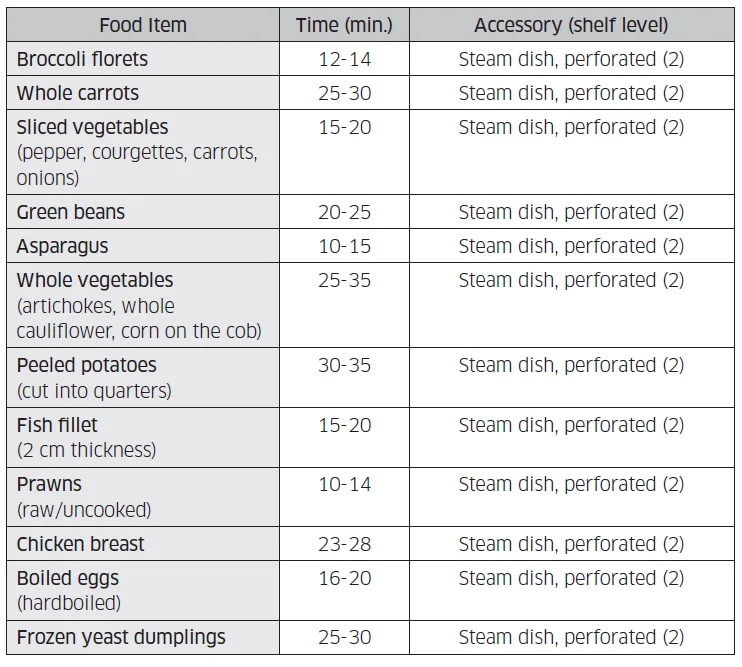
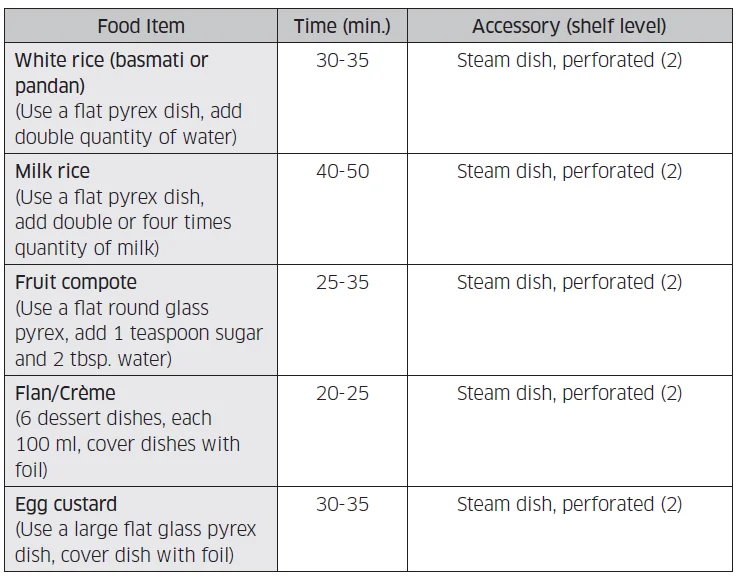
Use the settings and times in this table as guidelines for steaming. We recommend always filling the water reservoir with fresh water to the maximum level. Sometimes you can use the baking tray on the bottom for collecting condensation, for example fish fillet.
Two-level steam cooking
Use the settings and times in this table as guidelines for steam cooking. We recommend always filling the water reservoir with fresh water to the maximum level. If you have different foods with a similar preparation time, you can put all the items in the oven at the same time. Otherwise, put in first the item with the longest preparation time. Put the steam dish on level 2 and the oven rack on level 4.
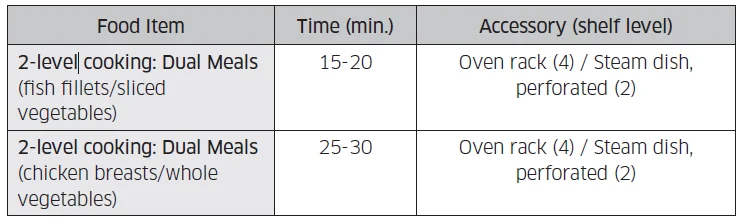
We recommend using a flat Pyrex dish on the oven rack. Please increase the cooking time by 20-30 % than a kind of food if you want to cook many different foods at the same time.
Steam Convection / Steam Top Heat + Convection / Steam Bottom Heat + Convection Use settings and times in this table as guidelines for baking and roasting. We recommend always filling the water reservoir with fresh water to the maximum level.
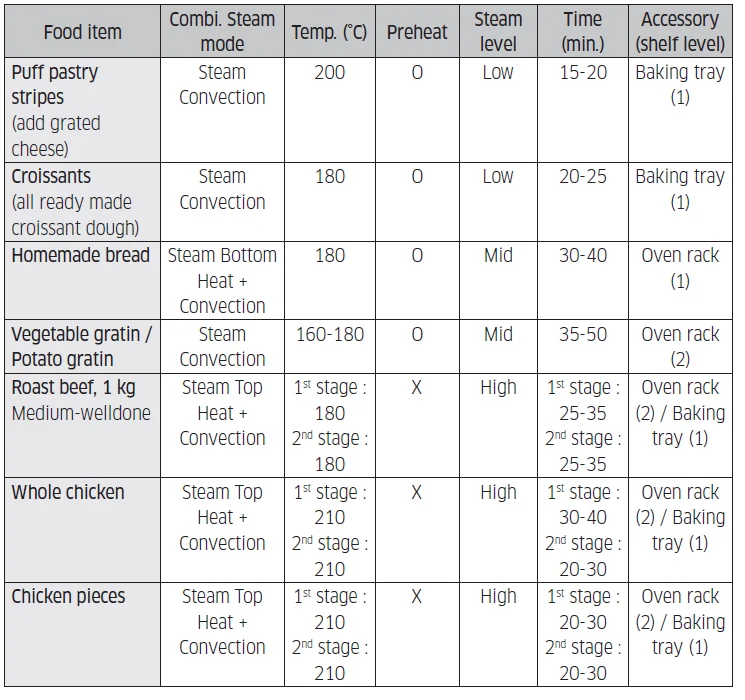
NOTE
- We recommend turning the food over 1st and 2nd stages.
- If you open the door while the oven is cooking, the oven stops. To restart the oven, close the door, select START, and then press the Dial Knob.
Maintenance
Cleaning
Clean the oven regularly to prevent impurities from building up on or inside the oven. Also, pay special attention to the door and the door sealing (applicable models only). If the door won’t open or close smoothly, first check if the door seals have built up impurities. Use a soft cloth in soapy water to clean both the inner and outer sides of the oven. Rinse and dry well. If there are fingerprints, grease, or stains on the exterior (such as the door surface or display), clean with a soft cloth with a glass cleaner or neutral detergent, and then wipe dry with a soft, clean, dry cloth. To remove stubborn impurities with bad smells from inside the oven
- With an empty oven, put a cup of diluted lemon juice on the centre of the cavity.
- Heat the oven for 10 minutes at max temperature of the oven mode.
- When the cycle is complete, wait until the oven cools down. Then, open the door and clean the cooking chamber.
CAUTION
- Keep the door and door sealing clean and ensure the door opens and closes smoothly. Otherwise, the oven’s lifecycle may be shortened.
- Take caution not to spill water into the oven vents.
- Do not use any abrasive or chemical substances for cleaning.
- After each use of the oven, use a mild detergent to clean the cooking chamber after waiting for the oven to cool down.
Troubleshooting
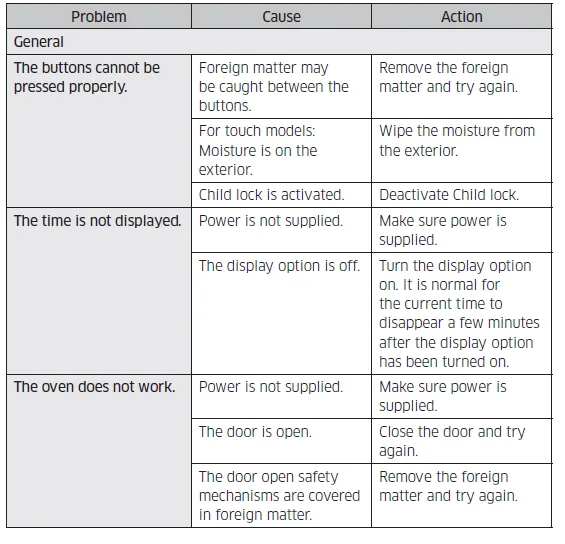
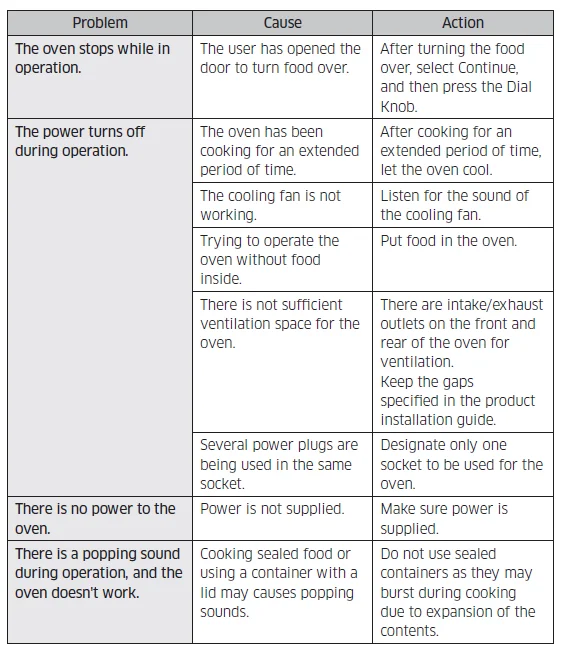
You may encounter a problem using the oven. In that case, first check the table below and try the suggestions. If a problem persists, or if any information code keeps appearing on the display, contact a local Samsung service centre.
Checkpoints
If you encounter a problem with the oven, first check the table below and try the suggestions.
For more manuals by SAMSUNG, Visit ManualsLibraryy
Samsung Combi Steam Built-in Oven-FAQs
What is a Samsung Combi Steam Built-in Oven?
A Samsung combi steam built-in oven combines steam cooking and convection heat in one appliance. This allows food to cook evenly while retaining moisture, flavor, and nutrients.
When were combi ovens first introduced?
Combi ovens were originally developed in the 1960s for professional kitchens and later adapted for home use due to their versatility and efficiency.
What is the difference between a steam oven and a combi steam oven?
A steam oven uses only steam, while a combi steam oven blends steam with convection heat. This combination improves browning, speeds up cooking, and offers more cooking modes.
Can a Samsung combi steam oven replace a regular oven?
Yes, a Samsung combi steam oven can replace a traditional oven by handling baking, roasting, reheating, and steaming—all in one unit.
Is a combi steam oven worth buying?
Yes, it’s worth it for users who value healthier cooking, better texture, and precise temperature control, especially for baking and roasting.
How long do Samsung built-in ovens typically last?
Samsung built-in ovens usually last 10 to 15 years, depending on usage, maintenance, and installation quality.
Can I use aluminum foil in a Samsung combi steam oven?
Yes, aluminum foil can be used safely if it doesn’t block vents or heating elements. Avoid lining the oven base completely unless stated in the user manual.
Does aluminum foil release toxins when heated?
Aluminum foil is generally safe below 400–450°F (200–230°C). At higher temperatures, minimal aluminum transfer may occur, especially with acidic foods.