
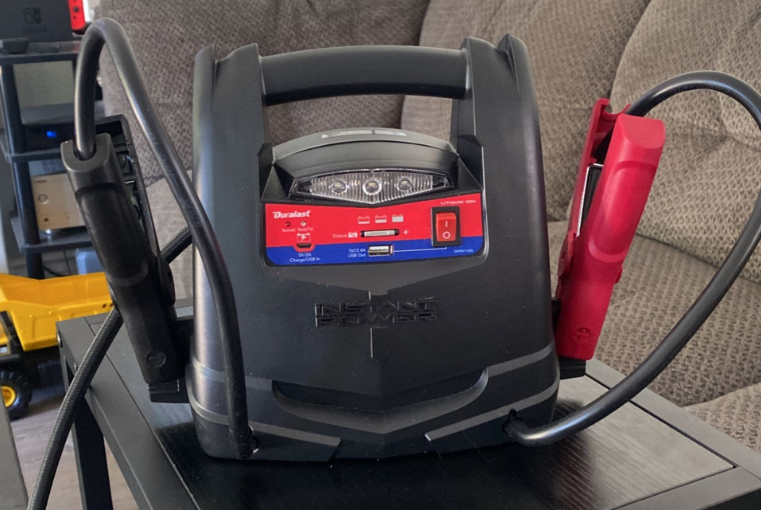

Schumacher DL-1200AC Lithium Ion Jump Starter
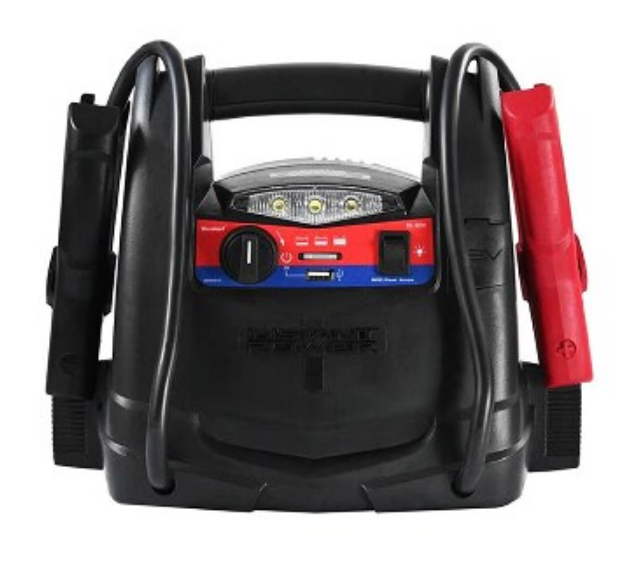
1. IMPORTANT SAFETY INSTRUCTIONS – SAVE THESE INSTRUCTIONS.
WARNING: RISK OF EXPLOSIVE GASES. WORKING IN THE VICINITY OF A LEAD-ACID BATTERY IS DANGEROUS. BATTERIES GENERATE EXPLOSIVE GASES DURING NORMAL OPERATION. IT IS IMPORTANT THAT YOU FOLLOW THESE INSTRUCTIONS EACH TIME YOU USE THE UNIT. To reduce the risk of battery explosion, follow these instructions and those published by the battery manufacturer and the manufacturer of any equipment you intend to use in the vicinity of a battery. Review cautionary markings on these products and on the engine. WARNING! RISK OF ELECTRIC SHOCK OR FIRE.
- Keep out of reach of children.
- Do not disassemble the jump starter. Take it to a qualified service professional if service or repair is required. Incorrect assembly may result in fire or electrical shock.
- Do not use the jump starter to jump a vehicle while charging the internal battery.
- Do not recharge the jump starter with a damaged extension cord.
- The jump starter gets hot during charging and must have proper ventilation.
- Do not set the jump starter on flammable materials, such as carpeting, upholstery, paper, cardboard, etc.
- Place the jump starter as far away from the battery being jumped as the cables will permit.
- Do not expose the jump starter to rain or snow.
- Never attempt to jump-start a frozen battery.
- Never place the jump starter directly above the battery being jumped.
- To prevent arcing, never allow the clamps to touch together or to contact the same piece of metal.
- Use of an attachment not recommended or sold by the jump starter manufacturer may result in damage to the unit or personal injury.
- Never operate the jump starter if it is damaged.
- If someone else uses the jump starter, ensure they are well-informed on how to use it safely, and have read and understood the operating instructions.
- The jump starter is NOT designed to be installed as a replacement for a vehicle battery.
- Use ONLY on vehicles, boats, and garden tractors powered with a 12V DC battery system.
- If the engine fails to start after the recommended number of attempts, disconnect the unit and look for other problems that may need to be corrected.
- Use the jump starter for jump-starting lead-acid batteries only. Do not use for dry cell batteries that are commonly used with home appliances.
2. PERSONAL SAFETY PRECAUTIONS
- Wear complete eye protection and protective clothing when working near lead-acid batteries. Always have someone nearby for help.
- Have plenty of fresh water, soap, and baking soda nearby for use, in case battery acid contacts your eyes, skin, or clothing. Wash immediately with soap and water and seek medical attention.
- If battery acid comes in contact with the eyes, flush the eyes immediately for a minimum of 10 minutes and get medical attention.
- Neutralize any acid spills thoroughly with baking soda before attempting to clean up.
- Remove all personal metal items from your body, such as rings, bracelets, necklaces, and watches. A battery can produce a short circuit current high enough to weld a ring to metal, causing a severe burn.
- Never smoke or allow a spark or flame in the vicinity of the battery or engine.
- This product contains a lithium-ion battery. In case of fire, you may use water, a foam extinguisher, Halon, CO2, ABC dry chemical, powdered graphite, copper powder, or soda (sodium carbonate) to extinguish the fire. Once the fire is extinguished, douse the product with water, an aqueous-based extinguishing agent, or other nonalcoholic liquids to cool the product and prevent the battery from re-igniting. NEVER attempt to pick up or move a hot, smoking, or burning product, as you may be injured.
- NOTE: This equipment has been tested and found to comply with the limits for a Class B digital device, pursuant to part 15 of the FCC Rules. These limits are designed to provide reasonable protection against harmful interference in a residential installation. This equipment generates, uses, and can radiate radio frequency energy and, if not installed and used in accordance with the instructions, may cause harmful interference to radio communications. However, there is no guarantee that interference will not occur in a particular installation. If this equipment does cause harmful interference to radio or television reception, which can be determined by turning the equipment off and on, the user is encouraged to try to correct the interference by one or more of the following measures:
- Reorient or relocate the receiving antenna.
- Increase the separation between the equipment and receiver.
- Connect the equipment into an outlet on a circuit different from that to which the receiver is connected.
- Consult the dealer or an experienced radio/TV technician for help.
3. FEATURES
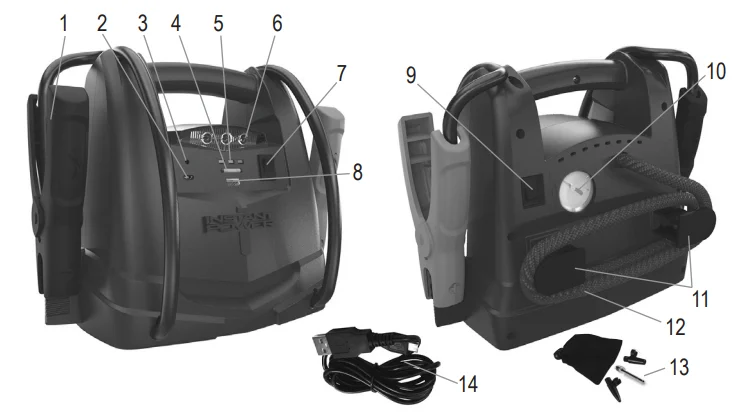
- Battery clamps
- Micro-USB charging port
- Ready/Fail LED
- Battery status/Light button
- Battery status indicators
- Built-in work light
- ON/OFF Power switch
- USB port
- Air compressor ON/OFF switch
- Air compressor gauge
- Air compressor hose wrap cleats
- Air compressor hose
- Air compressor adapters and storage bag
- Micro/USB charging cable

4. CHARGING THE INTERNAL BATTERY OF THE JUMP STARTER
IMPORTANT: CHARGE IMMEDIATELY AFTER PURCHASE, AFTER EACH USE, AND EVERY 30 DAYS, TO KEEP THE JUMP STARTER’S INTERNAL BATTERY FULLY CHARGED AND PROLONG BATTERY LIFE.
- CHECKING THE LEVEL OF THE INTERNAL BATTERY
- Press the ON/OFF Power switch. The Battery Status LEDs will light for 5 seconds and then turn off. While the Battery Status LEDs are off and the ON/OFF Power switch is on, press the Battery Status/Light button on the front of the unit. The LEDs will indicate the current charge level as follows:
- Red LED flashing: 0-5% of full charge; immediately charge the unit.
- Red LED solid: 6-49% of full charge.
- Yellow LED solid: 50-75% of full charge.
- Green LED solid: 76-100% of full charge.
- CHARGING THE INTERNAL BATTERY
- The jump starter will fully charge in 3-4 hours. NOTE: Use a 2A USB charger (not included) or a 2A USB charging port to quickly recharge the jump starter. Using a charger with less than 2A will increase charge time.
- Plug the Micro USB end of a charging cable into the input port. Next, plug the USB end of the charging cable into your charger’s USB port.
- Plug your charger into a live power source.
- When the unit is charging, the three LEDs will flash as follows:
- Red LED flashing: 0-49%
- Red LED solid and Yellow LED flashing: 50-75%
- Red and Yellow LEDs solid and Green LED flashing: 76-99%
- Green LED solid: 100% NOTE: The Battery Status LEDs will shut off after 5 seconds. Press the Battery Status button to turn the LEDs on.
- Ten seconds after the battery has reached full charge, the green LED will turn solid.
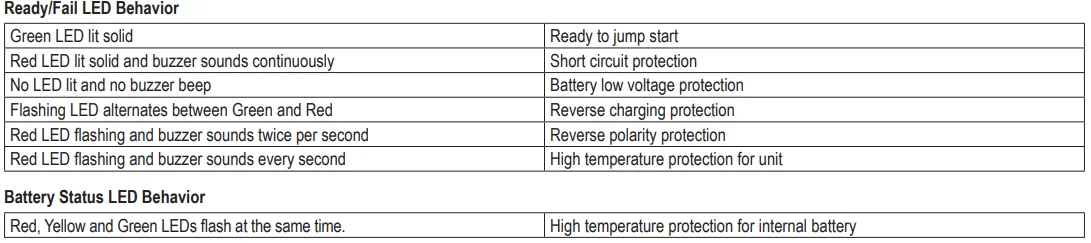
- If the Red Ready/Fail LED lights and the buzzer sound, the unit’s protection has been activated (such as short circuit protection, battery low voltage protection, reverse polarity protection, etc.), and the unit will not operate.
- When the battery is fully charged, disconnect your charger from the power source and then remove the charging cable from the charger and the unit. Make sure the power switch is set to OFF if not using the jump starter immediately.
5. OPERATING INSTRUCTIONS
5.1 JUMP STARTING A VEHICLE
IMPORTANT: Using the jump starter without a battery installed in the vehicle will damage the vehicle’s electrical system.
- Turn the ignition OFF.
- Lay the DC cables away from any fan blades, belts, pulleys, and other moving parts.
- For a negative-ground vehicle (as in most vehicles), connect the jump starter’s POSITIVE (RED) clamp to the POSITIVE (POS, P, +) battery post. Next, connect the NEGATIVE (BLACK) clamp to the vehicle chassis or engine block, away from the battery.
- For a positive-ground vehicle, connect the jump starter’s NEGATIVE (BLACK) clamp to the NEGATIVE (NEG, N, -) battery post. Next, connect the POSITIVE (RED) clamp to the vehicle chassis or engine block away from the battery.
- Press the ON/OFF switch to turn on the jump starter. The green Ready LED will light.
- Crank the engine for no more than 8 seconds. If the engine does not start, wait 2 minutes before cranking again.
- After the engine starts, press the ON/OFF switch to turn the jump starter off, and then disconnect the black clamp (-) and the red clamp (+), in that order.
- Recharge the unit as soon as possible after each use.
5.2 USING THE USB PORT
The USB port provides up to 2.4A at 5V DC.
- Ensure the battery clamps are securely clipped to the storage holders.
- Press the ON/OFF power switch to turn the unit ON.
- Plug your device into the USB port.
- Turn on the USB device.
- When finished using the USB port, turn the switch to the OFF position.
- Recharge the unit as soon as possible after each use.
5.3 USING THE WORK LIGHT
- Position the jump starter on a flat, stable surface near the intended work area.
- Ensure the battery clamps are securely clipped to the storage holders.
- Press the Battery Status/Light button on the front of the unit for 0.75 seconds to turn on the work light.
- When finished using the work light, press the button for 0.75 seconds to turn off the work light.
- Recharge the unit as soon as possible after each use.
5.4 USING THE AIR COMPRESSOR
WARNING. Read the instructions of the product being inflated before using the compressor. Avoid overinflation; do not exceed the manufacturer’s recommended pressures. Do not leave the air compressor unattended during use.
- Remove the air compressor hose from the storage cleats.
- Connect the adapter to the valve stem by threading it onto the end. If necessary, use one of the additional adapters.
- Turn ON the inflator power switch and inflate to the desired pressure or fullness. NOTE: To prevent overheating, the compressor has built-in thermal protection that will turn the compressor off before it overheats. If the compressor shuts off, wait a few minutes, and it will automatically restart when the compressor cools.
- When the desired pressure is reached, turn the inflator power switch to OFF, and unthread the connector from the valve stem.
- Wrap the compressor hose around these cleats when it is not being used.
- Allow the unit to cool.
- Recharge the unit before storing.
NOTE: The air compressor is rated for 150 PSI.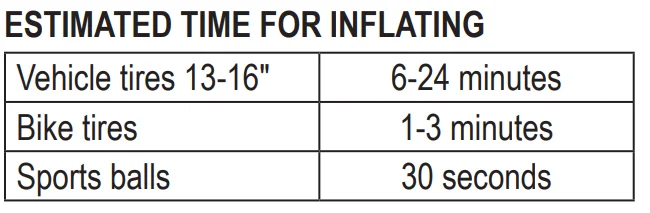
5.5 ENERGY SAVING MODE
If the unit is not used after the ON/OFF power switch is turned on, the unit will go into Energy Saving mode after 10 minutes to prevent battery discharge. Follow these steps to use any function after Energy Saving mode:
- Press the ON/OFF power switch to turn the unit ON.
- The Green Ready/Fail LED will light.
- After 10 minutes, the USB port and Battery Status/Light function will turn off.
- After 10 minutes, the Green Ready/Fail LED will turn off.
- Press the Battery Status/Light button once. The unit is now ready for checking the battery status and using the jump starter, compressor, USB, and work light.
6. MAINTENANCE AND STORAGE
- Clean the clips and the case each time you are finished using it.
- Charge battery to full capacity before storage.
- Store this unit at the temperatures between -4°F – +140°F (-20 ˚C – +60 ˚C).
- Store clips on their support posts to ensure they do not come into contact with any metallic surface.
- Never completely discharge the internal battery.
- Charge after each use.
- Charge at least once every month, if not in frequent use, to prevent over-discharge.
7. TROUBLESHOOTING
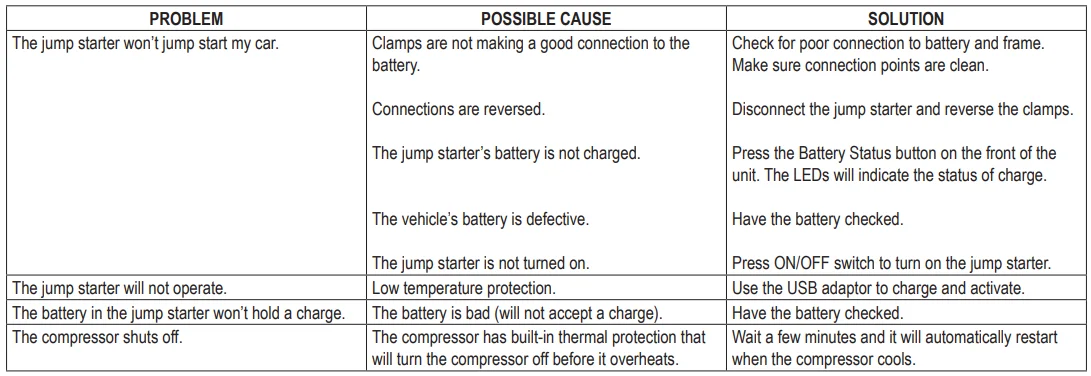
8. REPLACEMENT PARTS
Micro USB-USB charging cable…………………………………………………………………………………. 3899003781Z
9. BEFORE RETURNING FOR REPAIRS
For troubleshooting information, contact Schumacher Electric Corporation Customer Service for assistance:
[email protected] | www.batterychargers.com | or call 1-800-621-5485. Return products under warranty to your local AutoZone store.
10. LIMITED WARRANTY
SCHUMACHER ELECTRIC CORPORATION, 801 BUSINESS CENTER DRIVE, MOUNT PROSPECT, IL 60056-2179, MAKES THIS LIMITED WARRANTY TO THE ORIGINAL RETAIL PURCHASER OF THIS PRODUCT. THIS LIMITED WARRANTY IS NOT TRANSFERABLE OR ASSIGNABLE. Schumacher Electric Corporation (the “Manufacturer”) warrants this jump starter for one (1) year and the internal battery for ninety (90) days from the date of purchase at retail against defective material or workmanship that may occur under normal use and care.
If your unit is not free from defective material or workmanship, the manufacturer’s obligation under this warranty is solely to repair or replace your product with a new or reconditioned unit at the option of the Manufacturer. It is the obligation of the purchaser to forward the unit, along with proof of purchase and mailing charges prepaid to the Manufacturer or its authorized representatives, for repair or replacement to occur.
The manufacturer does not provide any warranty for any accessories used with this product that are not manufactured by Schumacher Electric Corporation and approved for use with this product. This Limited Warranty is void if the product is misused, subjected to careless handling, repaired, or modified by anyone other than the Manufacturer, or if this unit is resold through an unauthorized retailer.
The manufacturer makes no other warranties, including, but not limited to, express, implied, or statutory warranties, including, without limitation, any implied warranty of merchantability or implied warranty of fitness for a particular purpose. Further, Manufacturer shall not be liable for any incidental, special, or consequential damage claims incurred by purchasers, users, or others associated with this product, including, but not limited to, lost profits, revenues, anticipated sales, business opportunities, goodwill, business interruption, and any other injury or damage.
Any such warranties, other than the limited warranty included herein, are hereby expressly disclaimed and excluded. Some states do not allow the exclusion or limitation of incidental or consequential damages or the length of implied warranty, so the above limitations or exclusions may not apply to you. This warranty gives you specific legal rights, and it is possible you may have other rights that vary from this warranty. THIS LIMITED WARRANTY IS THE ONLY EXPRESS LIMITED WARRANTY, AND THE MANUFACTURER NEITHER ASSUMES NOR AUTHORIZES ANYONE TO ASSUME OR MAKE ANY OTHER OBLIGATION TOWARDS THE PRODUCT OTHER THAN THIS WARRANTY.
For More Manuals By Schumacher, Visit ManualsLibraryy.
Schumacher DL-1200AC Lithium Ion Jump Starter-FAQ
How do you use the Schumacher DL-1200AC jump starter?
First, turn off the vehicle. Connect the red clamp to the battery’s positive terminal and the black clamp to the negative terminal. Power on the jump starter and start the engine. Remove the clamps once the vehicle is running.
Is Schumacher a good brand for jump starters?
Yes, Schumacher is a trusted brand. Customers like its compact design, strong performance, long charge retention, and extra features such as USB charging ports.
Can the Schumacher DL-1200AC charge a dead battery?
It can help start vehicles with deeply discharged batteries using advanced boost technology, but it is not a replacement for a full battery charger.
Will a jump starter work on a completely dead battery?
A jump starter delivers a high burst of power to start the engine, even if the battery is very low. However, extremely damaged batteries may still need replacement.
How long does it take to charge the Schumacher DL-1200AC?
It typically takes 6–7 hours via USB or about 3.5 hours using a 12V car charger to fully recharge.
How do I know when the jump starter is fully charged?
The indicator lights or display will show a full charge status once charging is complete.
How many jump starts can you get on one charge?
On a full charge, the DL-1200AC can deliver up to 40 jump starts, depending on engine size and conditions.
How long should the jump starter stay connected to the car battery?
When used correctly, it is safe. Damage usually occurs due to reversed clamps, touching clips together, or ignoring battery damage.