
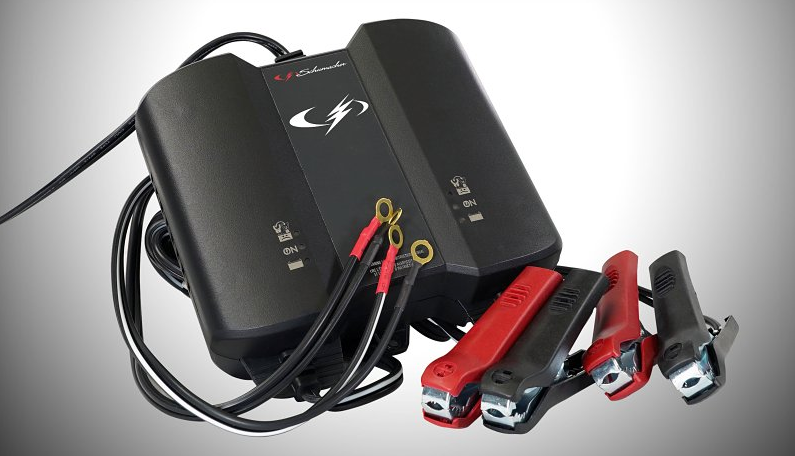

Schumacher SC1409 2A Battery Charger
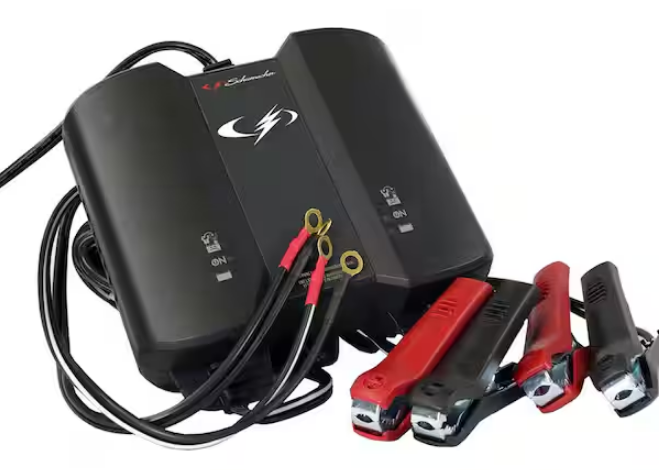
IMPORTANT SAFETY INSTRUCTIONS – SAVE THESE INSTRUCTIONS.
- SAVE THESE INSTRUCTIONS – This manual contains important safety and operating instructions.
- Keep out of reach of children.
- Do not expose the charger to rain or snow.
- Use of an attachment not recommended or sold by the battery charger manufacturer may result in a risk of fire, electric shock, or injury to persons.
- To reduce the risk of damage to the electric plug and cord, pull by the plug rather than the cord when disconnecting the charger.
- An extension cord should not be used unless necessary. Use of an improper extension cord could result in a risk of fire and electric shock. If an extension cord must be used, make sure:
- The pins on the plug of the extension cord are the same number, size, and shape as those of the plug on the charger.
- The extension cord is properly wired and in good electrical condition.
- The wire size is large enough for the AC ampere rating of the charger, as specified in section 8.
- Do not operate the charger with a damaged cord or plug – replace the cord or plug immediately.
- Do not operate the charger if it has received a sharp blow, been dropped, or otherwise damaged in any way; take it to a qualified serviceman.
- Do not disassemble the charger; take it to a qualified serviceman when service or repair is required. Incorrect reassembly may result in a risk of electric shock or fire.
- To reduce the risk of electric shock, unplug the charger from the outlet before attempting any maintenance or cleaning. Turning off controls will not reduce this risk.
- WARNING: RISK OF EXPLOSIVE GASES.
- WORKING IN THE VICINITY OF A LEAD-ACID BATTERY IS DANGEROUS. BATTERIES GENERATE EXPLOSIVE GASES DURING NORMAL BATTERY OPERATION. FOR THIS REASON, IT IS OF UTMOST IMPORTANCE THAT YOU FOLLOW THE INSTRUCTIONS EACH TIME YOU USE THE CHARGER.
- To reduce the risk of battery explosion, follow these instructions and those published by the battery manufacturer and the manufacturer of any equipment you intend to use in the vicinity of the battery. Review cautionary markings on these products and on the engine.
2. PERSONAL SAFETY PRECAUTIONS
- Consider having someone close enough by to come to your aid when you work near a lead-acid battery.
- Have plenty of fresh water and soap nearby in case battery acid contacts skin, clothing, or eyes.
- Wear complete eye protection and clothing protection. Avoid touching your eyes while working near the battery.
- If battery acid contacts skin or clothing, wash immediately with soap and water. If acid enters the eye, immediately flood the eye with running cold water for at least 10 minutes and get medical attention immediately.
- NEVER smoke or allow a spark or flame in the vicinity of the battery or engine.
- Be extra cautious to reduce the risk of dropping a metal tool onto the battery. It might spark or short-circuit the battery or other electrical parts, which may cause an explosion.
- Remove personal metal items such as rings, bracelets, necklaces, and watches when working with a lead-acid battery. A lead-acid battery can produce a short-circuit current high enough to weld a ring or the like to metal, causing a severe burn.
- Use the charger for charging only 6 and 12V LEAD-ACID (STD, GEL, or AGM) rechargeable batteries. It is not intended to supply power to a low-voltage electrical system other than in a starter-motor application. Do not use the battery charger for charging dry-cell batteries that are commonly used with home appliances. These batteries may burst and cause injury to persons and property damage.
- NEVER charge a frozen battery.
3. PREPARING TO CHARGE
- If necessary to remove the battery from the vehicle to charge, always remove the grounded terminal from the battery first. Make sure all accessories in the vehicle are off, so as not to cause an arc.
- Be sure the area around the battery is well ventilated while the battery is being charged.
- Clean the battery terminals. Be careful to keep corrosion from coming in contact with the eyes.
- Add distilled water in each cell until the battery acid reaches the level specified by the battery manufacturer. Do not overfill. For a battery without removable cell caps, such as valve-regulated lead-acid batteries, carefully follow the manufacturer’s recharging instructions.
- Study all battery manufacturers’ specific precautions while charging and recommended rates of charge.
4. CHARGER LOCATION
- Locate the charger as far away from the battery as the DC cables permit.
- Never place the charger directly above the battery being charged; gases from the battery will corrode and damage the charger.
- Never allow battery acid to drip on the charger when reading electrolyte specific gravity or filling the battery.
- Do not operate the charger in a closed-in area or restrict ventilation in any way.
- Do not set a battery on top of the charger.
5. DC CONNECTION PRECAUTIONS
- Connect and disconnect DC output clips only after removing the AC cord from the electric outlet. Never allow clips to touch each other.
- Attach clips to the battery and chassis, as indicated in sections 6 and 7.
6. FOLLOW THESE STEPS WHEN THE BATTERY IS INSTALLED IN THE VEHICLE
WARNING: A SPARK NEAR THE BATTERY MAY CAUSE A BATTERY EXPLOSION. TO REDUCE THE RISK OF A SPARK NEAR THE BATTERY:
- Position the AC and DC cords to reduce the risk of damage from the hood, door, or moving engine parts.
- Stay clear of fan blades, belts, pulleys, and other parts that can cause injury to persons.
- Check the polarity of battery posts. POSITIVE (POS, P, +) battery post usually has a larger diameter than NEGATIVE (NEG, N, –) post.
- Determine which post of the battery is grounded (connected) to the chassis. If the negative post is grounded to the chassis (as in most vehicles), see (6.5). If the positive post is grounded to the chassis, see (6.6).
- For a negative-grounded vehicle, connect the POSITIVE (RED) clip from the battery charger to the POSITIVE (POS, P, +) ungrounded post of the battery. Connect the NEGATIVE (BLACK) clip to the vehicle chassis or engine block away from the battery. Do not connect the clip to the carburetor, fuel lines, or sheet-metal body parts. Connect to a heavy-gauge metal part of the frame or engine block.
- For a positive-grounded vehicle, connect the NEGATIVE (BLACK) clip from the battery charger to the NEGATIVE (NEG, N, –) ungrounded post of the battery. Connect the POSITIVE (RED) clip to the vehicle chassis or engine block away from the battery. Do not connect the clip to the carburetor, fuel lines, or sheet-metal body parts. Connect to a heavy-gauge metal part of the frame or engine block.
- When disconnecting the charger, disconnect the AC cord, remove the clip from the vehicle chassis, and then remove the clip from the battery terminal.
- See Operating Instructions for length of charge information.
7. FOLLOW THESE STEPS WHEN THE BATTERY IS OUTSIDE THE VEHICLE
WARNING: A SPARK NEAR THE BATTERY MAY CAUSE A BATTERY EXPLOSION. TO REDUCE THE RISK OF A SPARK NEAR THE BATTERY:
- Check the polarity of battery posts. POSITIVE (POS, P, +) battery post usually has a larger diameter than NEGATIVE (NEG, N, –) post.
- Attach at least a 24-inch-long 6-gauge (AWG) insulated battery cable to the NEGATIVE (NEG, N, –) battery post.
- Connect the POSITIVE (RED) charger clip to the POSITIVE (POS, P, +) post of the battery.
- Position yourself and the free end of the cable as far away from the battery as possible, then connect the NEGATIVE (BLACK) charger clip to the free end of the cable.
- Do not face the battery when making the final connection.
- When disconnecting the charger, always do so in the reverse sequence of the connecting procedure and break the first connection as far away from the battery as practical.
- A marine (boat) battery must be removed and charged on shore. To charge it on board requires equipment specially designed for marine use.
8. GROUNDING AND AC POWER CORD CONNECTIONS
- This battery charger is for use on a nominal 120-volt circuit. The plug must be plugged into an outlet that is properly installed and grounded in accordance with all local codes and ordinances. The plug pins must fit the receptacle (outlet). Do not use with an ungrounded system.
- DANGER: Never alter the AC cord or plug provided. If it does not fit the outlet, have a properly grounded outlet installed by a qualified electrician. An improper connection can result in a risk of electric shock or electrocution.
- NOTE: Pursuant to Canadian regulations, use of an adapter plug is not allowed in Canada. Use of an adapter plug in the United States is not recommended and should not be used.
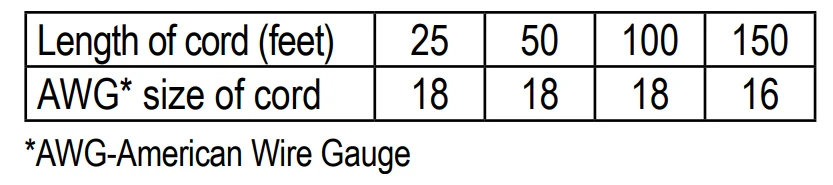
- USING AN EXTENSION CORD: The use of an extension cord is not recommended. If you must use an extension cord, follow these guidelines:
- Pins on the plug of the extension cord must be the same number, size, and shape as those of the plug on the charger.
- Ensure that the extension cord is properly wired and in good electrical condition.
- Wire size must be large enough for the AC ampere rating of the charger, as specified.

9. ASSEMBLY INSTRUCTIONS
- Remove all cord wraps and uncoil the cables before using the battery charger.
10. CONTROL PANEL
- LED INDICATORS
- POWER (green) LED lit: The charger is connected to AC power.
- CHARGING (yellow/orange) LED lit: The charger is charging the battery.
- CHARGED (green) LED lit: The battery is fully charged, and the charger is in maintenance mode.
- BAD BATTERY/CLAMPS REVERSED (red) LED flashing: The connections are reversed.
- BAD BATTERY/CLAMPS REVERSED (red) LED lit: The charger has detected a problem with the battery. See
- Troubleshooting for more information.
- NOTE: See Operating Instructions for a complete description of the charger modes.
11. OPERATING INSTRUCTIONS
IMPORTANT: Do not start the vehicle with the charger connected to the AC outlet, or it may damage the charger and your vehicle.
NOTE: This charger is equipped with an auto-start feature. Current is supplied to the battery clamps before a battery is connected, and the clamps may spark if touched together.
CHARGING A BATTERY IN THE VEHICLE
- Turn off all the vehicle’s accessories.
- Keep the hood open.
- Clean the battery terminals.
- Place the charger on a dry, non-flammable surface, or use the convenient hook attachment to hang the unit safely outside the work area.
- Lay the AC/DC cables away from any fan blades, belts, pulleys, and other moving parts.
- Connect the battery, following the precautions listed in sections 6 and 7.
- Connect the charger to a live grounded 120V AC outlet.
- The green Power LED will light.
- When charging is complete, disconnect the charger from the AC power, remove the clamp from the vehicle’s chassis, and then remove the clamp from the battery terminal.
CHARGING A BATTERY OUTSIDE OF THE VEHICLE
- Place the battery in a well-ventilated area.
- Clean the battery terminals.
- Connect the battery, following the precautions listed in sections 6 and 7.
- Connect the charger to a live grounded 120V AC outlet.
- The green Power LED will light.
- When charging is complete, disconnect the charger from the AC power, disconnect the negative clamp, and finally, the positive clamp.
- A marine (boat) battery must be removed and charged on shore.
USING THE QUICK-CONNECT CABLE CONNECTORS
Connect either of the two (2) output cable leads to the charger. Make sure to place the charger on a dry, non-flammable surface.
WARNING: Never connect the clamp and ring terminal connectors for use in other applications, such as external battery or other power source charging, or to extend the output cable length, as reverse polarity and/or overcharge conditions will occur.
BATTERY CLAMP QUICK-CONNECT
- Connect the end of the charger output cable to the end of the battery cable quick-connect and clamps.
- Follow the steps in sections 6 and 7 to connect the output clamps to the battery.
- Connect the charger to a live 120V AC outlet.
RING TERMINAL QUICK-CONNECT
- To permanently attach to a battery, loosen and remove each nut from the bolt at the battery terminal.
- Connect the red POSITIVE connector ring to the POSITIVE battery terminal.
- Connect the black NEGATIVE connector ring to the NEGATIVE battery terminal.
- Replace and tighten the nuts to secure.
- Connect the cable to the end of the charger output cord. Take care to keep the wires and plug away from metal and moving parts.
- Connect the charger to a live grounded 120V AC outlet.
BATTERY CHARGING TIMES
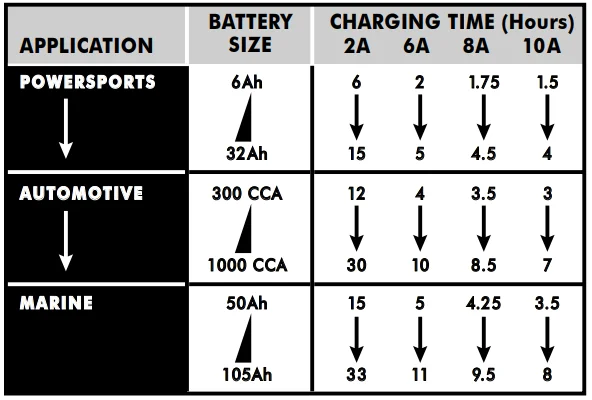
AUTOMATIC CHARGING MODE
When an automatic charge is performed, the charger switches to maintenance mode automatically after the battery is charged.
BAD BATTERY
If charging cannot be completed normally, the charger’s output is shut off, and the red Bad Battery LED will light. Do not continue attempting to charge this battery. Check the battery and replace it if necessary.
DESULFATION MODE
If the battery is left discharged for an extended period of time, it could become sulfated and not accept a normal charge. If the charger detects a sulfated battery, the charger will switch to a special mode of operation designed for such batteries. If successful, normal charging will resume after the battery is desulfated. Desulfation could take 8–10 hours. If desulfation fails, the red Bad Battery LED will light.
COMPLETION OF CHARGE
Charge completion is indicated by the green Charged LED. When lit, the charger has switched to the maintain mode of operation.
MAINTAIN MODE (FLOAT MODE MONITORING)
When the green Charged LED is lit, the charger has started maintenance mode. In this mode, the charger keeps the battery fully charged by delivering a small current when necessary. If the charger has to provide its maximum maintain current for a continuous 12-hour period, it will go into abort mode (see Bad Battery section). This is usually caused by a drain on the battery, or the battery could be bad. Make sure there are no loads on the battery. If there are, remove them. If there are none, have the battery checked or replaced.
MAINTAINING A BATTERY
The unit maintains both 6 and 12-volt batteries, keeping them at full charge. It is not recommended for industrial applications.
NOTE: The maintain mode technology allows you to safely charge and maintain a healthy battery for extended periods of time. However, problems with the battery, electrical problems in the vehicle, improper connections, or other unanticipated conditions could cause excessive current draws. As such, occasionally monitoring your battery and the charging process is recommended.
12. MAINTENANCE AND CARE
A minimal amount of care can keep your battery charger working properly for years.
- Clean the clamps each time you are finished charging. Wipe off any battery fluid that may have come in contact with the clamps to prevent corrosion.
- Occasionally, cleaning the case of the charger with a soft cloth will keep the finish shiny and help prevent corrosion.
- Coil the input and output cords neatly when storing the charger. This will help prevent accidental damage to the cords and charger.
- Store the charger unplugged from the AC power outlet in an upright position.
- Store inside in a cool, dry place. Do not store the clamps clipped together, on or around metal, or clipped to the cables.
13. TROUBLESHOOTING
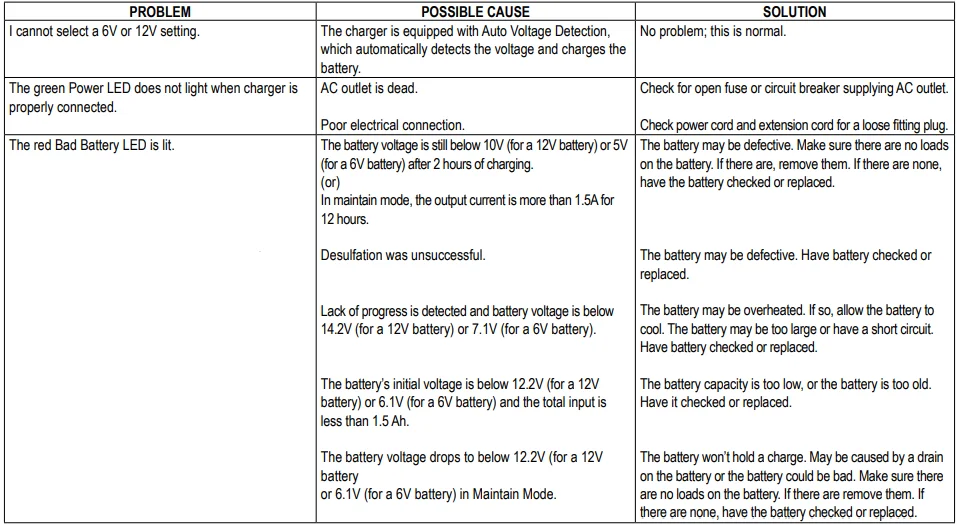
14. REPLACEMENT PARTS
- Ring connectors (quick-connect) ………………………… 94030008
- Battery clamps (quick-connect) …………………………. 3899002636Z
15. BEFORE RETURNING FOR REPAIRS
- For repairs or returns, visit 365rma.com.
- Visit batterychargers.com for replacement parts.
16. LIMITED WARRANTY
- For information on the one-year limited warranty, please visit batterychargers.com or call 1-800-621-5485 to request a copy.
- Go to batterychargers.com to register your product online.
For More Manuals By Schumacher, Visit ManualsLibraryy
Schumacher SC1409 2A Battery Charger-FAQS
What is the Schumacher SC1409 2A Battery Charger used for?
The Schumacher SC1409 is a compact 2-amp automatic battery charger designed for charging and maintaining 12-volt batteries in cars, motorcycles, lawn equipment, and small vehicles.
How do I use the Schumacher SC1409 battery charger step by step?
First, connect the charger clamps to the battery terminals (red to positive, black to negative). Then plug the charger into a power outlet. The charger will automatically start charging once it detects the battery.
How do I know when the battery is fully charged?
When charging is complete, the charger automatically stops charging and the indicator light shows a charged or ready status, confirming the battery is full.
Does the Schumacher SC1409 shut off automatically?
Yes. This charger is automatic and stops charging once the battery reaches full capacity, helping prevent overcharging.
What do the indicator lights on the charger mean?
A solid red or orange light usually means the battery is charging. A green light indicates the battery is fully charged. Flashing lights may signal a connection or polarity issue.
What should I do if the charger does not start charging?
Check that the clamps are connected correctly, the outlet is working, and the battery voltage is detectable. Incorrect polarity or a deeply discharged battery may prevent charging.
Is it better to charge a battery to 80% or 100%?
For everyday vehicle batteries, charging to 100% is safe with this charger. Automatic regulation prevents damage and helps maintain battery health.
Can I leave the battery connected after it’s fully charged?
Yes. The charger maintains the battery safely once fully charged, making it suitable for long-term maintenance.