
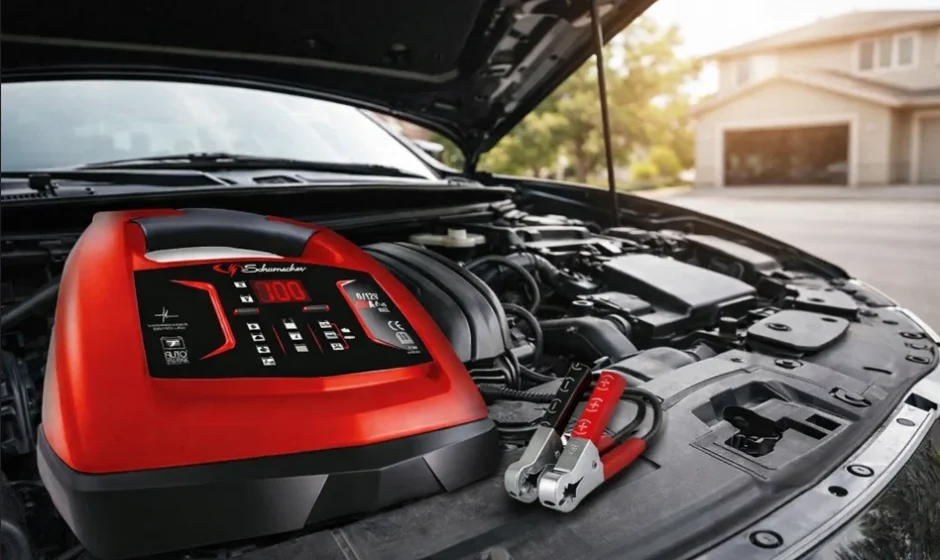

Schumacher SC190 6-12V Automatic Battery Charger

IMPORTANT SAFETY INSTRUCTIONS – SAVE THESE INSTRUCTIONS.
This manual will show you how to use your charger safely and effectively. Please read, understand, and follow these instructions and precautions carefully, as this manual contains important safety and operating instructions. The safety messages used throughout this manual contain a signal word, a message, and an icon.
The signal word indicates the level of the hazard in a situation.
WARNING: RISK OF ELECTRIC SHOCK OR FIRE.
- To reduce the risk of damage to the electric plug or cord, pull by the plug rather than the cord when disconnecting the charger.
- This charger is not intended for use by children. Persons with reduced physical, sensory, or mental capabilities, or a lack of experience and knowledge, must be given supervision or instruction concerning the use of the product by a person responsible for their safety.
- Children should be supervised to ensure they do not play with the charger.
- An extension cord should not be used unless absolutely necessary. Use of an improper extension cord could result in a risk of fire and electric shock. If an extension cord must be used, make sure:
- The pins on the plug of the extension cord are the same number, size, and shape as those of the plug on the charger.
- That the extension cord is properly wired and in good electrical condition.
- The wire size is large enough for the AC ampere rating of the charger as specified in section 7.3.
- Do not operate the charger with a damaged cord or plug; have the cord or plug replaced immediately by a qualified service person.
- Do not operate the charger if it has received a sharp blow, been dropped, or otherwise damaged in any way; take it to a qualified service person.
- Do not disassemble the charger; take it to a qualified service person when service or repair is required. Incorrect reassembly may result in a risk of fire or electric shock.
WARNING: Risk OF EXPLOSIVE GASES.
- WORKING IN THE VICINITY OF A LEAD-ACID BATTERY IS DANGEROUS. BATTERIES GENERATE EXPLOSIVE GASES DURING NORMAL BATTERY OPERATION. FOR THIS REASON, IT IS OF UTMOST IMPORTANCE THAT YOU FOLLOW THE INSTRUCTIONS EACH TIME YOU USE THE CHARGER.
- To reduce the risk of a battery explosion, follow these instructions and those published by the battery manufacturer and the manufacturer of any equipment you intend to use in the vicinity of the battery. Review the cautionary markings on these products and on the engine.
PREPARING TO CHARGE
WARNING: RISK OF CONTACT WITH BATTERY ACID.
BATTERY ACID IS A HIGHLY CORROSIVE SULFURIC ACID.
- Remove all cord wraps and uncoil the cables prior to using the battery charger.
- If it is necessary to remove the battery from the vehicle to charge it, always remove the grounded terminal first. Make sure all of the accessories in the vehicle are off to prevent arcing.
- Clean the battery terminals before charging the battery. During cleaning, keep airborne corrosion from coming into contact with your eyes, nose, and mouth. Use baking soda and water to neutralize the battery acid and help eliminate airborne corrosion. Do not touch your eyes, nose, or mouth.
- Add distilled water to each cell until the battery acid reaches the level specified by the battery manufacturer. Do not overfill. For a battery without removable cell caps, such as valve-regulated lead-acid batteries (VRLA), carefully follow the manufacturer’s recharging instructions.
- Read, understand, and follow all instructions for the charger, battery, vehicle, and any equipment used near the battery and charger. Study all of the battery manufacturers’ specific precautions while charging and recommended rates of charge.
- Determine the voltage of the battery by referring to the vehicle owner’s manual. This charger is equipped with Auto Voltage Detection of 6 or 12 volts.
- Make sure that the charger cable clips make tight connections.
- Included with your charger are two cord wrap cleats for the storage of the clip cables. To install, align the two tabs with the two receptacles on the back of the charger and push until you hear a snap.
CHARGER LOCATION
WARNING: RISK OF EXPLOSION AND CONTACT WITH BATTERY ACID.
- Locate the charger as far away from the battery as the DC cables permit.
- Never place the charger directly above the battery being charged; gases from the battery will corrode and damage the charger.
- Do not set the battery on top of the charger.
- Never allow battery acid to drip onto the charger when reading the electrolyte specific gravity or filling the battery.
FOLLOW THESE STEPS WHEN THE BATTERY IS INSTALLED IN THE VEHICLE
WARNING: A SPARK NEAR THE BATTERY MAY CAUSE A BATTERY EXPLOSION. TO REDUCE THE RISK OF A SPARK NEAR THE BATTERY:
- Position the AC and DC cables to reduce the risk of damage from the hood, door, and moving or hot engine parts. NOTE: If it is necessary to close the hood during the charging process, ensure that the hood does not touch the metal part of the battery clips or cut the insulation of the cables.
- Stay clear of fan blades, belts, pulleys, and other parts that can cause injury.
- Check the polarity of the battery posts. The POSITIVE (POS, P, +) battery post usually has a larger diameter than the NEGATIVE (NEG, N, -) post.
- Determine which post of the battery is grounded (connected) to the chassis.
- For a negative-grounded vehicle, connect the POSITIVE (RED) clip from the battery charger to the POSITIVE (POS, P, +) ungrounded post of the battery. Connect the NEGATIVE (BLACK) clip to the vehicle chassis or engine block away from the battery. Do not connect the clip to the carburetor, fuel lines, or sheet-metal body parts. Connect to a heavy-gauge metal part of the frame or engine block.
- For a positive-grounded vehicle, connect the NEGATIVE (BLACK) clip from the battery charger to the NEGATIVE (NEG, N, -) ungrounded post of the battery. Connect the POSITIVE (RED) clip to the vehicle chassis or engine block away from the battery. Do not connect the clip to the carburetor, fuel lines, or sheet-metal body parts. Connect to a heavy-gauge metal part of the frame or engine block.
- Connect the charger AC supply cord to the electrical outlet.
- When disconnecting the charger, disconnect the AC cord, remove the clip from the vehicle chassis, and then remove the clip from the battery terminal.
FOLLOW THESE STEPS WHEN THE BATTERY IS OUTSIDE THE VEHICLE
WARNING: A SPARK NEAR THE BATTERY MAY CAUSE A BATTERY EXPLOSION. TO REDUCE THE RISK OF A SPARK NEAR THE BATTERY:
- Check the polarity of the battery posts. The POSITIVE (POS, P, +) battery post usually has a larger diameter than the NEGATIVE (NEG, N, -) post.
- Attach at least a 24-inch (61 cm) long 6-gauge (AWG) insulated battery cable to the NEGATIVE (NEG, N, -) battery post.
- Connect the POSITIVE (RED) charger clip to the POSITIVE (POS, P, +) post of the battery.
- Position yourself and the free end of the cable you previously attached to the NEGATIVE (NEG, N, -) battery post as far away from the battery as possible — then connect the NEGATIVE (BLACK) charger clip to the free end of the cable.
- Do not face the battery when making the final connection.
- Connect the charger AC supply cord to the electrical outlet.
- When disconnecting the charger, always do so in the reverse order of the connecting procedure and break the first connection as far away from the battery as practical.
- A marine (boat) battery must be removed and charged on shore. To charge it on board requires equipment specially designed for marine use.
GROUNDING AND AC POWER CORD CONNECTIONS
WARNING: RISK OF ELECTRIC SHOCK OR FIRE.
- This battery charger is for use on a nominal 230V, 50 Hz circuit. (See the warning label on the charger for the correct input voltage.) The plug must be plugged into an outlet that is properly installed and grounded in accordance with all local codes and ordinances. The plug pins must fit the receptacle (outlet). Do not use with an ungrounded system.
- DANGER: Never alter the AC cord or plug provided — if it does not fit the outlet, have a proper grounded outlet installed by a qualified electrician. An improper connection can result in a risk of an electric shock or electrocution.
- Recommended minimum AWG size for extension cord:
- 100 feet (30.5 meters) long or less — use a 16-gauge (1.31 mm²) extension cord.
- Over 100 feet (30.5 meters) long — use a 14-gauge (2.08 mm²) extension cord.
CONTROL PANEL
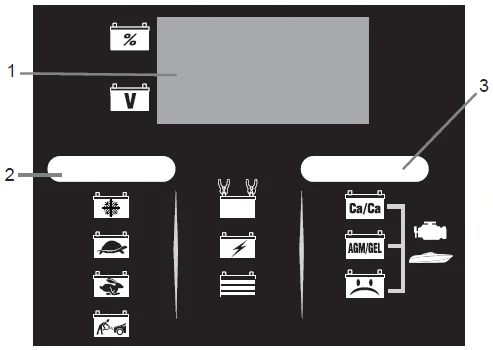
- Digital Display
- Charge Rate Button
- Battery Type Button
NOTE: See the Operating Instructions section for a complete description of the charger modes.
Charge Rate Button
Use this button to set the maximum charge rate. Press the button until the desired charge rate is selected.
 : Charges and maintains small batteries. Maintains large batteries.
 : Charges small batteries, such as those commonly used in garden tractors, snowmobiles, and motorcycles. Not for charging large batteries.
 : Charges automotive, marine, and light truck batteries.
 : Provides high amperage for cranking an engine with a weak or run-down battery.
 : Charges and maintains small batteries. Maintains large batteries.
 : Charges small batteries, such as those commonly used in garden tractors, snowmobiles, and motorcycles. Not for charging large batteries.
 : Charges automotive, marine, and light truck batteries.
 : Provides high amperage for cranking an engine with a weak or run-down battery.
Battery Type/Mode Button
Set the type of battery to be charged, or Desulfation Mode:
- Calcium: Calcium batteries are acid batteries impregnated with calcium.
- Absorbed Glass Mat/Gel: AGM batteries have electrolyte absorbed in separators consisting of a sponge-like mass of matted glass fiber. Gel batteries contain gelled electrolytes. These batteries are sealed with valves and should not be opened.
- Desulfation Mode: A special mode of operation designed for sulfated batteries.
NOTE: When charging a battery that is not marked, check the manual of the item that uses the battery for the correct battery type. Make sure the battery complies with the safety instructions in Section 2.3.
Digital Display
The Digital Display gives a digital indication of voltage, % of charge, or time. The display will show the battery VOLTAGE when the charger is not charging a battery. When it goes into charging mode, the display will automatically change to ON (to show charging has started) and then show the percent of charge of the battery being charged and either 6 or 12 (the voltage the charger determined the battery is). If you manually stop the charging process (by pressing the CHARGE RATE button) before the battery is fully charged, the display will show OFF.
- Battery % – The digital display shows an estimated charge percentage of the battery connected to the charger battery clips.
- Voltage – The digital display shows the voltage at the charger battery clips in DC volts.
NOTE: Once the charger has started charging the battery, if you press the Charge Rate button once, the output current is shut off and the display with show OFF and then the battery voltage. If you press the Charge Rate button again, the current will go back on at the same setting it was when it was turned off. For example, the charger is charging a battery at the slow charge rate setting. If you press the Charge Rate button, the output is turned off. If you press the Charge Rate button again, the output will turn back on at the slow charge rate setting.
OPERATING INSTRUCTIONS
WARNING: This battery charger must be properly assembled in accordance with the assembly instructions before it is used.
Battery Information
This charger can be used with 6 and 12V batteries with rated capacities of 12 Ah to 111 Ah.
Charging
- Ensure that all of the charger components are in place and in good working condition, for example, the plastic boots on the battery clips.
- Connect the battery following the precautions listed in sections 5 and 6.
- Connect the AC power following the precautions listed in section 7.
- Select the appropriate settings for your battery.
IMPORTANT: This charger does not have an ON/OFF switch. ON and OFF are controlled by plugging in the charger to the AC wall outlet. The charger will not supply current to the battery clips until a battery is properly connected. The clips will not spark if touched together.
Startup Defaults: When first turned on, the charger will default to the following startup settings:
- Battery Type: AGM/GEL
- Charge Rate: OFF (No charge rate selected)
After 10 minutes, if no charge rate is selected, the charger will automatically start charging at the following defaults:
- Charge Current: The lowest charge rate setting available, 3 amps.
- Charge Voltage: If no battery type is selected, 14.7V (for AGM/GEL); if CA/CA is selected, 16V; if Desulfation is selected, the charger goes into Desulfation Mode.
Battery Connection Indicator
If the charger does not detect a properly connected battery, the CONNECTED LED will not light. Charging will not begin if the CONNECTED LED is not on.
Automatic Charging Mode
When a charge rate is selected, the charger is set to perform an automatic charge.
When an automatic charge is performed, the charger switches to maintenance mode automatically after the battery is charged.
Aborted Charge
If charging cannot be completed normally, charging will abort. When charging aborts, the charger’s output is shut off, all of the LEDs are turned off, and the digital display will show an error code (see Troubleshooting for a list of error codes). In that state, the charger ignores all buttons. To reset after an aborted charge, unplug the charger.
Desulfation Mode
IMPORTANT: Battery must be removed from the car when using this mode, or damage to the car’s electrical system may result.
If the battery is left discharged for an extended period of time, it could become sulfated and not accept a normal charge. If you select Desulfation Mode, the charger will switch to a special mode of operation designed for sulfated batteries. If successful, the charger will fully desulfate and charge the battery, then the green LED will go on. If desulfation fails, the charger will abort, and the CHARGING (yellow) LED will blink.
Completion Of Charge
Charge completion is indicated by the CHARGED LED. When lit, the charger has stopped charging and switched to the Maintain Mode of operation.
Maintain Mode
When the CHARGED LED is lit, the charger has started Maintain Mode. In this mode, the charger keeps the battery fully charged by delivering a small current when necessary.
The voltage is maintained at a level determined by the battery type selected.
NOTE: If the charger has to provide its maximum maintain current for a continuous 12-hour period, it will go into Abort Mode. This is usually caused by a drain on the battery, or the battery could be bad. Make sure there are no loads on the battery. If there are, remove them. If there are none, have the battery checked or replaced.
Maintaining a Battery (3A  Charge Rate)
This charger has a maintenance setting that maintains both 6 and 12 volt batteries, keeping them at full charge. In this setting, it can charge small batteries and maintain both small and large batteries. We do not recommend charging a large battery on the maintenance setting.
NOTE: The maintain mode technology utilized in Schumacher’s chargers allows you to safely charge and maintain a healthy battery for extended periods of time. However, problems with the battery, electrical problems in the vehicle, improper connections, or other unanticipated conditions could cause excessive current draws. As such, occasionally monitoring your battery and the charging process is recommended.
Using the Engine Start feature
Your battery charger can be used to jumpstart your car if the battery is low. Follow these instructions on how to use the ENGINE START feature.
IMPORTANT: Using the ENGINE START feature WITHOUT a battery installed in the vehicle could cause damage to the vehicle’s electrical system. NOTE: If you have charged the battery and it still will not start your car, do not use the ENGINE START feature, or it could damage the vehicle’s electrical system.
- With the charger plugged in and connected to the battery and chassis (see section 6), press the CHARGE RATE button until the ENGINE START
 LED is lit.
 - This product is rated for 3 seconds of engine cranking. Crank the engine until it starts or 3 seconds pass. If the engine does not start, wait 3 minutes before cranking again. This allows the charger and battery to cool down. NOTE: During extremely cold weather or if the battery is under 2 volts, charge the battery for 5 minutes before cranking the engine.
- If the engine fails to start, charge the battery for 5 more minutes before attempting to crank the engine again. IMPORTANT: Do not leave the charger in Engine Start Mode for more than ten minutes at a time, or you may damage the charger.
- Clean and store the charger in a dry location.
NOTE: If the engine does turn over but never starts, there is not a problem with the starting system; there is a problem somewhere else with the vehicle. STOP cranking the engine until the other problem has been diagnosed and corrected.
Engine Starting Notes
During the starting sequence listed above, the charger is set to one of three states:
Wait for cranking:
The charger waits until the engine is actually being cranked before delivering the amps for engine start, and will reset if the engine is not cranked within 15 minutes. (If the charger resets, it sets itself to the default startup settings.) While waiting for cranking, the digital display shows rdy.
Cranking
When cranking is detected, the charger will automatically deliver up to its maximum output as required by the starting system for up to 3 seconds or until the engine cranking stops. The digital display shows a countdown of the remaining crank time.
TROUBLESHOOTING
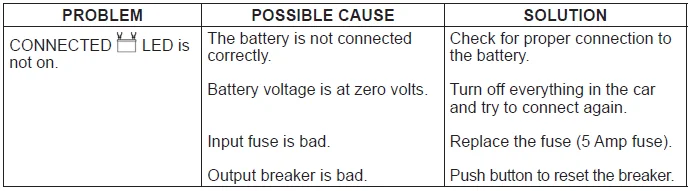
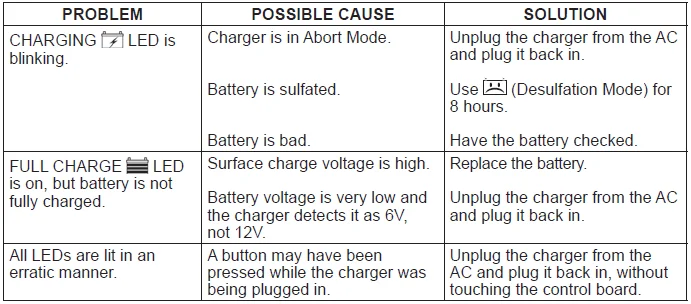
For more Manuals by Schumacher, visit ManualsLibraryy
Schumacher SC190 6-12V Automatic Battery Charger-FAQs
What is the Schumacher SC190 6‑12V Automatic Battery Charger?
The Schumacher SC190 is an automatic battery charger designed to safely charge and maintain 6V and 12V batteries using intelligent charging technology.
Can the Schumacher SC190 be used on car batteries?
Yes. It works well with car batteries and is also suitable for trucks, motorcycles, boats, lawn tractors, and power-sports vehicles.
What battery types are compatible with the SC190?
It supports common lead-acid batteries, including standard, AGM, and maintenance-free batteries.
How does the automatic charging feature work?
The charger automatically detects battery voltage and adjusts the charging rate, then switches to maintain mode once the battery is fully charged.
How fast does the Schumacher SC190 charge a battery?
The charger automatically detects battery voltage and adjusts the charging rate, then switches to maintain mode once the battery is fully charged.
What does error code F06 mean on a Schumacher charger?
F06 indicates the charger has detected that the battery may be overheating, which could signal a faulty or damaged battery.
What voltage should a fully charged 12V battery read?
A healthy, fully charged 12V battery typically reads between 12.6V and 12.8V.
Can the charger overcharge my battery?
No. The SC190 is designed to stop charging automatically and maintain the battery safely once it reaches full charge.
Can the charger revive a completely dead battery?
It may recharge deeply discharged batteries, but batteries that are permanently damaged or sulfated may not recover.