
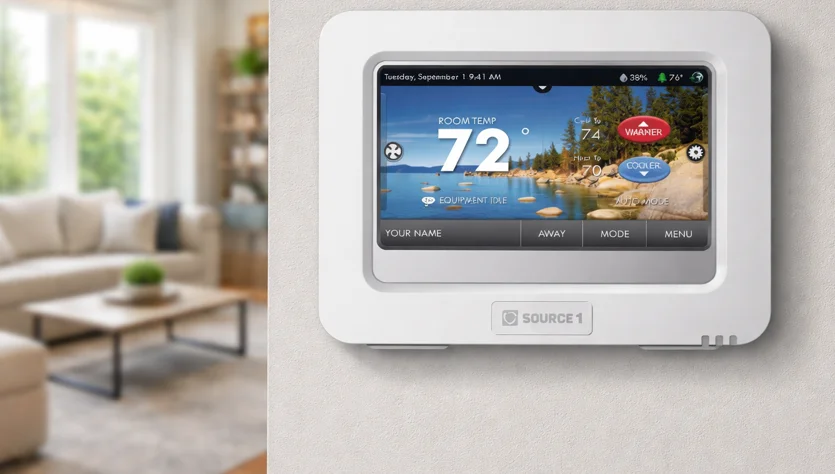

Source1 S1-THPU433-S High Resolution Digital Thermostat
Glossary of Terms
- Auto-Changeover: A mode in which the thermostat will turn on the heating or cooling based on room temperature demand.
- Cool Setpoint: The warmest temperature that the space should rise to before cooling is turned on (without regard to deadband).
- Deadband: The number of degrees the thermostat will wait, once a setpoint has been reached, before energizing heating or cooling.
- Differential: The forced temperature difference between the heat setpoint and the cool setpoint in Auto Mode.
- Heat Setpoint: The coolest temperature that the space should drop to before heating is turned on (without regard to deadband).
- Icon: The word or symbol that appears on the thermostat display.
- Mode: The current operating condition of the thermostat (i.e., Off, Heat, Cool, Auto).
- Non-Programmable Thermostat: A thermostat that does not have the capability of running Time Period Programming.
- Programmable Thermostat: A thermostat that has the capability of running Time Period Programming.
- Temperature Swing: Same as Deadband.
- Time Period Programming: A program that allows the thermostat to automatically adjust the heat setpoint and/or the cool setpoint based on the time of the day. Same as Schedule.
Get To Know Your Thermostat
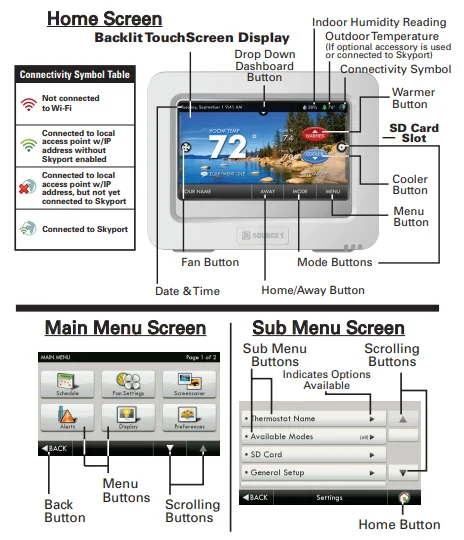
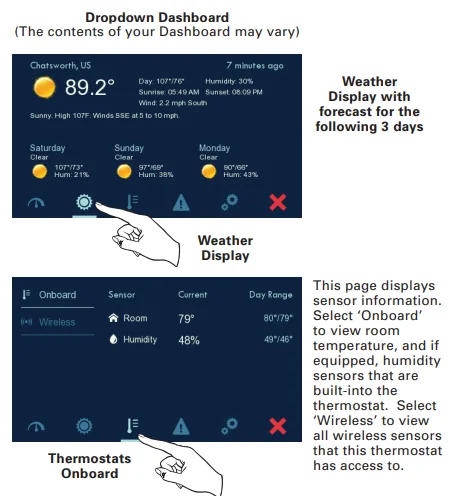
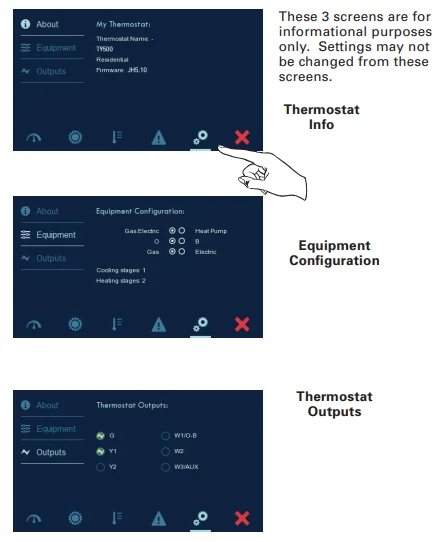
Dropdown Dashboard
The Dropdown Dashboard displays temperature, humidity, and other readings. It will also show the high and low readings of the day.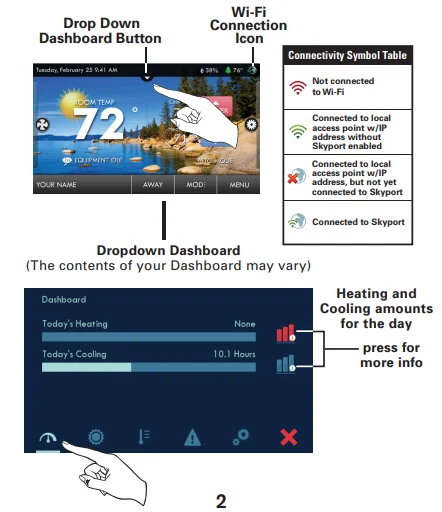
Care and Use of Your Thermostat
Pencils, pens, and other sharp objects should never be used on your thermostat; these may damage your touchscreen. Only use your fingertip to press the touchscreen buttons.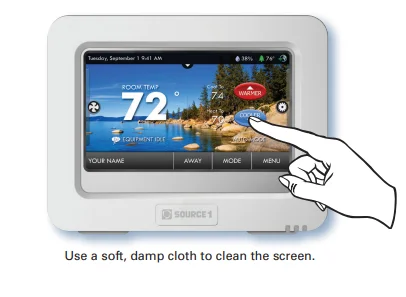
DO NOT USE ABRASIVE CLEANERS OR CLEANERS THAT CONTAIN SOLVENTS. DO NOT SPRAY ANYTHING DIRECTLY ONTO THE THERMOSTAT.
Installation Instructions
Remove and Replace the Old Thermostat
To install the thermostat properly, please follow these step-by-step instructions. If you are unsure about any of these steps, call a qualified technician for assistance.
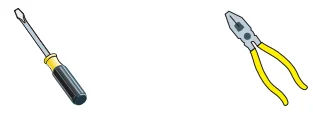
- Assemble tools: Flat blade screwdriver, wire cutters, and wire strippers.

- Make sure your Heater/Air Conditioner is working properly before beginning installation of the thermostat.
- Carefully unpack the thermostat. Save the screws, any brackets, and instructions.
- Turn off the power to the Heating/Air Conditioning system at the main fuse panel. Most residential systems have a separate breaker for disconnecting power to the furnace.
- Remove the cover of the old thermostat. If it does not come off easily, check for screws.
- Loosen the screws holding the thermostat base or subbase to the wall and lift away.
- Disconnect the wires from the old thermostat. Tape the ends of the wires as you disconnect them, and mark them with the letter of the terminal for easy reconnection to the new thermostat. Additionally, we recommend taking a photo with your phone of the connections for future reference.
- Keep the old thermostat for reference purposes until your new thermostat is functioning properly.
Wire Connections
If the terminal designations on your old thermostat do not match those on the new thermostat, refer to the chart below or the wiring diagrams that follow.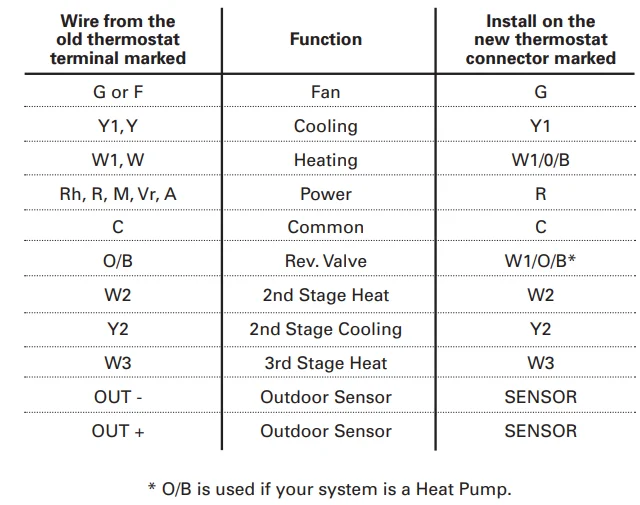
Before you go any further, determine what your existing wiring and equipment situation is.
- If you have a Heating-only system without Air Conditioning, the Source 1 thermostat will require 3 wires: R (24Vac), C (24Vac), and W (Heat). Most systems that only have Heating use very simple thermostats that require 2 wires: the R (24Vac) and W (Heat). The Source 1 thermostat requires 3 wires to the thermostat. In this case, an Add-a-Wire accessory will not work, and it will be necessary to install another wire for the C (24Vac) connection.
- If you have a single-stage fossil fuel heater with air conditioning, the Source 1 model will require 5 wires for independent fan control. They are R (24Vac), C (24Vac), W (Heat), Y (Cooling), and G (Fan). You may connect only 4 wires, as instructed in the “Making 4 Wires Work When 5 Wires Are Required” section on page 77.
If there are only 4 wires present that are connected to the existing thermostat, there are at least 3 options available to connect the Source 1 thermostat: - Use the 4 wires as instructed in the “Making 4 Wires Work When 5 Wires Are Required” section on page 77, and note that the fan will only operate with a Heating or Cooling demand.
- Pull new thermostat wire from the HVAC equipment to the thermostat so that there are at least 5 wires available.
- Purchase and install a Source 1 Add-A-Wire accessory.
- If you have a multi-stage HVAC system comprised of a fossil fuel heater with air conditioning, the Source 1 thermostat will require the 5 wires mentioned above (R, C, W, Y, G) plus an additional wire for each additional stage of Heating or Cooling. You may reduce the 5-wire requirement to 4 if you give up independent fan control, following the instructions in the “Making 4 Wires Work When 5 Wires Are Required” section on page 77, or use the optional Add-A-Wire accessory.
- If you have a heat pump without aux heat, the Source 1 model will require 5 wires: R (24Vac), C (24Vac), W1/O/B (Reversing Valve), Y (1st Stage Compressor), and G (Fan).
If you are short 1 wire, there are at least 3 options available to connect the Source 1 thermostat: - Use the available wires as instructed in the “Making 4 Wires Work When 5 Wires Are Required” section on page 77, and note that the fan will only operate with a Heating or Cooling demand.
- Pull the new thermostat wire from the HVAC equipment to the thermostat so that there are at least 5 wires available.
- Purchase and install a Source 1 Add-A-Wire accessory.
- If you have a heat pump with aux heat, the Source 1 model will require 6 wires: R (24Vac), C (24Vac), W1/O/B (Reversing Valve), Y (1st Stage Compressor), W2 (Aux Heat), and G (Fan).
If you are short 1 wire, there are at least 3 options available to connect the Source 1 thermostat: - Use the available wires as instructed in the “Making 5 Wires Work When 6 Wires Are Required” section on page 78, and note that the fan will only operate with a Heating or Cooling demand.
- Pull new thermostat wire from the HVAC equipment to the thermostat so that there are at least 6 wires available.
- Purchase and install a Source 1 Add-A-Wire accessory.
Making 4 Wires Work When 5 Wires Are Required
If you would like to install the Source 1 thermostat using only 4 wires when 5 are required, follow the directions below. You will need a screwdriver along with a 3″ long piece of thermostat wire to use as a jumper:
- Make sure the power is off.
- Label and disconnect wires at the thermostat. Please note the color and corresponding wire designator with each color. For example, the R wire is red, and the W wire is white, and so on. You will need this information handy for the next step with the HVAC equipment.
- At the HVAC equipment end of the thermostat wires (usually at the furnace), locate the terminals that the wires are attached to.
- Remove the “G wire” from the terminal marked G.
- Place the “G wire” on terminal C.
- Place one end of the 3″ long jumper on terminal G.
- Place the other end of the 3″ long jumper on terminal Y. Please note that there will be more than 1 wire on terminal Y.
- When connecting the wires to the Source 1 thermostat, note that the wire that was previously connected to the G terminal of the old thermostat will now be required to be connected to the C terminal on the Source 1 thermostat. All other wires will be connected such that the connections on each end of the individual wires match terminal designations. For example: Connect the yellow wire on the thermostat end to the Y terminal on the thermostat. The yellow wire will be connected to the Y terminal on the HVAC equipment end, also.
Making 5 Wires Work When 6 Wires Are Required
If you have a system that requires 6 wires and you would like to install the Source 1 thermostat using only 5 wires, follow the directions below. You will need a screwdriver along with a 3″ long piece of thermostat wire to use as a jumper:
- Make sure the power is off.
- Label and disconnect wires at the thermostat. Please note the color and corresponding wire designator with each color. For example, the R wire is red, and the W wire is white, and so on. You will need this information handy for the next step with the HVAC equipment.
- At the HVAC equipment end of the thermostat wires (usually at the furnace), locate the terminals that the wires are attached to.
- Remove the “G wire” from the terminal marked G.
- Place the “G wire” on terminal C.
- Place one end of the 3″ long jumper on terminal G.
- Place the other end of the 3″ long jumper on terminal Y. Please note that there will be more than 1 wire on terminal Y.
- When connecting the wires to the Source 1 thermostat, note that the wire that was previously connected to the G terminal of the old thermostat will now be required to be connected to the C terminal on the Source 1 thermostat. All other wires will be connected such that the connections on each end of the individual wires match terminal designations. For example: Connect the yellow wire on the thermostat end to the Y terminal on the thermostat. The yellow wire will be connected to the Y terminal on the HVAC equipment end, also.
The Source 1 Thermostat Backplate
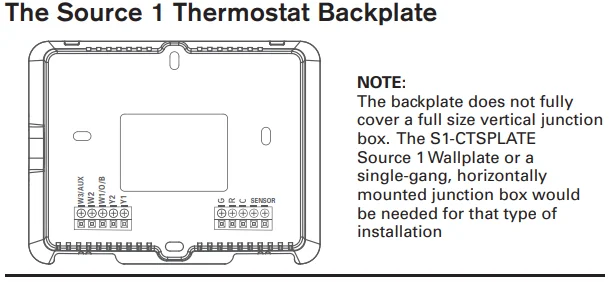
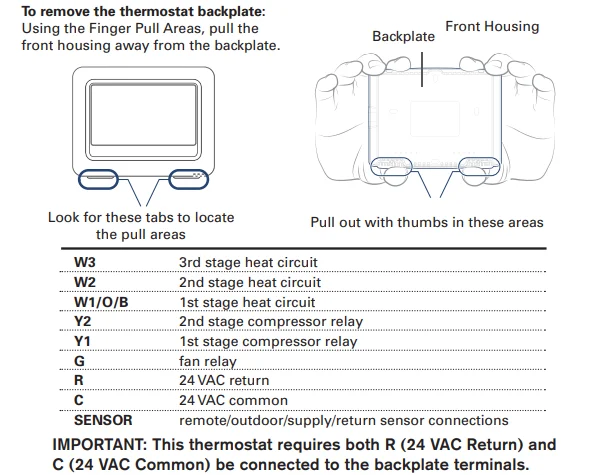
Explanation of Thermostat Dip Switches
Dip switches are located on the back of the thermostat.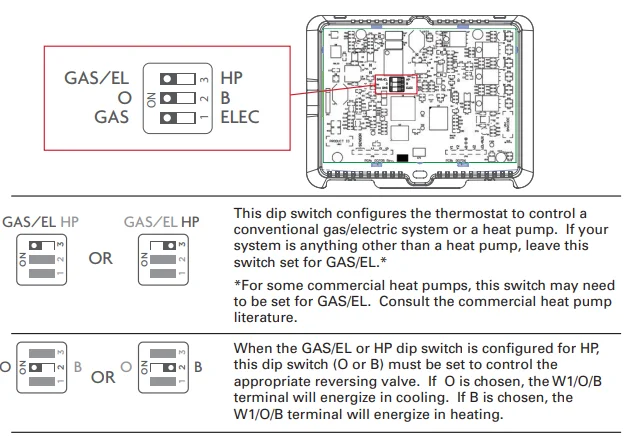
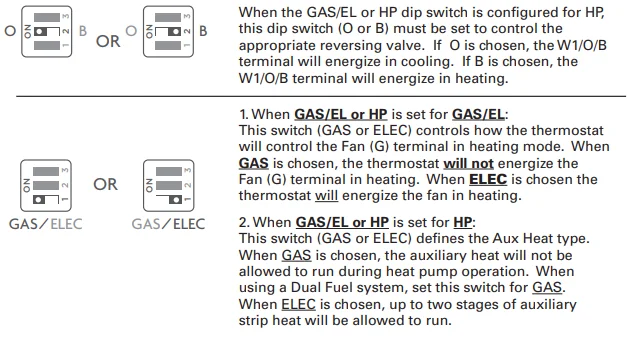
Sample Wiring Diagrams with Dip Switch Positions
Conventional Heating and Cooling Systems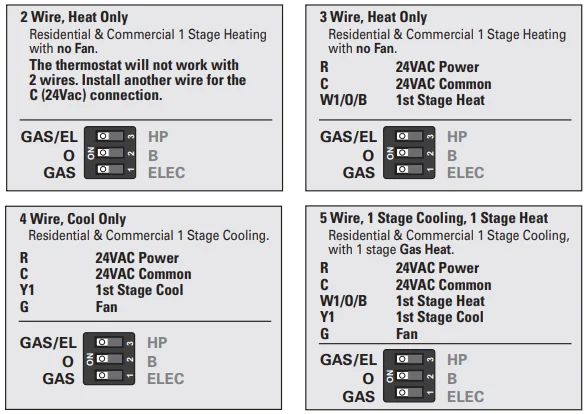
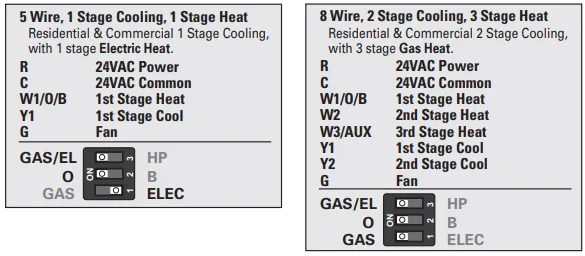
Sample Wiring Diagrams with Dip Switch Positions
Heat Pump Systems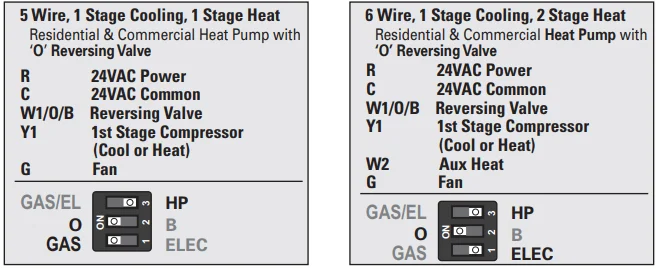
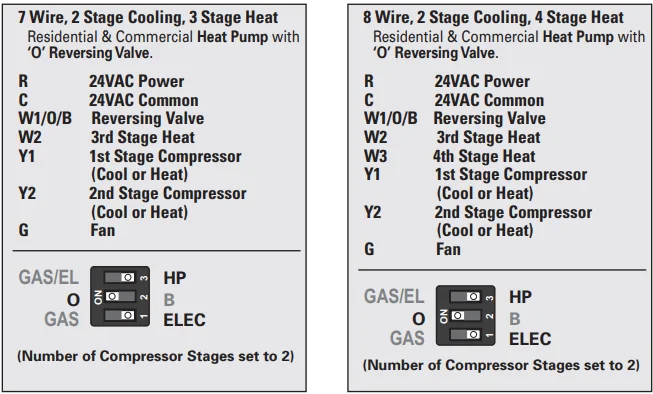
Sample Wiring Diagrams with Dip Switch Positions
Heat Pump Systems with Dual Fuel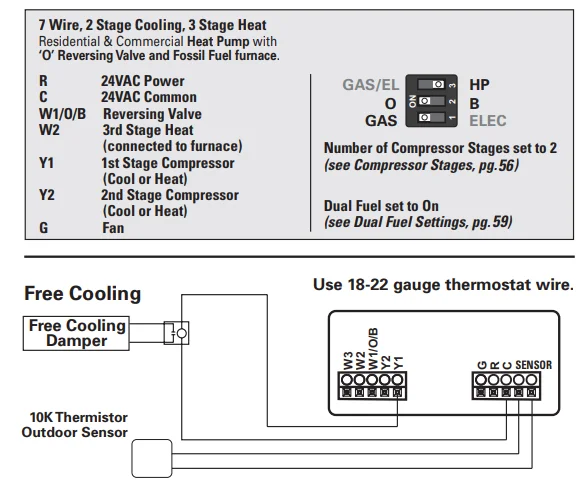
Free Cooling utilizes the Y1 terminal for the operation of 1st stage cooling. If mechanical (compressor) cooling is also present, the mechanical cooling is connected to the Y2 terminal in this instance. Free Cooling may be used with a Gas/Electric or Heat Pump system. Temperature Sensor: 10K ohm sensor at 77F/25C. Negative Temperature Coefficient. Outdoor Sensor: S1-CTSDTS Temperature Sensor, 10K ohm sensor at 77F/25C. Negative Temperature Coefficient.
Sample Wiring Diagrams
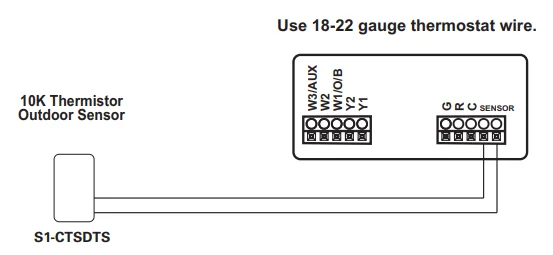
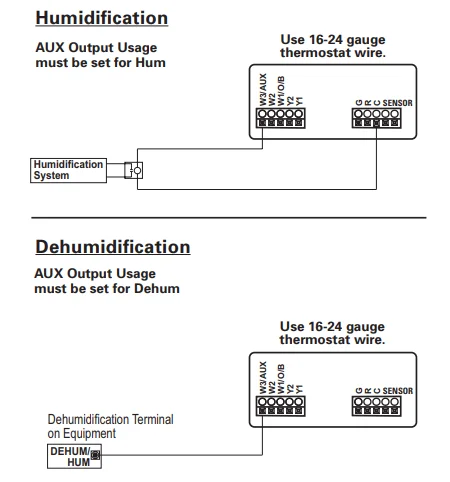
Troubleshooting
- SYMPTOM: The thermostat touchscreen buttons are not responsive.
- CAUSE: The touchscreen is out of calibration.
- REMEDY: Remove the thermostat from the backplate. Push the thermostat back onto the backplate while keeping your finger pressed firmly against the center of the touchscreen until the Calibration screen appears. Re-calibrate the touchscreen. See the Touch Calibration section of the full user’s manual (page 24).
- SYMPTOM: The display is blank.
- CAUSE: Lack of proper power.
- REMEDY: Make sure the power is on to the HVAC and that you have 24Vac between R & C.
- SYMPTOM: The air conditioning does not attempt to turn on.
- CAUSE: The cooling setpoint is set too high.
- REMEDY: Lower the cooling setpoint or lower the cooling setpoint limit. See Setpoint Limits (page 33).
- SYMPTOM: The heating does not attempt to turn on.
- CAUSE: The heating setpoint is set too low.
- REMEDY: Raise the heating setpoint or raise the heating setpoint limit. See Setpoint Limits (page 33).
- SYMPTOM: When controlling a residential heat pump and asking for cooling, the heat comes on.
- CAUSE: The thermostat reversing valve dip switch is set for “B.”
- REMEDY: Set the reversing valve jumper for “O.”
- SYMPTOM: When calling for cooling, both the heat and cool come on.
- CAUSE: The thermostat equipment dip switch is configured for “HP,” and the HVAC unit is a Gas/Electric.
- REMEDY: Set the equipment dip switch for “Gas.”
- SYMPTOM: The air handler control board fuse blows when the thermostat is attached to the backplate with the power on, but does not blow until the thermostat is placed onto the backplate.
- CAUSE: The Outdoor sensor and/or sensor wiring is shorted.
- REMEDY: Check/replace the Outdoor sensor and/or sensor wiring.
Warranty
One-Year Warranty – This Product is warranted to be free from defects in material and workmanship. If it appears within one year from the date of original installation, whether or not actual use begins on that date, that the product does not meet this warranty, a new or remanufactured part, at the manufacturer’s sole option, to replace any defective part, will be provided without charge for the part itself, provided the defective part is returned to the distributor through a qualified servicing dealer.
THIS WARRANTY DOES NOT INCLUDE LABOR OR OTHER COSTS incurred for diagnosing, repairing, removing, installing, shipping, servicing, or handling of either defective parts or replacement parts. Such costs may be covered by a separate warranty provided by the installer. THIS WARRANTY APPLIES ONLY TO PRODUCTS IN THEIR ORIGINAL INSTALLATION LOCATION AND BECOMES VOID UPON REINSTALLATION.
LIMITATIONS OF WARRANTIES – ALL IMPLIED WARRANTIES (INCLUDING IMPLIED WARRANTIES OF FITNESS FOR A PARTICULAR PURPOSE AND MERCHANTABILITY) ARE HEREBY LIMITED IN DURATION TO THE PERIOD FOR WHICH THE LIMITED WARRANTY IS GIVEN. SOME STATES DO NOT ALLOW
LIMITATIONS ON HOW LONG AN IMPLIED WARRANTY LASTS, SO THE ABOVE MAY NOT APPLY TO YOU. THE EXPRESS WARRANTIES MADE IN THIS WARRANTY ARE EXCLUSIVE AND MAY NOT BE ALTERED, ENLARGED, OR CHANGED BY ANY DISTRIBUTOR, DEALER, OR OTHER PERSON WHATSOEVER.
ALL WORK UNDER THE TERMS OF THIS WARRANTY SHALL BE PERFORMED DURING NORMAL WORKING HOURS. ALL REPLACEMENT PARTS, WHETHER NEW OR REMANUFACTURED, ASSUME AS THEIR WARRANTY PERIOD ONLY THE REMAINING TIME PERIOD OF THIS WARRANTY. THE MANUFACTURER WILL NOT BE RESPONSIBLE FOR:
- Normal maintenance as outlined in the installation and servicing instructions or owner’s manual, including filter cleaning and/or replacement and lubrication.
- Damage or repairs required as a consequence of faulty installation, misapplication, abuse, improper servicing, unauthorized alteration, or improper operation.
- Failure to start due to voltage conditions, blown fuses, open circuit breakers, or other damages due to the inadequacy or interruption of electrical service.
- Damage as a result of floods, winds, fires, lightning, accidents, corrosive environments, or other conditions beyond the control of the Manufacturer.
- Parts not supplied or designated by the Manufacturer, or damages resulting from their use.
- Manufacturer products installed outside the continental U.S.A., Alaska, Hawaii, and Canada.
- Electricity or fuel costs or increases in electricity or fuel costs for any reason whatsoever, including additional or unusual use of supplemental electric heat.
- ANY SPECIAL, INDIRECT, OR CONSEQUENTIAL PROPERTY OR COMMERCIAL DAMAGE OF ANY NATURE WHATSOEVER. Some states do not allow the exclusion of incidental or consequential damages, so the above may not apply to you. This warranty gives you specific legal rights, and you may also have other rights which may vary from state to state.
FCC Compliance Statement
This equipment has been tested and found to comply with the limits for an intentional radiator, pursuant to Part 15, subpart C of the FCC rules. These limits are designed to provide reasonable protection against harmful interference in a residential installation. This equipment generates, uses, and can radiate radio frequency energy and, if not installed and used in accordance with the instructions, may cause harmful interference in radio communications.
However, there is no guarantee that the interference will not occur in a particular installation. If this equipment does cause harmful interference to radio or television reception, which can be determined by turning the equipment off and on, the user is encouraged to try to correct the interference by one or more of the following measures:
- Reorient or relocate the receiving antenna.
- Increase the separation between the equipment and receiver.
- Connect the equipment to an outlet on a circuit different from that of the receiver.
- Consult the dealer or an experienced radio or TV technician for help.
Notice: Only peripherals complying with FCC limits may be attached to this equipment. Operation with noncompliant peripherals or peripherals not recommended by Source 1 is likely to result in interference to radio and TV reception. Changes or modifications to the product, not expressly approved by Source 1, could void the user’s authority to operate the equipment.
FCC – INDOOR Mobile Radio Information:
To comply with FCC/IC RF exposure limits for the general population / uncontrolled exposure, the antenna(s) used for this transmitter must be installed to provide a separation distance of at least 20 cm from all persons and must not be co-located or operating in conjunction with any other antenna or transmitter.
This Device complies with Industry Canada License-exempt RSS standard(s). Operation is subject to the following two conditions: 1) this device may not cause interference, and 2) this device must accept any interference, including interference that may cause undesired operation of the device.
Under Industry Canada regulations, this radio transmitter may only operate using an antenna of a type and maximum (or lesser) gain approved for the transmitter by Industry Canada. To reduce potential radio interference to other users, the antenna type and its gain should be so chosen that the equivalent isotropically radiated power (e.i.r.p.) is not more than that necessary for successful communication. Visit source1thermostats.com for more details.
For More Manuals By Source1 Thermostats, Visit ManualsLibraryy.
Source1 S1-THPU433-S High Resolution Digital Thermostat-FAQs
How do you troubleshoot a digital thermostat that is not working?
Start by checking the simplest causes first. Replace the batteries if your thermostat uses them, as low power is a common reason for display failure. If that doesn’t help, check your home’s circuit breaker and ensure the HVAC system has power. Confirm the thermostat is set to the correct mode and temperature. If problems continue, inspect wiring connections or consider resetting the unit according to the manufacturer’s instructions.
How do you read a digital thermostat display?
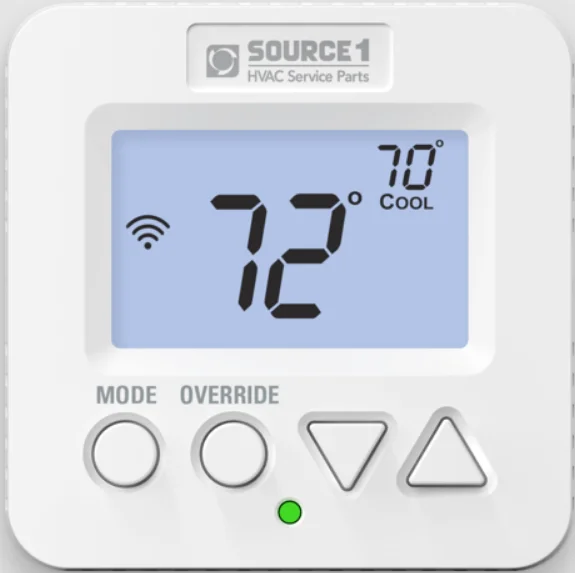
Most digital thermostats show two main temperature readings. One number represents the set temperature, which is the temperature you want your home to reach. The other number shows the current room temperature. The display may also indicate system mode, such as heat, cool, or fan. Understanding these basic indicators helps you quickly adjust settings and confirm that your system is operating as intended.
Is 70°F on heat the same as 70°F on cool?
No, 70°F on the heat and 70°F on the cool function differently. When set to 70°F on heat, the heating system activates when the room temperature drops below 70°F. When set to 70°F on cool, the air conditioner turns on when the temperature rises above 70°F. While the number is the same, the system responds in opposite ways depending on the selected mode.
How do you control a digital thermostat properly?
To control a digital thermostat, first select the appropriate mode, such as heat or cool. Use the up and down arrows to adjust the desired temperature. The system will automatically run until the room reaches that setting. Many models also allow scheduling, which lets you program temperature changes throughout the day to improve comfort and energy efficiency.
Can a thermostat affect the performance of my AC system?
Yes, a malfunctioning thermostat can directly impact your AC’s performance. If it provides inaccurate temperature readings or fails to communicate properly with the system, your AC may cycle too often or not turn on at all. This can lead to uneven cooling, higher energy bills, and unnecessary strain on your equipment. Ensuring your thermostat works correctly helps maintain efficient cooling.
How long does a digital thermostat typically last?
A digital thermostat generally lasts around 10 years with proper care. Over time, internal components can wear out or become less accurate. If you notice frequent temperature inconsistencies, system cycling issues, or display problems, it may be time for a replacement. Upgrading to a newer model can also improve energy efficiency and provide better temperature control features.
What is a common problem with digital thermostats?
One common issue is inaccurate temperature readings, often caused by dust buildup inside the unit. Dirt can interfere with internal sensors and electrical contacts. This may result in uneven heating or cooling. Carefully removing the cover and gently cleaning inside with a soft brush can sometimes resolve the issue. Persistent inaccuracies may require recalibration or replacement.
Where is the reset button on a digital thermostat?
The reset button is usually located behind the thermostat cover. To find it, turn off your HVAC system for safety and remove the front panel. Many models have a clearly labeled reset button inside. Pressing it restores factory settings, which can fix minor glitches. Always consult the product manual for model-specific instructions before performing a reset.
Can a digital thermostat work without batteries?
Some digital thermostats are hardwired into the home’s electrical system and do not rely on batteries. Others use batteries as either a primary or backup power source. If your thermostat display goes blank, replacing the batteries is a quick and simple first step. For hardwired models, power issues may be related to wiring or the HVAC system itself.
How can you test if a thermostat is working correctly?
To test your thermostat, set it to heat or cool and adjust the temperature several degrees above or below the current room temperature. Listen for the system to turn on within a minute. You can also use the built-in system test feature if available. If the HVAC system does not respond, there may be wiring, power, or calibration issues that need inspection.