


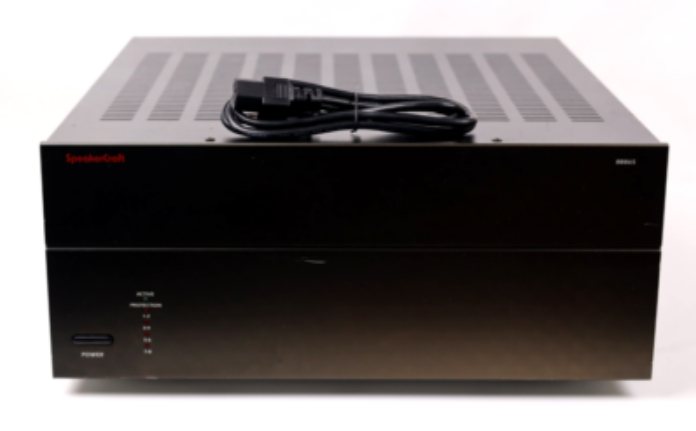
SpeakerCraft Big Bang BB865 Multi Channel Power Amplifier
FEATURES
Audiophile Design
Sophisticated design and superior internal components result in outstanding sound quality, performance, and long-term reliability.
Advanced Protection
Each channel is individually protected. If the circuitry determines that a channel must be shut down for protection, a rare occurrence, only the channel affected will be turned off. The other channels will continue to play. Once conditions return to normal, the affected channel will be turned back on and will operate as normal.
Flexible Input Selection
Each of the 12 channels can be assigned a variety of source inputs. A dedicated input can be assigned to each channel. Each channel can also be configured to play common signals from the Bus or Auxiliary inputs. This provides the flexibility needed in sophisticated custom audio installations.
Bridging
The power output of adjacent channels can be combined to provide extra power when needed in certain areas. This is easily accomplished by flipping a single switch.
Individual Channel Level Adjustments
Each channel has its own level adjustment. This allows the loudness of each speaker to be perfectly matched to its area.
InstaLLock™ Connector Outputs
Simplify the connection of the speaker outputs by using SpeakerCraft’s InstaLLock™ Connector, purchased separately. InstaLLock™ Connectors eliminate the hassle of connecting multiple wires to the back of the amplifier.
Instead, they can be easily connected to the InstaLLock™ Connector, which is later plugged into the back of the amplifier. InstaLLock™ Connectors can be purchased from your SpeakerCraft Dealer.
Multiple Power Modes and Output Trigger
There are three ways to turn the amplifier on: constant, trigger, and audio sense. This allows the amplifier to operate seamlessly as part of a sophisticated custom installation. A separate output trigger allows the amplifier to activate other components via a voltage trigger.
Diagram 1 – Front Panel
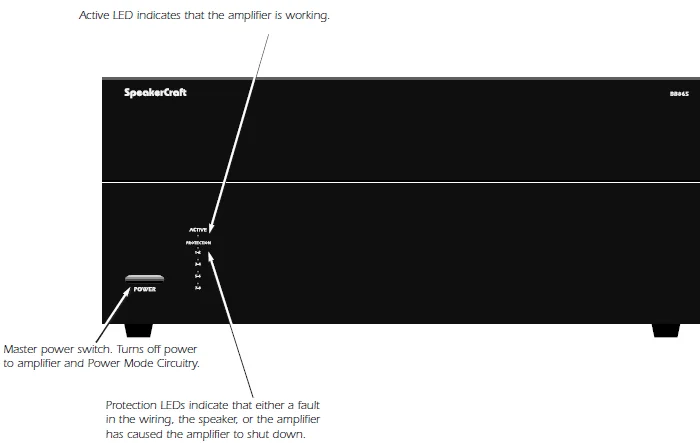
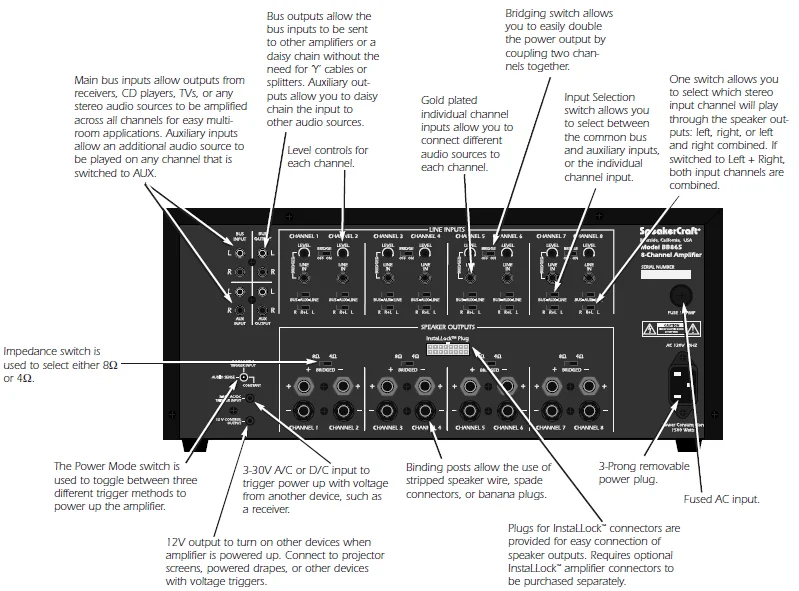
Diagram 2 – Rear Panel
SYSTEM DESIGN & OPERATION CONSIDERATIONS
To best understand system design and operation of the BB865, it is useful to understand the following terms and features as they relate to the BB865.
Multi-Room
A system design that plays the same source at the same time in all rooms. If a change is made in one room, the same change takes place in all other rooms. For example, if a listener changes from CD to Tuner in the bedroom, the same change will be heard in the kitchen.
Note: With the use of volume controls or speaker switchers, the volume of each room can be controlled separately from the other rooms.
Multi-Zone
A system design that allows different sources to be played in each room. A change in one room can be made without changing the other rooms. For example, the CD player can be heard in the bedroom while the kitchen is playing the tuner.
Bridging
The combination of 2 channels to create one mono channel. It is useful when more volume is needed in a particular area.
Source
A component, audio or video, that provides an audio signal. Examples are CD, VCR, DVD, tape deck, and tuner. The source provides the audio information that is amplified by the BB865.
Channel
A distinct unit of the amplifier that provides output to one speaker. On the BB865, the input to each channel can be configured to select from the BUS INPUT, the AUX INPUT, or that channel’s unique CHANNEL INPUT. Two adjacent channels can be bridged to provide higher power to one speaker.
Level Controls
Allows any of the channels to be adjusted independently to raise or lower the output of each channel. This may be used to control the speaker output in order to balance different rooms or areas of the system.
BUS AUX LINE Switch
Allows each channel to play a variety of different inputs. Depending on the switch position, the channel amplifies the signal connected to the BUS input, the AUX input, or its own LINE input.
R R+L L Switch
When either a BUS or AUX input is selected, this switch is used to direct the channel to play the left signal from the input “L” or the right signal from the input “R”, or a combined right and left signal from the input “R+L”.
Bus Input
Allows the signal from a source to be distributed to any of the 12 channels on the amplifier.
Auxiliary Inputs
Allows the signal from a secondary source to be distributed to any of the 12 channels of the amplifier.
Impedance Switch
Select either 8W or 4W to maximize amplifier performance with a variety of speaker loads. See the sections titled “Selecting the Impedance Setting” and “Selecting Bridge Mode” in the “Installation” section for proper setting of this switch.
Power Mode Selection
There are three ways to turn the amplifier on and off. Use the following list to decide which mode will work best for your application. See Diagram 3 below.
Constant
Use this selection when you wish to manually turn the amplifier on and off by using the front-mounted power button.
Trigger
Use this selection if you wish the amplifier to turn on when it receives voltage (3-30V A/C or D/C) from an external source and turn off once that voltage has stopped. Some components have voltage outputs that are designed for this use. In addition, there are devices that can be used as part of an automated system that will provide voltage to enable the mode. The voltage source must be connected to the trigger-input jack on the back of the amplifier.
Audio Sense
Use this selection when you want the amplifier to turn on when the amplifier’s main input receives an audio signal. At the moment that either the left or right input jacks receive a signal, the amplifier is turned on. Once the signal stops, the amplifier waits 3 minutes and then turns off.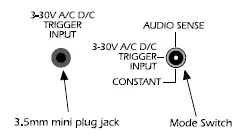
SYSTEM DESIGN EXAMPLES
There are many ways to configure the BB865 amplifier. The following pages contain some typical installation examples. Use these examples to generate ideas for your system design.
Multi-Room Installation Example (Diagram 4)
This illustrates the simplest use of the BB865, distributing audio throughout the home. In this example, only one source can be selected at a time; all pairs of speakers have the same audio signal available.
The Input Selection switch is set to “BUS” on all channels. Adjacent channels are assigned left and right.
Multi-Zone Example #1 (Diagram 5)
This illustrates the simplest way to provide an audio signal to one area that is independent of the main audio signal. Zone 2 uses a CD player connected to just that Zone. The rest of the system operates in Zone 1 and is connected to the preamplifier/receiver.
The Input Selection switch on channels 1-10 is set to “BUS” with adjacent channels assigned left and right. The Input Selection Switch on channels 11 and 12 is set to “LINE”.
Multi-Zone Example #2 (Diagram 6)
This illustrates the ability to listen to different audio signals in each zone, independent of every other zone. The system relies on a multi-zone preamplifier or up to 6 independent preamplifiers.
The Input Selection switch on each channel is set to “LINE”
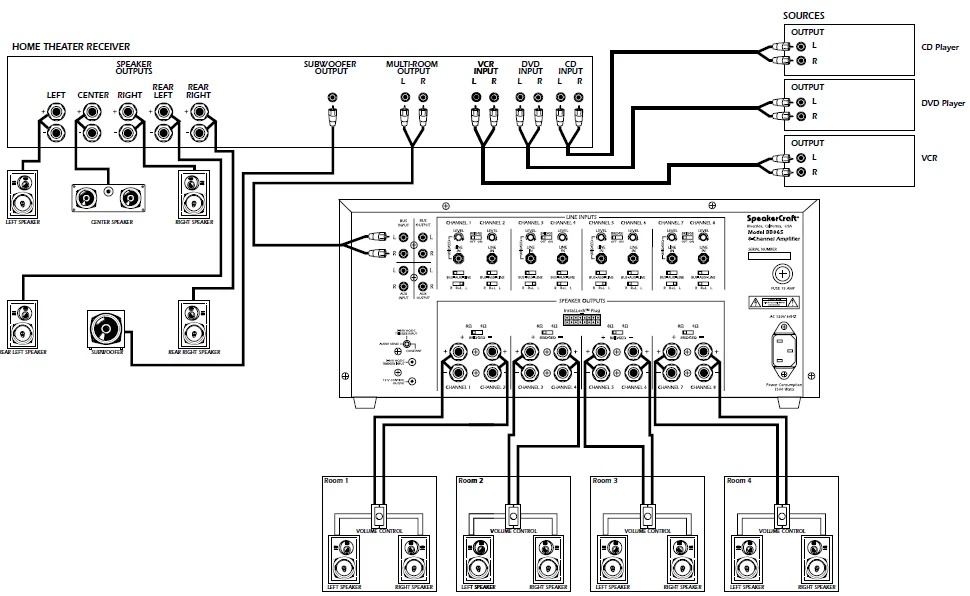
Home Theater / Multi-Room Example (Diagram 7)
This configuration allows the user to access the sources connected to a home theater receiver for use in a multi-room installation. It relies on the home theater receiver having a multi-room or similar output.
The Input Selection switch on each channel is set to “BUS” with adjacent channels assigned left and right.
Diagram 4 – Multi-Room Installation
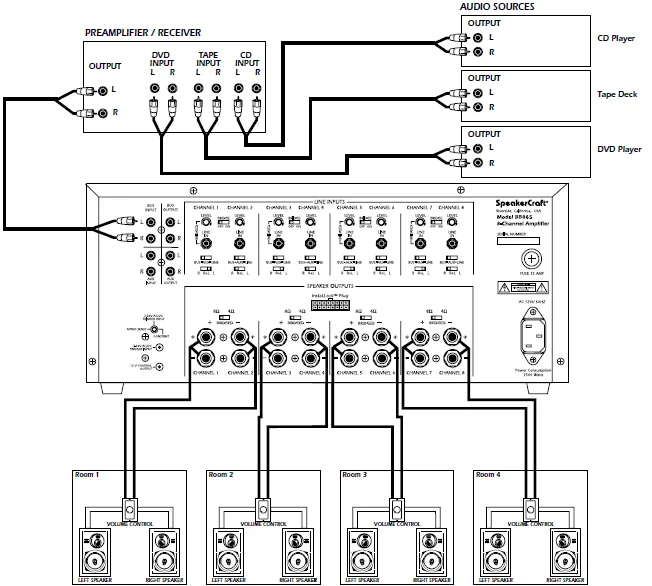
Diagram 5 – Multi-Zone Installation #1
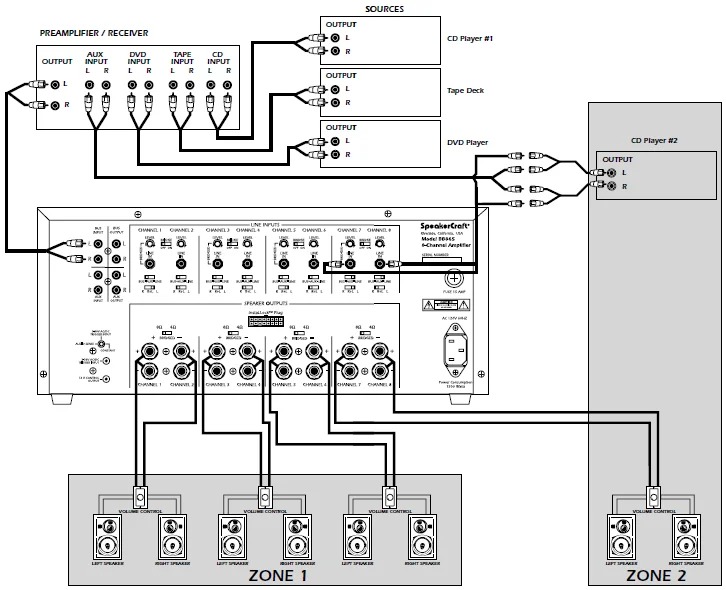
Diagram 6 – Multi-Zone Installation #2
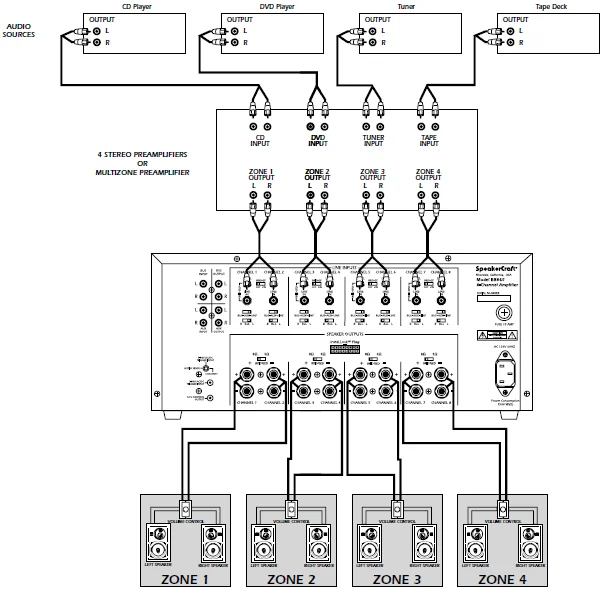
Diagram 7 – Home Theater/Multi-Room Installation
INSTALLATION CONSIDERATIONS
DO:
- Place the amplifier with the feet resting on a solid, flat level surface.
- Place the amplifier in a well-vented area to provide proper cooling. In areas that lack proper ventilation, such as tight cabinets or racks, it may be necessary to install small fans to create air movement.
DON’T:
- Don’t block the ventilation holes on the top or bottom of the amplifier. Never place it on carpeting or similar material.
- Don’t place the amplifier in any other position other than horizontal with the feet down. Never place it on its side or resting on the back where the terminals are located.
- Don’t place the amplifier near heat sources or in an area that would be exposed to moisture.
YOU SHOULD KNOW
The power supply is very large and, therefore, may cause a hum to be heard in some components if they are placed very close to the amplifier.
INSTALLATION
CAUTION: All connections and switching must be done with the amplifier’s master power switch positioned to “off”.
Select the Power Mode Selection
Refer to the Power Mode Selection area under installation considerations to determine which setting to use to turn the amplifier on. Once you have determined which mode you will be using, set the switches as outlined in the following chart: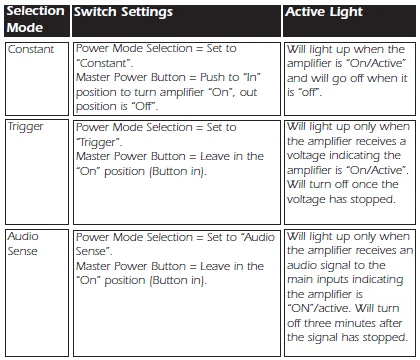
Selecting Inputs
Each channel is capable of delivering the source from many inputs. The three main inputs are BUS, AUX, and LINE IN. The selection for these inputs is done via the Input Selection switch, marked “BUS-AUX-LINE”. To select a source for each channel, follow the steps below:
- Select the desired source input. Set the Input Selection switch to BUS (will play source connected to the BUS INPUT), AUX (will play source connected to the AUX INPUT), or LINE (will play source connected to the LINE IN).
- The BUS and AUX inputs each have a left and right input. The left, right, or combined left and right signal from these may be selected via the switch marked “R R+L L”. Select the side you want the channel to deliver. Selecting “R” will play the right channel of the selected input. Selecting “L” will play the left channel of the selected input. Selecting “R+L” will play the combined signals of right and left.
Select the Impedance Setting
CAUTION: The switch must always be set to 8W if the adjacent channels are bridged.
For best results, if you will be using multiple speakers that will make the overall system impedance load drop to below 4 ohms at any pair of outputs, make sure that the switch above the speaker inputs is in the 4 ohm speaker setting. If the system impedance load will not drop below 4 ohms, leave it in the factory setting of 8 ohms.
Selecting Bridge Mode (See Diagram 11)
Under normal operation, this should be left in the 8 ohm position. It is sometimes desirable to combine two channels into one through bridging. The output of the combined channels can then be used to power one speaker.
To bridge two adjacent channels, first make sure that the Impedance Switch is in the 8ohm position. Next, move the switch marked “BRIDGE” to the “ON” position.
The speaker must be connected to the terminals immediately under the “BRIDGED” text as indicated in Diagram 11. All input selection and settings for the bridged channels will be done on the channel to the left. Do not connect more than one speaker to the outputs of the bridged channel.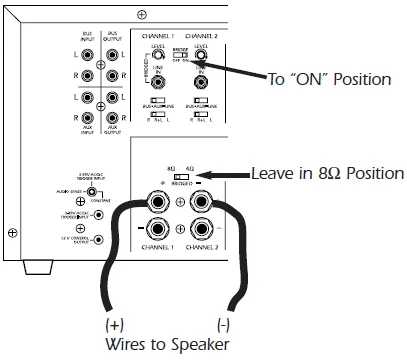
Control Output
The 12V output jack on the back of the amplifier can be used to turn on a variety of components equipped to be activated when they receive a 12V DC output. Voltage is only delivered to the jack when the amplifier is “on” or active. When the amplifier turns off, the voltage ceases. Before connecting another device to the 12V output, please make sure that the device can accept 12V DC at 150mA. To connect the output to another device, you must access the output jack with a two-conductor plug that fits into the 3.5mm jack. Be aware that the tip of the plug will be (+). If you are unsure about using this feature, please contact an authorized SpeakerCraft dealer for assistance.
Connecting the Speaker Wires
CAUTION: Only make connections when the amplifier is turned off.
Using Standard Connections
For best performance, use high-quality speaker cables. The banana plug outputs on the back of the amplifier allow for a variety of ways to connect your speakers to the amplifier.
Using InstaLLock™ Connector (purchased separately)
The InstaLLock™ Connector, designed for use with SpeakerCraft Amplifiers, must be used. The InstaLLock™ Connector designed for SpeakerCraft Speaker Selector,s is not labeled for use with the amplifiers. Please follow the instructions included with the Connector.
Connecting the Line Level Audio Inputs
CAUTION: Only make connections when the amplifier is turned off.
There are three areas that an input signal can be connected: BUS, AUX, and LINE IN. Refer to the System Design Examples to determine which is best suited for your application.
Audio Outputs
Sources connected to the “BUS” or “AUX” inputs can be forwarded to other components or amplifiers by connecting to the corresponding output sections to the right of each input section. By using standard audio patch cables, you can connect these outputs to the inputs of another amplifier. Up to 5 SpeakerCraft amplifiers can be daisy-chained together.
AC Power
Plug the socket of the AC cord supplied with the amplifier into the receptacle on the rear of the amplifier. Plug the 2-prong plug directly into a 120V 60 Hz wall outlet.
CAUTION: Do not plug the amplifier into the preamplifier or receiver’s switched outlet. If you wish to have the amplifier turn on once the preamplifier or receiver is activated, use one of the turn-on modes: voltage or audio.
OPERATION
See Diagram 1 for the location of the following:
Power Switch
The switch marked “Power” on the front panel of the amplifier will turn off all amplifier circuitry, no matter which turn-on mode is selected. Refer to the “Power Mode Selection” section for further information.
Active LED
When lit, the Active LED indicates that the amplifier is operating. Refer to the “Power Mode Selection” section of this manual for further information.
Protection LEDs
When the “Protection” LEDs located on the front of the amplifier indicate that either a fault in the wiring, the speaker, or the amplifier has caused the channels associated with the LED to shut down.
Level Adjustment Knobs
The level adjustment knobs on the back panel of the amplifier can be used to adjust the level of each channel. There are many reasons for needing to adjust the level. You may wish to closely match other levels in the system, or you may wish to limit the volume level in an area, such as a child’s room.
TROUBLESHOOTING
The amplifier is designed to function trouble-free. Most problems occur because of operating errors. If you have a problem, please check the troubleshooting list first. If the problem persists, contact your authorized SpeakerCraft dealer or SpeakerCraft customer service at (800) 448-0976.
No sound is heard on all channels.
- Audio cable to the source component is not connected properly, or the cable is bad. Use another cable that you know is good.
- The Input Selection switch is positioned incorrectly. Refer to the installation instructions for proper settings.
- Some or all of the internal fuses are blown. Return the amplifier to your SpeakerCraft dealer for servicing.
No sound is heard on one or some channels.
- The audio cable to the source component is not connected properly, or the cable is bad. Use another cable that you know is good.
- The Input Selection switch is positioned incorrectly. Refer to the installation instructions for proper settings.
- The Bridging switch is positioned incorrectly. Refer to the installation instructions for proper settings.
- Check the termination points of the speaker cable at both the amplifier and the speaker. If using InstaLLock™ Connector, check the connections at the levers.
- A speaker is not working. Make sure that by connecting the channel to a speaker that you know to be working.
- The level adjustment on the channel is turned all the way down. Turn it clockwise to raise the volume.
- Some or all of the internal fuses are blown. Return the amplifier to your SpeakerCraft dealer for servicing.
Hum or buzzing sound is heard.
- The sound may be caused by a ground loop in the system. Try to eliminate this by reversing the AC plugs of other components in the system.
- Other causes include faulty cables.
The amplifier will not turn on.
- The amplifier must be plugged into a live outlet. The power switch on the front panel must be on.
- The Power Mode switch may be positioned incorrectly.
For more Manuals by Speakercraft, visit ManualsLibraryy
SpeakerCraft Big Bang BB865 Multi Channel Power Amplifier-FAQs
What is a multi-channel power amplifier?
A multi-channel amplifier can power several speakers from a single audio source. Each channel delivers equal power, allowing you to create immersive, balanced sound across multiple zones or rooms.
How does a multi-channel amplifier work?
It splits an audio signal into multiple channels, sending each to a dedicated speaker. For example, in a 5.1 setup, sound is divided among left, right, center, surround speakers, and a subwoofer for a full surround experience.
How many speakers can I connect to the SpeakerCraft BB865 amplifier?
The BB865 is an 8-channel amplifier designed to power multiple speakers at once. You can connect up to 8 speakers (one per channel) or more if configured in stereo pairs — while maintaining safe impedance levels.
Can I connect too many speakers to my amplifier?
Connecting too many speakers can overload the amplifier, causing overheating or distortion. Always check total impedance — if it’s too low, it can damage your amp. Two 8-ohm speakers in parallel equal a 4-ohm load.
What happens if I use 4-ohm speakers with an 8-ohm amplifier?
Running 4-ohm speakers on an amp rated for 8 ohms may cause the amplifier to overheat or clip, leading to possible damage. Always match your speaker and amp impedance for safe operation.
How do I connect speakers to the BB865 amplifier?
Connect the positive (red +) and negative (black –) terminals of each speaker to the matching terminals on the amplifier. Ensure cables are secure and polarity is correct for optimal sound performance.
What is the ideal speaker placement for best sound quality?
For balanced audio, position your speakers in an equilateral triangle with your listening spot. Angle them slightly inward toward your ears and keep them 1/5 of the room length away from the rear wall.
What is the “83% rule” for speakers?
This rule suggests that the distance between your speakers should be about 80–83% of the distance from your ears to each speaker, creating an ideal stereo image.
How long do speakers take to break in?
New speakers usually sound their best after about 20–30 hours of normal use. During this time, the drivers loosen up and produce smoother, more accurate sound.
What causes an amplifier to fail?
Common causes include poor ventilation, loose connections, shorted speaker wires, or power surges. Regular maintenance and correct wiring can prevent most amplifier issues.